New Update Windows 11 Patch Tuesday April 2025 (KB5055523 & KB5055528)

silversurfer

Super Moderator
Thread author
Verified
Top Poster
Staff Member
Malware Hunter
Forum Veteran
Aug 17, 2014
13,010
125,238
8,399
Microsoft has released Windows 11 KB5055523 and KB5055528 cumulative updates for versions 24H2 and 23H2 to fix security vulnerabilities and issues.

Today's updates are mandatory as they contain the April 2025 Patch Tuesday security patches for vulnerabilities discovered in previous months.


It did this on mine too and I deleted that folder after searching online. Now I saw this article and realized that it happened to some other users too. It's not a problem, just odd
 
It did this on mine too and I deleted that folder after searching online. Now I saw this article and realized that it happened to some other users too. It's not a problem, just odd
It happened to me too.
 
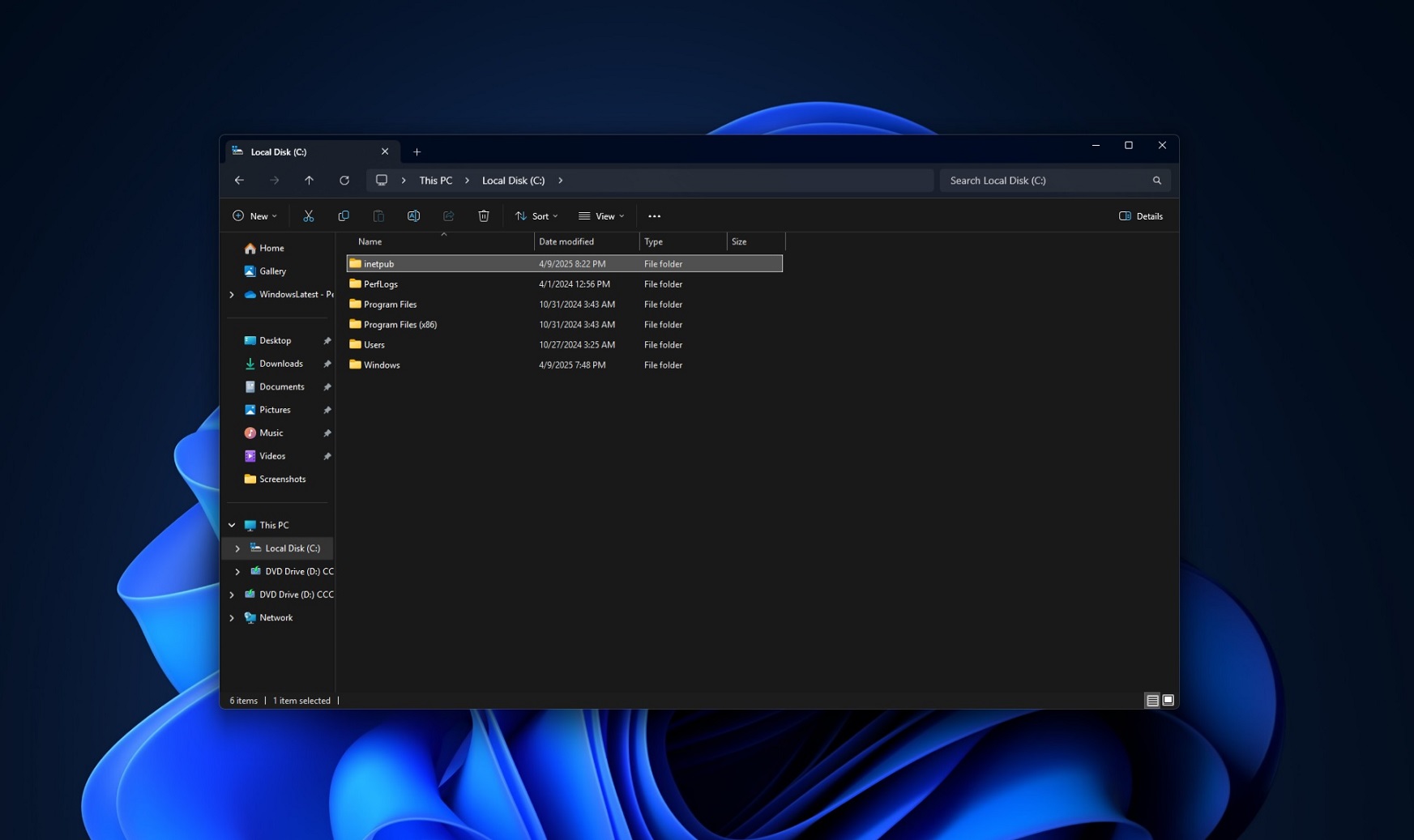
On my C-drive the folder inetpub was created 19-01-2025. It has something to do with Internet Information Services (IIS).
 
  • Like
Reactions: rashmi
WTH is wrong with Microsoft? Now they are saying that it is intentional and should not be removed yet it was not mentioned in the changelog 😑
Screenshot_2025-04-11-03-32-45-73_0b2fce7a16bf2b728d6ffa28c8d60efb.jpg
 
Security Update Guide - Microsoft Security Response Center

After installing the updates listed in the Security Updates table for your operating system, a new %systemdrive%\inetpub folder will be created on your device. This folder should not be deleted regardless of whether Internet Information Services (IIS) is active on the target device. This behavior is part of changes that increase protection and does not require any action from IT admins and end users.
 
I can tell the author of this article deleted this folder as well. 🤣
There’s no need to panic if you’ve already removed the %systemdrive%\inetpub folder assuming it to be an issue with Windows 11. After all, it was Microsoft’s fault that the changes in the release notes were not correctly clarified.
 
I can tell the author of this article deleted this folder as well. 🤣

What to do if you removed the “inetpub” folder assuming it to be a bug?
There’s no need to panic if you’ve already removed the %systemdrive%\inetpub folder assuming it to be an issue with Windows 11. After all, it was Microsoft’s fault that the changes in the release notes were not correctly clarified.

Regardless, if you removed the folder, we strongly recommend you reinstall the April 2025 updates.

To do this, you need to uninstall the April 2025 Update from Settings, reboot, check for updates again, and reinstall the update. In our tests, this brings back the folder and applies the security patch correctly.

If you don’t want to go through the hassle, wait for the next cumulative update, which will also include the folder.
 
Microsoft should do this by default. They should even go one step further and super hide it since they consider this an essential security patch related folder. I use my PC with hidden files always shown, so if MS don't do it, I'll probably do it myself after the next update.
 
Microsoft confirms Windows Hello issues in latest Windows 11 updates
If you have a Windows Hello-compatible device with facial recognition, such as the Surface Pro 11 or a third-party webcam with an IR scanner, you might encounter a problem with biometric authentication after installing this month's security updates for Windows 11. In the support document for KB5055523, which was released on April 8, Microsoft acknowledged issues with Windows Hello.

According to Microsoft, Windows Hello facial recognition or PIN stops working after performing a system reset while keeping local files. Once back at the login screen, affected systems show an error message claiming the user's PIN is not available or "something went wrong with face setup."

Here is the full description:
We're aware of an edge case of Windows Hello issue affecting devices with specific security features enabled. After installing this update and performing a Push button reset or Reset this PC from Settings > System > Recovery and selecting Keep my Files and Local install, some users might be unable to login to their Windows services using Windows Hello facial recognition or PIN. Users might observe a Windows Hello Message saying "Something happened and your PIN isn't available. Click to set up your PIN again" or "Sorry something went wrong with face setup".
 

Windows: Empty inetpub folder creates a new security problem​

When Microsoft released the April 2025 security updates for Windows, users from all over the world started to notice that Microsoft's update created an empty folder in the main drive called inetpub.

This led to confusion, as Microsoft was tight lipped initially about the presence of the folder. The official release notes did not include any information about it. Shortly thereafter, Microsoft revealed that it created the folder on purpose to "increase protection". Users and administrators were encouraged to keep the folder and not tinker with it.

Background information: Microsoft created the folder as a direct response to CVE-2025–21204, which allows attackers to use symlinks to elevate privileges.

It turns out now that the creation of the folder may very well be used by cybercriminals for nefarious purposes.

Security researcher Kevin Beaumont shared information about the issue on Medium. Beaumont discovered that Microsoft's fix "introduced a denial of service vulnerability in the Windows servicing stack".

The details:
  • Regular users may abuse the issue to stop all Windows security updates.
  • It takes a single command to from a regular (non-elevated) prompt to abuse the issue.
All that is required is to create a new symbolic link between the inetpub folder and an application like notepad. Symbolic links do not require elevation, which means that attackers do not need to gain elevated access to a system to block future security updates on it.
 
I did wonder what that new folder was, it would be at the very least for MS to let informed users know why a new folder appears from nowhere? Crazy!
(when one door opens another door slams)
 
So does this mean I should hold updating Windows a bit longer than those two weeks I mentioned in my previous post? Or is it safe enough to resume updates?
 
Microsoft shares script to restore inetpub folder you shouldn’t delete
Microsoft has released a PowerShell script to help restore an empty 'inetpub' folder created by the April 2025 Windows security updates if deleted. As Microsoft previously warned, this folder helps mitigate a high-severity Windows Process Activation privilege escalation vulnerability.

In April, after installing the new security updates, Windows users suddenly found that an empty C:\Inetpub folder was created. As this folder is associated with Microsoft's Internet Information Server, users found it confusing that it was created when the web server was not installed.

This caused some people to remove the folder, making them vulnerable again to the patched vulnerability. Microsoft said that users who removed it can manually recreate it by installing Internet Information Services from the Windows "Turn Windows Features on or off" control panel.

Once IIS is installed, a new inetpub folder will be added to the root of the C:\ drive, with files and the same SYSTEM ownership as the directory created by the April Windows security updates. Also, if you don't use IIS, you can uninstall it using the same Windows Features control panel to remove it, leaving the C:\inetpub folder behind.

On Wednesday, in a new update to the CVE-2025-21204 advisory, the company also shared a remediation script that helps admins re-create this folder from a PowerShell shell using the following commands:
Code:
Install-Script -Name Set-InetpubFolderAcl

C:\Program` Files\WindowsPowerShell\Scripts\Set-InetpubFolderAcl.ps1
As Redmond explains, the script will set the correct IIS permissions to prevent unauthorized access and potential vulnerabilities related to CVE-2025-21204.

It will also update access control list (ACL) entries for the DeviceHealthAttestation directory on Windows Server systems to ensure it is secure if created by the February 2025 security updates.