Y Yoshi_Galaxy New Member Thread author May 18, 2018 4 0 1 United States May 18, 2018 #1 I've used multiple anti-virus software in attempt to remove the threat, but it keeps returning after I reboot my computer. Is there any other way I can fix it? For background information, I'm not a computer expert.
I've used multiple anti-virus software in attempt to remove the threat, but it keeps returning after I reboot my computer. Is there any other way I can fix it? For background information, I'm not a computer expert.
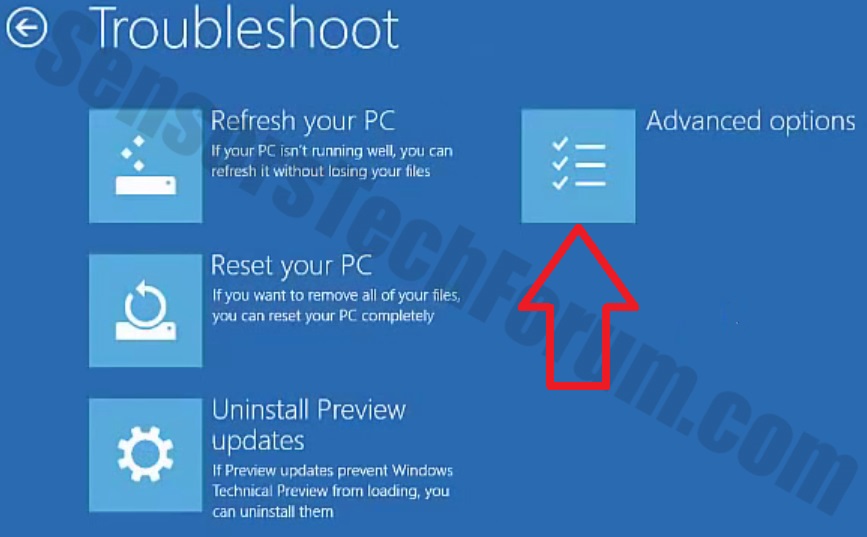
TwinHeadedEagle Level 41 Verified Mar 8, 2013 22,627 2,906 3,979 May 19, 2018 #2 Hello, Please download Farbar Recovery Scan Tool x64 and save it to a flash drive. Plug the flashdrive into the infected PC. Boot to windows recovery by using one of the methods on this link: Boot to Advanced Startup Options in Windows 10 If you're unable to boot to recovery you will need to create a recovery drive. You can do it by following this guide: https://support.microsoft.com/en-us/help/4026852/windows-create-a-recovery-drive Make sure to uncheck Back up system files to the recovery drive box, so that process goes faster. Now you should get a window like this where you need to click Troubleshoot. In the next window, click Advanced options and select Command Prompt. Now you should log in into your account and after that Command Promptwindow. Access the notepad and identify your USB drive In the Command Prompt please type in: Code: notepad and press Enter. When the notepad opens, go to File menu. Select Open. Go to Computer and search there for your USB drive letter. Note down the letter and close the notepad. Scan with Farbar Recovery Scan Tool Once back in the command prompt window, please do the following: Type in e:\frst64.exe and press Enter. You need to replace e with the letter of your USB drive taken from notepad! FRST will start to run. Give him a minute or so to load itself. Click Yes to Disclaimer. In the main console, please click Scan and wait. When finished it will produce a logfile named FRST.txt in the root of your pendrive and display it. Close that logfile. Transfer it to your clean machine and include it in your next reply.
Hello, Please download Farbar Recovery Scan Tool x64 and save it to a flash drive. Plug the flashdrive into the infected PC. Boot to windows recovery by using one of the methods on this link: Boot to Advanced Startup Options in Windows 10 If you're unable to boot to recovery you will need to create a recovery drive. You can do it by following this guide: https://support.microsoft.com/en-us/help/4026852/windows-create-a-recovery-drive Make sure to uncheck Back up system files to the recovery drive box, so that process goes faster. Now you should get a window like this where you need to click Troubleshoot. In the next window, click Advanced options and select Command Prompt. Now you should log in into your account and after that Command Promptwindow. Access the notepad and identify your USB drive In the Command Prompt please type in: Code: notepad and press Enter. When the notepad opens, go to File menu. Select Open. Go to Computer and search there for your USB drive letter. Note down the letter and close the notepad. Scan with Farbar Recovery Scan Tool Once back in the command prompt window, please do the following: Type in e:\frst64.exe and press Enter. You need to replace e with the letter of your USB drive taken from notepad! FRST will start to run. Give him a minute or so to load itself. Click Yes to Disclaimer. In the main console, please click Scan and wait. When finished it will produce a logfile named FRST.txt in the root of your pendrive and display it. Close that logfile. Transfer it to your clean machine and include it in your next reply.
Y Yoshi_Galaxy New Member Thread author May 18, 2018 4 0 1 United States May 19, 2018 #3 Okay, I ran the frst.exe application and attached the .txt file to this post. Attachments FRST.txt FRST.txt 64 KB · Views: 5
TwinHeadedEagle Level 41 Verified Mar 8, 2013 22,627 2,906 3,979 May 20, 2018 #4 Can you run FRST from Normal mode now?
Y Yoshi_Galaxy New Member Thread author May 18, 2018 4 0 1 United States May 20, 2018 #5 How do I run frst.exe in normal mode?
TwinHeadedEagle Level 41 Verified Mar 8, 2013 22,627 2,906 3,979 May 20, 2018 #6 Boot normally and run FRST.
Y Yoshi_Galaxy New Member Thread author May 18, 2018 4 0 1 United States May 20, 2018 #7 Yes, I was able to run the application on normal mode.
TwinHeadedEagle Level 41 Verified Mar 8, 2013 22,627 2,906 3,979 May 21, 2018 #8 Okay, make a scan and attach produced reports.