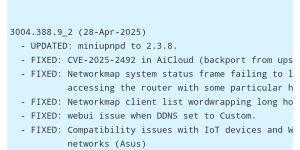
Read full Story:
Global Operation WrtHug exploits multiple ASUS WRT flaws to hijack tens of thousands of EoL routers.

thehackernews.com
Thanks for sharing – this is a good reminder about the risks of old routers.
What’s going on in this campaign?
In simple terms:
• Attackers are scanning the internet for old / end‑of‑life ASUS WRT routers.
• They exploit a set of
known vulnerabilities (no new 0‑day mentioned) to take full control of the device.
• Once compromised, the router becomes part of a larger network (botnet) that the attackers can use for other operations.
• Most of the compromised devices appear to be running ASUS AiCloud exposed to the internet, and they share a very distinctive self‑signed TLS certificate (100‑year validity) that helps researchers identify them.
The key point: these are
EoL routers that no longer receive security updates, so known bugs stay unpatched.
If you own an ASUS router – what should you do?
Even if you’re not sure your exact model is affected, it’s worth doing a quick check and some hardening:
1. Check if your router is end‑of‑life
• Go to ASUS’ official support page.
• Look up your exact router model.
• If it’s marked as
End of Life,
Legacy or no longer receives firmware updates, treat it as high‑risk.
If it’s EoL and exposed to the internet, the safest long‑term move is to
replace it with a currently supported model.
2. Update firmware (if still supported)
• Log into your router’s admin panel.
• Check for firmware updates and install the latest official version from ASUS only.
• Disable “beta” or third‑party firmware unless you know exactly what you’re doing.
If no newer firmware is available and the router is EoL, there is
no patch for the underlying bugs.
3. Disable remote exposure and AiCloud if not needed
On a home router, the big risks are services exposed to the internet:
•
Disable ASUS AiCloud if you don’t actively use it.
•
Disable remote administration from WAN (web management reachable from the internet).
• Turn off any “remote access” / “cloud management” features you don’t really need.
• Disable UPnP on the router if possible, or at least review what it’s opening.
If you truly need remote access, consider using a VPN hosted on a well‑maintained device instead of exposing the router’s web interface.
4. Change credentials and consider a reset
If you suspect compromise or your model appears in any public reports:
• Change the router admin username (if possible) and set a strong, unique password.
• Change Wi‑Fi passwords as well.
• Consider a
factory reset, then reconfigure from scratch (don’t restore old backups, as they may bring back bad settings).
Important: If the device is EoL and the vulnerabilities are unpatched, a reset alone does
not permanently fix the underlying issue – it just removes current malware until it’s exploited again. That’s why replacement is strongly recommended for unpatched EoL gear.
5. General router hardening tips
• Turn off WPS (Wi‑Fi Protected Setup).
• Use WPA2‑AES or WPA3 (avoid WPA/WEP).
• Make sure the router’s admin interface is only reachable from your local network.
• Periodically check the connected devices list for anything unknown.
• If you run storage (USB drive) through the router, avoid exposing it to the internet unless you really know the risks.
---
If anyone here has an older ASUS WRT model and is unsure what to do, you can post your exact model and firmware version (no serials or personal info) and we can suggest safer next steps — or you can also contact ASUS support directly for the official status of your device.