


hi everybody ,
i thought that i might be infected by a malware as my machine became very slow
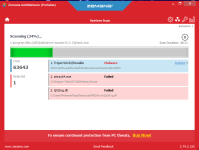
so i used Zamana Anti-malware as an on demand scanner to scan my laptop
i was surprised that it caught XDM (xtreme download manager) as a Trojan.
so i want to know if it is a false positive or it is actually a Trojan and delete it.
more details copied from Zemana:
Trojan:Win32/Poweliks
Status : Scanned
Object : HKCU\Software\Microsoft\Windows\CurrentVersion\Run\XDM
MD5 : -
Publisher : -
Size : -
Version : -
Detection : Malware
Cleaning Action : Delete
Related Objects :
Registry Entry - HKCU\Software\Microsoft\Windows\CurrentVersion\Run\XDM = "C:\Program Files (x86)\XDM\jre\bin\javaw.exe" -Xmx1024m -jar "C:\Program Files (x86)\XDM\xdman.jar" -m
Malwarebyte results:
Malwarebytes
www.malwarebytes.com
-Log Details-
Scan Date: 8/25/18
Scan Time: 4:40 PM
Log File: dfb2645c-a874-11e8-9857-1c3e842aa1b4.json
Administrator: Yes
-Software Information-
Version: 3.5.1.2522
Components Version: 1.0.374
Update Package Version: 1.0.6505
License: Free
-System Information-
OS: Windows 7 Service Pack 1
CPU: x64
File System: NTFS
User: Mohamed-PC\Mohamed
-Scan Summary-
Scan Type: Threat Scan
Scan Initiated By: Manual
Result: Completed
Objects Scanned: 254439
Threats Detected: 29
Threats Quarantined: 0
(No malicious items detected)
Time Elapsed: 18 min, 15 sec
-Scan Options-
Memory: Enabled
Startup: Enabled
Filesystem: Enabled
Archives: Enabled
Rootkits: Enabled
Heuristics: Enabled
PUP: Detect
PUM: Detect
-Scan Details-
Process: 4
PUP.Optional.AdvancedSystemCare, C:\PROGRAM FILES (X86)\IOBIT\ADVANCED SYSTEMCARE\MONITOR.EXE, No Action By User, [3807], [398206],1.0.6505
PUP.Optional.AdvancedSystemCare, C:\PROGRAM FILES (X86)\IOBIT\ADVANCED SYSTEMCARE\ASCTRAY.EXE, No Action By User, [3807], [380353],1.0.6505
PUP.Optional.AdvancedSystemCare, C:\PROGRAM FILES (X86)\IOBIT\ADVANCED SYSTEMCARE\ASCSERVICE.EXE, No Action By User, [3807], [380352],1.0.6505
PUP.Optional.AdvancedSystemCare, C:\PROGRAM FILES (X86)\IOBIT\ADVANCED SYSTEMCARE\ASC.EXE, No Action By User, [3807], [396386],1.0.6505
Module: 7
PUP.Optional.AdvancedSystemCare, C:\PROGRAM FILES (X86)\IOBIT\ADVANCED SYSTEMCARE\MONITOR.EXE, No Action By User, [3807], [398206],1.0.6505
PUP.Optional.AdvancedSystemCare, C:\PROGRAM FILES (X86)\IOBIT\ADVANCED SYSTEMCARE\ASCTRAY.EXE, No Action By User, [3807], [380353],1.0.6505
PUP.Optional.AdvancedSystemCare, C:\PROGRAM FILES (X86)\IOBIT\ADVANCED SYSTEMCARE\ASCSERVICE.EXE, No Action By User, [3807], [380352],1.0.6505
PUP.Optional.AdvancedSystemCare, C:\PROGRAM FILES (X86)\IOBIT\ADVANCED SYSTEMCARE\OFCOMMON.DLL, No Action By User, [3807], [396386],1.0.6505
PUP.Optional.AdvancedSystemCare, C:\PROGRAM FILES (X86)\IOBIT\ADVANCED SYSTEMCARE\OFCOMMON.DLL, No Action By User, [3807], [396386],1.0.6505
PUP.Optional.AdvancedSystemCare, C:\PROGRAM FILES (X86)\IOBIT\ADVANCED SYSTEMCARE\OFCOMMON.DLL, No Action By User, [3807], [396386],1.0.6505
PUP.Optional.AdvancedSystemCare, C:\PROGRAM FILES (X86)\IOBIT\ADVANCED SYSTEMCARE\ASC.EXE, No Action By User, [3807], [396386],1.0.6505
Registry Key: 7
PUP.Optional.AdvancedSystemCare, HKLM\SOFTWARE\MICROSOFT\WINDOWS NT\CURRENTVERSION\SCHEDULE\TASKCACHE\TREE\ASC11_PerformanceMonitor, No Action By User, [3807], [380341],1.0.6505
PUP.Optional.AdvancedSystemCare, HKLM\SOFTWARE\MICROSOFT\WINDOWS NT\CURRENTVERSION\SCHEDULE\TASKCACHE\TASKS\{EE4D954A-F31E-4776-823C-42341686008B}, No Action By User, [3807], [380341],1.0.6505
PUP.Optional.AdvancedSystemCare, HKLM\SOFTWARE\MICROSOFT\WINDOWS NT\CURRENTVERSION\SCHEDULE\TASKCACHE\LOGON\{EE4D954A-F31E-4776-823C-42341686008B}, No Action By User, [3807], [380341],1.0.6505
PUP.Optional.AdvancedSystemCare, HKLM\SOFTWARE\MICROSOFT\WINDOWS NT\CURRENTVERSION\SCHEDULE\TASKCACHE\TREE\ASC11_SkipUac_Mohamed, No Action By User, [3807], [380341],1.0.6505
PUP.Optional.AdvancedSystemCare, HKLM\SOFTWARE\MICROSOFT\WINDOWS NT\CURRENTVERSION\SCHEDULE\TASKCACHE\TASKS\{A72F188F-C461-45AE-A911-B2C13B980967}, No Action By User, [3807], [380341],1.0.6505
PUP.Optional.AdvancedSystemCare, HKLM\SOFTWARE\MICROSOFT\WINDOWS NT\CURRENTVERSION\SCHEDULE\TASKCACHE\PLAIN\{A72F188F-C461-45AE-A911-B2C13B980967}, No Action By User, [3807], [380341],1.0.6505
PUP.Optional.AdvancedSystemCare, HKLM\SYSTEM\CURRENTCONTROLSET\SERVICES\AdvancedSystemCareService11, No Action By User, [3807], [380352],1.0.6505
Registry Value: 1
PUP.Optional.AdvancedSystemCare, HKU\S-1-5-21-3173155449-446945268-500677902-1000\SOFTWARE\MICROSOFT\WINDOWS\CURRENTVERSION\RUN|ADVANCED SYSTEMCARE 11, No Action By User, [3807], [380353],1.0.6505
Registry Data: 0
(No malicious items detected)
Data Stream: 0
(No malicious items detected)
Folder: 0
(No malicious items detected)
File: 10
PUP.Optional.AdvancedSystemCare, C:\WINDOWS\SYSTEM32\TASKS\ASC11_PerformanceMonitor, No Action By User, [3807], [380341],1.0.6505
PUP.Optional.AdvancedSystemCare, C:\WINDOWS\SYSTEM32\TASKS\ASC11_SkipUac_Mohamed, No Action By User, [3807], [380341],1.0.6505
PUP.Optional.AdvancedSystemCare, C:\PROGRAM FILES (X86)\IOBIT\ADVANCED SYSTEMCARE\MONITOR.EXE, No Action By User, [3807], [398206],1.0.6505
PUP.Optional.AdvancedSystemCare, C:\USERS\MOHAMED\APPDATA\ROAMING\MICROSOFT\INTERNET EXPLORER\QUICK LAUNCH\USER PINNED\TASKBAR\Advanced SystemCare 11.lnk, No Action By User, [3807], [380340],1.0.6505
PUP.Optional.AdvancedSystemCare, C:\USERS\PUBLIC\DESKTOP\Advanced SystemCare 11.lnk, No Action By User, [3807], [380338],1.0.6505
PUP.Optional.AdvancedSystemCare, C:\PROGRAM FILES (X86)\IOBIT\ADVANCED SYSTEMCARE\ASCTRAY.EXE, No Action By User, [3807], [380353],1.0.6505
PUP.Optional.AdvancedSystemCare, C:\PROGRAM FILES (X86)\IOBIT\ADVANCED SYSTEMCARE\ASCSERVICE.EXE, No Action By User, [3807], [380352],1.0.6505
PUP.Optional.AdvancedSystemCare, C:\PROGRAM FILES (X86)\IOBIT\ADVANCED SYSTEMCARE\OFCOMMON.DLL, No Action By User, [3807], [396386],1.0.6505
PUP.Optional.AdvancedSystemCare, C:\DOCUMENTS AND SETTINGS\PUBLIC\Desktop\Advanced SystemCare 11.lnk, No Action By User, [3807], [396386],1.0.6505
PUP.Optional.AdvancedSystemCare, C:\PROGRAM FILES (X86)\IOBIT\ADVANCED SYSTEMCARE\ASC.EXE, No Action By User, [3807], [396386],1.0.6505
Physical Sector: 0
(No malicious items detected)
WMI: 0
(No malicious items detected)
Note: the setup executable file was downloaded from source forge website as it is an open source software
Update: i scanned with Malwarebytes antimalware which doesnot caught it (it caught Advanced system care as PUP)
i thought that i might be infected by a malware as my machine became very slow
so i used Zamana Anti-malware as an on demand scanner to scan my laptop
i was surprised that it caught XDM (xtreme download manager) as a Trojan.
so i want to know if it is a false positive or it is actually a Trojan and delete it.
more details copied from Zemana:
Trojan:Win32/Poweliks
Status : Scanned
Object : HKCU\Software\Microsoft\Windows\CurrentVersion\Run\XDM
MD5 : -
Publisher : -
Size : -
Version : -
Detection : Malware
Cleaning Action : Delete
Related Objects :
Registry Entry - HKCU\Software\Microsoft\Windows\CurrentVersion\Run\XDM = "C:\Program Files (x86)\XDM\jre\bin\javaw.exe" -Xmx1024m -jar "C:\Program Files (x86)\XDM\xdman.jar" -m
Malwarebyte results:
Malwarebytes
www.malwarebytes.com
-Log Details-
Scan Date: 8/25/18
Scan Time: 4:40 PM
Log File: dfb2645c-a874-11e8-9857-1c3e842aa1b4.json
Administrator: Yes
-Software Information-
Version: 3.5.1.2522
Components Version: 1.0.374
Update Package Version: 1.0.6505
License: Free
-System Information-
OS: Windows 7 Service Pack 1
CPU: x64
File System: NTFS
User: Mohamed-PC\Mohamed
-Scan Summary-
Scan Type: Threat Scan
Scan Initiated By: Manual
Result: Completed
Objects Scanned: 254439
Threats Detected: 29
Threats Quarantined: 0
(No malicious items detected)
Time Elapsed: 18 min, 15 sec
-Scan Options-
Memory: Enabled
Startup: Enabled
Filesystem: Enabled
Archives: Enabled
Rootkits: Enabled
Heuristics: Enabled
PUP: Detect
PUM: Detect
-Scan Details-
Process: 4
PUP.Optional.AdvancedSystemCare, C:\PROGRAM FILES (X86)\IOBIT\ADVANCED SYSTEMCARE\MONITOR.EXE, No Action By User, [3807], [398206],1.0.6505
PUP.Optional.AdvancedSystemCare, C:\PROGRAM FILES (X86)\IOBIT\ADVANCED SYSTEMCARE\ASCTRAY.EXE, No Action By User, [3807], [380353],1.0.6505
PUP.Optional.AdvancedSystemCare, C:\PROGRAM FILES (X86)\IOBIT\ADVANCED SYSTEMCARE\ASCSERVICE.EXE, No Action By User, [3807], [380352],1.0.6505
PUP.Optional.AdvancedSystemCare, C:\PROGRAM FILES (X86)\IOBIT\ADVANCED SYSTEMCARE\ASC.EXE, No Action By User, [3807], [396386],1.0.6505
Module: 7
PUP.Optional.AdvancedSystemCare, C:\PROGRAM FILES (X86)\IOBIT\ADVANCED SYSTEMCARE\MONITOR.EXE, No Action By User, [3807], [398206],1.0.6505
PUP.Optional.AdvancedSystemCare, C:\PROGRAM FILES (X86)\IOBIT\ADVANCED SYSTEMCARE\ASCTRAY.EXE, No Action By User, [3807], [380353],1.0.6505
PUP.Optional.AdvancedSystemCare, C:\PROGRAM FILES (X86)\IOBIT\ADVANCED SYSTEMCARE\ASCSERVICE.EXE, No Action By User, [3807], [380352],1.0.6505
PUP.Optional.AdvancedSystemCare, C:\PROGRAM FILES (X86)\IOBIT\ADVANCED SYSTEMCARE\OFCOMMON.DLL, No Action By User, [3807], [396386],1.0.6505
PUP.Optional.AdvancedSystemCare, C:\PROGRAM FILES (X86)\IOBIT\ADVANCED SYSTEMCARE\OFCOMMON.DLL, No Action By User, [3807], [396386],1.0.6505
PUP.Optional.AdvancedSystemCare, C:\PROGRAM FILES (X86)\IOBIT\ADVANCED SYSTEMCARE\OFCOMMON.DLL, No Action By User, [3807], [396386],1.0.6505
PUP.Optional.AdvancedSystemCare, C:\PROGRAM FILES (X86)\IOBIT\ADVANCED SYSTEMCARE\ASC.EXE, No Action By User, [3807], [396386],1.0.6505
Registry Key: 7
PUP.Optional.AdvancedSystemCare, HKLM\SOFTWARE\MICROSOFT\WINDOWS NT\CURRENTVERSION\SCHEDULE\TASKCACHE\TREE\ASC11_PerformanceMonitor, No Action By User, [3807], [380341],1.0.6505
PUP.Optional.AdvancedSystemCare, HKLM\SOFTWARE\MICROSOFT\WINDOWS NT\CURRENTVERSION\SCHEDULE\TASKCACHE\TASKS\{EE4D954A-F31E-4776-823C-42341686008B}, No Action By User, [3807], [380341],1.0.6505
PUP.Optional.AdvancedSystemCare, HKLM\SOFTWARE\MICROSOFT\WINDOWS NT\CURRENTVERSION\SCHEDULE\TASKCACHE\LOGON\{EE4D954A-F31E-4776-823C-42341686008B}, No Action By User, [3807], [380341],1.0.6505
PUP.Optional.AdvancedSystemCare, HKLM\SOFTWARE\MICROSOFT\WINDOWS NT\CURRENTVERSION\SCHEDULE\TASKCACHE\TREE\ASC11_SkipUac_Mohamed, No Action By User, [3807], [380341],1.0.6505
PUP.Optional.AdvancedSystemCare, HKLM\SOFTWARE\MICROSOFT\WINDOWS NT\CURRENTVERSION\SCHEDULE\TASKCACHE\TASKS\{A72F188F-C461-45AE-A911-B2C13B980967}, No Action By User, [3807], [380341],1.0.6505
PUP.Optional.AdvancedSystemCare, HKLM\SOFTWARE\MICROSOFT\WINDOWS NT\CURRENTVERSION\SCHEDULE\TASKCACHE\PLAIN\{A72F188F-C461-45AE-A911-B2C13B980967}, No Action By User, [3807], [380341],1.0.6505
PUP.Optional.AdvancedSystemCare, HKLM\SYSTEM\CURRENTCONTROLSET\SERVICES\AdvancedSystemCareService11, No Action By User, [3807], [380352],1.0.6505
Registry Value: 1
PUP.Optional.AdvancedSystemCare, HKU\S-1-5-21-3173155449-446945268-500677902-1000\SOFTWARE\MICROSOFT\WINDOWS\CURRENTVERSION\RUN|ADVANCED SYSTEMCARE 11, No Action By User, [3807], [380353],1.0.6505
Registry Data: 0
(No malicious items detected)
Data Stream: 0
(No malicious items detected)
Folder: 0
(No malicious items detected)
File: 10
PUP.Optional.AdvancedSystemCare, C:\WINDOWS\SYSTEM32\TASKS\ASC11_PerformanceMonitor, No Action By User, [3807], [380341],1.0.6505
PUP.Optional.AdvancedSystemCare, C:\WINDOWS\SYSTEM32\TASKS\ASC11_SkipUac_Mohamed, No Action By User, [3807], [380341],1.0.6505
PUP.Optional.AdvancedSystemCare, C:\PROGRAM FILES (X86)\IOBIT\ADVANCED SYSTEMCARE\MONITOR.EXE, No Action By User, [3807], [398206],1.0.6505
PUP.Optional.AdvancedSystemCare, C:\USERS\MOHAMED\APPDATA\ROAMING\MICROSOFT\INTERNET EXPLORER\QUICK LAUNCH\USER PINNED\TASKBAR\Advanced SystemCare 11.lnk, No Action By User, [3807], [380340],1.0.6505
PUP.Optional.AdvancedSystemCare, C:\USERS\PUBLIC\DESKTOP\Advanced SystemCare 11.lnk, No Action By User, [3807], [380338],1.0.6505
PUP.Optional.AdvancedSystemCare, C:\PROGRAM FILES (X86)\IOBIT\ADVANCED SYSTEMCARE\ASCTRAY.EXE, No Action By User, [3807], [380353],1.0.6505
PUP.Optional.AdvancedSystemCare, C:\PROGRAM FILES (X86)\IOBIT\ADVANCED SYSTEMCARE\ASCSERVICE.EXE, No Action By User, [3807], [380352],1.0.6505
PUP.Optional.AdvancedSystemCare, C:\PROGRAM FILES (X86)\IOBIT\ADVANCED SYSTEMCARE\OFCOMMON.DLL, No Action By User, [3807], [396386],1.0.6505
PUP.Optional.AdvancedSystemCare, C:\DOCUMENTS AND SETTINGS\PUBLIC\Desktop\Advanced SystemCare 11.lnk, No Action By User, [3807], [396386],1.0.6505
PUP.Optional.AdvancedSystemCare, C:\PROGRAM FILES (X86)\IOBIT\ADVANCED SYSTEMCARE\ASC.EXE, No Action By User, [3807], [396386],1.0.6505
Physical Sector: 0
(No malicious items detected)
WMI: 0
(No malicious items detected)
Note: the setup executable file was downloaded from source forge website as it is an open source software
Update: i scanned with Malwarebytes antimalware which doesnot caught it (it caught Advanced system care as PUP)
Thanks in advance
Attachments
Last edited:


