

A growing number of fraudulent websites are targeting individuals with the promise of a $1,400 “Economic Stimulus Cheque.” These sites may appear professional and legitimate, but they’re part of a widespread scam operation designed to steal personal and financial information. If you’ve seen websites claiming you can instantly check eligibility or claim your stimulus funds in 2025, read this article before taking any action.
This comprehensive guide exposes how these scams operate, the red flags to look out for, and what you should do if you think you’ve been targeted.
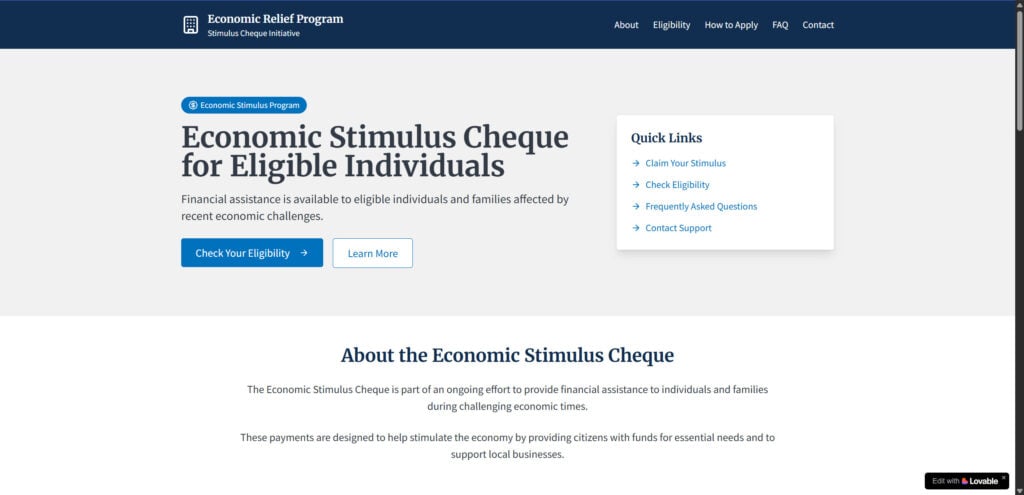
Scam Overview
What Are Economic Stimulus Cheque Scam Websites?
Scam websites posing as government relief portals are falsely advertising economic stimulus payments to lure users. The schemes typically involve fake eligibility checks, application forms that capture sensitive data, and misleading claims of fast payouts.
These sites often use terms like “Economic Relief Program,” “Stimulus Cheque Initiative,” or “Emergency Relief Payment” to create a false sense of legitimacy. They mimic the appearance of government websites using official-sounding language, American flags, and trust-building icons, but they are not associated with any real federal programs.
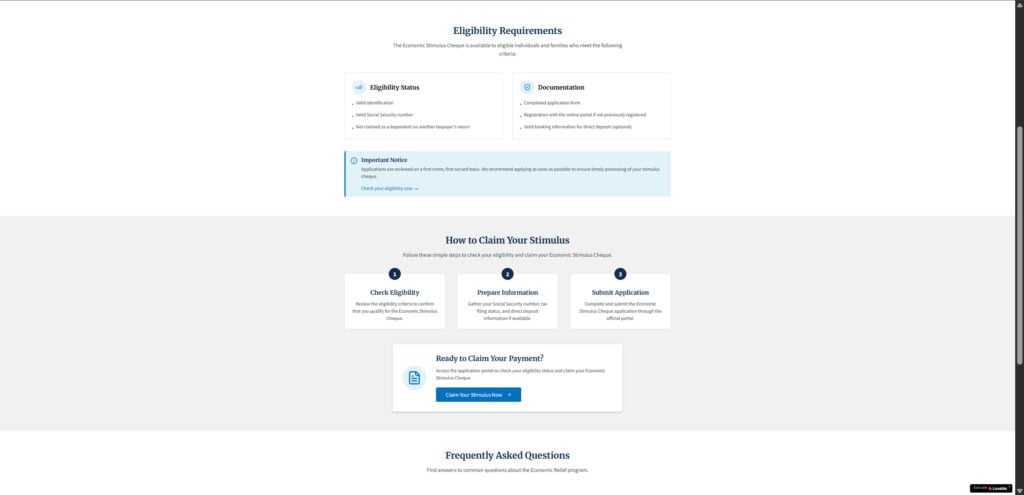
Why These Sites Are Dangerous
These scam websites are not just clickbait; they are data collection tools used for:
- Identity theft
- Banking fraud
- Unauthorized access to tax records
- Selling personal data on the dark web
In some cases, these sites also redirect users to malicious platforms or bombard them with further phishing emails, texts, and scam calls.
Common Red Flags
- Recent Domain Registration
Most of these scam websites are registered recently and often after the dates of the stimulus programs they claim to represent. Always check domain age using a WHOIS lookup tool. - No Official .gov Domain
U.S. government websites always use .gov domains. Any site offering federal payments without a .gov domain is suspect. - Missing Contact Information
Scammers rarely provide verifiable addresses, phone numbers, or real support. A lack of transparency is a major warning sign. - No Security Certificates or Misused HTTPS
While some use HTTPS to appear safe, others don’t even have secure protocols. Always look for proper security certificates and privacy policies. - Misleading Language
Terms like “no strings attached,” “act fast,” or “limited funding” are used to pressure users into acting quickly without thinking. - No Presence on Trusted Review Sites
Search the domain name on Trustpilot, Reddit, or scam tracking websites. Real businesses and services typically have user reviews or mentions.
Psychological Tactics Used
These scams often appeal to individuals in financial distress. They use urgency, scarcity, and credibility triggers such as patriotic visuals and pseudo-government language to trick users into trusting the platform. Victims are led to believe that they must act immediately or miss out on free money.
How the Scam Works
1. Initial Contact Through Ads or Messages
Scammers use platforms like Facebook, Instagram, email, and even SMS to promote links to these fake stimulus websites. The ads claim that you may be eligible for a $1,400 stimulus cheque and urge you to apply right away.
2. Landing Page Mimicking a Government Website
Once clicked, users are taken to a site designed to look like an official government page. It might include elements such as “Check Your Eligibility” buttons, official-looking seals, or even fake endorsements from the IRS or the U.S. Treasury.
3. Fake Eligibility Checker
You’re asked to fill in basic details like your name, zip code, and age to “verify eligibility.” Regardless of what you enter, the site always declares you eligible. This is a tactic to encourage submission of more sensitive data.
4. Personal Information Request
You’re then prompted to complete a form that may request:
- Full name
- Date of birth
- Social Security number
- Home address
- Bank account or routing number
This step is the core of the scam. The data collected is either sold to third parties or used directly for identity theft and financial fraud.
5. Redirect or Confirmation Page
After submitting your information, you’re redirected to other sketchy offers or shown a fake confirmation screen. You may be told your cheque is being processed or that it will arrive in a few weeks. This false reassurance delays your awareness that you’ve been scammed.
6. Follow-Up Exploitation
After your data is stolen, you may receive follow-up scam calls or phishing emails. These attempts might reference the fake application you submitted to gain even more personal details or direct you to other malicious websites.
Technical Tricks Used
- Geo-targeting to localize the scam message.
- Pixel tracking to monitor user engagement.
- Browser fingerprinting to collect additional data without consent.
These tools help scammers optimize their con and ensure higher data yield from each visitor.
What to Do If You’ve Fallen Victim to a Stimulus Cheque Scam
Acting fast can reduce the risk of long-term damage. If you suspect you’ve interacted with a scam site, follow these steps immediately:
1. Freeze Your Credit
Contact the major credit bureaus:
- Equifax: equifax.com
- Experian: experian.com
- TransUnion: transunion.com
Freezing your credit prevents scammers from opening new accounts in your name.
2. Place a Fraud Alert
Request a fraud alert on your credit file. This notifies lenders to take extra verification steps before approving credit applications in your name.
3. Contact Your Bank or Credit Union
If you entered banking information, notify your financial institution. They may advise closing your account and opening a new one. Watch for unauthorized transactions.
4. Report to the Federal Trade Commission (FTC)
File a report with the FTC at reportfraud.ftc.gov. Include the name of the website, the information you submitted, and any resulting actions or emails you received.
5. Notify the IRS if Tax Information Was Shared
Go to the IRS’s Identity Theft Central at irs.gov/identity-theft-central. Follow instructions for placing an Identity Protection PIN on your account.
6. File a Report with the Internet Crime Complaint Center (IC3)
Submit details about the scam through the FBI’s IC3 portal at ic3.gov. This helps federal investigators track widespread fraud.
7. Run an Antivirus Scan
Use reputable antivirus software to check your device for malware. Some scam sites deploy scripts that install tracking software or keyloggers.
8. Change Passwords Immediately
If you use similar passwords across accounts, change them all. Use a password manager to generate secure, unique passwords for each service.
9. Monitor Your Accounts Closely
Watch for new account openings, hard inquiries on your credit report, and suspicious emails or messages.
10. Spread Awareness
Inform friends, family, and coworkers. Share links to government resources so others don’t fall for the same scam.
The Bottom Line
Economic Stimulus Cheque Scam websites are a dangerous and evolving threat. They use professional design, emotionally manipulative language, and fraudulent promises to exploit people who are simply looking for financial help. With no real stimulus checks being distributed in 2025, any site claiming otherwise should raise immediate suspicion.
To stay safe, always:
- Verify information through official .gov websites
- Be skeptical of offers that sound too good to be true
- Protect your personal information at all costs
If you’ve already been targeted, acting quickly can prevent deeper financial damage. And by sharing what you know, you can help stop these scams from spreading further. Stay alert, stay informed, and protect your digital identity.
Frequently Asked Questions (FAQ) About Economic Stimulus Cheque Scam Websites
What are Economic Stimulus Cheque scam websites?
These are fraudulent websites that claim to offer $1,400 stimulus payments or other government relief funds. They imitate official government platforms to collect personal, financial, or tax-related information from users. These scams are designed to commit identity theft or financial fraud.
How can I tell if a stimulus cheque website is a scam?
Watch for these red flags:
- The website is not a .gov domain
- It asks for sensitive personal information upfront
- It was recently registered (use WHOIS to check)
- There’s no contact information or customer service
- It features fake reviews or no reviews at all
- It promises fast, no-strings-attached money
Legitimate government programs are never hosted on commercial domains or promoted via social media ads.
Are there any real $1,400 stimulus payments in 2025?
No. As of now, there are no active $1,400 stimulus payments being issued by the U.S. government. Any such claims in 2025 are either outdated or entirely fabricated.
What happens if I submit my information to one of these scam sites?
You could become a victim of:
- Identity theft
- Tax refund fraud
- Bank account compromise
- Phishing attacks
Scammers may use or sell your data to exploit your identity for financial gain.
Can I remove my personal data from a scam site?
Unfortunately, no. Once submitted, your information may be stored, misused, or sold. The best step is to report the scam and take immediate action to protect your identity and finances.
Where should I report a stimulus cheque scam website?
Report the scam to these official resources:
- FTC: reportfraud.ftc.gov
- IRS: irs.gov/identity-theft-central
- FBI’s IC3: ic3.gov
Also, notify your bank or credit union if financial information was shared.
What should I do if I already entered my personal information?
Take the following steps:
- Freeze your credit with all major bureaus
- Notify your bank or card provider
- File an identity theft report with the FTC
- Contact the IRS if tax information was shared
- Monitor your credit reports for unusual activity
- Change passwords and run a virus scan
Are websites like StimulusFund.us part of this scam?
Yes. Sites like StimulusFund.us have been flagged for promoting fake $1,400 checks while lacking any connection to official stimulus programs. They use misleading language, unverified claims, and hidden data-collection tactics.
Can scammers really steal my identity just from an online form?
Yes. A few personal details—like your name, address, date of birth, and Social Security number—are enough for scammers to commit serious identity fraud, including opening accounts or filing false tax returns in your name.
How can I protect myself from future scams?
- Only trust .gov domains for official government relief information
- Avoid clicking on ads or links from unknown sources
- Use antivirus and browser security tools
- Never share sensitive data unless you’re 100% sure of the site’s legitimacy

Join the discussion
0 commentsShare your experience or ask a question about this article.
Discussion
Start the conversation
Have a question or something useful to share? Add the first comment.