

A voicemail from (585) 767-6102 may sound like a legitimate loan follow-up, but it is part of a phishing scam.
The caller, often identifying himself as Brian, claims you were pre-approved for a NovaLend loan and gives a reference number, 9856473A, then asks you to send documents. The problem is simple: most recipients never applied for any loan.
This is not a real pre-approval. It is a robocall scam designed to collect personal information, identity documents, and in some cases upfront fees. In this article, we break down how the NovaLend scam works, the warning signs to watch for, and what to do if you already responded.

Scam Overview
The (585) 767-6102 NovaLend scam is a classic fake loan approval scam with a modern delivery method.
Instead of a badly written email or a sketchy website, the scam starts with a voicemail that sounds polished and personal. The caller typically introduces himself as Brian and says something like:
- “Hey, this is Brian over here at NovaLend”
- “It appears we were able to get everything preapproved”
- “I just need some documents back”
- “Your approval number is 9856473A”
- “Call me back at 585-767-6102”
That script is powerful because it skips the part where a normal lender asks if you want a loan.
It starts from the assumption that you already have one.
That is not a small detail. It is the psychological trick that makes the scam work.
Instead of asking you to consider an offer, it tells you there is a process already in motion. That changes how many people react. They feel confused, then curious, then concerned. Some people call back just to “clear it up.” Others worry someone may have applied in their name.
Either reaction benefits the scammer.
This type of call is designed to pull you into a conversation.
Once you call back, the person on the other end can adapt the script in real time. They can position the call as a mistake, a loan offer, a verification issue, or a final approval step. The goal stays the same, which is to collect valuable personal or financial data.
Why the repeated details matter
One of the biggest red flags in this scam is that people report nearly identical voicemails.
The same first name. The same “pre-approved” language. The same callback pattern. In at least one recent public discussion, multiple people described getting the same “Brian / Nova Lend” message and the same style of fake pre-approval callback request, with commenters specifically calling out that it was “the very same call.”
Real loan approvals do not work like that.
A real lender does not mass-send the same approval number to random strangers. A legitimate lending process is tied to an actual application, an applicant identity, and a credit review. It includes legally required disclosures and clear documentation, not a vague voicemail asking for “documents back.”
The repeated approval number, 9856473A, is especially telling.
It sounds official, and that is the point.
Scammers know that reference numbers create a sense of structure. A code makes the interaction feel internal, organized, and already underway. It reduces skepticism because the target thinks, “They have a file on me.”
In reality, the reference number is often just a prop.
It is there to simulate legitimacy.
This is a known scam pattern, not a one-off call
The NovaLend voicemail fits a broader scam pattern that consumer protection agencies have been warning about.
The FTC published a consumer alert specifically about unexpected calls involving loans you did not apply for. In that alert, the FTC explains that scammers use “prequalified” or similar language, ask for personal information like Social Security numbers and bank account details, and use pressure tactics to get you to respond quickly. The FTC also states clearly: never call back, and do not trust caller ID because scammers use spoofed numbers.
That is almost a perfect match for the Brian pre-approval robocall tactic.
The FTC also warns about advance-fee loan scams, where scammers claim you are approved but then demand payment for “insurance,” “processing,” or “paperwork” before a loan is released. The agency states that any upfront fee before the loan is granted is a major red flag, and it also notes that telemarketers cannot legally promise a loan and ask for money upfront before delivering.
So even if the NovaLend call starts as a document request, it often has two likely end goals:
- Identity theft
- Advance-fee fraud
Sometimes both.
Why the voicemail sounds so believable
Scammers have become much better at sounding normal.
Older scam calls often sounded robotic, aggressive, or obviously fake. This one is different. It sounds like a loan officer doing routine follow-up work.
That is intentional.
The voice is calm. The wording is short. There is no immediate demand for money. There is no obvious threat. That makes it feel safer, which increases the chance that people call back.
Many scam operations now use one or more of the following:
- Pre-recorded human voicemails
- AI-generated or AI-enhanced voices
- Local-looking phone numbers
- Neutral business language
- Internal-sounding “approval” codes
Each one reduces friction.
The victim is less likely to hang up, more likely to call back, and more likely to answer follow-up questions.
Why “you’re approved” is such an effective hook
This scam is not just about fake loans. It is about emotional timing.
People respond strongly to the idea that something is already approved, especially if money is involved. It triggers a mix of:
- Relief
- Curiosity
- Hope
- Fear of missing out
- Concern about identity misuse
That combination is powerful.
Even someone who knows scam calls are common may still call back “just to check” because the voicemail sounds specific and references documents and an approval number.
That is exactly what the scammer wants.
The FTC recently described this same dynamic in its loan robocall warning, noting that these voicemails are designed to throw people off balance and get them to “respond first and think later.”
Why the caller asks for documents
The request for documents is the most dangerous part of the message.
When scammers say they need documents to finalize a loan, they are usually trying to collect high-value identity material, such as:
- Driver’s license photos
- Social Security card images
- Utility bills
- Bank statements
- Pay stubs
- Employer details
- Address verification
- Date of birth
- Account numbers
That package of data can be enough to:
- Open fraudulent accounts
- Apply for loans or credit cards
- Take over existing accounts
- Bypass identity verification checks
- Build a more convincing scam profile for future attacks
This is why the voicemail can be more dangerous than a generic spam call.
It is not just fishing for a callback. It is fishing for a document set.
The scam may not even be tied to a real company
In many cases like this, the name used in the voicemail may be entirely fake, loosely based on a real company name, or intentionally hard to verify.
“NovaLend” and “Noval End” can sound the same on voicemail, which creates confusion. Scammers often rely on that ambiguity. If a target searches quickly, they might find unrelated companies with similar names and assume the call is connected.
That uncertainty gives the scam extra room to operate.
A legitimate lender should be easy to verify through official licensing records, a known website, written disclosures, and a documented application process. A mystery voicemail from “Brian” with no clear paper trail is the opposite of that.
Who these calls target
This kind of robocall does not only target people actively looking for loans.
It can target anyone with a phone number.
That includes:
- People who recently applied for credit and might be expecting calls
- People under financial stress
- Older adults who are more likely to trust voicemail etiquette
- Busy people who call back quickly between tasks
- People worried about identity theft who want to “fix” a possible issue
The script is broad enough to work on many audiences.
If you are looking for a loan, it sounds like a pre-approval follow-up.
If you are not, it sounds like possible fraud in your name.
Both paths lead to the same outcome, which is engagement.
This is why the scam keeps spreading
Scam campaigns like this scale well.
The attacker can blast thousands of voicemails in a short time, then only spend time on the people who call back. That makes it efficient, cheap, and easy to repeat using different numbers or area codes.
The FTC also warns that loan scam callers often use multiple numbers and repeat the calls to wear people down. That is another reason a single reported number, including (585) 767-6102, should be treated as part of a larger robocall campaign, not a standalone incident.
If one number gets blocked, they rotate.
If one script gets exposed, they change a few words and keep going.
The structure stays the same.
How The Scam Works
The Brian pre-approval robocall trap follows a predictable sequence. Once you understand the flow, it becomes much easier to spot and shut down.
Step 1: The robocall or voicemail drop
The scam starts with a voicemail, sometimes without your phone ever ringing.
That matters because voicemail feels less intrusive than a live scam call. It also gives the scammer a chance to deliver the script cleanly, without interruption.
The message is usually friendly and concise. It sounds like a routine business follow-up, not a sales pitch. That is deliberate.
The caller claims:
- Your loan was pre-approved
- A few documents are still needed
- A reference or approval number exists
- You should call back
The voicemail creates just enough detail to feel real, but not enough detail to verify anything.
That gap is important.
If the caller gave too much information, you might catch inconsistencies. If they gave too little, you would ignore it. The message is carefully balanced to make you call back for the missing pieces.
Step 2: The callback turns you into a “lead”
The scammer’s first objective is not money. It is contact.
When you call back, you confirm three things immediately:
- Your number is active
- You listened to the voicemail
- You are willing to engage
At that moment, your value goes up.
Even if you do not give information right away, your number can be tagged as responsive and reused later in other scams. In some operations, active responders get sold to other scammers as “warm leads.”
This is one reason the FTC advises people never to call back unexpected loan robocalls. Calling back can trigger more scam traffic, even if you think you are just asking questions.
Step 3: The scammer moves into “verification mode”
Once contact is made, the scammer usually avoids sounding pushy.
They shift into what sounds like a standard verification process. You may hear phrases like:
- “I just need to confirm a few details”
- “This is for your security”
- “We need to complete your file”
- “Your application is already in underwriting”
- “The approval is pending documents”
This is where many victims let their guard down.
Verification is a normal part of real financial processes, so it feels familiar. The scammer borrows that language to make the interaction feel legitimate.
The details they ask for can start small:
- Full name
- Zip code
- Date of birth
- Email address
Then they escalate:
- Full address
- Social Security number
- Employer name
- Monthly income
- Bank name
- Account and routing details
This escalation is strategic.
If they asked for your Social Security number in the first sentence, many people would hang up. If they ask after you have already answered five normal questions, it feels like a continuation of a process you already started.
Step 4: They request documents to complete the trap
The voicemail itself often mentions “documents,” and this is where the scam deepens.
The scammer may ask you to send items by:
- Text
- Upload link
- Messaging app
- “Secure portal” link (which may be fake)
Common document requests include:
- Driver’s license or state ID
- Social Security card
- Bank statements
- Pay stubs
- Proof of address
- Voided check
- Tax forms
- Selfie with ID for “identity verification”
This is not random.
Document fraud is now a major part of financial scams because many institutions use document-based verification. A scammer who gets your ID, address proof, and bank details can impersonate you much more effectively than one who only has your phone number.
In some cases, they ask for documents first and money later.
In other cases, they use the documents to commit identity theft quietly and never contact you again.
Both outcomes are bad.
Step 5: They create urgency and remove your time to think
Scammers know that time helps victims notice red flags.
So they compress the decision window.
Common pressure tactics include:
- “Your file expires today”
- “We can release funds once this is complete”
- “We just need this one last item”
- “I do not want you to lose the offer”
- “Rates change if you wait”
- “We need the verification deposit today”
The FTC’s loan scam alert specifically notes that callers use pressure language, even when they pretend not to. Phrases like “no pressure” and “I hope you do not miss out” are still pressure tactics because they push you toward immediate action.
This is one of the clearest tells of a scam.
A legitimate lender can explain a process and give you time to review disclosures. A scammer needs momentum.
Step 6: Two common endings, identity theft or upfront fee fraud
After the scammer has enough information, the call usually ends in one of two ways.
Path A: Identity theft
In this version, the scammer focuses on harvesting personal information and documents.
They may disappear after getting what they need, or they may keep you talking while they gather more. Later, you may discover:
- New credit inquiries
- Accounts opened in your name
- Fake loan applications
- Changes to existing accounts
- Fraud alerts from banks
- Debt collection calls
Sometimes the damage shows up quickly. Sometimes it takes weeks.
That delay is why this scam is dangerous. People often assume they are safe because “nothing happened right away.”
Path B: Advance-fee loan fraud
In this version, the scammer claims the loan is approved but blocked by a fee.
The fee might be labeled as:
- Processing fee
- Insurance fee
- Verification deposit
- Transfer fee
- Collateral
- Compliance fee
- First payment in advance
The FTC warns that this is a classic advance-fee loan scam. If someone says you are approved but asks for money before the loan is issued, it is a scam. The FTC also notes that telemarketers cannot legally promise a loan and collect money upfront before delivering it.
The payment methods are often chosen for speed and low recovery odds, such as:
- Wire transfer
- Gift cards
- Crypto
- Payment apps
- Debit transactions
Once you pay, the “loan” never arrives.
Then the scammer may invent another fee.
Many victims lose money in stages because each payment is framed as the final step.
Step 7: Caller ID and number trust are used against you
A lot of people still use caller ID as a trust signal.
Scammers know this, which is why they spoof numbers.
The FTC warns consumers not to trust caller ID in these loan robocall scams because scammers can fake names and numbers to make calls appear local, official, or familiar.
That means the number on your screen, including (585) 767-6102, may be:
- The real callback number used in this campaign
- A temporary number
- A spoofed number
- One of many rotating numbers
So even if you block one number, the campaign can continue through others.
Blocking still helps, and you should do it, but do not assume the risk is gone just because one number is blocked.
Step 8: The scammer may use your response for future attacks
Even if you stop before sending documents or money, a callback can still create future risk.
The scammer may now know:
- Your voice
- Your availability
- Your location clues
- Your financial concerns
- Whether you are cautious or trusting
That information can be used later in:
- Fake bank fraud calls
- Debt collection scams
- IRS impersonation scams
- Tech support scams
- Follow-up loan scams from “other companies”
This is one reason scam prevention experts always stress early cutoff.
The less data you give, the less useful you are to the scam network.
Step 9: Why this scam is hard to stop
Robocall campaigns are difficult to shut down because they are distributed.
The same script can be used by multiple operators across different numbers and states. The number changes, but the message stays the same.
Regulators are still encouraging complaints because reports help identify patterns and support enforcement. The FCC complaint system specifically states that while it does not resolve individual unwanted call complaints, complaints provide information used for policy and potential enforcement actions.
That means your report matters, even if you did not lose money.
It helps map the campaign.
Step 10: How this compares to other fake loan approval scams
The NovaLend voicemail is part of a larger trend, not an isolated script.
Banks and credit unions have also been warning customers about fake loan approval messages that claim people are approved even when they never applied. For example, CEFCU published a scam alert in January 2026 describing fake loan approval texts that push people to respond, click links, or provide personal or financial information, and emphasized that legitimate lenders do not send unsolicited loan approvals or demand urgent action to “secure” a loan
Different channel, same method.
Text, voicemail, email, and live calls all use the same formula:
- You are already approved
- Act now
- Verify your identity
- Send documents or money
Once you see that pattern, the scam becomes much easier to spot.
What To Do If You Have Fallen Victim to This Scam
If you already called back, sent documents, or paid money, do not panic.
You can still reduce the damage, and acting quickly makes a big difference.
Follow these steps in order.
1) Cut off all contact immediately
Stop responding to the caller.
Do not call back, do not text, and do not click any links they send. If they contact you again, do not argue or explain. Just block the number.
If they claim the loan is “almost complete,” ignore it.
That is pressure designed to keep you engaged.
2) Write down exactly what happened
Create a quick timeline while it is fresh.
Include:
- Date and time of the voicemail or call
- Phone number used (585-767-6102 and any others)
- What the caller said
- The fake approval number (9856473A)
- What information you shared
- What documents you sent
- Any payment you made
- Any email addresses, links, or payment handles used
This record will help when reporting the scam and talking to your bank, credit bureaus, or law enforcement.
3) If you shared bank or card info, contact your bank right away
If you gave any banking details, debit card information, or credit card details, call your bank or card issuer immediately.
Tell them:
- You believe you were targeted in a loan phishing scam
- You may have disclosed account information
- You need fraud monitoring on the account
- You may need to freeze, replace, or close the account/card
Ask them to review recent transactions with you.
If money was sent, ask what recovery options are available and whether a fraud claim can be opened.
4) Place a fraud alert or credit freeze, ideally both
If you shared personal identity details like your Social Security number, date of birth, or ID documents, protect your credit immediately.
The CFPB advises identity theft victims to place fraud alerts or security freezes on their credit reports and to file a report at IdentityTheft.gov.
The FTC also explains that a credit freeze can stop new credit accounts from being opened in your name, is free to place or lift, and does not affect your credit score.
Important details:
- A fraud alert tells lenders to verify your identity before opening new credit
- A credit freeze blocks new creditors from accessing your file (which usually blocks new account openings)
- Freezes must be placed with all three major bureaus individually
- Fraud alert placement with one bureau notifies the others (for the initial alert)
If the scammer got enough information to impersonate you, a freeze is often the strongest immediate protection.
5) File an identity theft report at IdentityTheft.gov
If you shared sensitive data or documents, file a report at IdentityTheft.gov.
The CFPB and FTC both direct identity theft victims there, and the CFPB specifically notes that victims should file at IdentityTheft.gov and take steps to protect their credit and finances.
This gives you:
- A formal identity theft report process
- Recovery guidance
- Documentation you may need when disputing fraudulent accounts
If you later find fraud on your credit report, this report becomes even more important.
6) Check your credit reports using the official source
Review your credit reports for anything you do not recognize.
The FTC states that the only authorized site for free annual credit reports is AnnualCreditReport.com, and also notes that free online reports are available through that system.
When reviewing your reports, look for:
- New accounts you did not open
- Hard inquiries from lenders you do not recognize
- Address changes
- Name variations
- Collection accounts
Do not skip this step.
Loan scams often lead to identity misuse that shows up first on your credit file.
7) Change passwords if you sent documents or used a link
If you clicked a link, uploaded files, or sent documents through email, change passwords on important accounts right away, especially:
- Banking
- Payment apps
- Mobile carrier account
- Credit monitoring accounts
Also enable multi-factor authentication where possible.
Your email account is especially critical because scammers often use it to reset other accounts.
8) Report the call to the FTC
The FTC specifically advises reporting unwanted scam loan calls, including the caller ID number and any callback number provided in the voicemail. The agency also says never call back these unexpected loan calls and not to trust caller ID.
Report the NovaLend robocall and include:
- (585) 767-6102
- “Brian” / “Brian O’Brien” (if that name was used)
- Approval number 9856473A
- Any documents requested
- Any money requested or sent
Even if you did not lose money, your report helps investigators identify patterns.
9) Report the call to the FCC (optional but useful)
You can also report unwanted calls to the FCC.
The FCC complaint portal notes that individual complaints are not resolved one by one, but the information helps support policy and potential enforcement actions. It also provides the complaint path for unwanted calls/texts.
If the number appears spoofed or the caller used a fake caller ID, mention that in your complaint.
10) Report to IC3 if you sent money, documents, or links were involved
If the scam involved online transfers, email attachments, uploaded documents, or any internet-based fraud element, file a complaint with the FBI’s IC3.
IC3 states it is the main intake form for a range of cyber-enabled frauds and scams and encourages people to file even if they are unsure whether the complaint qualifies.
This is especially important if:
- You wired money
- You sent ID scans online
- You clicked a portal link
- The scammer used email
- You suspect account takeover attempts
11) Watch for follow-up scams
This is a step many people miss.
After a loan scam, victims are often targeted again by:
- “Recovery” scammers who claim they can get your money back for a fee
- Fake fraud departments
- Fake debt collectors
- Fake investigators
No legitimate recovery service will guarantee results or demand immediate payment to “unlock” funds.
If someone contacts you claiming they are helping with the NovaLend case, verify independently before speaking with them.
12) Tell family members, especially older relatives
Scammers reuse the same script on many people.
If you got this voicemail, someone close to you may get it next week. Share the exact red flags:
- Unsolicited loan pre-approval
- Caller named Brian
- Approval number 9856473A
- Request for documents
- Callback to (585) 767-6102 or a similar number
A 2-minute warning can prevent a major identity theft problem.
13) If you lost money, document everything for disputes and tax records
If you paid a fee, save everything.
Keep:
- Bank statements
- Receipts
- Screenshots
- Caller logs
- Voicemails
- Emails
- Transfer confirmations
You may need these for:
- Bank disputes
- Card chargeback requests
- Police reports
- Identity theft reports
- Insurance claims (in some cases)
The more organized your file is, the easier it is to prove what happened.
14) Continue monitoring for several months
Do not assume you are safe after one week.
Identity theft often unfolds in stages. Set reminders to check:
- Credit reports
- Bank and card statements
- New account alerts
- Postal mail for unfamiliar bills
- Email security alerts
- Mobile carrier account notices
If you placed a credit freeze, keep it in place unless you need to apply for credit.
It is one of the most effective ways to block new-account fraud.
Is Your Device Infected? Run a Free Malware Scan
Slow performance, constant pop-ups, or strange behavior? These are classic signs of a malware infection. The fastest way to find out is to scan your device with Malwarebytes Free — one of the most trusted malware removal tools available.
The free version detects and removes the most common threats, including:
- Adware — the cause of those annoying pop-ups
- Browser hijackers — unwanted redirects and changed homepages
- Trojans and spyware — hidden programs stealing your data
- Potentially unwanted programs (PUPs) — software you never asked for
👉 Select your device below — Windows, Mac, or Android — then follow the simple steps to download Malwarebytes, scan your system, and remove any threats it finds. The scan usually takes 5 to 20 minutes.
Run a Malware Scan with Malwarebytes for Windows
Malwarebytes is one of the most popular and trusted anti-malware tools for Windows — and it’s completely free for removing infections. It catches threats that many antivirus programs miss, including adware, browser hijackers, and trojans. Follow the steps below to scan and clean your PC in just a few minutes.
Download Malwarebytes
Click the button below to download the latest version of Malwarebytes for Windows from the official source. The free version is all you need — it will scan your computer and remove adware, browser hijackers, and other malicious software at no cost.
Download MalwarebytesOfficial installer for Windows 11 and 10. Your download starts right away.Want real-time protection? See Malwarebytes Premium Malwarebytes Free for WindowsScans and removes malware at no cost
-
Install Malwarebytes
When the download finishes, open your Downloads folder and double-click the MBSetup file. If Windows shows a User Account Control pop-up, click “Yes” to allow the installation.
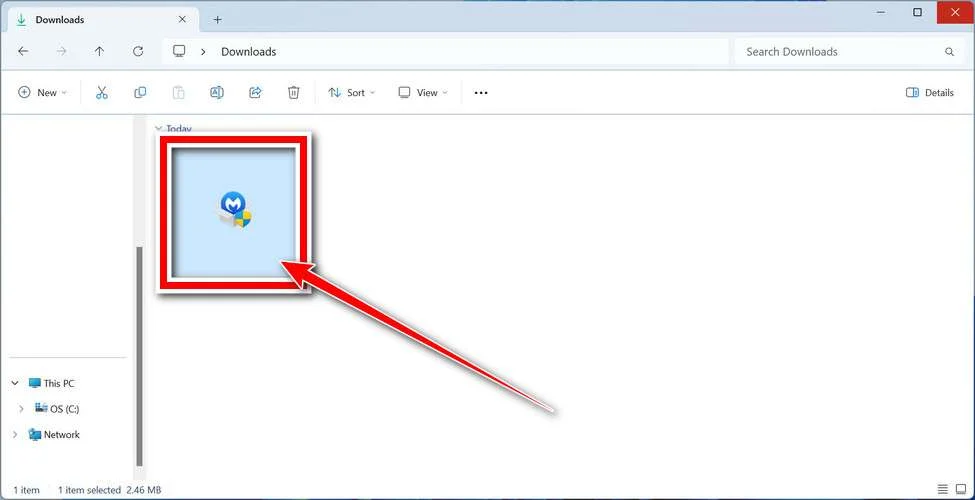
Follow the On-Screen Prompts to Install Malwarebytes
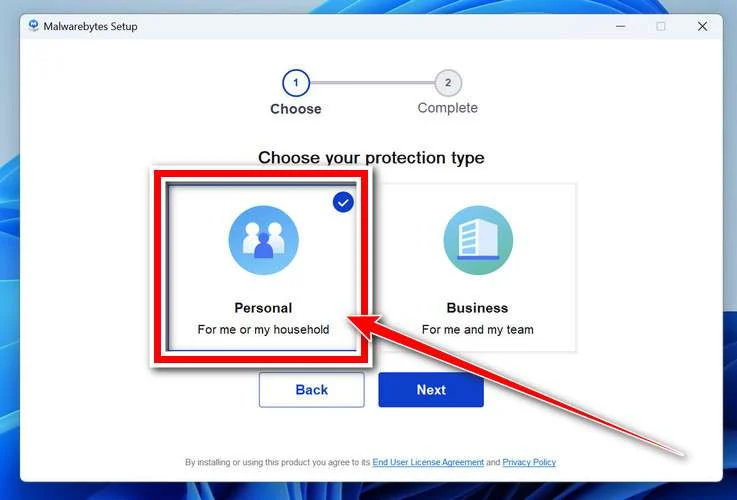
The setup wizard will walk you through a few quick screens:
-
Choose where you’re installing the program — “Personal Computer” or “Work Computer” — then click Next.
-
Malwarebytes will now install on your device. This usually takes under a minute.

-
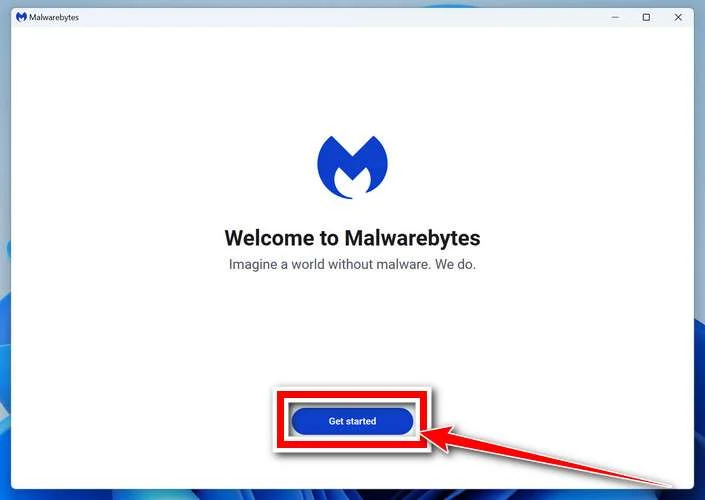
When installation is complete, the “Welcome to Malwarebytes” screen will open automatically.
-
On the final screen, click Open Malwarebytes to launch the program.

-
Enable “Scan for Rootkits”
Before scanning, turn on rootkit detection so Malwarebytes can find even the most hidden threats. Click the Settings gear icon on the left side of the screen.
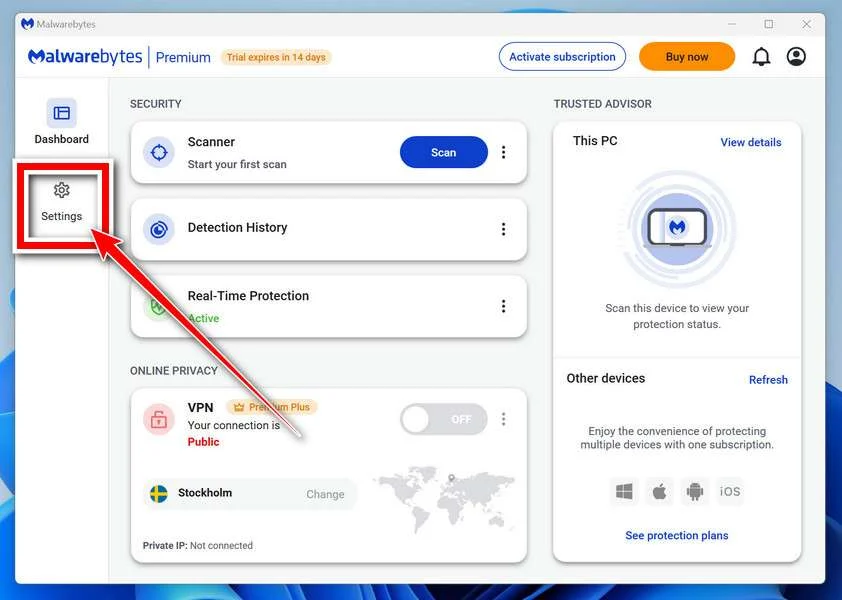
In the settings menu, find “Scan for rootkits” and click the toggle so it turns blue.

Done? Click “Dashboard” in the left pane to return to the main screen.
Start the Scan
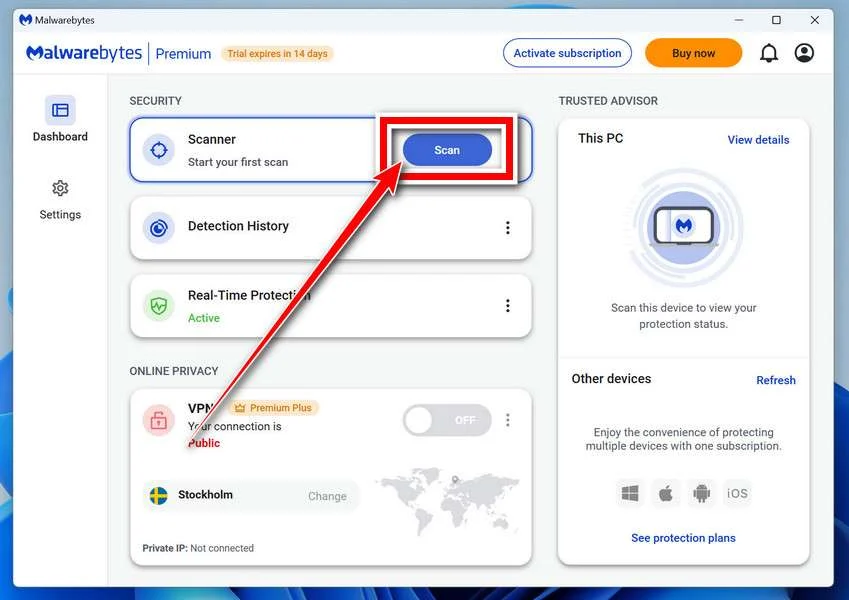
Click the blue Scan button. Malwarebytes will automatically update its virus database and start checking your computer for malware.
-
Wait for the Scan to Finish
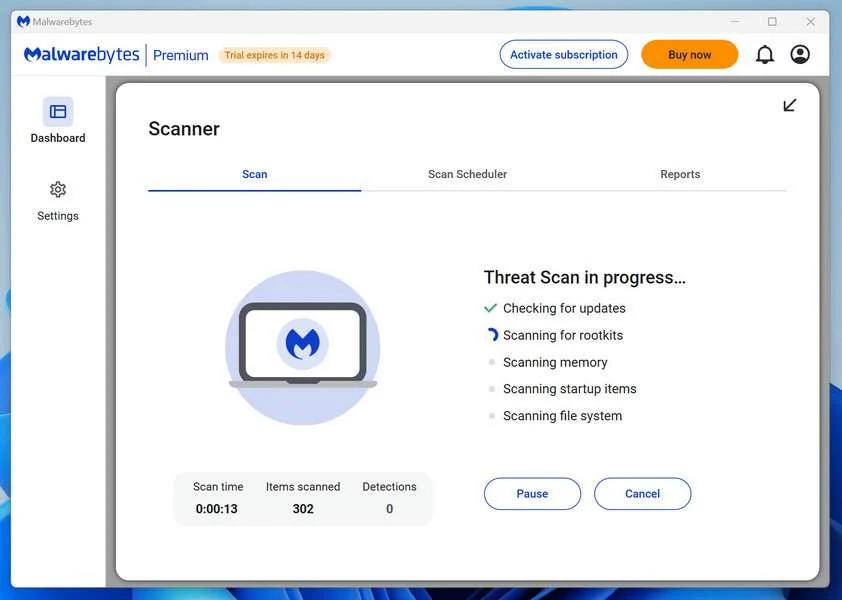
The scan checks your entire system for browser hijackers and other malicious programs, so it can take 5 to 20 minutes depending on your computer. Feel free to do something else — just check back occasionally to see the progress.
-
Quarantine the Detected Threats
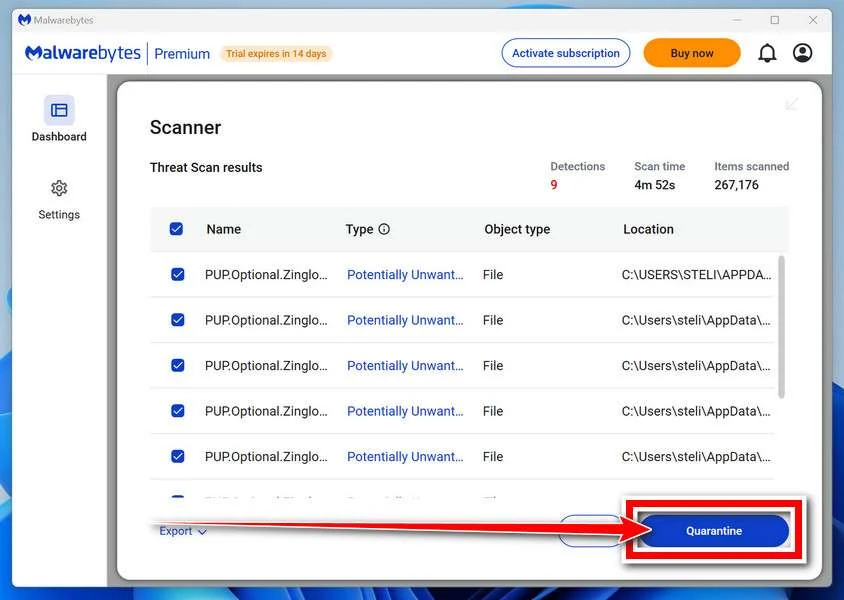
When the scan is done, you’ll see a list of everything Malwarebytes found — malware, adware, and potentially unwanted programs. Click the “Quarantine” button to remove all of them at once.
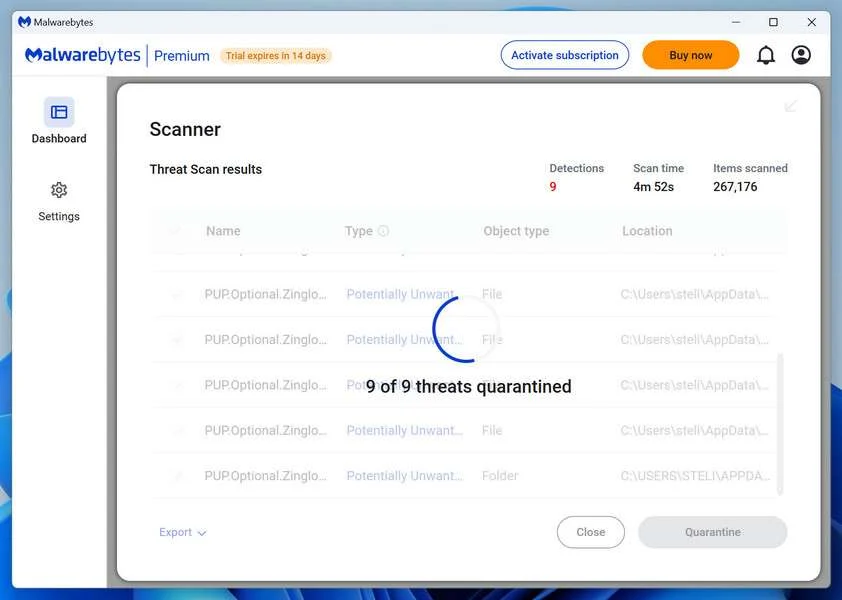
Malwarebytes will now remove the malicious files and registry entries and move them safely into quarantine.
-
Restart Your Computer
Some threats can only be fully removed after a reboot. If Malwarebytes asks you to restart, click Yes. Once you’re logged back in, Malwarebytes has finished removing the threats it found.
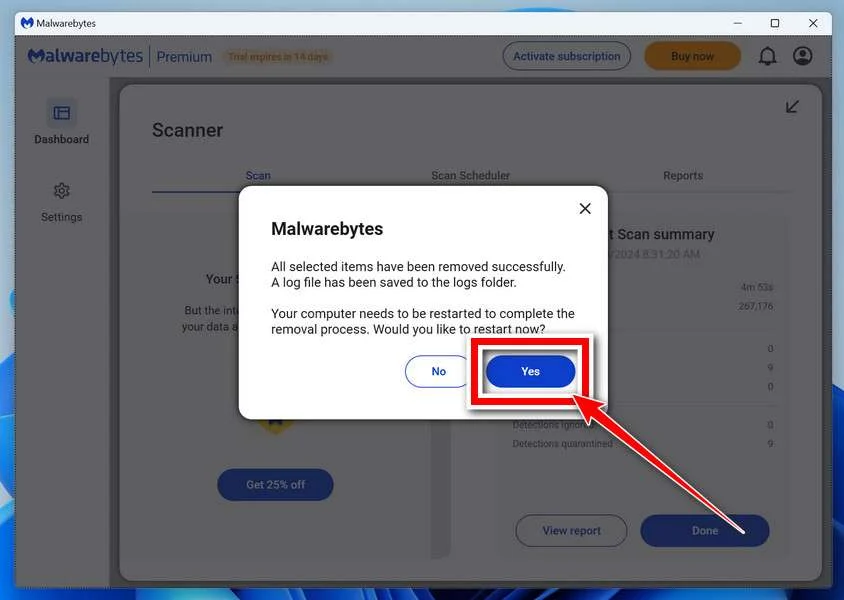
That’s it — your Windows PC is now clean of trojans, adware, and other malware, and should be back to running smoothly.
If you are still having problems with your computer after completing these instructions, then please follow one of the steps:
- Run a computer scan with ESET Online Scanner
- Ask for help in our Windows Malware Removal Help & Support forum.
Run a Malware Scan with Malwarebytes for Mac
Malwarebytes for Mac is a free on-demand scanner that removes the malware other security software tends to miss — adware, browser hijackers, and unwanted programs included. Cleaning an infected Mac with Malwarebytes has always been completely free, and it’s our go-to recommendation. Follow the steps below to scan and clean your Mac in just a few minutes.
-
Download Malwarebytes for Mac
Click the button below to download the latest version of Malwarebytes for Mac.
Download MalwarebytesOfficial installer for macOS. Your download starts right away.Want real-time protection? See Malwarebytes PremiumMalwarebytes Free for MacScans and removes malware at no cost -
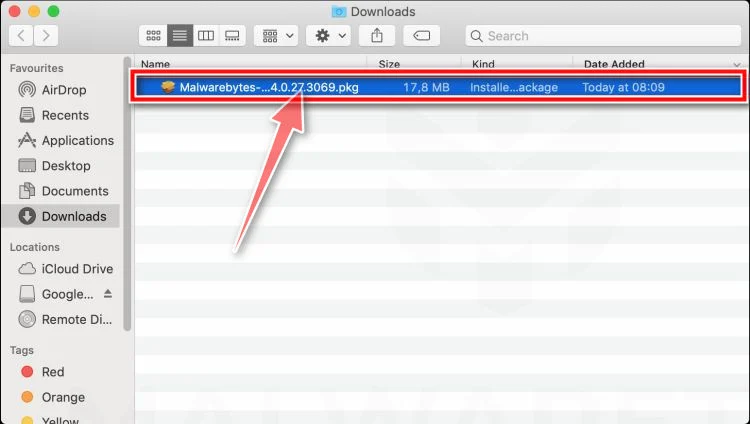
Open the Malwarebytes setup file
When the download finishes, open your Downloads folder and double-click the setup file to begin the installation.
-
Follow the On-Screen Prompts to Install Malwarebytes
The Malwarebytes for Mac Installer will guide you through a few quick screens. Click “Continue” and keep following the prompts until the installation completes.
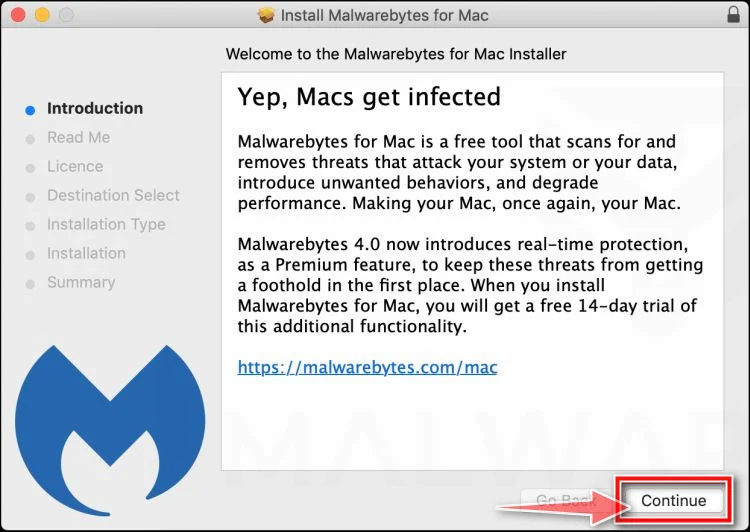
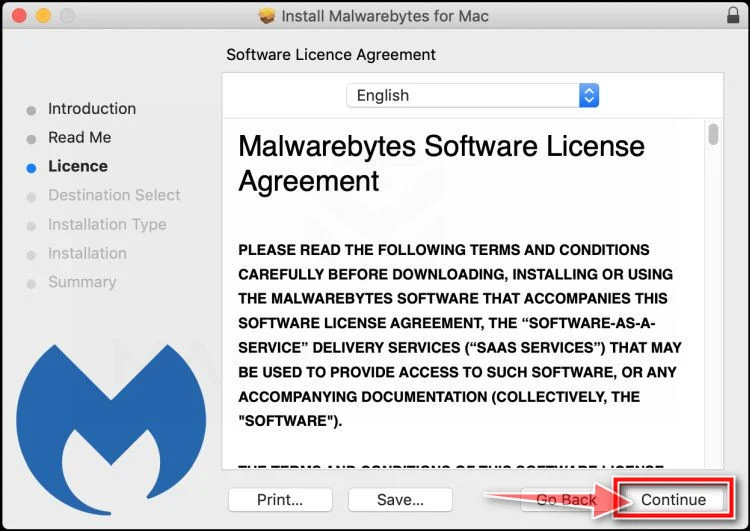
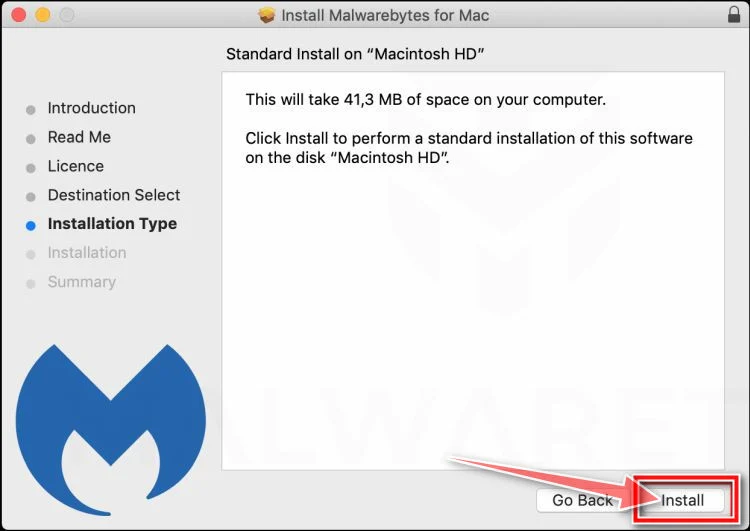
When the installation is complete, Malwarebytes opens to the Welcome to Malwarebytes screen. Click “Get started“.
-
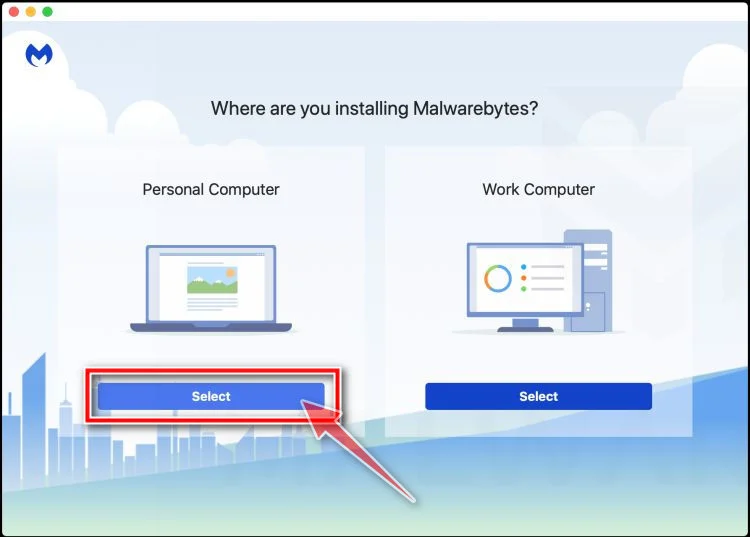
Select “Personal Computer” or “Work Computer”
Malwarebytes will ask what type of computer you’re installing it on. Click either Personal Computer or Work Computer, whichever applies.
-
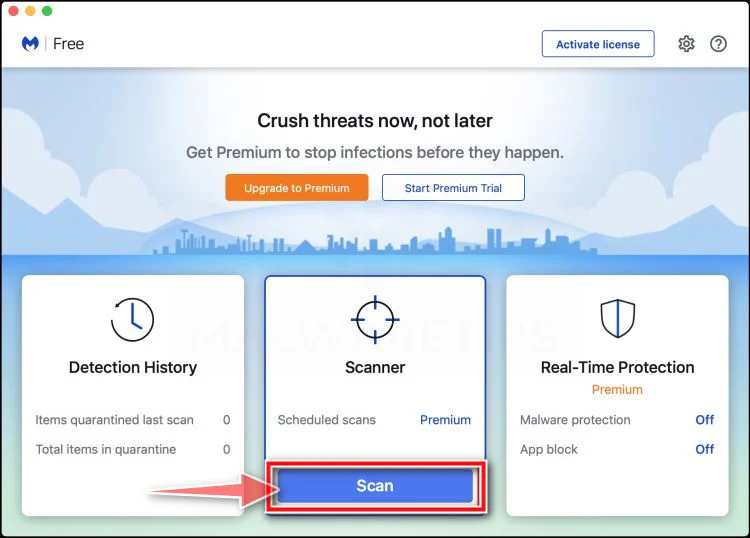
Start the Scan
Click the “Scan” button. Malwarebytes will automatically update its detection database and begin checking your Mac for malware.
-
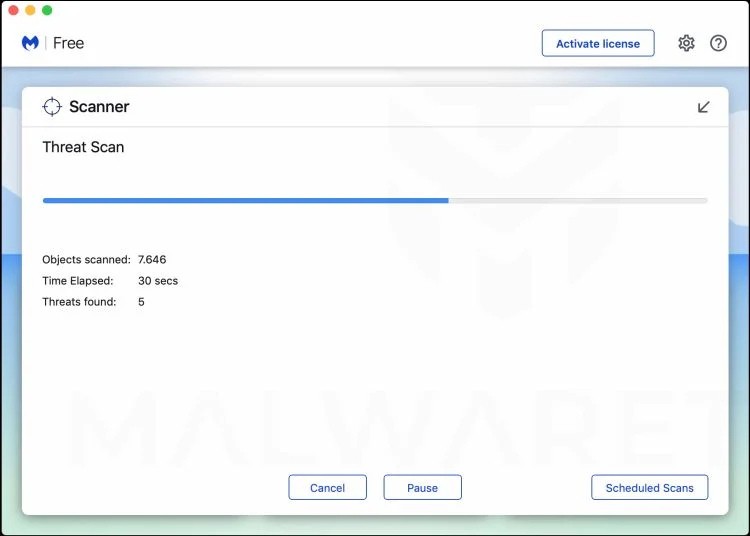
Wait for the Scan to Finish
Malwarebytes will scan your Mac for adware, browser hijackers, and other malicious programs. This can take a few minutes, so feel free to do something else — just check back occasionally to see the progress.
-
Quarantine the Detected Threats
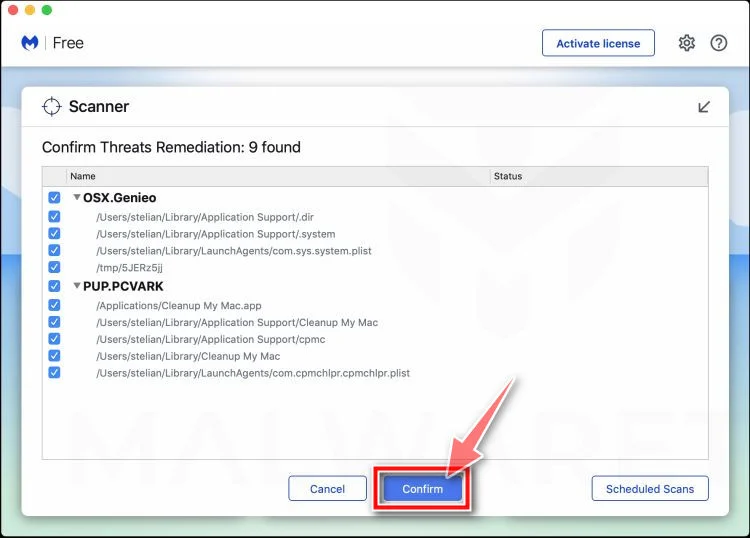
When the scan is done, you’ll see a list of everything Malwarebytes found. Click the “Quarantine” button to remove all the threats at once.
-
Restart Your Mac
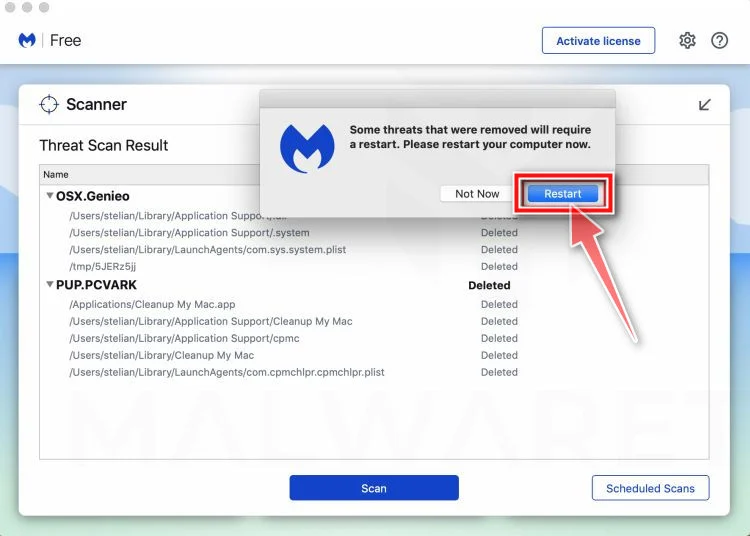
Malwarebytes will now remove all the malicious files it found. Some threats can only be fully removed after a reboot — if Malwarebytes asks you to restart, allow it. Once you’re logged back in, your Mac is clean.
That’s it — your Mac is now free of adware, rogue browser extensions, and other potentially harmful software.
If you are still experiencing problems while trying to remove a malicious program from your computer, please ask for help in our Mac Malware Removal Help & Support forum.
Run a Malware Scan with Malwarebytes for Android
Malwarebytes for Android automatically detects and removes dangerous threats like malware and ransomware so you don’t have to worry about your most-used device being compromised. Aggressive detection of adware and potentially unwanted programs keeps your Android phone or tablet running smooth.
-
Download Malwarebytes for Android.
You can download Malwarebytes for Android by clicking the link below.
Get Malwarebytes for AndroidOpens Google Play in a new tab.Want real-time protection? See Malwarebytes Premium for AndroidMalwarebytes for AndroidScans your phone and removes malware at no cost -
Install Malwarebytes for Android on your phone.
In the Google Play Store, tap “Install” to install Malwarebytes for Android on your device.

When the installation process has finished, tap “Open” to begin using Malwarebytes for Android. You can also open Malwarebytes by tapping on its icon in your phone menu or home screen.

-
Follow the on-screen prompts to complete the setup process
When Malwarebytes will open, you will see the Malwarebytes Setup Wizard which will guide you through a series of permissions and other setup options.
This is the first of two screens that explain the difference between the Premium and Free versions. Swipe this screen to continue.
Tap on “Got it” to proceed to the next step.
Malwarebytes for Android will now ask for a set of permissions that are required to scan your device and protect it from malware. Tap on “Give permission” to continue.
Tap on “Allow” to permit Malwarebytes to access the files on your phone.
-
Update database and run a scan with Malwarebytes for Android
You will now be prompted to update the Malwarebytes database and run a full system scan.

Click on “Update database” to update the Malwarebytes for Android definitions to the latest version, then click on “Run full scan” to perform a system scan.

-
Wait for the Malwarebytes scan to complete.
Malwarebytes will now start scanning your phone for adware and other malicious apps. This process can take a few minutes, so we suggest you do something else and periodically check on the status of the scan to see when it is finished.

-
Click on “Remove Selected”.
When the scan has been completed, you will be presented with a screen showing the malware infections that Malwarebytes for Android has detected. To remove the malicious apps that Malwarebytes has found, tap on the “Remove Selected” button.

-
Restart your phone.
Malwarebytes for Android will now remove all the malicious apps that it has found. To complete the malware removal process, Malwarebytes may ask you to restart your device.
That’s it — your Android phone is now clean — no more malicious apps, adware, or browser redirects.
If you are still having problems with your phone after completing these instructions, then please follow one of the steps:
- Restore your phone to factory settings by going to Settings > General management > Reset > Factory data reset.
- Ask for help in our Mobile Malware Removal Help & Support forum.
Stay Protected: Block Ads and Malicious Sites
Now that your device is clean, keep it that way. Most infections start with a malicious ad or a fake download button — so blocking them at the source is your best defense.
We recommend AdGuard, which blocks malicious ads, phishing pages, and dangerous redirects before they can reach you.
👉 Download AdGuard and browse safely
The Bottom Line
The (585) 767-6102 NovaLend scam is a fake loan pre-approval robocall trap, not a legitimate lending process.
The voicemail is designed to sound calm and professional so you call back, trust the script, and hand over personal information, documents, or money. The repeated use of “Brian,” the fake approval number 9856473A, and the unsolicited request for documents are major warning signs.
If you get this call, do not call back.
Block the number, report it, and warn others.
If you already engaged with the caller, act quickly by protecting your accounts, freezing your credit, and filing reports through the FTC, CFPB guidance channels, and IC3 when needed. Those steps can significantly reduce the damage and help stop the scam from spreading further.
The most important thing to remember is simple: real lenders do not cold-call random people with a pre-approved loan and ask for documents before you even know who they are. If the process starts with confusion and pressure, it is not a loan offer. It is a scam.
FAQ
Is (585) 767-6102 a real NovaLend loan number?
Reports indicate this number is being used in a loan pre-approval robocall scam. Callers claim to be from NovaLend and say you were pre-approved, even if you never applied.
Who is “Brian” in the NovaLend voicemail?
The caller often identifies himself as Brian and uses a calm, professional script to sound legitimate. In scam reports, the same name is repeated across many calls, which is a major red flag.
What is the approval number 9856473A?
It appears to be a fake reference number used to make the voicemail sound official. Real lenders do not reuse the same approval number for multiple people.
Why did I get a pre-approval call if I never applied for a loan?
That is exactly how this scam works. The caller wants to create confusion and curiosity so you call back and share personal information.
What happens if I call the number back?
The scammer may ask you to “verify” your identity and request personal details such as your full name, address, date of birth, Social Security number, banking information, or photo ID documents.
What documents do NovaLend scammers usually ask for?
Victims report requests for things like:
- Driver’s license or state ID
- Social Security card
- Pay stubs
- Bank statements
- Proof of address
- Other identity verification documents
These are commonly used for identity theft.
Is this an advance-fee loan scam too?
It can be. Some victims are asked to pay a processing fee, insurance fee, or verification deposit before receiving the loan. If a caller asks for money upfront for a loan you never applied for, it is a scam.
What should I do if I get the Brian pre-approval voicemail?
Do not call back. Block the number, delete the voicemail, and report it as spam. If you want to help others, report the number and share the exact script details.
What should I do if I already sent documents or personal information?
Act quickly:
- Stop all contact with the caller
- Contact your bank if financial details were shared
- Monitor your accounts and credit
- Place a fraud alert or credit freeze if identity details were shared
- Report the scam to the proper fraud reporting channels
Can scammers use different numbers with the same message?
Yes. Scam campaigns often rotate or spoof numbers. Even if you block (585) 767-6102, you may receive the same “Brian pre-approval” voicemail from another number.

Join the discussion
4 commentsShare your experience or ask a question about this article.
Discussion
Just to add to the fun:
I have gotten voicemails from them since NOVEMBER, 2025. (It is currently Mar 4, 2026) Persistent little devils, aren’t they?
Love the : “your loan is close to approval.” “Just need the go-ahead and finish the paperwork.”
THEN: “Your loan is approved, need your signature on the paperwork.”
BTW, the new phone number given by Brian at Novalend is 585-767-6102
In reply to Joie
That persistence is typical of loan scam call centers. They rotate numbers and scripts to keep people on the hook.
What helps most:
Do not call back and do not press “opt out” keys. It can confirm your number is active.
Turn on carrier spam protection and your phone’s “silence unknown callers” features.
Report the calls as spam in your carrier app and to FTC/your local consumer fraud portal.
If it becomes extreme, a number change is the last-resort fix, but it is sometimes the only permanent reset.
The new phone number given by Brian at Novalend is 585-767-6107. The fake website is https://novalend.org/
In reply to MW
Thanks for the update. Rotating phone numbers and spinning up new domains is typical for these loan robocall operations.
If anyone receives calls like this:
Do not provide personal info.
Do not follow links from voicemails or texts.
Report the domain to the registrar and report the calls to your carrier’s spam reporting tools, plus FTC and IC3.