

The Lalamove Payment Link arrived after a buyer skipped haggling, inspection, and ordinary delivery questions. Payment was supposedly complete, and the seller only had to collect it.
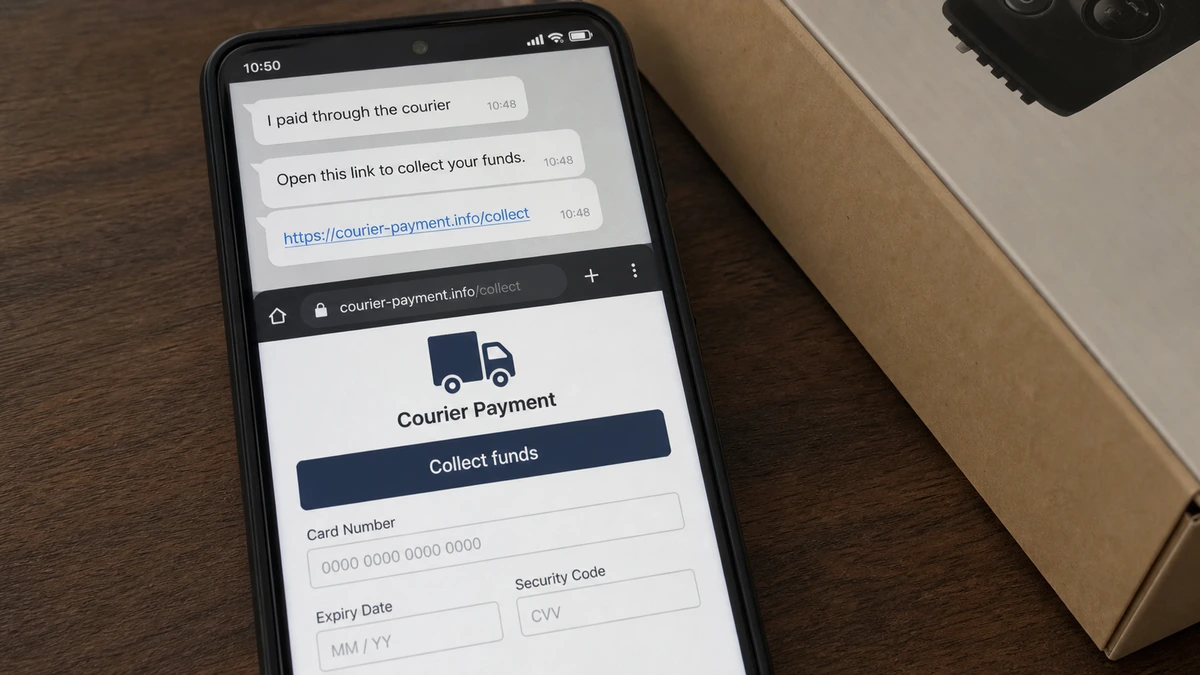
The link opened a courier-branded page with a reassuring button. The seller stopped before pressing it or entering bank information, then wondered whether the first click alone had already caused damage.
Overview
A fake buyer moves the sale away from Marketplace
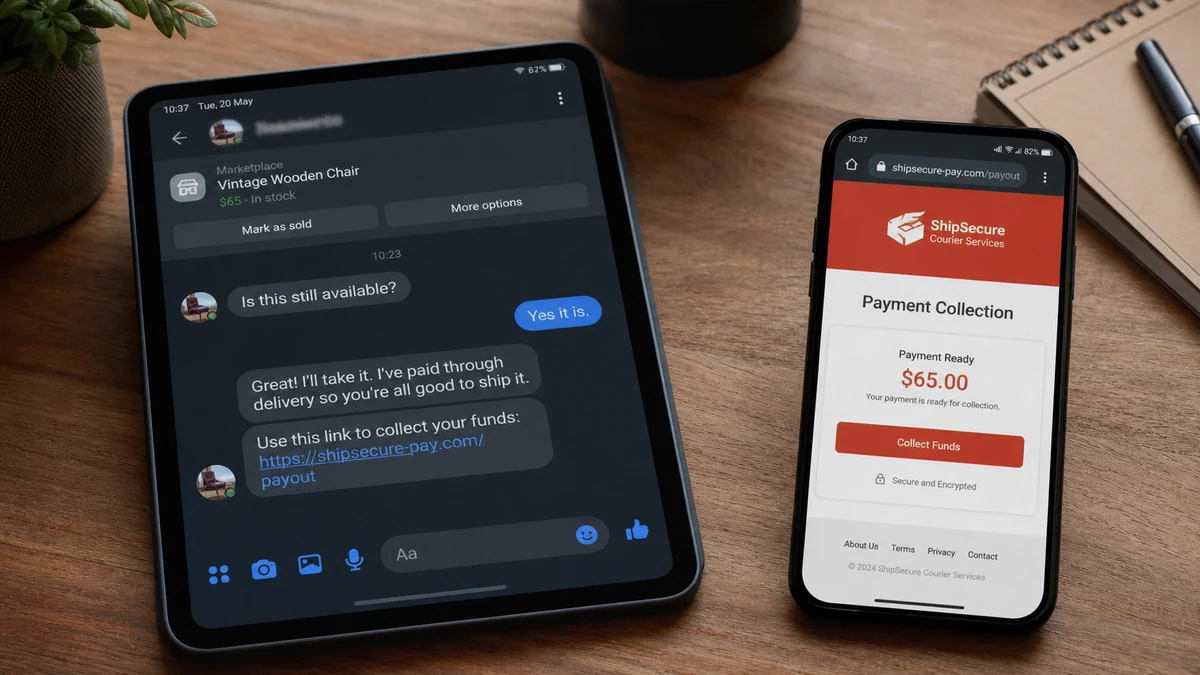
A recent consumer report describes a Facebook Marketplace buyer who claimed to have paid through Lalamove. The buyer then sent the seller a link to receive the money.
The seller opened the page but did not select “collect funds” and did not submit bank details. That pause likely prevented the most direct part of the phishing attempt.
This is a seller-targeted scam. The operator is not trying to buy the listed item. The listing merely supplies a believable reason to discuss payment and delivery with someone expecting messages from strangers.
Lalamove is used as borrowed credibility
Lalamove is a real delivery platform. That does not make a link containing its name genuine, and it does not connect the company to a page sent by an unknown Marketplace account.
In its official phishing notice, Lalamove warns about fake sites and messages that request bank credentials. The company says it does not provide external payment or collection links and does not ask users for passwords or sensitive bank information through such pages.
The courier story works because delivery is a normal concern in remote sales. The fake buyer turns that ordinary logistics step into a reason for the seller to leave Facebook and trust an unverified website.
The first click is not the same as submitting banking data
Opening a phishing page usually reveals technical information such as the visitor’s IP address, browser type, language, and approximate location. It can also confirm that the seller is responsive.
If the browser and operating system are updated, no file was downloaded, no permission was granted, and no data was entered, the risk is generally much lower than after submitting credentials. A click does not normally hand over an entire bank account automatically.
Warning signs in the fake Lalamove payment link include:
- The buyer claimed payment was complete before the seller verified it independently.
- A courier was presented as the holder of the sale proceeds.
- The seller was directed to an external “collect funds” page.
- The payment did not appear inside the seller’s real bank or payment account.
- The link came from the buyer rather than the official Lalamove app.
- The page was positioned to request bank or card information from the person receiving money.
- The buyer controlled both the payment story and the verification route.
- The transaction left Facebook before trust was established.
What Happens When You Click but Enter Nothing?
A normal webpage request sends basic connection data to the server. The operator can learn that the link was opened, when it happened, the IP address used, and characteristics of the device. Tracking parameters can connect that visit to the specific Marketplace conversation.
That information alone does not provide the bank password, card security code, or one-time passcode. The fake page normally needs the visitor to type those details into a form.
There are exceptions. A site may attempt a browser exploit, trigger a download, ask to install an app, request notification access, or persuade the visitor to add a configuration profile. Those risks are why software updates and a careful download check matter.
Look in the browser’s download history. Remove any unfamiliar notification, camera, microphone, location, accessibility, or device-management permission granted to the site. On a phone, also inspect recently installed apps and profiles.
Do not return to the phishing page for screenshots. Save the original chat and visible URL instead. Reopening confirms interest and creates another opportunity for a changed payload.
If no data or permission was provided, locking every bank account is usually not the first response. Monitor the accounts, secure the Marketplace profile, update the device, and escalate if new evidence appears.
How the Fake Lalamove Payment Link Scam Works
Step 1: The operator finds a new Marketplace listing
Fresh listings provide a steady supply of sellers who expect messages. The fake buyer may respond within minutes, offer the full price, and avoid detailed questions about condition or pickup.
A fast, easy buyer feels welcome. The lack of normal curiosity is actually part of the warning.
Step 2: Delivery becomes the reason for an unusual process
The buyer says they are busy, far away, sending a courier, or paying through a delivery app. That explanation makes it less surprising that the transaction will not follow a local cash exchange.
The courier name may change with the country. The mechanism survives because the operator copies whichever brand local sellers recognize.
Step 3: The buyer announces payment without paying
A chat message, screenshot, or fake email says the money has been deposited. The seller is told that the funds are being held until one final confirmation.
Only the real payment account can prove receipt. A buyer’s screenshot and a website the buyer selected are not independent evidence.
Step 4: A courier-branded collection link arrives
The URL may contain the courier name, words such as secure or payout, and a path like collect, receive, or delivery. The landing page copies colors, icons, and support language.
A padlock icon only means the browser encrypted its connection to that domain. It does not prove the domain belongs to Lalamove or protects the information from the site’s operator.
Step 5: The seller is asked to receive money by sending secrets
The page may request online-banking credentials, a card number, account number, PIN, identity document, or one-time passcode. Some variants demand a small verification payment or refundable courier fee.
Receiving a normal sale payment does not require giving a stranger the password to the account receiving it. That reversal exposes the trap.
Step 6: Real security codes complete a fraudulent action
After card or bank details are submitted, the operator may initiate a login, card enrollment, wallet addition, or transfer. The real bank sends a one-time code.
The fake page labels the code as payment confirmation. Entering it can authorize the attacker’s real transaction rather than release any Marketplace money.
Step 7: The operator disappears or starts another fee
Once data or money is captured, the buyer blocks the seller. If the seller remains engaged, a fake support agent may demand tax, insurance, account-upgrade, or cancellation fees.
The listed item was never the objective. It may remain unsold while the seller deals with card replacement, bank disputes, or account recovery.
Why Sellers Are So Vulnerable to Fake Payment Pages
Most fraud warnings teach buyers to fear dishonest sellers. A person selling an item may therefore assume that receiving money is the safe side of the transaction.
Fake buyers exploit that assumption. They offer a smooth sale, do not negotiate, and volunteer to organize the courier. Every inconvenience appears to be handled already.
The operator also creates a sunk-cost feeling. By the time the link appears, the seller may have answered messages, marked the item pending, and prepared it for collection.
A professional-looking payout page resolves the final uncertainty. The button uses the language the seller wants to see, while the form quietly changes the task from receiving money to disclosing secrets.
The MalwareTips guide to Facebook Marketplace scam buyers documents the same broader pattern: a fake buyer pushes payment, pickup, codes, or fees outside the platform.
The safest rule is simple. A sale is paid only when funds appear inside an account you reached independently, not when a buyer sends a page saying they are waiting.
How to Check a Payment Safely
Open the payment or banking app yourself. Do not use the link in the chat, a QR code from the buyer, or a support number printed on a collection page.
Look for a completed incoming transaction, not a pending screenshot or email. Confirm the amount, sender, status, and whether the payment can be reversed under the platform’s rules.
Keep communication inside Marketplace until the transaction is complete. Moving to WhatsApp, SMS, or email removes some platform warnings and reporting context.
If using Lalamove for delivery, arrange it through the official app or official website reached independently. Delivery status and payment status are separate facts.
Do not hand the item to a courier merely because the buyer shows a transfer screenshot. If the real account shows no money, the seller has not been paid.
For local sales, a public meeting place and payment verified in person can reduce several layers of risk. Follow the platform’s safety rules and do not invite unknown buyers into a private home when avoidable.
Technical Cleanup After Opening the Link
Close the tab and do not interact with pop-ups. Check the browser download list and remove unfamiliar files without opening them.
Review site permissions. Revoke notifications, location, camera, microphone, clipboard, and pop-up permissions for the suspicious domain.
Update the browser, operating system, and security software. Updates close known vulnerabilities that a malicious page could attempt to exploit.
Clear data for the suspicious site if practical. Clearing cookies does not erase information already submitted, but it can remove local tracking or session state.
Change passwords only when there is a reason: credentials were entered, the browser auto-filled them, an account alert appeared, or a malicious extension or app was installed. Do not create unnecessary chaos by changing every password from a possibly compromised device.
Monitor Marketplace for new logins, changed contact information, unfamiliar listings, or messages you did not send. Enable multifactor authentication and save recovery codes securely.
What a Real Remote Sale Should Look Like
A legitimate buyer asks questions that relate to the item: condition, measurements, accessories, defects, pickup window, and final price. A scammer often treats the object as interchangeable because the listing is only a route to the seller.
Agree on the payment method before arranging delivery. Both parties should understand where the payment will appear, whether it can be reversed, and which fees apply. A new collection process introduced after agreement is reason to pause.
The seller should choose the courier or verify the booking through the official courier app. A buyer-supplied driver, reference number, or support contact is not independent confirmation.
Keep the item until the money is final according to the payment service’s actual rules. A pending status, payment email, screenshot, or “funds waiting” page is not the same as settled funds.
Photograph the item, serial number, packaging, and handover. Use a signed receipt or platform confirmation for high-value goods. These records help with a legitimate dispute and discourage a dishonest chargeback.
If the buyer says a business account, insurance upgrade, refundable deposit, or verification fee is required, stop. The seller should not have to send money to receive the agreed sale price.
Never refund an overpayment until the original payment provider confirms that the funds are irreversible and genuinely belong to you. A fake or reversible payment can disappear after the seller returns real money.
The same one-time-code danger appears in the Visa Click to Pay phishing scam. A code sent by the real bank may authorize the criminal’s action, even when the fake page labels it as a payout confirmation.
For expensive items, prefer an established marketplace checkout with seller protection or a safe in-person exchange. Read the protection rules before accepting the offer, since a familiar payment brand does not cover every transaction type.
When the buyer objects to these basic controls, end the sale. Losing an impatient buyer costs less than losing the item, the account credentials, and the contents of a bank account.
Marketplace ratings and account age are only supporting clues. Stolen profiles, purchased accounts, and hijacked pages can carry old photos and genuine history. Judge the transaction by its current behavior.
A request to scan a QR code deserves the same caution as a clickable URL. The code can hide a phishing address or initiate a wallet action that is difficult to inspect on a small screen.
If the buyer claims the courier will cancel within minutes, let it cancel. A real delivery can be booked again after payment is verified; exposed banking credentials cannot be recalled as easily.
Company, Address, and Fulfillment Checks
Lalamove is real, but the buyer’s page was not verified
The report names a legitimate courier, but no evidence connects Lalamove to the external collection link. Brand imitation is part of the scam.
Official Lalamove guidance says external payment collection links and requests for sensitive banking information should not be trusted.
The link address matters more than the logo
A copied logo, color scheme, and HTTPS padlock can appear on any domain controlled by the operator. The registered domain must belong to the real service.
Do not rely on a URL fragment or subdomain containing the word Lalamove.
The buyer did not prove identity or payment
A Marketplace profile, chat message, and payment screenshot are not proof that funds moved. The seller’s own account is the authoritative source.
A buyer who refuses normal verification should not receive the item.
No courier fulfillment should happen before verified payment
A driver arriving does not settle the sale. Delivery is a physical service and cannot authenticate a separate financial transaction.
Keep the item until payment is visible through a trusted, independently opened channel.
What to Do if You Have Fallen Victim to This Scam
- Stop contact with the buyer. Do not open another link or speak with a supposed support agent.
- Report and block the profile. Use Facebook Marketplace’s reporting controls and preserve the chat first.
- Check downloads and permissions. Remove unknown files, apps, browser extensions, notification permissions, and device profiles.
- Contact the bank immediately if you entered data. Explain that details were submitted to a courier payment phishing page.
- Replace exposed cards. Ask the issuer to block the card and monitor attempted wallet enrollments or recurring charges.
- Change exposed passwords. Use a clean device, revoke other sessions, and do not reuse the new password.
- Reject one-time code requests. Tell the bank if a code was entered because it may have approved a transaction or device.
- Document the URL. Save screenshots, the profile link, timestamps, and the full address without revisiting it.
- Report the fake page. Notify Lalamove through its official support channel and submit the URL to the hosting or domain provider if instructed.
- Run a complete Malwarebytes scan. This is especially important if anything downloaded or installed.
- Use AdGuard after cleanup. It can block many known phishing destinations, but seller verification is still essential.
- Report financial loss. Contact local police or the relevant cybercrime and fraud-reporting service in your country.
- Ignore recovery scammers. Nobody needs another fee or code to release nonexistent Marketplace funds.
Frequently Asked Questions
Am I safe if I clicked the Lalamove link but entered nothing?
Your risk is generally much lower if you entered no data, downloaded nothing, and granted no permission. Complete the browser and device checks described above.
Does Lalamove hold Marketplace payments for sellers?
Do not accept that claim from a buyer. Lalamove’s phishing notice says it does not provide external payment or collection links of this kind.
Can a phishing page steal my bank login automatically?
Most need you to enter credentials or approve an action. Exploits exist, so updated software and a malware scan remain sensible after a suspicious visit.
Why would a buyer send a courier before paying?
The courier story creates urgency and separates you from normal Marketplace safeguards. The operator usually wants data or fees, not the item.
Is the padlock icon proof the collection page is real?
No. It only indicates an encrypted connection to that particular domain. A phishing site can use HTTPS.
Should I cancel my bank account after one click?
Not usually when no banking data, file, or permission was involved. Monitor the account and call the bank immediately if anything was entered or suspicious activity appears.
The Bottom Line
The fake Lalamove payment link turns a normal delivery conversation into a counterfeit payout process. The buyer says the money already exists, then asks the seller to prove ownership of a bank account on a page the buyer controls.
Verify payments only inside an app or account you open independently. If the funds are absent, keep the item, report the buyer, and never exchange banking credentials for a promise to “collect” money you cannot see.








