


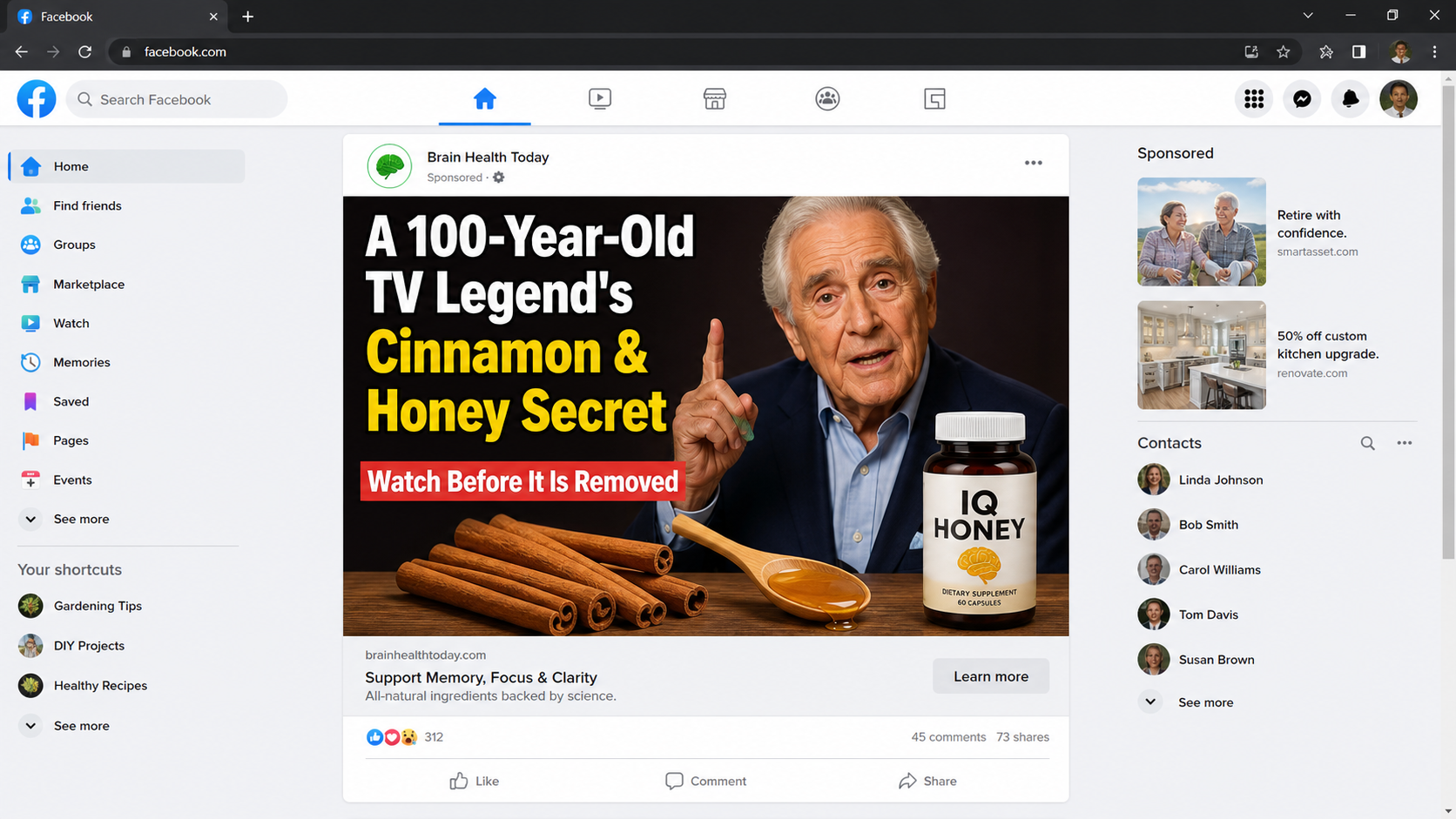
A familiar television face appears beside cinnamon, honey, and a dramatic promise about memory. The presentation feels personal, urgent, and unexpectedly convincing.
Before trusting the video or ordering anything, pause. Several details reveal whether this supposed discovery deserves attention or a much closer investigation.
Overview
The celebrity story is the hook, not the evidence
The Dick Van Dyke cinnamon and honey brain cure scam places a beloved performer at the center. His fame makes an unfamiliar claim feel reassuring.
Viewers may see an elderly performer speaking about memory, aging, or a private family concern. The emotional subject encourages attention before skepticism catches up.
Some versions also introduce Bill Gates, a doctor, or a television host. Those added names create the impression that several trusted people reached the same conclusion.
We found no credible announcement connecting Dick Van Dyke to this brain remedy. A polished clip does not establish consent, participation, or a genuine endorsement.
The recipe changes into a product pitch
The opening promises a kitchen recipe involving cinnamon and honey. The viewer expects measurements, preparation instructions, and a simple explanation.
Instead, the video stretches the story through warnings, testimonials, and claims about hidden discoveries. The promised answer remains just beyond the next minute.
Eventually, the presentation stops discussing an ordinary recipe and recommends a supplement. One observed destination promoted capsules labeled IQ Honey.
That product name is not the lasting part of the campaign. Sellers can replace a bottle, domain, or checkout while keeping the same celebrity narrative.
The medical promise is where the danger becomes serious
Memory lapses frighten families because they can signal many conditions. A sales video may exploit that concern by presenting uncertainty as an emergency.
The National Institute on Aging says no vitamin or supplement has been proven to prevent Alzheimer’s disease. There is also no known intervention that cures it.
The FDA has repeatedly warned about online products claiming to prevent, treat, or cure Alzheimer’s. Such claims can delay proper assessment and appropriate care.
Cinnamon and honey are foods, not evidence that a capsule reverses dementia. A sincere testimonial cannot replace controlled research, accurate labeling, or medical guidance.
- A famous face is used to create instant trust.
- AI-generated speech may imitate a real interview.
- A household recipe keeps viewers watching.
- A fake news layout supplies borrowed authority.
- The story eventually redirects to a supplement checkout.
- Product names and websites can change without changing the pitch.
- Strong health claims appear without reliable clinical proof.
The central question is not whether cinnamon or honey belongs in someone’s diet. It is whether this advertisement honestly proves its endorsement and treatment claims.
It does not. The marketing asks viewers to accept an emotional story first, then treats that acceptance as permission to sell the bottle.
That reversal matters. Evidence should support a medical claim before payment, not appear as vague reassurance after the checkout decision.

How The Scam Works
Step 1: A social media ad borrows a beloved face
The first contact usually arrives as a sponsored video, suggested post, or short clip in a social feed. It resembles ordinary entertainment news.
The thumbnail may place Dick Van Dyke beside honey, cinnamon sticks, or a supplement bottle. Large captions promise a secret connected with exceptional longevity.
Because the subject is 100 years old, the campaign can turn his age into implied proof. Longevity becomes a marketing credential he never granted.
The ad may claim that broadcasters removed the interview or that powerful companies want it hidden. That manufactured conflict makes immediate viewing feel necessary.
Real medical evidence does not become reliable because a post says it is being censored. Suppression language mainly discourages viewers from checking independent information.
Step 2: AI creates an interview that never happened
A modern fake endorsement may use cloned audio, lip synchronization, generated photographs, or a fully synthetic presenter. Each method can look plausible briefly.
Listen for flat emotion, strange pauses, inconsistent pronunciation, or sentences that do not match natural breathing. Watch the mouth during names and technical phrases.
Visual clues can include waxy skin, unstable teeth, flickering glasses, irregular fingers, or lighting that changes around the face. None is conclusive alone.
The strongest check happens outside the clip. Search the celebrity’s official channels, reputable reporting, and the claimed interview program independently.
If the only evidence leads back to sellers, anonymous advertorials, and copied videos, the endorsement remains unverified regardless of production quality.
Step 3: The click opens a counterfeit news story
The advertisement rarely sends viewers directly to a normal product catalog. It often opens a page styled like a television network or respected newspaper.
A logo-like header, breaking-news banner, market ticker, and reporter portrait make the page feel editorial. These are inexpensive design elements, not newsroom credentials.
The address bar tells a different story. The domain may have no relationship to the publication whose appearance the page imitates.
Buttons, menus, and category links may all point to the same sales destination. On a genuine news site, navigation normally leads to different sections.
Fake comments and countdown messages add social proof. Their dates may refresh automatically, making an old promotion appear newly discovered each morning.
Step 4: A long video delays the promised recipe
The advertorial invites the visitor to watch before the information disappears. A video then repeats the emotional setup without delivering a useful recipe.
Stories about a spouse, forgotten name, frightening diagnosis, or rejected research keep the viewer emotionally invested. Every delay increases the cost of leaving.
The narrator may say the method takes seconds, uses two ingredients, or was overlooked by doctors. Yet exact instructions remain unavailable.
This is a commitment device. Someone who watches for 25 minutes may continue simply because abandoning the presentation feels like wasting that time.
Near the end, the “recipe” becomes a proprietary blend. The ordinary pantry imagery was only a bridge toward a product the viewer must purchase.
Step 5: The bottle inherits claims made by the story
The sales page may avoid repeating every disease claim in direct language. It relies on the preceding video to place those expectations in the buyer’s mind.
Words such as clarity, focus, natural, and breakthrough sound meaningful while remaining difficult to measure. Attractive labels can make those vague ideas feel scientific.
Ingredient references may cite general research about cinnamon, antioxidants, or honey. Research on an ingredient does not automatically prove the finished capsule works.
Dosage, extraction method, ingredient amounts, manufacturing controls, and tested outcomes all matter. A marketing page rarely supplies enough information to bridge those gaps.
FDA registration language can also mislead. Dietary supplements are not approved by the FDA as treatments before being sold like prescription medicines.
Step 6: The checkout pushes a larger commitment
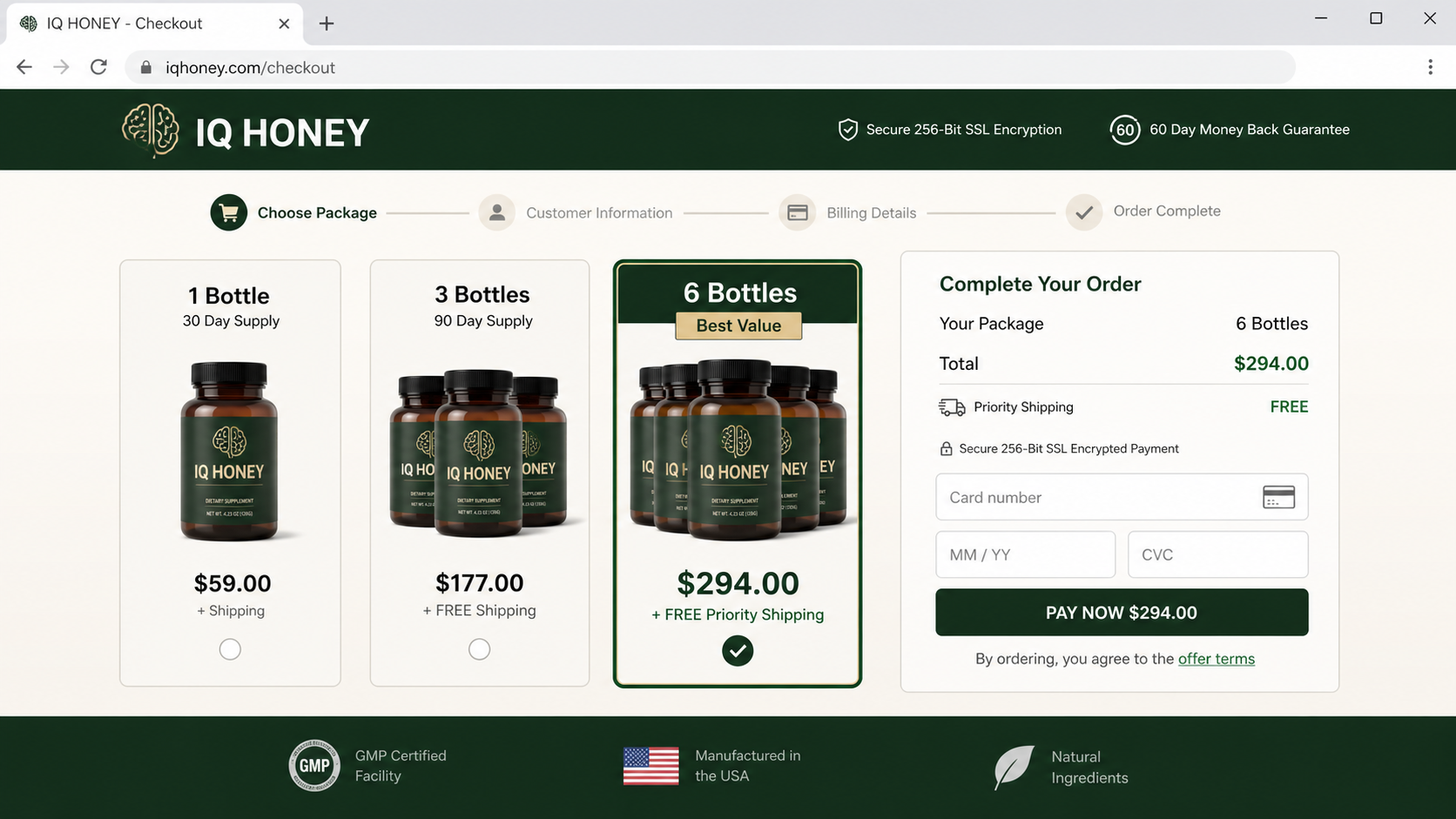
The ordering page may highlight three or six bottles while making the single bottle less attractive. Per-bottle pricing distracts from the total charge.
“Best value” labels, expiring inventory notices, and free-shipping banners create pressure. Buyers may choose a larger package before reviewing the full amount.
Continuity terms can appear near the payment button, inside linked conditions, or during a later upsell. Not every version uses recurring billing.
Because the funnel can change, buyers must check whether the order authorizes future shipments, membership fees, priority processing, or an added digital program.
A money-back guarantee is only useful when the seller is identifiable, reachable, and willing to honor it. A badge cannot prove any of those things.
Step 7: Complaints become harder after the brand rotates
After payment, the customer may receive more bottles than expected, a different label, delayed shipping, or charges described under an unfamiliar billing name.
Support may require repeated calls, returned packages, tracking numbers, or narrow refund windows. Each obstacle consumes time while another billing date approaches.
If advertisers switch domains or product names, searching the original label may reveal little. The story survives while the public-facing storefront disappears.
This is why screenshots, receipts, terms, shipment labels, and card statements matter. They preserve connections that the seller’s changing website may no longer show.
Consumers should dispute the exact transaction, identify any recurring authorization, and explain the deceptive endorsement rather than arguing only about supplement effectiveness.
Why the Cinnamon and Honey Claim Is Not Medical Proof
Foods can be part of a balanced diet without becoming cures. Marketing deliberately blurs that simple distinction because familiar ingredients feel safer than unfamiliar chemicals.
Alzheimer’s disease requires professional evaluation. Memory problems may also relate to medication, sleep disorders, depression, infections, stroke, or other treatable conditions.
Someone who replaces an examination with an online capsule may lose valuable time. That risk exists even when the product itself causes no immediate reaction.
Supplements can interact with prescriptions, affect blood sugar, or cause allergic responses. “Natural” describes an origin story, not a universal safety guarantee.
A legitimate clinical claim should identify the exact formula, study design, participant count, outcomes, limitations, and publication. A celebrity anecdote supplies none of that.
Celebrity, Claims, Seller, and Billing Checks
Check the endorsement beyond the advertisement
Search for the complete interview through the celebrity’s official website, verified social accounts, and established media archives. Do not search only the product name.
Scam pages can dominate product searches with affiliate reviews. Looking for the alleged broadcast, quotation, and date makes fabricated stories easier to expose.
A genuine national interview should exist outside one sales funnel. If every copy leads to checkout, the “news” is functioning as an advertisement.
Separate ingredient research from finished-product evidence
Ask whether the exact supplement has been tested, not whether a component appeared in unrelated laboratory research. Formulation and dosage cannot be assumed.
Look for a complete Supplement Facts panel, lot information, warnings, manufacturer identity, and actual ingredient quantities. Missing specifics prevent meaningful comparison.
Promises to reverse dementia, restore lost memories, or replace treatment are major warning signs. Serious disease claims demand far more than testimonials.
Identify the legal seller and physical operation
The bottle’s brand may not be the company charging the card. Compare the checkout, terms, privacy policy, confirmation email, and statement descriptor.
Search every listed address. It may resolve to a mailbox, residential property, shared office, or fulfillment warehouse rather than a manufacturer.
A fulfillment center can pack products for hundreds of brands. Its return address does not prove who designed, tested, or legally sold the supplement.
Call support before buying. Unanswered numbers, generic voicemail, bounced email, or representatives unable to name the product are strong reasons to stop.
Read the transaction as carefully as the health pitch
Record the total quantity, final price, shipping charge, refund deadline, return conditions, and any continuity language before entering payment details.
Watch for preselected upgrades and post-purchase offers. A button labeled “complete order” may not be the final screen in a direct-response funnel.
Never assume the advertised package equals one bottle. Confirm the cart line by line and save the terms that existed on the purchase date.
What to Do if You Have Fallen Victim to This Scam
- Stop taking the product until you receive medical guidance. Contact a pharmacist or clinician, especially after any unusual symptom or possible interaction.
- Preserve the entire sales trail. Save the advertisement, video URL, checkout pages, receipt, bottle labels, package, terms, emails, and card descriptor.
- Contact the seller in writing. Request cancellation, reject future shipments, ask for a return authorization, and keep dated copies of every response.
- Call the card issuer promptly. Explain what you authorized, what arrived, and whether the endorsement or billing terms were misrepresented.
- Block recurring charges carefully. Ask whether replacing the card stops merchant tokens, and request monitoring for rebills under related descriptors.
- Report health problems. Seek urgent care for severe reactions and submit supplement adverse-event information through the appropriate FDA reporting channel.
- Report the deceptive promotion. Notify the FTC, the social platform, and your state attorney general with screenshots and transaction evidence.
- Secure the device used for ordering. Run Malwarebytes if downloads, redirects, browser prompts, or suspicious extensions appeared during the purchase.
- Reduce repeated exposure. Use AdGuard to filter malicious advertising and tracking, while remembering that no blocker replaces careful verification.
- Tell relatives who saw the same video. A calm warning can prevent another purchase, especially when the advertisement targets memory concerns.
Is Your Device Infected? Run a Free Malware Scan
Slow performance, constant pop-ups, or strange behavior? These are classic signs of a malware infection. A quick way to check is to scan your device with Malwarebytes Free, one of the most trusted malware removal tools available. If you only visited a scam page and didn’t download or install anything, this scan is optional.
The free version detects and removes the most common threats, including:
- Adware — the cause of those annoying pop-ups
- Browser hijackers — unwanted redirects and changed homepages
- Trojans and spyware — hidden programs stealing your data
- Potentially unwanted programs (PUPs) — software you never asked for
👉 Select your device below — Windows, Mac, or Android — then follow the simple steps to download Malwarebytes, scan your system, and remove any threats it finds. The scan usually takes 5 to 20 minutes.
Run a Malware Scan with Malwarebytes for Windows
Malwarebytes is one of the most popular and trusted anti-malware tools for Windows — and it’s completely free for removing infections. It catches threats that many antivirus programs miss, including adware, browser hijackers, and trojans. Follow the steps below to scan your PC and remove what Malwarebytes finds.
Download Malwarebytes
Click the button below to download the latest version of Malwarebytes for Windows from the official source. The free version is all you need — it will scan your computer and remove adware, browser hijackers, and other malicious software at no cost.
Download MalwarebytesOfficial installer for Windows 11 and 10. Your download starts right away.Want real-time protection? See Malwarebytes Premium Malwarebytes Free for WindowsScans and removes malware at no cost
-
Install Malwarebytes
When the download finishes, open your Downloads folder and double-click the MBSetup file. If Windows shows a User Account Control pop-up, click “Yes” to allow the installation.

Follow the On-Screen Prompts to Install Malwarebytes
The setup wizard will walk you through a few quick screens:
-
Choose where you’re installing the program — “Personal Computer” or “Work Computer” — then click Next.

-
Malwarebytes will now install on your device. This usually takes under a minute.

-
When installation is complete, the “Welcome to Malwarebytes” screen will open automatically.

-
On the final screen, click Open Malwarebytes to launch the program.

-
Optional: Check for rootkits with a Custom Scan
You don’t need to change any settings for a normal scan. The standard Threat Scan in the next step is enough for most problems, so you can go straight to it.
If you also want to check for rootkits, use a Custom Scan. In current versions of Malwarebytes, rootkit scanning is only available there:
- On the Scanner tile, click the three-dot menu and select Advanced Scan.
- Choose Custom Scan. In its options, check Scan for rootkits.
- Select your system drive (usually C:\) as the location to scan, then start the scan. It takes longer than a Threat Scan.
- When it finishes, review and quarantine the results as described in the steps below.
Rootkit scanning isn’t available on Windows devices with ARM processors.
Start the Scan
Click the blue Scan button. Malwarebytes will automatically update its virus database and start checking your computer for malware.

-
Wait for the Scan to Finish
The scan checks your entire system for browser hijackers and other malicious programs, so it can take 5 to 20 minutes depending on your computer. Feel free to do something else — just check back occasionally to see the progress.

-
Quarantine the Detected Threats
When the scan is done, you’ll see a list of everything Malwarebytes found — malware, adware, and potentially unwanted programs. Click the “Quarantine” button to remove all of them at once.

Malwarebytes will now remove the malicious files and registry entries and move them safely into quarantine.

-
Restart Your Computer
Some threats can only be fully removed after a reboot. If Malwarebytes asks you to restart, click Yes. Once you’re logged back in, Malwarebytes has finished removing the threats it found.

When the scan is done, check whether the problems you noticed have stopped. If they continue, see the options below.
If you are still having problems with your computer after completing these instructions, then please follow one of the steps:
- Run a computer scan with ESET Online Scanner
- Ask for help in our Windows Malware Removal Help & Support forum.
Run a Malware Scan with Malwarebytes for Mac
Malwarebytes for Mac is a free on-demand scanner that removes the malware other security software tends to miss — adware, browser hijackers, and unwanted programs included. Cleaning an infected Mac with Malwarebytes has always been completely free, and it’s our go-to recommendation. Follow the steps below to scan your Mac and remove what Malwarebytes finds.
-
Download Malwarebytes for Mac
Click the button below to download the latest version of Malwarebytes for Mac.
Download MalwarebytesOfficial installer for macOS. Your download starts right away.Want real-time protection? See Malwarebytes PremiumMalwarebytes Free for MacScans and removes malware at no cost -
Open the Malwarebytes setup file
When the download finishes, open your Downloads folder and double-click the setup file to begin the installation.

-
Follow the On-Screen Prompts to Install Malwarebytes
The Malwarebytes for Mac Installer will guide you through a few quick screens. Click “Continue” and keep following the prompts until the installation completes.



When the installation is complete, Malwarebytes opens to the Welcome to Malwarebytes screen. Click “Get started“.
Malwarebytes needs Full Disk Access to check your whole Mac. When it asks, open System Settings > Privacy & Security > Full Disk Access, turn on Malwarebytes (it may be listed as Malwarebytes Protection), and confirm with your password or Touch ID. Then return to Malwarebytes. On macOS Monterey and earlier, this setting is in System Preferences > Security & Privacy > Privacy.
-
Select “Personal Computer” or “Work Computer”
Malwarebytes will ask what type of computer you’re installing it on. Click either Personal Computer or Work Computer, whichever applies.

-
Start the Scan
Click the “Scan” button. Malwarebytes will automatically update its detection database and begin checking your Mac for malware.

-
Wait for the Scan to Finish
Malwarebytes will scan your Mac for adware, browser hijackers, and other malicious programs. This can take a few minutes, so feel free to do something else — just check back occasionally to see the progress.

-
Quarantine the Detected Threats
When the scan is done, you’ll see a list of everything Malwarebytes found. Click the “Quarantine” button to remove all the threats at once.

-
Restart Your Mac
Malwarebytes will now remove all the malicious files it found. Some threats can only be fully removed after a reboot — if Malwarebytes asks you to restart, allow it. Once you’re logged back in, check whether the problems you noticed have stopped. If they come back, save the scan report and ask for help in our forum.

If the problems you noticed continue after the scan, see the options below.
If you are still experiencing problems while trying to remove a malicious program from your computer, please ask for help in our Mac Malware Removal Help & Support forum.
Run a Malware Scan with Malwarebytes for Android
Malwarebytes for Android scans your phone or tablet for malware, adware, and potentially unwanted apps. The free version scans only when you start a scan. Real-time protection, which checks apps automatically, is part of the paid Premium version.
-
Download Malwarebytes for Android.
You can download Malwarebytes for Android by clicking the link below.
Get Malwarebytes for AndroidOpens Google Play in a new tab.Want real-time protection? See Malwarebytes Premium for AndroidMalwarebytes for AndroidScans your phone and removes malware at no cost -
Install Malwarebytes for Android on your phone.
In the Google Play Store, tap “Install” to install Malwarebytes for Android on your device.

When the installation process has finished, tap “Open” to begin using Malwarebytes for Android. You can also open Malwarebytes by tapping on its icon in your phone menu or home screen.

-
Follow the on-screen prompts to complete the setup process
When Malwarebytes opens, it walks you through a short setup. Tap Get started and follow the prompts. If you see an offer for a trial or a paid plan, read it before you accept. You can skip it and keep using the free scanner.
Malwarebytes will ask for permission to access the files on your phone so it can scan them. Tap Allow, or turn on the permission in the Android screen that opens, then return to Malwarebytes.
-
Run a scan with Malwarebytes for Android
On the main screen, tap Scan now. In some versions, you open the menu, tap Scanner, and then tap Run a scan.
-
Wait for the Malwarebytes scan to complete.
Malwarebytes will now start scanning your phone for adware and other malicious apps. This process can take a few minutes, so we suggest you do something else and periodically check on the status of the scan to see when it is finished.

-
Remove the detected apps.
When the scan has been completed, you will see a list of the threats that Malwarebytes for Android has detected. Next to each detected item, tap the menu icon (three dots), then choose to uninstall the app or delete the file. Android then asks you to confirm. Tap OK or Uninstall to remove the app.
-
Restart your phone.
When the detected apps are removed, restart your phone if Malwarebytes asks you to. Then check whether the problems you noticed have stopped.
If the problems you noticed continue after the scan, see the options below.
If you are still having problems with your phone after completing these instructions, then please follow one of the steps:
- Ask for help in our Mobile Malware Removal Help & Support forum.
- Only as a last resort, reset your phone to factory settings. Read the warning below first.
- Back up your photos, videos, files, and messages, for example to your Google account or a computer.
- Make sure you know your Google account email and password. The phone asks for them after the reset. If you changed the password recently, Google recommends waiting 24 hours before you reset.
- On a Samsung phone, also make sure you know your Samsung account password.
- If you use an authenticator app for two-step verification, move your accounts to another device or save your backup codes first.
Stay Protected: Block Ads and Malicious Sites
No scan can prove a device is completely clean, so it helps to block threats before they reach you. Most infections start with a malicious ad or a fake download button — so blocking them at the source is your best defense.
We recommend AdGuard, which blocks malicious ads, phishing pages, and dangerous redirects before they can reach you.
👉 Download AdGuard and browse safely
Frequently Asked Questions
Did Dick Van Dyke endorse IQ Honey?
We found no credible evidence that Dick Van Dyke endorsed IQ Honey or a cinnamon and honey cure for Alzheimer’s disease.
A video using his appearance or voice should be treated as unverified unless his official representatives confirm the specific promotion.
Is the voice in the advertisement generated by AI?
Some observed promotions show signs consistent with synthetic audio or generated video. Visual quality alone cannot prove authenticity.
Confirmation should come from the original interview source, official channels, and independent reporting, not from the seller hosting the clip.
Can cinnamon and honey cure memory loss?
No reliable evidence shows that a cinnamon and honey recipe cures Alzheimer’s disease or reverses dementia.
Memory changes deserve medical evaluation because many possible causes require different care, and some causes may be treatable.
Is IQ Honey the only product used with this story?
No. The bottle can change while advertisers reuse the same celebrity, censorship, kitchen recipe, and breakthrough narrative.
Search the story itself when investigating, not only the current supplement name printed at checkout.
Does a secure padlock make the checkout legitimate?
No. HTTPS encrypts traffic between your browser and a website. It does not verify medical claims, endorsements, refund practices, or seller identity.
Scam and low-quality sales sites can obtain ordinary security certificates just like other websites.
What if I ordered only one bottle?
Review the receipt and statement rather than relying on memory. Confirm quantity, total price, future shipments, and any added program.
If the transaction differs from your authorization, contact the seller and payment provider quickly while your evidence is available.
The Bottom Line
The Dick Van Dyke cinnamon and honey brain cure scam is not reliable medical guidance. It is a sales narrative built around borrowed familiarity.
AI can manufacture a convincing voice, face, interview, and newsroom. None proves that the featured person participated or that the bottle treats disease.
Skip the advertisement’s shortcut. Verify endorsements independently, discuss memory concerns with a clinician, and examine every charge before trusting a supplement funnel.

Join the discussion
0 commentsShare your experience or ask a question about this article.
Discussion
Start the conversation
Have a question or something useful to share? Add the first comment.