

The offer arrived when a creator had openly said they needed extra income. A private group appeared to provide exactly that, with an administrator who arranged paid video sessions.
Five hour-long sessions later, the promised payment still had not arrived. The missing money was only one part of the problem.
Overview
A private referral made the work look organized
The creator had posted about needing additional money. Another person recommended a group on Session Messenger where creators supposedly met paying customers.
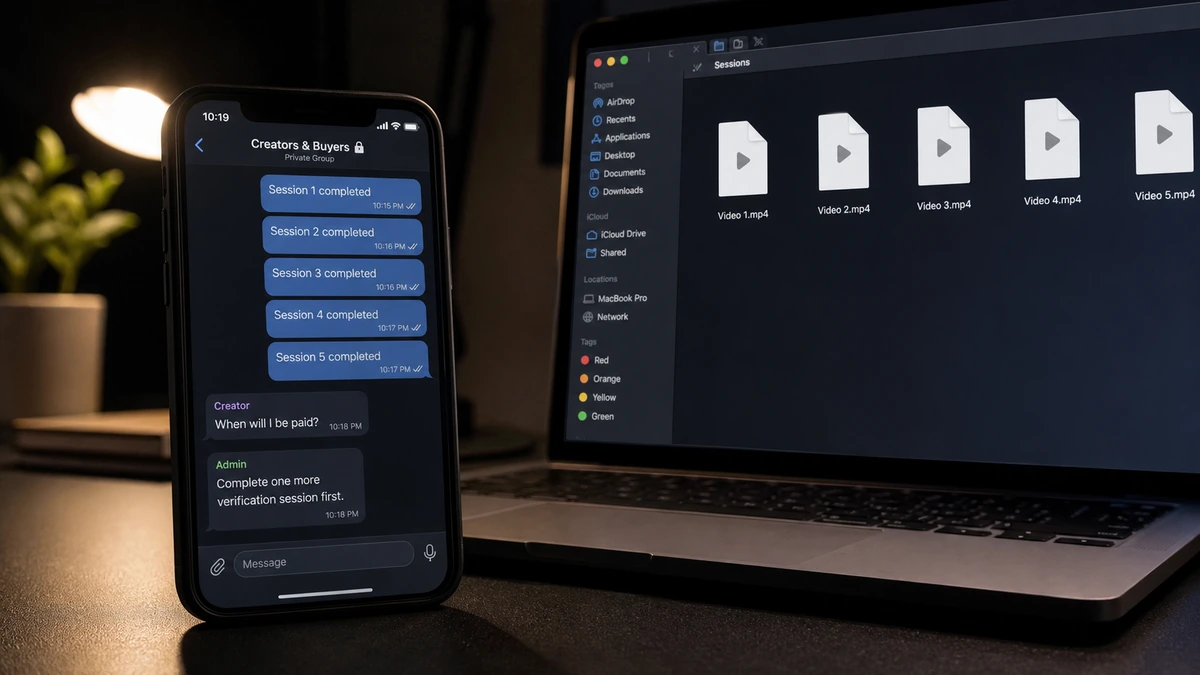
Inside the group, an administrator acted as a broker. The admin appeared to match creators with buyers, explain the process, and organize the sessions. Those details gave the arrangement the shape of a business without proving that a business existed.
The conversation had also moved away from the original platform. The creator was now relying on an unknown intermediary, pseudonymous buyers, and a private messenger with no contract or protected checkout behind the promises.
The five-session rule kept moving payment into the future
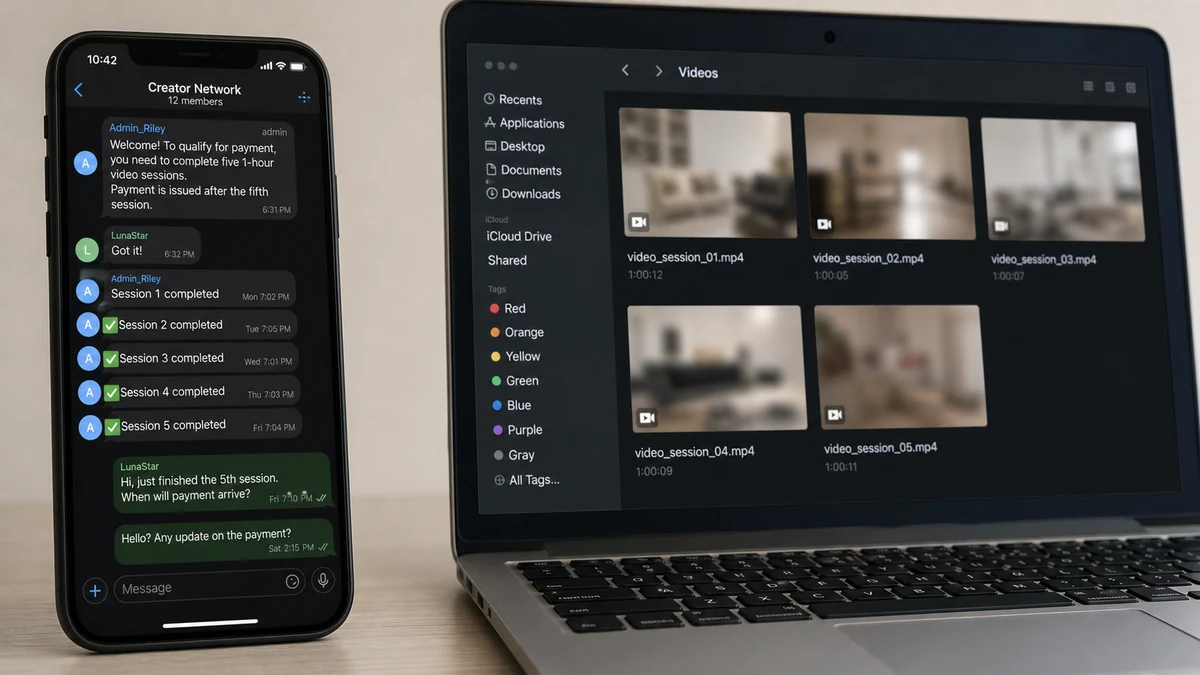
The administrator said payment would come after five video sessions, each lasting about one hour. The creator completed all five before receiving anything.
That structure put almost every risk on one side. The buyers received access immediately, while the creator accumulated unpaid time and shared increasingly valuable content in exchange for a future promise.
After the fifth session, the payment did not appear. Roughly two weeks passed without a meaningful answer from the buyers or the person who had presented themselves as the admin.
Unpaid work may not be the end of the exposure
The known harm is clear: five sessions were provided and the agreed payment was not made. There is also a risk that the calls were recorded, copied, resold, reposted, or saved for a later threat.
Those possible outcomes should not be reported as though they already happened. Preparing for misuse is sensible, but the available account did not confirm that the content had appeared online or that extortion had begun.
The warning signs visible before payment disappeared included:
- The approach followed a public statement about needing money.
- A stranger redirected the opportunity into a private messaging app.
- An administrator claimed authority without a verifiable company identity.
- The same unverified intermediary introduced the supposed buyers.
- No contract covered payment, recording, ownership, distribution, or takedowns.
- Five long sessions had to be completed before any payment.
- There was no deposit, escrow, or protected platform checkout.
- The group stopped responding after receiving everything it had requested.
The Messenger Was Not the Employer
Session is a legitimate encrypted messaging application. Its official documentation describes a privacy-focused network that allows communication without tying an account to a phone number or email address.
Those features can be valuable for legitimate privacy. They do not verify the identity, payment history, or business registration of someone using the app. Encryption protects a message while it travels; it does not guarantee that the sender will keep a promise.
The relevant conduct belongs to the administrator and buyers who arranged the sessions, not to the messenger itself. The same distinction applies when scams use Telegram, Signal, WhatsApp, Discord, or ordinary email.
Trust has to come from the work arrangement: accountable identities, written terms, a secured payment, clear content rights, and a dispute process that does not depend on the admin answering another message.
How the Unpaid Video Sessions Scam Works
Step 1: A recruiter notices financial urgency
Posts about bills, job loss, debt, or the need for quick income give a recruiter useful information. The approach can be tailored to sound timely and supportive rather than aggressive.
The opening offer may simply mention flexible online work and a community of other creators. The sensitive nature of the sessions is introduced only after the person has engaged.
Step 2: The opportunity moves into a private group
The recruiter provides a Session ID or group invitation. Moving platforms separates the offer from the public profile and removes some of the moderation, history, and reporting context available where the first contact occurred.
The private setting can feel exclusive. It also makes it easier for accounts to disappear and for the only copy of the terms to remain inside a chat controlled by strangers.
Step 3: An administrator supplies borrowed authority
The admin schedules calls, introduces buyers, and explains payment. Titles such as manager, coordinator, or administrator sound official even when there is no legal entity behind them.
Other accounts in the group may praise the arrangement or appear to have completed work. They are not independent references if the same unknown person controls them or if their payments cannot be verified.
Step 4: A quota postpones every payment question
The creator is told that being paid after five sessions is standard. After the first session, payment is not late because the quota is incomplete. After the fourth, stopping feels like giving up the money supposedly earned so far.
This is sunk-cost pressure built into a work rule. The more unpaid time the person invests, the harder it becomes to walk away before completing the final session.
Step 5: Buyers receive sensitive content first
Each buyer receives the live session while the creator holds only a promise. A live call can be captured through screen-recording software, built-in tools, a second phone, or external recording equipment.
Using an alias or hiding a face can reduce some risk, but a voice, room, tattoos, reflections, usernames, and reused photographs may still identify a person.
Step 6: The admin and buyers stop answering
Once the fifth session is complete, the group can delay, remove the creator, or simply go quiet. There is no payroll department, billing address, or payment processor holding funds for a dispute.
At that point, the operation has already received hours of content without carrying the normal cost or accountability of a real client.
Step 7: Recorded material may be reused or weaponized
Some operators repost content or sell it elsewhere. Others threaten to send it to family, employers, or followers unless the victim pays or creates more.
Again, that later stage was not confirmed in this case. If a threat does arrive, the FBI’s sextortion guidance advises victims to preserve evidence, report the account, and seek help rather than paying.
Why “Payment After Five” Changes the Balance of Power
Delayed payment is not automatically fraudulent. Real clients sometimes use invoicing periods. The difference is that legitimate terms identify who owes the money, exactly when it is due, and where a dispute can be filed.
“This is how the group works” provides none of that. It asks the creator to accept the admin’s authority without a legal name, written contract, secured funds, or independently verifiable record of paying other people.
The quota also turns each completed session into pressure to continue. After several hours of work, one more session can seem like the only way to avoid losing everything already earned.
For an unfamiliar buyer, cleared payment before the session or a dependable escrow arrangement is safer. At minimum, the agreement should state the fee, duration, deadline, processor, cancellation rule, recording permission, distribution rights, and takedown obligations.
Payment should be verifiable without asking the admin for another screenshot. A pending balance or message from the intermediary does not mean money has been secured.
Once a client misses the first agreed payment, stop. More sessions do not create leverage over someone who has already ignored the terms; they only add unpaid work and more material.
A Live Call Can Still Be Recorded
Encrypted communication protects data in transit between devices. It cannot control what the recipient does after the image and sound reach their screen.
Disappearing messages have the same limit. They may remove the app’s stored copy while doing nothing about screen capture, a second camera, or recording hardware.
Assume sensitive live content may be saved. That is a practical safety rule, not an excuse for misuse and not a transfer of responsibility to the victim. Consent to a private session is not consent to redistribution.
Before any paid session, separate creator and personal identities. Use different email, payment accounts, cloud storage, usernames, and profile photos. Avoid images that can be reverse-searched to personal accounts.
Remove location clues from the camera view. Mail, work badges, family photos, windows, school items, reflections, and background audio can reveal more than expected.
A buyer-specific watermark may discourage casual reposting and help trace a leaked copy, although it can be cropped. Keep the original agreement and every statement about recording or use.
If the Content Appears Online
Preserve evidence before contacting the uploader. Record the full URL, account name, date, screenshots, page title, and any message connecting the upload to the original group.
Use the hosting platform’s non-consensual intimate imagery reporting process. Provide only the information required, and keep the confirmation number and a copy of the report.
Adult victims can use StopNCII.org to create a digital fingerprint of an image on their own device. Participating platforms can compare that fingerprint without StopNCII receiving the original image.
If the person was under 18 when the content was created, use Take It Down and contact the appropriate law-enforcement authority. Do not download or forward illegal material in an attempt to collect more proof.
Search engines also accept some requests to remove explicit personal images from results. Removing a result does not remove the source page, so report both places.
A copyright notice may help in some situations when the creator owns the recording, but ownership can be fact-specific. A non-consensual imagery report often describes the immediate harm more directly.
Avoid companies that guarantee complete removal for a large advance payment. No service controls every website, private group, saved file, or future upload.
If a Threat or Blackmail Demand Arrives
Do not pay. Payment shows the person making the threat that fear can produce money and often leads to a larger demand rather than an end to contact.
Save the threat before blocking. Record the account ID, payment instructions, wallet address, phone number, deadline, and exact claim about where the content will be sent.
Tell someone trusted. The threat relies on secrecy and shame, while a second person can help with reports, account security, and messages to potential recipients.
Consider warning close contacts that a criminal may send private or manipulated content. They do not need intimate details; they need to know not to engage, pay, or redistribute anything.
Report extortion to local police and the relevant national cybercrime authority. An immediate threat of physical harm requires emergency services.
Do not provide additional material as proof of cooperation. The person who broke the payment agreement has not earned more trust or content.
A Safer Setup Before Accepting Sensitive Online Work
Verify the buyer outside the messenger. Ask for a legal name, billing identity, business domain, and payment account that match. An introduction from an unverified admin is not a reference.
Write the terms before sharing a preview. Include the exact amount, deposit, session length, delivery method, recording rule, permitted use, cancellation terms, and payment deadline.
Use cleared payment or a reputable platform that holds funds for unfamiliar clients. Do not accept overpayment checks or send refunds through gift cards, cryptocurrency, or payment apps.
Decide boundaries before the session and do not renegotiate under pressure. A client who ignores a written limit should lose access immediately.
Keep local copies of agreements, payment records, buyer IDs, and schedules. Do not depend on a disappearing message or private group remaining available after a dispute.
Tell a trusted person when the session starts and ends. A simple check-in provides support if the buyer becomes threatening or refuses to end the call.
Do not install viewing, recording, or payment software supplied by the buyer. Obtain tools only from their official stores and domains, and review active sessions after each call.
The most important rule is simple: a client’s missed payment is the client’s breach. It is not evidence that the creator needs to work harder, complete another quota, or prove their honesty.
Company, Address, and Fulfillment Checks
The private group was not a verified company
A group name and member count do not establish incorporation, management, employment, or a dispute process. Session carried the messages but did not verify the job.
Ask for the exact legal entity, registration, official domain, and independently verifiable payment history before providing work or identity documents.
The administrator’s identity and location were unknown
A display name and Session ID can be pseudonymous. That supports privacy, but it does not identify the person responsible for paying the creator.
Do not accept an address shown only in chat. Verify business records and use a payment method tied to the same accountable party.
The buyers came from the same unverified source
Several buyer accounts can create the appearance of independent demand while remaining under common control. The admin’s introduction did not verify them.
Each buyer should have separate written terms and payment that the creator can confirm without relying on a screenshot from the intermediary.
The promised payment was not fulfilled
Five sessions were reportedly completed, followed by roughly two weeks without payment or a meaningful response. No escrow release, invoice process, or processor dispute supported the promise.
Do not perform another session to unlock the first payment. Additional work only increases the exposure created by the original breach.
What to Do if You Have Fallen Victim to This Scam
- Stop all further sessions. Do not send more content or complete another quota in an attempt to unlock payment.
- Preserve the full agreement. Save the referral, Session IDs, group information, admin messages, buyer accounts, schedules, and payment promises.
- Document the work without redistributing it. Record session dates, lengths, filenames, watermarks, and identifying details in a private evidence log.
- Report the accounts and group. Use Session’s support resources and report the recruiter on the platform where the original approach occurred.
- Watch carefully for misuse. Search distinctive usernames and non-sensitive preview images, but do not upload private material to unknown reverse-search sites.
- Use appropriate removal tools. Adult victims can use StopNCII.org; material created while under 18 should be handled through Take It Down and law enforcement.
- Secure connected identities. Change reused passwords, remove location clues, review cloud sharing, and separate creator accounts from personal profiles.
- Check software sent by the group. If any app or file was installed, run a full scan with Malwarebytes before using the device for sensitive accounts.
- Reduce malicious-link exposure. AdGuard can block many phishing and harmful-ad destinations, but it cannot stop another participant from recording a live call.
- Report threats promptly. Preserve extortion demands and contact local police, IC3, or the appropriate national cybercrime authority.
The person who trusted an organized-looking work offer is not responsible for another person’s decision to withhold payment, misuse content, or make threats. Fast evidence preservation matters more than embarrassment or self-blame.
Frequently Asked Questions
Is Session Messenger itself a scam?
No. Session is a legitimate encrypted messenger. The concern is the unverified group and people using it to arrange unpaid work.
Does encryption prevent the buyer from recording?
No. Encryption protects the connection, but the recipient can record the material after it appears on their screen.
Is payment after five sessions ever normal?
Delayed payment can exist in legitimate work, but it needs a verified client, clear contract, dependable payment route, and real dispute process.
What if the admin promises payment after one more session?
Do not continue. The stated quota was already completed, and changing it after the work is another reason to stop.
Can StopNCII remove every copy from the internet?
No. It works with participating platforms and should be combined with direct platform reports, search-result removal, evidence preservation, and law enforcement where appropriate.
Should a victim pay a blackmail demand?
No. Payment rarely ends the threat. Preserve the demand, report and block the account, secure related profiles, and seek help from someone trusted.
The Bottom Line
The Unpaid Video Sessions scheme used a private group, an administrator title, and a five-session quota to obtain valuable work before the creator received anything.
Stop additional sessions, preserve every promise, and prepare a careful takedown response without assuming misuse has already occurred. A private messenger can protect a conversation, but it cannot make an anonymous client accountable.








