

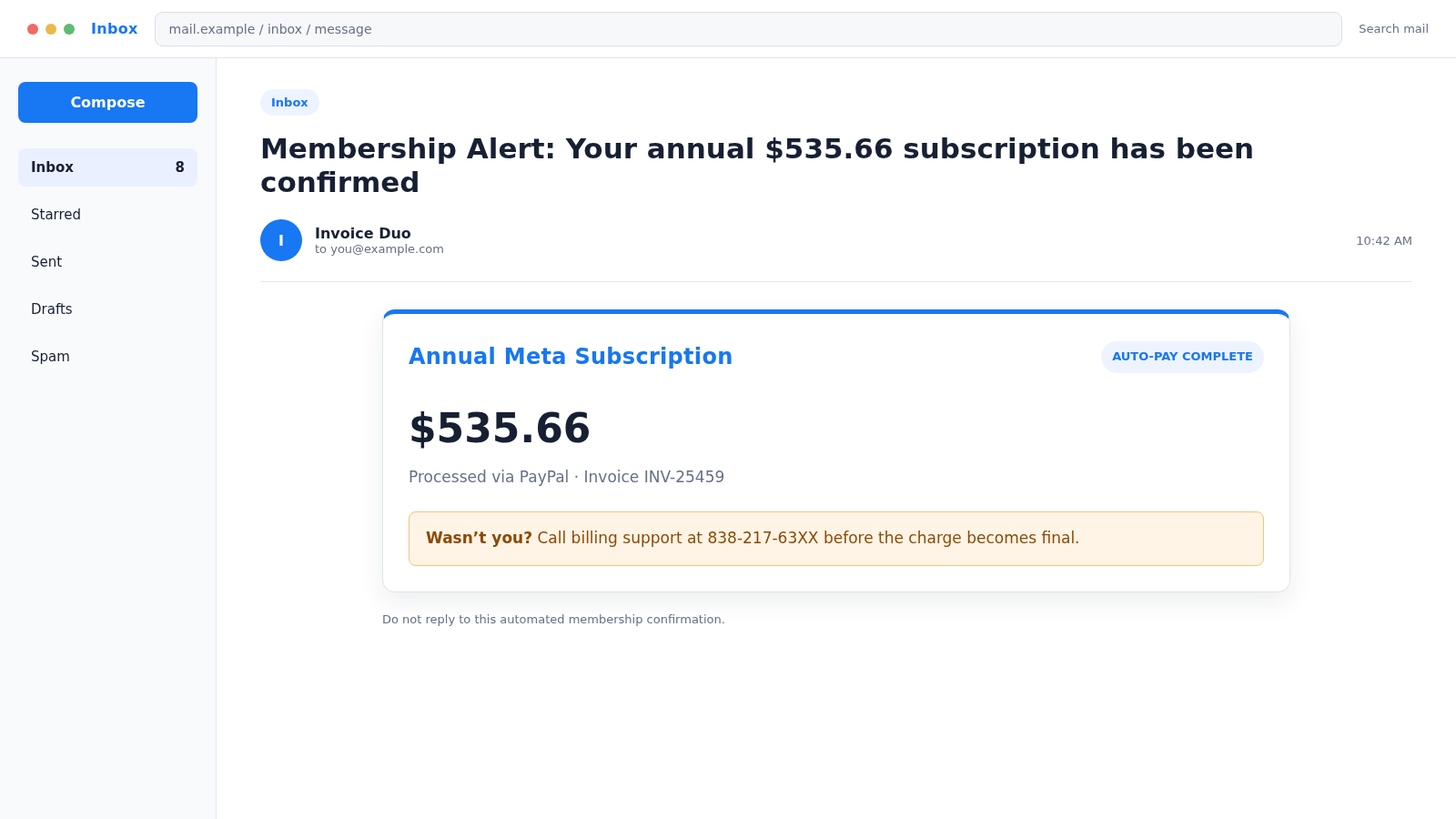
An email announces that a $535.66 annual Meta subscription has been confirmed through PayPal. You never ordered it, but the invoice helpfully provides a number to cancel before the charge becomes final.
The amount is meant to be alarming. The support number is meant to feel like the solution. In the Meta annual subscription PayPal scam, both details belong to the same trap.
Overview
The invoice creates a problem that may not exist
The message claims that an annual Meta membership, verification plan, advertising service, or business subscription renewed automatically. A charge around $535.66 may be displayed beside a PayPal transaction number and invoice reference.
Some versions are plain phishing emails that only imitate a PayPal notice. Others may use a real PayPal invoice or money-request feature to deliver an alarmist note from an unknown account.
Either way, receiving an invoice is not the same as completing a payment. Before calling anyone, open PayPal and your bank independently to determine whether an actual transaction exists.
The cancellation number is the real call to action
The email is designed to make the recipient call. It may avoid an obvious phishing button and instead place a telephone number in the invoice description, subject line, or account-activity warning.
PayPal specifically warns that invoice and money-request scams may include alarmist notes telling recipients to call fake customer service. The caller is then pressured to disclose personal or financial details.
A callback scam can pursue several goals:
- Collecting card and banking information
- Stealing PayPal or email credentials
- Convincing the victim to install remote-access software
- Moving money to a supposed safe account
- Creating a fake refund and overpayment story
- Obtaining one-time security codes
- Charging for unnecessary support
- Confirming that the phone number reaches a responsive target
Meta and PayPal branding are borrowed for different reasons
Meta supplies a recognizable subscription story. Many people manage Facebook pages, Instagram accounts, ads, or verification products and may not remember every billing detail.
PayPal supplies a familiar payment context. An invoice number, transaction ID, and payment language make the email feel more official even when the sender controls the invoice description.
Neither brand is responsible for a criminal’s impersonation. The claim must be verified inside the genuine Meta and PayPal accounts, not through the phone number in the notice.
Why the $535.66 Amount Is So Effective
The charge is large enough to demand attention but not so large that it immediately looks absurd. The cents make it appear calculated by a billing system rather than invented by a scammer.
An unusual amount also gives the caller a reference point. When the victim says “I’m calling about the $535.66 charge,” the scammer knows exactly which script produced the call.
The invoice may include a fake transaction ID and a recent date. Those fields are visual props unless they match records inside the real PayPal account.
Do not assume that a familiar sender layout proves payment. Email addresses can be spoofed, and legitimate invoice platforms can be used by strangers to send unauthorized requests.
The Remote Refund Version
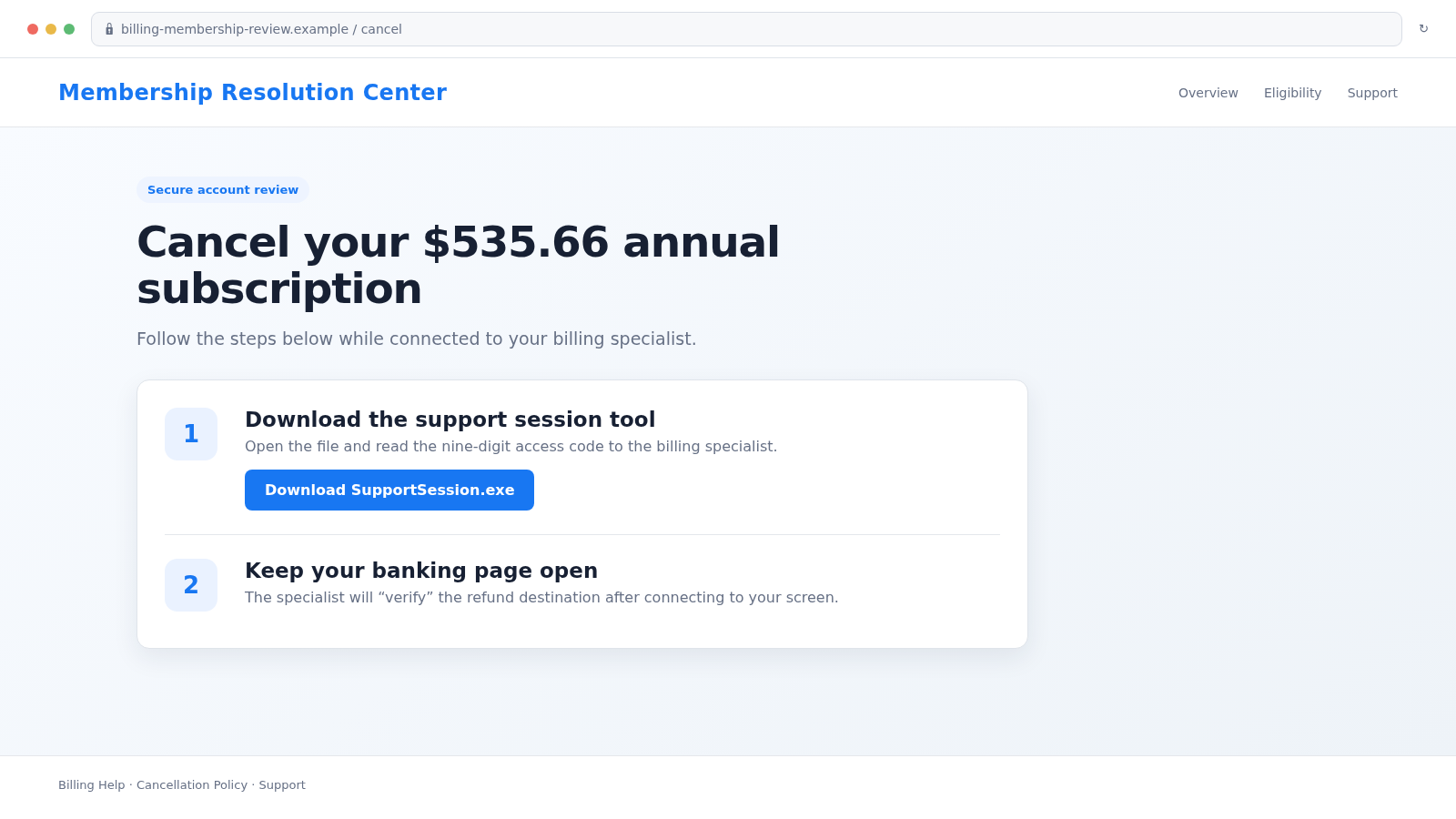
After the victim calls, a supposed billing specialist confirms the invoice and offers to cancel it. The agent may say that a secure cancellation form can be completed only from a computer.
The caller directs the victim to download a remote-support program. Legitimate remote tools have real business uses, but giving an unsolicited caller access allows that person to view the screen, control the mouse, and observe financial activity.
The scammer may ask the victim to sign in to online banking to “verify the refund.” The screen can be hidden or manipulated while money is transferred.
In another version, the caller edits what appears on the bank page or a local document to make a small refund look like a much larger deposit. The victim is accused of receiving too much and told to return the difference.
The repayment is often demanded through wire transfer, gift cards, cryptocurrency, or cash. When the fake screen is later closed, no excess refund exists.
How the Meta Annual Subscription PayPal Scam Works
Step 1: A fake or unwanted invoice reaches the inbox
The subject announces a successful automatic payment, completed membership, or annual renewal. Meta may be named as the service, with PayPal described as the processor.
The sender may be an unrelated account such as “Invoice Duo,” “Billing Desk,” or “Membership Alert.” The visible name is chosen to sound procedural.
Step 2: The amount triggers a cancellation reflex
The recipient sees $535.66 or another substantial charge and searches immediately for a dispute route. The message warns that waiting could make the transaction final.
This is not how card and PayPal dispute rights are determined. A countdown in an email does not remove the protections available through the real account.
Step 3: The victim calls the number in the invoice
The scammer answers with a brand-neutral phrase such as “billing support” so the same call center can handle several invoice themes.
The agent asks for the invoice number, then appears to locate the account. In reality, the number only identifies the script.
Step 4: Personal or financial information is collected
The caller may request a name, address, email, card number, PayPal login, or security code. Each question is framed as necessary to verify identity or locate the charge.
A legitimate dispute should be handled after you sign in through PayPal’s official app or website, not by disclosing secrets to an inbound call center.
Step 5: Remote access turns a fake invoice into real financial access
The victim is sent to a download page and asked to read a connection code. Once connected, the scammer may view email, saved passwords, banking pages, and other sensitive records.
The caller may ask that the victim keep the session private or ignore security warnings because the refund is “encrypted.” Secrecy protects the scammer, not the customer.
Step 6: Money is moved through a hard-to-reverse channel
The story changes from cancellation to account protection, overpayment, or compliance. The victim is instructed to send money, buy gift cards, move funds, or authorize a payment.
The original $535.66 charge may never have existed. It was only the reason the victim accepted instructions from a stranger.
Step 7: Follow-up scammers exploit the same fear
After the call, another person may claim to represent a bank fraud team, PayPal investigations, Meta security, or law enforcement. Information collected during the first call makes the follow-up believable.
The victim may also be approached by a recovery service promising guaranteed reimbursement for an upfront fee.
Company, Address, and Fulfillment Checks
The product name is not the invoice sender
An invoice mentioning Meta does not prove that Meta created it. Check the requestor name, email address, PayPal account, merchant descriptor, and actual product record separately.
A legitimate platform can deliver an invoice submitted by a dishonest user. The infrastructure and the invoice originator are not necessarily the same party.
The domain must match the service you intend to use
PayPal account review should occur on paypal.com or inside the official app. Meta account and advertising activity should be checked through Meta’s real account interfaces.
A long address containing “paypal,” “meta,” “billing,” or “secure” can still belong to an unrelated domain. Read from right to left to identify the registered domain before clicking.
The support number must be independently sourced
Do not call the number printed inside the suspicious invoice. Navigate independently to the company’s official help center and choose a support method from there.
Search results can contain fraudulent sponsored listings, so do not rely on the first telephone number shown by a search engine without checking the official domain.
The payment and subscription trail must exist
A genuine annual plan should appear in the relevant account, subscription settings, and payment history. The merchant and amount should also match bank or card records.
If the invoice exists only in email or as an unpaid request, do not pay it merely to make it disappear. Report or cancel it through the platform’s official tools.
How to Verify the Invoice Safely
Close the email and open PayPal through a saved app or typed address. Review activity, invoices, automatic payments, and notifications.
Then check the relevant Meta account directly. Review subscriptions, verified-account products, advertising billing, and business settings.
Look at the bank or card account independently. An email claim is not a posted transaction. If no matching charge exists, do not create one by following the invoice’s payment request.
PayPal’s official guidance says not to pay an invoice you do not recognize and not to call phone numbers in an alarmist invoice note. Suspicious emails can be forwarded to PayPal’s phishing reporting address.
If an unfamiliar request appears inside PayPal, report it while signed in. Do not use contact details supplied by the requestor.
Review automatic payments separately from invoices. A money request can remain unpaid while an unrelated billing agreement is active, and scammers may deliberately blur that distinction to make an ordinary request look like a completed charge.
Warning Signs in the Meta Subscription Invoice
- You did not purchase an annual Meta service
- The sender is unrelated to Meta or PayPal
- The subject claims payment before the body explains the product
- A large amount includes urgent cancellation language
- The main action is calling a telephone number
- The number appears only inside the invoice note
- The caller asks for a PIN, password, or one-time code
- Remote-support software is required to cancel or refund
- You are told to sign in to banking while screen sharing
- A refund supposedly requires sending money elsewhere
What to Do if You Have Fallen Victim to This Scam
- End the call and disconnect remote access. Turn off network access if the scammer controlled the device. Do not warn the caller or continue the supposed refund.
- Contact your bank or card issuer immediately. Use the official number on the card or statement. Explain the remote-access or invoice scam and ask about transfer recalls, card replacement, blocks, and disputes.
- Secure PayPal through the real site or app. Change the password, review transactions and automatic payments, revoke unknown sessions, and report unfamiliar invoices or money requests.
- Protect Meta accounts. Review Facebook, Instagram, advertising, and business accounts for changed administrators, contact details, payment methods, campaigns, and sessions.
- Secure the email account. Change its password from a clean device, remove forwarding rules, check sent and deleted mail, review recovery methods, and sign out unknown sessions.
- Remove remote-control software. Uninstall tools the caller requested, then run a complete scan with Malwarebytes. Consider professional inspection before using the device for financial activity.
- Change exposed credentials. Replace any password, PIN, security answer, or code entered or shown during the session. Do not reuse replacements across services.
- Monitor and protect identity records. If Social Security, identity, or bank documents were exposed, use IdentityTheft.gov and consider free credit freezes.
- Block the malicious page. Report the domain, sender, and telephone number. AdGuard can reduce access to known malicious ads and scam sites, but it cannot undo remote access or payments.
- Preserve evidence and report. Keep the original email with headers, invoice, call log, remote tool name, transaction details, and screenshots. Report to PayPal, Meta, the FTC, and the FBI’s IC3 when appropriate.
- Reject recovery-fee demands. Continue through financial institutions and official platforms. A stranger who promises a guaranteed refund for another payment is likely running a second scam.
Frequently Asked Questions
Is the $535.66 Meta subscription charge real?
Do not decide from the email. Check PayPal, the relevant Meta account, and your bank independently. If no matching transaction exists, the message may be only a fake invoice or unpaid request.
Can a scam invoice come through real PayPal infrastructure?
Yes. A dishonest user may abuse invoice or money-request features. A platform-delivered message does not make the requestor or invoice legitimate.
Should I call the cancellation number?
No. Use support details found independently through the official PayPal or Meta website. The number inside an alarmist invoice may connect directly to scammers.
Will PayPal ask me to install remote-access software?
A legitimate invoice dispute does not require an unsolicited caller to control your computer or watch you sign in to online banking. End the call if remote access is requested.
What if the invoice appears in my PayPal account but is unpaid?
Do not pay an unfamiliar request. Report or cancel it through official account controls and review activity for any separate unauthorized transaction.
What if I only called but shared no information?
Your number is now confirmed as active, so expect more calls. Block the number, watch for follow-up impersonation, and verify your accounts independently. No password change is required solely because you called, unless other information was exposed.
The Bottom Line
The Meta annual subscription PayPal scam uses a fake $535.66 problem to generate a real phone call. The invoice is bait, and the supposed cancellation desk is where credentials, remote access, or money may be taken.
Do not call the number in the notice. Check PayPal, Meta, and your bank through their official channels. An unfamiliar invoice should be reported, not paid, and a refund should never require remote control of your screen.








