

Watching short dramas for spare cash sounds almost effortless. A few episodes during quiet moments could apparently turn screen time into a welcome payout.
BuzzReels gives that idea a precise destination: a $500 cashout. The closer users get, however, the more complicated the journey reportedly becomes.
Overview
BuzzReels mixes short dramas with an advertised rewards experience
BuzzReels is available through Apple’s App Store as a short-drama application. Its public store description focuses on entertainment rather than guaranteeing cash income.
Users describe a separate in-app rewards flow where watching episodes and advertisements appears to build a withdrawable balance.
The figure that dominates complaints is $500. Reviewers say the app makes that threshold feel reachable, especially during the earliest sessions.
The reported problem begins near the cashout point
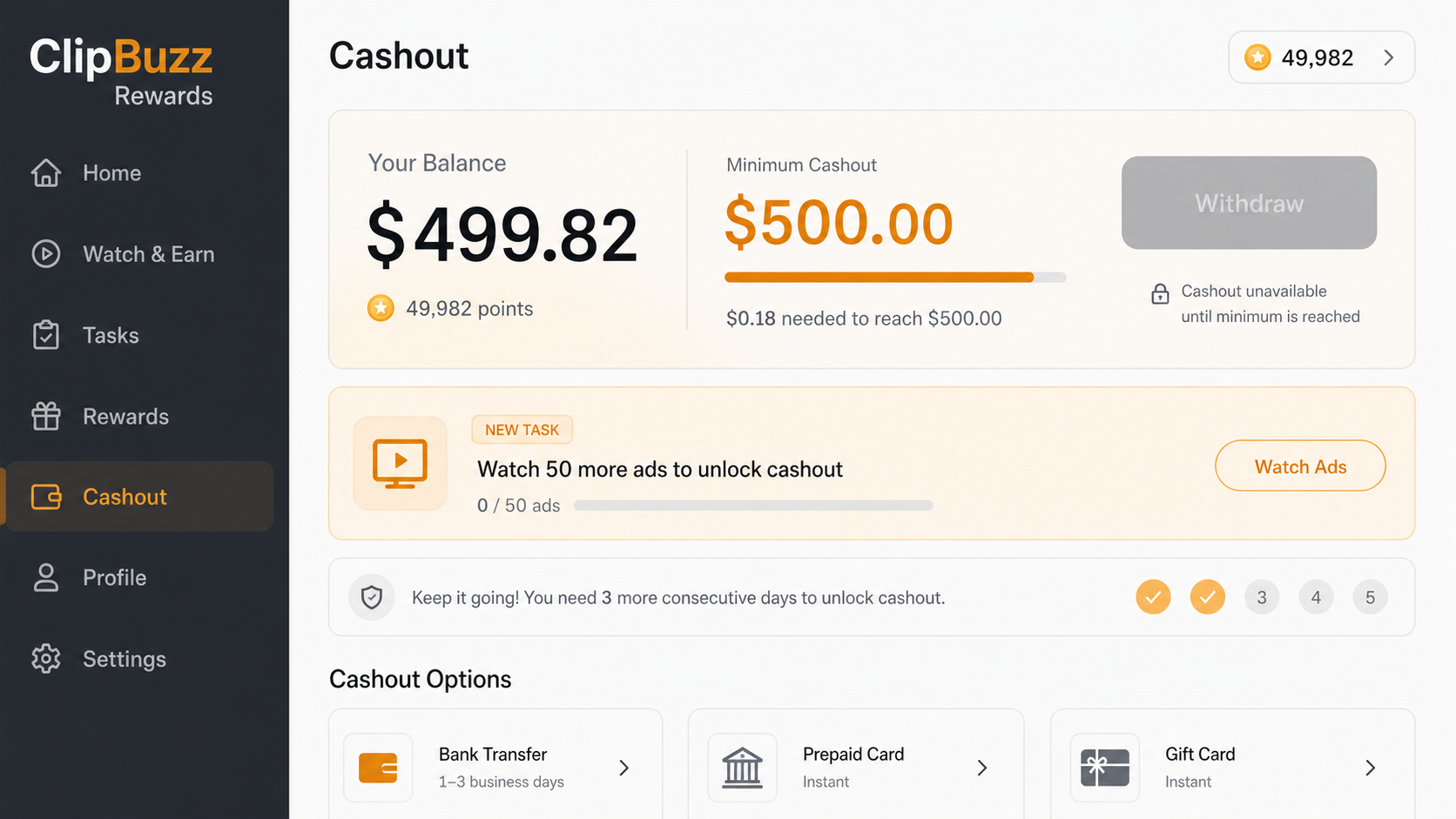
Many reviewers describe rapid progress at first. As their displayed balance approaches $500, individual rewards allegedly shrink from meaningful amounts to tiny increments.
After reaching or nearly reaching the goal, users report new tasks. These can include dozens of advertisements, consecutive daily logins, or additional eligibility checks.
Several complaints say another condition appears after the previous one is completed. The withdrawal remains unavailable while the app continues receiving engagement.
The evidence supports a strong warning about the reward promise
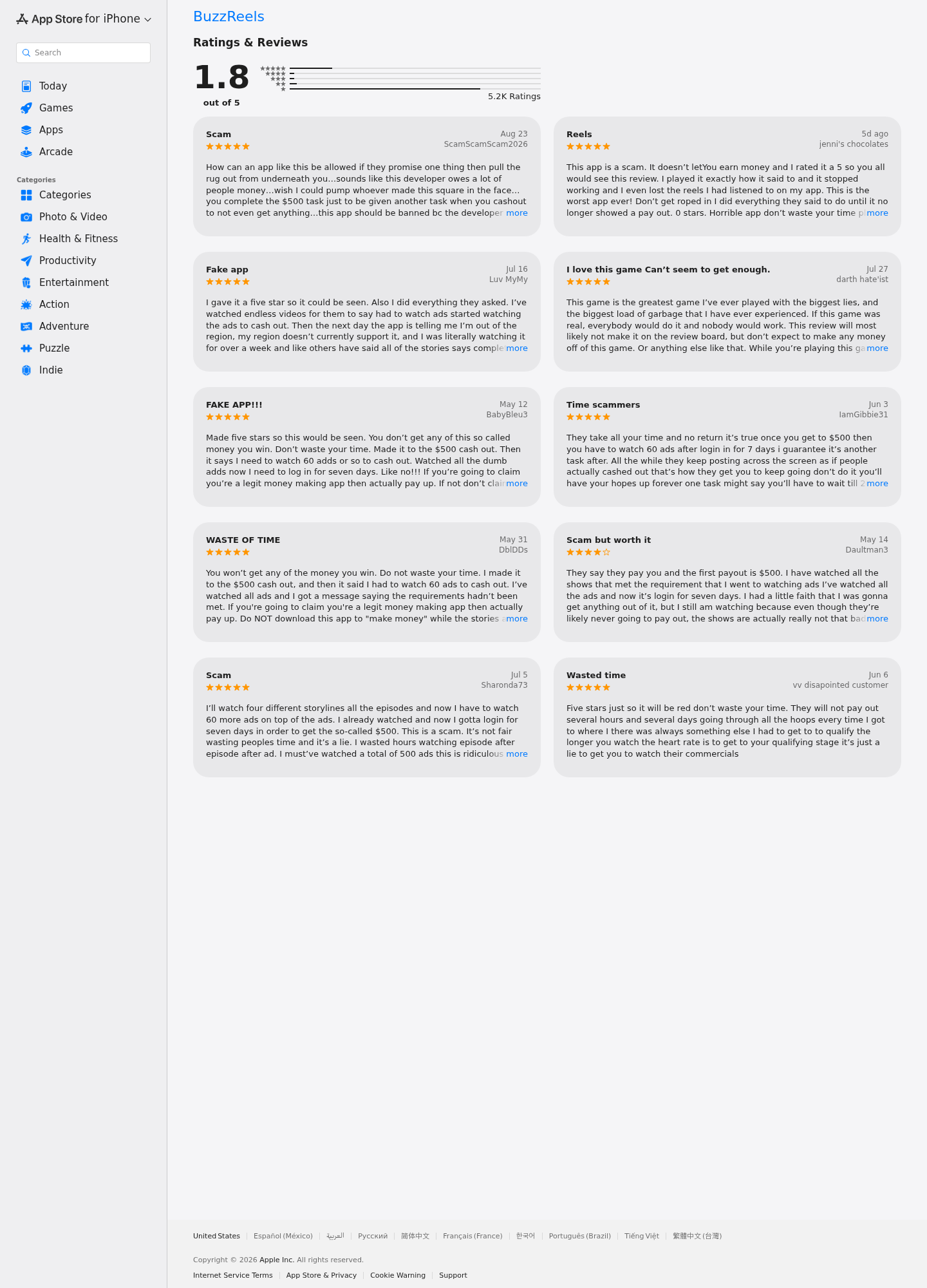
At the time reviewed, the US App Store page showed a 1.8 rating from approximately 5,200 ratings. The visible reviews repeatedly raised nonpayment concerns.
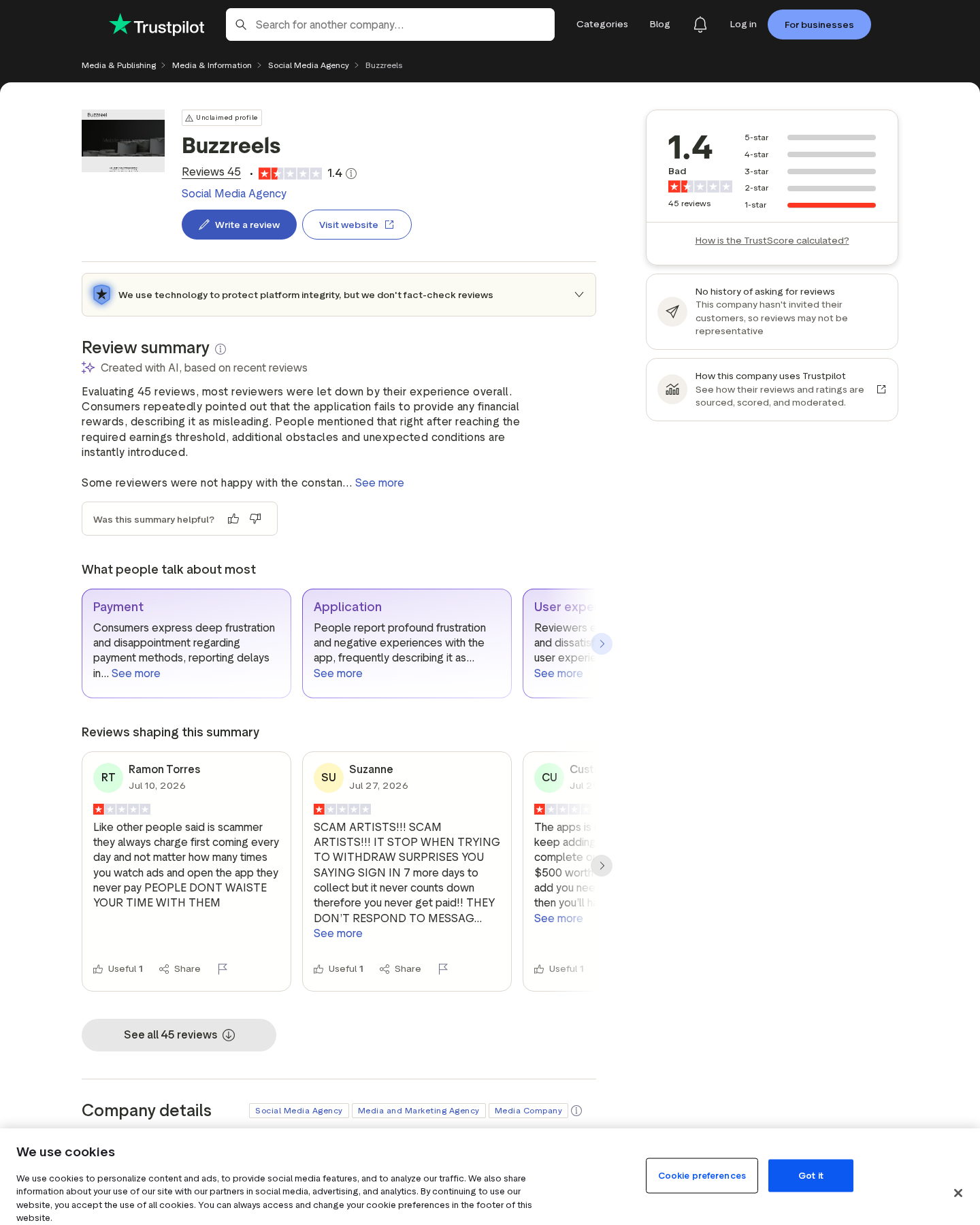
A Trustpilot profile associated with BuzzReels also carried a very low score and similar moving-goalpost allegations. Those reports are not court findings, but their consistency matters.
- Early virtual earnings reportedly rise much faster than later earnings.
- The displayed balance can stop just below the $500 threshold.
- Users describe new advertising and login requirements appearing near withdrawal.
- The public App Store description does not clearly promise a guaranteed $500 payment.
- Apple’s privacy disclosure says identifiers may be used for tracking.
- There is little reason to keep watching solely to recover time already spent.
Our conclusion is not that every drama viewer loses money. The concern is whether the cashout mechanic creates a reasonable expectation that the app does not fulfill.
What BuzzReels Is and What It Promises
The core application presents serialized, vertical-format dramas designed for quick viewing. This entertainment model is common across many mobile platforms.
Revenue can come from advertisements, subscriptions, episode unlocks, coin packages, or combinations of these methods. A reward feature can add another engagement loop.
There is nothing inherently deceptive about earning points. Problems arise when the interface makes points resemble cash while important payout conditions remain unclear or expandable.
A displayed balance creates a sense of ownership. Users may feel the money already belongs to them, even before every withdrawal condition is satisfied.
That psychological shift is powerful. Walking away at $497 feels like losing $497, although no actual payment may ever have been approved.
The app can then request one more advertisement, one more episode, or one more login. Each task seems small compared with the apparent accumulated value.
A fair reward program should disclose eligibility, geography, minimum payout, verification, expiration, processing time, and disqualification rules before significant participation.
It should not keep adding unexpected obstacles after the user satisfies the prominently displayed goal.
The $500 Cashout Complaint Pattern
Fast early gains establish belief
Reviewers frequently say they began with a generous virtual amount or accumulated rewards quickly. That pace makes $500 appear attainable within a reasonable period.
Large early increments are more persuasive than a conventional advertisement. The user watches their own balance rise and treats it as personal evidence.
Once the routine is established, the reward schedule can change without feeling like a new offer.
Progress slows at exactly the wrong moment
Complaints describe earnings falling to cents as the balance nears the threshold. A task that once added several units may suddenly contribute almost nothing.
This creates a mathematical trap. The remaining amount looks tiny, but completing it can require far more advertisements than all earlier progress combined.
Users continue because stopping so close feels irrational. In reality, prior viewing time cannot be recovered by spending more time.
Completion reportedly unlocks another condition
Some reviewers say reaching the target reveals requirements involving 50 or 60 additional advertisements. Others mention consecutive daily check-ins.
A new countdown or queue can appear after those tasks. Region errors, processing messages, or another qualification stage may then block withdrawal.
The specific sequence can vary. The common feature is that the apparent finish line moves after the user arrives.
Why a Virtual Balance Feels Like Real Money
Reward interfaces borrow visual language from banking. They use currency symbols, progress bars, withdrawal buttons, account histories, and payment-method icons.
Those elements can make an internal counter feel equivalent to funds in a bank account. Legally and practically, the two may be very different.
A virtual balance might remain conditional until identity, geography, activity, and anti-fraud checks are complete. Broad terms can also reserve cancellation rights.
Users rarely read long conditions after an app has already credited them with a large starting amount. The interface’s visual promise overwhelms the fine print.
Variable rewards also resemble a game. Unpredictable increments keep the next advertisement interesting because it might finally deliver the missing amount.
This is closely related to sunk-cost pressure. Hours already spent cannot be recovered, yet they make leaving feel more painful.
Advertisements create real value for the platform when viewed. A reward that never becomes payable can still generate impressions, retention, and behavioral data.
That imbalance is why users should judge the withdrawal record before investing time, not after the counter reaches its target.
How the BuzzReels $500 Cashout Funnel Works
Step 1: A cash-themed promotion attracts the user
The initial message suggests ordinary entertainment can produce meaningful side income. No specialized skill, sale, investment, or job application appears necessary.
A round target such as $500 feels substantial but believable. It can cover groceries, a bill, or a small emergency.
The viewer downloads the legitimate-looking app through an official store, which lowers suspicion about the reward claim.
Step 2: The account receives rapid early progress
The user may see a starting credit or generous rewards after simple actions. The counter advances fast enough to demonstrate the system supposedly works.
At this stage, withdrawal still remains out of reach. The user is encouraged to watch more content and advertisements first.
The app has converted curiosity into a routine before the difficult portion of the payout path becomes visible.
Step 3: Advertisements become the route to completion
Sponsored videos appear as the practical way to accelerate earnings. Each completed ad produces another visible increment.
The platform receives the engagement immediately. The user receives a conditional number whose real value depends on a future approval.
Because the balance keeps rising, repeated advertising feels like productive work rather than ordinary monetized viewing.
Step 4: Rewards shrink near the threshold
Reviewers report that amounts become tiny as $500 approaches. Progress continues, but at a pace designed to require many more interactions.
A balance of $499.82 looks effectively complete. Eighteen cents should be trivial, based on the earlier reward schedule.
If each new task yields a fraction of a cent, that small gap becomes a long sequence of profitable ad impressions for the operator.
Step 5: The withdrawal button reveals a new obstacle
After the threshold is reached, the user may be told to watch another fixed number of ads. The requirement was not prominent during earlier participation.
Other reported tasks include consecutive logins, additional episodes, account verification, or waiting for a processing queue.
The user complies because the promised payment appears larger than the cost of one final condition.
Step 6: Further conditions preserve the loop
Completing one task may unlock another. Reviewers describe repeated delays, disappearing progress, eligibility errors, or payment options that never become active.
The exact wording can change after updates. What remains stable is the absence of a predictable, documented path from balance to payment.
Each extra condition extends retention and advertising exposure while making the user responsible for not being “finished” yet.
Step 7: Frustrated users leave after generating value
Eventually, the time cost becomes impossible to ignore. The person uninstalls the app with no cash, while the viewed advertisements cannot be undone.
Some users continue returning because they fear losing their progress. That fear can keep the cycle alive far longer than expected.
The safest response is to stop once the rules move. More participation cannot prove a program will honor a finish line it keeps changing.
Company and Checkout Checks
The App Store identifies an unexpected seller
Apple lists the seller as DLC VIET NAM Construction and Furniture Trading Joint Stock Company.
That corporate name does not naturally describe a short-drama or rewards developer. It may be accurate, but the mismatch deserves explanation.
Users should record the seller name, developer link, app version, and store listing because ownership and descriptions can change.
The store description emphasizes drama, not guaranteed income
The public listing describes short entertainment and personalized viewing. A clear promise that every qualified user will receive $500 is not prominent there.
This gap matters when advertisements create stronger expectations than the official product description. Promotional creatives may disappear while the store listing remains.
Capture any cashout claim before installing. Include the advertiser name, destination, date, and complete screen rather than a cropped balance alone.
The privacy disclosure deserves attention
Apple’s page says identifiers may be used to track users across apps and websites. It also lists device identifiers under data collection.
These disclosures come from the developer, and Apple notes they are not independently verified. Review permissions and tracking choices before use.
A reward is less attractive when participation involves extensive advertising exposure and behavioral tracking without a dependable payout.
Independent complaints show a repeated experience
The App Store rating was 1.8 across thousands of ratings during our review. Visible complaints repeatedly mentioned the $500 threshold and added conditions.
The related Trustpilot profile also showed poor feedback and similar allegations. Review sites can contain unreliable entries, so no single post proves misconduct.
However, many independently written accounts describing the same sequence are more informative than an isolated angry review.
How to Evaluate Any Watch-and-Earn App
Start by calculating the implied economics. If an app promises hundreds for ordinary ad viewing, ask how much each impression could realistically generate.
Read payout rules before beginning. Search for thresholds, country restrictions, identity checks, processing times, expiration, daily caps, and reasons balances can be voided.
Look specifically for a rule allowing new conditions after reaching the threshold. Broad discretion makes the displayed progress less meaningful.
Check recent low-star reviews, not only the average. Search within reviews for “withdraw,” “cashout,” “payment,” “ads,” and the advertised amount.
Separate entertainment value from earning value. If you enjoy the dramas without payment, the app may still serve a purpose.
If cash is the only reason for continuing, set a strict time limit. Never spend money to unlock a reward that supposedly came from free participation.
Do not submit identity documents unless the operator, privacy policy, retention period, and verification provider are clear.
Never pay a release fee, tax, deposit, or upgrade to receive app earnings. Legitimate costs should be disclosed and ordinarily deducted from a real payment.
What to Do if You Have Fallen Victim to This Scam
- Stop chasing the displayed balance. Take screenshots of the total, withdrawal screen, completed tasks, new conditions, account ID, app version, and every support exchange before leaving.
- Do not pay to unlock cashout. Reject requests for deposits, taxes, upgrades, prepaid cards, cryptocurrency, or verification fees. Another payment usually creates another loss.
- Cancel any paid subscription. Check Apple subscriptions and purchase history, not only the app’s settings. Request appropriate refunds through the platform’s official process.
- Revoke unnecessary permissions. Disable tracking where available, remove notification access, and inspect whether the app can reach photos, contacts, location, microphone, or other data.
- Secure reused credentials. Change any password used elsewhere and enable multifactor authentication. Be alert for follow-up messages offering to recover the missing $500.
- Remove the app and inspect the device. Delete questionable profiles or extensions. Malwarebytes can check for unwanted software, while AdGuard can reduce deceptive ads and redirect chains.
- Report the exact advertising claim. Submit evidence to Apple, the advertising network, and the FTC. Explain the changing cashout requirements without exaggerating what you can prove.
- Contact your payment provider after a real charge. Dispute only unauthorized or misrepresented payments, not the value of unpaid time. Preserve receipts and cancellation attempts.
Frequently Asked Questions
Does BuzzReels really pay $500?
Numerous reviewers say they could not complete withdrawal after reaching the displayed target. We found no dependable evidence that ordinary users consistently receive the advertised amount.
Is BuzzReels malware?
The app’s reward complaints do not automatically make it malware. The primary concern examined here is a reportedly misleading cashout loop and extensive advertising engagement.
Why does the balance grow quickly at first?
Fast early progress establishes belief that the goal is attainable. Reviewers say increments later shrink dramatically as the account nears $500.
What happens after users reach the threshold?
Complaints describe new tasks involving many more ads, consecutive logins, waiting periods, verification, or other requirements that continue delaying withdrawal.
Should I submit identification to cash out?
Only consider verification after confirming the legal operator, privacy practices, purpose, storage period, and genuine payout history. Never send documents to an unverified contact.
Can I recover compensation for time spent watching ads?
Recovering the value of time is difficult. Preserve the claim and report it, but focus payment disputes on actual unauthorized or misrepresented financial charges.
The Bottom Line
BuzzReels turns a virtual $500 balance into a reason to keep watching. Reviewers consistently say the finish line slows, moves, and produces additional conditions.
Enjoy short dramas only if they are worth your time without payment. If cashout is the purpose, the evidence says to stop before more ads consume it.








