

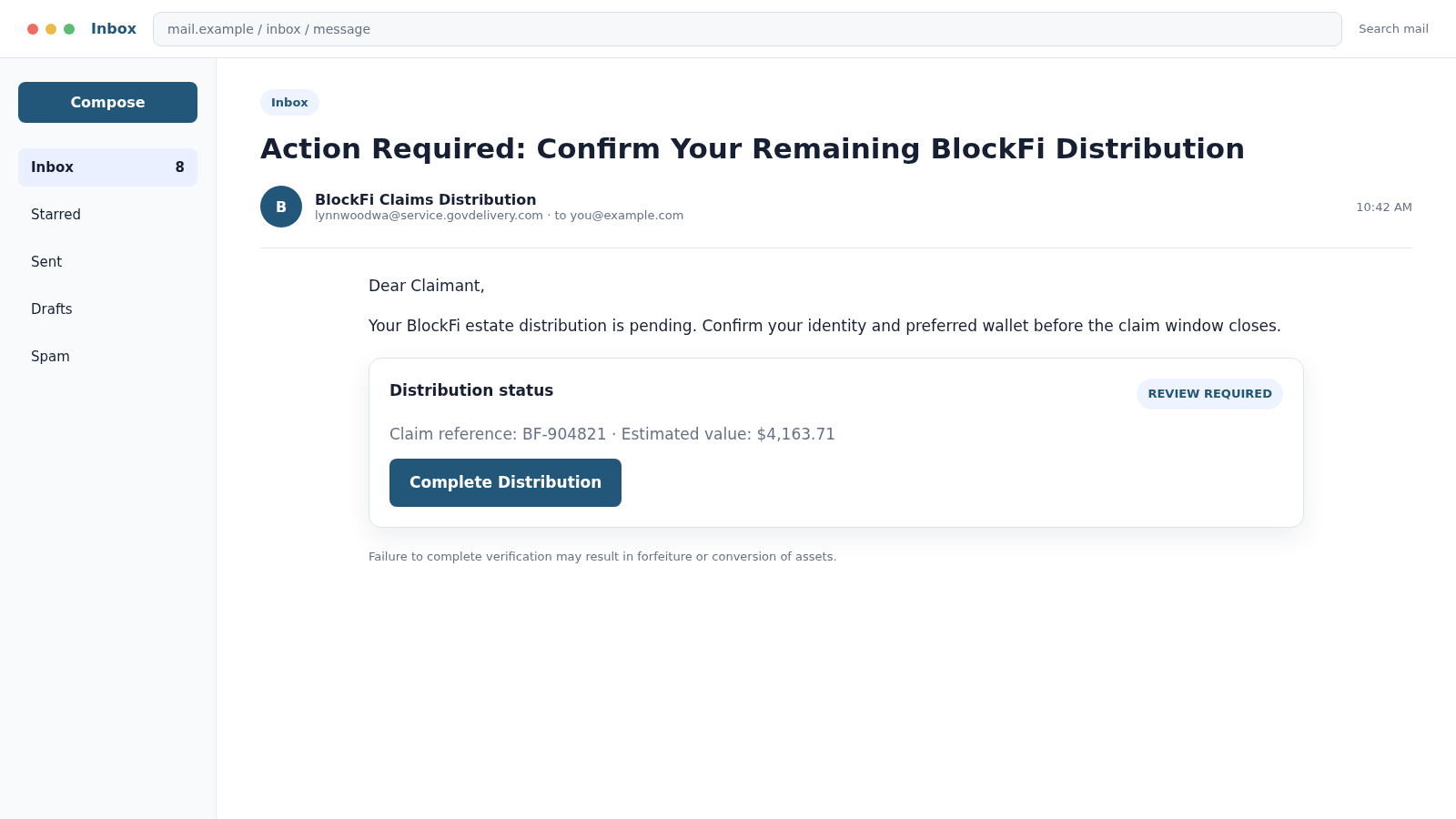
An email says a remaining BlockFi distribution is waiting, but the deadline is close. The sender address ends in service.govdelivery.com, which looks far more credible than the usual random phishing domain.
That trusted-looking route is the camouflage. The message leads toward a fake claim process where a wallet, recovery phrase, identity record, or payment can be stolen.
Overview
The email borrows a legitimate delivery platform
GovDelivery is used by public agencies to distribute notices and subscriptions. A real service domain in the sender line can therefore make an unexpected message look vetted.
The BlockFi scam may appear to come from an unrelated account such as lynnwoodwa@service.govdelivery.com. The local name has no natural connection to a cryptocurrency bankruptcy distribution.
A legitimate mail platform can be abused through a compromised account, an open subscription feature, or misleading content. The infrastructure that transported an email does not prove the claims inside it.
The BlockFi bankruptcy creates a believable reason for delayed money
Former BlockFi customers have dealt with real bankruptcy notices, identity checks, Coinbase distributions, Kroll communications, and changing deadlines. That complex history gives scammers excellent material.
A fake message may claim that an earlier payment failed, a balance remains unclaimed, or a wallet must be connected before funds are forfeited. The amount can be tailored to feel plausible.
Recipients who remember having a BlockFi account may act before noticing that the sender, domain, and instructions do not match official outreach channels.
The verification step is where the theft occurs
The link may open a copy of a BlockFi, Kroll, Coinbase, or wallet-connect page. The victim is asked to sign in, enter personal data, approve a wallet request, or reveal a recovery phrase.
A recovery phrase gives control of the associated crypto wallet. No legitimate distribution agent needs it to send assets to an address.
The scam may seek one or more of the following:
- Email, Coinbase, or claim-portal credentials
- Crypto wallet recovery phrases and private keys
- Wallet approvals that authorize token transfers
- Government ID and identity-verification images
- Social Security or tax identification numbers
- Bank and payment-account details
- A supposed release, gas, tax, or processing fee
- One-time security codes captured in real time
Why BlockFi Claim Emails Require Careful Verification
Not every BlockFi-related email is fake. Real communications have involved the bankruptcy estate, Kroll, Digital Disbursements, and Coinbase.
That is exactly why checking only for the word “BlockFi” or “Kroll” is insufficient. Criminals copy names, logos, formatting, claim language, and publicly known deadlines.
Official guidance has warned former clients to rely on a defined list of outreach channels and avoid links from communications outside that list. Coinbase also states that neither Coinbase nor BlockFi will ask customers to send funds manually or provide a password or 2FA code.
The sender’s display name can be changed freely. Expand the full address, inspect the reply-to field, and compare the domain character by character.
Even then, do not use the email link. Open the claims resource from a trusted bookmark or an independently verified official page.
The Danger of Wallet Verification Requests
A crypto wallet does not need to reveal its recovery phrase to receive funds. A sender only needs the public receiving address.
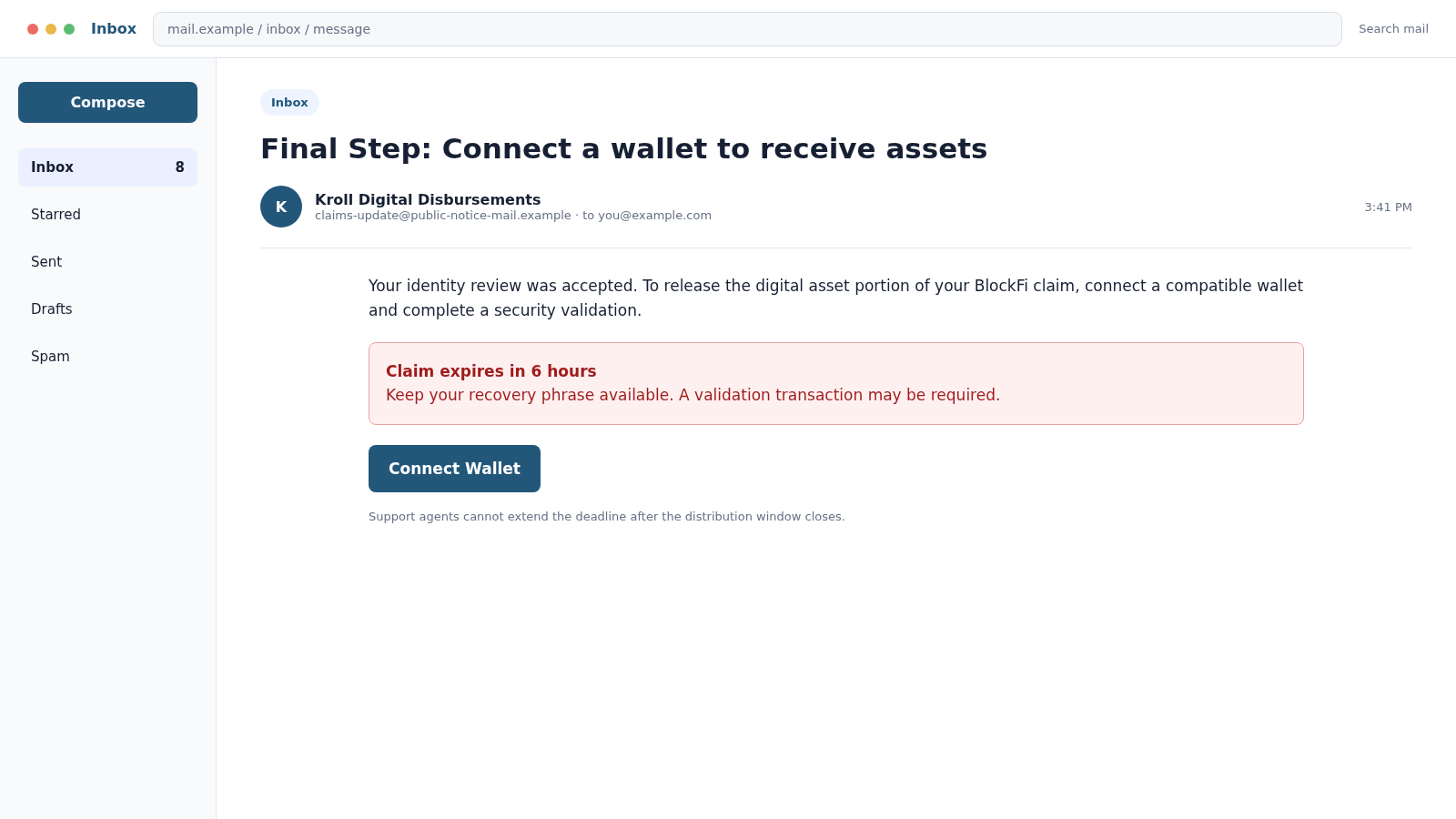
Phishing pages often imitate a wallet connection dialog. After the victim selects a wallet, the page asks for the 12-word or 24-word phrase because an automatic connection supposedly failed.
Entering those words hands the attacker the master key. The wallet can be recreated elsewhere and emptied without another approval from the victim.
A different version asks the user to sign a transaction. The page may describe the signature as verification, but the underlying request can grant token allowances or initiate a transfer.
Read every wallet prompt. If the purpose, contract, permissions, or destination is unclear, reject it and close the page.
Company, Address, and Fulfillment Checks
Begin with the official BlockFi distribution guidance
Open the official information page from a saved bookmark or a fresh search, not from the message. Compare the named distribution partner, current process, eligible assets, and support route with what the email claims.
Treat GovDelivery as a delivery channel, not proof
A recognizable sending platform can carry legitimate notices, but the platform name alone does not establish who created the message or where its button leads. The destination and requested action still require independent verification.
Confirm Kroll or Coinbase contact details independently
Use the authenticated claim or exchange account and contact details published by the organization. Do not trust a support address, telephone number, or chat window that appears only after opening the email link.
Reject any secret-wallet verification request
No distribution process needs a recovery phrase or private key. A wallet connection can also authorize asset movement, so read every signature and transaction carefully and abandon any flow that introduces an unexplained approval.
How the BlockFi GovDelivery Email Scam Works
Step 1: Criminals identify likely former BlockFi customers
Targets may be found through old data leaks, crypto-related mailing lists, public posts, or broad spam. The scam does not need to know the exact value of a person’s claim.
A recipient with no BlockFi history will delete the message. A former customer may see it as a long-awaited update.
Step 2: A trusted-looking delivery domain bypasses doubt
The email travels through or imitates a notification platform associated with public agencies. Spam filters and recipients may give that domain more trust than a newly created crypto address.
The unrelated mailbox name is easy to overlook on a mobile screen where only the display name may appear.
Step 3: The message creates an expiring claim
The victim is told that a remaining distribution, failed payout, or cash conversion requires action. A deadline implies that waiting will permanently destroy the claim.
Scammers may display a specific amount and claim reference. Those numbers are props unless they match records in an independently accessed official portal.
Step 4: The link opens an imitation portal
The page may copy BlockFi, Kroll, Coinbase, or Digital Disbursements branding. A familiar logo and professional design hide the unrelated registered domain.
The page collects an email address and password or asks the visitor to connect a crypto wallet.
Step 5: Real-time phishing defeats account security
If the credentials are valid, the attacker attempts to sign in immediately. The victim then sees a request for a one-time code, which the phishing page forwards to the criminal.
Multi-factor authentication helps, but a code must never be entered into a page reached through a suspicious email.
Step 6: Wallet access or payment is demanded
The page asks for a recovery phrase, a signature, a test transaction, or a fee. Each action is described as necessary to validate ownership and release the distribution.
Legitimate claim administrators do not need a wallet’s secret phrase. A demand to send crypto before receiving a payout is an advance-fee warning.
Step 7: Assets and accounts are drained
Stolen credentials can expose email, exchange, and claim information. A compromised wallet can be emptied as soon as the attacker reconstructs it or uses a malicious approval.
Identity documents may be reused for account creation, account recovery, or more personalized fraud.
Step 8: A support or recovery agent follows up
If the victim hesitates, a supposed claims specialist may call and offer guidance. If assets were stolen, another account may promise recovery for a retainer or gas fee.
Both conversations keep the victim inside the criminal’s communication channel. Return to independently verified official contacts instead.
How to Verify a BlockFi Distribution Message Safely
Do not begin with the button in the email. Open a new browser window and navigate from a trusted official source.
Compare the sender with BlockFi’s published outreach channels. Be alert when the local name belongs to a city or public agency unrelated to the bankruptcy.
Review your own historical claim records and earlier verified communications. A real update should be consistent with your claim status, jurisdiction, and chosen distribution method.
Coinbase’s BlockFi distribution guidance identifies Kroll and Digital Disbursements as handlers of eligible cash distributions and warns that passwords, 2FA codes, and manual payments will not be requested.
Contact Kroll or Coinbase using details published on their official websites. Do not call a number copied from the suspicious message or a search advertisement.
If the email claims a new deadline, look for the same announcement on the official case site. A deadline that exists only in one unexpected email should be treated as hostile.
Warning Signs in the GovDelivery Message
- The local sender name refers to an unrelated public agency
- The reply-to address differs from the visible sender
- An unclaimed distribution appears without matching records
- The deadline is measured in hours
- The link’s registered domain is not an official claims channel
- A wallet must be connected before details are shown
- The page requests a recovery phrase or private key
- A payment or test transaction is required
- The sender asks for a password or one-time code
- Support discourages independent verification
What to Do if You Have Fallen Victim to This Scam
- Close the phishing page and stop communicating. Do not complete another verification step, sign another wallet request, or pay a release fee.
- Move remaining crypto safely. If a recovery phrase was exposed, treat the wallet as permanently compromised. From a clean device, transfer remaining assets to a newly created wallet with a new phrase.
- Revoke malicious approvals. Use the relevant blockchain explorer or a trusted wallet security tool to review token allowances. Moving tokens may be safer when the seed phrase itself was disclosed.
- Secure exchange and claim accounts. Change passwords, sign out unknown sessions, replace multi-factor methods if necessary, and notify Coinbase or the legitimate claims administrator.
- Protect the email account. Change its password from a clean device, review forwarding rules and recovery methods, and check sent, deleted, and archived folders.
- Contact financial providers. Report bank, card, PayPal, or crypto transfers immediately. Ask whether pending transactions can be stopped and provide destination addresses or account details.
- Scan affected devices. Remove downloaded files or extensions and run a full scan with Malwarebytes. Reset sensitive credentials after the device is clean.
- Block known malicious links. Report the domain and email. AdGuard can reduce access to known phishing and malicious advertising, but it cannot restore a compromised wallet.
- Protect identity records. If you uploaded ID, tax, or Social Security information, follow an identity-theft recovery plan and consider credit freezes.
- Preserve evidence. Save full headers, URLs, screenshots, wallet prompts, transaction hashes, destination addresses, telephone numbers, and chat messages.
- Report the crime. Notify the email platform, the impersonated organizations, the FTC, and the FBI’s IC3. Crypto transaction hashes can help investigators trace movement.
- Ignore recovery messages. Criminals monitor public complaints and contact victims. No stranger can guarantee reversal of a blockchain transaction for an upfront fee.
How to Preserve Crypto Evidence Without Creating More Risk
Write down the transaction hash and public wallet addresses involved, but never place a recovery phrase in a report, screenshot, cloud note, or support chat. Investigators can examine public blockchain activity without needing the secret that controls your wallet.
Record exactly what the phishing page requested. There is a major difference between entering an account password, approving a token allowance, signing a transaction, and revealing a recovery phrase. Each action creates a different response priority.
If you connected a wallet, note the network, wallet application, site address, time, and approval displayed. Preserve browser history and screenshots before clearing anything, provided doing so does not require reopening the malicious page.
Contact the exchange receiving stolen funds through its official abuse or compliance channel. Supply the transaction hash, destination address, police or IC3 report number, and proof that you controlled the sending address.
- The original email file and complete headers
- The exact phishing URL without revisiting it
- Wallet prompts and transaction approval screens
- Transaction hashes and destination addresses
- Claim-account login and security notifications
- Case numbers from exchanges and authorities
Be cautious when discussing the loss publicly. Fraudsters search social networks and complaint forums for victims, then pose as blockchain analysts, attorneys, exchange employees, or recovery specialists with convincing but fabricated credentials.
No legitimate helper needs your recovery phrase to trace a transfer. Anyone asking you to synchronize, validate, or restore a wallet through an unfamiliar site is attempting to gain control of it.
Also record any security emails that arrived immediately after the interaction. Password resets, new-device alerts, withdrawal confirmations, and changed recovery settings can show which accounts were accessed and help support teams contain the compromise.
When reporting the event, separate confirmed actions from suspicions. Say whether you typed credentials, approved a prompt, downloaded a file, or sent funds. Precise details help responders focus on the most urgent exposure first.
Frequently Asked Questions
Is every service.govdelivery.com email fraudulent?
No. Government agencies legitimately use the platform. Evaluate the specific sender, topic, links, and instructions. An unrelated public-agency address sending a BlockFi claim notice is a major mismatch.
Can a legitimate email platform send scam content?
Yes. Accounts and distribution features can be abused. A trustworthy transport service does not independently certify every claim made in the message body.
Will BlockFi or Coinbase ask for my recovery phrase?
No legitimate distribution requires your wallet recovery phrase or private key. Anyone who obtains it can control the wallet, so never enter it into a claim page.
What if the amount matches my old BlockFi balance?
A matching amount increases the risk that leaked data was used. Verify through the official claim channel and contact the administrator independently before taking any action.
Is connecting a wallet safe if I do not type the seed phrase?
Not automatically. A malicious site can request dangerous signatures or token approvals. Reject any prompt you do not fully understand and verify the domain independently.
Can stolen cryptocurrency be recovered?
Recovery is difficult and never guaranteed. Report immediately to the exchange, financial provider, and law enforcement with transaction hashes. Do not pay private recovery scammers.
The Bottom Line
The BlockFi GovDelivery email scam uses a credible-looking delivery domain and a complicated bankruptcy story to rush former customers into a fake payout process.
Do not trust the sender line alone. Verify every claim through official channels, never reveal a recovery phrase, and never send money to unlock money that is supposedly owed to you.








