

A steep VPN discount can feel like an easy win, especially when the offer appears just as your subscription is ending. That moment of convenience is exactly what a NordVPN coupon code scam is designed to exploit.
The page may look polished, the countdown may be ticking, and the checkout may promise a price that seems too good to leave behind. Before entering a card, it is worth slowing down and checking who is really collecting the payment.
Overview
What the NordVPN coupon code scam claims
This scam promotes a supposedly exclusive NordVPN deal through an email, social media ad, sponsored search result, coupon page, or direct message. The offer commonly promises a lifetime plan, an unusually long subscription, or a discount far larger than the prices shown through the real provider.
Some versions say the code expires in a few minutes. Others claim that only a small number of licenses remain. The urgency is artificial, but it gives the visitor less time to inspect the domain or compare the offer with NordVPN’s official website.
- A discount such as 80% or 90% off
- A lifetime license for one small payment
- A bonus antivirus, password manager, or cloud storage plan
- A countdown that resets when the page is refreshed
- A coupon code that works only on an unfamiliar checkout
What the scammers actually want
The immediate goal is usually to collect card details, billing information, and contact data. A fake checkout can capture the card number, expiration date, security code, name, address, phone number, and email address in one visit.
In other cases, the payment does go through, but the buyer receives a recycled, stolen, invalid, or short-lived activation key. Some pages also enroll customers in an undisclosed recurring charge or sell a completely unrelated VPN service under misleading branding.
Why the offer looks convincing
Scammers copy the colors, language, pricing cards, trust badges, and product descriptions used by established cybersecurity companies. A professional-looking page is easy to assemble, and a padlock in the browser only means the connection is encrypted. It does not prove that the seller is NordVPN.
The promotion may also appear beside legitimate search results. Coupon aggregators and affiliate-style pages can create an extra layer between the advertisement and the final checkout, making it harder to notice that the payment form is hosted on an unrelated domain.
How the NordVPN Coupon Code Scam Works
Step 1: The victim encounters an exceptional discount
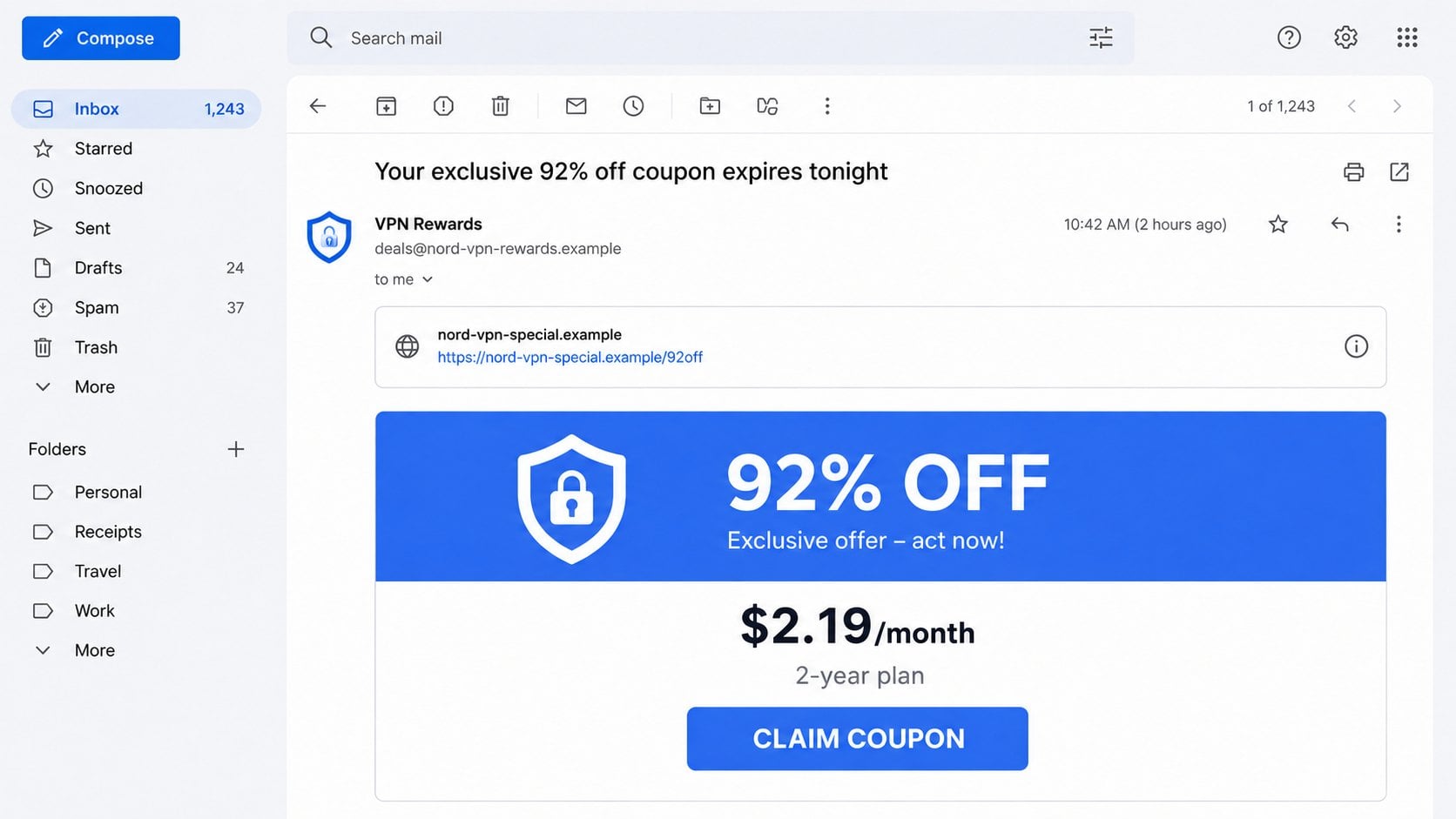
The first contact often arrives as an email with a subject such as “Your private NordVPN offer expires tonight.” It may also appear in a paid search result for phrases like “NordVPN coupon,” “NordVPN lifetime deal,” or “cheapest NordVPN plan.”
The message is written to feel timely. It might mention a renewal, a seasonal event, or an account loyalty reward even when the recipient has never used NordVPN. Broad campaigns send the same wording to thousands of addresses and rely on coincidence.
Step 2: A button opens an imitation promotion page
The email or advertisement leads to a page that resembles a genuine sales landing page. The domain may contain words such as nord, vpn, privacy, secure, deal, or renewal, but it is not one of the official domains controlled by NordVPN.
According to NordVPN’s own guidance on imitation scams, its official web properties include nordvpn.com, nordvpn.org, nordauth.com, nordaccount.com, and support.nordvpn.com. A familiar word somewhere in a longer address is not enough.
Step 3: Urgency blocks careful comparison
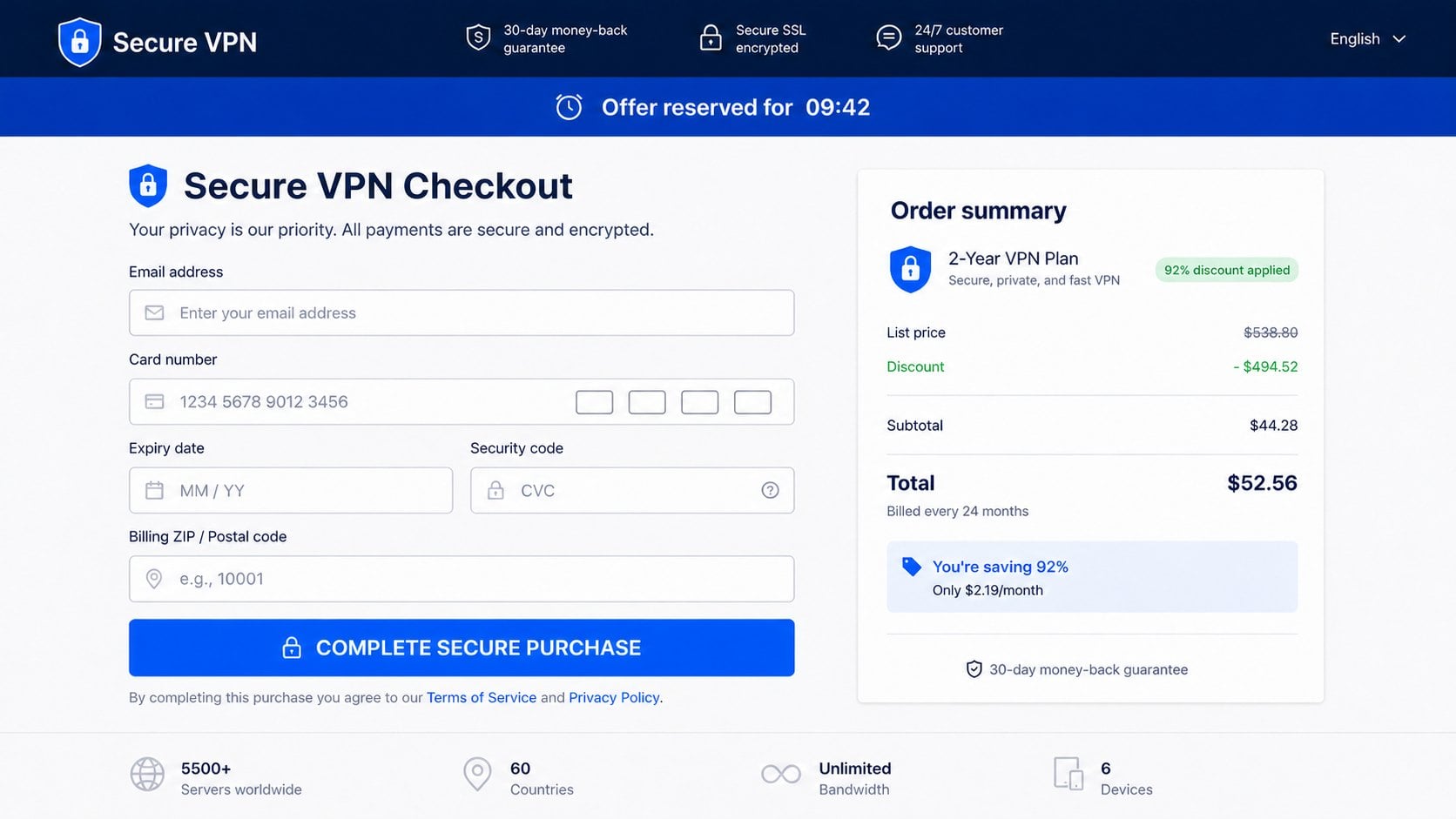
A countdown, low-stock notice, or “one use per customer” warning pressures the visitor to act. These elements are often simple scripts. Reloading the page may reset the timer, and visiting from another browser may show the same supposed last few licenses.
The page may claim the discount has already been applied and that leaving will permanently remove it. This is a psychological nudge, not evidence of a real limited offer.
Step 4: The fake checkout collects payment data
After the visitor chooses a plan, a checkout form requests full card and billing details. Some versions ask for a phone number and account password as well. A legitimate coupon should not require an existing VPN password on a third-party page.
The form can transmit every field to the scam operator even if the final payment appears to fail. A message such as “bank declined” or “try another card” may be used to collect a second card number.
Step 5: The victim receives nothing useful or a risky download
Once the payment is submitted, the page may disappear, display an invalid activation code, or provide a download that is not the official NordVPN application. An unofficial installer can include adware, credential-stealing malware, or a remote-access component.
A buyer may also receive credentials for an account belonging to someone else. Shared or stolen accounts can be reclaimed at any time and expose the buyer to further messages from the seller.
Step 6: Follow-up charges and phishing begin
The stolen information remains valuable after the first transaction. Scammers may test the card with small charges, sell the details, or send follow-up messages pretending to fix an activation problem.
A fake support agent may request remote access, a one-time bank code, or an additional “verification” payment. Victims who already paid are more likely to trust a message containing details from the original order.
Warning Signs That a VPN Coupon Is Not Genuine
No single visual mistake proves a page is fraudulent, but several inconsistencies together should stop the purchase. The most important clue is the identity of the seller, not the quality of the design.
- The checkout is not on an official NordVPN domain.
- The seller promises a lifetime NordVPN subscription.
- The price is dramatically lower than the offer on the official website.
- The timer resets or the same “last chance” returns every day.
- The contact address uses a free mailbox or unrelated domain.
- The page asks for a NordVPN password, bank code, or crypto payment.
- The installer is delivered as an unusual archive or from a file-sharing site.
- The refund policy names a different company from the checkout.
Spelling errors can be a clue, but their absence proves nothing. Modern scam pages often use clean templates and fluent copy. Checking the complete address bar is more reliable than judging grammar.
Company, Address, and Fulfillment Checks
Confirm who is selling the subscription
Look for the legal seller named beside the final price, in the terms, and on the payment statement description. If the landing page says NordVPN but the checkout identifies an unrelated marketing company, pause before paying.
Do not assume a page is authorized because it calls itself a partner. Open a fresh browser tab, type nordvpn.com yourself, and ask official support whether the promotion and reseller are recognized.
Inspect the complete domain and contact address
Read the domain from right to left and identify the registered site name before the final extension. An address such as nordvpn.discount-example.test belongs to discount-example.test, not NordVPN.
Compare the email sender with the reply-to address and the destination of every button. NordVPN lists its legitimate email domains in its imitation-scam guidance. A display name can be copied, while the underlying address reveals where a reply will go.
Verify the product and delivery method
A legitimate subscription should be attached to an account the customer controls and should be manageable through the official service. Be wary of sellers who promise to send a username and password, provide a key through a chat app, or require an unofficial installer.
Before buying, confirm the plan length, renewal price, cancellation terms, refund conditions, and number of supported devices through the official website. The headline discount can hide a recurring price that is much higher.
Check payment and support traceability
Reputable checkout pages provide a clear merchant identity, accessible terms, and a support route that can be independently verified. Crypto, gift cards, wire transfers, and payment through a stranger’s personal account remove ordinary dispute protections.
Search the exact domain and merchant name together with words such as complaint, refund, and unauthorized charge. Treat reviews hosted only on the seller’s page as advertising, because the operator controls what appears there.
How to Buy a NordVPN Plan Safely
Begin at the official site rather than a link in an unsolicited message. If you find a coupon elsewhere, compare the final price and plan details with those shown after navigating directly to NordVPN.
- Type the official domain into the browser yourself.
- Check that the account and checkout remain on an expected official domain.
- Read the renewal terms instead of relying on the large discount headline.
- Download apps only from NordVPN’s site or an official app store listing.
- Use a unique account password and enable available account protections.
- Keep the confirmation email and payment receipt.
A browser password manager can also help. It will not normally offer saved credentials on a lookalike domain, which can provide an extra warning that the page is not the site you intended to visit.
Check the confirmation screen before closing it. The account email, plan length, billing interval, renewal date, and merchant should match what you intended to buy. If the page offers only a downloadable key and no manageable subscription record, do not assume the order is complete.
Be equally cautious with browser extensions that promise to test dozens of private coupons. An extension can request broad access to shopping pages and form data. Install only a well-established extension whose publisher, permissions, privacy policy, and store history you have reviewed.
What to Do if You Have Fallen Victim to This Scam
- Call the card issuer without delay. Explain that card details were entered on a suspected fraudulent checkout. Ask whether the card should be locked or replaced, dispute any unauthorized charge, and review pending transactions.
- Stop communicating with the seller. Do not pay an activation, refund, tax, or verification fee. A scammer who promises to return the first payment after one more transfer is attempting to deepen the loss.
- Change exposed passwords. If the fake page collected a NordVPN, email, or reused password, replace it from a clean device. Change every other account using the same password and enable two-factor authentication where available.
- Remove unofficial software. Disconnect the device from sensitive accounts and uninstall anything obtained through the promotion. Run a full scan with Malwarebytes, quarantine detections, restart if requested, and scan again.
- Block malicious follow-up pages. AdGuard can help block known phishing, advertising, and tracking domains. It is an additional layer, not permission to ignore a suspicious address or browser warning.
- Preserve evidence. Save the full URL, email headers, screenshots, receipt, merchant descriptor, chat history, and downloaded filename. Do not keep a suspicious installer executable if doing so creates additional risk.
- Report the campaign. Send the fake page and message to NordVPN through its official support channel. You can also report phishing to the email provider, browser safe-browsing service, payment company, and the relevant national fraud authority.
- Watch for secondary fraud. Be skeptical of callers who know the order amount and offer recovery help. Legitimate investigators do not require gift cards, crypto, remote access, or a fee to release recovered funds.
The FTC’s phishing guidance recommends contacting the impersonated company through a phone number or website known to be genuine, rather than using the details in the suspicious message.
Frequently Asked Questions
Are all NordVPN coupon codes scams?
No. Legitimate promotions and affiliate offers exist, but the final destination, seller, plan, and payment flow must be verifiable. A code on an unfamiliar site is not trustworthy simply because it produces a discount.
Does NordVPN sell a lifetime subscription?
A page promising a lifetime branded plan deserves particularly careful verification. Check the current plans directly on NordVPN’s official website and confirm any unusual offer with official support before paying.
Can a secure padlock prove the checkout is genuine?
No. HTTPS encrypts traffic between the browser and that website. Scam operators can obtain certificates too, so the padlock does not confirm the identity or honesty of the merchant.
What if the fake checkout said my payment failed?
Treat the card as exposed anyway. The form may have transmitted the data before displaying the failure. Contact the issuer and do not enter a second card.
Is an activation key from a marketplace safe?
Not necessarily. The key may be stolen, already used, restricted to another region, or revoked later. An account sold with shared credentials is even riskier because the buyer never controls its recovery details.
Can Malwarebytes recover money lost to the scam?
No. Malwarebytes can scan for malicious software, but it cannot reverse a payment. The card issuer, bank, payment provider, or relevant fraud authority handles payment disputes and reports.
The Bottom Line
A NordVPN coupon code scam succeeds by placing a familiar cybersecurity name beside an irresistible price. The design may be convincing, but the domain, seller identity, delivery method, and payment protections reveal whether the offer deserves trust.
Open the official website independently, compare the real plan, and confirm unusual promotions before entering a card. If you already paid, contact the issuer quickly, secure exposed accounts, remove unofficial software, and keep evidence for your reports.

Join the discussion
0 commentsShare your experience or ask a question about this article.
Discussion
Start the conversation
Have a question or something useful to share? Add the first comment.