

A familiar television face appears to recommend a simple answer for aging eyes. The presentation feels reassuring, polished, and unexpectedly personal.
Clear Gaze is promoted through that atmosphere of borrowed trust. A closer inspection reveals important questions shoppers should answer before ordering.
Overview
The advertising story is larger than the bottle
Clear Gaze is presented as a dietary supplement for visual comfort, screen strain, and age-related eye support.
Some promotions reportedly place the product beside unauthorized depictions of recognizable television personalities and medical figures.
Those familiar faces can make an unknown seller feel established before a shopper checks the actual company, formula, or terms.
We found no reliable evidence that Anderson Cooper, Morgan Freeman, or eye surgeon Dr. Ming Wang endorsed Clear Gaze.
The sales pages do not tell one consistent story
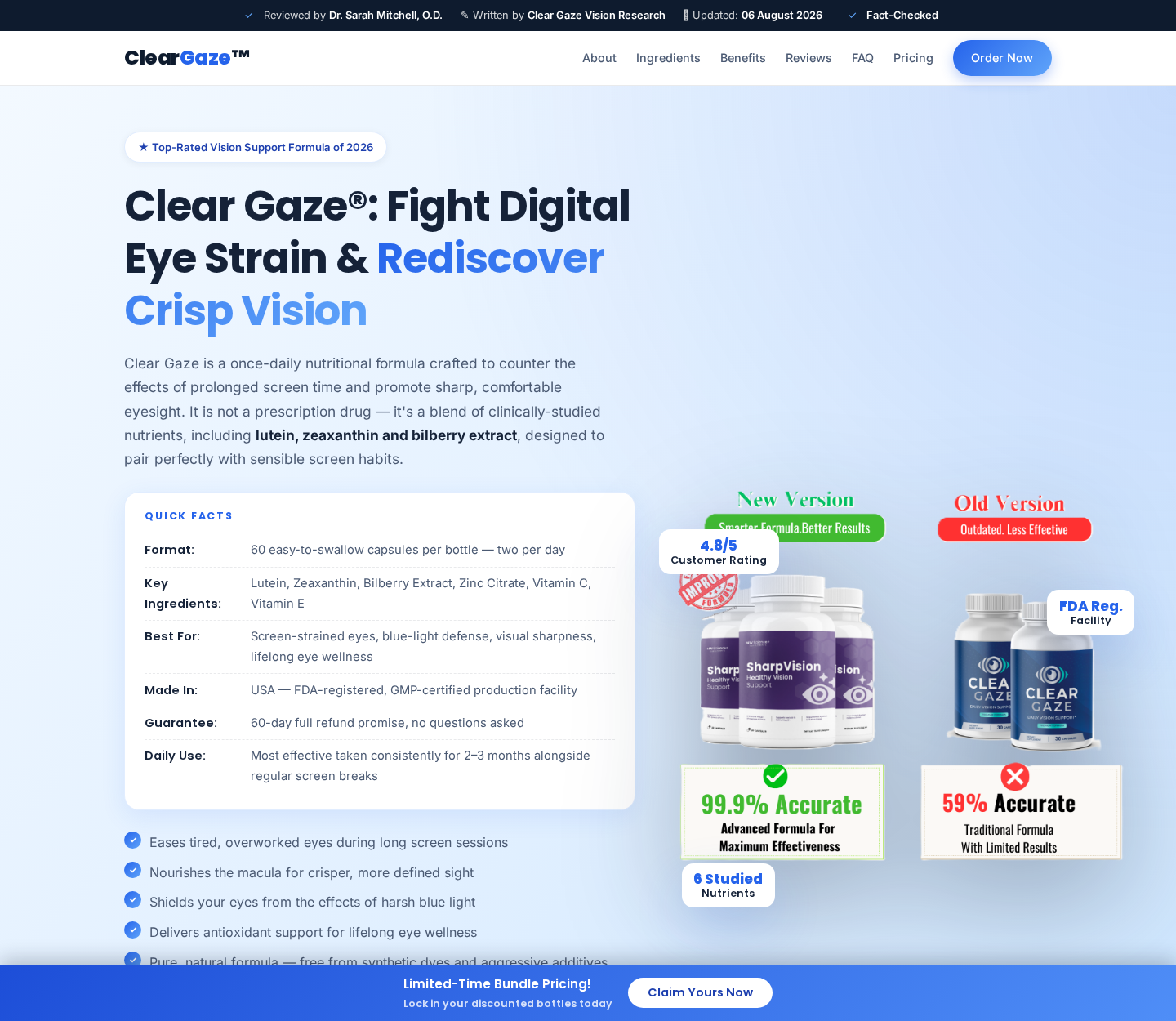
One page says the formula is taken once daily, while its quick-facts area describes two capsules per day.
The same page displays conflicting bundle prices in different sections. One six-bottle line even shows an implausible per-bottle figure.
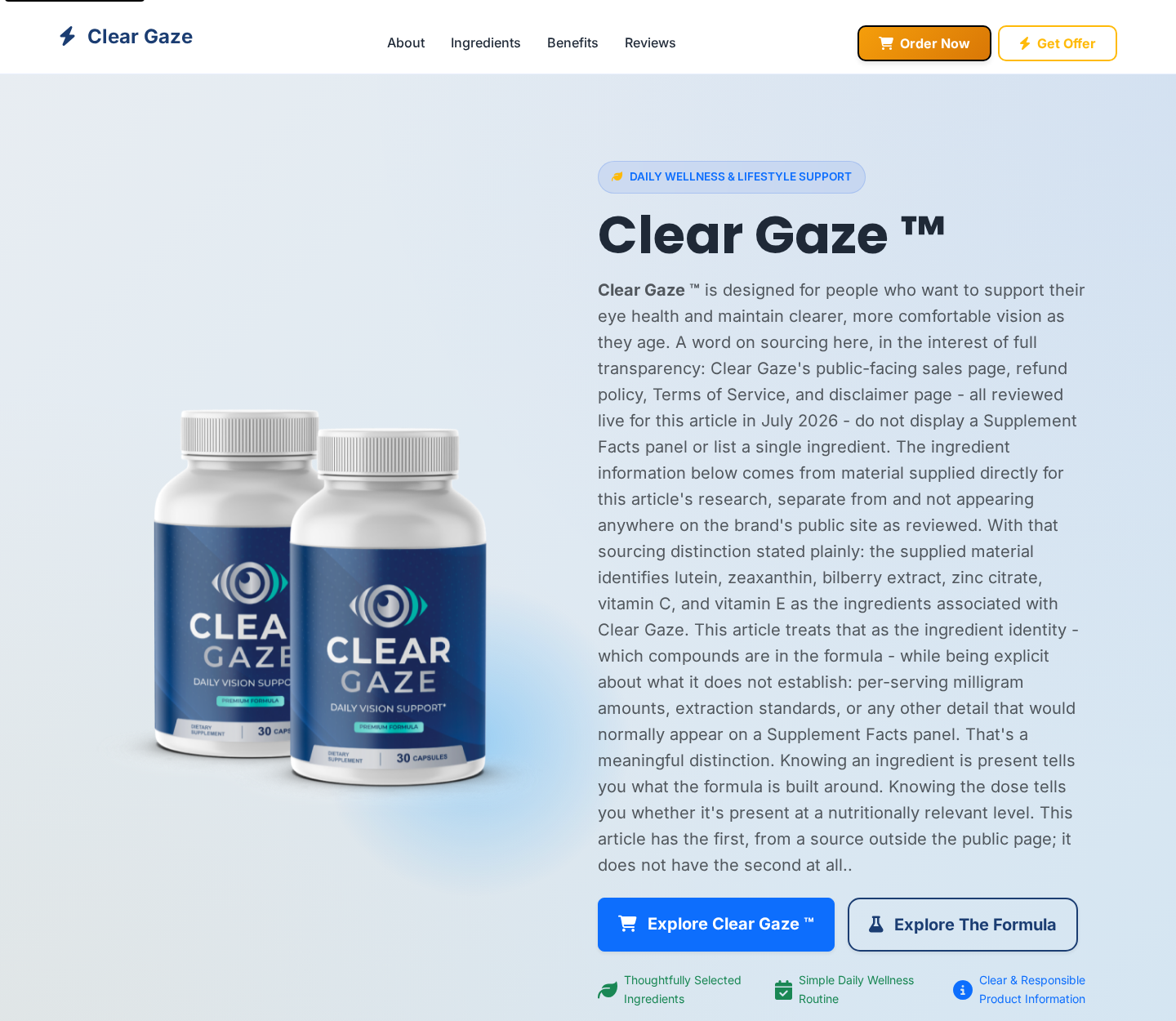
An alternate Clear Gaze page discusses ingredients supplied for research, yet says its public pages did not display a Supplement Facts panel.
These contradictions do not automatically prove an unsafe product. They do make informed comparison and accountability far harder.
The safest conclusion is about the campaign, not a diagnosis
The strongest concern is the marketing route: borrowed celebrity authority, aggressive health language, inconsistent disclosures, and redirects through unrelated sales infrastructure.
A capsule cannot be judged from a dramatic video or a polished bottle rendering. Buyers need the exact label, seller identity, and checkout terms.
Warning signs visible around this campaign include:
- Celebrity or doctor footage with no confirmation on the person’s official channels.
- Claims that sound closer to treatment than ordinary nutritional support.
- Different dosing instructions on the same sales experience.
- Price tables that disagree about bottle count or unit cost.
- Purchase buttons routing through a domain unrelated to the displayed brand.
- Missing or incomplete Supplement Facts information before checkout.
- Testimonials that cannot be independently verified.
- Urgency designed to replace careful product comparison.
What Clear Gaze Claims to Offer
The reviewed page names lutein, zeaxanthin, bilberry extract, zinc citrate, vitamin C, and vitamin E.
Several of those nutrients are familiar in eye-health research. Their presence alone does not establish that this particular mixture produces advertised outcomes.
Dosage matters. Extraction standards, ingredient amounts, testing, interactions, and manufacturing controls determine far more than a decorative ingredient list.
A complete Supplement Facts panel should show serving size and quantity per serving. Shoppers should see it before entering payment details.
The page also uses phrases such as clinically studied nutrients. That wording can describe ingredients generally without proving the finished product underwent clinical testing.
Likewise, an FDA-registered facility is not the same as FDA approval of a supplement’s effectiveness.
Dietary supplements are not reviewed like prescription drugs before ordinary market entry. A registration statement should never be read as a government endorsement.
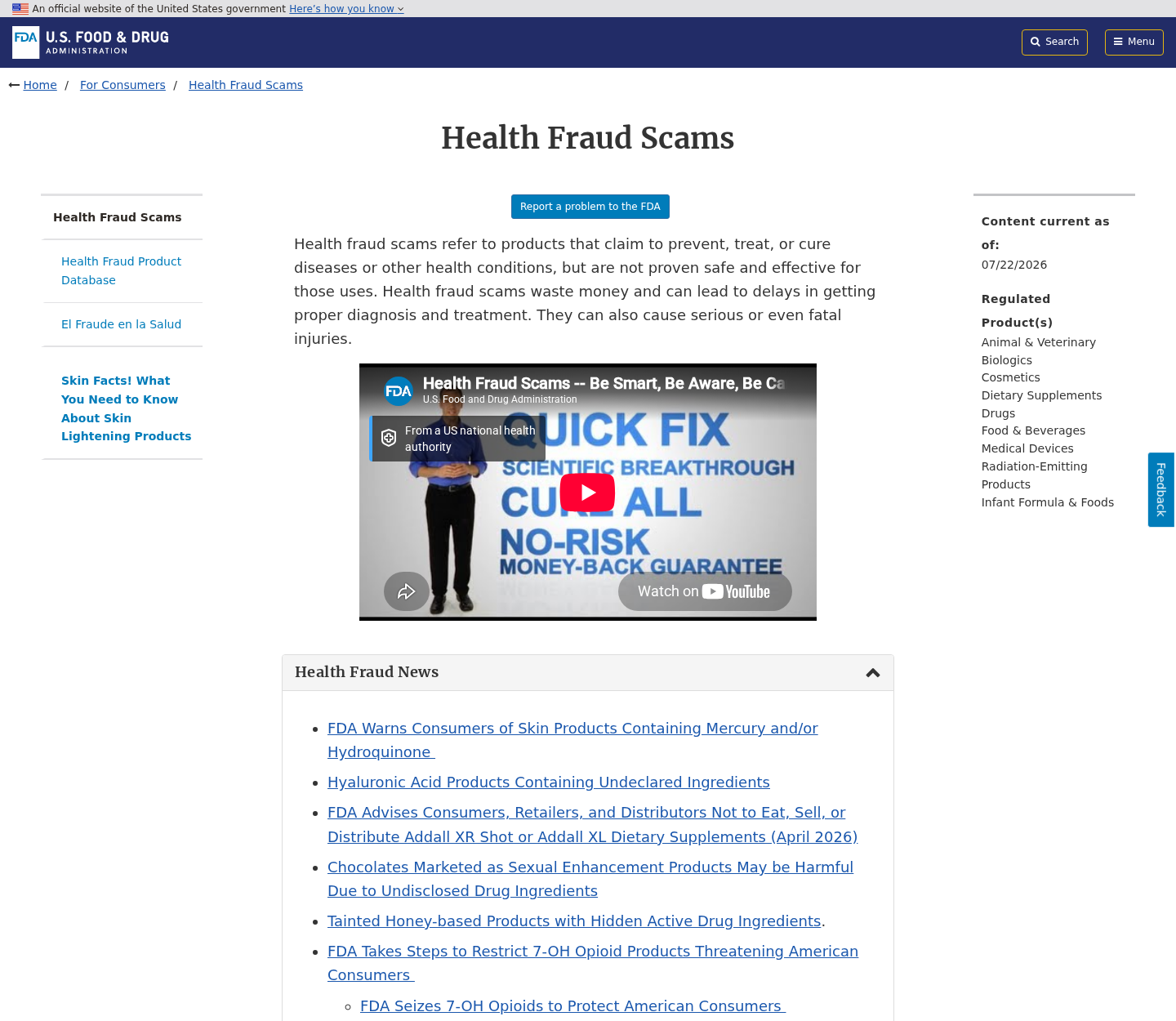
Claims about reversing deterioration, restoring lost vision, or replacing professional treatment would require strong evidence. A sales page is not that evidence.
People with sudden vision changes need prompt medical attention. Delaying evaluation while testing an online supplement can allow serious conditions to progress.
Even familiar nutrients can interact with medication or create problems at excessive doses. A pharmacist can review the complete label, not a promotional summary.
Why the Celebrity-Style Advertising Deserves Scrutiny
Scam advertising increasingly uses synthetic voices, edited interviews, and cloned television layouts. The result can resemble a genuine news segment at first glance.
A real host may appear to ask a question they never asked. A doctor’s authentic footage can be paired with fabricated audio.
Short clips are especially persuasive because viewers cannot inspect context. Captions and dramatic cuts make the recommendation feel immediate.
The video then moves to an advertorial that imitates reporting. Familiar colors, studio graphics, and invented viewer comments reinforce the illusion.
Nothing about a news-like layout proves editorial involvement. Check the address bar and the publisher’s real website independently.
Authentic endorsements should be verifiable from the celebrity, physician, broadcaster, or organization being quoted.
If the only evidence exists inside a paid advertisement, the endorsement remains unverified regardless of production quality.
Celebrity identity is valuable because it transfers trust quickly. That is precisely why impersonation is central to many supplement funnels.
The promotion can survive a product-name change. Operators replace the bottle while keeping the same interview, emotional promise, and checkout sequence.
This distinction matters. The story may be the durable scam component, while the product label is merely the current sales destination.
How the Clear Gaze Advertising Scam Works
Step 1: A social advertisement borrows a trusted face
The campaign begins with a video or image featuring a well-known presenter, actor, physician, or television personality.
The material may be edited, taken out of context, or generated with AI. Viewers are encouraged to believe the person revealed a suppressed discovery.
Common hooks mention failing eyesight, screen damage, macular health, or an ingredient supposedly ignored by conventional medicine.
Step 2: The click opens a news-style sales story
The destination may resemble a television network, health magazine, or interview transcript rather than an ordinary advertisement.
Logos, comment sections, and urgent headlines create borrowed credibility. Links often lead only toward the same order page.
The story minimizes uncertainty and presents one bottle as the natural conclusion to a dramatic medical narrative.
Step 3: Familiar ingredients are turned into sweeping promises
The advertorial names recognizable vitamins or plant extracts, then jumps from ingredient research to claims about the finished formula.
That leap skips dose, formulation, participant population, study quality, and whether Clear Gaze itself was tested.
Scientific vocabulary gives the pitch texture, but citations may be missing, irrelevant, or unrelated to the product sold.
Step 4: Testimonials manufacture social proof
Customer stories describe sharper vision, easier night driving, reduced strain, or restored confidence after a surprisingly short period.
Photographs and names do not prove those people used the product. Reverse-image searches and repeated wording can expose recycled testimonials.
Extreme outcomes should be treated cautiously, especially when ordinary negative reviews are absent from the seller-controlled page.
Step 5: Bundle math pushes a larger first purchase
The checkout emphasizes three-bottle or six-bottle packages, countdown language, limited stock, and a lower displayed unit price.
A large bundle raises the immediate charge and makes a disappointing purchase harder to unwind.
When price tables conflict, screenshot the exact offer and final total. Never assume the headline amount is the amount submitted.
Step 6: The order moves through separate infrastructure
Buttons may redirect through another domain, payment processor, tracking service, or fulfillment partner.
Separate infrastructure is not automatically fraudulent. It becomes concerning when buyers cannot identify who sells, bills, ships, and accepts returns.
Read the checkout page again. The legal seller and renewal terms can differ from branding displayed earlier in the funnel.
Step 7: Refund friction protects the sale
A guarantee sounds reassuring, but the practical value depends on reachable support, return authorization rules, deadlines, and the correct warehouse address.
Customers may be required to return opened bottles, pay tracked postage, or satisfy conditions hidden outside the main pitch.
Record every call, email, tracking number, and promised refund date. Verbal assurances are difficult to dispute later.
How to Evaluate Clear Gaze Before Buying
Start with the label, not the video. Demand a readable image showing every ingredient amount, serving size, warning, and manufacturer statement.
Compare the recommended daily dose across the homepage, label, checkout, and follow-up email. Contradictions should be resolved in writing.
Search the exact legal company name appearing in the terms and card descriptor. A brand name may have no independent corporate identity.
Look for a physical address that can receive returns. Map results may reveal a mailbox, warehouse, residence, or unrelated business.
Call support before ordering. Ask whether the purchase is one-time, whether refills occur, and which entity issues refunds.
If the representative cannot answer basic label or billing questions, the promise of effortless support deserves little weight.
Check the celebrity claim outside the sales funnel. Search the person’s official website and verified social accounts.
Inspect the domain age and archived versions, but interpret them carefully. A new domain is a risk signal, not proof by itself.
Use a credit card rather than bank transfer, cryptocurrency, or debit when consumer protections are available.
Do not buy because a timer is expiring. Legitimate health decisions remain valid after time for a pharmacist or doctor to review them.
What the Contradictions Mean for a Real Buyer
One inconsistency might be a typing mistake. Several inconsistencies across dosage, pricing, product imagery, and disclosure suggest weak control over material influencing a health purchase.
That matters because buyers cannot compare value when the number of capsules, daily serving, and cost per bottle do not align.
It also complicates refunds. A seller can point to a different page or offer after the shopper challenges the final charge.
Save the entire checkout journey, not only the order confirmation. Include every price table, selected package, shipping line, and guarantee statement.
A screenshot cannot prove safety, but it can preserve the exact representation that caused the purchase.
Responsible sellers correct obvious errors promptly and make the authoritative label easy to find. They do not require buyers to reconcile competing versions.
Clear disclosures also protect legitimate manufacturers. Transparency gives shoppers a fair basis for separating ordinary supplements from deceptive promotional funnels.
The return promise deserves the same attention as the ingredients. Count the calendar days from delivery, not from the day you remember to complain.
Ask whether opened containers qualify and whether shipping charges are refundable. Those details determine the guarantee’s real value.
Compare the billing descriptor with the seller named in the policy. A mismatch can complicate customer-service searches and card disputes.
Keep packaging until the refund is complete. Lot codes and mailing labels can identify the manufacturer, distributor, and fulfillment route.
Do not assume a “new version” is clinically superior because graphics compare percentages. The advertiser must explain what those numbers measure.
A 99.9% accuracy claim is meaningless without a defined test, sample, outcome, and independent report.
Eye comfort can fluctuate with sleep, lighting, allergies, medication, and screen habits. Testimonials cannot isolate one capsule as the cause.
That uncertainty is normal, which is why responsible health marketing avoids guaranteed personal outcomes.
Company, Address, and Fulfillment Checks
Identify the entity taking the money
The bottle name is not enough. Find the legal seller in the checkout terms, receipt, privacy policy, and card statement.
If different entities appear without explanation, ask each one to state its role. Save the answer before the return window closes.
Test the address before trusting the guarantee
Search the listed business and return addresses. A fulfillment warehouse can ship packages without being the manufacturer or responsible seller.
Fake or borrowed addresses sometimes point to unrelated companies. Send no return until support confirms authorization and destination in writing.
Verify telephone and email support
Call the published number before paying. Ask a product-specific question and request the cancellation procedure.
Disconnected lines, generic voicemail, unanswered email, and agents unable to identify Clear Gaze are serious warning signs.
Demand traceable manufacturing information
Unknown supplements may be mass-produced through overseas contract facilities and relabeled for changing storefronts.
Without a complete label, lot number, testing evidence, and accountable manufacturer, contamination or undeclared ingredients cannot be responsibly excluded.
What to Do if You Have Fallen Victim to This Scam
- Save the complete purchase trail. Capture the advertisement, celebrity claim, landing page, checkout total, confirmation email, package label, card descriptor, and every exchange with support.
- Read the actual billing terms. Determine whether you made a one-time purchase or entered a refill arrangement. Note cancellation deadlines and return requirements.
- Contact the seller in writing. Request cancellation, a return authorization, and confirmation that no future charges will occur. Keep the message and delivery timestamp.
- Call your card issuer. Explain any misleading representation, unauthorized amount, or recurring charge. Ask about blocking future merchant charges and filing a dispute.
- Do not mail products blindly. Obtain a verified return address and authorization number. Use tracked shipping and photograph the package contents before sealing it.
- Check your statements carefully. Watch for altered merchant descriptors, separate shipping charges, and later rebills. Report unfamiliar transactions promptly.
- Change reused passwords. If the checkout password was used elsewhere, replace it everywhere. Enable multifactor authentication on email and financial accounts.
- Scan the device if redirected. Run Malwarebytes after suspicious downloads, browser prompts, or extensions. Remove anything installed during the purchase journey.
- Reduce malicious advertising. AdGuard can block many deceptive ad destinations and tracking requests. It cannot replace careful verification, but it lowers accidental exposure.
- Speak with a medical professional. Stop using the supplement and seek advice if symptoms, interactions, or unexpected effects occur. Bring the bottle and full label.
- Report the promotion. Notify the advertising platform, FTC, FDA when health claims are involved, and your state consumer-protection office.
- Ignore recovery solicitations. Anyone promising guaranteed reimbursement for an upfront fee may be targeting victims a second time.
Is Your Device Infected? Run a Free Malware Scan
Slow performance, constant pop-ups, or strange behavior? These are classic signs of a malware infection. The fastest way to find out is to scan your device with Malwarebytes Free — one of the most trusted malware removal tools available.
The free version detects and removes the most common threats, including:
- Adware — the cause of those annoying pop-ups
- Browser hijackers — unwanted redirects and changed homepages
- Trojans and spyware — hidden programs stealing your data
- Potentially unwanted programs (PUPs) — software you never asked for
👉 Select your device below — Windows, Mac, or Android — then follow the simple steps to download Malwarebytes, scan your system, and remove any threats it finds. The scan usually takes 5 to 20 minutes.
Run a Malware Scan with Malwarebytes for Windows
Malwarebytes is one of the most popular and trusted anti-malware tools for Windows — and it’s completely free for removing infections. It catches threats that many antivirus programs miss, including adware, browser hijackers, and trojans. Follow the steps below to scan and clean your PC in just a few minutes.
Download Malwarebytes
Click the button below to download the latest version of Malwarebytes for Windows from the official source. The free version is all you need — it will scan your computer and remove adware, browser hijackers, and other malicious software at no cost.
Download MalwarebytesOfficial installer for Windows 11 and 10. Your download starts right away.Want real-time protection? See Malwarebytes Premium Malwarebytes Free for WindowsScans and removes malware at no cost
-
Install Malwarebytes
When the download finishes, open your Downloads folder and double-click the MBSetup file. If Windows shows a User Account Control pop-up, click “Yes” to allow the installation.

Follow the On-Screen Prompts to Install Malwarebytes
The setup wizard will walk you through a few quick screens:
-
Choose where you’re installing the program — “Personal Computer” or “Work Computer” — then click Next.

-
Malwarebytes will now install on your device. This usually takes under a minute.

-
When installation is complete, the “Welcome to Malwarebytes” screen will open automatically.

-
On the final screen, click Open Malwarebytes to launch the program.

-
Enable “Scan for Rootkits”
Before scanning, turn on rootkit detection so Malwarebytes can find even the most hidden threats. Click the Settings gear icon on the left side of the screen.

In the settings menu, find “Scan for rootkits” and click the toggle so it turns blue.

Done? Click “Dashboard” in the left pane to return to the main screen.
Start the Scan
Click the blue Scan button. Malwarebytes will automatically update its virus database and start checking your computer for malware.

-
Wait for the Scan to Finish
The scan checks your entire system for browser hijackers and other malicious programs, so it can take 5 to 20 minutes depending on your computer. Feel free to do something else — just check back occasionally to see the progress.

-
Quarantine the Detected Threats
When the scan is done, you’ll see a list of everything Malwarebytes found — malware, adware, and potentially unwanted programs. Click the “Quarantine” button to remove all of them at once.

Malwarebytes will now remove the malicious files and registry entries and move them safely into quarantine.

-
Restart Your Computer
Some threats can only be fully removed after a reboot. If Malwarebytes asks you to restart, click Yes. Once you’re logged back in, Malwarebytes has finished removing the threats it found.

That’s it — your Windows PC is now clean of trojans, adware, and other malware, and should be back to running smoothly.
If you are still having problems with your computer after completing these instructions, then please follow one of the steps:
- Run a computer scan with ESET Online Scanner
- Ask for help in our Windows Malware Removal Help & Support forum.
Run a Malware Scan with Malwarebytes for Mac
Malwarebytes for Mac is a free on-demand scanner that removes the malware other security software tends to miss — adware, browser hijackers, and unwanted programs included. Cleaning an infected Mac with Malwarebytes has always been completely free, and it’s our go-to recommendation. Follow the steps below to scan and clean your Mac in just a few minutes.
-
Download Malwarebytes for Mac
Click the button below to download the latest version of Malwarebytes for Mac.
Download MalwarebytesOfficial installer for macOS. Your download starts right away.Want real-time protection? See Malwarebytes PremiumMalwarebytes Free for MacScans and removes malware at no cost -
Open the Malwarebytes setup file
When the download finishes, open your Downloads folder and double-click the setup file to begin the installation.

-
Follow the On-Screen Prompts to Install Malwarebytes
The Malwarebytes for Mac Installer will guide you through a few quick screens. Click “Continue” and keep following the prompts until the installation completes.



When the installation is complete, Malwarebytes opens to the Welcome to Malwarebytes screen. Click “Get started“.
-
Select “Personal Computer” or “Work Computer”
Malwarebytes will ask what type of computer you’re installing it on. Click either Personal Computer or Work Computer, whichever applies.

-
Start the Scan
Click the “Scan” button. Malwarebytes will automatically update its detection database and begin checking your Mac for malware.

-
Wait for the Scan to Finish
Malwarebytes will scan your Mac for adware, browser hijackers, and other malicious programs. This can take a few minutes, so feel free to do something else — just check back occasionally to see the progress.

-
Quarantine the Detected Threats
When the scan is done, you’ll see a list of everything Malwarebytes found. Click the “Quarantine” button to remove all the threats at once.

-
Restart Your Mac
Malwarebytes will now remove all the malicious files it found. Some threats can only be fully removed after a reboot — if Malwarebytes asks you to restart, allow it. Once you’re logged back in, your Mac is clean.

That’s it — your Mac is now free of adware, rogue browser extensions, and other potentially harmful software.
If you are still experiencing problems while trying to remove a malicious program from your computer, please ask for help in our Mac Malware Removal Help & Support forum.
Run a Malware Scan with Malwarebytes for Android
Malwarebytes for Android automatically detects and removes dangerous threats like malware and ransomware so you don’t have to worry about your most-used device being compromised. Aggressive detection of adware and potentially unwanted programs keeps your Android phone or tablet running smooth.
-
Download Malwarebytes for Android.
You can download Malwarebytes for Android by clicking the link below.
Get Malwarebytes for AndroidOpens Google Play in a new tab.Want real-time protection? See Malwarebytes Premium for AndroidMalwarebytes for AndroidScans your phone and removes malware at no cost -
Install Malwarebytes for Android on your phone.
In the Google Play Store, tap “Install” to install Malwarebytes for Android on your device.

When the installation process has finished, tap “Open” to begin using Malwarebytes for Android. You can also open Malwarebytes by tapping on its icon in your phone menu or home screen.

-
Follow the on-screen prompts to complete the setup process
When Malwarebytes will open, you will see the Malwarebytes Setup Wizard which will guide you through a series of permissions and other setup options.
This is the first of two screens that explain the difference between the Premium and Free versions. Swipe this screen to continue.
Tap on “Got it” to proceed to the next step.
Malwarebytes for Android will now ask for a set of permissions that are required to scan your device and protect it from malware. Tap on “Give permission” to continue.
Tap on “Allow” to permit Malwarebytes to access the files on your phone.
-
Update database and run a scan with Malwarebytes for Android
You will now be prompted to update the Malwarebytes database and run a full system scan.

Click on “Update database” to update the Malwarebytes for Android definitions to the latest version, then click on “Run full scan” to perform a system scan.

-
Wait for the Malwarebytes scan to complete.
Malwarebytes will now start scanning your phone for adware and other malicious apps. This process can take a few minutes, so we suggest you do something else and periodically check on the status of the scan to see when it is finished.

-
Click on “Remove Selected”.
When the scan has been completed, you will be presented with a screen showing the malware infections that Malwarebytes for Android has detected. To remove the malicious apps that Malwarebytes has found, tap on the “Remove Selected” button.

-
Restart your phone.
Malwarebytes for Android will now remove all the malicious apps that it has found. To complete the malware removal process, Malwarebytes may ask you to restart your device.
That’s it — your Android phone is now clean — no more malicious apps, adware, or browser redirects.
If you are still having problems with your phone after completing these instructions, then please follow one of the steps:
- Restore your phone to factory settings by going to Settings > General management > Reset > Factory data reset.
- Ask for help in our Mobile Malware Removal Help & Support forum.
Stay Protected: Block Ads and Malicious Sites
Now that your device is clean, keep it that way. Most infections start with a malicious ad or a fake download button — so blocking them at the source is your best defense.
We recommend AdGuard, which blocks malicious ads, phishing pages, and dangerous redirects before they can reach you.
👉 Download AdGuard and browse safely
Frequently Asked Questions
Is Clear Gaze definitely a fake supplement?
Our evidence supports strong concerns about the advertising and sales disclosures. It does not independently prove that every shipped bottle is counterfeit.
The responsible question is whether the exact product, seller, label, and offer can be verified before payment.
Did Anderson Cooper or Morgan Freeman endorse Clear Gaze?
We found no reliable confirmation of such endorsements through official channels. Appearance inside an advertisement does not establish permission or participation.
Did Dr. Ming Wang recommend this product?
No reliable official endorsement was located during our review. Synthetic or repurposed medical footage should never guide treatment decisions.
Is Clear Gaze FDA approved?
A dietary supplement or its facility may be described with FDA-related language. That does not mean the agency approved the product’s effectiveness.
Does the guarantee make ordering risk-free?
No. A guarantee depends on enforceable terms, reachable support, a valid return address, and timely reimbursement.
What is the quickest safe check?
Verify the endorsement independently, obtain the complete Supplement Facts panel, and read the final checkout terms before entering card details.
The Bottom Line
Clear Gaze is surrounded by enough marketing inconsistencies to justify caution. Celebrity-style promotion cannot substitute for transparent labeling, accountable ownership, and coherent prices.
Do not let a familiar face rush a health purchase. Verify the seller and formula independently, then discuss significant vision concerns with a qualified professional.

Join the discussion
0 commentsShare your experience or ask a question about this article.
Discussion
Start the conversation
Have a question or something useful to share? Add the first comment.