

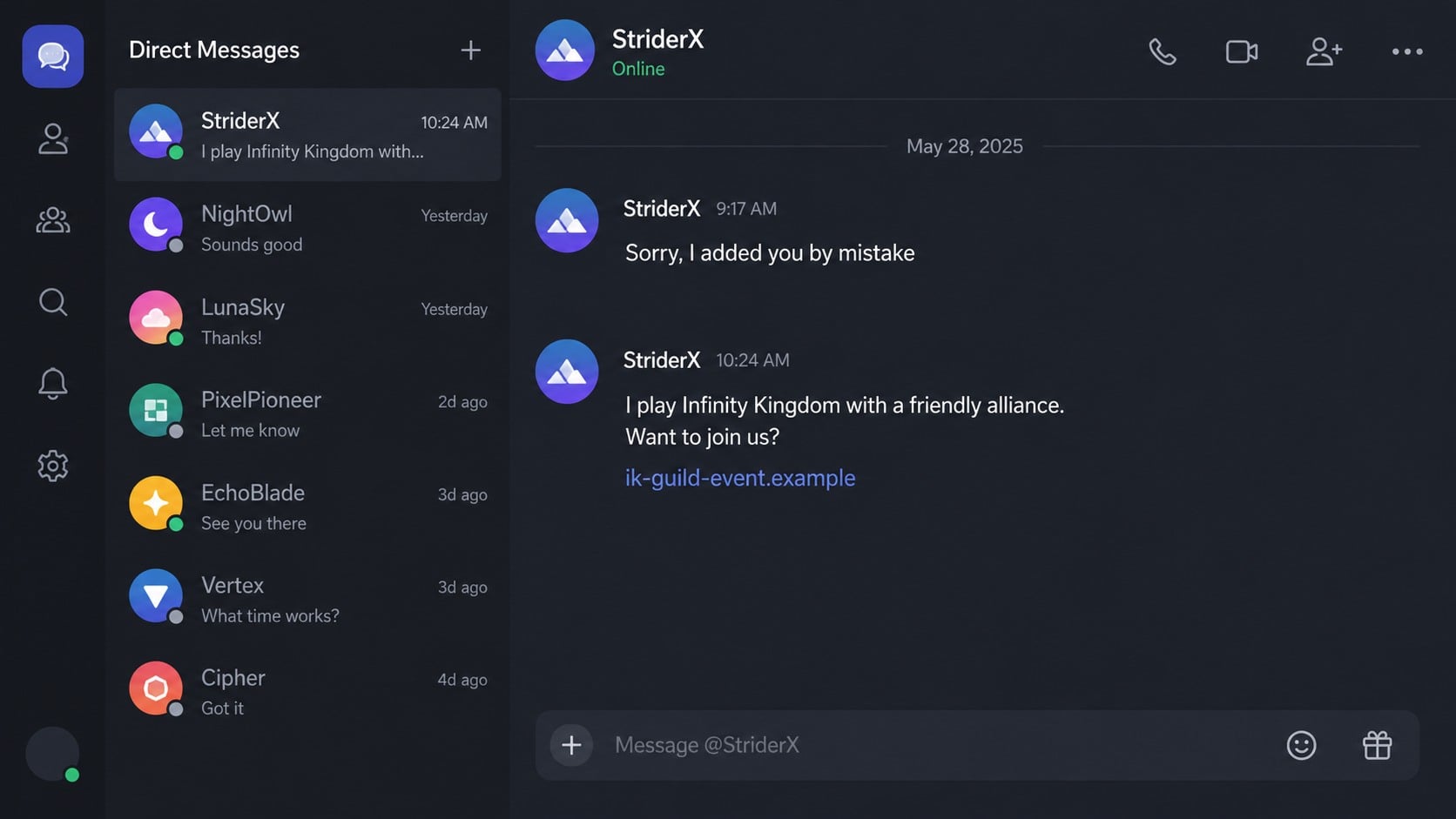
The conversation rarely begins with a sales pitch. A stranger sends a friend request, apologizes for adding the wrong person, and chats casually until an invitation to play Infinity Kingdom feels like a natural next step.
The game itself is real. The risk comes from the person steering the conversation, the unofficial links that follow, and the pressure that can turn a friendly gaming invitation into an expensive trap.
Overview
A friendly mistake becomes a gaming invitation
The Infinity Kingdom Discord scam is a social-engineering pattern reported by players who receive unexpected friend requests. The sender often says the request was accidental, continues the conversation, and later introduces a mobile strategy game or alliance.
The slow pace is important. Instead of demanding money immediately, the sender builds familiarity through everyday conversation, shared interests, compliments, and regular check-ins.
- An unsolicited friend request explained as a harmless mistake
- Several days of casual conversation before the game is mentioned
- An invitation to join a particular alliance or server
- Links to unofficial downloads, stores, account portals, or payment pages
- Pressure to buy packs, prove commitment, or keep up with group spending
Infinity Kingdom is not the scam
Infinity Kingdom is a real strategy game published through GTarcade. Its existence does not validate every person who invokes the name, every Discord server claiming to represent an alliance, or every download link sent privately.
The official Infinity Kingdom website publishes game information and updates. A link supplied by a stranger should be compared with official channels rather than trusted because it contains the game’s name or artwork.
The scam can branch in several directions
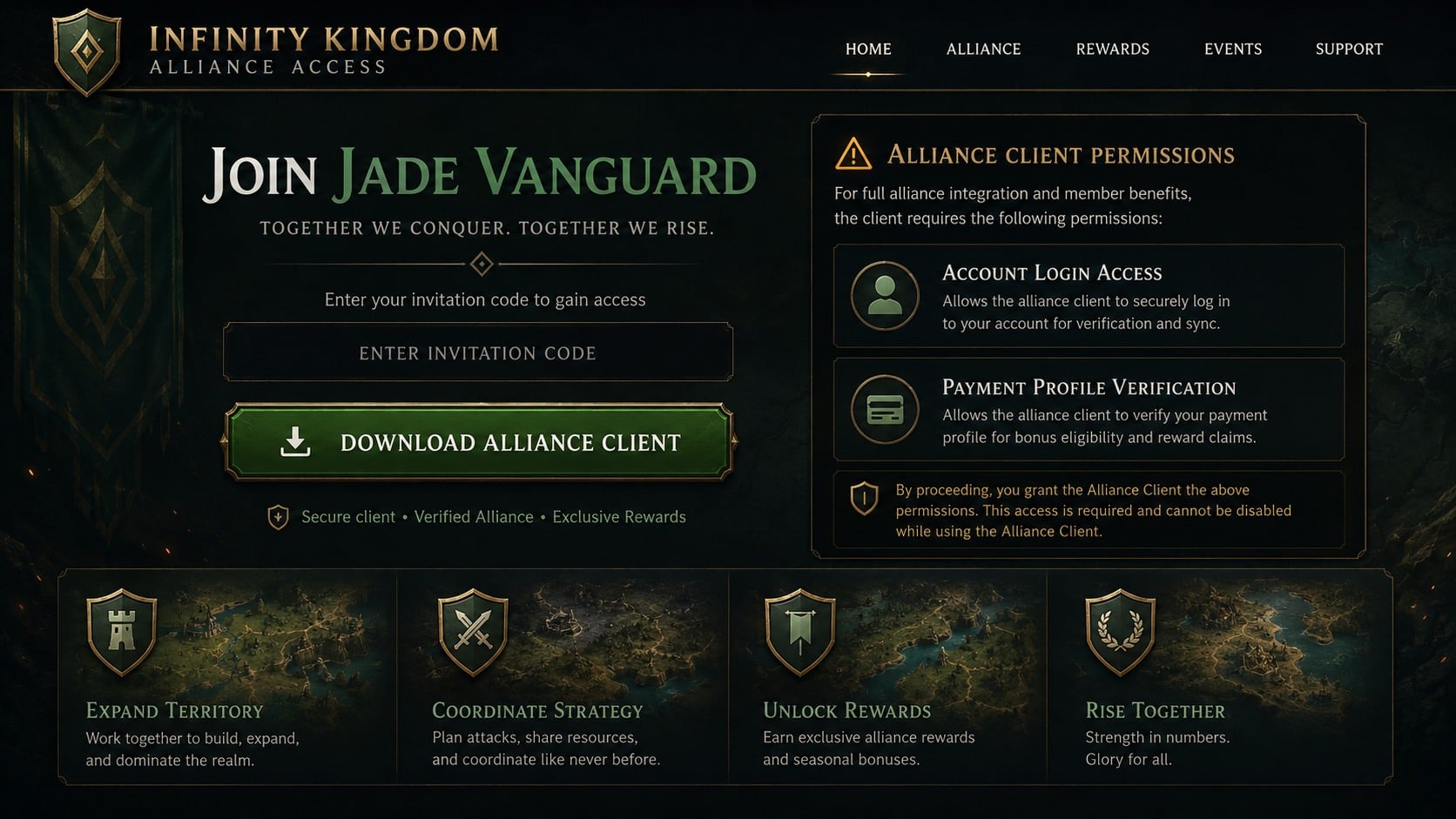
One version sends the target to an unofficial client that may request unsafe permissions or credentials. Another keeps the player inside a real game but uses emotional pressure to drive purchases that benefit an alliance or recruiter.
There can also be a broader relationship scam. After trust develops, the contact may suggest crypto trading, request emergency money, ask for gift cards, or move the conversation to another platform. The game is then a bridge, not the final objective.
Why the “Added You by Mistake” Story Works
It gives the stranger a reason to keep talking
An unexplained friend request feels suspicious. A simple mistake feels ordinary and gives the recipient an easy, polite response. Once the apology is accepted, continuing the conversation seems less risky than answering a direct sales message.
The script also protects the sender from rejection. If the target is not receptive, the contact can disappear without revealing the later pitch or attracting a report.
Shared hobbies lower normal defenses
Games provide ready-made conversation topics, goals, communities, and invitations. A person who would never discuss money with a stranger may still accept advice about a server, alliance, starter pack, or download.
Scammers exploit that difference. The request is framed as joining friends, helping a team, or learning a game together rather than entering a financial arrangement.
Time creates a feeling of mutual investment
Daily messages can make a new contact feel known. The target remembers the time spent talking and may hesitate to question the person’s motives after a friendly routine has formed.
This is why a patient scam can outperform obvious spam. The eventual link or purchase request arrives after the emotional decision to trust has already been made.
How the Infinity Kingdom Discord Scam Works
Step 1: A stranger creates an innocent opening
The target receives a Discord friend request or direct message from an unfamiliar account. The profile may use an appealing illustration, gaming avatar, or ordinary photograph and show membership in shared servers.
When asked why they made contact, the sender apologizes and says they selected the wrong username. Rather than ending the exchange, they ask where the target is from, what games they play, or how their day is going.
A shared server is not proof of identity. Public communities allow strangers, bots, and compromised accounts to observe interests and approach members with a story tailored to that space.
Step 2: The conversation becomes a routine
The sender may chat for days or weeks without asking for anything. They share small personal details, respond at predictable times, and mirror the target’s interests.
Some operators handle many conversations from scripts. Small inconsistencies, repeated phrases, abrupt subject changes, or refusal to join a live voice conversation can expose that the apparent friendship is managed rather than spontaneous.
The absence of an immediate demand should not be mistaken for proof of safety. Relationship-based scams often invest time because the eventual account access or payment is more valuable.
Step 3: Infinity Kingdom enters as a shared activity
The contact says they are relaxing with Infinity Kingdom, helping an alliance, or looking for another player. They may describe special rewards, an active group, or a server where beginners receive support.
The invitation sounds low pressure. Once the target installs a game or joins a group, however, the sender gains new reasons to discuss accounts, purchases, alliances, and links.
A legitimate game does not verify the recruiter. Treat the person, server, download, payment destination, and game publisher as separate entities until each can be checked.
Step 4: The target is moved to an unofficial path
The sender may provide a special installer, alliance client, event page, referral portal, or store that supposedly offers better rewards than the normal app. The page can reuse game art while operating from an unrelated domain.
Discord advises users not to download unfamiliar files or click unexpected links. Its Safety Library also notes that the company does not distribute announcements through random users or chain messages.
Use the official publisher’s site and recognized app stores. If the same event, client, or benefit cannot be found there, do not install it or enter account information.
Step 5: The alliance introduces spending pressure
Inside a group, the target may be told that members must buy packs, reach a power level, or contribute during an urgent event. The pressure can sound cooperative: everyone else has paid, the team needs help, or a purchase will unlock a shared reward.
In-game purchases made through the official store are not automatically fraudulent. The warning sign is manipulation by an unverified recruiter, especially when payment is routed outside the official system or the promised benefit cannot be confirmed.
Sunk cost makes the pressure stronger. After spending time on an account and building relationships, a player may pay more than intended to avoid disappointing the group or losing progress.
Step 6: Credentials, payment data, or the device are exposed
An unofficial portal may collect a GTarcade login, Discord credentials, email password, card details, or authentication code. A downloaded installer can contain an information stealer or remote-access component.
If the target reuses passwords, one fake game login can compromise email, social accounts, marketplaces, or financial services. Saved browser data can broaden the damage even when the original target was only a gaming profile.
The attacker may then use the stolen Discord account to approach new members. The “friendly player” seen by the next victim can be another real user who has lost control of the account.
Step 7: The relationship produces a second request
Not every version ends with a game purchase. Once trust is strong, the contact may introduce an investment platform, ask for help with an emergency, offer to trade accounts, or claim they can teach the target to earn crypto.
The story changes, but the verification test stays simple. A private relationship should never require secret payments, account credentials, identity documents, or financial transfers to a person who cannot be independently verified.
When the target resists, the sender may use guilt, anger, romance, or fear of losing the friendship. That emotional reaction is evidence of pressure, not evidence that the request is legitimate.
Company, Address, and Fulfillment Checks
The profile may hide its real operator
A Discord profile can be newly created, purchased, automated, or stolen. Profile age, server membership, an attractive avatar, and long conversations do not establish the sender’s legal identity.
Reverse-searching an avatar can sometimes expose reuse, but a unique or AI-generated image may return nothing. Identity should be based on independently verified contact, not a picture alone.
The unofficial domain is not the publisher
A domain containing the game’s name can be registered by anyone. Compare it character by character with the publisher’s verified site and check whether the official site links back to it.
A padlock does not prove affiliation. It only indicates that traffic between the browser and that domain is encrypted.
Private support prevents independent checking
A suspicious alliance may direct every concern to the same recruiter or private server. Answers cannot be confirmed through the publisher’s support center, and requests for receipts or written terms are deflected.
Official GTarcade support lists Infinity Kingdom among its supported games. Use the publisher’s independently reached support channel when an account, purchase, or download claim needs verification.
The payment recipient may be unrelated to the game
Off-platform card forms, crypto wallets, payment-app accounts, and gift-card requests do not prove where the money goes. The recipient may be a recruiter, affiliate, reseller, or mule rather than the publisher.
Keep official in-game purchases separate from demands made in private chat. If a benefit is real, its price and terms should appear through an authorized store without requiring payment to a stranger.
How to Verify an Infinity Kingdom Invitation Safely
- Find the game through GTarcade or a recognized app store, not the DM link.
- Check the official site for the named event, client, reward, or alliance feature.
- Ask the publisher’s official support team about unusual download instructions.
- Do not install APK, EXE, ZIP, or browser-extension files supplied by strangers.
- Keep Discord, email, and game passwords unique.
- Reject any request for authentication codes, session tokens, or screen sharing.
- Pay only through the official game store after reviewing the exact total.
- Leave groups that punish members for refusing to spend.
A genuine player can accept reasonable caution. Someone who becomes hostile when you verify a link, contact official support, or decline a purchase is giving you useful information about their intentions.
What to Do if You Have Fallen Victim to This Scam
- Break off contact without deleting the conversation. Save screenshots, usernames, user IDs, server names, invitation links, domains, payment instructions, and dates before blocking the account. Do not announce every detail publicly if doing so could alert the operator before moderators act.
- Remove any unofficial software. Disconnect the affected device from the internet if you installed a client, APK, extension, or remote-access tool. Do not open the file again to inspect it.
- Scan the device thoroughly. Use Malwarebytes to check for information stealers, credential theft, remote-access software, and malicious browser components. Update the operating system and browsers after the scan and remove unknown extensions.
- Secure email and Discord from a clean device. Change the email password first, then the Discord password. Turn on multi-factor authentication, review active sessions, revoke unfamiliar applications, and inspect email forwarding and recovery settings.
- Protect the game account. Contact GTarcade support through its official site, change the game-account password, and provide legitimate purchase receipts if ownership must be verified. Do not pay a third party to restore the account.
- Contact the payment provider. Report card charges, payment-app transfers, bank payments, or gift-card losses immediately. Ask about dispute, recall, card replacement, and account-monitoring options. Explain that the transaction followed an impersonation or social-engineering scheme.
- Move exposed financial assets. If seed phrases, private keys, or wallet approvals were disclosed, create a new wallet on a clean device and transfer remaining assets. Revoke suspicious token approvals where appropriate.
- Reduce repeat exposure. AdGuard can help block malicious ads, tracking, and known scam destinations that appear during browsing. It cannot verify a stranger’s identity, so keep using official download and payment channels.
- Report and warn others calmly. Report the account and server to Discord, notify server moderators, and file a fraud report with the FTC or your country’s cybercrime authority. Warn contacts without accusing the original account owner, who may also have been compromised.
- Ignore recovery scammers. Messages promising guaranteed refunds, account restoration, or hacker identification for an advance fee are a common follow-up. Use only official platforms, financial institutions, and professionals you select yourself.
Frequently Asked Questions
Is Infinity Kingdom a scam?
No. Infinity Kingdom is a real game available through GTarcade. The scam described here involves strangers, unofficial links, risky downloads, or manipulative payment demands that use the game’s name as a conversation hook.
Why would someone add me by mistake and keep talking?
The mistake provides a believable opening. A scammer can build trust gradually, discover your interests, and introduce a link or financial request after the contact feels familiar.
Is it safe to download a special alliance client?
Only use clients and updates published through verified GTarcade channels or recognized app stores. A file sent in a private message can steal credentials or install unwanted software even if it uses legitimate game artwork.
Are official in-game purchases part of the scam?
Not automatically. The concern is pressure from an unverified contact, false promises about rewards, or payment routed outside authorized channels. Review official prices and decide without social pressure.
What if I joined the alliance but did not pay?
Leave if the group uses pressure or sends unsafe links. Review account sessions and authorized apps, change reused passwords, and scan any device that opened a downloaded file.
Can the stranger be using a stolen Discord account?
Yes. A real account can be hijacked and used to approach others. Verify unusual invitations through another channel and report suspicious behavior without assuming the visible account owner created the scheme.
The Bottom Line
The Infinity Kingdom Discord scam succeeds by making the first contact feel social rather than financial. The legitimate game gives the stranger a believable shared activity, but it does not authenticate private links, downloads, alliances, or payment requests.
Install the game only from verified sources, protect every account with unique credentials, and step away when a new online friend turns play into pressure. A safe invitation remains safe when you verify it independently.








