€2.5 Million Compensation Program Email Scam Exposed: UN and IMF Fraud
Written by: Lapain Epuran
Published on:
A message promising compensation for people harmed by earlier fraud can sound like an overdue chance to recover what was taken.
The official language and enormous figure invite hope, but the sender’s story needs evidence before it deserves trust.
Overview
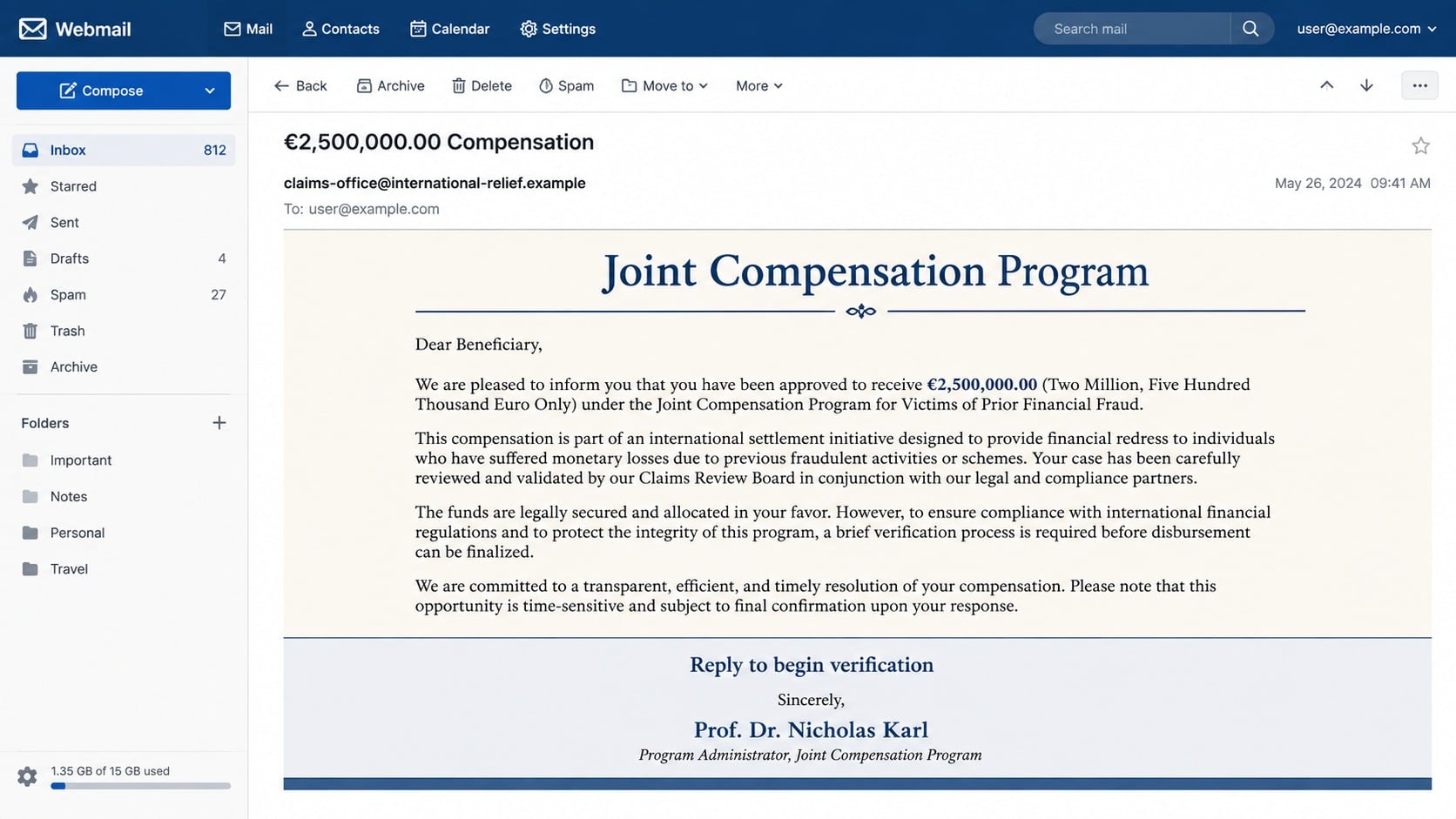
The email offers €2,500,000 through a supposed international program
The message claims the recipient was selected for compensation administered jointly by the United Nations and International Monetary Fund.
It presents €2,500,000 as relief for people affected by cryptocurrency fraud, advance-fee schemes, or other Internet losses.
The sender uses institutional language, legal references, and an impressive title to make an unsolicited award appear official.
The recipient receives a life-changing award without filing a verified claim or participating in a documented proceeding.
The email invokes the United Nations, IMF, European law, and a supposed professor to manufacture authority.
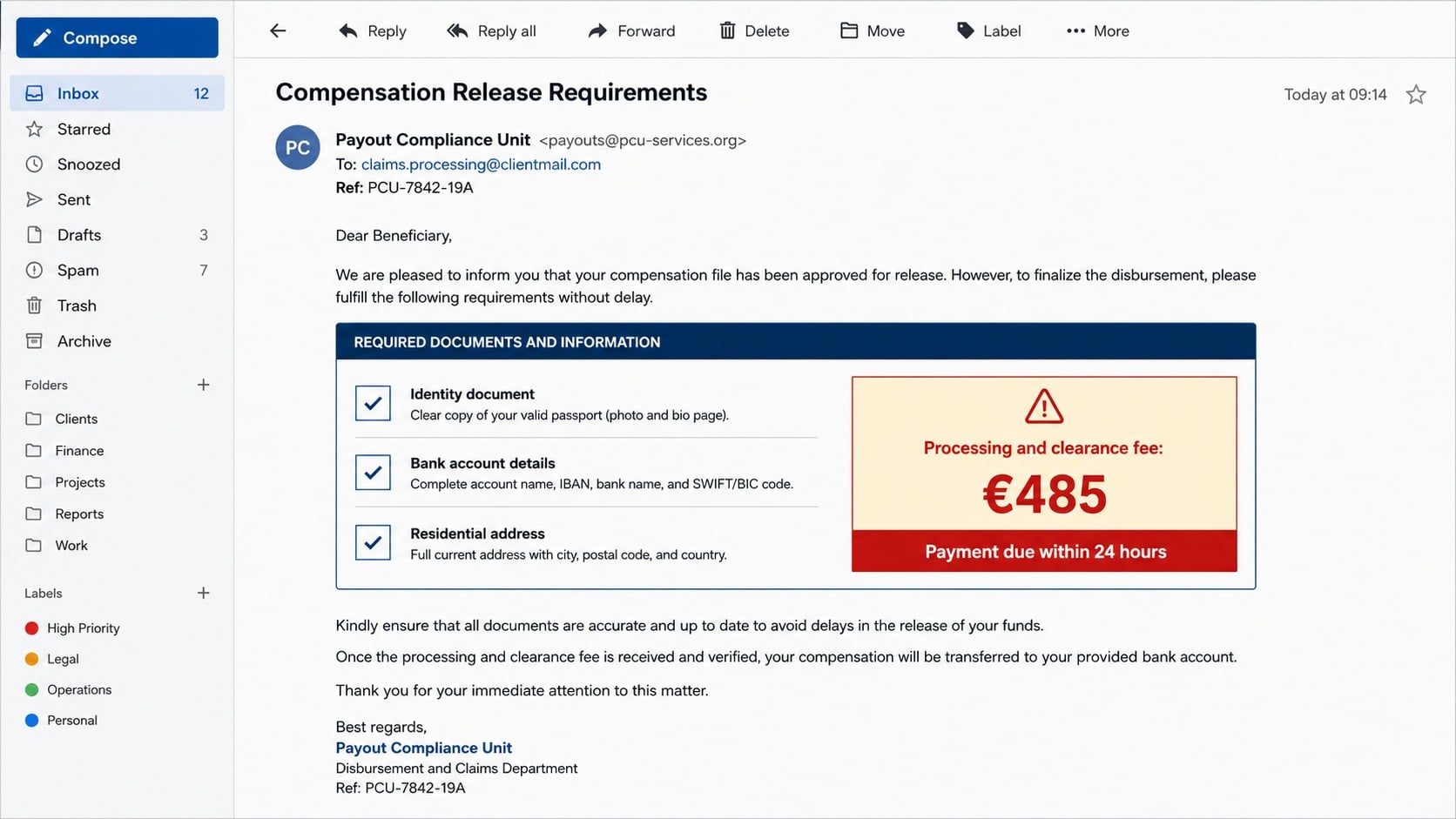
Replies can lead to requests for identity documents, bank details, signatures, and increasingly urgent fees.
No genuine compensation is waiting, and each payment only prepares the next demand.
The named organizations reject this kind of offer
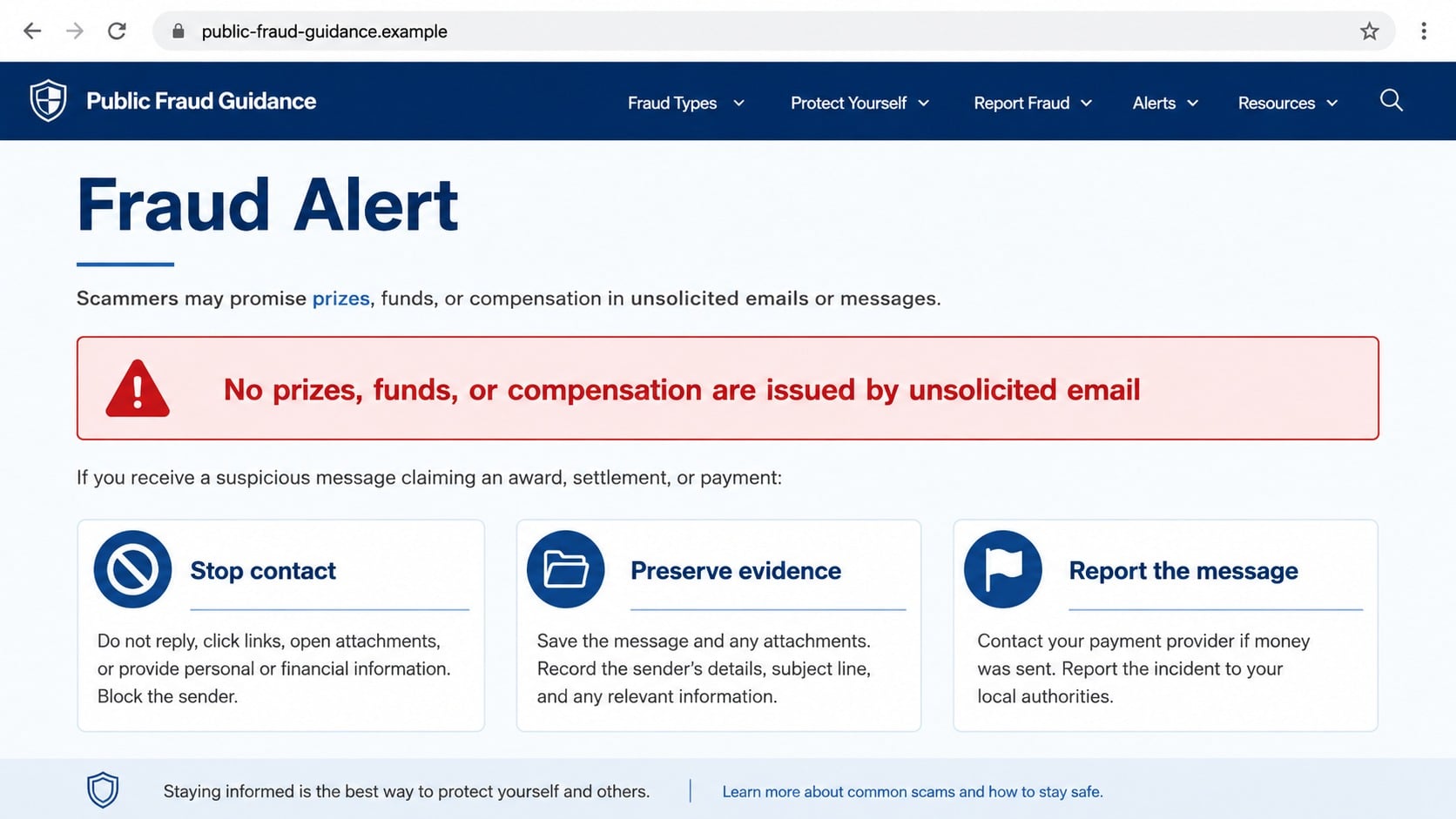
The United Nations warns that it does not offer prizes, funds, certificates, or compensation for Internet fraud through unsolicited messages.
It also advises people not to provide bank details or other private information in response to such communications.
A real institution does not prove a specific email is real merely because its name and emblem appear inside it.
This is a recovery scam aimed at hope and prior loss
Recovery fraud often targets people who already lost money, because their contact details may circulate among criminal groups.
The new operator promises restitution, then invents taxes, clearance costs, insurance, certificates, or administrative charges.
Victims can be drawn into repeated payments because stopping feels like abandoning both the promised award and earlier losses.
The False Story Behind the Compensation Offer
One version uses a subject resembling “€2.500.000,00 Compensation” and introduces a supposed international relief program.
The unusual punctuation and formatting may reflect copied templates or regional number styles.
More important, the email never explains a verifiable claim number, public program page, formal eligibility process, or court decision tied to the recipient.
The story appoints a person called “Prof. Dr. Nicholas Karl” as a representative or payment official.
A name paired with academic titles can sound credible even when the recipient has no independent way to verify that role.
The message may mention Article 47 of the Charter of Fundamental Rights of the European Union.
That article concerns the right to an effective remedy and a fair trial.
It does not create a hidden €2,500,000 email compensation fund or authorize strangers to distribute awards.
Legal citations are often included because most recipients will recognize the format but will not look up the actual provision.
The scammer relies on the visual weight of a law number, not its relevance.
The United Nations Compensation Commission is another name sometimes borrowed by unrelated recovery schemes.
That commission closed and did not make direct payments to individuals through unsolicited agents.
A sender may combine several genuine institutions into one fictional arrangement.
The mixture feels international and difficult to challenge, while responsibility remains conveniently vague.
How the Compensation Program Email Scam Works
Step 1: Criminals identify a receptive audience
Messages may be sent widely, but previous scam victims are especially valuable targets.
Names, email addresses, payment histories, and notes about earlier interactions can be resold between fraud groups.
The recipient may therefore receive a surprisingly specific reference to cryptocurrency loss, a fake broker, or an advance-fee payment.
That specificity can come from criminal data sharing, not an official investigation.
Step 2: An enormous award changes the emotional frame
The email announces €2,500,000 or another implausibly large amount before explaining any legitimate claims process.
Hope can temporarily overpower questions about why the recipient was selected.
The sender may add a deadline, confidentiality request, or warning that the file will close without a response.
Urgency prevents the victim from seeking outside advice.
United Nations and IMF names, flags, seals, legal language, and formal signatures decorate the message.
These elements are freely available online and can be copied into any email.
The reply address usually belongs to a free-mail provider or unrelated domain rather than an official institution.
Some scammers spoof the visible sender, making full header review important.
Step 4: The recipient is asked to establish a claim
The supposed official requests a full name, address, telephone number, occupation, nationality, identification copy, and banking information.
Each answer makes the invented file more detailed and exposes material useful for identity theft.
The scammer may send a certificate, approval letter, claim form, or payment schedule assembled from official-looking templates.
Professional formatting cannot substitute for an independently verifiable case.
Step 5: A modest fee appears before release
After the victim accepts the award, a smaller obstacle suddenly blocks payment.
The sender may call it a transfer authorization, anti-money-laundering certificate, courier cost, tax, insurance premium, or administrative charge.
The amount seems manageable beside €2,500,000, which makes paying it feel rational.
Payment may be demanded through wire transfer, cryptocurrency, gift cards, or another difficult-to-reverse method.
Step 6: Every payment reveals another obstacle
A second official may claim customs, a correspondent bank, or a compliance department requires more money.
Documents become more elaborate while the release date keeps moving.
This shifting sequence is deliberate.
There is no final clearance because the promised fund never existed.
Step 7: Recovery pressure can continue after refusal
When the victim hesitates, the operator may threaten forfeiture, legal penalties, account freezing, or public disclosure.
Another criminal may later offer to recover the fees lost to the first recovery scam.
That follow-up repeats the same structure under a new identity.
Ending contact and reporting every approach is safer than negotiating for a final payment date.
Institution, Identity, Payment, and Address Checks
Ignore seals and verify the program independently
Search the named organization’s official website from a separately opened browser tab.
Look for the exact program, eligibility rules, public announcements, application procedure, and verified contact directory.
The United Nations explicitly warns that it does not distribute Internet-fraud compensation through this kind of unsolicited communication.
A private email cannot override that public warning.
Test the legal citation instead of admiring it
Look up the cited law in an official legal database and read what it actually covers.
Article 47 protects access to an effective remedy and fair trial.
It does not name the recipient, establish an award, or instruct an unknown agent to collect banking information.
An irrelevant citation is decoration designed to discourage questions.
Examine the person, domain, and physical address
Search the claimed official in the institution’s staff directory, not through links or attachments sent by that person.
Check whether the email domain belongs to the organization and whether the reply address changes during the exchange.
Scammers may list an international headquarters, virtual office, unrelated residence, mail drop, or genuine building they do not occupy.
A prestigious address proves nothing unless the organization confirms the individual and case through an established channel.
Reject every advance payment and secret route
A legitimate restitution process documents deductions and disbursement through accountable procedures.
It does not require gift cards, cryptocurrency, personal wire transfers, or fees sent to a supposed employee.
Do not accept a check and forward part of it to another party.
Counterfeit deposits can appear temporarily before the bank reverses them, leaving the account holder responsible.
Why Previous Victims Are Contacted Again
A person who reports an earlier loss may expect officials, banks, or investigators to make contact.
Recovery scammers imitate that expected outreach while skipping the safeguards of a real case.
Criminal lead lists can record who answered, how much they paid, which story persuaded them, and whether relatives intervened.
That information allows the next operator to sound informed and sympathetic.
The new message may mention a genuine company used in the original fraud.
It may also claim that seized criminal assets, a class action, or an international fund now covers the loss.
The victim’s prior experience supplies emotional credibility the sender has not earned.
Shame can make the situation worse.
Someone who lost money once may avoid telling family or a bank about a promised recovery.
Secrecy leaves the scammer free to control the story.
Sunk-cost pressure develops after the first fee.
Each additional charge seems like the final step needed to rescue both the award and the money already paid.
Stopping is not a failure.
It is the action that prevents the operator from converting hope into further losses.
Real recovery options begin with the payment provider, bank, relevant regulator, police report, or documented legal proceeding.
No honest helper needs secrecy or an advance payment through an irreversible channel.
Victims should also be cautious with online recovery companies that guarantee results or claim special access to blockchain funds.
A guarantee is especially suspect when the company has not reviewed transaction evidence or explained its legal authority.
How Legitimate Restitution Differs From the Email
A real restitution process begins with a traceable authority, published case, eligibility rules, and formal method for submitting a claim.
Potential claimants can confirm the process through public records without depending on one stranger’s private instructions.
A genuine notice explains appeal rights, deadlines, privacy handling, and the official office responsible for questions.
It does not punish a recipient for speaking with family, a lawyer, a bank, or law enforcement.
Compensation amounts normally relate to documented losses, legal findings, available funds, and a defined distribution formula.
An identical €2,500,000 award for an unknown recipient ignores every part of that process.
Fees are another decisive difference.
A legitimate authority does not route clearance charges to personal accounts, cryptocurrency wallets, gift cards, or money-transfer recipients.
When uncertain, ask the named institution for written confirmation using contact details found independently.
If no public program or case exists, do not send identification merely to learn what happens next.
Silence is safer than testing whether an invented claims officer can provide one more convincing answer.
What to Do if You Have Fallen Victim to This Scam
End all communication. Block the sender and do not argue, threaten, or pay a final charge to close the supposed case.
Contact the payment provider. Ask the bank, card issuer, transfer service, gift-card company, or cryptocurrency exchange about immediate recovery options.
Do not trust a returned deposit. If a check was involved, tell the bank it may be counterfeit before spending or forwarding any funds.
Protect exposed banking access. Replace compromised credentials, review beneficiaries, enable alerts, and ask the bank whether account numbers should change.
Secure your email. Change reused passwords, end unknown sessions, enable multifactor authentication, and inspect forwarding and recovery settings.
Address identity exposure. If identification was shared, place appropriate fraud alerts or credit freezes and monitor new-account activity.
Save the evidence. Preserve messages, headers, documents, telephone numbers, payment receipts, wallet addresses, account details, and the full conversation timeline.
Report impersonation. Notify the genuine institution through its official fraud channel and report the case to national authorities.
Tell someone you trust. A second person can spot new demands and help separate genuine recovery steps from continued manipulation.
Check the device. Run Malwarebytes if files or links were opened, and use AdGuard to reduce exposure to known scam destinations.
Expect another approach. Treat unsolicited lawyers, investigators, hackers, or refund agents referencing this loss as high risk.
Reject guaranteed recovery. Do not pay anyone who promises certain results, secret access, or priority release of frozen funds.
Is Your Device Infected? Run a Free Malware Scan
Slow performance, constant pop-ups, or strange behavior? These are classic signs of a malware infection. The fastest way to find out is to scan your device with Malwarebytes Anti-Malware Free — one of the most trusted malware removal tools available.
The free version detects and removes the most common threats, including:
Adware — the cause of those annoying pop-ups
Browser hijackers — unwanted redirects and changed homepages
Trojans and spyware — hidden programs stealing your data
Potentially unwanted programs (PUPs) — software you never asked for
👉 Select your device below — Windows, Mac, or Android — then follow the simple steps to download Malwarebytes, scan your system, and remove any threats it finds. The whole process takes about 5 minutes.
Malwarebytes for WindowsMalwarebytes for MacMalwarebytes for Android
Run a Malware Scan with Malwarebytes for Windows
Malwarebytes is one of the most popular and trusted anti-malware tools for Windows — and it’s completely free for removing infections. It catches threats that many antivirus programs miss, including adware, browser hijackers, and trojans. Follow the steps below to scan and clean your PC in just a few minutes.
Download Malwarebytes
Click the button below to download the latest version of Malwarebytes for Windows from the official source. The free version is all you need — it will scan your computer and remove adware, browser hijackers, and other malicious software at no cost.
(The link opens in a new page where your download will start)
Install Malwarebytes
When the download finishes, open your Downloads folder and double-click the MBSetup file. If Windows shows a User Account Control pop-up, click “Yes” to allow the installation.
Follow the On-Screen Prompts to Install Malwarebytes
The setup wizard will walk you through a few quick screens:
Choose where you’re installing the program — “Personal Computer” or “Work Computer” — then click Next.
Malwarebytes will now install on your device. This usually takes under a minute.
When installation is complete, the “Welcome to Malwarebytes” screen will open automatically.
On the final screen, click Open Malwarebytes to launch the program.
Enable “Scan for Rootkits”
Before scanning, turn on rootkit detection so Malwarebytes can find even the most hidden threats. Click the Settings gear icon on the left side of the screen.
In the settings menu, find “Scan for rootkits” and click the toggle so it turns blue.
Done? Click “Dashboard” in the left pane to return to the main screen.
Start the Scan
Click the blue Scan button. Malwarebytes will automatically update its virus database and start checking your computer for malware.
Wait for the Scan to Finish
The scan checks your entire system for browser hijackers and other malicious programs, so it can take several minutes. Feel free to do something else — just check back occasionally to see the progress.
Quarantine the Detected Threats
When the scan is done, you’ll see a list of everything Malwarebytes found — malware, adware, and potentially unwanted programs. Click the “Quarantine” button to remove all of them at once.
Malwarebytes will now remove the malicious files and registry entries and move them safely into quarantine.
Restart Your Computer
Some threats can only be fully removed after a reboot. If Malwarebytes asks you to restart, click Yes. Once you’re logged back in, your PC is clean and you can continue with the next steps in this guide.
When the scan finishes, click Quarantine to remove everything Malwarebytes found. That’s it — your Windows PC is now clean of trojans, adware, and other malware, and should be back to running smoothly.
If your current antivirus allowed this malicious program on your computer, you may want to consider purchasing Malwarebytes Premium to protect against these types of threats in the future. If you are still having problems with your computer after completing these instructions, then please follow one of the steps:
Malwarebytes for Mac is a free on-demand scanner that removes the malware other security software tends to miss — adware, browser hijackers, and unwanted programs included. Cleaning an infected Mac with Malwarebytes has always been completely free, and it’s our go-to recommendation. Follow the steps below to scan and clean your Mac in just a few minutes.
Download Malwarebytes for Mac
Click the button below to download the latest version of Malwarebytes for Mac.
When the download finishes, open your Downloads folder and double-click the setup file to begin the installation.
Follow the On-Screen Prompts to Install Malwarebytes
The Malwarebytes for Mac Installer will guide you through a few quick screens. Click “Continue” and keep following the prompts until the installation completes.
When the installation is complete, Malwarebytes opens to the Welcome to Malwarebytes screen. Click “Get started“.
Select “Personal Computer” or “Work Computer”
Malwarebytes will ask what type of computer you’re installing it on. Click either Personal Computer or Work Computer, whichever applies.
Start the Scan
Click the “Scan” button. Malwarebytes will automatically update its detection database and begin checking your Mac for malware.
Wait for the Scan to Finish
Malwarebytes will scan your Mac for adware, browser hijackers, and other malicious programs. This can take a few minutes, so feel free to do something else — just check back occasionally to see the progress.
Quarantine the Detected Threats
When the scan is done, you’ll see a list of everything Malwarebytes found. Click the “Quarantine” button to remove all the threats at once.
Restart Your Mac
Malwarebytes will now remove all the malicious files it found. Some threats can only be fully removed after a reboot — if Malwarebytes asks you to restart, allow it. Once you’re logged back in, your Mac is clean.
Once the scan is done, remove every threat it detected. Your Mac is now free of adware, rogue browser extensions, and other potentially harmful software.
If your current antivirus allowed a malicious program on your computer, you might want to consider purchasing the full-featured version of Malwarebytes Anti-Malware to protect against these types of threats in the future. If you are still experiencing problems while trying to remove a malicious program from your computer, please ask for help in our Mac Malware Removal Help & Support forum.
Run a Malware Scan with Malwarebytes for Android
Malwarebytes for Android automatically detects and removes dangerous threats like malware and ransomware so you don’t have to worry about your most-used device being compromised. Aggressive detection of adware and potentially unwanted programs keeps your Android phone or tablet running smooth.
Download Malwarebytes for Android.
You can download Malwarebytes for Android by clicking the link below.
In the Google Play Store, tap “Install” to install Malwarebytes for Android on your device.
When the installation process has finished, tap “Open” to begin using Malwarebytes for Android. You can also open Malwarebytes by tapping on its icon in your phone menu or home screen.
Follow the on-screen prompts to complete the setup process
When Malwarebytes will open, you will see the Malwarebytes Setup Wizard which will guide you through a series of permissions and other setup options. This is the first of two screens that explain the difference between the Premium and Free versions. Swipe this screen to continue. Tap on “Got it” to proceed to the next step. Malwarebytes for Android will now ask for a set of permissions that are required to scan your device and protect it from malware. Tap on “Give permission” to continue. Tap on “Allow” to permit Malwarebytes to access the files on your phone.
Update database and run a scan with Malwarebytes for Android
You will now be prompted to update the Malwarebytes database and run a full system scan.
Click on “Update database” to update the Malwarebytes for Android definitions to the latest version, then click on “Run full scan” to perform a system scan.
Wait for the Malwarebytes scan to complete.
Malwarebytes will now start scanning your phone for adware and other malicious apps. This process can take a few minutes, so we suggest you do something else and periodically check on the status of the scan to see when it is finished.
Click on “Remove Selected”.
When the scan has been completed, you will be presented with a screen showing the malware infections that Malwarebytes for Android has detected. To remove the malicious apps that Malwarebytes has found, tap on the “Remove Selected” button.
Restart your phone.
Malwarebytes for Android will now remove all the malicious apps that it has found. To complete the malware removal process, Malwarebytes may ask you to restart your device.
After the scan, tap Remove Selected to delete all detected threats. Your Android phone is now clean — no more malicious apps, adware, or browser redirects.
If your current antivirus allowed a malicious app on your phone, you may want to consider purchasing the full-featured version of Malwarebytes to protect against these types of threats in the future. If you are still having problems with your phone after completing these instructions, then please follow one of the steps:
Restore your phone to factory settings by going to Settings > General management > Reset > Factory data reset.
Now that your device is clean, keep it that way. Most infections start with a malicious ad or a fake download button — so blocking them at the source is your best defense.
We recommend AdGuard, which blocks malicious ads, phishing pages, and dangerous redirects before they can reach you.
Does the United Nations compensate Internet fraud victims by email?
No.
The organization warns that it does not offer unsolicited compensation, prizes, funds, or certificates for this purpose.
Messages claiming otherwise misuse its identity.
What does Article 47 actually mean?
It concerns the right to an effective remedy and a fair trial within European Union law.
It is not a payment authorization and does not create the program described by the email.
Why does the sender know about my previous loss?
Your details may have been shared or sold by an earlier scam operation.
They might also come from data breaches, public complaints, or information you entered on a recovery website.
Can I pay one fee and receive the award?
No genuine award exists in this scheme.
Paying demonstrates willingness and usually produces another invented charge.
Stop before the sequence grows.
Is a certificate with signatures and seals proof?
No.
Logos, stamps, signatures, passports, and official-looking letters are easily copied or fabricated.
Verification must come directly from the named institution through a trusted channel.
Can a cryptocurrency recovery expert reverse my transfer?
Blockchain transactions are generally difficult to reverse, and guaranteed recovery claims are dangerous.
Report the wallet to the exchange and authorities, but never pay an unsolicited expert for secret retrieval tools.
The Bottom Line
The €2,500,000 Compensation Program email exploits earlier pain with a fictional award, borrowed institutions, irrelevant law, and escalating advance fees.
No payment unlocks the promised fund, so end contact, secure exposed information, report the loss, and distrust anyone offering guaranteed recovery.
10 Rules to Avoid Online Scams
Here are 10 practical safety rules to help you avoid malware, online shopping scams, crypto scams, and other online fraud. Each tip includes a quick “if you already got hit” action.
Stop and verify before you click, log in, download, or pay.
Most scams win by creating urgency. Verify using a trusted method: type the website address yourself, use the official app, or call a known number (not the one in the message).
If you already clicked: close the page, do not enter passwords, and run a malware scan.
Keep your operating system, browser, and apps updated.
Updates patch security holes used by malware and malicious ads. Turn on automatic updates where possible.
If you saw a scary “update now” pop-up: close it and update only through your device settings or the official app store.
Use layered protection: antivirus plus an ad blocker.
Antivirus helps block malware. An ad blocker reduces scam redirects, phishing pages, and malvertising.
If your browser is acting weird: remove unknown extensions, reset the browser, then run a full scan.
Install apps, software, and extensions only from official sources.
Avoid cracked software, “keygens,” and random downloads. During installs, choose Custom/Advanced and decline bundled offers you do not recognize.
If you already installed something suspicious: uninstall it, restart, and scan again.
Treat links and attachments as untrusted by default.
Phishing often impersonates delivery services, banks, and popular brands. If it is unexpected, do not open attachments or log in through the message.
If you entered credentials: change the password immediately and enable 2FA.
Shop safely: research the store, then pay with protection.
Be cautious with brand-new stores, “closing sale” stories, and prices that make no sense. Prefer credit cards or PayPal for dispute options. Avoid wire transfers, gift cards, and crypto payments.
If you already paid: contact your card issuer or PayPal quickly to dispute the transaction.
Crypto rule: never pay a “fee” to withdraw or recover money.
Common patterns include fake profits, then “tax,” “gas,” or “verification” fees. Another is a “recovery agent” who demands upfront crypto.
If you already sent crypto: stop paying, save evidence (wallet addresses, TXIDs, chats), and report the scam to the platform used.
Secure your accounts with unique passwords and 2FA (start with email).
Use a password manager and unique passwords for every account. Enable 2FA using an authenticator app when possible.
If you suspect an account takeover: change passwords, sign out of all devices, and review recent logins and recovery settings.
Back up important files and keep one backup offline.
Backups protect you from ransomware and device failure. Keep at least one backup on an external drive that is not always connected.
If you suspect infection: do not connect backup drives until the system is clean.
If you think you are a victim: stop losses, document evidence, and escalate fast.
Move quickly. Speed matters for disputes, account recovery, and limiting damage.
Stop payments and contact: do not send more money or respond to the scammer.
Call your bank or card issuer: block transactions, replace the card if needed, and start a dispute or chargeback.
Secure your email first: change the email password, enable 2FA, and remove unfamiliar recovery options.
Secure other accounts: change passwords, enable 2FA, and log out of all sessions.
Scan your device: remove suspicious apps or extensions, then run a full malware scan.
Save evidence: screenshots, emails, order pages, tracking pages, wallet addresses, TXIDs, and chat logs.
Report it: to the payment provider, marketplace, social platform, exchange, or wallet service involved.
These rules are intentionally simple. Most online losses happen when decisions are rushed. Slow down, verify independently, and use payment methods and account controls that give you recourse.
Hello! I'm Lapain Epuran, your go-to source for detailed and honest product reviews. From tech gadgets to miracle cures, I provide insights to help you make informed choices. Join me as we discover what's truly worth your time and money.