Fake Aironox Stores Exposed: Real Product, Copycat Websites and Refund Risk
Written by: Lapain Epuran
Published on:
An automatic machine that dries and smooths a shirt while you do something else sounds genuinely useful. That promise has drawn shoppers toward several Aironox-branded websites.
The difficulty begins when nearly identical names, confident guarantees, conflicting policies, and sharply divided customer reports appear around what looks like one simple appliance.
Overview
Aironox is a physical garment-care appliance, not an imaginary invention
The machine resembles an inflatable shirt dryer. Warm air fills a garment-shaped bag, stretching damp fabric while drying it over several minutes.
That basic product category has existed for years under many brands. A working unit can reduce light wrinkles, especially on damp shirts prepared carefully.
It is not the same as a conventional iron pressing collars, cuffs, seams, pleats, and stubborn creases against a firm surface.
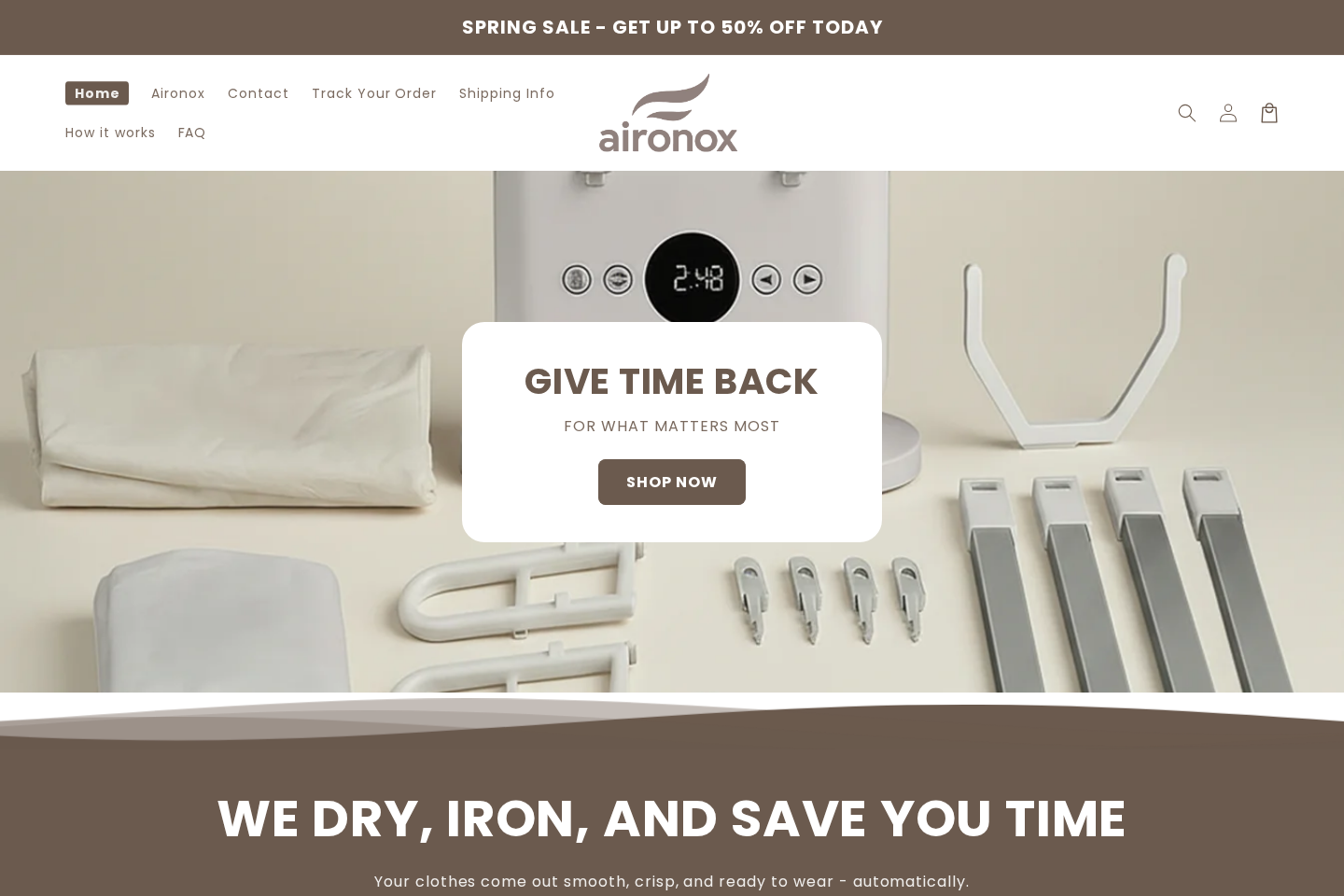
The reviewed Aironox.com page sells HOME and GO models, plus accessories. It claims hands-free drying and smoothing, with bundles priced through prominent discounts.
The advertising creates expectations the hardware may not meet
Aironox marketing repeatedly uses phrases such as wrinkle-free, automatically irons, professional results, and no iron needed.
Those statements can suggest a finished, sharply pressed result. The underlying process is closer to heated air shaping than traditional pressure ironing.
Some buyers may find that convenient for everyday shirts. Others may still need an iron for heavier cotton, trousers, dress details, or a crisp finish.
That distinction should be visible before checkout, not discovered after an expensive international delivery.
Lookalike domains make an already risky purchase harder to evaluate
Aironox.com states that it is the official website. Meanwhile, Aironoxofficial.com uses the same name and broadly similar appliance imagery.
The second site identifies a different operator, 40NPARIS, an address in Montmorency, France, and a Proton Mail contact address.
That does not prove the second seller is committing fraud. It does prove shoppers cannot treat every Aironox-branded domain as one company.
The central warning signs are easy to scan:
Several domains use the Aironox name and similar product photographs.
Company names and contact addresses differ between those domains.
Sale banners present steep savings without a stable reference price.
Guarantee details vary by bundle, region, and seller.
Some buyers report delays, missing accessories, unsuitable plugs, or refund trouble.
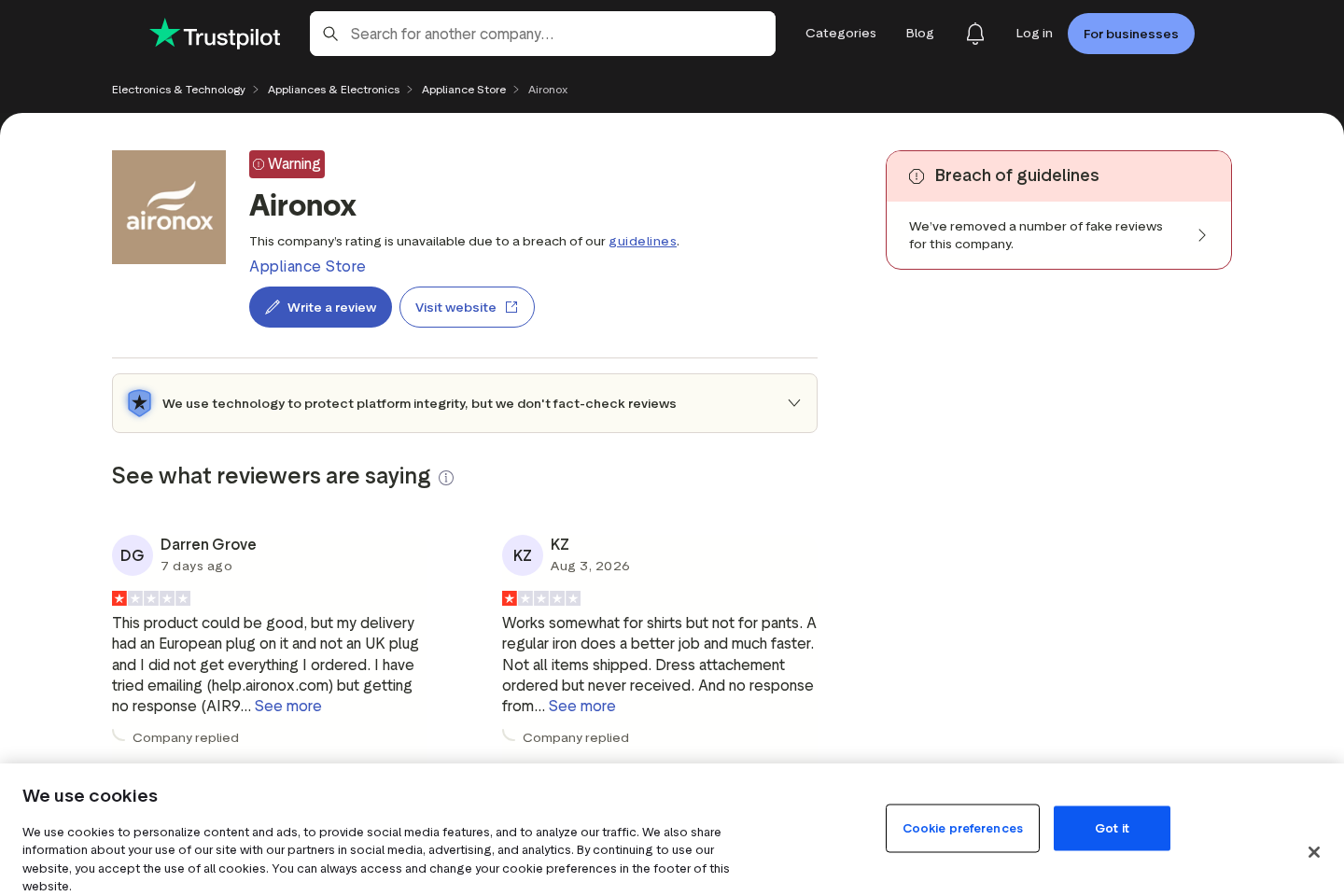
Trustpilot currently withholds Aironox.com’s rating after removing fake reviews.
The machine smooths through airflow, not pressure against an ironing plate.
A return may require authorization and tracked international shipping.
What the Aironox Machine Can Realistically Do
A garment dryer can be useful when the buyer understands its limits. Damp clothing is placed over an inflatable form, then warm air expands the fabric.
The tension and airflow may soften ordinary wrinkles as moisture leaves. Results depend on fabric, starting dampness, garment positioning, cycle length, and machine temperature.
Thin shirts usually respond better than structured jackets. Heavy seams, collars, pockets, and creased trousers often need direct pressure afterward.
Setup also consumes time. The user must assemble the supports, dress the form, fasten the garment, choose settings, then remove everything after cooling.
For several shirts, a conventional iron or steamer may be faster. For one shirt while preparing breakfast, hands-free operation may feel convenient.
Neither experience proves every advertisement accurate or every unit worthless. It shows why practical demonstrations should include setup and untouched final results.
Watch for clips that jump from a visibly wrinkled shirt to a perfect result without showing the complete cycle. Editing can hide manual finishing.
Also compare the pictured accessories with the written bundle list. A dress attachment, shoe attachment, adapter, or storage piece may cost extra.
Voltage and plug type matter with heated appliances. A European plug delivered to a North American or British buyer is not a cosmetic inconvenience.
Using an unsuitable adapter can introduce heat, grounding, and current risks. Confirm the voltage, frequency, plug, and certification for your destination before ordering.
How the Fake Aironox Store Scheme Works
Step 1: A polished social advertisement sells time, not machinery
The opening video rarely discusses wattage, build quality, warranty service, or the exact fabrics tested.
Instead, it shows an effortless morning. A shirt becomes smooth while the owner eats, works, packs, or relaxes nearby.
This lifestyle framing makes the device feel like relief from a hated chore. Convenience becomes more memorable than specifications.
Step 2: The click reaches a branded page with a dramatic discount
The landing page displays a crossed-out price, an urgent sale, reassuring reviews, and a large guarantee badge.
A quiz or coupon can appear immediately. Once a shopper earns a personal discount, leaving may feel like wasting something already gained.
Countdowns and seasonal banners can reset on later visits. A constantly available deadline is a sales device, not proof of dwindling stock.
Step 3: Similar names blur the identity of the seller
A shopper remembers Aironox but may not remember whether the address ended in .com, used “official,” or came from a social-media redirect.
That small difference can change the merchant, contract, support inbox, return address, and payment descriptor.
Search results may place the sites beside one another. Familiar imagery encourages the assumption that they are regional branches of one brand.
Step 4: The offer bundles attachments and protection
The purchase path may add accessories, shipping upgrades, longer guarantees, or multiple machines.
Preselected items and visually stronger bundle cards can lift the total above the headline price.
Read the itemized order summary. A claimed free attachment may be included only with a larger package.
Step 5: Delivery and performance problems create a difficult return
Complaints describe long waits, incomplete deliveries, plug mismatches, unclear tracking, faulty units, and performance below the advertisement’s promise.
These are customer allegations, not proof that every order fails. Their concentration still makes documentation important from the day payment occurs.
A seller may require an RMA number before accepting a parcel. Returning a bulky appliance with tracking can be expensive.
Support from one Aironox domain may have no authority over an order placed through another similarly named website.
A bank dispute can also fail if the buyer presents screenshots from the wrong seller’s policy.
The decisive evidence is the checkout domain, receipt, card descriptor, confirmation email, and policy saved at purchase time.
Review Warnings and Customer Complaints
Review platforms can reveal patterns, but they do not verify every individual story. Treat each complaint as an allegation unless supporting records are available.
Repeated themes still matter. Delivery delays, missing accessories, unsuitable plugs, weak results, and refund friction describe risks a prospective buyer can investigate.
A current Trustpilot warning deserves particular attention. The platform says Aironox.com’s rating is unavailable following a guideline breach and removal of fake reviews.
That notice does not establish who submitted each review. It does undermine confidence in using the displayed review profile as uncomplicated proof of satisfaction.
Buyers should compare review dates with domain history, product launches, and policy changes. A sudden cluster of polished praise deserves additional scrutiny.
Look for photographs showing the delivered plug, attachments, packaging, serial label, and complete machine. Specific evidence is more useful than generic approval.
Negative reviews also require context. Confirm whether the buyer used Aironox.com, Aironoxofficial.com, a marketplace listing, or an unrelated seller using similar imagery.
Mixing complaints from different operators can produce an unfair conclusion. Separating each domain makes the investigation sharper and more defensible.
Search the exact checkout descriptor and customer-service email, not only the product name. Those identifiers often connect experiences to the responsible seller.
Finally, examine how the company responds. Detailed resolutions reveal more than defensive replies that blame every problem on misuse or the courier.
Trustpilot currently marks the Aironox.com profile with a warning. The platform says the company’s rating is unavailable after a breach of its guidelines.
The visible notice specifically says a number of fake reviews were removed. That finding concerns review integrity, not the mechanical existence of the product.
The same page shows a strong concentration of one-star reviews. Review platforms contain allegations and should be weighed alongside receipts, responses, and policies.
Recurring complaints mention orders not arriving, delayed shipping, unanswered messages, missing components, refund delays, and machines that did not meet expectations.
There are also favorable and mixed accounts. Some reviewers say the device smooths shirts adequately once they understand assembly and garment positioning.
That mixed record supports a precise conclusion. Aironox is not merely a fictional picture, but buying it involves substantial seller and fulfillment risk.
The official page has changed its presentation over time. Earlier material advertised a 30-day satisfaction period, while current language describes selected 60-day bundles.
A changing policy is not automatically deceptive. It means an old screenshot or review cannot define the terms attached to a new order.
Save the exact product page and guarantee language before paying. Do not depend on a generic badge after a dispute starts.
The current refund policy says customers should request authorization and receive a region-specific return address. It also distinguishes faulty goods from changed-mind returns.
For ordinary returns, the buyer may lose original shipping and pay tracked return postage. Missing bundle components can reduce the refund.
These conditions can materially change the value of a “risk-free” promise, especially for a large machine shipped across borders.
Company, Address, and Fulfillment Checks
The brand name does not identify one legal seller
Aironox.com provides help@aironox.com and calls itself the only official website in responses to customer reviews.
Aironoxofficial.com names 40NPARIS, lists a French street address, and uses aironoxofficial@proton.me. Those are plainly different seller disclosures.
Before paying, copy the legal entity from the terms, receipt, checkout, privacy notice, and card authorization. Every record should tell a coherent story.
The listed address must match the company role
An address may be an office, home, mailbox, returns depot, or fulfillment warehouse. Each function is different.
Search the full address and company number through the relevant government registry. A returns location does not prove where the product was designed or manufactured.
If a page withholds its legal operator entirely, the buyer may struggle to identify whom a warranty actually binds.
Support should answer specific questions before payment
Ask which exact entity takes the order, which voltage arrives, where the machine ships from, and where a changed-mind return must go.
Also ask whether the guarantee covers every bundle, opened machines, original shipping, and return postage. Keep the reply in writing.
A vague answer such as “our team will help” is weaker than a named country, time limit, cost allocation, and documented procedure.
Fulfillment details reveal the real commercial risk
Aironox.com says it uses warehouses in several countries and supplies a regional return address after authorization.
Distributed fulfillment is common and does not prove fraud. However, it can separate the storefront, payment company, warehouse, and manufacturer across jurisdictions.
That separation makes missed parcels, faulty plugs, replacement parts, and return tracking harder to resolve. Use a credit card with dispute protections.
How to Check an Aironox Offer Before Buying
Start from the typed domain, not the advertisement’s logo. Write the full web address beside the product price.
Confirm that the support email uses the same domain. A free mailbox deserves extra scrutiny when an expensive appliance and long warranty are involved.
Capture the bundle selector before clicking. Then capture the final order summary and compare quantities, accessories, delivery, tax, and any protection plan.
Search the model images using a reverse-image tool. Identical machines under unrelated names can reveal a generic product with a branding markup.
Ask for a full unedited demonstration on the fabric you wear most. Look closely at collars, button plackets, cuffs, seams, and trouser creases.
Check whether the seller publishes electrical specifications and recognizable safety certification. A heated device should provide more than lifestyle photographs.
Read recent negative reviews for repeated operational issues. Then read company responses to see whether they solve problems or merely request order numbers publicly.
Finally, price tracked return shipping to the likely destination. A guarantee loses much of its value when recovery costs approach the refund.
What to Do if You Have Fallen Victim to This Scam
Identify the exact seller. Record the domain, legal entity, confirmation email, card descriptor, order number, and every item promised in the bundle.
Preserve the offer. Save screenshots of claims, delivery times, plug specifications, the guarantee, and the return policy that appeared when you paid.
Request a written resolution. Describe missing, faulty, or misrepresented items precisely and ask for either replacement or refund under the applicable policy.
Do not ship blindly. Obtain the required RMA, confirm the full return address, photograph every component, and use tracked postage with retained proof.
Contact the card issuer quickly. Explain whether the problem is non-delivery, merchandise not as described, duplicate billing, or a promised refund not received.
Reject secondary recovery offers. Anyone demanding an upfront fee to recover an Aironox payment may be running a separate refund scam.
Report unsafe hardware. Stop using a smoking, overheating, sparking, or incorrectly rated machine and notify the appropriate product-safety authority.
Secure the device used for checkout. Run Malwarebytes if the advertisement triggered redirects, pop-ups, extensions, or unexpected downloads.
Reduce malicious advertising. AdGuard can block many aggressive ad networks, though it cannot reverse a card charge or cancel an order.
File a consumer complaint. Send the evidence to the FTC, your state attorney general, or the relevant national consumer-protection service.
Is Your Device Infected? Run a Free Malware Scan
Slow performance, constant pop-ups, or strange behavior? These are classic signs of a malware infection. The fastest way to find out is to scan your device with Malwarebytes Anti-Malware Free — one of the most trusted malware removal tools available.
The free version detects and removes the most common threats, including:
Adware — the cause of those annoying pop-ups
Browser hijackers — unwanted redirects and changed homepages
Trojans and spyware — hidden programs stealing your data
Potentially unwanted programs (PUPs) — software you never asked for
👉 Select your device below — Windows, Mac, or Android — then follow the simple steps to download Malwarebytes, scan your system, and remove any threats it finds. The whole process takes about 5 minutes.
Malwarebytes for WindowsMalwarebytes for MacMalwarebytes for Android
Run a Malware Scan with Malwarebytes for Windows
Malwarebytes is one of the most popular and trusted anti-malware tools for Windows — and it’s completely free for removing infections. It catches threats that many antivirus programs miss, including adware, browser hijackers, and trojans. Follow the steps below to scan and clean your PC in just a few minutes.
Download Malwarebytes
Click the button below to download the latest version of Malwarebytes for Windows from the official source. The free version is all you need — it will scan your computer and remove adware, browser hijackers, and other malicious software at no cost.
(The link opens in a new page where your download will start)
Install Malwarebytes
When the download finishes, open your Downloads folder and double-click the MBSetup file. If Windows shows a User Account Control pop-up, click “Yes” to allow the installation.
Follow the On-Screen Prompts to Install Malwarebytes
The setup wizard will walk you through a few quick screens:
Choose where you’re installing the program — “Personal Computer” or “Work Computer” — then click Next.
Malwarebytes will now install on your device. This usually takes under a minute.
When installation is complete, the “Welcome to Malwarebytes” screen will open automatically.
On the final screen, click Open Malwarebytes to launch the program.
Enable “Scan for Rootkits”
Before scanning, turn on rootkit detection so Malwarebytes can find even the most hidden threats. Click the Settings gear icon on the left side of the screen.
In the settings menu, find “Scan for rootkits” and click the toggle so it turns blue.
Done? Click “Dashboard” in the left pane to return to the main screen.
Start the Scan
Click the blue Scan button. Malwarebytes will automatically update its virus database and start checking your computer for malware.
Wait for the Scan to Finish
The scan checks your entire system for browser hijackers and other malicious programs, so it can take several minutes. Feel free to do something else — just check back occasionally to see the progress.
Quarantine the Detected Threats
When the scan is done, you’ll see a list of everything Malwarebytes found — malware, adware, and potentially unwanted programs. Click the “Quarantine” button to remove all of them at once.
Malwarebytes will now remove the malicious files and registry entries and move them safely into quarantine.
Restart Your Computer
Some threats can only be fully removed after a reboot. If Malwarebytes asks you to restart, click Yes. Once you’re logged back in, your PC is clean and you can continue with the next steps in this guide.
When the scan finishes, click Quarantine to remove everything Malwarebytes found. That’s it — your Windows PC is now clean of trojans, adware, and other malware, and should be back to running smoothly.
If your current antivirus allowed this malicious program on your computer, you may want to consider purchasing Malwarebytes Premium to protect against these types of threats in the future. If you are still having problems with your computer after completing these instructions, then please follow one of the steps:
Malwarebytes for Mac is a free on-demand scanner that removes the malware other security software tends to miss — adware, browser hijackers, and unwanted programs included. Cleaning an infected Mac with Malwarebytes has always been completely free, and it’s our go-to recommendation. Follow the steps below to scan and clean your Mac in just a few minutes.
Download Malwarebytes for Mac
Click the button below to download the latest version of Malwarebytes for Mac.
When the download finishes, open your Downloads folder and double-click the setup file to begin the installation.
Follow the On-Screen Prompts to Install Malwarebytes
The Malwarebytes for Mac Installer will guide you through a few quick screens. Click “Continue” and keep following the prompts until the installation completes.
When the installation is complete, Malwarebytes opens to the Welcome to Malwarebytes screen. Click “Get started“.
Select “Personal Computer” or “Work Computer”
Malwarebytes will ask what type of computer you’re installing it on. Click either Personal Computer or Work Computer, whichever applies.
Start the Scan
Click the “Scan” button. Malwarebytes will automatically update its detection database and begin checking your Mac for malware.
Wait for the Scan to Finish
Malwarebytes will scan your Mac for adware, browser hijackers, and other malicious programs. This can take a few minutes, so feel free to do something else — just check back occasionally to see the progress.
Quarantine the Detected Threats
When the scan is done, you’ll see a list of everything Malwarebytes found. Click the “Quarantine” button to remove all the threats at once.
Restart Your Mac
Malwarebytes will now remove all the malicious files it found. Some threats can only be fully removed after a reboot — if Malwarebytes asks you to restart, allow it. Once you’re logged back in, your Mac is clean.
Once the scan is done, remove every threat it detected. Your Mac is now free of adware, rogue browser extensions, and other potentially harmful software.
If your current antivirus allowed a malicious program on your computer, you might want to consider purchasing the full-featured version of Malwarebytes Anti-Malware to protect against these types of threats in the future. If you are still experiencing problems while trying to remove a malicious program from your computer, please ask for help in our Mac Malware Removal Help & Support forum.
Run a Malware Scan with Malwarebytes for Android
Malwarebytes for Android automatically detects and removes dangerous threats like malware and ransomware so you don’t have to worry about your most-used device being compromised. Aggressive detection of adware and potentially unwanted programs keeps your Android phone or tablet running smooth.
Download Malwarebytes for Android.
You can download Malwarebytes for Android by clicking the link below.
In the Google Play Store, tap “Install” to install Malwarebytes for Android on your device.
When the installation process has finished, tap “Open” to begin using Malwarebytes for Android. You can also open Malwarebytes by tapping on its icon in your phone menu or home screen.
Follow the on-screen prompts to complete the setup process
When Malwarebytes will open, you will see the Malwarebytes Setup Wizard which will guide you through a series of permissions and other setup options. This is the first of two screens that explain the difference between the Premium and Free versions. Swipe this screen to continue. Tap on “Got it” to proceed to the next step. Malwarebytes for Android will now ask for a set of permissions that are required to scan your device and protect it from malware. Tap on “Give permission” to continue. Tap on “Allow” to permit Malwarebytes to access the files on your phone.
Update database and run a scan with Malwarebytes for Android
You will now be prompted to update the Malwarebytes database and run a full system scan.
Click on “Update database” to update the Malwarebytes for Android definitions to the latest version, then click on “Run full scan” to perform a system scan.
Wait for the Malwarebytes scan to complete.
Malwarebytes will now start scanning your phone for adware and other malicious apps. This process can take a few minutes, so we suggest you do something else and periodically check on the status of the scan to see when it is finished.
Click on “Remove Selected”.
When the scan has been completed, you will be presented with a screen showing the malware infections that Malwarebytes for Android has detected. To remove the malicious apps that Malwarebytes has found, tap on the “Remove Selected” button.
Restart your phone.
Malwarebytes for Android will now remove all the malicious apps that it has found. To complete the malware removal process, Malwarebytes may ask you to restart your device.
After the scan, tap Remove Selected to delete all detected threats. Your Android phone is now clean — no more malicious apps, adware, or browser redirects.
If your current antivirus allowed a malicious app on your phone, you may want to consider purchasing the full-featured version of Malwarebytes to protect against these types of threats in the future. If you are still having problems with your phone after completing these instructions, then please follow one of the steps:
Restore your phone to factory settings by going to Settings > General management > Reset > Factory data reset.
Now that your device is clean, keep it that way. Most infections start with a malicious ad or a fake download button — so blocking them at the source is your best defense.
We recommend AdGuard, which blocks malicious ads, phishing pages, and dangerous redirects before they can reach you.
Is the Aironox automatic ironing machine completely fake?
No. The underlying appliance category is real, and some buyers report receiving working units. The concern involves expectations, seller identity, fulfillment, reviews, and refunds.
Is Aironoxofficial.com the same company as Aironox.com?
Their published details do not show that. They list different email domains and company information, so treat them as separate sellers unless independently proven otherwise.
Why does Trustpilot show an Aironox warning?
Trustpilot says it removed fake reviews and currently withholds the rating after a guideline breach. The notice does not mean every customer review is false.
Will Aironox replace a normal iron?
It may smooth damp everyday garments, but warm airflow cannot always reproduce firm pressure on collars, cuffs, pleats, seams, or stubborn creases.
Does every Aironox order include a 60-day guarantee?
The current Aironox.com policy says the guarantee applies to selected bundles. Verify the product page and confirmation for the exact order you are considering.
What is the safest way to pay?
A credit card generally offers stronger dispute rights for non-delivery or misrepresented goods. Avoid bank transfers, cryptocurrency, gift cards, or payment outside the checkout.
The Bottom Line
Aironox is a real type of garment appliance, but the surrounding sales environment deserves caution. Lookalike domains, inflated expectations, review manipulation, and fulfillment complaints create meaningful risk.
Verify the precise seller, save the purchase terms, confirm electrical compatibility, and price the return before ordering. Convenience is valuable only when the company remains accountable afterward.
10 Rules to Avoid Online Scams
Here are 10 practical safety rules to help you avoid malware, online shopping scams, crypto scams, and other online fraud. Each tip includes a quick “if you already got hit” action.
Stop and verify before you click, log in, download, or pay.
Most scams win by creating urgency. Verify using a trusted method: type the website address yourself, use the official app, or call a known number (not the one in the message).
If you already clicked: close the page, do not enter passwords, and run a malware scan.
Keep your operating system, browser, and apps updated.
Updates patch security holes used by malware and malicious ads. Turn on automatic updates where possible.
If you saw a scary “update now” pop-up: close it and update only through your device settings or the official app store.
Use layered protection: antivirus plus an ad blocker.
Antivirus helps block malware. An ad blocker reduces scam redirects, phishing pages, and malvertising.
If your browser is acting weird: remove unknown extensions, reset the browser, then run a full scan.
Install apps, software, and extensions only from official sources.
Avoid cracked software, “keygens,” and random downloads. During installs, choose Custom/Advanced and decline bundled offers you do not recognize.
If you already installed something suspicious: uninstall it, restart, and scan again.
Treat links and attachments as untrusted by default.
Phishing often impersonates delivery services, banks, and popular brands. If it is unexpected, do not open attachments or log in through the message.
If you entered credentials: change the password immediately and enable 2FA.
Shop safely: research the store, then pay with protection.
Be cautious with brand-new stores, “closing sale” stories, and prices that make no sense. Prefer credit cards or PayPal for dispute options. Avoid wire transfers, gift cards, and crypto payments.
If you already paid: contact your card issuer or PayPal quickly to dispute the transaction.
Crypto rule: never pay a “fee” to withdraw or recover money.
Common patterns include fake profits, then “tax,” “gas,” or “verification” fees. Another is a “recovery agent” who demands upfront crypto.
If you already sent crypto: stop paying, save evidence (wallet addresses, TXIDs, chats), and report the scam to the platform used.
Secure your accounts with unique passwords and 2FA (start with email).
Use a password manager and unique passwords for every account. Enable 2FA using an authenticator app when possible.
If you suspect an account takeover: change passwords, sign out of all devices, and review recent logins and recovery settings.
Back up important files and keep one backup offline.
Backups protect you from ransomware and device failure. Keep at least one backup on an external drive that is not always connected.
If you suspect infection: do not connect backup drives until the system is clean.
If you think you are a victim: stop losses, document evidence, and escalate fast.
Move quickly. Speed matters for disputes, account recovery, and limiting damage.
Stop payments and contact: do not send more money or respond to the scammer.
Call your bank or card issuer: block transactions, replace the card if needed, and start a dispute or chargeback.
Secure your email first: change the email password, enable 2FA, and remove unfamiliar recovery options.
Secure other accounts: change passwords, enable 2FA, and log out of all sessions.
Scan your device: remove suspicious apps or extensions, then run a full malware scan.
Save evidence: screenshots, emails, order pages, tracking pages, wallet addresses, TXIDs, and chat logs.
Report it: to the payment provider, marketplace, social platform, exchange, or wallet service involved.
These rules are intentionally simple. Most online losses happen when decisions are rushed. Slow down, verify independently, and use payment methods and account controls that give you recourse.
Hello! I'm Lapain Epuran, your go-to source for detailed and honest product reviews. From tech gadgets to miracle cures, I provide insights to help you make informed choices. Join me as we discover what's truly worth your time and money.