

The invoice is expected, the amount is correct, and the sender appears to be the supplier your company has paid for years. Nothing about the conversation feels like a cold phishing email.
Then one sentence changes the destination of the money. That small request is the heart of the vendor invoice email scam, and it can turn an ordinary accounts-payable task into a major loss.
Overview
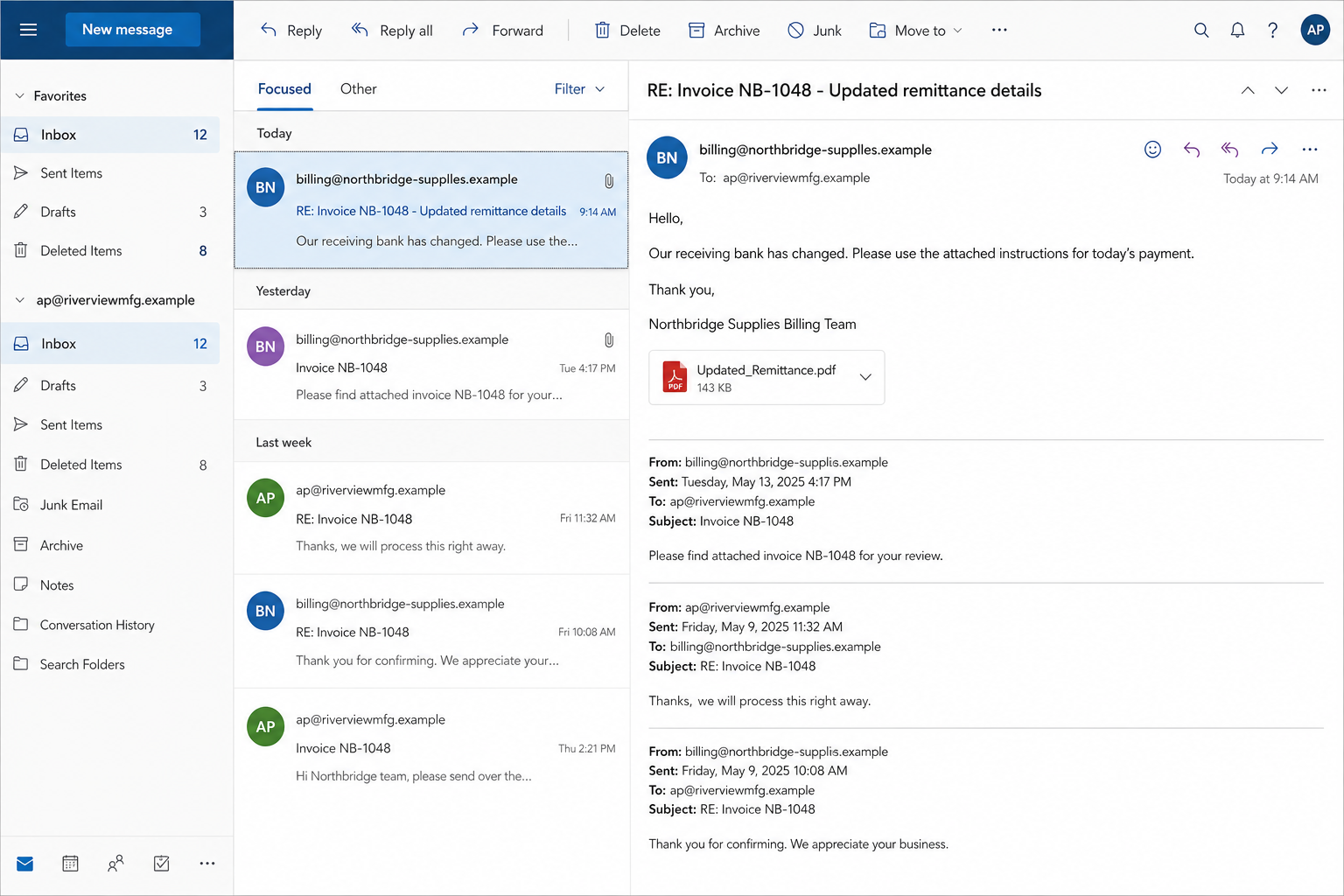
A real invoice thread can be hijacked
The strongest version of this scam does not begin with a random attachment. Criminals study a genuine relationship between a buyer and a supplier, then wait for an invoice, renewal, shipment, or scheduled payment.
Access may come from a compromised mailbox, stolen browser session, exposed forwarding rule, or earlier phishing attack. Another group simply registers a lookalike domain and copies the names, signature, tone, and timing visible in prior correspondence.
The result feels familiar because much of it is familiar. The invoice number may be real. The amount may match the contract. The person named in the signature may genuinely work for the vendor.
Only the payment instructions belong to the criminal.
One letter can move the entire payment
A lookalike address can differ from the genuine vendor by one added letter, a swapped pair of characters, or a different domain ending. In a busy thread, the display name gets noticed while the full address escapes attention.
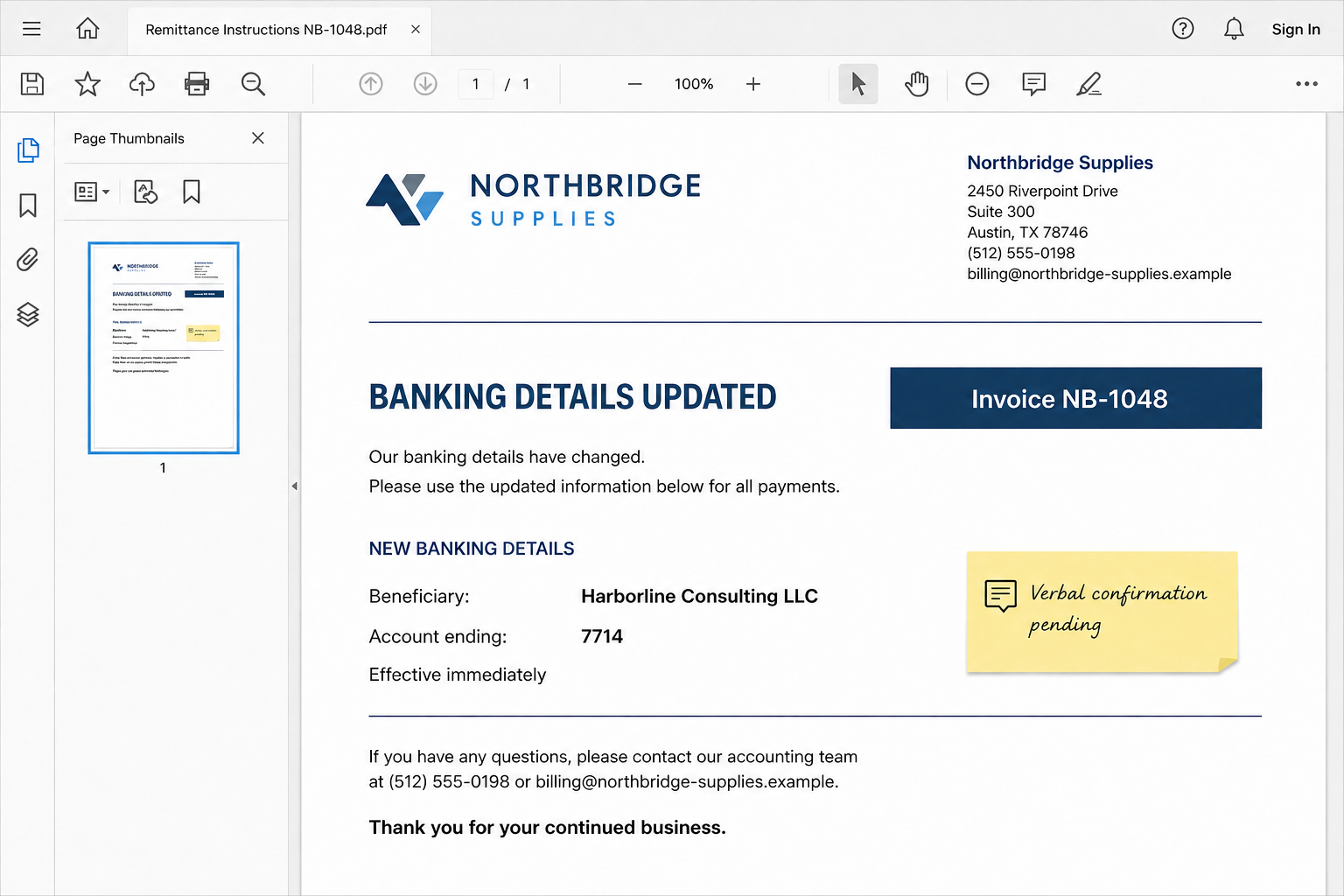
The message usually says the supplier has changed banks, moved to a new payment processor, closed an old account, or needs a wire sent to a temporary receiving account. The explanation is short because too much detail creates questions.
The fake instructions may arrive as a polished PDF with an invoice reference, company address, and professional signature. A beneficiary name that does not match the supplier may be excused as a parent company, finance partner, or factoring service.
Common versions include:
- a revised invoice with a different beneficiary account;
- a reply inside a genuine email conversation;
- a nearly identical supplier domain with one altered character;
- a request to split one payment across two accounts;
- a message asking staff to ignore the previous remittance details;
- a follow-up call using a number supplied in the fraudulent email.
The money moves before the mistake is noticed
The scam works best when the payer and supplier each assume the other side completed its part. Accounts payable marks the invoice paid. The vendor waits through its normal settlement period. Days may pass before anyone asks why the money did not arrive.
By then, the receiving account may have sent the funds through other banks, money mules, cryptocurrency services, or overseas transfers. Recovery becomes harder with each move.
The FBI describes business email compromise as one of the most financially damaging online crimes. Its examples include fake vendor instructions and real-estate wires redirected by messages that appear to come from known sources.
A 2026 EPA Office of Inspector General alert warns that criminals use both lookalike addresses and legitimate compromised accounts. It recommends a multistep process for every new payment instruction.
Why a Familiar Thread Is Not Proof
People often treat a reply inside an old conversation as stronger evidence than a new email. That instinct made sense when only participants could easily see the thread. A mailbox compromise changes the equation.
An intruder can read months of messages, learn who approves transfers, identify recurring invoice dates, and watch for language the vendor normally uses. The criminal does not need to invent a believable business relationship. The mailbox supplies one.
Thread hijacking also hides the most obvious warning sign: missing context. A random request for money raises questions. A request placed below twelve authentic messages feels like the next routine step.
Lookalike domains imitate this advantage. The attacker copies the subject line and quoted history into a new message, then relies on the recipient viewing only the display name. Mobile mail apps can make the full address especially easy to miss.
Replying is not an independent check. If the mailbox or domain belongs to the attacker, the same person who requested the bank change will happily confirm it.
Calling the number in the attachment is not independent either. The PDF can contain a phone number controlled by the fraud group, complete with a convincing greeting and someone posing as the vendor’s finance team.
How the Vendor Invoice Email Scam Works
Step 1: Criminals learn the payment relationship
The operators identify a business that regularly pays suppliers, contractors, landlords, freight companies, or professional services. They may use public staff pages, social profiles, leaked credentials, malware, or phishing to map the organization.
A compromised mailbox provides the richest detail. Search terms such as invoice, remittance, wire, payable, overdue, and bank can reveal who sends instructions and who approves them.
Step 2: They wait for a believable payment moment
Timing separates this fraud from ordinary spam. The attacker watches until a genuine invoice is issued or a payment date approaches. Some criminals create a mailbox rule that hides messages from the real supplier while they take over the conversation.
The request then arrives when staff already expect to act. There is no surprise invoice to challenge, only a changed destination attached to a legitimate obligation.
Step 3: A trusted identity is copied or taken over
The email may come from the vendor’s real compromised account. If not, the sender uses a nearly identical domain, familiar display name, copied footer, and a subject line lifted from earlier messages.
A quick glance shows the expected person and invoice. A careful address comparison reveals the substitution, but the scam is designed for a crowded inbox and a routine workday.
Step 4: New banking details are framed as routine
The message says an audit, merger, bank migration, payment-provider change, or temporary account issue requires updated instructions. It may ask that future payments use the new account or claim only the current invoice is affected.
Urgency is often polite rather than dramatic. Phrases such as “to avoid delay” or “for today’s payment” create pressure without sounding like a typical threat.
Step 5: The victim verifies through a channel the criminal controls
Staff may reply to the email, call the attachment’s number, or accept a follow-up message as confirmation. None of those checks reaches the supplier through a previously trusted route.
The attacker can answer basic questions learned from the mailbox and approve the exact change being questioned. The verification ceremony happens, but it verifies the criminal’s own story.
Step 6: Funds are dispersed and the correspondence is hidden
Once the wire or transfer lands, recipients move it quickly. A compromised mailbox may continue hiding replies so the payer and supplier do not compare notes.
The fraud surfaces when the real vendor sends an overdue notice. That delay gives the receiving network time to break the money into smaller transfers or move it beyond the first bank.
The Payment Checks That Actually Break the Scam
Treat every bank-detail change as a new instruction, even when it arrives inside a long conversation. The amount of the invoice does not matter. A small successful diversion can be a test before a much larger request.
Call a known vendor representative using a number already stored in your accounting system, contract, or independently verified official website. Do not use the number in the change request.
Read back both the beneficiary name and the account ending. Asking “Did your bank change?” invites a simple yes. Asking the vendor to state the expected details makes the check harder to fake.
Require a second employee to approve all new or modified payment destinations. The reviewer should see the original trusted record, not only the forwarded email and attachment.
Good controls include:
- a mandatory callback to a previously verified number;
- dual approval for new beneficiaries and account changes;
- a cooling-off period before high-value transfers;
- alerts for lookalike domains and reply-to mismatches;
- separate confirmation when a beneficiary name changes;
- regular review of mailbox forwarding and deletion rules;
- payment notifications sent to more than one responsible person.
Technology can flag unusual mail, but the strongest barrier is an out-of-band process that remains mandatory when the email looks perfect.
Company, Address, and Fulfillment Checks
Confirm the company through records you already hold
Open the supplier profile in the accounting or procurement system. Compare the legal name, tax details, known domain, contact names, and approved payment method against the new request.
Do not replace trusted records merely because the email contains newer-looking information. A change should pass the verification process before the master vendor record is edited.
Check the entire email address, not the display name
Expand the sender and reply-to fields. Compare every character with prior genuine messages. A correct display name beside a slightly altered domain is still an impostor.
If the message came from the genuine domain, that reduces one risk but does not rule out mailbox compromise. Continue with the independent callback.
Verify the beneficiary and bank-change story separately
A beneficiary that differs from the supplier deserves a clear, documented explanation. Parent companies and payment processors can be legitimate, but their involvement should be confirmed through known contacts and formal records.
Do not let a deadline replace evidence. A genuine vendor can explain the corporate relationship and accept a short delay while a material banking change is checked.
Match fulfillment evidence to the real transaction
Confirm that goods were ordered, services were delivered, or milestones were approved. Fraudsters can exploit real invoice data, but they may also alter quantities, due dates, or purchase references while changing the bank.
Purchase order, receiving record, contract, invoice, beneficiary, and approval should describe one consistent transaction. A mismatch in any layer requires a pause.
What to Do if You Have Fallen Victim to This Scam
- Call the sending bank immediately. Ask for the fraud or wire-recall team, not ordinary customer service. State that the transfer was induced by business email compromise and request a recall, freeze, and notification to the receiving bank.
- Contact the real vendor through a known route. Confirm which mailboxes were involved, stop any pending payments, and agree on one verified channel for the incident. Do not continue using the suspicious thread.
- Preserve evidence before cleaning accounts. Save the original message with full headers, attachments, payment confirmation, beneficiary details, timestamps, call logs, and the complete conversation. Screenshots alone may omit routing evidence.
- Report the fraud quickly. In the United States, file at IC3.gov and provide the bank with the complaint number. Businesses elsewhere should contact local police and their national cybercrime reporting service.
- Secure every exposed mailbox. Reset passwords from a clean device, revoke sessions, enable multi-factor authentication, remove unknown recovery methods, and inspect forwarding rules, delegates, application passwords, OAuth grants, and sent or deleted mail.
- Search for related payment changes. Review recent beneficiaries, invoice amendments, payroll requests, tax payments, and transfers approved by the same staff. One detected wire may not be the first attempt.
- Scan devices used with the suspicious message. If anyone opened an attachment, installed software, or entered credentials after a link, run an updated scan with Malwarebytes or another trusted security product. Isolate a device if malware or remote access is suspected.
- Reduce repeat contact. If the incident triggered malicious ads, redirects, or notification spam during research, AdGuard can help filter known harmful destinations. It does not replace mailbox repair, bank action, or endpoint investigation.
- Notify insurers, counsel, and affected partners. Follow contractual and legal reporting duties. Warn contacts if the compromised account sent messages in your name, while avoiding claims that have not yet been verified.
- Change the payment process. Add independent callbacks, dual approval, and beneficiary-change alerts before normal payment activity resumes.
Frequently Asked Questions
Can the email be fraudulent if it came from the vendor’s real address?
Yes. A genuine mailbox can be compromised and used to send the request. The address proves which account sent the message, not who controlled that account at the time.
Is replying to confirm the bank change enough?
No. The reply returns to the same potentially compromised mailbox or lookalike domain. Confirm through a telephone number or relationship channel established before the request arrived.
What if the beneficiary is a different company?
Stop the payment until the supplier explains and documents the relationship through a trusted contact. A factoring company can be legitimate, but a mismatched name is also a common warning sign.
Can a bank reverse the transfer?
Sometimes, especially when the fraud is reported immediately and the funds remain at the receiving bank. A recall is not guaranteed, which is why every minute matters.
Does multi-factor authentication prevent this scam?
It makes account takeover harder, but it cannot detect every stolen session, malicious rule, lookalike domain, or human approval of fraudulent instructions. Payment controls are still required.
Should small invoice changes be verified too?
Yes. Criminals may test a process with a modest transfer before targeting a larger payment. The rule should be based on a changed destination, not only on the amount.
The Bottom Line
The vendor invoice email scam succeeds by changing one detail inside an otherwise legitimate transaction. A real invoice, familiar name, correct amount, and old thread can all coexist with a fraudulent bank account.
Do not approve a new payment destination inside the channel that requested it. Call a known vendor contact, read back the beneficiary details, require a second approval, and act immediately if money has already moved.








