

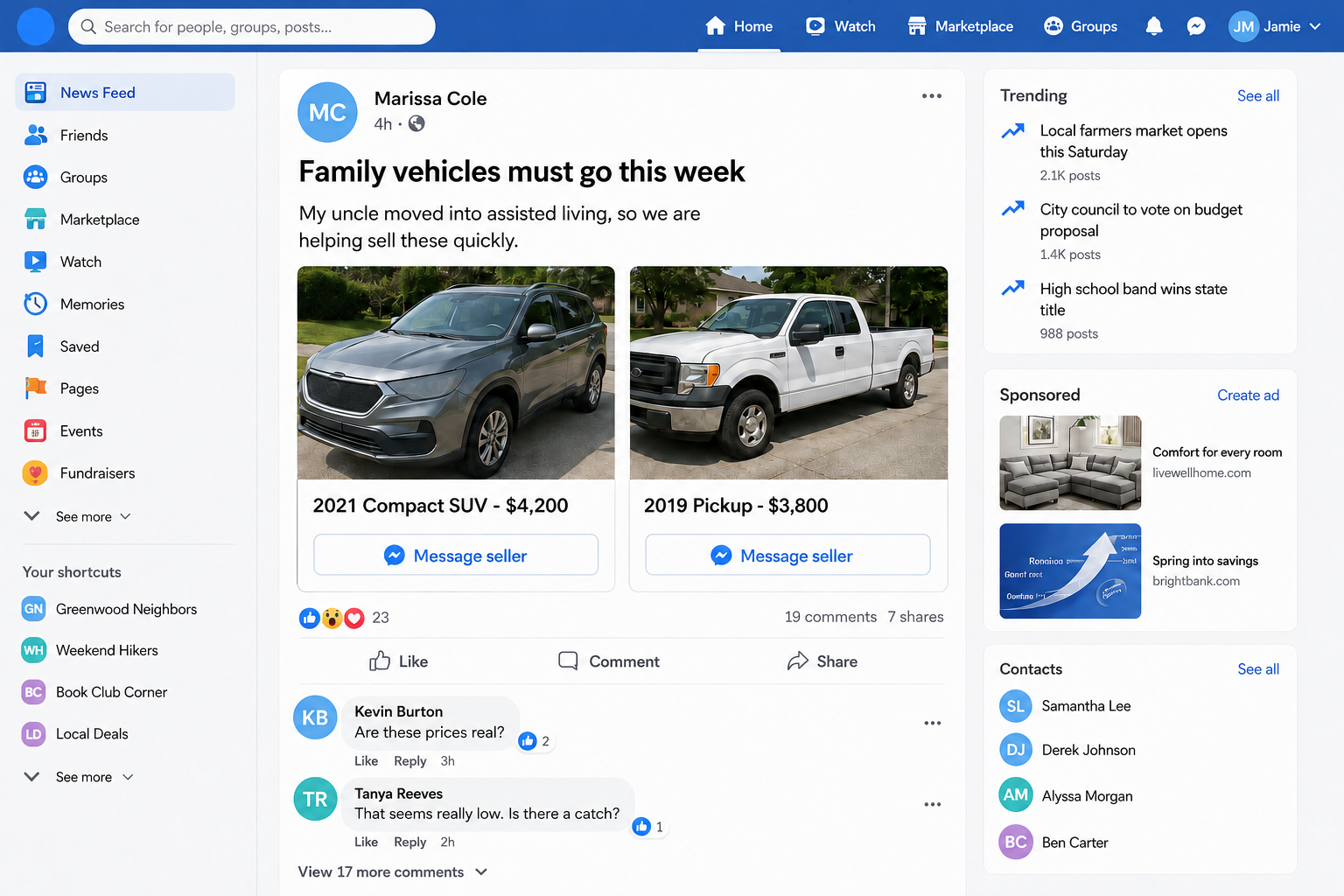
A friend suddenly posts two late-model vehicles at prices that make no sense. The explanation sounds personal: a relative entered assisted living, the family is clearing an estate, and everything needs to go this week.
The profile is real. The friendship may be real too. In the hacked Facebook car sale scam, it is the person controlling the account and the vehicles behind the story that are fake.
Overview
The trusted profile is part of the bait
This scam often appears as a normal post from someone already in your network. The account may belong to a friend, former coworker, neighbor, church member, or distant relative whose name you recognize.
Criminals take over that account through phishing, password reuse, stolen sessions, or a verification-code trick. They then post cars, trucks, trailers, tools, furniture, and appliances at unusually low prices.
Friends of the victim see a familiar name, years of old photos, genuine comments, and a believable local history. Those details were not created for the scam. They were inherited with the stolen account.
The attacker only needs to add a reason for the sudden sale.
The assisted-living story explains the low price
A common script says an uncle, parent, or grandparent moved into assisted living, entered a nursing home, died, relocated, or can no longer drive. The family supposedly wants a quick, uncomplicated sale rather than full market value.
That story does several jobs at once. It makes multiple unrelated items seem plausible, explains why the account holder is selling for someone else, and discourages hard bargaining because the prices already look generous.
It also introduces sympathy. Asking too many questions can feel insensitive when the seller appears to be dealing with an aging relative or family emergency.
The vehicles are usually copied from old listings, dealer pages, auctions, or another marketplace. The scammer does not own them and cannot arrange a legitimate inspection.
The refundable deposit is the real product
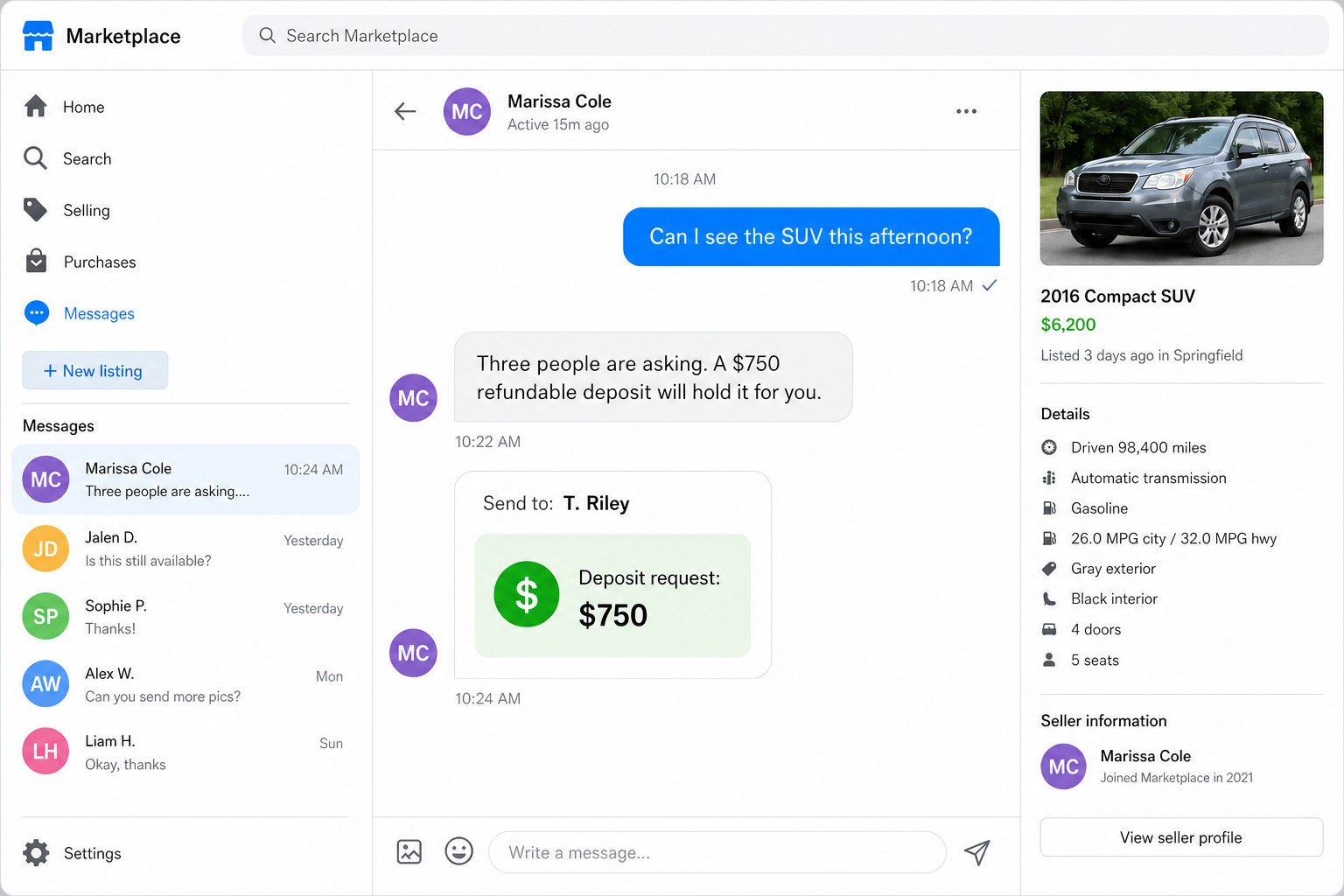
The seller claims many buyers are interested and asks for a deposit to reserve the vehicle. The amount may be several hundred or more, but it is repeatedly described as refundable.
The payment request often goes to a name that does not match the Facebook profile. The mismatch is explained as the owner’s child, an estate representative, a transport agent, or the person managing the sale.
Typical warning signs include:
- a late-model vehicle priced far below comparable listings;
- a sudden estate, assisted-living, military, divorce, or moving story;
- several high-value items posted at the same time;
- no in-person viewing before payment;
- a deposit requested through a payment app, bank transfer, gift card, or cryptocurrency;
- a payment recipient whose name differs from the seller;
- pressure caused by other interested buyers;
- a refusal to speak through a known telephone number.
The San Diego County District Attorney’s Facebook Marketplace scam alert specifically warns about fake vehicle listings where the person does not own the car and asks for a deposit or payment up front.
Why the Post Can Fool People Who Avoid Stranger Scams
Most scam advice begins with caution around strangers. This setup slips past that habit because the post appears to come from someone the buyer already knows.
The account’s old content acts like borrowed identity evidence. Birthday messages, tagged photos, shared contacts, and community groups create a convincing background that a new fake profile could not build quickly.
Even the first comments can strengthen the illusion. Friends may ask ordinary questions without realizing the account was compromised. Those genuine reactions make the post look socially verified.
Some attackers hide warnings by deleting comments, blocking suspicious friends, or moving interested buyers into private messages. They may also post from the victim’s account in local groups, extending the reach beyond the friend list.
A low price then supplies the urgency. The buyer knows a bargain will attract attention and believes hesitation means losing the vehicle to someone else.
The scammer does not need every viewer to believe the story. One deposit from one trusted contact is enough to make the hijacked account profitable.
The family explanation also gives the attacker room to change details. One person supposedly has the title, another collects payment, and a third will arrange pickup. Each handoff makes the missing owner feel temporary rather than impossible.
Notice what never becomes simple: seeing the vehicle, speaking with the person you know, and matching the payment recipient to the title. A legitimate urgent sale may be inconvenient, but it still produces verifiable ownership.
How the Hacked Facebook Car Sale Scam Works
Step 1: A real Facebook account is taken over
The criminal obtains a password, steals a logged-in browser session, persuades the owner to share a recovery code, or abuses an account-recovery process. The owner may not notice immediately.
Attackers often change recovery details and create persistence before posting. Some use the account to message friends, while others rely on a public feed post that can reach many people at once.
Step 2: High-value listings are copied from elsewhere
Photos and descriptions are lifted from vehicle dealers, auctions, old listings, and social posts. A clean title, low mileage, recent model year, and attractive price produce fast replies.
The same account may offer two cars plus household goods. A supposed estate sale makes the sudden inventory seem coherent.
Step 3: A family event explains every inconsistency
The seller says the actual owner is elderly, ill, deceased, deployed, abroad, or moving. That absent owner cannot join a video call, meet the buyer, or answer detailed questions.
The account holder appears to be helping, but another relative supposedly controls the title, payment, keys, or pickup. Each new person makes verification more confusing.
Step 4: The buyer is rushed into private messages
Public questions can attract warnings, so the scammer asks serious buyers to message privately. The conversation becomes warm and personal, often referencing the apparent friendship.
When the buyer asks to view the vehicle, the seller introduces other interested buyers, work travel, estate paperwork, or a temporary storage location.
Step 5: A refundable deposit is requested
The criminal offers to hold the car for a deposit. The word “refundable” is repeated because it makes the payment feel reversible even when the selected transfer method offers little purchase protection.
The recipient may be unrelated to the profile. The seller supplies a quick family or business explanation and asks for a screenshot after payment.
Step 6: More fees appear or the account disappears
After the first transfer, the buyer may be asked for shipping insurance, title processing, registration, storage, or the remaining balance. Paying once signals that the story is working.
Eventually, messages stop, the post vanishes, or the genuine account owner regains access. There is no car to inspect and no real deposit to refund.
How to Verify the Friend and the Vehicle
Contact the friend using a phone number or conversation that existed before the sale. Do not use a new number supplied by the hijacked account.
Ask a question only the real person would answer naturally, then call. A criminal may have read old messages, so one biographical question is weaker than a live conversation through a trusted route.
Require an in-person inspection before any deposit. Confirm the vehicle identification number, title, seller identity, and physical possession. Run the identifier through the appropriate government or reputable vehicle-history service in your country.
Reverse-search the listing photos. Cropped images, changed backgrounds, or screenshots can complicate the search, so try several pictures and distinctive phrases from the description.
Compare the price with similar vehicles by year, mileage, trim, and condition. A family emergency can motivate a sale, but it does not remove the need for ownership documents and a safe inspection.
Use these practical checks:
- call the friend on a previously saved number;
- inspect the vehicle and title before paying;
- match the seller’s identification to ownership records;
- verify the vehicle identification number in more than one location;
- avoid transfers to unrelated recipients;
- meet at a bank, licensing office, or safe exchange location;
- do not accept a screenshot as proof of ownership;
- leave if urgency replaces ordinary documentation.
Meta provides tools for users to report compromised Facebook accounts. If a friend’s profile posts the sale, alert the person through another channel before arguing with the attacker inside the account.
Company, Address, and Fulfillment Checks
Facebook hosts the post but does not own the vehicle
A familiar platform and established account do not verify the listing. The transaction is with the person claiming to own or represent the vehicle, and that identity must be checked independently.
Do not treat the profile’s age, friend count, or old posts as proof that its current controller is genuine.
The seller’s identity must match the paperwork
Ask whose name appears on the title and why anyone else is collecting money. An estate or family sale can involve legitimate representatives, but those roles produce documents that can be checked.
A payment-app name that differs from the title holder and account owner creates a three-way mismatch. Do not transfer money while that mismatch remains.
The address must lead to a real inspection
Scammers may provide a storage-lot address, dealer address, vacant home, or distant city found online. An address is not proof unless the vehicle and authorized seller are actually present.
Never travel to an isolated location with cash. Arrange daylight inspection at a safe public site and tell someone where you are going.
Delivery promises cannot replace possession
Shipping, military transport, eBay protection, escrow, and a courier are common explanations for why the vehicle cannot be seen. Verify any service through its official website, not an invoice or link sent by the seller.
A genuine carrier cannot prove that the person messaging you owns the car. Title and possession still need separate checks.
What to Do if You Have Fallen Victim to This Scam
- Contact the payment provider or bank now. Report that the transfer funded a fraudulent vehicle deposit. Ask whether a recall, fraud claim, recipient-account alert, or card dispute is available.
- Do not send a second payment. Claims about insurance, title release, recovery fees, or a larger refundable hold are attempts to deepen the loss.
- Save the complete evidence. Capture the post, profile address, chat, payment request, recipient name, transaction identifier, vehicle photos, claimed address, telephone numbers, and timestamps before the attacker removes them.
- Notify the real account owner. Use a known phone number or another trusted contact. The owner should begin Facebook’s account-recovery process and warn friends through a separate channel.
- Report the profile, post, and messages. Use the platform’s reporting tools and include that the account appears compromised. Report the payment recipient to the transfer service too.
- Report the fraud to authorities. United States victims can use ReportFraud.ftc.gov and IC3.gov. Include payment and vehicle identifiers. Use the equivalent police and fraud services elsewhere.
- Protect any information you shared. If you sent identification, insurance records, title information, or account details, contact the relevant issuer and place appropriate fraud alerts or credit freezes.
- Change exposed passwords. If you followed a login link or shared a code, secure that account and the associated email account. Revoke unknown sessions and enable multi-factor authentication.
- Scan devices if a file or app was involved. Use an updated product such as Malwarebytes if you installed a vehicle report, remote-support app, browser extension, or attachment supplied by the seller.
- Block malicious follow-up traffic. AdGuard can reduce exposure to known phishing pages and malicious advertising, but it cannot reverse a transfer or restore a stolen account.
- Ignore recovery strangers. Anyone who promises to retrieve the deposit for an upfront fee is likely running another scam.
Frequently Asked Questions
Can a real friend’s Facebook post still be a scam?
Yes. The account can be real while its current controller is a criminal. Verify the friend through a phone number or contact route you already trusted.
Why do the posts mention assisted living or an estate?
The story explains the low price, absent owner, multiple items, and urgency. It also uses sympathy to make normal verification feel impolite.
Is a refundable deposit safe?
Only if a verified seller, documented transaction, and payment method genuinely protect it. A scammer’s promise does not make an irreversible transfer refundable.
What if the seller sends a title photo?
An image can be stolen, edited, or taken from another transaction. Compare original identification and title to the physical vehicle through a safe, lawful process.
Does a video of the car prove ownership?
No. Videos can be copied or supplied by another victim. A live, specific walkthrough helps, but it does not replace title verification and an in-person inspection.
Should I warn people in the comments?
First alert the real owner through another channel and report the account. A warning can help, but the attacker may delete it or block you, so share the warning where contacts will still see it.
The Bottom Line
The hacked Facebook car sale scam borrows trust from a real person’s history, then uses a sad family story and a low vehicle price to make an advance deposit feel reasonable.
Do not pay to hold a car you have not inspected. Call the friend through a known route, verify the title and vehicle in person, and stop when the account name, owner, and payment recipient do not match.

Join the discussion
0 commentsShare your experience or ask a question about this article.
Discussion
Start the conversation
Have a question or something useful to share? Add the first comment.