

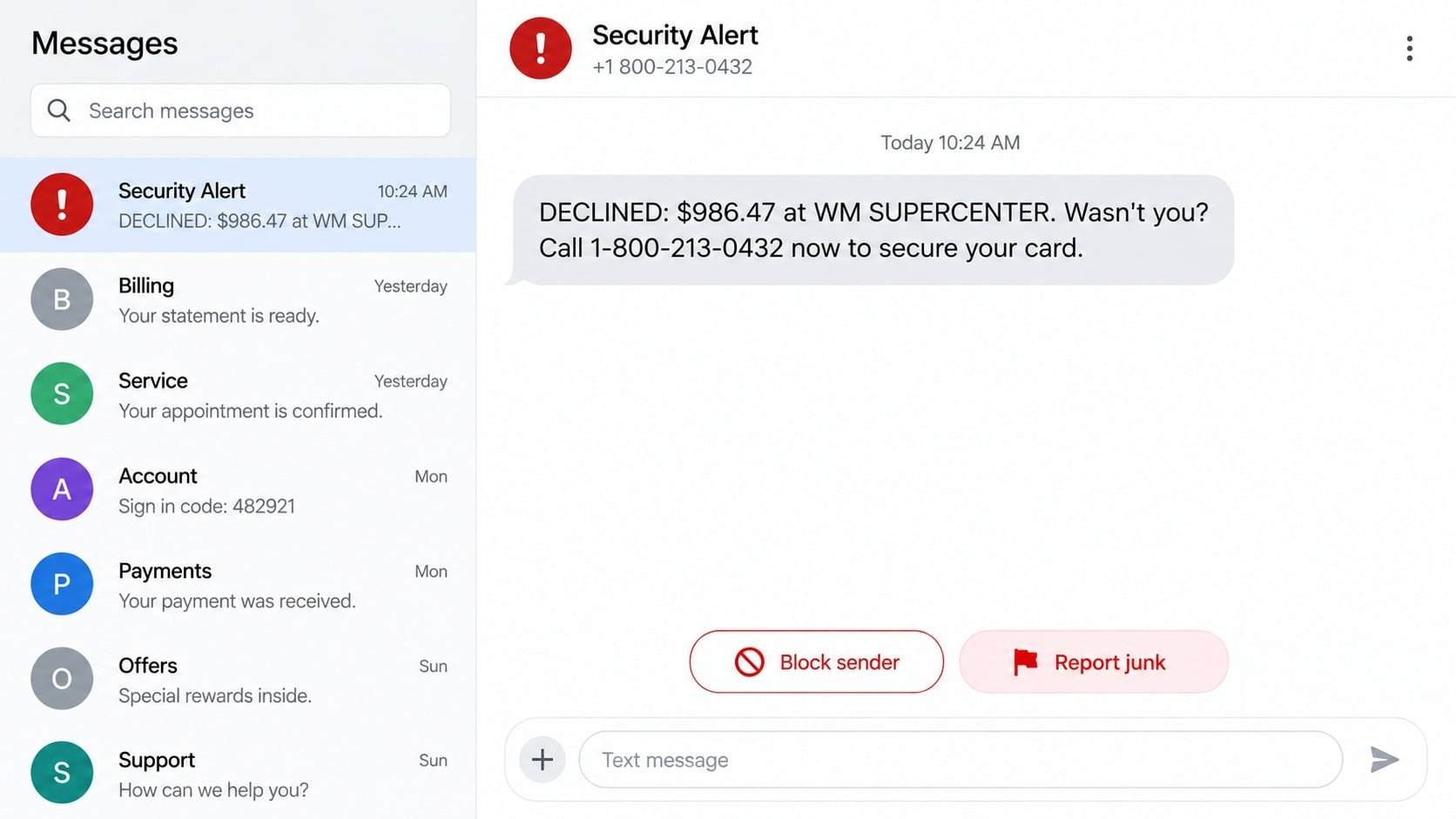
The text looks like the kind of warning a bank might send after stopping a large purchase. It says a charge at WM SUPERCENTER was declined and gives you one number to call before your card is supposedly used again.
That number, 1-800-213-0432, is the dangerous part of the message. Calling it does not connect you with the fraud department printed on the back of your card.
Overview
What the 1-800-213-0432 message says
The scam text reports a declined or pending card purchase at WM SUPERCENTER, often for an amount large enough to cause alarm. It then tells the recipient to call 1-800-213-0432 immediately if the transaction was not authorized.
The message may omit the name of the bank, the last four digits of the card, or a genuine account reference. Its goal is not to help with an existing transaction. It is to make the recipient initiate contact with a fake support desk.
A Walmart store name makes the warning feel ordinary and plausible. Most consumers recognize it, and a busy person may not stop to ask which card or account the alert concerns.
Why the callback number should not be trusted
The same number has appeared in more than one impersonation story. A recent warning reported by Patch said Newtown Artesian Water Company customers were receiving fraudulent calls directing them to pay through 1-800-213-0432.
That does not prove who controls or originates every appearance of the number. Phone numbers can be reassigned, forwarded, or displayed deceptively. It does establish that recipients should not treat 1-800-213-0432 as a verified bank or merchant contact.
Use the phone number on the back of your physical card, inside your bank’s official application, or on a statement you already possess. Never substitute the number supplied by an unexpected text.
Red flags inside the fake WM SUPERCENTER alert
- The text does not clearly identify the bank that issued the card.
- It uses a large purchase amount to provoke an immediate response.
- The only offered solution is calling 1-800-213-0432.
- The sender asks you to confirm a full card number, PIN, or online banking password.
- A supposed agent requests the one-time code sent by your real bank.
- You are told to move money, buy gift cards, or install remote-access software.
- The alert cannot be found when you sign in through the official banking application.
- The agent resists when you offer to call the bank through its published number.
A real fraud alert can ask whether you recognize a purchase, but you should still verify it independently. A message that happens to mention a familiar merchant is not evidence that a transaction exists.
How the 1-800-213-0432 WM SUPERCENTER Scam Works
Step 1: A bulk text announces a frightening card purchase
The campaign begins with messages sent to many phone numbers. The scammers do not need to know which bank you use because the wording is broad enough to create doubt for almost anyone with a payment card.
WM SUPERCENTER is chosen because it resembles a legitimate merchant descriptor. The amount may be close to $900 or another figure that feels too serious to ignore.
The text may say the purchase was declined, pending, or awaiting confirmation. Each version creates the same question: what if someone is using my card right now?
Step 2: The victim calls the number supplied by the scammer
Calling 1-800-213-0432 places the victim inside an environment controlled by the sender. An automated greeting or polished agent can sound like a bank fraud department even when no bank is involved.
The person answering may ask which bank issued the card. That lets the scammer adapt the script and pretend to represent whichever institution the victim names.
Hold music, case numbers, and transfers between departments are inexpensive ways to simulate a large organization. None of them verifies the caller’s identity.
Step 3: The fake agent gathers card and identity details
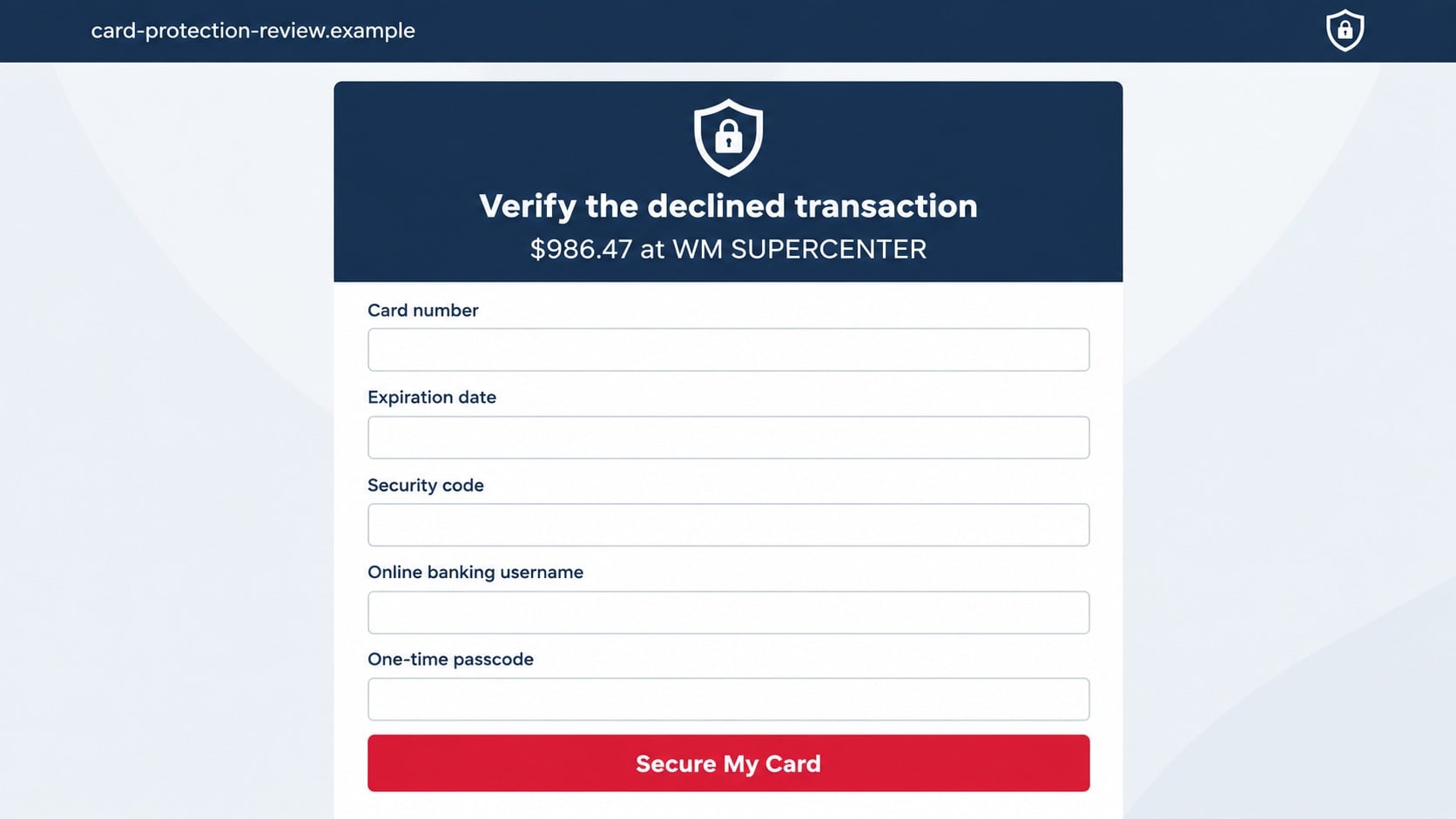
The agent claims the card must be authenticated before the purchase can be canceled. Questions may include the full card number, expiration date, security code, billing address, birth date, or Social Security number.
Some scammers ask for an online banking username and say a password is unnecessary. With enough other data, they can start a password reset and trigger a genuine code to the victim’s phone.
A real bank employee does not need the complete PIN or a one-time code to discuss a suspicious transaction. Those secrets can authorize access and should never be read aloud to an incoming or unverified agent.
Step 4: A genuine security code is misrepresented
After entering the victim’s information on the real bank website, the scammer causes a one-time passcode to be sent. The text containing that code may clearly warn not to share it.
The fake agent calls it a cancellation code, dispute number, or final verification. If the victim reads it aloud, the scammer may gain account access, add a digital wallet, or approve a transfer.
This step often convinces victims that the call is legitimate because the message truly came from their bank. The bank sent the code in response to the scammer’s login attempt, not because it endorsed the conversation.
Step 5: The scam expands into payment or remote access
Once the account is compromised, the agent may claim additional unauthorized activity was found. The victim can be told to transfer money to a secure account or withdraw cash for safekeeping.
Another version asks the victim to install a support application so the agent can help reverse the charge. Remote access exposes balances, messages, saved documents, and active banking sessions.
The initial WM SUPERCENTER purchase may never have existed. It was simply the hook used to open the door to a much larger theft.
Step 6: Follow-up contacts try to keep control
If the victim becomes suspicious, a second caller may claim to be a supervisor, bank investigator, or police officer. Caller ID spoofing can make that follow-up appear to come from a familiar institution.
The scammers may threaten account closure or say that ending the call will make the victim responsible for the charge. This pressure is designed to prevent independent verification.
After money is lost, another contact may offer recovery for a fee. The details can sound convincing because they came from the same group or were sold to another criminal operation.
Is Every WM SUPERCENTER Alert Fraudulent?
No. A bank can legitimately flag a Walmart purchase, and a real charge may appear on a statement with a store number. The safe response is to inspect the account through a trusted channel, not to accept or reject the transaction through an unknown number.
Open the banking application you normally use or type the institution’s web address yourself. If the transaction is real, it should appear with a status, date, amount, and merchant information.
Walmart’s guidance for unrecognized charges tells customers to contact their bank or card company and dispute unauthorized use. It does not direct customers to a random number supplied in a text.
Company, Address, and Fulfillment Checks
The merchant name does not identify the sender
Anyone can type WM SUPERCENTER into a message. The label describes the alleged purchase, not the company operating the callback line.
The toll-free number lacks verified bank context
A toll-free prefix looks professional but says nothing about ownership. Compare the number with the back of your card and the bank’s official website before making contact.
Legitimate support survives an independent callback
If an alert is real, the issuing bank can locate it when you call through a known number. A scammer needs you to remain on the route created by the text.
A real transaction leaves records beyond the message
Check the banking application, statement, and available card controls. An alert that exists only in an unsolicited text should never be used as the basis for sharing account secrets.
How to Verify the Alert Safely
- Do not reply to the text and do not call 1-800-213-0432.
- Open the official banking application from your device’s normal app list.
- Review pending, declined, and posted card activity for the stated amount.
- Lock the card inside the application if any real transaction is unfamiliar.
- Call the number printed on the back of the card and ask for the fraud department.
- Forward the suspicious message to 7726 (SPAM), then block the sender.
Do not search the callback number and choose the first sponsored result. Criminals can place fake support advertisements that lead to the same kind of impersonation desk.
If no matching charge appears, the message was likely bait. Continue monitoring because the sender may try a different merchant name or amount later.
What a Real Bank Fraud Review Should Allow You to Do
Confirm the card without revealing the entire number
A legitimate alert often identifies only the last few digits of a card already held by the institution. An agent reached through the issuer’s published number can locate the account without asking you to dictate every printed number.
When the person answering says they cannot help until you provide the full PIN or security code, end the conversation. Those values are used to authorize activity, not to prove that an inbound support desk is genuine.
Review the transaction inside the official application
Many issuers display fraud alerts, pending purchases, card controls, and secure messages after sign-in. The record should remain visible even when you ignore the text and enter through the application yourself.
A fake agent may discourage this check by claiming the application is compromised or temporarily frozen. That explanation keeps the victim dependent on the caller and should increase suspicion.
End the call without losing access to help
Real fraud departments expect cautious customers to call back through a trusted number. They do not threaten to approve a transaction merely because you want to verify who is speaking.
If an alert is genuine, a different authorized employee can find the case. A scam operation, by contrast, needs the victim to stay connected to the number selected by the sender.
Receive a documented outcome
After a valid fraud report, the issuer can explain whether the card was locked, replaced, or left active. Record the case reference, delivery estimate for a replacement, and instructions for challenging posted transactions.
Do not accept a verbal promise that the WM SUPERCENTER charge vanished. Return to the official application later and confirm the card status and transaction history for yourself.
What to Do if You Have Fallen Victim to This Scam
- Contact the card issuer now. Use the number printed on the card, explain that you called a fraudulent number, and specify every card or account detail you revealed.
- Lock and replace exposed cards. Ask the issuer whether digital-wallet tokens and recurring authorizations also need to be revoked. A new plastic card alone may not remove every token.
- Reset banking and email credentials. Use a trusted device, choose unique passwords, review recovery contacts, and sign out unfamiliar sessions. Replace any one-time code or authentication method the scammers intercepted.
- Challenge unauthorized transfers quickly. Give the bank the transaction times, recipients, and call records. Recovery options become narrower as money moves through additional accounts.
- Remove remote-control tools. Disconnect affected computers, uninstall software introduced during the call, and run a complete Malwarebytes scan to find remote-access components or other unwanted programs.
- Document the original text. Preserve screenshots, the 1-800-213-0432 callback instruction, voicemail, agent names, codes, and receipts. Do not publish unredacted financial information.
- Report the campaign. Forward the message to 7726, submit the details at ReportFraud.ftc.gov, and contact local police if money or identity documents were taken.
- Block related malicious pages. AdGuard can filter many known phishing destinations and harmful ads. Keep in mind that it cannot make a suspicious phone number trustworthy.
- Reject paid recovery offers. Your bank and law enforcement will not demand an advance fee to recover money. Treat unsolicited recovery agents as another scam attempt.
Frequently Asked Questions
Is 1-800-213-0432 a verified bank number?
No verified bank connection should be assumed. The number has appeared in reported fraud warnings, so use the contact information printed on your card instead.
What does WM SUPERCENTER mean on a card statement?
It commonly refers to a Walmart Supercenter transaction and may include a store number. A descriptor can be legitimate, mistaken, or connected to unauthorized card use.
What if the amount really appears in my account?
Lock the card and contact the issuer through its official number. A real unauthorized charge still does not make the callback number in the text legitimate.
Should I reply NO to cancel the purchase?
Do not interact with an unexpected message unless you have independently confirmed it came from your bank. Open the official application or call the number on your card.
Can the scammers use a real bank verification code?
Yes. They may trigger a genuine code by attempting a login or wallet enrollment. The code proves that an action was attempted, not that the caller is a bank employee.
Will blocking the text protect my card?
Blocking stops that sender from reaching you, but it does not secure information already disclosed. Contact the issuer if you shared card, login, or identity details.
The Bottom Line
The 1-800-213-0432 WM SUPERCENTER scam text uses a believable merchant and a frightening amount to pull recipients into a fake fraud-support call.
Do not call the supplied number. Check the account through your normal banking application and speak with the issuer through the number on the card.








