

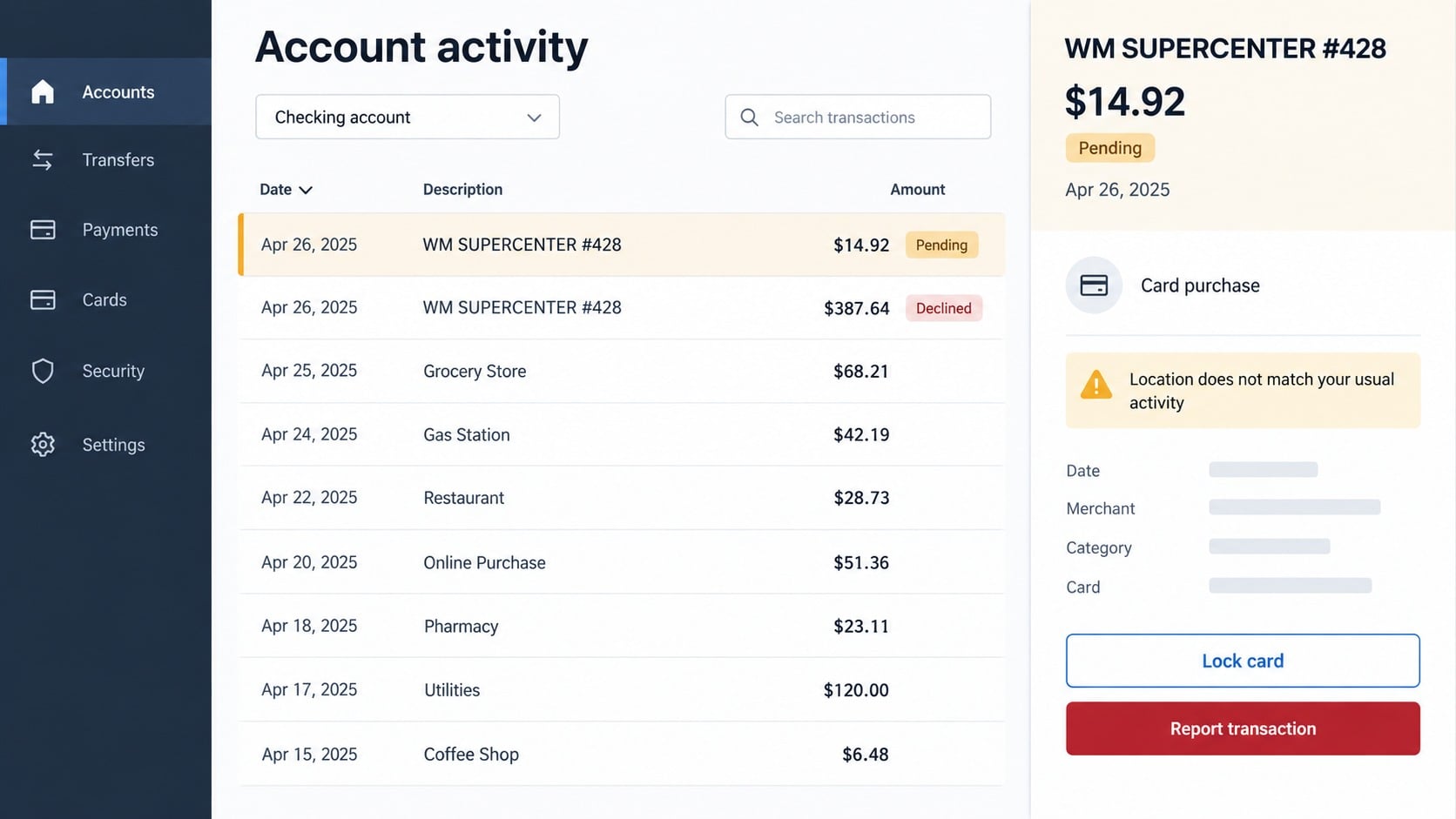
You open a bank statement and find a transaction labeled WM SUPERCENTER followed by a store number. You do not remember visiting Walmart, and the amount is just unfamiliar enough to make you wonder whether the card has been copied.
The descriptor deserves attention, but it does not tell the whole story. It can represent a real purchase, a household member’s order, a temporary authorization, or unauthorized card use.
Overview
What a WM SUPERCENTER charge usually represents
WM SUPERCENTER is a common card-statement label for purchases associated with a Walmart Supercenter. The descriptor may include a store number, abbreviated location, transaction date, or payment channel.
An unfamiliar entry is not automatically proof that Walmart or the displayed store committed fraud. Card data can be used by another person, a family purchase can be forgotten, and pending authorizations can differ temporarily from a final receipt.
Your first task is to determine whether the transaction exists and who authorized it. Do not call a phone number from an unsolicited message that merely mentions the same merchant.
When the transaction points to possible card compromise
Concern rises when the purchase appears at a distant store, repeats rapidly, follows a small test charge, or is accompanied by activity at unrelated merchants. A declined larger attempt after a small successful charge can also indicate that stolen card data is being tested.
Walmart’s official help page for unrecognized charges says a card may be compromised when a Walmart.com charge is not recognized. It recommends contacting the bank or card company about unauthorized use.
Act through your issuer even if the transaction is still pending. The issuer can explain whether it can lock the card immediately and when a formal dispute may be filed.
Clues that separate confusion from likely fraud
- The store number resolves to a city you have not visited.
- No household member, authorized user, or employee recognizes the purchase.
- The amount does not match an online order, pickup, fuel, pharmacy, or grocery receipt.
- Several low-value purchases appear before a larger attempt.
- The card was recently used at a compromised terminal or entered on a suspicious website.
- Your Walmart account shows an order you did not place or a changed delivery address.
- You receive password-reset or digital-wallet alerts at the same time.
- A caller offers to refund the charge but asks for codes, remote access, or a transfer.
One clue rarely proves the complete path of the fraud. Combine statement information, receipts, account history, store location, and issuer records before drawing a conclusion.
How the WM SUPERCENTER Charge Scam Works
Step 1: Card information is obtained elsewhere
Stolen card data can come from a phishing checkout, account takeover, compromised merchant, skimming device, malicious browser extension, or person with physical access to the card.
The appearance of WM SUPERCENTER on the statement does not reveal where the information was stolen. It identifies the merchant associated with the attempted purchase, not necessarily the point of compromise.
This distinction matters because accusing the store can distract from securing the card, email account, shopping accounts, and devices that may still be exposed.
Step 2: A small transaction tests whether the card works
A criminal may begin with a modest purchase that a cardholder could overlook. If the transaction clears, the card appears usable and may be tried for a larger purchase or sold to someone else.
Not every small unfamiliar charge is a deliberate test. Temporary authorizations, tips, split shipments, and delayed posting can also change what appears on a statement.
Review both pending and posted activity. Ask the issuer how the merchant submitted the transaction and whether additional attempts were declined.
Step 3: Goods, gift cards, or pickup orders are purchased
Stolen payment information can be used online or at a physical checkout. High-resale items, gift cards, electronics, and pickup orders may be attractive because they can be converted quickly.
An account takeover can make the order look more convincing by using stored addresses and purchase history. The attacker may add a new pickup person or change contact details to intercept notifications.
The cardholder may notice only after the goods are collected. Fast account alerts and card-lock controls reduce the time available for repeated use.
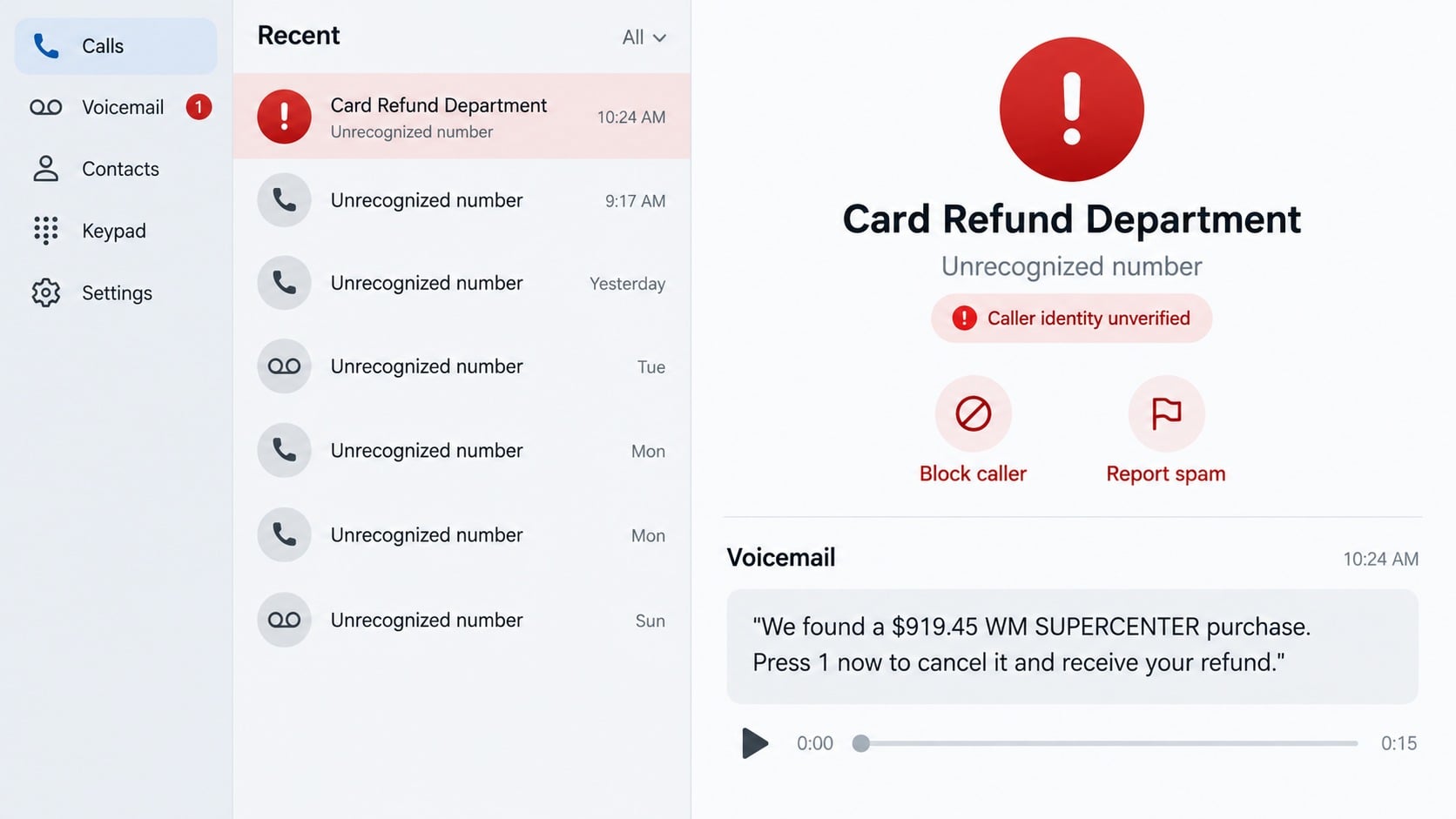
Step 4: A fake fraud call can follow the real or invented charge
Criminals also send texts and robocalls about supposed WM SUPERCENTER purchases. Sometimes no transaction exists at all. The merchant name is simply a believable reason to make the victim call.
In other cases, someone with stolen card data may know about attempted activity and use that knowledge to sound like the issuer. The caller offers to cancel or refund the purchase while collecting credentials.
Verify through the number printed on the card. Never use a callback number delivered by the same message that announced the problem.
Step 5: The refund story captures deeper account access
A fake agent may ask for the card number, online banking username, and one-time security code. They can use those details to reset a password, enroll a digital wallet, or move money.
Remote-access software is another common escalation. The caller says they need to inspect the account or issue a refund, then watches the victim sign in and manipulates what appears on screen.
A legitimate dispute does not require moving funds to a safe account, purchasing gift cards, or returning an accidental refund through cryptocurrency.
Step 6: Additional transactions and recovery scams appear
Once a card or account is known to work, attempts can spread across merchants. Replacing the card may be necessary, but linked tokens and compromised shopping credentials also need attention.
Victims may later receive calls from people claiming to recover the original loss. These services often demand an advance payment and use details from the first incident to appear informed.
Keep communication with the issuer, the merchant, and law enforcement channels you contact yourself. Do not hand the case to an unsolicited recovery agent.
Legitimate Reasons the Charge May Look Unfamiliar
A household or authorized user made the purchase
Ask every authorized user and compare the date with household errands. Digital receipts, pickup emails, and shared accounts can resolve the mystery quickly.
The purchase posted later than expected
Card transactions can move from pending to posted after the shopping date. The final entry may appear when the cardholder no longer connects it with the original visit.
The amount changed after authorization
Temporary holds, substitutions, split orders, canceled items, fuel authorizations, or tips can make a pending amount differ from the final transaction. Review the final receipt before disputing a legitimate adjustment.
The descriptor covers an online or pickup order
A transaction may be associated with a store even when the purchase began online. Check Walmart order history and all email accounts used by household members.
Company, Address, and Fulfillment Checks
The descriptor is not a complete receipt
WM SUPERCENTER and a store number provide only a starting point. Ask the issuer for the transaction date, payment channel, location, and any merchant data it can disclose.
The store number can narrow the location
Use Walmart’s official store finder or customer service to identify the store. A geographic mismatch strengthens a fraud report but does not replace the issuer’s investigation.
Support should confirm an order without requesting secrets
Contact Walmart through walmart.com and the issuer through the card. Neither party needs your online banking password, full PIN, or one-time authentication code.
Fulfillment records can show how goods were collected
Online orders may include shipping, pickup, or delivery information. Preserve those records for the bank and police instead of confronting a suspected pickup person yourself.
What to Check Before Filing a Dispute
- Compare the amount and date with paper receipts, email receipts, and purchase history.
- Ask authorized users whether they recognize the transaction.
- Identify the store number through Walmart’s official tools.
- Review pending attempts and nearby charges for a testing pattern.
- Check the Walmart account for changed addresses, phone numbers, or pickup names.
- Lock the card through the issuer if the transaction remains unexplained.
Do not delay merely because the amount is small. A low-value charge can precede additional activity, and dispute deadlines vary.
When the transaction turns out to be legitimate, unlock the card only after confirming with the issuer that no other risk indicators remain.
How to Read the Transaction Details More Carefully
Pending and posted entries can tell different stories
A pending card authorization is not always the final charge. It can disappear, change amount, or be replaced by a posted transaction with a different date once the merchant completes settlement.
Take a screenshot for your records, but ask the issuer whether it requires the purchase to post before a formal dispute begins. The card can still be locked while you wait.
Store numbers help test the location
The digits after WM SUPERCENTER may point to a particular store. Compare that location with where the cardholder and authorized users were at the time.
A distant location supports the concern, but location data can still require interpretation for online orders and centralized processing. Let the issuer obtain the transaction-level records.
Several small entries may reveal a pattern
Review more than the single charge that caught your attention. Look backward and forward for low-value authorizations, reversals, declined attempts, and purchases from merchants you do not recognize.
Report the complete cluster together. Treating each amount as an isolated mistake can hide the fact that someone is testing how much activity the account will allow.
A receipt search should not require account secrets
Use Walmart’s official receipt and support tools, not a number or form supplied by an unsolicited caller. A legitimate lookup may use limited transaction details but should not demand your bank password or one-time code.
If someone offers to locate the receipt through remote access, stop. Your statement, merchant support, and issuer already provide safer ways to investigate the purchase.
Ask whether the purchase was card-present, contactless, keyed manually, or submitted online. The issuer may not share every fraud signal, but the channel can help explain why a distant transaction appeared.
Continue watching replacement-card activity and linked accounts. An exposed email or retailer login can remain useful to an attacker even after the original card number stops working.
What to Do if You Have Fallen Victim to This Scam
- Lock the payment card. Use the issuer’s application or published telephone number. Ask whether the card should be replaced and whether linked digital-wallet tokens must be removed.
- Dispute every unauthorized entry. Provide the exact WM SUPERCENTER descriptor, amount, date, store number, and related declined attempts. Follow the issuer’s written process and deadlines.
- Secure the Walmart account. Change its password, sign out unknown sessions, delete unfamiliar addresses and payment methods, and review recent orders and pickup contacts.
- Protect the connected email address. Replace reused passwords, enable multifactor authentication, inspect forwarding rules, and check deleted mail for order notices the attacker may have hidden.
- Examine the device when compromise is possible. Remove suspicious extensions or remote-support tools. Run Malwarebytes when files or software were downloaded, because it can detect many credential stealers and unwanted remote-access programs.
- Preserve transaction evidence. Save statements, alerts, order records, store details, call logs, and correspondence. Share redacted copies and keep the originals for the issuer.
- Report broader fraud. Submit the incident at ReportFraud.ftc.gov and make a police report when identity theft, pickup fraud, or significant loss occurred.
- Filter malicious follow-up links. AdGuard can reduce exposure to known phishing sites and deceptive advertisements. Continue verifying every message independently.
- Decline recovery-fee demands. A stranger cannot guarantee a card refund. Work through the bank’s dispute channel and official merchant support.
Frequently Asked Questions
Does WM SUPERCENTER on my statement mean Walmart?
It commonly identifies a Walmart Supercenter transaction, often with a store number. Confirm the payment channel and location with the issuer.
Can the transaction be legitimate even if I do not remember it?
Yes. Household purchases, delayed posting, pickup orders, and temporary authorizations can cause confusion. Compare receipts and account history promptly.
Why would a criminal start with a small charge?
A low amount may test whether card information works and whether the cardholder notices. It can also be a normal pending authorization, so verify the details.
Should I call the store or my bank first?
Lock the card and contact the issuer first when fraud is plausible. The bank can protect the account while merchant records are reviewed.
Will replacing the card stop every transaction?
It usually stops use of the old card number, but ask about digital-wallet tokens and automatic account updater services. Also secure compromised shopping accounts.
Is a WM SUPERCENTER fraud-alert call trustworthy?
Not merely because it names a real merchant. End the call and contact the issuer through the number printed on your card.
The Bottom Line
An unfamiliar WM SUPERCENTER charge may be an innocent descriptor issue or evidence that a card was used without permission. The statement alone cannot identify how the information was obtained.
Check receipts and authorized users quickly, then lock the card and contact the issuer if the charge remains unexplained. Ignore anyone who turns the dispute into a request for passwords, codes, remote access, or another payment.








