

A public transport voucher scam can arrive from a familiar Telegram contact. The amount is modest, the deadline is close, and the link looks like a routine government benefit form.
The person who sent it may really be someone you know. What the message does not reveal is that their account may already be under a scammer’s control.
Overview
The voucher message spreads through trusted accounts
A public transport voucher scam uses a benefit, rebate, subsidy, or limited-time credit to persuade people to open a fraudulent claim page. The message may arrive from an unknown account, but it can also come from a friend whose Telegram account has been compromised.
That familiar sender changes how the link is judged. Recipients assume the person already claimed the voucher or is forwarding a legitimate community announcement.
The amount is believable rather than spectacular. A small transport benefit feels more plausible than an enormous prize.
The form is designed to capture the Telegram login code
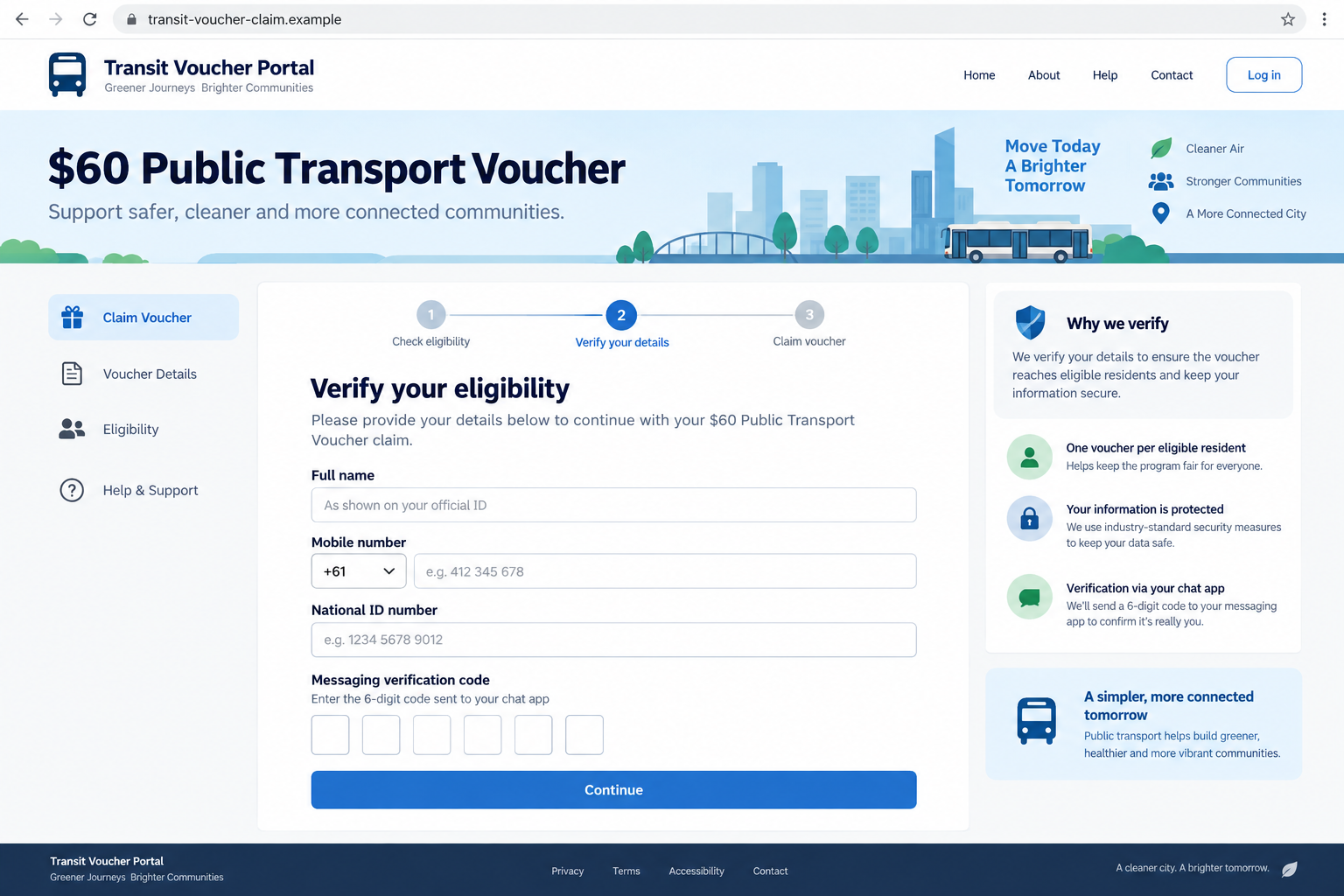
The fake portal asks for ordinary eligibility details such as a name, mobile number, address, or national identification number. It then requests a six-digit messaging verification code.
That code is not confirming voucher eligibility. It may authorize a new login to the victim’s Telegram account.
Once the criminal enters the code, the victim can lose control of the account even though no password was typed into the form.
Police have documented the account-takeover campaign
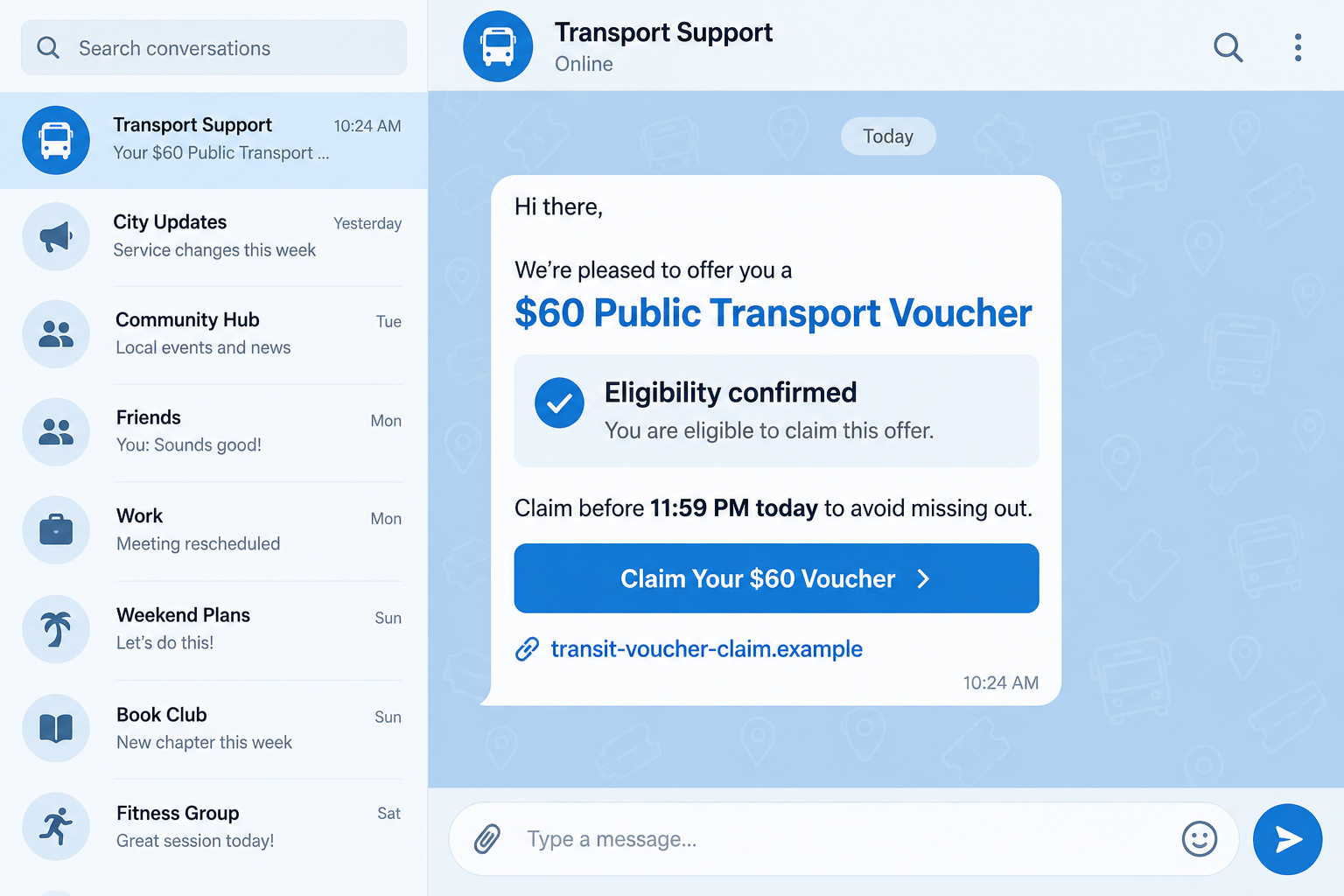
On August 13, 2026, the Singapore Police Force warned about a resurgence of Telegram takeovers linked to fake public transport vouchers. Police said victims received an infographic and a fraudulent link asking for personal details and a Telegram verification code.
Compromised accounts were then used to send the same links to contacts or add people to groups promoting fraudulent investments. The Ministry of Transport does not contact people through Telegram to ask them to click a voucher-claim link.
Common warning signs include:
- a voucher announced only through a forwarded chat message;
- a claim deadline measured in hours;
- a domain that does not end in the official government suffix;
- a form requesting a Telegram or messaging verification code;
- a friend who sends the link without a personal explanation;
- a login alert that appears immediately after the form is submitted;
- a request to share the promotion with more contacts;
- investment groups appearing after the account changes hands.
Why a Small Transport Benefit Is an Effective Hook
Public transport vouchers are ordinary enough to escape the skepticism attached to luxury giveaways. Governments and local authorities do run benefit programs, and eligibility rules can change.
The recipient may have seen genuine subsidy announcements before. Familiar colors, bus icons, official-sounding language, and an eligibility checker make the fake page feel consistent with that experience.
A modest amount also lowers the perceived risk. People may decide that completing a short form is harmless because the reward is not large enough to attract sophisticated criminals.
The claim deadline supplies urgency without sounding aggressive. A banner saying the allocation closes tonight encourages action before the recipient searches for the program independently.
The message may arrive from a real contact. The scammer does not need to create a convincing relationship because the stolen account already contains one.
The portal gradually increases the sensitivity of its questions. A name and telephone number come first, while the verification code appears as the final administrative step.
How the Public Transport Voucher Scam Works
Step 1: A voucher message arrives in Telegram
The message includes an infographic, claim amount, eligibility statement, and link. It may come from an unknown sender, a community group, or a compromised friend.
The wording encourages immediate action and may say that only a limited number of vouchers remain.
Step 2: The link opens a copied benefit portal
The page uses transport imagery, public-service language, and a multi-step claim process. A lock icon and HTTPS may be displayed prominently.
Encryption only protects the connection to that domain. It does not prove the site belongs to a government agency.
Step 3: The form collects identity details
The victim enters a name, telephone number, identification number, date of birth, or address. These details make later impersonation attempts easier.
The page may pretend to check eligibility before advancing to account verification.
Step 4: Telegram sends a real login code
The scammer triggers a login attempt using the victim’s telephone number. Telegram then sends a genuine verification code to the victim’s app or device.
Because the fake page is waiting for a code, the timing makes the request feel legitimate.
Step 5: The victim gives the code to the fake portal
The portal labels it a voucher verification code, but the scammer enters it into Telegram. If additional protection is not enabled, the new session may gain access immediately.
The fake page can display a success message even though no voucher application exists.
Step 6: The criminal secures and exploits the account
The attacker may add a password, terminate other sessions, review contacts, read accessible chats, and impersonate the owner.
Contacts receive the voucher link from an account they recognize, extending the campaign.
Step 7: The stolen account promotes new scams
The account may add contacts to investment groups, request emergency loans, advertise fake jobs, or send other phishing links.
The original voucher page can disappear while the network of compromised accounts continues spreading.
The Verification Code Is the Account Key
A verification code is generated because someone is attempting to sign in. It is not a coupon number, benefit reference, identity question, or customer-service confirmation.
Read the complete notification that contains the code. Legitimate messages often state that the code must not be shared and identify the action it approves.
A scammer may tell the victim to ignore that warning because the system uses the same code for eligibility. That explanation is false.
Two-Step Verification adds another password beyond the one-time login code. Enabling it can stop an attacker who obtains only the code, though it does not make phishing links safe.
Review active sessions regularly. A device, location, or login time you do not recognize should be terminated immediately.
Do not assume a message is safe because a friend sent it. Contact that person through another channel when a link or money request feels unusual.
How to Verify a Real Voucher Program
Start from the transport ministry, city authority, or benefits agency website you find independently. Do not search by copying the domain from the message.
Read the eligibility and application instructions on the official page. A real program should explain who qualifies, when applications open, and which portal processes claims.
Check the complete domain. Government services use defined official suffixes, and an extra word before `.com`, `.info`, or another public suffix does not become official branding.
Look for the announcement on verified government social accounts and established local news outlets. A screenshot circulating in chat can be altered.
Call the agency using the telephone number on its official site if the program cannot be found. Ask whether Telegram is used for direct claims.
Never enter a messaging login code into a benefit form. If a program genuinely uses an account, start from the service’s official app or bookmarked website.
A legitimate voucher does not require recipients to recruit contacts. Forwarding requirements help scams spread and should be treated as a warning.
How One Stolen Account Can Reach an Entire Contact List
Account takeover gives the criminal more than a username. It provides an established identity, years of social context, and a network of people who already trust the sender.
The attacker can study recent conversations to learn how the owner writes, which language is used, and who might respond quickly. Even a short message such as “I claimed mine” can sound personal when it arrives from a familiar profile.
Group chats amplify the reach. A compromised member can post the voucher graphic where dozens or hundreds of people see it, and other members may forward it before the account is reported.
Some contacts will ask whether the promotion is genuine. The criminal can answer from the stolen account, creating a false confirmation that is more persuasive than the original link.
The attacker may also delete sent messages or security alerts, delaying discovery by the account owner. Friends often notice first because the voucher message does not match the person’s usual behavior.
After the first campaign, the account can be repurposed. It may promote an investment chat, request an emergency loan, advertise a fake job, or ask contacts to vote in another phishing form.
That is why warning contacts matters even after access is restored. A deleted malicious session does not remove copies of the link already delivered to other people.
Recipients should report both the message and the compromised profile. Platform reports help connect multiple accounts and domains that belong to the same campaign.
If a trusted contact sends an unexpected benefit link, call them or reach them through another service. A ten-second verification can stop the compromise from moving to the next account.
Account owners should also review whether private information was visible in chats. Travel plans, identity documents, financial conversations, and saved contact details can support scams that arrive weeks later.
Changing a profile photo or username will not remove an attacker with an active session. Session control and Two-Step Verification are the important recovery actions.
Community administrators can slow the spread by deleting the link, warning members, restricting new posts temporarily, and preserving the sender details for a platform report.
Company, Address, and Fulfillment Checks
The program must appear on an official agency site
A graphic in a chat is not an official announcement. Confirm the exact program name, amount, dates, and eligibility through the transport authority’s own website.
If the only evidence is the forwarded message, do not submit the form.
The domain must belong to the real application service
Check spelling, suffix, registration history, and links from the official agency. A padlock does not establish ownership.
Shortened links can hide the destination and should not be used for benefit claims.
Support must be reachable outside Telegram
Use an official telephone number or email address found independently. A chat administrator who refuses outside verification should not receive personal data.
Do not accept a voice message or copied ID as proof of government employment.
The claim must not require access to your messaging account
A transport benefit has no reason to activate a new Telegram session. Requests for login codes, backup passwords, or QR login scans reveal the real objective.
Close the page as soon as account credentials are requested.
What to Do if You Have Fallen Victim to This Scam
- Open Telegram from a trusted device. Go to Settings, Devices, and terminate every session you do not recognize.
- Enable or change Two-Step Verification. Use a strong unique password and confirm that the recovery email belongs to you.
- Warn your contacts immediately. Tell them not to open the voucher link or trust recent requests from your account.
- Review account changes. Check profile information, privacy settings, connected bots, groups, channels, archived chats, and newly added administrators.
- Change reused credentials. If the phishing page collected a password or identity details, secure the related email, banking, and government accounts.
- Call your bank if financial information was entered. Replace exposed cards, review transfers, and ask the fraud team to monitor the account.
- Preserve evidence. Save the message, sender profile, URL, form screenshots, login alerts, new-session details, and messages sent from the compromised account.
- Scan the affected device. If the page prompted a download or app installation, run a full Malwarebytes scan and remove unfamiliar profiles or applications.
- Block malicious follow-up pages. AdGuard can filter many known phishing domains and deceptive ads, but account sessions still must be terminated manually.
- Report the campaign. Use Telegram’s reporting tools and notify the impersonated transport agency, domain registrar, local police, and national fraud-reporting service.
Frequently Asked Questions
Can a Telegram contact send the link without knowing?
Yes. A criminal controlling the account can send messages that appear to come directly from your friend.
Does the real Telegram code mean the voucher page is real?
No. The real code confirms that someone started a Telegram login. Giving it to the page may hand that session to the attacker.
Will changing my telephone number fix the account?
Not by itself. Terminate unknown sessions, enable Two-Step Verification, and review account settings first.
What if I entered personal data but not the code?
Your account may remain safe, but the information can support later phishing. Expect follow-up messages and protect any identity details you disclosed.
Can HTTPS make the claim page trustworthy?
No. HTTPS encrypts traffic to the site. Criminals can obtain certificates for deceptive domains.
How do I confirm a real public transport voucher?
Visit the transport authority’s official website independently and follow only the application route published there.
The Bottom Line
The public transport voucher scam offers a believable benefit, then repurposes a genuine Telegram verification code to seize the victim’s account.
Never enter a messaging login code into a voucher form. Verify the program outside the chat, and treat unexpected links from familiar accounts as potentially compromised.








