

You list something on Carousell, then an interested buyer contacts you by email. They mention the exact item. They seem ready to pay. For a seller hoping to clear some space or finish a sale, it looks like good timing.
The Carousell buyer email scam starts with that believable connection. The question is not just whether the person knows your listing, but why the conversation has arrived somewhere you were not expecting it.
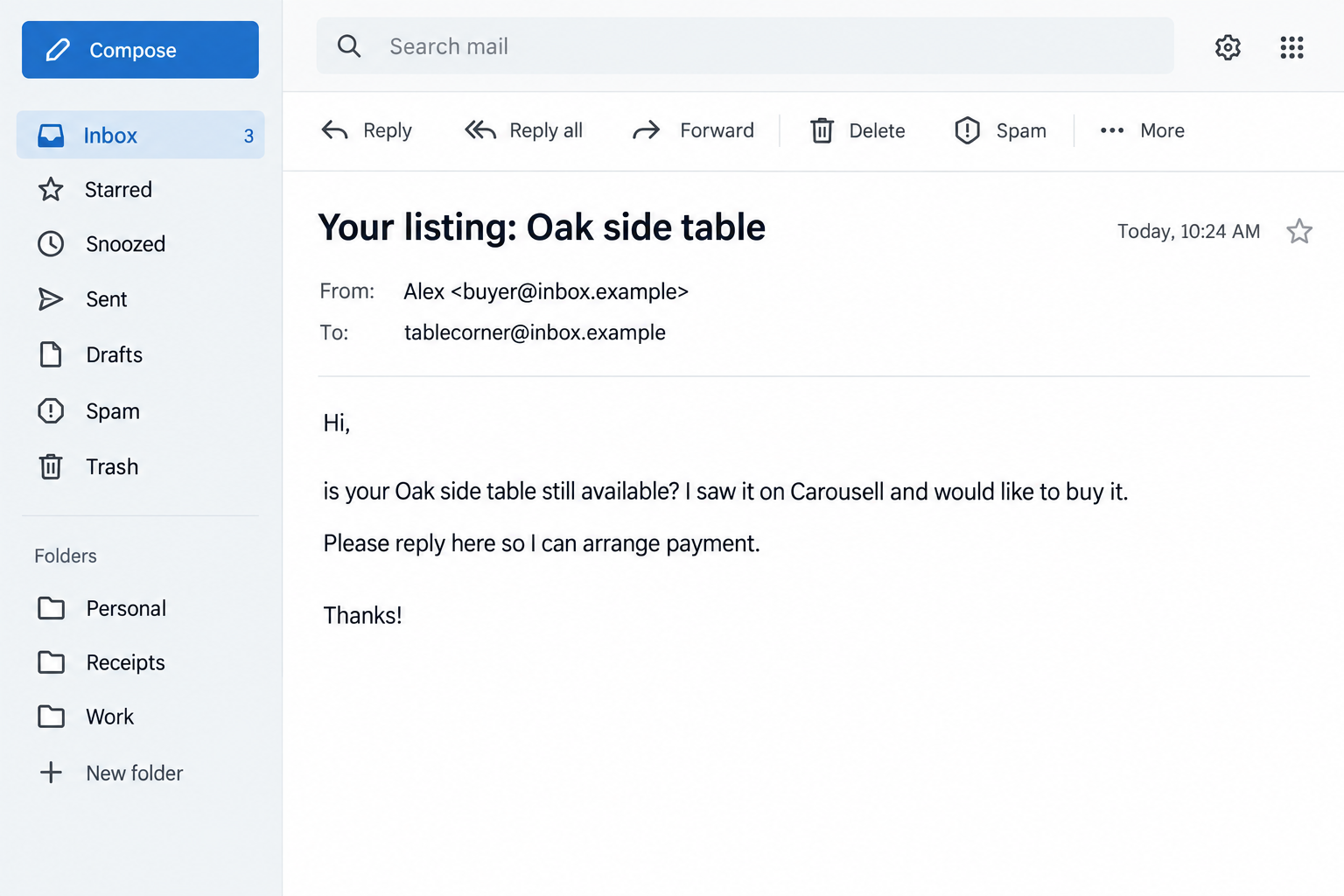
Overview
A fake buyer can know the item without knowing you
Carousell has published an official warning about scammers guessing sellers’ email addresses from their public usernames. They then contact those addresses while pretending to be interested in a listing.
That explains an unsettling detail: the seller may never have given this person an email address. The scammer can try combining a visible username with a common email provider and see whether it reaches someone.
In its warning about guessed email addresses, Carousell says these approaches can lead to phishing links, stolen credentials, and false payment confirmations. This is a confirmed impersonation pattern, not an accusation that the marketplace itself is fraudulent.
The product, buyer identity, email addresses, and S$85 payment used in our illustrated examples are fictional. They show the approach without reproducing a functioning phishing link or exposing a real seller.
The claimed payment is where the conversation becomes dangerous
The first email may be a simple availability question. It does not need an obvious threat or a suspicious attachment. Once you reply, the supposed buyer can introduce a payment or delivery procedure that sounds like part of the sale.
A follow-up might claim you need to confirm a payout, verify a card, or speak to support before receiving the money. Those are not instructions to accept merely because the person correctly identified your item.
The seller should be receiving money, yet the proposed procedure asks for information that can expose the seller’s own accounts. That reversal is the key point to notice.
This is not proof that Carousell leaked your inbox
An accurate email address can make the contact feel official or suggest a data breach. Neither conclusion follows from the message alone. Username guessing is one explanation explicitly documented by the platform.
The safer check is practical: open Carousell independently and see whether the conversation and transaction exist there. Do not treat a private email as an in-app order.
- The sender knows a listing that is visible publicly.
- The message arrives in your inbox without a matching in-app conversation.
- The buyer wants to finish the sale through email or another messaging service.
- A link asks you to claim money or enter financial details.
- A supposed support representative insists the unfamiliar process is compulsory.
Those signs together deserve a stop, not a rushed attempt to complete the form before the buyer loses interest.
Why the Listing Details Feel More Convincing Than They Are
An ordinary spam email says something generic. This one can name your furniture, camera, or clothing listing. It feels like the sender has a reason to contact you, and that makes the rest of the conversation easier to accept.
But public listing details are not confidential evidence. A stranger can read the title and asking price without buying anything. The information proves that someone saw the listing, not that a payment exists.
Imagine that your public username and personal email share the same distinctive word. Someone could try the email address without accessing your account. Changing that overlap may reduce easy targeting, though it cannot make every future message trustworthy.
A real email notification and an emailed conversation are also different things. Carousell explains that its notifications can alert you to chats, but replies belong on the platform. An unsolicited buyer asking you to negotiate directly in email is outside that flow.
How the Carousell Buyer Email Scam Works
Step 1: A public listing provides a believable opening
The scammer picks an item and copies enough details to sound like a buyer. The opening does not have to be complicated. A question about whether the item is still available is something a seller expects.
That familiarity is why it helps to check the channel before answering the content. You can read the question and still decide to respond only through the marketplace’s own messaging system.
You do not owe a stranger an explanation for keeping a sale on the platform. A genuine transaction should not depend on you surrendering the place where the listing and discussion can be checked.
Step 2: The sender reaches your inbox or asks to move off-platform
In the guessed-email variant, the first approach arrives directly in email. Related attempts may start in chat and ask for your email address, WhatsApp, or Telegram details.
Carousell’s examples of phishing messages include excuses about images not loading and supposed requirements for a seller’s email. The story gives the move an administrative reason.
The practical concern is that the buyer is changing the route before payment is verified. If their instructions conflict with the app, do not let a screenshot supplied by the buyer settle the disagreement.
Step 3: A payment notice makes the sale appear finished
Next comes a claim that the money is ready, held, or waiting for confirmation. An email can borrow marketplace language and present a button that looks like the final step in accepting the sale.
Do not ship or hand over the item based on that message. Check the actual order or payment record through the service you normally use. A payment screenshot is not the same as money appearing in your own verified account.
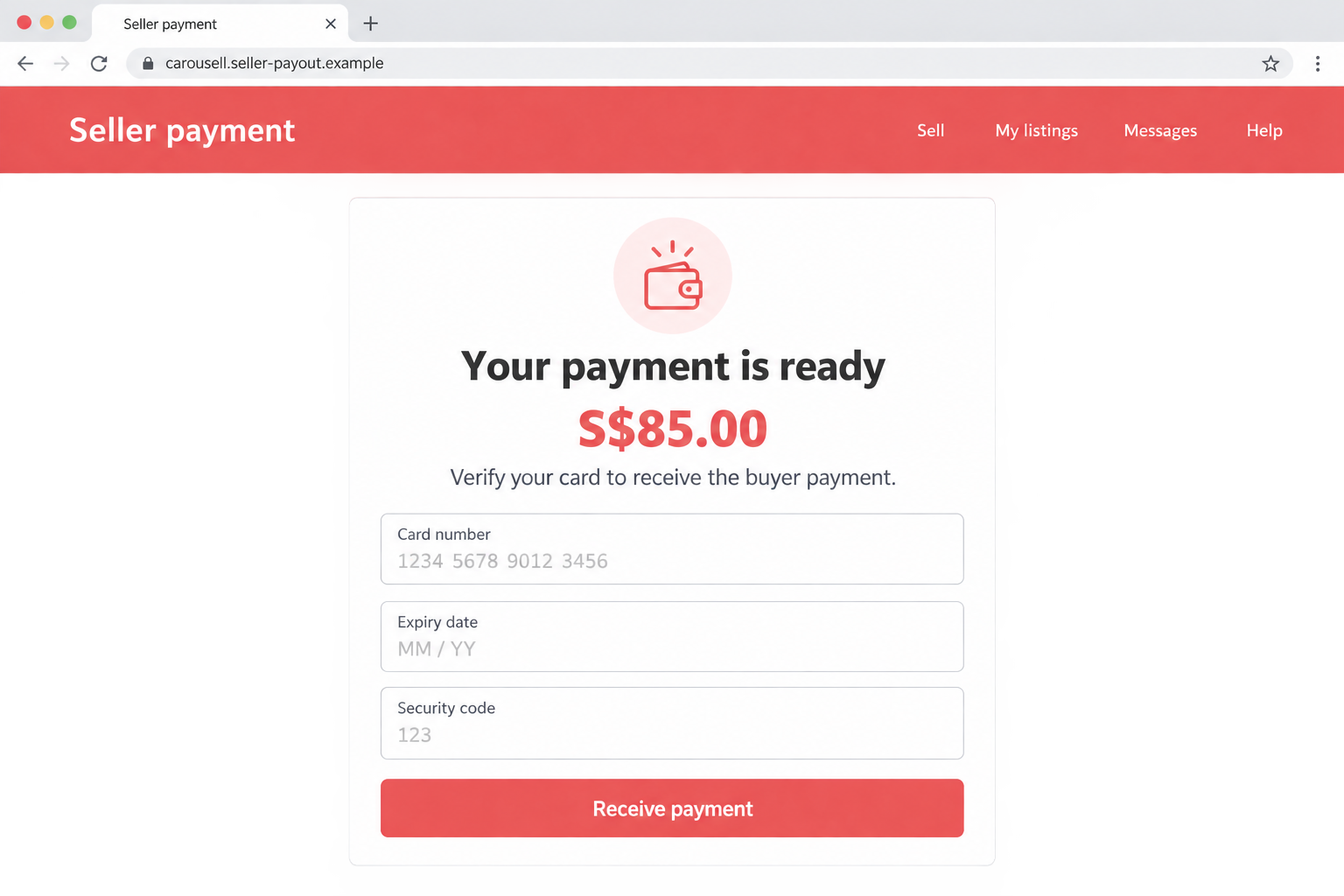
The illustrative page below shows one possible card-collection pretext. Its amount and appearance are examples, not a claim that every Carousell phishing attempt uses this exact form.
Step 4: The payout process asks for sensitive information
A fake page may request a marketplace password, card details, or banking information. Different versions seek different things. Do not assume the risk ends with a small verification payment or the value of your listed item.
Carousell’s phishing guidance warns against third-party sites that collect sensitive details under its name. A page containing the word Carousell in its address is not necessarily operated by Carousell.
For example, carousell.seller-payout.example is a fictional lookalike address, not an official marketplace service. Brand text placed at the beginning of a domain does not give the brand control over it.
Step 5: Fake support keeps the seller cooperating
If the seller hesitates, an impersonated support account may claim the payout requires verification or the account will be restricted. The person who introduced the problem now introduces someone to resolve it.
A support chat reached from the suspect page is not independent reassurance. Both the page and the representative may belong to the same fraud. Open the real Help Centre yourself if a payment procedure seems unfamiliar.
Stop if the process requires you to approve an unexpected bank action. A buyer does not gain authority over your account because they claim to have sent money.
Company and Payment Checks That Keep the Sale Yours
Carousell is the impersonated platform
This warning concerns fraudulent buyers and counterfeit support or payment pages. It does not mean every buyer is dishonest or that every sale on Carousell is unsafe.
The platform’s own warnings are useful precisely because they identify behaviors outside its intended transaction process. Compare the demand with the service’s instructions, not with a stranger’s assurance that this is how everyone gets paid.
The destination address needs its own check
Read the full website address before entering anything. A familiar name in a subdomain, page title, or path can be decorative. So can a padlock, which does not verify the business behind the page.
The best shortcut is to avoid the emailed route altogether. Open the app or a saved official address. If the claimed payout is not present, ask official support about it rather than testing the buyer’s link.
Real support should not depend on the buyer’s introduction
Use contact options in the official Help Centre. Keep the suspicious buyer’s account, email, and payment demand available for the support team, but do not let that buyer choose your support representative.
If you receive another message claiming support has reviewed the case, verify it through the case you opened yourself. Knowing your listing title or previous conversation does not prove the new contact is genuine.
Track the actual order, not an emailed promise
A real sale leaves a record you can inspect. Confirm the item, buyer, delivery arrangement, and payment status in the appropriate trusted account before handing over property.
Do not invent an off-platform refund because someone claims they overpaid. Ask the payment provider about a genuine transaction through its own system. A separate repayment can create a second loss rather than undoing the first.
What to Do if You Have Fallen Victim to This Scam
-
Stop the sale through the suspicious channel. Do not send the item, provide another code, or pay a fee to unlock the promised money. Save the conversation and open Carousell separately.
If you already arranged a collection or shipment, contact the legitimate delivery provider promptly to ask what can still be stopped. Do not rely on a courier contact supplied only by the buyer.
-
Tell your bank about any exposed financial details. Use your banking app or a number you already trust. Explain that a fake marketplace payout page collected the information and describe any codes or approvals you supplied.
Ask the bank to assess card replacement, account protection, and unauthorized transactions. If you sent money yourself, ask whether a recall or dispute is possible. Be accurate about the payment rather than labeling every transaction the same way.
-
Recover control of the marketplace and email accounts. If you typed a password into the suspect page, change it through the genuine service. Check recovery addresses and any account changes, and replace the password wherever else it was reused.
If access has been lost, contact official support. An unsolicited direct message promising to recover the account is not a substitute for the platform’s recovery process.
-
Report the buyer and preserve the original emails. Give Carousell the username, listing, email address, timestamps, and screenshots of the demand. Keep email headers when possible. Explain if there was no matching conversation in the app.
Report to the relevant local police or fraud-reporting service if you lost money or property. Remove sensitive payment information from any public warning you share.
-
Check for software exposure only if something was downloaded. A phishing page can steal typed information without installing malware. If you ran an attachment or an alleged support tool, then device checks are also needed.
Malwarebytes can help inspect a supported device for malicious programs. AdGuard can help reduce exposure to known malicious pages and advertising. Neither authenticates a buyer or makes entering banking details on an unverified site safe.
-
Expect attempts to reuse the same sale story. A scammer may return under another identity claiming the payment is still available or that a refund needs an activation fee. Do not pay to retrieve fictional proceeds.
For future listings, avoid using an easily guessed email name as your public username where practical. More importantly, keep conversations in-app and verify payments in your own account every time.
Frequently Asked Questions
How did the buyer get my email address?
Carousell documents attempts that combine a public username with an email provider. Other sources are possible, so one message does not prove how your address was found. It also does not, by itself, prove a Carousell data breach.
Is mentioning my exact item proof of a genuine buyer?
No. The item title and description may be public. A scammer can copy them into an email without placing an order. Check the conversation and transaction through the platform.
Does Carousell ever send email notifications?
Yes. The platform distinguishes notifications about chats from replying to buyers by email. Open the app to inspect and answer the actual conversation instead of continuing an unsolicited off-platform exchange.
Should I enter my card to receive the buyer’s payment?
Do not follow that instruction from a buyer’s link. Check the genuine payout procedure inside the app or official Help Centre. A third-party form collecting your card under the promise of receiving money is a major phishing warning.
What if I replied but did not click anything?
A reply alone does not hand over your bank account. Stop the exchange, report it, and watch for follow-up messages. Take additional protective steps if you shared passwords, payment details, identity documents, or approvals.
Will changing my username stop every phishing email?
No. It can make this particular guessing technique less convenient, but scammers may already know your address. Keeping transactions in the verified service is more reliable than trying to make yourself impossible to contact.
The Bottom Line
The Carousell buyer email scam makes public listing details feel like private proof. A stranger who knows what you are selling still has not proved they bought it, paid for it, or represent marketplace support.
Keep the conversation where the sale can be checked. Before shipping anything or entering payment information, open your own account and verify the transaction without the buyer’s link.








