Instant Income Bot Scam Exposed: Fake Earnings, Upsells, and Refund Risks
Written by: Lapain Epuran
Published on:
A button that quietly earns money while its owner sleeps is the sort of promise that becomes more attractive when bills feel impossible.
Instant Income Bot builds an elaborate story around that hope, yet the missing business model, invented characters, and paid funnel reveal something far less remarkable.
Overview
The advertised bot never explains where profit comes from
Instant Income Bot claims ordinary users can activate an automated system and receive fast payouts through a phone, tablet, or computer with little effort.
The presentation does not identify a sustainable source of revenue. There is no customer, product, service, market, investment strategy, or audited transaction generating the promised money.
Real income requires someone to pay for value or accept financial risk. A dashboard balance does not explain either side of that exchange.
The founder story and earnings display are sales devices
The video introduces Jason Bennett, described as a struggling delivery driver who learned about a secret algorithm from an MIT graduate named Michael.
Researchers could not verify those characters or the dramatic origin story. The spokesperson imagery and narration show signs of synthetic or stock production.
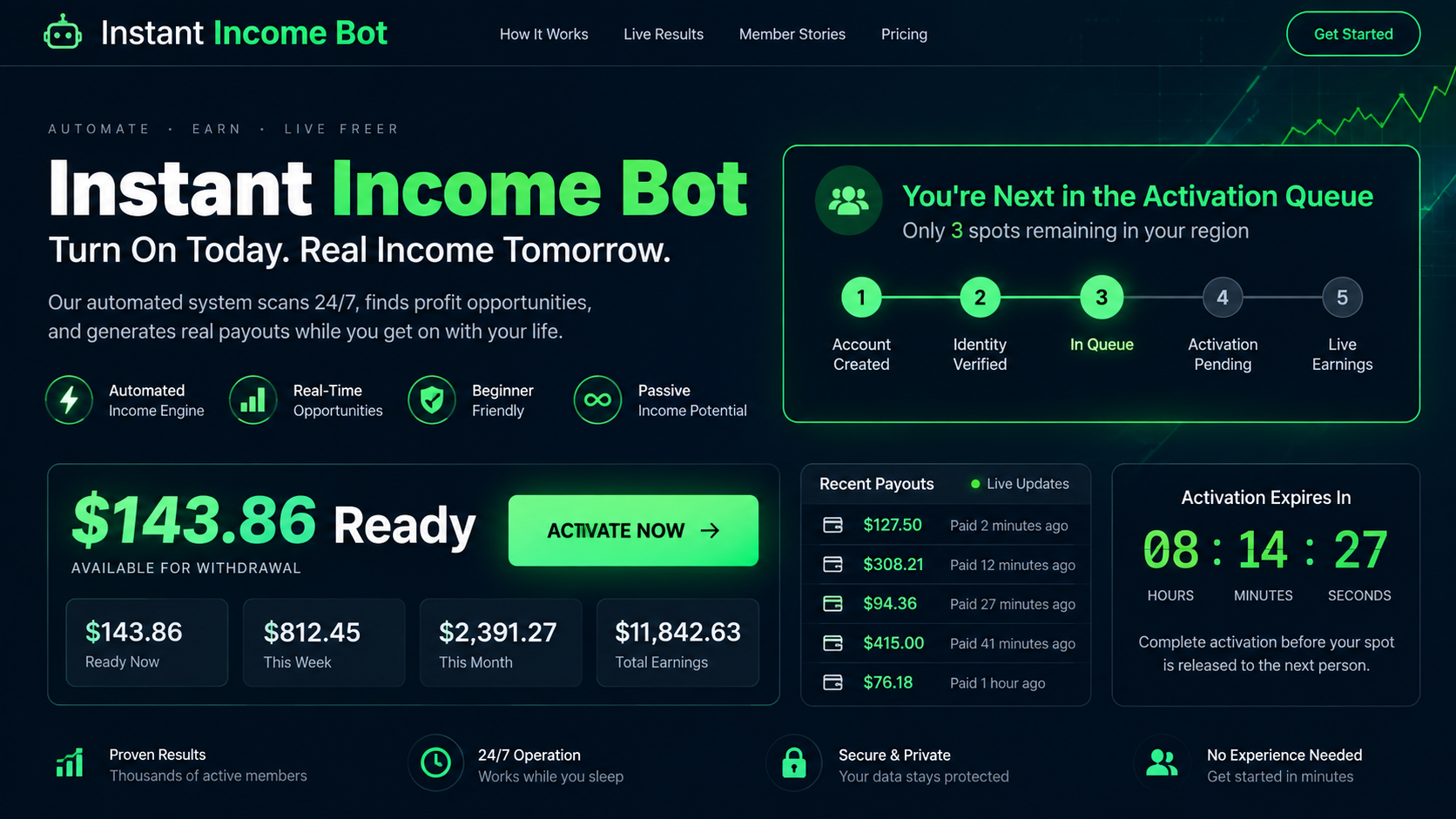
Visitors may see an activation queue and a balance such as $143.86 already waiting. No money was earned because the visitor had not performed any economic activity.
The low entry price can open a larger funnel
Promotions have described inexpensive access, sometimes near $17. Public complaint records also reference purchases of $34 and a $97 done-for-you addition.
A small first payment reduces resistance. Once the buyer enters, upsells can promise faster results, automation, traffic, coaching, or a supposedly complete version.
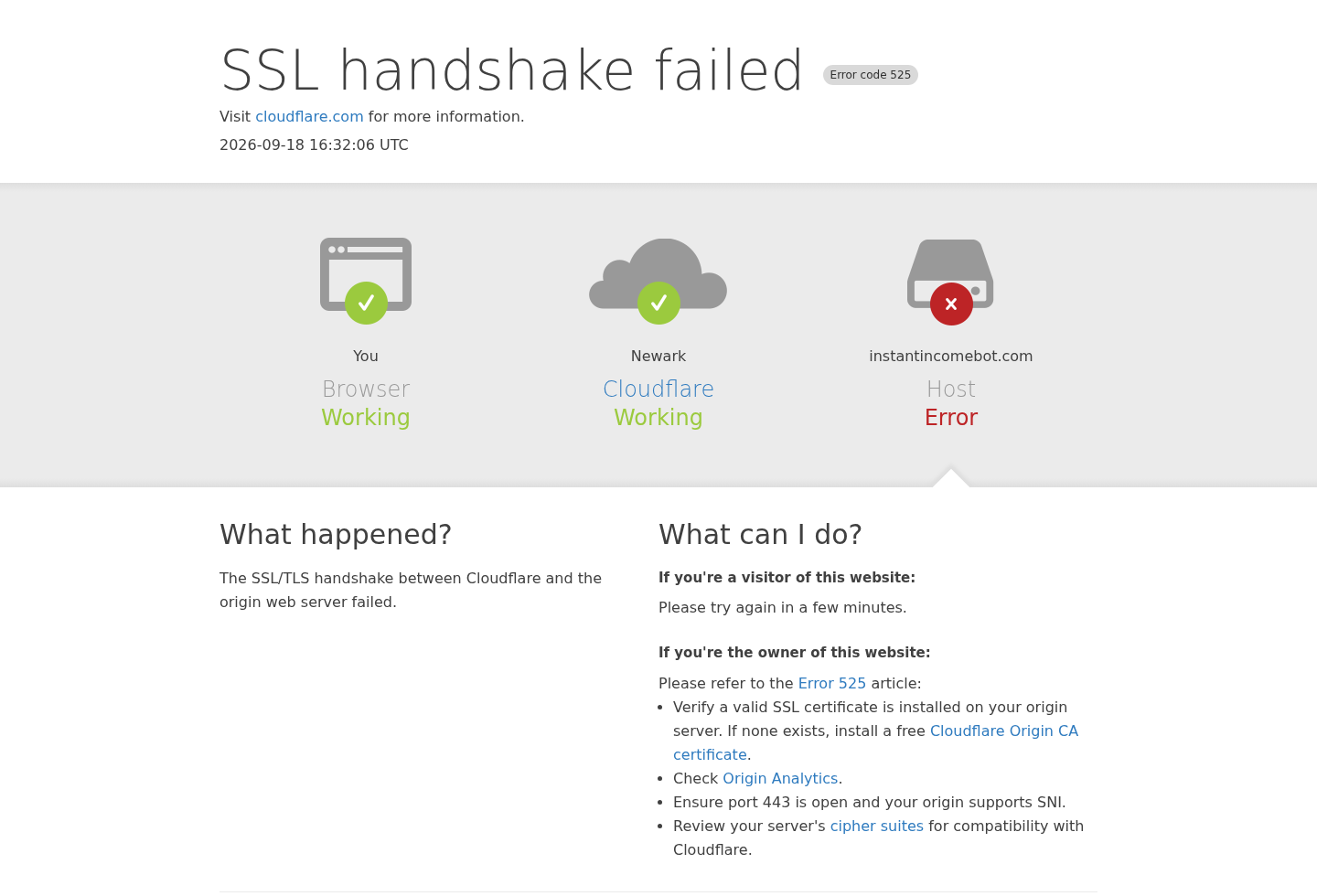
The program’s website was returning an SSL handshake error during our current capture. A broken sales domain makes support and access more uncertain for previous buyers.
The page promises automatic income without identifying a credible underlying business activity.
A fake balance appears before the visitor has earned or deposited anything.
The activation queue and countdown manufacture urgency around a digital product.
Characters, testimonials, and personal success stories cannot be independently verified as presented.
The inexpensive front-end offer can be followed by higher-priced additions and done-for-you packages.
Explodely complaint records specifically reference Instant Income Bot purchases and refund requests.
The current site failure highlights the danger of buying access dependent on a short-lived funnel.
Why the Numbers on the Page Are Not Earnings
A genuine account balance represents completed transactions recorded by an accountable institution. It should have a payer, date, activity, fee, and withdrawal process.
The Instant Income Bot figure appears before the user has sold anything, attracted customers, provided a service, invested capital, or completed identity verification.
That makes it a persuasion element, not proof of money belonging to the visitor. The number creates a feeling of loss if activation is not completed.
The queue performs a similar function. It suggests that a place has already been reserved and another person will receive the money if the timer expires.
Digital access usually has no meaningful scarcity. Software can admit another buyer unless licensing, support, or capacity limits are documented.
A legitimate platform can demonstrate a complete transaction. It can show who pays, why they pay, what work is required, and which risks affect results.
Instant Income Bot substitutes vague terms such as artificial intelligence, algorithm, automation, hidden revenue, and fast payouts for that explanation.
AI can write, classify, optimize, or analyze information. It does not create money without customers, sales, advertising, capital, data, or another economic input.
Even automated affiliate marketing requires an audience, compliant promotion, tracking, conversions, refunds, and merchant approval. A bot cannot guarantee any of those outcomes.
When the operator refuses to name the income source, assume the payment funnel itself may be the clearest source of revenue.
The Fabricated Story Behind the Offer
The script begins with financial hardship. Jason Bennett is presented as an ordinary older worker carrying debts and worrying about his family’s future.
That character is carefully chosen. He is not a technology entrepreneur, investor, or marketing expert. His lack of credentials makes the method appear accessible.
During a chance meeting, he supposedly encounters Michael, an MIT-trained genius connected to powerful technology companies and a secret income algorithm.
The mysterious expert cannot speak publicly because lawyers or corporations would stop him. This familiar conspiracy device explains why no independent documentation exists.
Michael shares the system with Jason, who quickly escapes financial stress. Emotional testimonials then suggest that other ordinary families repeated the transformation.
Religious language, family responsibility, debt, illness, or retirement anxiety may appear in variations. The story is designed to make skepticism feel like rejecting hope.
None of those emotions explains the business model. A moving biography cannot replace bank records, audited results, software documentation, or representative user outcomes.
The presentation may display earnings notifications and withdrawal imagery. Such graphics can be created without connecting to any real payment processor.
Ask for independently verified median net earnings after all fees and upsells. Screenshots from unnamed accounts do not answer that question.
If the seller cannot produce typical results, evaluate the purchase as educational software that may earn $0, not as an income opportunity.
How the Instant Income Bot Scam Works
Step 1: An advertisement targets financial pressure
The first message promises quick relief from bills, debt, retirement anxiety, or an inadequate paycheck. It says ordinary people can earn without experience.
Short videos and native ads may resemble news, testimonials, or personal discoveries. AI language makes an old passive-income pitch sound newly plausible.
The viewer is not asked to evaluate a business. The viewer is asked to imagine how life would change after turning on the system.
Step 2: A pre-landing page displays money already waiting
The page may say the visitor is next in queue and show an amount around $143.86 ready for activation. Nothing establishes ownership of that figure.
A countdown and limited spots create pressure. The visitor fears forfeiting a balance that never came from any verified transaction.
This is a sunk-gain illusion. The person feels emotionally attached to supposed profit before paying the fee required to unlock it.
Step 3: A long video delays the practical explanation
Instead of demonstrating software, the narrator tells the Jason and Michael story. Each chapter builds trust, secrecy, urgency, and identification with financial hardship.
The presentation promises that details are moments away, encouraging the viewer to continue. By the end, the method remains a vague automated algorithm.
Long sales videos prevent easy comparison. Viewers cannot scan terms, search precise claims, or quickly revisit the sentence that implied a guarantee.
Step 4: A small payment becomes the commitment point
The initial price seems minor compared with the displayed earnings. Paying $17 or another low amount feels rational if $143.86 supposedly waits behind the button.
The buyer supplies identity, email, payment information, and proof of interest in money-making products. Those details also support future promotions.
Always inspect the merchant name, billing descriptor, recurring terms, refund policy, and checkbox state before authorizing any digital program.
Step 5: Upsells redefine what is needed
After the first purchase, additional pages can promote done-for-you setup, premium traffic, advanced automation, faster results, licenses, coaching, or expanded access.
The basic offer may suddenly look incomplete. Each new purchase is presented as the missing piece that removes work or unlocks the promised outcome.
A BBB business response referencing Instant Income Bot listed a $34 purchase and a separate $97 done-for-you product, confirming multiple transaction levels existed.
Step 6: The member area cannot generate demand
Buyers may receive videos, affiliate links, generic marketing materials, dashboards, or simple software. Access to content does not mean the earnings promise was fulfilled.
Without traffic and buyers, an affiliate link produces nothing. Without a valuable service, automation simply repeats an activity that lacks customers.
Refund disputes can then turn on whether digital access was delivered, while the buyer’s real complaint concerns the unrealistic income presentation.
Step 7: The funnel disappears or changes names
Low-cost income systems can be relaunched with new names, characters, balances, and artificial-intelligence claims. The same sales structure survives after one domain loses reputation.
InstantIncomeBot.com showed an SSL handshake failure when captured. A temporary outage is not proof of fraud, but it demonstrates dependency on infrastructure the buyer cannot control.
Search by merchant descriptor, operator, checkout platform, support email, and story phrases. A product name alone may vanish before refund or renewal questions are resolved.
Company, Address, and Fulfillment Checks
The purchase trail points to Explodely
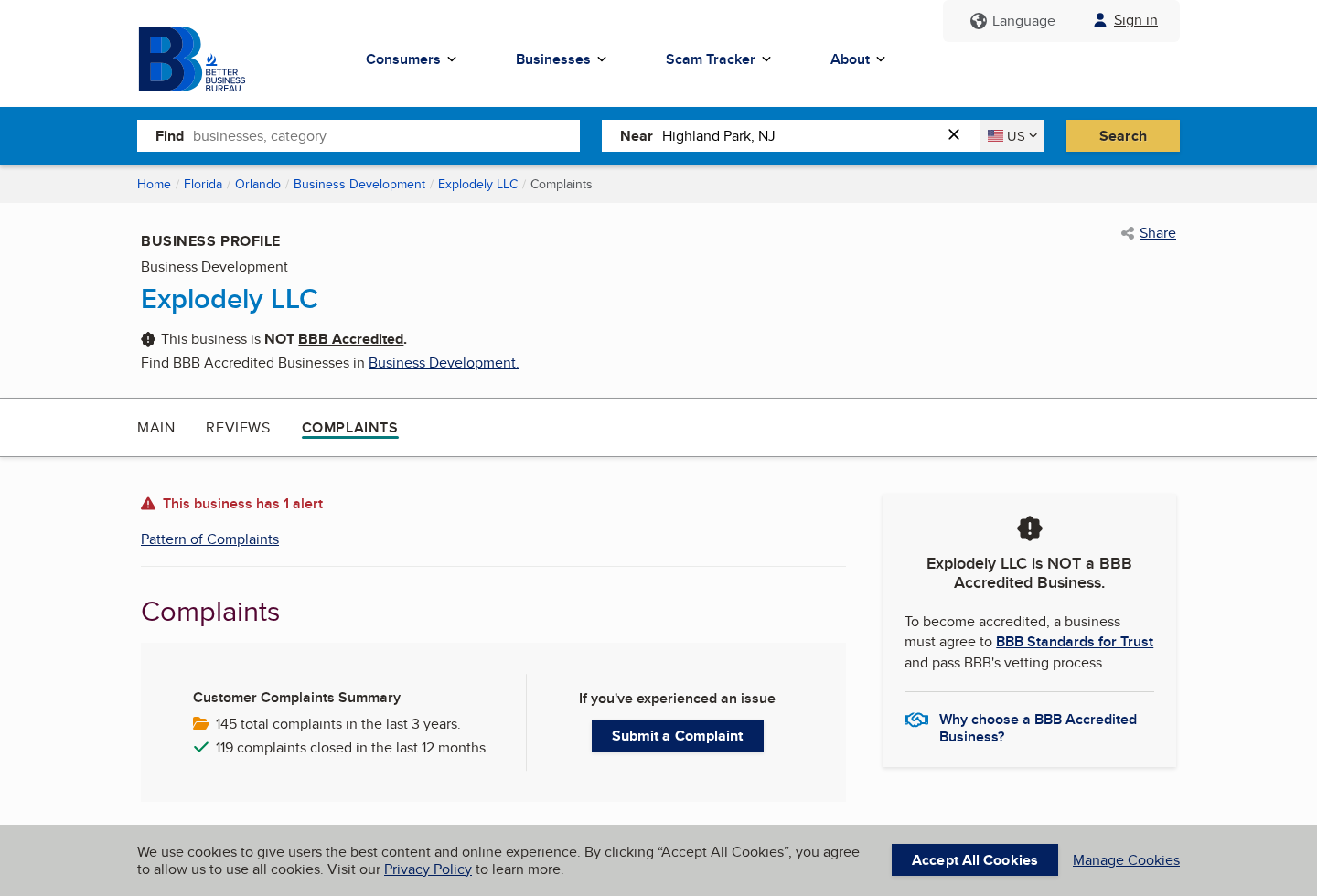
BBB complaint material for Explodely LLC includes an Instant Income Bot transaction. One business response described refunding $34 and $97 purchases to a complainant.
That record connects at least some program payments with a known digital-commerce operator. It does not independently validate the advertised earnings or fictional story.
Buyers should identify whether their receipt names Explodely, another processor, or a separate vendor and address requests to the actual charging merchant.
A digital business still needs a verifiable address
No physical parcel is necessary, but the terms should identify a legal entity, service address, jurisdiction, refund rules, and dispute contact before checkout.
An address belonging to a registered agent or shared office can be lawful. It does not prove that support staff, developers, or company leadership work there.
Compare corporate records with the terms and card descriptor. If names conflict, ask for clarification before purchasing any higher-priced upgrade.
Support must survive the sales page
A temporary campaign domain is a weak foundation for account access. Buyers need a durable email, support portal, order lookup, password recovery, and data-deletion channel.
Test support with a specific pre-sale question about recurring charges and refunds. A generic promotional reply reveals little about post-purchase service.
Keep confirmation emails offline. If the domain later fails, those records may provide the only link between product name, amount, and processor.
There is no traditional fulfillment chain to inspect
Instant Income Bot delivers digital access rather than a supplement or gadget. The relevant supply chain includes the advertiser, sales-page operator, checkout vendor, and content provider.
No warehouse is needed, which makes launching and replacing a brand inexpensive. A new domain can sell substantially similar videos or dashboards within days.
That flexibility increases the importance of legal identity, refund records, software ownership, privacy controls, and proof that the promised function actually exists.
What Public Complaint Evidence Does and Does Not Show
Explodely’s BBB profile displayed 145 total complaints during the previous three years when captured, with 119 closed during the preceding 12 months.
That count covers the business and may include products unrelated to Instant Income Bot. It should not be presented as 145 complaints about this program.
The specific Instant Income Bot entry is more relevant. It shows that a customer sought refunds for two program-related charges and that the business said both were refunded.
A completed refund demonstrates a functioning dispute channel in that instance. It does not resolve whether the sales claims were appropriate or how typical the outcome was.
Independent review coverage repeatedly criticizes the unverifiable characters, absent business model, fake scarcity, earnings graphics, and upsell structure.
Some reviews promote their own alternative business programs. Their conclusions should therefore be separated from independently observable facts.
The strongest facts are visible in the offer itself: unearned balances, no explained revenue source, fictional storytelling, urgent activation, and paid access.
Those elements are sufficient to reject the income promise without accepting every accusation made by a competing marketer.
Warning Signs in Automated-Income Offers
A balance appears before the visitor has created value, funded an account, or completed any measurable work.
The system never identifies who pays users, why payments occur, or what transaction creates revenue.
A secret expert from MIT, a large technology company, or a suppressed project supplies unverifiable authority.
Characters have common names, synthetic portraits, AI narration, and no professional records outside sales pages.
The countdown and activation queue imply scarcity for downloadable or browser-based software.
A small initial fee is compared with large daily earnings to make payment feel riskless.
Done-for-you upgrades, traffic packages, or premium automation appear after the first transaction.
Testimonials show gross screenshots without costs, dates, identities, representative results, or audit evidence.
The merchant, processor, product operator, and support service are not explained together before payment.
The sales domain becomes unavailable while buyers still depend on it for login or refund information.
A legitimate opportunity explains the work in plain language. It also states costs, typical outcomes, risks, time requirements, and the qualifications needed to compete.
It never needs a fake queue or preloaded balance to prove value. The product should remain worthwhile even if the buyer earns $0.
If the offer fails that simple test, hope is carrying more weight than the actual deliverable.
What to Do if You Have Fallen Victim to This Scam
Preserve every sales claim. Save the pre-landing page, fake balance, queue, countdown, video, testimonials, pricing, checkout, refund policy, receipt, and emails before the domain changes.
List every transaction separately. Record the front-end purchase, done-for-you service, upgrades, recurring fees, and statement descriptors. Do not combine authorized and unauthorized charges.
Cancel continuing billing in writing. Contact the merchant and processor, request closure of memberships, and demand confirmation that no additional charges or renewals remain active.
Request refunds promptly. Quote the policy and describe the material mismatch between the automatic-income presentation and the delivered content. Include dates and precise amounts.
Contact your card issuer if necessary. Explain what was promised, what access was delivered, and which charges lacked authorization. Submit evidence before dispute deadlines expire.
Do not buy another upgrade to recover losses. A salesperson may claim premium traffic or personal setup will make the original system work. Stop adding money to the same unsupported premise.
Secure exposed accounts. Change reused passwords, enable multi-factor authentication, remove saved cards, and review email forwarding, payment accounts, and browser extensions for unfamiliar changes.
Check the device for unwanted software. Run Malwarebytes if files, remote tools, or extensions were installed. Use AdGuard to reduce malicious redirects and aggressive follow-up advertising.
Report the income claim. Send the FTC, BBB, payment platform, and advertising network the unearned balance, fictional expert story, total charges, and refund correspondence.
Ignore recovery offers. Anyone promising to retrieve the payment for an advance fee, cryptocurrency transfer, or remote access may be launching a second scam.
Is Your Device Infected? Run a Free Malware Scan
Slow performance, constant pop-ups, or strange behavior? These are classic signs of a malware infection. The fastest way to find out is to scan your device with Malwarebytes Anti-Malware Free — one of the most trusted malware removal tools available.
The free version detects and removes the most common threats, including:
Adware — the cause of those annoying pop-ups
Browser hijackers — unwanted redirects and changed homepages
Trojans and spyware — hidden programs stealing your data
Potentially unwanted programs (PUPs) — software you never asked for
👉 Select your device below — Windows, Mac, or Android — then follow the simple steps to download Malwarebytes, scan your system, and remove any threats it finds. The whole process takes about 5 minutes.
Malwarebytes for WindowsMalwarebytes for MacMalwarebytes for Android
Run a Malware Scan with Malwarebytes for Windows
Malwarebytes is one of the most popular and trusted anti-malware tools for Windows — and it’s completely free for removing infections. It catches threats that many antivirus programs miss, including adware, browser hijackers, and trojans. Follow the steps below to scan and clean your PC in just a few minutes.
Download Malwarebytes
Click the button below to download the latest version of Malwarebytes for Windows from the official source. The free version is all you need — it will scan your computer and remove adware, browser hijackers, and other malicious software at no cost.
(The link opens in a new page where your download will start)
Install Malwarebytes
When the download finishes, open your Downloads folder and double-click the MBSetup file. If Windows shows a User Account Control pop-up, click “Yes” to allow the installation.
Follow the On-Screen Prompts to Install Malwarebytes
The setup wizard will walk you through a few quick screens:
Choose where you’re installing the program — “Personal Computer” or “Work Computer” — then click Next.
Malwarebytes will now install on your device. This usually takes under a minute.
When installation is complete, the “Welcome to Malwarebytes” screen will open automatically.
On the final screen, click Open Malwarebytes to launch the program.
Enable “Scan for Rootkits”
Before scanning, turn on rootkit detection so Malwarebytes can find even the most hidden threats. Click the Settings gear icon on the left side of the screen.
In the settings menu, find “Scan for rootkits” and click the toggle so it turns blue.
Done? Click “Dashboard” in the left pane to return to the main screen.
Start the Scan
Click the blue Scan button. Malwarebytes will automatically update its virus database and start checking your computer for malware.
Wait for the Scan to Finish
The scan checks your entire system for browser hijackers and other malicious programs, so it can take several minutes. Feel free to do something else — just check back occasionally to see the progress.
Quarantine the Detected Threats
When the scan is done, you’ll see a list of everything Malwarebytes found — malware, adware, and potentially unwanted programs. Click the “Quarantine” button to remove all of them at once.
Malwarebytes will now remove the malicious files and registry entries and move them safely into quarantine.
Restart Your Computer
Some threats can only be fully removed after a reboot. If Malwarebytes asks you to restart, click Yes. Once you’re logged back in, your PC is clean and you can continue with the next steps in this guide.
When the scan finishes, click Quarantine to remove everything Malwarebytes found. That’s it — your Windows PC is now clean of trojans, adware, and other malware, and should be back to running smoothly.
If your current antivirus allowed this malicious program on your computer, you may want to consider purchasing Malwarebytes Premium to protect against these types of threats in the future. If you are still having problems with your computer after completing these instructions, then please follow one of the steps:
Malwarebytes for Mac is a free on-demand scanner that removes the malware other security software tends to miss — adware, browser hijackers, and unwanted programs included. Cleaning an infected Mac with Malwarebytes has always been completely free, and it’s our go-to recommendation. Follow the steps below to scan and clean your Mac in just a few minutes.
Download Malwarebytes for Mac
Click the button below to download the latest version of Malwarebytes for Mac.
When the download finishes, open your Downloads folder and double-click the setup file to begin the installation.
Follow the On-Screen Prompts to Install Malwarebytes
The Malwarebytes for Mac Installer will guide you through a few quick screens. Click “Continue” and keep following the prompts until the installation completes.
When the installation is complete, Malwarebytes opens to the Welcome to Malwarebytes screen. Click “Get started“.
Select “Personal Computer” or “Work Computer”
Malwarebytes will ask what type of computer you’re installing it on. Click either Personal Computer or Work Computer, whichever applies.
Start the Scan
Click the “Scan” button. Malwarebytes will automatically update its detection database and begin checking your Mac for malware.
Wait for the Scan to Finish
Malwarebytes will scan your Mac for adware, browser hijackers, and other malicious programs. This can take a few minutes, so feel free to do something else — just check back occasionally to see the progress.
Quarantine the Detected Threats
When the scan is done, you’ll see a list of everything Malwarebytes found. Click the “Quarantine” button to remove all the threats at once.
Restart Your Mac
Malwarebytes will now remove all the malicious files it found. Some threats can only be fully removed after a reboot — if Malwarebytes asks you to restart, allow it. Once you’re logged back in, your Mac is clean.
Once the scan is done, remove every threat it detected. Your Mac is now free of adware, rogue browser extensions, and other potentially harmful software.
If your current antivirus allowed a malicious program on your computer, you might want to consider purchasing the full-featured version of Malwarebytes Anti-Malware to protect against these types of threats in the future. If you are still experiencing problems while trying to remove a malicious program from your computer, please ask for help in our Mac Malware Removal Help & Support forum.
Run a Malware Scan with Malwarebytes for Android
Malwarebytes for Android automatically detects and removes dangerous threats like malware and ransomware so you don’t have to worry about your most-used device being compromised. Aggressive detection of adware and potentially unwanted programs keeps your Android phone or tablet running smooth.
Download Malwarebytes for Android.
You can download Malwarebytes for Android by clicking the link below.
In the Google Play Store, tap “Install” to install Malwarebytes for Android on your device.
When the installation process has finished, tap “Open” to begin using Malwarebytes for Android. You can also open Malwarebytes by tapping on its icon in your phone menu or home screen.
Follow the on-screen prompts to complete the setup process
When Malwarebytes will open, you will see the Malwarebytes Setup Wizard which will guide you through a series of permissions and other setup options. This is the first of two screens that explain the difference between the Premium and Free versions. Swipe this screen to continue. Tap on “Got it” to proceed to the next step. Malwarebytes for Android will now ask for a set of permissions that are required to scan your device and protect it from malware. Tap on “Give permission” to continue. Tap on “Allow” to permit Malwarebytes to access the files on your phone.
Update database and run a scan with Malwarebytes for Android
You will now be prompted to update the Malwarebytes database and run a full system scan.
Click on “Update database” to update the Malwarebytes for Android definitions to the latest version, then click on “Run full scan” to perform a system scan.
Wait for the Malwarebytes scan to complete.
Malwarebytes will now start scanning your phone for adware and other malicious apps. This process can take a few minutes, so we suggest you do something else and periodically check on the status of the scan to see when it is finished.
Click on “Remove Selected”.
When the scan has been completed, you will be presented with a screen showing the malware infections that Malwarebytes for Android has detected. To remove the malicious apps that Malwarebytes has found, tap on the “Remove Selected” button.
Restart your phone.
Malwarebytes for Android will now remove all the malicious apps that it has found. To complete the malware removal process, Malwarebytes may ask you to restart your device.
After the scan, tap Remove Selected to delete all detected threats. Your Android phone is now clean — no more malicious apps, adware, or browser redirects.
If your current antivirus allowed a malicious app on your phone, you may want to consider purchasing the full-featured version of Malwarebytes to protect against these types of threats in the future. If you are still having problems with your phone after completing these instructions, then please follow one of the steps:
Restore your phone to factory settings by going to Settings > General management > Reset > Factory data reset.
Now that your device is clean, keep it that way. Most infections start with a malicious ad or a fake download button — so blocking them at the source is your best defense.
We recommend AdGuard, which blocks malicious ads, phishing pages, and dangerous redirects before they can reach you.
Does Instant Income Bot really generate automatic money?
We found no credible evidence of an automated engine producing the advertised earnings. The funnel never explains a verifiable revenue source or representative results.
Is the $143.86 balance real?
No evidence shows that amount belongs to the visitor. It appears before any income-generating activity and functions as an incentive to pay for activation.
Are Jason Bennett and Michael real people?
Their identities and story could not be verified as presented. The characters serve a promotional narrative about hardship, secrecy, and an MIT algorithm.
Why are there several prices?
The funnel can include a low introductory offer followed by additions. BBB material referenced $34 access and a separate $97 done-for-you purchase.
Can I obtain a refund?
Some complaint records show refunds occurred, but outcomes depend on timing, merchant policy, processor rules, and evidence. Request cancellation and reimbursement immediately.
What if the website no longer works?
Use receipts, card descriptors, checkout emails, and payment-platform records to locate the merchant. Preserve the SSL error and contact the issuer before deadlines pass.
The Bottom Line
Instant Income Bot turns an ordinary low-cost digital funnel into a fantasy of preloaded earnings, secret AI, and effortless payouts without explaining any real economic engine.
The fictional origin story, fake balance, urgency, multiple purchase levels, and unstable website are incompatible with the transparent evidence expected from a credible opportunity.
Do not pay to unlock money supposedly waiting for you. Real income begins with customers, work, capital, or risk, not a timer and an activation button.
10 Rules to Avoid Online Scams
Here are 10 practical safety rules to help you avoid malware, online shopping scams, crypto scams, and other online fraud. Each tip includes a quick “if you already got hit” action.
Stop and verify before you click, log in, download, or pay.
Most scams win by creating urgency. Verify using a trusted method: type the website address yourself, use the official app, or call a known number (not the one in the message).
If you already clicked: close the page, do not enter passwords, and run a malware scan.
Keep your operating system, browser, and apps updated.
Updates patch security holes used by malware and malicious ads. Turn on automatic updates where possible.
If you saw a scary “update now” pop-up: close it and update only through your device settings or the official app store.
Use layered protection: antivirus plus an ad blocker.
Antivirus helps block malware. An ad blocker reduces scam redirects, phishing pages, and malvertising.
If your browser is acting weird: remove unknown extensions, reset the browser, then run a full scan.
Install apps, software, and extensions only from official sources.
Avoid cracked software, “keygens,” and random downloads. During installs, choose Custom/Advanced and decline bundled offers you do not recognize.
If you already installed something suspicious: uninstall it, restart, and scan again.
Treat links and attachments as untrusted by default.
Phishing often impersonates delivery services, banks, and popular brands. If it is unexpected, do not open attachments or log in through the message.
If you entered credentials: change the password immediately and enable 2FA.
Shop safely: research the store, then pay with protection.
Be cautious with brand-new stores, “closing sale” stories, and prices that make no sense. Prefer credit cards or PayPal for dispute options. Avoid wire transfers, gift cards, and crypto payments.
If you already paid: contact your card issuer or PayPal quickly to dispute the transaction.
Crypto rule: never pay a “fee” to withdraw or recover money.
Common patterns include fake profits, then “tax,” “gas,” or “verification” fees. Another is a “recovery agent” who demands upfront crypto.
If you already sent crypto: stop paying, save evidence (wallet addresses, TXIDs, chats), and report the scam to the platform used.
Secure your accounts with unique passwords and 2FA (start with email).
Use a password manager and unique passwords for every account. Enable 2FA using an authenticator app when possible.
If you suspect an account takeover: change passwords, sign out of all devices, and review recent logins and recovery settings.
Back up important files and keep one backup offline.
Backups protect you from ransomware and device failure. Keep at least one backup on an external drive that is not always connected.
If you suspect infection: do not connect backup drives until the system is clean.
If you think you are a victim: stop losses, document evidence, and escalate fast.
Move quickly. Speed matters for disputes, account recovery, and limiting damage.
Stop payments and contact: do not send more money or respond to the scammer.
Call your bank or card issuer: block transactions, replace the card if needed, and start a dispute or chargeback.
Secure your email first: change the email password, enable 2FA, and remove unfamiliar recovery options.
Secure other accounts: change passwords, enable 2FA, and log out of all sessions.
Scan your device: remove suspicious apps or extensions, then run a full malware scan.
Save evidence: screenshots, emails, order pages, tracking pages, wallet addresses, TXIDs, and chat logs.
Report it: to the payment provider, marketplace, social platform, exchange, or wallet service involved.
These rules are intentionally simple. Most online losses happen when decisions are rushed. Slow down, verify independently, and use payment methods and account controls that give you recourse.
Hello! I'm Lapain Epuran, your go-to source for detailed and honest product reviews. From tech gadgets to miracle cures, I provide insights to help you make informed choices. Join me as we discover what's truly worth your time and money.