

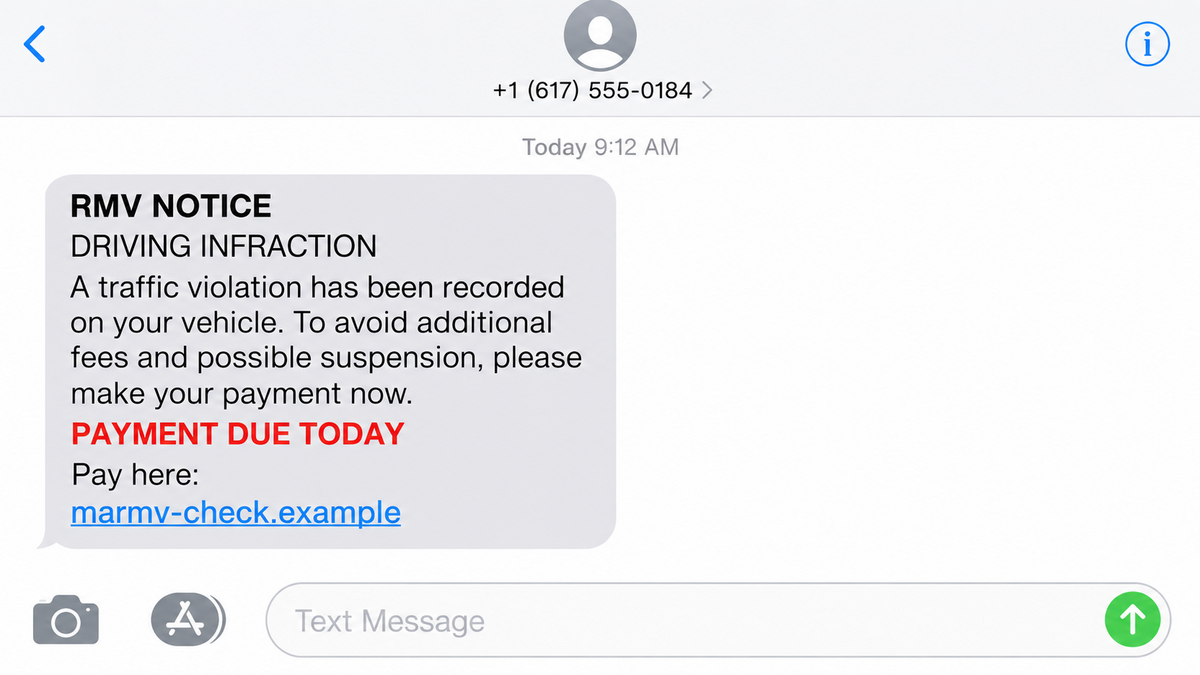
The message says your driving record has an unpaid infraction. It gives you a short deadline, a payment link, and just enough official-sounding language to make the notice feel more serious than an ordinary text.
You may not remember a toll, a camera ticket, or a recent trip. That doubt is exactly what the sender wants. The message suggests that one quick payment will prevent a larger problem.
Massachusetts officials have warned that these texts are not RMV notices. They are a payment trap built to collect card details from people who click before checking the real account.
Overview
The message invents an urgent driving violation
The Massachusetts Registry of Motor Vehicles warned about text messages claiming that recipients owed money for a driving infraction. The wording changes, but the pressure is consistent: open the link now, pay the balance quickly, and avoid consequences.
Some versions mention a traffic ticket. Others use overdue tolls, a vehicle record, or a final notice. The recipient may not have driven in Massachusetts at all. The campaign relies on sending enough messages that a few people will recognize a recent trip or worry that a family member used the car.
The RMV does not send text messages requesting payment. An urgent payment link inside an unexpected SMS is therefore a warning sign before the website is even opened.
The URL borrows the look of a government service
Massachusetts officials specifically described a version containing “marmv” in the web address. A brand-like word in a domain does not make the address official. The registered domain is the part immediately before the extension, and that may belong to an unrelated person or a newly created site.
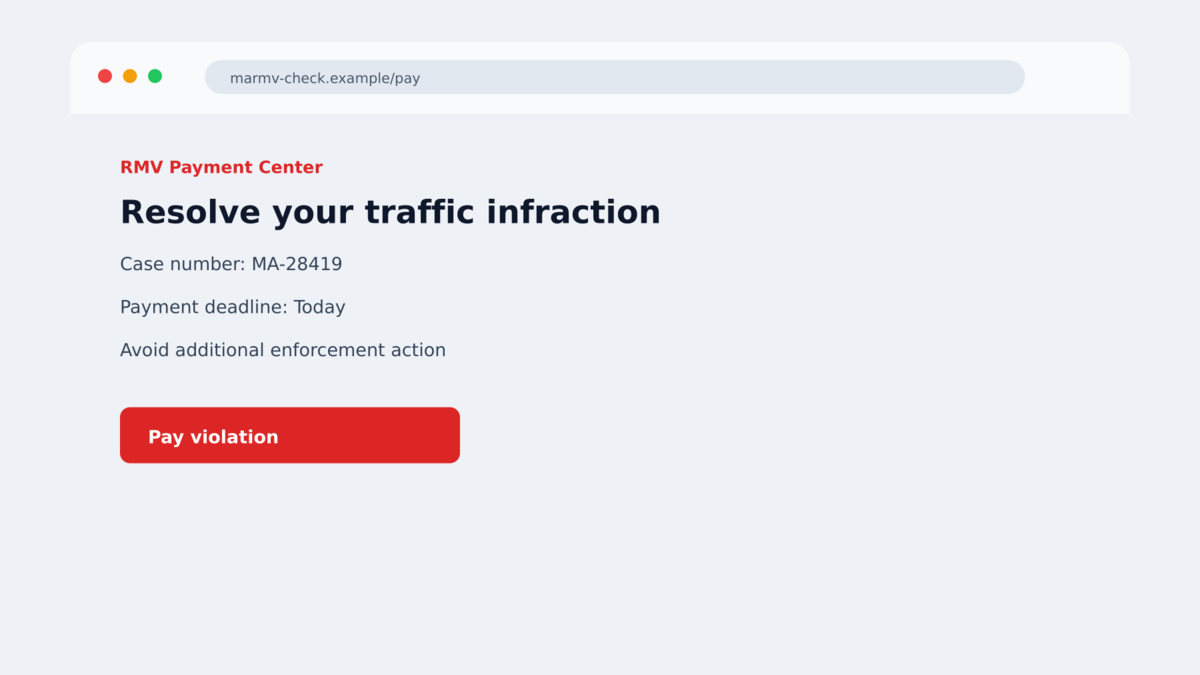
The page can copy a seal, a color scheme, a case number, and a button that says Pay now. Those details are visual props. They do not connect the page to the RMV’s records or payment systems.
The payment form is the real target
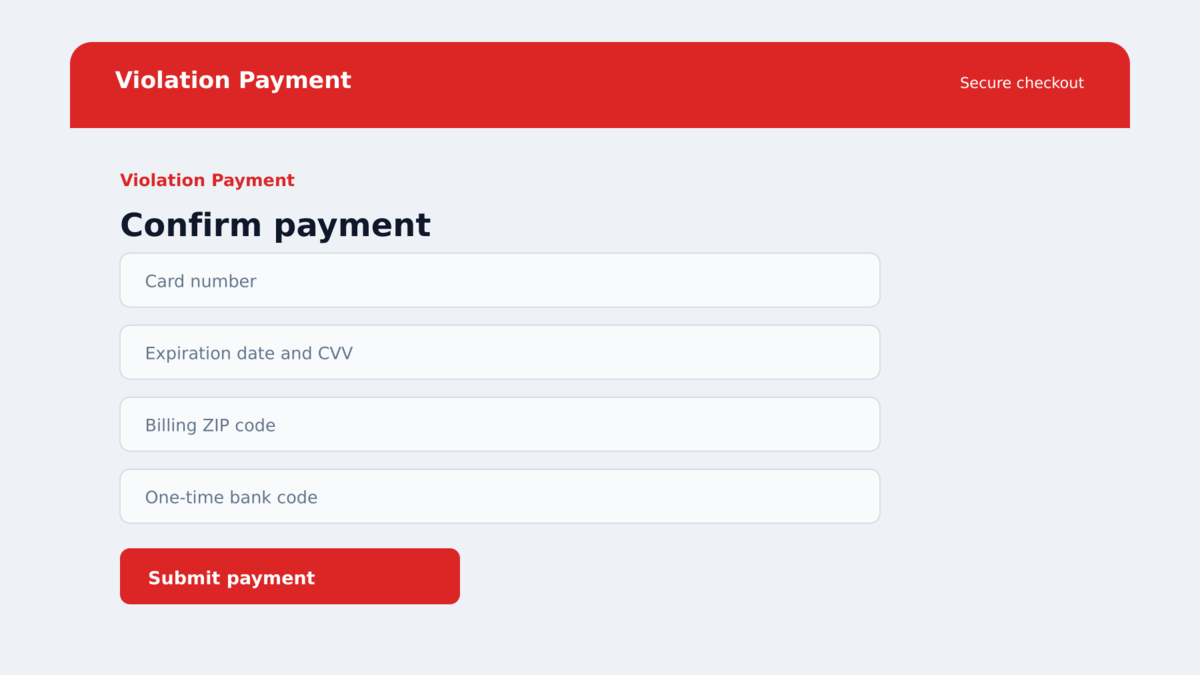
The fake notice is not trying to explain a real ticket. It is trying to move the recipient into a checkout flow. The page may request a card number, expiration date, security code, name, address, and a bank verification code.
After the form is submitted, the criminal can attempt a charge, sell the details, or use the information in a second impersonation. A small “processing fee” can be the first transaction in a much larger problem.
- The message arrives without a matching notice in the official RMV account.
- The deadline is short and the text threatens a license, record, or credit consequence.
- The link contains a brand-like word but does not end in an official government domain.
- The page asks for payment before you can verify a case through a trusted route.
- The sender uses a random number, a changing sender name, or an unusual country code.
- The payment request is made by SMS even though the agency says it does not collect this way.
- The page requests card details and a one-time bank code for a supposed traffic balance.
- The message tells you not to delay or not to contact the agency directly.
Why the Traffic Infraction Story Works
A vague ticket lets the victim fill in the missing details
The message rarely gives enough information to check a real case. It may show a reference number without a date, location, vehicle plate, or court record. That vagueness is useful because the recipient supplies the context mentally.
A person who recently drove on a highway may assume the notice relates to a toll. Someone who lent out a car may worry that another driver caused the problem. The scam does not need accurate information if it can create a believable possibility.
The deadline turns a routine check into a panic decision
Words such as final notice, immediate action, and license suspension are designed to override careful habits. A real government issue can have deadlines, but a text link is not a safe way to verify one.
When a message demands payment in minutes, the safest response is to leave the message and open the official agency site manually. A genuine balance should still be visible there.
Small fees make stolen cards feel like a reasonable risk
The page may ask for $6.99, $9.95, or another modest amount. The small figure is not evidence that the page is legitimate. It is a way to persuade someone that entering a full card number is worth the convenience.
Some fake forms also ask for an OTP after the card is entered. That code can authorize a transaction or help the operator connect the card to another payment service.
Company and Checkout Checks
The message is not the legal agency
A sender name that says RMV, MassDOT, or Toll Services is easy to type. It does not establish that the message came from a state system. Verify the warning through Mass.gov or the known agency portal typed into the browser yourself.
The web address may be a disposable payment page
Scam domains can use government-like words, hyphens, and subdomains to look official at a glance. Check the registered domain, the spelling, the privacy policy, and whether the address is linked from the official state site. A page that appeared only through the text should be treated as untrusted.
The support number belongs to the page owner
Some versions offer a phone number or chat button for questions. That contact route is part of the same unverified funnel. Do not call a number printed in the text or form. Find the agency number from its official website.
The charge has no real traffic record behind it
The balance displayed on a fake page is just a line of text. It does not prove that a ticket exists. A real case can be checked through the agency’s account or a verified customer-service channel without using the link in the message.
How the Fake RMV Traffic Text Scam Works
Step 1: A bulk text claims that a record is overdue
The operation sends the same basic warning to large lists of phone numbers. It does not need to know which recipients drive, which state they live in, or whether they use toll roads. The message is built around the chance that a familiar government name will make someone pause.
Different batches can change the fee, date, sender name, or wording. That variation helps the campaign survive simple filters while preserving the same payment story.
Step 2: The deadline supplies a consequence
The recipient is told to pay within a day or face a license problem, a late fee, a collection referral, or damage to a driving record. The threat may sound official, but it is usually too vague to verify.
The goal is to keep the victim from opening the official app or searching the agency’s known website. The scam wants the text link to become the only source of information.
Step 3: A lookalike domain opens a copied notice
The link leads to a page that repeats the message’s claim. It may show a fake case number, a balance, and a government-style header. The page is designed to answer the first question, “Is this real?”, before the visitor asks who owns the address.
Some campaigns use redirect chains so the final domain is different from the visible link. That makes it harder for a recipient to remember how the page was reached.
Step 4: The form collects payment information
The page asks for the details required to process a supposed fine. A card number, expiration date, security code, billing address, and phone number may appear normal on a payment page, but the payment page itself has not been verified.
Never enter an OTP into a page reached through an unexpected text. The code may be the bank’s confirmation for a real purchase that the criminal is attempting at the same time.
Step 5: The operator tests or sells the details
The criminal may submit a small charge, add the card to a wallet, or pass the details to another fraud group. Personal data from the form can support later calls that claim to be from a bank or motor-vehicle office.
If the victim closes the page before paying, the information already submitted may still be stored. Treat every field as exposed and act accordingly.
Step 6: A second message tries to finish the theft
Follow-up texts can claim that the payment failed, that the record remains open, or that an identity check is required. The new link may look different, but it is part of the same pressure cycle.
Do not try to correct a fake payment through another link. Contact the bank and the agency using independently verified channels.
Warning Signs of a Fake Traffic Notice
- The agency name appears in a text that asks you to pay immediately.
- The message does not include a verifiable date, location, plate, or official case record.
- The domain uses a government-like word but is not linked from the agency’s known website.
- The page displays a balance that cannot be found after you sign in independently.
- The sender wants a card, bank login, PIN, or OTP to “verify” a ticket.
- The message threatens a suspension or credit problem if you do not click.
- The page’s phone number is different from the number on Mass.gov or your state portal.
- The form uses a countdown or claims that support is available only through the text.
What to Do if You Have Fallen Victim to This Scam
- Stop using the link. Close the page and do not return to it to check a receipt or correct a field.
- Call the card issuer immediately. Use the number on the card or the official banking application. Ask for a block, replacement card, and dispute of any unknown charge.
- Tell the bank about any OTP. Explain exactly what information was entered and whether a verification code was shared. The bank can review pending authorizations.
- Change exposed passwords. Start with email and banking accounts, especially if you reused a password on the fake page.
- Check the real motor-vehicle account. Use the official agency website typed manually. Do not use any number, QR code, or URL from the SMS.
- Save the evidence. Keep the full message, sender, URL, screenshots, bank alerts, and transaction details. Do not forward the link to friends.
- Scan the device if something downloaded. Malwarebytes can check for unwanted files. AdGuard can help block malicious ads and known scam redirects, but neither can reverse a submitted payment.
- Report the text. Use your carrier’s spam-reporting option, notify the real agency, and report financial loss to the bank and the relevant fraud authority.
- Warn drivers around you. A short explanation that the RMV does not request payment by text can prevent someone else from entering card details.
Frequently Asked Questions
Does the RMV send payment links by text?
Massachusetts officials said the RMV does not send text messages requesting payment. Verify any real matter through the official agency site or a number you find independently.
The official warning matters because the message is not merely a bad customer-service experience. The agency has identified the text as an impersonation attempt, and the requested payment route is controlled outside the RMV’s normal systems.
A real notice can still be checked without using the link. Sign in through the state website you already know, look for a matching case, and call the published agency number if anything remains unclear.
The absence of a matching notice is useful evidence. It means the urgency exists only inside the message, not inside the agency’s own records.
What does “marmv” in the URL mean?
It is a brand-like word used in a fraudulent address identified in the official warning. It is not proof that the website belongs to the RMV or MassDOT.
What if I do not live in Massachusetts?
The same campaign pattern can be adapted to other states and toll agencies. A message can arrive while you are traveling, or it can be sent randomly. Verify with the agency that actually issued a ticket.
Can a small payment still expose my card?
Yes. A small fee can be used to test the card or collect the details needed for later charges. Contact the issuer even if no transaction appears yet.
Should I reply to tell the sender it is a scam?
No. Replying confirms that the number is active and can lead to more messages. Report the text through your messaging app or carrier instead.
Can security software verify a traffic ticket?
No. Security software can block malicious pages or scan a device, but only the official motor-vehicle agency can confirm whether a ticket exists.
The Bottom Line
The fake RMV traffic text uses a government name, a short deadline, and a payment link to make an invented infraction feel urgent. The screen is not connected to the agency’s records.
Never pay a ticket through a link in an unsolicited text. Open the official website yourself, and use the account or phone number published there.
If you entered card details or an OTP, contact the bank now. Speed matters more than proving the text was fake to the person who sent it.








