

A text says a delivery driver could not leave your parcel, your postcode is incomplete, or a small redelivery fee is due. It arrives at exactly the sort of moment when many people are waiting for an online order.
The message looks routine, but the link does not fix a delivery. It opens a carefully copied Australia Post page built to collect personal information, card details, and sometimes the security code sent by your bank.
Overview
The scam borrows urgency from a real delivery
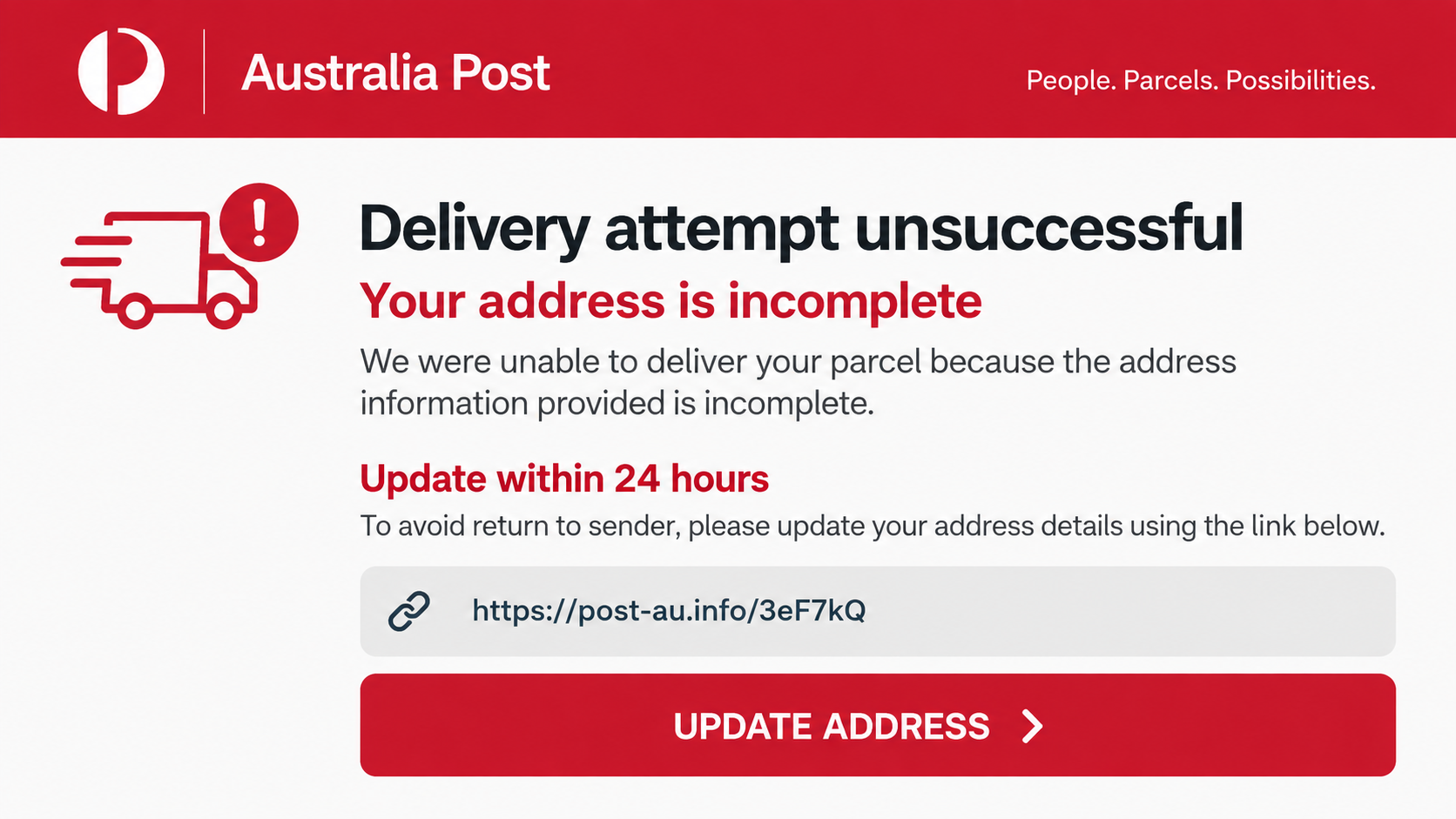
Fake Australia Post texts and emails use ordinary shipping problems as bait. The parcel supposedly has an incomplete address, an invalid postcode, no safe place for delivery, or a deadline before it is returned.
Criminals do not need to know whether you ordered anything. Online shopping is common enough that a large campaign will reach many people who happen to be expecting a package.
The link leads to a fake Australia Post website
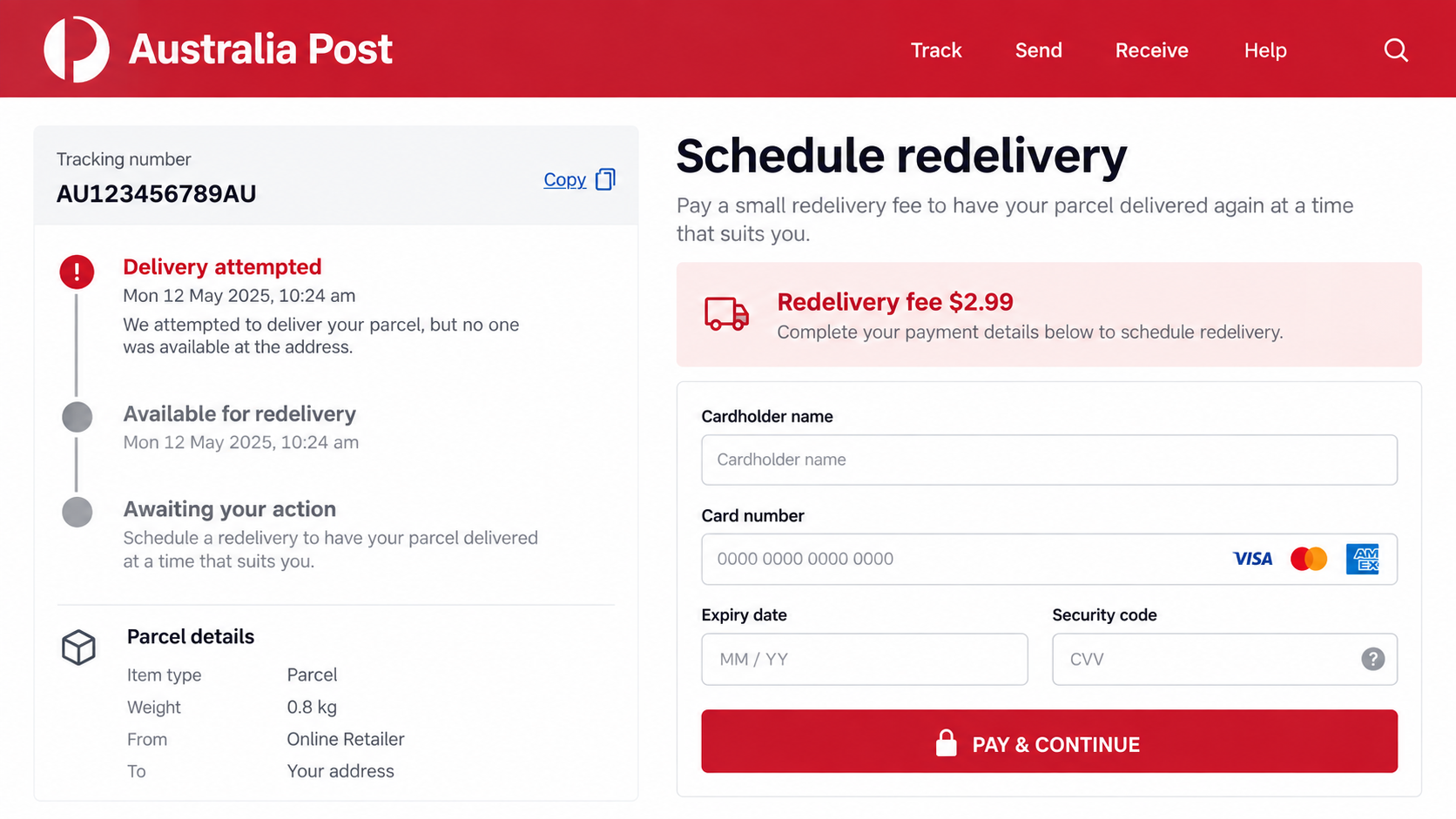
The imitation site copies red branding, parcel language, tracking details, and familiar buttons. It asks the visitor to confirm a name, address, phone number, and payment card before rescheduling the delivery.
Australia Post says scam links lead to fake sites designed to steal personal and financial details. It also says it will not call, text, or email customers to request passwords, credit card information, or payment.
A small fee can become a much larger loss
A charge such as $1.80 or $2.99 feels plausible and too small to investigate. The real target is the card number, expiry date, security code, contact data, and bank verification step.
Once those details are submitted, criminals may attempt unauthorized purchases, enroll the card in a wallet, call while posing as the bank, or reuse the victim’s address and phone number in later scams.
- A text or email reports an address, postcode, or delivery problem.
- The recipient is pushed to act before the parcel is returned.
- A link opens a website that imitates Australia Post or StarTrack.
- The page requests contact information and a small redelivery fee.
- Card details and one-time banking codes may be captured.
- The real parcel, if one exists, is unrelated to the message.
What Current Australia Post Scam Messages Say
The wording changes frequently because domains and phone numbers are removed. The story remains remarkably stable: something minor is preventing a parcel from reaching you, and the only way to correct it is to use the enclosed link.
One version says the driver could not find a safe place to leave the item. Another says the house number is missing, the postcode is invalid, or the delivery address must be confirmed within 24 or 48 hours.
Some messages tell the recipient to reply with “Y” before opening the link. Australia Post warns that this can make a device treat the sender as trusted and may help a malicious link bypass built-in protections.
Email versions use subjects such as attempted delivery, action required, confirm your details, or schedule redelivery. The body may contain a fake tracking number and a large red button.
Marketplace sellers face another variation. A supposed buyer says payment and courier pickup have already been arranged, then sends an Australia Post link or QR code where the seller must enter card details to “receive funds.”
That reverses the normal payment process. A seller does not need to give a stranger card credentials to receive an ordinary marketplace payment.
The fake page may show a CAPTCHA, countdown, parcel map, or loading screen before requesting information. These steps create the impression of a live logistics system while also slowing the victim down enough to feel invested in completing the process.
Sender names are not reliable. Scammers can manipulate the displayed sender, and fraudulent messages may appear in the same conversation thread as genuine Australia Post notifications.
How the Australia Post Scam Works
Step 1: A high-volume text or email campaign is sent
Criminals send large numbers of messages to Australian phone numbers and email addresses. The campaign may use recently registered domains, compromised accounts, iMessage, RCS, or spoofed sender names.
The message is intentionally broad. It avoids identifying the retailer or exact item because the scammer usually has no real parcel data.
Step 2: A routine delivery problem creates urgency
The recipient is told that delivery failed or cannot continue without action. A short deadline and the threat of return make immediate clicking feel safer than waiting.
The message may include a random tracking number. A string of letters and digits looks official, but it should be checked only in the independently opened AusPost app or official website.
Step 3: The link opens a cloned parcel page
The page copies Australia Post colors, layout, and terminology. Its address may contain words such as auspost, tracking, delivery, support, or parcel inside an unrelated domain.
A padlock icon does not make the site genuine. HTTPS encrypts the connection to the criminal’s server; it does not verify that the server belongs to Australia Post.
Step 4: Personal and card details are collected
The victim enters a name, home address, phone number, email, card number, expiry date, and security code. The form may reject the first submission so the criminal can capture a second card.
Those details can support unauthorized payments and more convincing follow-up calls. The address also helps a criminal answer basic identity questions.
Step 5: A bank code or app approval is requested
After the card is submitted, the page may ask for a one-time password. That code can be authorizing a purchase or adding the card to a digital wallet, not confirming a $2.99 postal fee.
Victims should read the entire bank message and never type a security code into a site reached through an unexpected delivery link.
Step 6: The data is charged, sold, or reused
Criminals may attempt transactions immediately or wait until the victim is less alert. They may also pose as a bank fraud team and refer to the fake delivery payment to sound credible.
The phishing page disappears, but stolen contact information can circulate between criminal groups and trigger more parcel, toll, tax, or account-security scams.
How to Tell a Real Australia Post Message From a Fake
The safest check happens outside the message. Close it, open the AusPost app yourself, and review the deliveries attached to your account. Alternatively, type auspost.com.au directly into the browser.
Australia Post has removed clickable links from nearly all tracking SMS notifications to make scam messages easier to identify. A text pushing you toward a payment or address-update link should therefore be treated with strong suspicion.
Real notifications should correspond to a parcel you recognize and a tracking number you can independently verify. A generic greeting and no sender or retailer information indicate a mass campaign.
Inspect the full domain, not just a word within it. An address such as auspost.delivery-example.com belongs to delivery-example.com, not Australia Post.
Do not trust a familiar sender name or an existing message thread. SMS sender IDs can be abused, and a fraudulent message can appear beside real notifications.
Australia Post says it will not ask for personal or financial information, card details, passwords, or payment through an unsolicited call, text, or email. That rule is more useful than trying to judge grammar.
Watch for instructions to reply before opening a link. A genuine organization does not need you to establish a trusted conversation so a web address becomes clickable.
Be skeptical of a fee that is tiny enough to feel harmless. A payment page needs the same sensitive card information whether it claims to charge $1.80 or $180.
Do not scan a QR code supplied by a marketplace buyer. Verify payment inside the marketplace or your own bank, and arrange shipping through the carrier account you opened yourself.
Spelling errors and awkward phrasing are useful clues, but well-written messages also exist. The independent delivery check remains the decisive test.
Why the Small Redelivery Fee Is So Effective
A large unexpected invoice naturally creates resistance. A charge under $5 can feel like an administrative nuisance, so the recipient focuses on completing the task instead of validating the site.
The fee also explains why a payment form appears in a delivery flow. Without it, a request for full card details would be harder to justify.
Criminals can use the card for a different amount from the one displayed. The form is controlled by them, and the “payment” button can transmit data without processing the claimed transaction.
A bank verification screen makes the process feel safer, even when it is part of the theft. A code sent by the bank may authorize a transaction chosen by the criminal.
The delivery deadline adds emotional pressure. People fear losing an item they already paid for and may act before asking whether Australia Post even has the parcel.
Seasonal shopping periods increase the odds of a match. During busy weeks, one recipient may have several deliveries in progress and assume the vague message relates to one of them.
The best response is not to solve the mystery inside the message. Check every expected order through the retailer and official carrier channel, then delete anything that cannot be matched.
Company, Address, and Fulfillment Checks
Open the official tracking channel yourself
Use the AusPost app or manually enter auspost.com.au. Do not use a search advertisement, text link, QR code, or contact number supplied by the sender.
If no matching parcel appears, contact the retailer through the account where you placed the order and ask which carrier and tracking number were used.
Compare the complete website address
The legitimate service uses official Australia Post domains. A lookalike word placed before or after another registered domain does not create an official website.
Check the address again on every page. Criminal sites sometimes begin with an innocent redirect and move the victim to a different domain for the card form.
Verify the sender and claimed delivery
A sender ID, logo, or tracking number can be copied. Match the message against an order confirmation and the tracking record available through the retailer or official app.
Never disclose extra information to a caller who says they need it to locate the parcel. Hang up and use Australia Post’s published contact route.
Reject unusual payment and collection steps
Australia Post says it will not request payment through an unexpected text, email, or call. A marketplace buyer also does not need your card security code to send you money.
When a genuine delivery needs action, handle it inside the official app or account. Do not let a deadline move the transaction into a stranger’s webpage.
What to Do if You Have Fallen Victim to This Scam
- Call your card issuer now. Use the number on the card or the bank’s official app. Explain that card details were entered on a phishing site and ask for replacement, transaction blocks, and wallet-token review.
- Dispute unauthorized charges. Give the bank the exact time, amount shown by the fake page, and any transactions you do not recognize. Speed improves the chance of limiting loss.
- Secure exposed accounts. Change passwords entered on the page, starting with email and banking. Enable multi-factor authentication and sign out unknown sessions.
- Check the device. If you downloaded an attachment, app, or profile, remove it and run a reputable scan such as Malwarebytes. A normal webpage visit alone does not always install malware, but downloads require attention.
- Reduce repeat exposure. AdGuard can block many known phishing domains and deceptive ads, although it cannot recover card data already submitted.
- Preserve evidence. Save the message, sender, full link, screenshots, bank alerts, and any receipt before deleting the conversation.
- Report the impersonation. Australia Post asks people to send suspicious messages to scams@auspost.com.au. Report financial loss to Scamwatch and serious cybercrime through ReportCyber.
- Monitor identity misuse. Watch statements, email resets, mobile-account changes, and credit activity if you provided a birth date, license, or other identity information.
Do not call a number that appears in a follow-up “fraud department” message. Criminals may use the stolen data to make that second contact sound authentic.
Frequently Asked Questions
Does Australia Post send tracking text messages?
Yes, legitimate notifications exist, but Australia Post has removed clickable links from nearly all tracking SMS messages. Verify every delivery inside the AusPost app or official website.
Will Australia Post ask for a redelivery fee by text?
Australia Post says it will not call, text, or email unexpectedly to request payment or card information. A linked payment demand is a major scam warning.
Can a scam text appear in a real Australia Post thread?
Yes. Sender-ID manipulation can cause a fraudulent message to be grouped with genuine notifications, so the position in the conversation is not proof.
What if the tracking number looks real?
Copy or type the number only into the independently opened AusPost app or official site. A random valid-looking code inside the message does not authenticate the sender.
Is it safe to pay a $1.80 delivery fee?
Not through an unexpected link. The small amount is bait for full card details and possibly a one-time bank code that authorizes a larger action.
Where should I report an Australia Post scam?
Send the suspicious message to scams@auspost.com.au, report the campaign to Scamwatch, and contact ReportCyber or police if money or sensitive data was stolen.
The Bottom Line
Australia Post scam texts turn a believable delivery inconvenience into a card-stealing phishing flow. The copied branding and tiny fee are there to make a risky form feel routine.
Do not reply, follow the link, scan the QR code, or enter payment details. Open the AusPost app or official website yourself, match the parcel to a real order, and contact your bank immediately if any information was submitted.








