

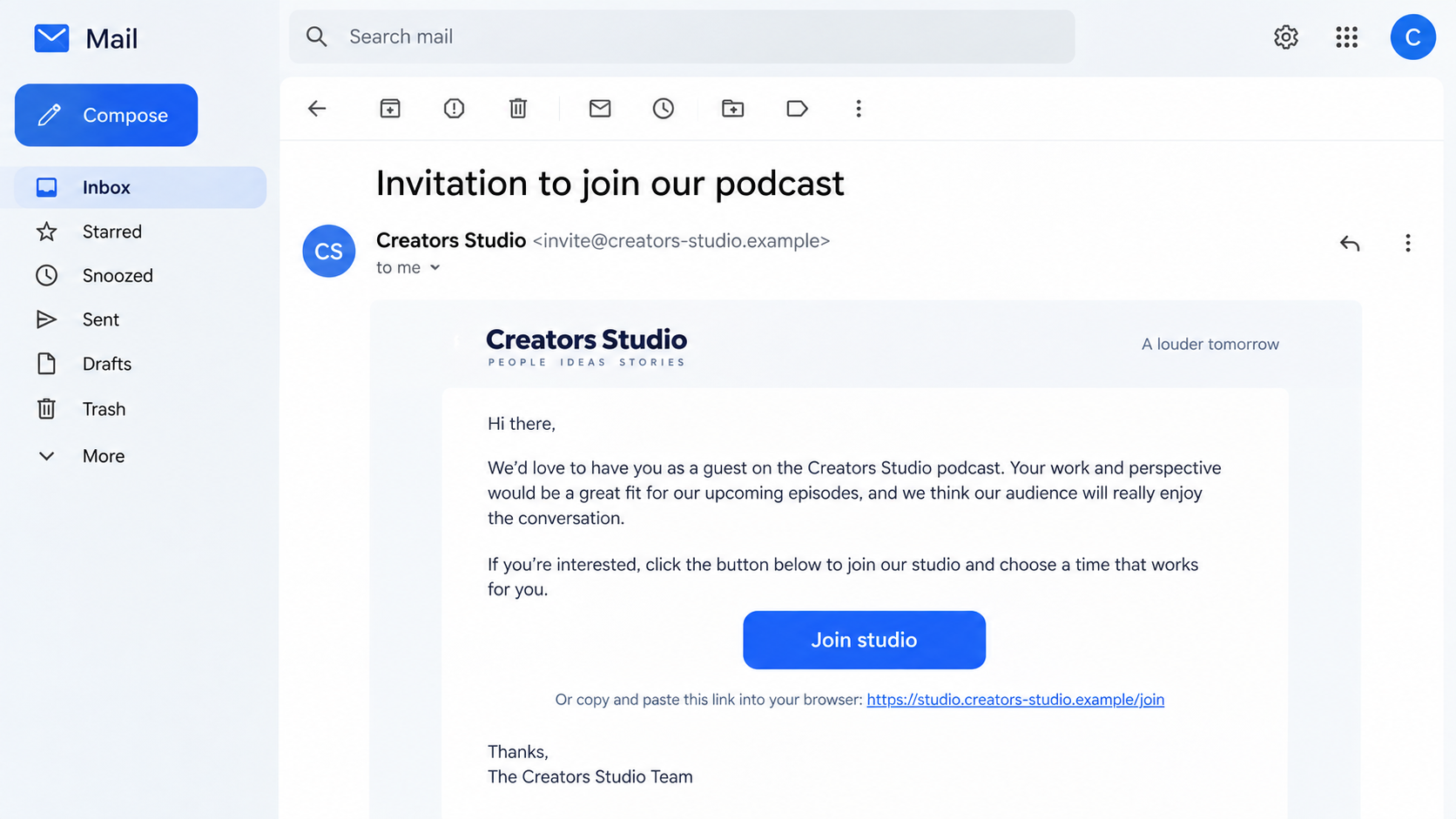
A podcast invitation lands in your inbox with a friendly note about your work. The guest link looks like an easy way to confirm the conversation, and the recording is supposedly starting soon.
For a creator or small business owner, that can feel like a welcome opportunity. One unexpected step in the joining process, though, can change what this invitation is really asking you to do.
Overview
A real recording platform can be used as a believable pretext
StreamYard is a legitimate live-streaming and recording service. Hosts can invite guests with a studio link, so an email mentioning a StreamYard interview does not sound strange by itself. Scammers exploit that familiar workflow to make an unsolicited invitation seem routine.
The suspicious part is not the platform’s name. It is the sender and the route they want you to take. A fake invite can lead to a lookalike page that claims the studio is broken and demands an unfamiliar download.
The fake interview may lead to a software trap
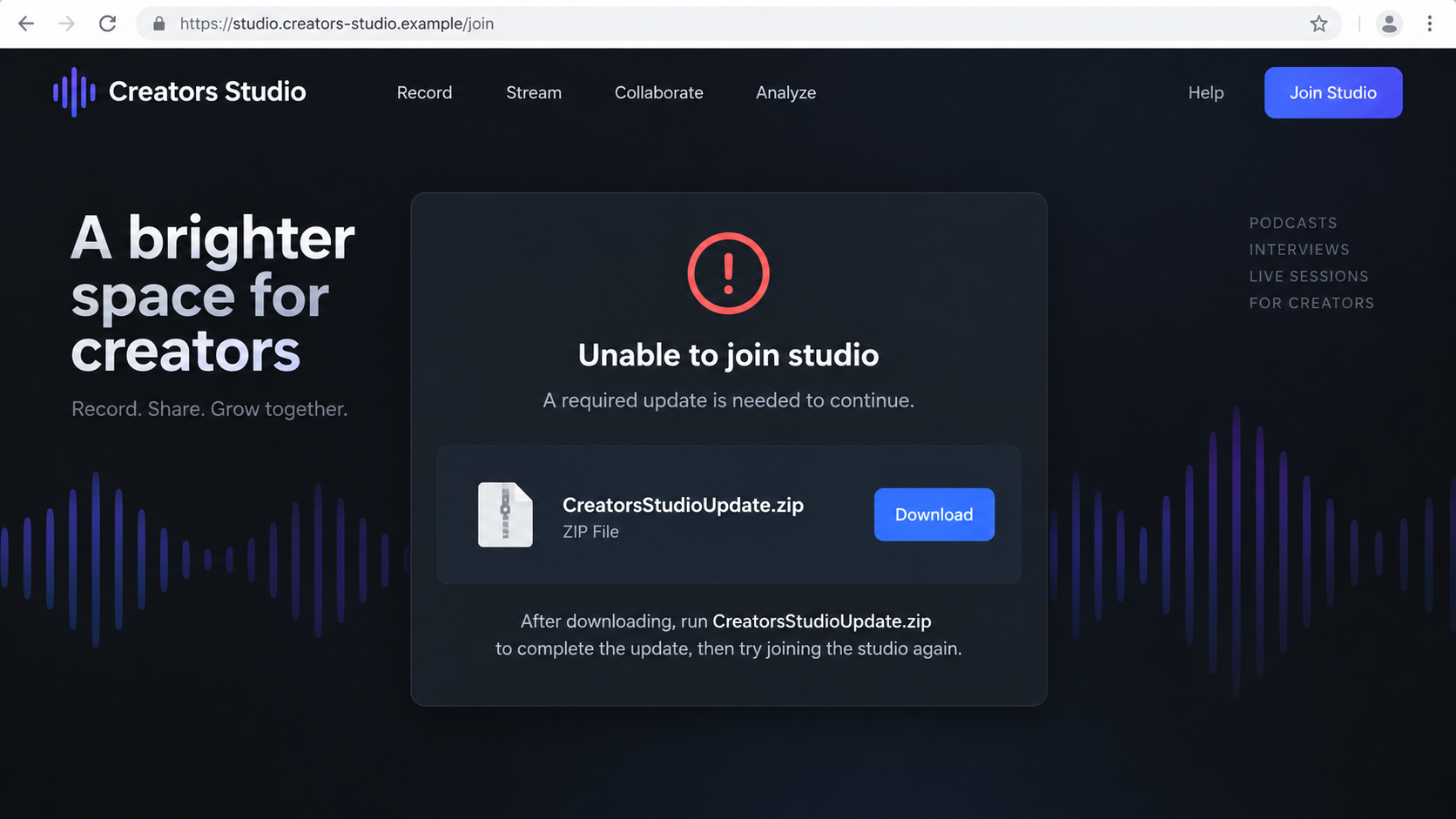
Security researchers at Ethel Security documented a targeted fake StreamYard flow in which a studio-looking page produced an error and downloaded a ZIP file. Their analysis found a malicious macOS loader in the archive.
That report describes one investigated attempt, not every podcast invite. The target in that case downloaded the file but did not execute it, so researchers did not report an actual wallet theft from that person. The distinction matters when assessing risk.
The safest question is whether the invitation is verifiable
A genuine host should be identifiable outside the message. An unfamiliar producer, a vague show name, and a link that quickly turns into an installer request deserve an independent check before you join, sign in, or run anything.
Pause when these signs appear together:
- The invitation arrives unexpectedly and asks you to join at short notice.
- The sender’s address does not match the show’s established contact details.
- The link leaves the expected studio route for a lookalike domain.
- A page claims a special desktop component is required after an error.
- A ZIP, script, or installer is offered instead of an ordinary guest join.
Why a Podcast Invite Can Lower Your Guard
Most phishing stories begin with fear: a locked account, an unpaid bill, or a missed delivery. A fake interview works differently. It offers attention and a useful conversation, so the recipient may be thinking about preparation rather than security.
The request can feel personal even when it is not. A scammer may mention the recipient’s recent post, business, or audience. Public information makes that easy to do and does not prove a real producer has reviewed the person’s work.
A scheduled recording also creates a time constraint. If the guest thinks a host is waiting in a studio, a connection error feels like a practical problem to solve quickly. That is when an odd download can be reframed as a routine fix.
There are legitimate differences among guest devices. StreamYard’s guest guidance describes joining through a studio link in a supported browser, and some mobile setups use an official guest app. That does not authorize a random ZIP or executable supplied by an invitation page.
The same skepticism applies to an email asking you to “verify your account” before a guest session. A host invitation normally explains who is inviting you and where the recording takes place. It should not become a request for unrelated passwords, recovery phrases, or remote-access permission.
People who discuss technology or cryptocurrency may be especially attractive targets because a device compromise could expose browser sessions or wallets. Still, the immediate evidence in any particular invite may only show a suspicious link. Do not assume a specific malware family without examining the file.
How the StreamYard Invitation Scam Works
Step 1: The attacker chooses a plausible guest
The scammer may target someone who posts videos, appears on podcasts, runs a business, or has an online following. A message referencing that public work can look carefully selected even if much of the text is reused across recipients.
A fake producer name and show title complete the story. The sender may use a free email account or a domain that resembles a media company. A professional signature is easy to create, so check the actual show independently.
Step 2: An interview link becomes the next action
The invitation asks the recipient to pick a time or join the studio. That is a normal guest workflow, which is why the link can feel less risky than a payment request. The destination, however, may not belong to the real platform or host.
Do not rely on button text. Copying the visible words “Join studio” tells you nothing about the link behind them. Inspect the full destination and compare it with the host’s independently confirmed instructions.
Step 3: The page imitates a technical problem
A fake studio page can show a camera check, a joining screen, or a connection error. The error matters because it changes the user’s goal from verifying the invite to fixing a problem. The page can now present a download as the solution.
In the Ethel Security case, the suspicious page produced an error and automatically downloaded a file presented as a StreamYard installer. The researchers analyzed the resulting archive. Their documented chain is evidence for this tactic, not proof that every studio error is malicious.
Step 4: A ZIP or installer is offered as a fix
The visitor may be told to unzip a package and run a program before rejoining. This is the decisive trust boundary. A website is asking to put executable code on the guest’s device, even though the original purpose was simply to attend an interview.
On macOS, an attacker may package a script or application to look like a helper. On Windows, the file type and behavior may differ. The important question is who provided the file and whether the need for it is corroborated by the real service.
Step 5: The attacker seeks access beyond the interview
If a malicious file runs, it may attempt to collect local data, browser information, or wallet material. The documented Ethel Security case involved a loader that fetched an AppleScript stealer. It was a targeted attempt, not a verified loss for the person they interviewed.
Other fake invitations may only phish credentials or ask for payment. Do not collapse every variation into the same outcome. Preserve the actual link and file if your security team needs to investigate, but do not open them again yourself.
Step 6: The scammer disappears or escalates
After the download, the supposed producer may stop replying, press for another installation, or ask why you have not joined. The message may also redirect you to a second contact account, making the original invitation harder to verify.
A real host should be able to confirm the meeting through their established website or social account. If the invitation cannot survive that simple independent question, there is no reason to run a program for it.
Host, Link, Platform, and File Checks
Confirm the show and host
Search for the podcast’s established site and past episodes. Does the named producer appear there, and does the contact information match the invitation? A newly created profile or a copied logo is not strong evidence on its own.
Reach the host through a channel you found independently. Ask for the recording date and the exact guest link. Do not simply reply to the suspicious email and accept the same sender’s reassurance.
Inspect the actual joining link
Look at the full address before opening it. A branded word in the path or subdomain does not make the domain part of StreamYard. If you are uncertain, ask the host to resend the link through a known channel.
Redirects can make the first link appear harmless. Watch the final address after the page loads, especially if it suddenly asks for a login or software installation. A changing destination is a reason to stop and verify.
Compare the request with guest guidance
StreamYard’s own guest help explains normal preparation: a supported browser, camera and microphone permissions, and the host’s studio link. A random archive claiming to be a mandatory desktop update is not established by that guidance.
Some legitimate mobile guests use an official app. Install software only from the service’s verified instructions and app store route, not from a file pushed by an unfamiliar interview page. Context and source matter more than the word “app.”
Examine the file without running it
A ZIP, executable, script, or disk image sent by an unverified host should remain unopened. Note the file name and download source for your security team. Do not bypass browser or operating-system warnings to make an interview work.
If you already ran it, stop using sensitive accounts on that device until it has been checked. A download by itself is different from execution, and the response should reflect what actually happened.
What a Genuine Guest Workflow Should Look Like
A real invitation normally gives the show name, topic, producer, schedule, and a way to clarify practical details. The guest link should be part of a conversation you can trace to an identifiable host.
It is normal for a browser to ask permission to use your camera or microphone when you join. Those prompts are different from permission to install a program, run a script, reveal a password, or grant remote control of your computer.
If the studio fails to load, use the real service’s help page or ask the producer to troubleshoot. Do not treat an error displayed inside an unfamiliar page as independent technical advice. The page could be the source of the false problem.
Give yourself room to postpone. A legitimate interview can be rescheduled. A stranger who insists you execute a file immediately is telling you that the supposed opportunity matters more than your device safety.
For teams booking guests regularly, keep a standard verification process. Confirm new shows, store the host’s known contact, and share guest links through approved channels. A repeatable habit is easier to follow when an invitation sounds exciting.
What to Do if You Have Fallen Victim to This Scam
- Stop the interaction and preserve the invitation. Save the email or message, full link, sender address, page screenshot, and downloaded file name. Do not forward the suspicious file to other people or reopen the link to test it. Record whether you merely downloaded the file or actually ran it.
- If you ran software, disconnect the device from sensitive work. Pause banking, wallet, and administrator activity on that machine. Tell your organization’s security team if it is a work device. They may need logs and the original file for analysis before any cleanup.
- Scan and assess the device. Use a trusted security tool such as Malwarebytes and follow any findings. An AdGuard filter can reduce future exposure to malicious pages but cannot remove a program that already executed. If high-value accounts or wallets were accessible, seek professional incident help.
- Secure accounts from a clean device. Change affected passwords, review active sessions, enable or reset multifactor authentication, and check email forwarding rules. If a wallet seed phrase or private key may have been exposed, treat that wallet as compromised and seek platform-specific guidance; changing an email password will not fix a stolen key.
- Contact the real host and service separately. If an actual show or producer was impersonated, let them know through an established channel. Report the fake site or invitation to StreamYard and the email provider. This helps distinguish impersonation from a genuine invitation with a technical problem.
- Watch for follow-up contact. A scammer may send a second file, ask for a “repair” session, or offer to recover lost funds. Do not grant remote access or pay a recovery fee. Keep records of any payments and report financial loss promptly to your bank or wallet service.
- Document and report material harm. If credentials, business data, or money were exposed, preserve a timeline and report it through your employer’s incident process. U.S. victims can use the FTC reporting portal; the appropriate authority may differ elsewhere.
Frequently Asked Questions
Is every StreamYard invitation a scam?
No. StreamYard is a real service used by legitimate hosts. Verify the sender and studio link independently, and be especially wary if an unsolicited invite changes into an installer request.
Does joining a StreamYard studio require a ZIP file?
StreamYard’s guest instructions describe joining through a supported browser, with an official app route for certain mobile guests. A ZIP supplied by an unfamiliar studio page is not a normal reason to proceed.
Can a fake studio page install malware by itself?
A malicious page can trigger a download or attempt other browser tricks, but downloading and executing are different events. Do not run the file; keep your browser updated and report the suspicious page.
What if I downloaded the file but did not open it?
Delete or quarantine it without running it, and scan the device with a trusted security tool. Tell your security team if it was a work computer. A mere download does not prove infection.
What did researchers find in the documented attempt?
Ethel Security reported a fake StreamYard flow that delivered a ZIP containing a macOS loader for a stealer. Their target did not run the file, so the report does not establish a successful theft from that person.
How do I verify a podcast host quickly?
Check the show’s established site, prior episodes, and a contact route you found yourself. Ask the host to confirm the invitation and guest link there before joining or installing anything.
The Bottom Line
A podcast invite should lead to a conversation, not a mystery installer. The fake StreamYard-style trap relies on the excitement of being invited and the pressure of a studio that suddenly “needs” a fix.
Verify the host, inspect the final link, and use the real platform’s guest instructions. If a page demands a ZIP or executable, stop and ask the host through a separate channel.








