

A search for a new AI model lands on GitHub. The repository has the right logo, release notes, a crowd of stars, and two downloads labeled for Windows. It looks like the short route from curiosity to trying the software.
That familiar setting is what made this case dangerous. The page was not where the model’s developer had put an installer, and the file behind the release was not an AI tool.
The fake DeepSeek V4 GitHub installer scam was built for people who found the page before they checked its owner.
Overview
The repository copied credibility instead of software
The fake DeepSeek V4 GitHub installer scam was a documented malware campaign, not a dispute about whether an unofficial AI wrapper worked well. Microsoft Threat Intelligence traced an attacker-created GitHub organization and repository that impersonated DeepSeek soon after an official V4 preview.
The repository used a copied DeepSeek whale logo, real benchmark figures, and search-friendly wording. Those authentic-looking pieces surrounded two archive downloads. The archives contained Windows executables that posed as installers and delivered an information stealer.
The fake page was not a harmless fan project. Microsoft recorded at least one affected endpoint that downloaded and ran an extracted payload. It also observed the files changing while their public archive names stayed the same. GitHub later removed the organization, repository, and operator account.
Search results helped the fake page look official
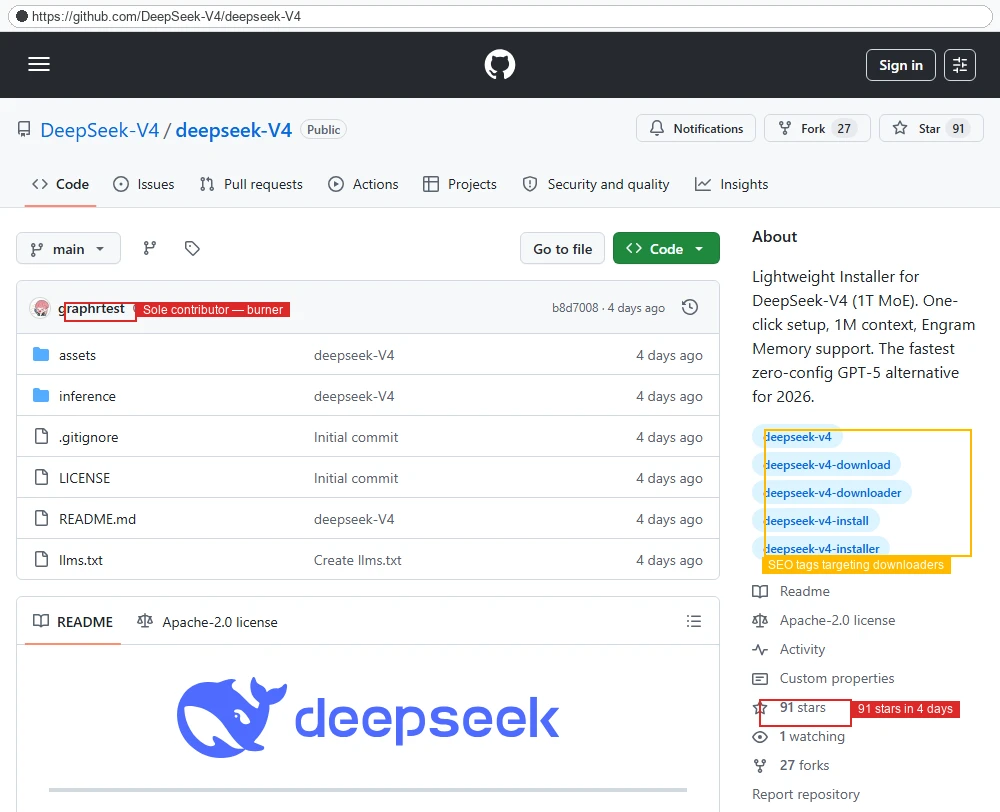
The attacker built the repository on April 24, 2026, within hours of DeepSeek previewing V4. The names were almost too perfect for someone searching in a hurry: DeepSeek-V4, deepseek-V4, and tags about downloading and installing the model.
Microsoft found the malicious repository appearing prominently in GitHub and ordinary search results. One GitHub query for a DeepSeek V4 installer returned it as the only result in the researchers’ snapshot. That placement was not proof of an official release. It was proof that the lure was discoverable.
- The organization and repository names mimicked the model’s release.
- The README displayed DeepSeek branding and genuine benchmark data.
- The page advertised two large
.7zarchives as installers. - The archives led to a Windows loader and Vidar stealer.
- Microsoft observed the archive contents rotate at least three times in three days.
There is a confirmed victim path, but not a public loss total
Microsoft reported a first victim download about four hours after the repository went live and detailed an extracted executable on a confirmed affected endpoint. The repository collected 91 stars and 27 forks in four days, but Microsoft could not tell how many were organic. Those counts do not equal installations or stolen accounts.
The distinction matters. This was clearly an attacker-controlled malware distribution attempt with at least one observed endpoint impact. It is not necessary to inflate the number of victims to show why a fake model installer can be serious.
Microsoft said the malicious GitHub account was taken down. Search results may still surface copies, discussions, or other fake repositories. The exact page in the screenshot is historical evidence, not a live place to visit for a download.
Why This GitHub Page Fooled More Than a Casual Glance
The scam did not rely on a random domain with obvious misspellings. It sat on GitHub, a real platform used by countless legitimate developers. The attacker needed visitors to confuse a legitimate hosting platform with a verified publisher. That is a different kind of impersonation from a fake lookalike website.
In another confirmed case, fake software download sites led to Silver Fox malware. This DeepSeek lure used GitHub instead of a copied vendor domain, but the ownership check was just as important.
The README used real DeepSeek benchmark information. A person checking only whether the model claims sounded plausible could find genuine numbers and relax. The trick was to wrap a false installer offer around those true facts. Accurate facts on a page do not authenticate its owner.
The repository also used terms that match natural searches, including install, installer, and download. A file called llms.txt repeated discoverability-oriented copy. Microsoft noted that both ordinary search engines and AI-assisted search could surface the repository. It did not observe paid ads for this campaign, so this story should not be called malvertising.
Another warning sign appeared inside the project itself. According to Microsoft, the repo had a README, a LICENSE file, llms.txt, and mostly stub directories instead of substantive model code. All nine commits arrived in one burst from one author. The README and GitHub metadata also disagreed about the license.
None of those clues alone proves a repository is malicious. A small new project may have a thin file tree or rushed documentation. Here, they mattered because the supposed release offered heavy Windows archives while the project did not contain the real software it claimed to package.
Stars and forks can be another trap. The screenshot shows 91 stars and 27 forks, enough to make the page feel noticed. Microsoft did not independently verify how much of that engagement came from ordinary users. Even genuine stars can be given by people who have not analyzed a binary.
The safe question is not “Does this page look busy?” It is “Did the actual developer link to this exact release from an official channel?” Without that connection, a realistic GitHub page remains a stranger’s upload.
How the Fake DeepSeek V4 GitHub Installer Scam Works
Step 1: A model announcement creates search demand
When a new model is previewed, people quickly search for installation guides, desktop builds, weights, and GitHub releases. The attacker created a page inside that surge. Microsoft placed the start of the observed chain within hours of the V4 preview.
Speed matters because reliable third-party tutorials and official links may not yet be widespread. A repository whose name exactly matches the phrase people search can acquire credibility simply by being easy to find first.
Step 2: A fake organization takes the obvious name
The operator made a GitHub organization called DeepSeek-V4 and a repository called deepseek-V4. The page carried copied DeepSeek branding and benchmark data. Its search tags promised a downloader and one-click installation.
That presentation targeted the gap between a real AI model and a user’s desire for a simple Windows setup. It did not mean DeepSeek published or endorsed the repository. Microsoft characterized the account as fraudulent and GitHub removed it.
Step 3: The release offers two archive choices
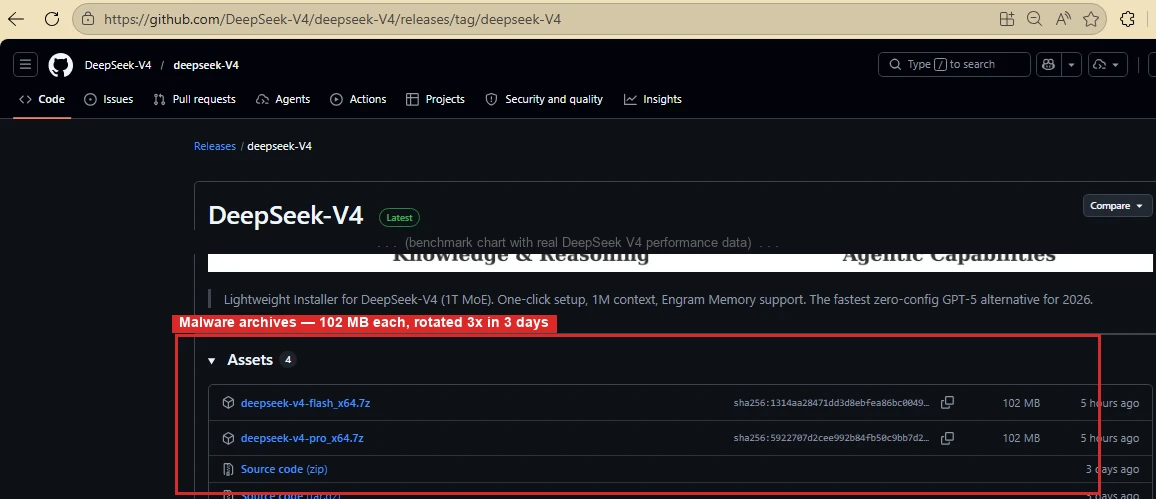
The release page showed deepseek-v4-pro_x64.7z and deepseek-v4-flash_x64.7z. Both looked like install packages for different versions. In the captured release, each archive was about 102 MB.
The archive format gave the operator a convenient wrapper. The user had to extract it before seeing the executable inside. A large file size can feel plausible for AI software, even though size is no evidence of authenticity.
Step 4: The extracted program impersonates an installer
After extraction, the user sees a Windows executable that appears to set up DeepSeek V4. Microsoft documented one affected endpoint where the payload appeared under a folder named for the model. This is the point where a misleading repository turns into a device-level risk.
Opening an archive to inspect filenames is not the same as executing malware, but it is also not a useful safety test by itself. The dangerous act is running the extracted program. A plausible filename inside a .7z file can still conceal a loader.
Step 5: The loader brings in Vidar
Microsoft’s analysis linked the loader to Vidar information-stealing malware and potentially additional payloads. Vidar can seek sensitive information stored on a machine. The exact accounts or files exposed depend on what was available and what executed on that endpoint.
Microsoft also observed that the same loader family appeared under other AI-themed filenames. The fake DeepSeek release was one identity in a wider rotating ecosystem, not an isolated trick that becomes safe once a single repository disappears.
Step 6: The archives change without changing the sales pitch
Across three days, the attack rotated archive contents at least three times while preserving the same release page and filenames. A person checking an old hash or an old warning could miss a newly packaged version. This is why the publisher and distribution path matter more than one static filename.
Microsoft reported the operation to GitHub, which removed the malicious assets. A later search for “DeepSeek V4 installer” may show different results. The principle remains: do not run a model installer just because search placed an unverified repository high in the list.
Company, Address, and Fulfillment Checks
The GitHub organization was not the model developer
The name DeepSeek-V4 was chosen by the repository creator. It was not proof of ownership. Microsoft found copied branding from a real DeepSeek repository and a project structure that did not resemble a complete official model release.
The correct identity check is to start at the developer’s verified website or official organization account and follow its links outward. Do not work backward from a search result and assume the most convenient account is genuine.
The address was a hosted page, not a verified distribution channel
The GitHub URL located the files, but it did not supply a legal company address or validated publisher. There was no physical fulfillment in this case. The “delivery” was a release asset on GitHub’s infrastructure, a platform attackers can abuse without controlling GitHub itself.
Readers should distinguish host from publisher. A trustworthy host can contain attacker-controlled material. An address beginning with github.com is not enough; the account behind the path matters.
Support and documentation were part of the costume
The README and release notes made the project appear documented. Microsoft found genuine benchmark data mixed with copied branding and installer keywords. That can answer a visitor’s superficial questions while leaving the critical ownership question unresolved.
We found no evidence of a legitimate support service behind this attacker repository. A support link inside the same unverified project would not solve that problem. Verify through the actual model developer’s own channels, not through an email or issue thread on a suspicious repo.
The payload trail shows what was delivered
Microsoft observed the repository, the two archives, the extracted loader, and the downstream stealer. It also compared multiple versions of the archives. That technical trail supports a clear conclusion: the downloaded “installer” was malicious.
This does not mean every unofficial DeepSeek tool is malicious, or that DeepSeek’s official services were compromised. The identified fraud belonged to the specific attacker-created GitHub campaign and related rotating lures.
What Real Verification Looks Like for AI Downloads
Search results are a starting point, not a chain of custody. Before downloading a new model release, open the official developer site or verified organization profile. Follow its links to the model, documentation, and approved software.
If a page claims an installer but the developer publishes only hosted access or model files, stop.
Compare the repository owner, not only the repository name. Many GitHub names can be made to look official. The owner should be linked from the developer’s site or another trusted first-party channel. Do not use follower counts, stars, or polished README graphics as a substitute.
Check whether the download fits the actual software. A 102 MB Windows archive promising a one-click install of a major model may deserve more scrutiny than a well-documented official distribution. Large size is not proof, just as small size is not proof.
Do not try to “test” an unknown executable on your main computer. A malware loader may wait, show little visible activity, or download a later stage. If analysis is necessary, that is work for a properly isolated security environment, not a casual double-click.
Remember that this exact repository was taken down. That fact is useful history, not an all-clear for future files. The same search habit can be exploited with a different AI name tomorrow.
What to Do if You Have Fallen Victim to This Scam
- If you only opened the repository, do not download its archives. Leave the page and find the model through the developer’s verified site. Seeing a web page does not mean the stealer ran.
- If an archive is in Downloads but its program was never run, remove it. Do not open the executable to see what it does. Keep the filename or a screenshot if you need to report the exposure to a workplace security team.
- If you ran the extracted installer, isolate the computer. Disconnect it from the network and alert your IT team if it is a work device. Treat the situation as a possible information-stealer incident, even if no obvious window remains open.
- Scan and investigate the device. Update and run Malwarebytes or another reputable endpoint product to detect and remove known payloads. A scan helps identify infection, but it cannot guarantee that previously stolen browser data is retrieved or made harmless.
- Secure accounts from a clean device. Change passwords for primary email, password manager, financial services, and accounts whose sessions were stored in the browser. Revoke active sessions, rotate API keys, and enable phishing-resistant multifactor authentication where possible.
- Review money and sensitive access. Check exchanges, wallets, cards, and bank accounts for unauthorized actions. Contact providers through official channels. If business credentials may have been available, ask the security team to review logs and revoke tokens.
- Reduce future exposure. AdGuard can help block some malicious ads and known dangerous pages, but it cannot validate a GitHub release or reverse a stealer. Keep the browser and operating system updated, and use first-party download links.
- Save evidence and reject recovery promises. Record the repository name, downloaded archive, date, and security alerts. Do not pay strangers who claim they can recover stolen credentials or cryptocurrency.
Frequently Asked Questions
Was the DeepSeek V4 GitHub repository official?
No. Microsoft identified the observed DeepSeek-V4/deepseek-V4 repository as attacker-created and GitHub removed it. It copied branding and benchmark data to look convincing.
Did the fake installer actually infect anyone?
Microsoft reported at least one confirmed affected endpoint and a first victim download about four hours after the lure went live. The public report does not establish a total number of infected users.
Did GitHub or DeepSeek get hacked?
The published evidence shows abuse of a GitHub account and impersonation of DeepSeek. It does not show that GitHub’s platform or DeepSeek’s official services were compromised by this specific scam.
Are 91 stars evidence that the file was safe?
No. Microsoft observed that count on the fake repository but could not determine how much engagement was organic. Stars are social activity, not malware analysis or publisher verification.
Is a .7z archive itself dangerous to open?
The main risk in the documented chain was running the executable extracted from the archive. If you downloaded the file, do not extract and run its contents; remove it and follow your organization’s policy if applicable.
Can the same trap use another AI model name?
Yes. Microsoft linked the loader to a wider set of fake AI and tool names. The safer habit is to verify the publisher and official download path each time.
The Bottom Line
The fake DeepSeek V4 GitHub installer scam used a real hosting platform, copied branding, and genuine benchmark data to make malicious archives look like a new model release.
Do not judge an AI download by its search ranking or star count. Follow the developer’s official path to the software, and treat an executed copy of this fake installer as a possible credential-theft incident.








