

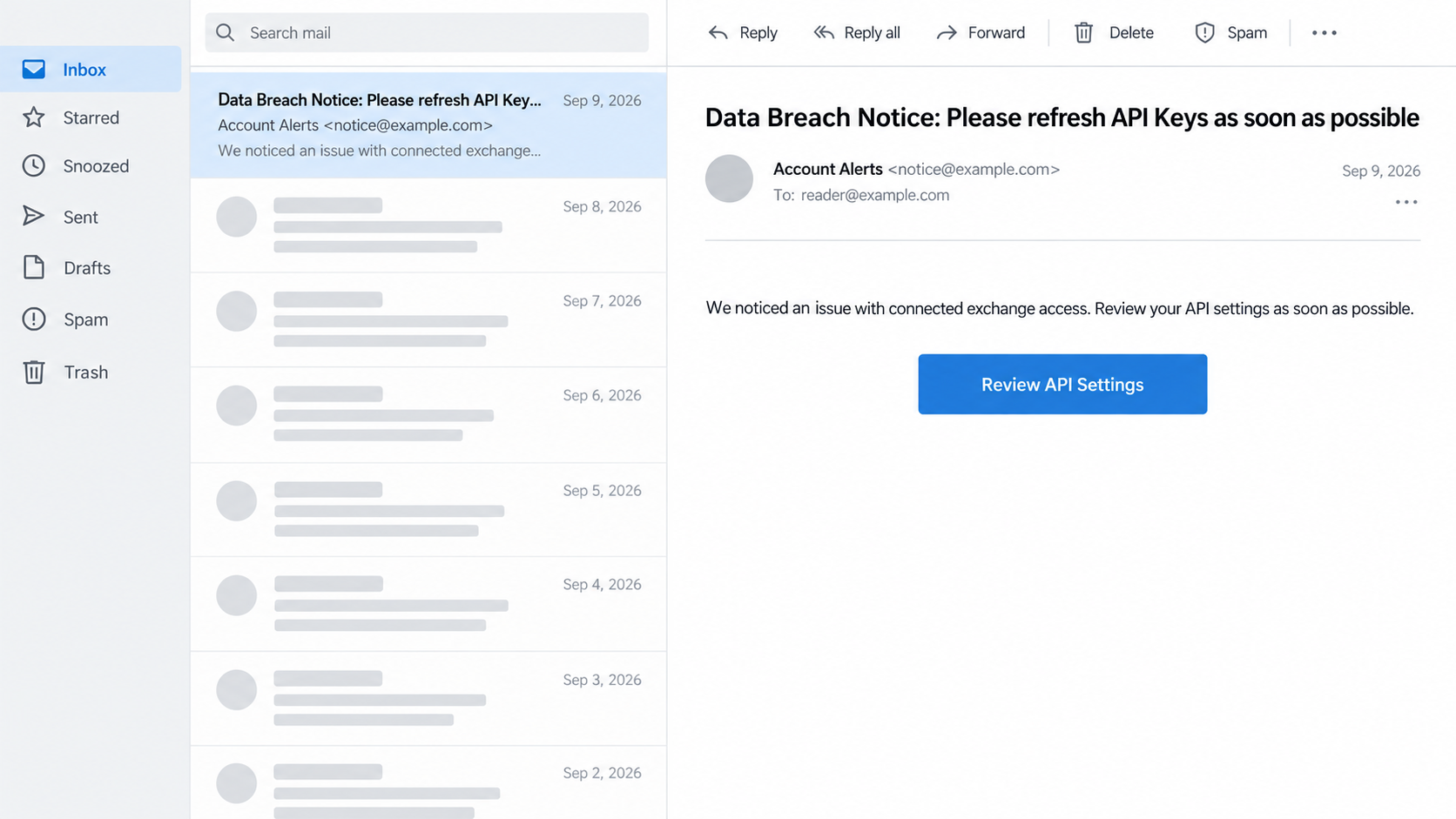
An email arrives with a subject that sounds like a security team doing the right thing: “Data Breach Notice: Please refresh API Keys as soon as possible.” It appears to belong to a crypto portfolio service you actually use.
The uncomfortable part is that the sender can look legitimate. The message was not a routine account warning, and acting on its link could put the very exchange access it mentions at risk.
The CoinTracking API key email scam exploited that tension between urgent security advice and an untrusted link.
Overview
The message was a confirmed phishing attempt
CoinTracking has publicly confirmed that some users received an email on September 9, 2026 with the subject “Data Breach Notice: Please refresh API Keys as soon as possible.” The company states plainly that the message was not sent by CoinTracking and was a phishing attempt.
It was not a case where a single upset customer called a legitimate subscription a scam. An attacker gained access to Brevo, an outside email delivery provider, and used legitimate mailing infrastructure to send malicious messages. That technical route explains why a familiar sender address or normal mail-authentication result was less reassuring than usual.
The email image above is an illustrative reconstruction based only on the confirmed subject and the general API-key pretext. It is not a screenshot of the actual message. Its fictional address and body text should not be used to identify a received email. The exact subject and the company’s own warning are the evidence.
CoinTracking’s own systems were not breached
CoinTracking said its account, portfolio, and transaction systems were not compromised. Brevo did not hold CoinTracking passwords, API keys, or portfolio data. In an update on September 22, CoinTracking said Brevo’s investigation found no CoinTracking email addresses had been exported by the attacker.
That matters because the phishing subject claimed a “data breach” and pressed users to refresh keys. The incident involved the email provider, not a confirmed breach of the service’s account database.
A reader should not change exchange API keys because the phishing message told them to. If they entered keys into a page reached from that message, they should revoke those keys through the actual exchange.
- The phishing subject named a data breach and urgent API-key refresh.
- The mail was sent through a compromised third-party email platform.
- CoinTracking said its own systems and stored portfolio data were not compromised.
- The email carried a malicious link, according to CoinTracking.
- Any exchange API key entered through the link should be revoked at the issuing exchange.
The danger depends on what the recipient did
CoinTracking says that a person who only received the email and entered nothing does not need to take account-recovery action. If a person supplied a CoinTracking password, they should change it and enable two-factor authentication. If they supplied exchange API keys, they should revoke and regenerate them directly at the exchange.
The company says the malicious links have been deactivated and the email-sending access route has been closed. That limits this specific incident, but copies of the wording or new sender accounts could appear. The safe response is to use the service and exchange sites you normally reach yourself, never the alert’s link.
We do not know from the official notice how many recipients entered information or whether any exchange account was misused. The public facts support a confirmed phishing campaign, not a public loss total.
Why an Email from the Right Domain Can Still Be Wrong
Most phishing advice starts with the sender address. It is still worth checking, but it is not decisive when attackers gain control of a legitimate mailing account. Brevo is an email platform companies use to send newsletters and notices.
In this incident, an attacker used access to customer accounts on that platform to send phishing through normal infrastructure.
CoinTracking says the messages passed usual authentication checks. That does not mean the company authorized the content. Email authentication can confirm that a message flowed through an approved sender, while a separate question asks who controlled the account at that moment.
This is why the urgent subject was effective. It borrowed the voice of a security notice and described a task that sounds protective. API keys are real security-sensitive objects.
Crypto users know they should rotate exposed keys, so a message claiming a breach can make an unsafe link feel like a shortcut to doing the right thing.
The shortcut is the trap. An exchange API key can grant access according to the permissions set when it was created. Some keys are read-only; others may allow trading or withdrawals. The actual risk depends on those permissions and the exchange.
Never paste a key and secret into a site reached through an unexpected email, even if the message uses correct product language.
The compromised sender route also complicates the usual “look for spelling mistakes” test. The phishing email could be polished and technically authenticated. A better check is to ignore the message’s links and open CoinTracking and the relevant exchange through your saved bookmarks or manually entered addresses. Check the company’s security notice there.
CoinTracking posted its own incident statement. That independent confirmation is what turns a worrying email into a known phishing attempt. The company’s statement also narrows the facts: its service was not compromised, and the security response differs for people who merely received the email versus people who entered data.
Another mailing customer faced a different lure during the Brevo incident. MalwareTips documented the BitBox entropy vulnerability email scam, which used wallet-security language rather than CoinTracking’s API-key pretext. The two messages should not be treated as identical.
How the CoinTracking API Key Email Scam Works
Step 1: The attacker reaches a trusted mail provider
The fraudulent send began with unauthorized access at Brevo, the external service CoinTracking used for email delivery. Brevo’s wider incident affected several customer accounts. CoinTracking says its own application and databases were not accessed through this event.
The distinction is important. The scammer did not need to break into each recipient’s CoinTracking account to reach the inbox. Access to a trusted outbound email channel gave the message an appearance of legitimacy at scale.
Step 2: An urgent subject creates a security task
The email subject read “Data Breach Notice: Please refresh API Keys as soon as possible.” It put two powerful ideas together: a breach, and an action that might prevent harm. Someone who connects a crypto exchange to a portfolio tracker may recognize API keys as important and want to respond immediately.
The phrase did not make the claimed breach of CoinTracking’s systems real. CoinTracking explicitly denied that its systems had been compromised. The subject was part of the attacker’s pretext.
Step 3: Authenticated delivery reduces obvious warning signs
Because the attacker used Brevo’s legitimate infrastructure, the email could pass the checks that normally help filter forged senders. CoinTracking warned that this made the phishing harder to recognize. A recipient might see familiar branding or a familiar address and conclude the request is authorized.
That conclusion would be unsafe. The content and its destination still need independent verification. A genuine sender route can be hijacked, just as a legitimate social account can be taken over and used to send malicious messages.
Step 4: The link moves the reader out of the inbox
CoinTracking confirmed the message contained a malicious link. The official notice does not publish a full capture of the destination page or a complete record of its fields. We therefore will not claim that every recipient saw a particular form or domain.
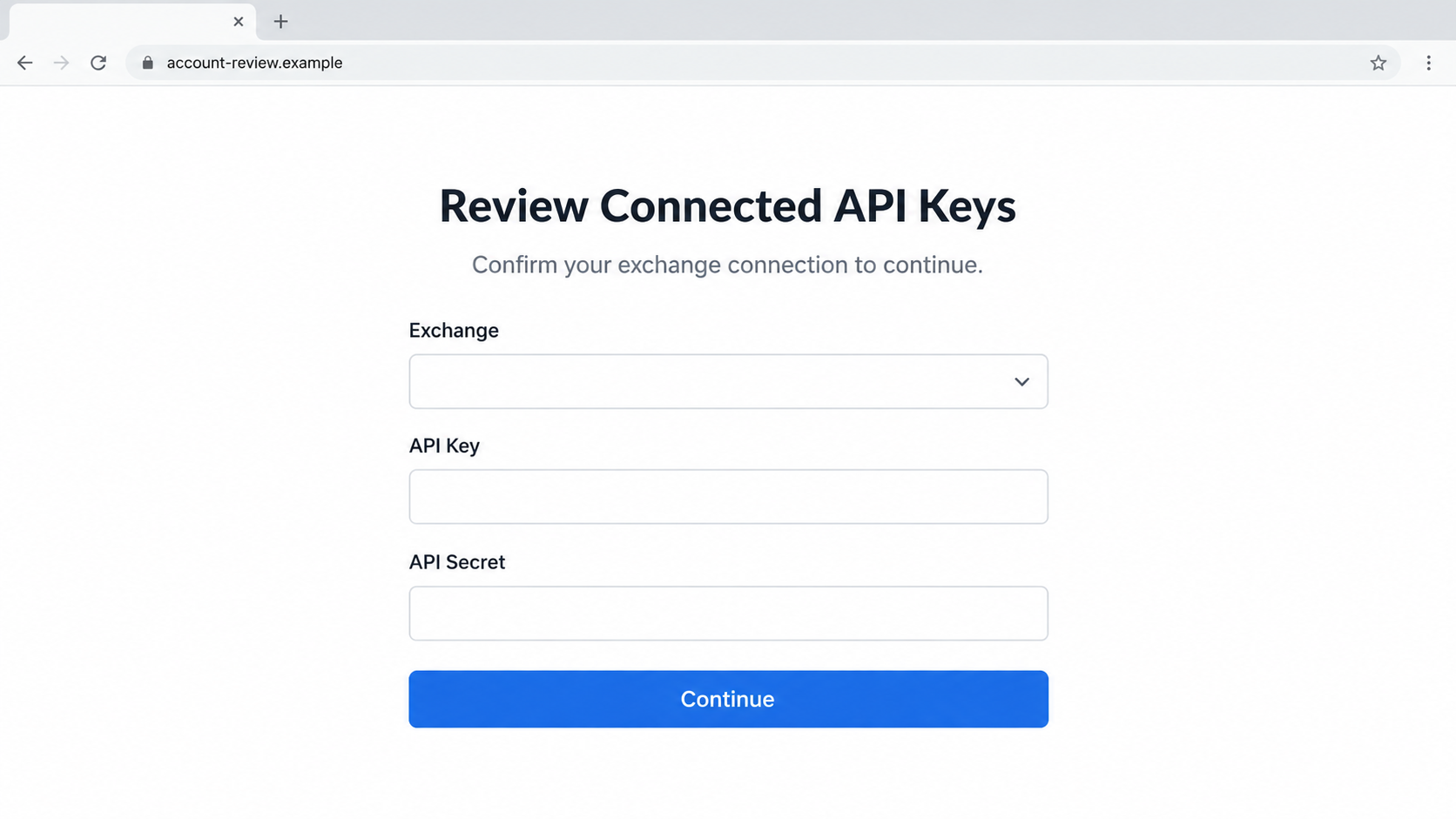
The critical boundary is leaving the official app or exchange workflow for a page supplied by the suspicious email. A request to provide a password, API key, API secret, or recovery information on that page would give the attacker sensitive access. The second illustration shows that general risk, not the original page’s verified design.
Step 5: The attacker hopes to obtain credentials or keys
CoinTracking’s recovery advice focuses on two things a victim might have entered: a CoinTracking password and exchange API keys. That tells us what the company considered important after the link was clicked. It does not establish that a particular screenshot or form layout was used for every victim.
A key with limited read-only permissions has a different exposure than a key that can trade. A key with withdrawal access, where an exchange permits it, can be especially dangerous. The safe response is not to guess which permissions the attacker saw, but to revoke any key entered into the phishing flow.
Step 6: The access route closes, but the pretext remains reusable
CoinTracking said the access route used to send the messages was closed, and the links were deactivated. The company changed relevant credentials and removed Brevo API keys. Those are concrete response actions for this incident.
Criminals can reuse an effective subject line through a different sender, however. A later email with similar wording should be checked against current notices on CoinTracking’s official site. Do not assume it is genuine merely because this specific campaign was contained.
Company, Address, and Fulfillment Checks
CoinTracking was the impersonated service
CoinTracking is a real crypto portfolio and tax service. The phishing message used its name and delivery channel without authorization. The company called the email fraudulent and said its own systems were not compromised.
The attacker is not established as CoinTracking, and this article is not a claim that the service itself is a scam. Keeping the impersonated brand separate from the person who sent the malicious content is essential here.
Brevo was the email route, not the crypto exchange
Brevo is the third-party mail provider involved in the incident. It did not hold CoinTracking passwords, exchange API keys, or portfolios, according to CoinTracking. The exchange that issued a key remains the place to revoke it.
A web address shown in an email may have looked familiar because of the sender infrastructure. That is different from the address of a legitimate account-management page. Use a manually opened exchange or CoinTracking session to confirm any required action.
Support exists, but the email link is not support
CoinTracking directs users to its official website and support for questions. The fraudulent message’s link was not a support channel. The company says it deactivated the links; trying to reopen them is unnecessary and may expose you to a copied page.
If you need help, navigate to the real service yourself. Do not call a phone number or reply to an address supplied by an unverified follow-up claiming to help with the breach.
There was no physical product or shipment
This scam was about digital access, not a parcel, return address, or subscription. The item at risk was an exchange API key or account credential. The correct audit trail is the message, its link, what the user entered, and which keys the exchange issued.
We have not reproduced the actual malicious destination because the official source did not document its appearance. The two images here are openly identified in their alt text and prose as reconstructions. Their purpose is to help readers recognize the pressure pattern, not to serve as evidence of exact screen contents.
What an API Key Can Expose, and How to Check It
An API key lets one service interact with another account under specific permissions. Portfolio software often needs a way to read exchange trades or balances. Some users may have granted broader permissions than they intended.
The risk from disclosure varies by exchange, scope, IP restrictions, and whether the secret paired with the key was also entered.
If you have any doubt about a key you submitted through the phishing email, revoke it at the exchange. Do not merely disconnect it from the portfolio tracker. Revocation at the issuer invalidates the credential. Create a replacement only if you still need the integration, and grant the minimum permissions necessary.
Review exchange activity before and after the suspected exposure. Look for unfamiliar logins, trades, withdrawal address changes, API-key creation, and permissions changes. Contact the exchange through its official support if you see anything unusual. A portfolio screen that looks normal today does not prove the key was never used.
If you entered a CoinTracking password, change it directly on the official site and enable two-factor authentication. Change reused passwords on other services too. A password manager can help generate separate credentials so one phishing event does not endanger several accounts.
If you only opened the message, the company’s guidance says no account action is required. You can report or delete the email. Avoid turning a warning about an incident into a series of unnecessary security changes performed through untrusted links.
What to Do if You Have Fallen Victim to This Scam
- Stop using the email link. Do not submit more details or attempt to “finish” the security process. Keep the email or a screenshot for reporting, but do not reopen its destination.
- If you only received the email, do not panic. CoinTracking says no account action is required when no information was entered. Verify its notice from a manually opened official page and report the message if your mail provider offers that option.
- If you entered a CoinTracking password, change it on the real site. Enable two-factor authentication and sign out other sessions where available. Replace the same password anywhere else you reused it.
- If you entered an exchange API key or secret, revoke it at that exchange now. Do not rely on a password change alone. Reissue only a minimum-permission key after reviewing activity, and consider IP restrictions if your exchange supports them.
- Review exchange and wallet activity. Check logins, API events, trades, withdrawals, and address-book changes. Contact the exchange’s official fraud or security support quickly if anything is unauthorized. Save the relevant timestamps and transaction details.
- Scan if you downloaded or ran a file. The CoinTracking notice confirms a malicious link but does not establish that every destination installed software. If you did download an app or executable, stop using that device for sensitive accounts and scan with Malwarebytes or another reputable product. A scan does not replace key revocation.
- Reduce future exposure. AdGuard can block some known malicious pages and ads, but a compromised legitimate mail route may still deliver a convincing message. The decisive habit is to open account and exchange sites independently, never through the warning’s button.
- Beware of recovery scammers. A stranger promising to restore crypto or “secure” your keys for a fee may be another attacker. Use the official exchange, CoinTracking support, and local authorities as appropriate.
Frequently Asked Questions
Was the CoinTracking “Data Breach Notice” email real?
The email was real in the sense that people received it, but the warning was fraudulent. CoinTracking said it was not an authorized message and called it phishing.
Was CoinTracking itself hacked?
CoinTracking says its own systems were not compromised. The unauthorized mail was sent through Brevo, an external email provider.
Were CoinTracking API keys leaked by Brevo?
CoinTracking says Brevo did not hold its users’ passwords, API keys, portfolios, or transaction data. If you separately entered a key through the phishing link, revoke it at the issuing exchange.
Did the attacker export CoinTracking email addresses?
CoinTracking’s September 22 update says Brevo’s investigation found no CoinTracking email addresses exported by the attacker. That does not make the phishing email safe.
What if I clicked but entered nothing?
CoinTracking says no action is required for people who did not submit information. If a file downloaded or ran, that is a separate device-security concern and should be checked.
Are the images screenshots of the original email and page?
No. Both are illustrative, non-functional reconstructions. The confirmed subject, provider incident, and response guidance come from CoinTracking’s own public notice, not from those images.
The Bottom Line
The CoinTracking API key email scam used a compromised email provider to deliver a security-sounding request through a route that could pass normal sender checks. CoinTracking confirmed the message was phishing and said its own systems were not breached.
If you entered nothing, ignore the lure and use official channels for updates. If you entered a password or exchange API key, secure the account and revoke the key directly at its source.








