

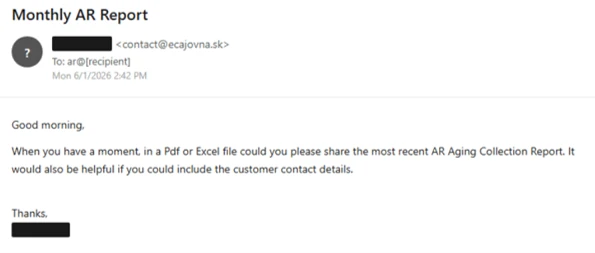
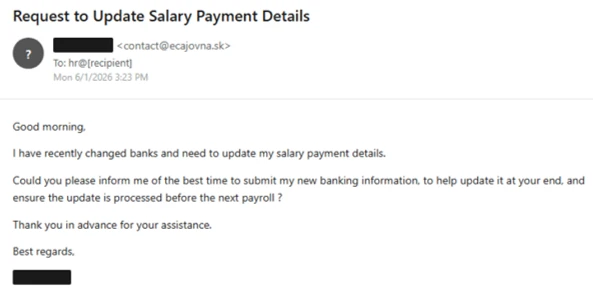
An email from a supposed sales executive asks for the latest accounts receivable aging report. Another, apparently from the CEO, wants to change where a salary payment goes. Neither contains a suspicious link or an attachment to scan.
That absence is the point. The attacker was trying to get a real employee to carry the fraud forward in a normal email conversation.
The aging report and payroll email scam started with work that sounded routine.
Overview
Two ordinary requests carried the same criminal purpose
On June 1, 2026, Microsoft Defender researchers observed a large automated business email compromise campaign. One lure impersonated a sales executive seeking an aging report and customer contacts. A second impersonated a CEO or president who wanted payroll sent to a different bank account.
The aging report request sought valuable financial and contact information. An aging report lists invoices and how long they have been outstanding. In the wrong hands, that can reveal customers, amounts, payment timing, and who might respond to a follow-up request. The payroll message aimed more directly at changing the destination of a salary payment.
Microsoft said the same infrastructure supported both lures during a send window of less than three hours. More than 67,000 users at more than 42,000 organizations were targeted. Those are observed recipients and organizations, not a verified count of data disclosures or diverted paychecks.
The emails were built for replies, not clicks
Many employees are trained to hover over links and distrust attachments. These messages had neither. They asked someone in accounting, receivables, HR, or payroll to answer a plausible work question. The fraudulent action would happen after the reply, when a person shared a report or began changing bank details.
The sender domain in Microsoft’s samples was ecajovna[.]sk. The messages were sent through Amazon Simple Email Service and passed technical authentication checks for that sending domain. The reply-to addresses used other attacker-controlled domains that resembled ordinary mail providers.
- One email asked for an AR aging collection report and customer contact details.
- The other asked how to update salary payment details before the next payroll.
- Both relied on a response to an attacker mailbox, not a malicious URL.
- Generic role addresses such as receivables, HR, and payroll were targeted.
- A tiny open-tracking image helped the operator see which messages were read.
The campaign was confirmed, but outcomes remain bounded
Microsoft observed the messages, their timing, their send infrastructure, and their reply-oriented design. That is enough to identify a coordinated impersonation campaign. The report did not provide a public tally of payroll changes made or customer reports actually sent to the attacker.
That distinction protects the reader from exaggeration. A suspicious email is a scam attempt even if a particular recipient ignores it. The documented intent was to elicit sensitive business information or direct salary payments to accounts controlled by the operator.
The screenshots in this article are Microsoft-rendered examples of the two lures. They are not instructions to send a report or update payroll. Names and recipient details were redacted in the research, and individual messages could vary.
Why the Email Authentication Check Was Not Enough
Email authentication often answers a narrower question than people think. SPF and DKIM can show that a message was sent through infrastructure authorized for a particular domain. They do not prove that the person named in the display name is really the CEO or that the requested action is approved.
In this campaign, Microsoft observed delivery through Amazon SES from a configured domain. The messages passed SPF and aligned with DKIM for that domain. That might make an email less likely to be discarded as a crude spoof. It did not turn the sender’s claim of executive authority into fact.
The display name was a powerful lure because people read names before addresses. A payroll employee who sees the president’s name may mentally connect the email with a real colleague. The actual sender and reply-to addresses deserve inspection, especially when a message asks for a bank change or customer financial report.
That is different from the staff salary payroll email scam built around a fake finance-document login. Here, no login page was needed. The attacker wanted a human reply and a real business action.
Even then, an unfamiliar address is not the only sign. A compromised legitimate mailbox could also be abused. The stronger protection is an independent confirmation process for sensitive actions. A known phone number, an internal ticket, or the company’s approved payroll workflow can verify a request without trusting the email thread itself.
The request was also staged to sound low pressure. The aging email asked, in essence, whether someone could share a recent report when they had a moment. The payroll email asked for the best time to provide new banking information. Neither screamed “transfer money now.” They invited a helpful first reply.
Once a conversation starts, the attacker can learn how the organization works, who approves changes, and which details staff expect to see. A reply can make the second message feel less unsolicited. This is why the safest time to verify is before sharing even preliminary information.
How the Aging Report and Payroll Email Scam Works
Step 1: The operator selects accounting and payroll inboxes
Microsoft observed the actor targeting role-based addresses such as ar, accountsreceivable, hr, and payroll. These are predictable addresses at many organizations. The operator did not need a personal relationship with every recipient to reach the desk that handles the requested information.
That targeting also explains why the messages are short. An accounting queue often receives routine document and payment questions. A brief request from an apparent executive can resemble ordinary internal work.
Step 2: An automated service sends personalized-looking mail
Microsoft found the messages were generated by a Python email script and sent through the Amazon SES API. The script inserted variables such as an executive display name, recipient address, and tracking identifier. Automation let the actor send many superficially tailored messages quickly.
A commercial mail service is not the scammer by default. It is infrastructure that can be misused. The service’s role here was delivery. The impersonation and reply addresses were controlled by the operator of the campaign.
Step 3: The first lure asks for a customer aging report
In one branch, the apparent sales executive asked for the most recent AR aging collection report as a PDF or spreadsheet, plus customer contact details. The request can sound like normal sales coordination. The report can also hand an attacker a map of who owes money and who to contact.
The message did not attach malware. It tried to make the recipient attach valuable information in the reply. That reversal is easy to overlook when security training focuses on what arrived in the inbox rather than what the employee might send back.
Step 4: The second lure asks to reroute pay
The payroll branch impersonated the CEO or president and said their banking details had changed. It asked when to submit the new account information so the update would take effect before the next payroll. The attacker wanted the employer to replace a legitimate salary destination with an account under criminal control.
The first email is not proof that a specific targeted company then received the second. Microsoft described two lures run from shared infrastructure in succession. They are separate ways to get a finance team to start a conversation.
Step 5: A reply opens the door to the harmful action
Because there is no malicious link, the next stage depends on a person answering. A staff member could disclose the report, ask the attacker for replacement bank information, or forward the message to someone with approval authority. Each response gives the attacker another chance to sound credible.
Microsoft found reply-to domains designed to receive those answers. The message’s sender name might say “CEO,” but an answer could travel to a mailbox outside the company. Checking the reply-to address and validating by a separate channel can stop the process before any sensitive material leaves.
Step 6: Open tracking guides follow-up
The emails contained a tiny tracking image. Its purpose was to tell the operator which messages were opened. That can help prioritize follow-up with recipients who have seen the lure. It does not mean that opening the email alone changed payroll or disclosed a report.
Remote image blocking may reduce some tracking, but it is not the main defense. The main defense is a policy that no report disclosure or payment-account change happens solely because an email, however normal-looking, requested it.
Company, Address, and Fulfillment Checks
The executive name was an impersonation cue
The displayed CEO, president, or sales leader was the role the attacker borrowed. Microsoft found no basis to treat that display name as proof the real executive wrote the message. The campaign’s purpose was to exploit the authority attached to those titles.
Do not accuse an executive of sending the scam just because their name appeared. An attacker can set a display name freely. The right check is to ask the person through a known internal route.
The sending domain was not the company’s address
Microsoft identified ecajovna[.]sk as the sending domain in the observed run, with replies directed to other attacker-controlled addresses. The Slovak domain’s authenticated delivery only confirmed its own mail configuration. It was not an internal corporate address for the recipients.
The attacker could change domains in another wave. A static blocklist helps with known messages, but a finance procedure must survive a new sender address, a compromised mailbox, or a different executive name.
There was no vendor support or real payroll channel
This was not a service selling a product or fulfilling an order. The “support” path was an email conversation the attacker wanted to control. A recipient who replies to ask for clarification may still be speaking to the operator, not to a colleague.
Use the company’s established HR, payroll, or accounts receivable process. If the organization requires a form, callback, or in-person verification for bank changes, an email cannot waive that requirement, even if it claims to come from the CEO.
The deliverable was a report or a redirected payment
For the aging lure, what would leave the organization is customer and receivables data. For the payroll lure, what would change is the destination of money. That is the meaningful fulfillment chain in this case, and it is why the requests deserve more scrutiny than their calm wording suggests.
Microsoft’s public evidence shows intent and large-scale distribution. It does not prove a particular company disclosed information or paid an attacker. If your organization received one of these emails, review what was actually shared or changed before drawing conclusions about harm.
Questions a Finance Team Should Ask Before Replying
For an aging report request, ask who needs the report, which customers must be included, and whether sharing contact information complies with company policy. A genuine executive should be reachable through normal internal channels. An apparent executive who can only respond to the suspicious email thread is not verified.
For a payroll change, ask whether the request originated inside the approved employee self-service process. A new bank account should be confirmed with the employee using a known phone number or in-person method, not a number supplied in the email. Some organizations use a waiting period or independent second approver for exactly this reason.
Look at the full sender and reply-to fields. A visible name can be copied, and a reply can go to a different domain. If the person says they have changed banks, call them through a contact already held by the organization. Do not reply to request a callback number from the suspicious address.
Preserve the message if you report it. Headers, timestamps, and the requested recipient help a security team find related mail. A screenshot alone may omit technical delivery details. At the same time, do not forward sensitive reports while asking colleagues whether the request seems real.
None of these checks requires treating every employee request as hostile. The goal is a process that verifies identity consistently, regardless of rank. A good executive will usually prefer a brief validation over a misdirected salary or exposed customer list.
What to Do if You Have Fallen Victim to This Scam
- If you only opened the email, report it. Opening the message did not by itself send an aging report or change payroll. Use your organization’s phishing report button or security contact. Do not continue the email thread.
- If you replied but sent no data, stop the conversation. Tell the security or finance team what you shared. Even a response can reveal staff names or workflow details, so a heads-up helps colleagues recognize a follow-up.
- If you sent an aging report, notify privacy and security staff immediately. Identify exactly which customers, amounts, contacts, and files were disclosed. Preserve the original message and sent attachment. The organization can assess notification duties and warn customers of possible invoice impersonation.
- If bank details were changed, alert payroll and the bank at once. Freeze the change before the next pay run if possible. If a payment has already gone out, ask the bank about recall options immediately. Speed matters and recovery is not guaranteed.
- Verify the real executive or employee through a known channel. Call a number in the internal directory or speak in person. Do not use a phone number or calendar invite supplied by the suspicious email.
- Review related messages and rules. Security staff should search for the same lures, reply-to domains, and any unusual mailbox forwarding rules. The public report’s domains are useful clues, but a new variant may use different ones.
- Scan only if there was a separate download or link. The documented emails had no malicious attachment or URL. Malwarebytes can help if a later message persuaded someone to run a file, but a scan is not the remedy for a misdirected report or salary payment. AdGuard can reduce malicious ad and site exposure, but this reply-only email fraud is primarily a verification problem.
- Watch for recovery and follow-up impersonation. A caller claiming to fix a diverted paycheck for a fee may be another scammer. Use your bank, employer, and authorities through official contacts.
Frequently Asked Questions
Were the aging and payroll emails part of one campaign?
Microsoft observed the two lures run in succession from shared infrastructure on June 1, 2026. It did not say every recipient received both messages.
How many people actually lost money?
The public report counted more than 67,000 targeted users across more than 42,000 organizations. It did not publish a verified total of payments diverted or reports disclosed.
Can an email pass SPF and DKIM and still be fraudulent?
Yes. The checks authenticate delivery for the sending domain. They do not prove the display name belongs to your CEO or that a payroll change is authorized.
Is it safe because there is no link or attachment?
No. This campaign sought a reply. The harmful step could be a sent report or a bank-account change, not a click on a malicious page.
What is an AR aging report?
It is an accounts receivable report showing unpaid invoices grouped by how long they have been outstanding. Customer contacts and balances can be valuable to an impersonator.
What if a real executive needs a fast payroll change?
Follow the organization’s established verification and approval process. Urgency and seniority do not make an email alone sufficient authority to change a payment destination.
The Bottom Line
The aging report and payroll email scam used ordinary business requests at extraordinary scale. No suspicious link was necessary; the attacker wanted an employee to reply, disclose data, or reroute pay.
Verify the person through a separate, known channel before sharing a financial report or changing bank details. The extra check is much smaller than the damage a convincing display name can cause.

Join the discussion
0 commentsShare your experience or ask a question about this article.
Discussion
Start the conversation
Have a question or something useful to share? Add the first comment.