

A message labeled as an internal employee briefing says the meeting summary is attached. The attachment looks like a saved Teams recording. Inside, a voicemail button points to a familiar Microsoft sign-in address.
Nothing about that path is quite what it seems. The message used several ordinary office formats to guide a reader from a supposed staff update toward a Windows file.
The fake staff update email was designed to make each next click feel like normal office work.
Overview
A fake internal briefing reached a large audience
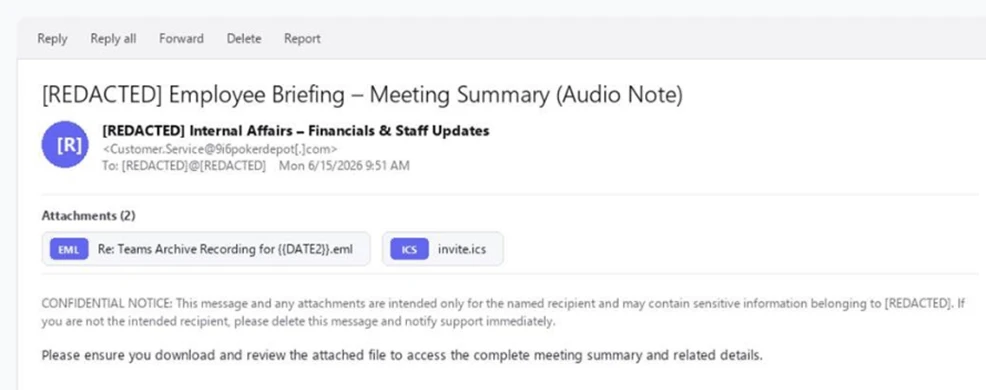
Microsoft Defender researchers observed a staff update phishing campaign on June 14 and 15, 2026. It targeted more than 107,000 users at nearly 19,000 organizations, mostly in the United States. The messages pretended to come from an internal “Internal Affairs – Financials & Staff Updates” function.
The subject and sender display name began with the recipient’s organization name. That small customization made the email feel local. Its body was sparse, asking the employee to download an attached meeting summary and carrying a confidentiality notice.
One attachment was an .eml file posed as a Teams archive recording. Another was an .ics calendar invite. The file formats were familiar in an office, but the chain behind them was not a normal meeting workflow.
The “voicemail” link borrowed a real Microsoft address
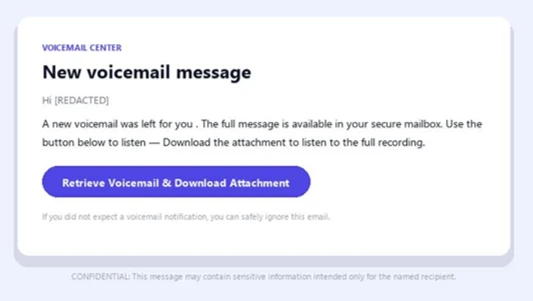
Opening the EML showed a voicemail notice with a button. Microsoft found that the button led first to a real Microsoft OAuth sign-in endpoint. That fact is unusually deceptive: a person or scanner sees login.microsoftonline.com and may assume the destination is safe.
The URL also carried parameters for an attacker-registered multi-tenant application. The requested silent sign-in could not complete in the victim’s context, so Microsoft’s authentication service redirected the browser to a destination the attacker had registered. The destination was a ClickUp attachment host serving a Windows batch file.
- The first email pretended to be an employee meeting summary.
- The nested EML pretended to contain a Teams archive recording or voicemail.
- The button passed through a legitimate Microsoft sign-in endpoint.
- An attacker-controlled redirect ended at a
.batfile. - The batch file launched a hidden download and installer on Windows.
This was malware delivery, not a stolen voicemail
The file was called Financial_report.bat. Microsoft found that it ran a hidden PowerShell command, fetched an installer from a file-hosting service, executed it silently, and removed the dropper. The report characterizes the observed outcome as silent malware execution rather than a straightforward credential-harvesting page.
The observed target count is a measure of emails sent to users, not a count of people who ran the batch file. Microsoft’s evidence supports calling this a confirmed malicious campaign because the attachments and redirect chain were analyzed. It does not justify claiming every recipient’s device was infected.
The screenshots show the initial email and the nested voicemail notice as captured by Microsoft. Names were redacted. The real organization whose name appears in a recipient’s copy was being impersonated, not identified as the scam operator.
How a Real Microsoft Link Became Part of a Dangerous Route
People often check whether a link begins with a trusted domain. That habit is useful, but it is not complete. Authentication services can redirect users after sign-in attempts. An attacker who can register an application and set a redirect destination may abuse that expected behavior as one stage in a harmful chain.
In this case, Microsoft said the voicemail button pointed to its own OAuth sign-in endpoint with parameters requesting a silent sign-in. Because that sign-in could not be satisfied, the browser was sent to the address registered for the attacker application. The file there was a batch script, not a voice recording.
The link did not prove that Microsoft sent the email, created the voicemail, or endorsed the download. It was a legitimate service used as a waystation. This is a different problem from a visibly misspelled login domain.
The next host was a ClickUp public attachment domain. ClickUp is a real collaboration service; public attachments can be abused. A file appearing under a familiar cloud hostname is still only a file uploaded by someone. Its origin and purpose must be checked separately.
The nested email format added another layer of confusion. An .eml attachment opens like an email inside an email. It can display its own sender and button, making the recipient feel they have moved into a forwarded message or recorded communication. That second message is attacker-supplied content.
A separate MalwareTips report covers fake misconduct emails that pushed Zoho Assist. Both exploited workplace authority, but this staff-update campaign used a nested voicemail and redirect to a batch file.
The .ics calendar invite helped the package resemble a normal meeting follow-up. Microsoft did not describe the calendar file as the malware executable. Its significance was to reinforce the meeting story, while the nested EML and redirect delivered the harmful route.
One visible flaw did survive the templating: the EML filename contained the literal placeholder {{DATE2}}. It should have been replaced with a date if the sender were genuinely preparing a polished individual meeting notice. That clue is useful, but future versions can fix it, so it should not be the only defense.
How the Fake Staff Update and Teams Voicemail Scam Works
Step 1: The email adopts your organization’s name
The sender display name and subject insert the recipient organization’s name before a fixed staff-update phrase. For a busy employee, that can make the message resemble internal communications even when its underlying sending address belongs elsewhere.
Microsoft traced the messages to a Postfix host on 9i6pokerdepot[.]com, routed through an outbound mail service. DKIM passed for that sending domain. As with other authenticated scam mail, that technical pass did not verify the claimed internal identity.
Step 2: Two attachments make the story feel routine
The body offers little detail and asks the recipient to download the file for the meeting summary. The attachments are a nested .eml and an .ics calendar invite. Those formats are common enough in office workflows to lower suspicion.
The EML’s filename says it is a Teams archive recording, although the file is an email message. The unreplaced {{DATE2}} token is a clue that the file name was generated from a template, not prepared for a real meeting.
Step 3: The nested email presents a voicemail button
Opening the EML shows a message from a supposed voicemail center. It says a new voicemail is available in a secure mailbox and offers one prominent button to retrieve it. The user may now feel they are following an internal communication, but the content is still part of the attacker’s attachment.
The button does not open a Teams recording. It starts a URL chain through Microsoft’s sign-in service. A familiar domain in that first hop is the campaign’s strongest credibility cue.
Step 4: An OAuth redirect sends the browser to a file
The URL requested silent authentication with an attacker-registered multi-tenant application. Microsoft found the request could not complete, triggering a redirect to the application’s registered destination on a ClickUp attachment host.
That redirect delivered Financial_report.bat, a Windows batch file. The presence of login.microsoftonline.com earlier in the path did not make the batch file safe. The final download and its publisher were the important facts.
Step 5: The batch file silently runs another installer
If the recipient ran the batch file, it launched a hidden PowerShell command to download installer.exe from a file-hosting service into the Temp directory. It then ran the installer silently and removed the batch dropper.
Microsoft’s public summary does not require readers to know the command syntax to understand the danger. The file named like a financial report was actually a program-launching script. An employee expecting audio should never have to run a .bat file.
Step 6: The attacker can repackage the same path
The particular sending host, EML name, redirect destination, and payload URL can change. The structural trick is more durable: an internal-looking email, a nested message, a real sign-in service used as a redirect, and a cloud-hosted Windows script.
Do not rely on the exact phrase “Internal Affairs” to identify future attempts. Ask whether the requested action fits the stated purpose. A meeting summary should not need a batch file, a silent installer, or an unexplained application redirect.
Company, Address, and Fulfillment Checks
The internal department name was invented for trust
“Internal Affairs – Financials & Staff Updates” was the identity the message claimed. Microsoft identified it as impersonation. The recipient’s organization name at the front made the label more plausible, but it did not prove the message came from that organization’s staff.
If your company genuinely uses a similarly named function, verify this exact communication through the intranet, known HR contact, or security team. A department title in an email is not authentication.
The sending and download addresses had different roles
The observed sender infrastructure involved 9i6pokerdepot[.]com. The file later sat on a ClickUp public attachment host. The Microsoft sign-in address was an intermediate service, not the origin of the staff message or the final file.
Keeping those roles separate prevents misplaced blame. The scam operator abused services and domains along the way. A legitimate domain in one hop does not make the full chain legitimate.
There was no meeting support to contact
The message did not offer a verifiable organizer with meeting details in Microsoft’s description. It offered attachments and a button. A real meeting recording should be retrievable through the organization’s normal Teams or intranet experience, not through a nested email that ends in a Windows script.
Ask a colleague or the named meeting organizer using an existing contact, not by replying to the suspicious email. If no one recognizes the meeting, preserve the message for the security team.
The digital “fulfillment” was an installer
The promised item was a meeting summary or voicemail. The delivered item was Financial_report.bat, which Microsoft found launched a hidden downloader and installer. That mismatch is decisive evidence of the malicious objective.
The public report did not publish a comprehensive list of what every later installer did on every endpoint. It did establish that the chain ended in malware execution. Victim response should therefore be based on whether the script or its payload ran, not on whether a voicemail was actually heard.
How to Separate a Meeting Notice from a Download Trap
Check the expected workflow. Did you attend or know about the meeting? Would a Teams recording normally arrive as an .eml attachment inside another email? Is the sender address part of your organization? A meeting title can be fabricated, but the organization’s actual process is harder to fake.
Be wary of a sudden shift in file type. Audio recordings and meeting summaries do not need Windows batch scripts. If the browser offers a .bat, .cmd, or .exe file when you expected audio or a document, stop immediately.
Do not treat a Microsoft domain as a complete verdict. The full route matters. Authentication links can include application parameters and redirects. If an unexpected meeting notice opens a sign-in flow and then a file download, close the path and verify independently.
Look for odd template leftovers such as {{DATE2}}, but remember that a more careful attacker can remove them. The core question is whether the request is coherent and authorized. An urgent file from an unrecognized meeting is not made safe by a polished button.
For work accounts, report suspicious mail before experimenting. Security teams can examine the headers, attachments, and redirect chain in an isolated environment. A regular user should not click through to “see where it goes” on a company computer.
What to Do if You Have Fallen Victim to This Scam
- If you only received or opened the email, report it. Do not open the EML or calendar attachment further, and do not follow the voicemail button. Receiving the message alone does not mean malware ran.
- If you opened the EML but did not download or run a file, stop there. Notify your organization’s security team. Save the original message so its headers and attachments can be analyzed without relying on a screenshot.
- If a
.batfile downloaded, do not run it. Record its filename and location for security staff. Deleting an unexecuted file may be enough for a personal device, but a workplace team may want to inspect it safely. - If you ran the script, disconnect the device and call IT immediately. The documented batch file silently launched another installer. Avoid signing in to sensitive services on that device until it is reviewed. Do not assume that closing a window stopped the process.
- Investigate and scan. Malwarebytes or an enterprise endpoint product can detect known components and help remove them. Security staff should review process and network activity, including any downloaded installer, because a clean-looking desktop does not establish that nothing ran.
- Secure accounts from a clean device. Change important passwords, revoke active sessions, and review cloud sign-in logs if your organization uses Microsoft 365. The observed chain was malware delivery, not necessarily password theft, but downstream malware may expose accounts.
- Reduce exposure without overstating tools. AdGuard may block some malicious ads and known unsafe destinations, but it cannot determine whether an internal-looking email is genuine or reverse a file already executed. Keep Windows and browsers updated and follow company attachment policies.
- Watch for follow-up impersonation. A later caller claiming to be IT and asking for remote access could exploit the same incident. Contact support through the company’s established number or portal.
Frequently Asked Questions
Was this a real Teams archive recording?
No. Microsoft documented a nested EML pretending to be a Teams recording and voicemail notice. The path ended in a Windows batch file and silent installer, not a meeting recording.
Why did the link go through a real Microsoft address?
The attacker used Microsoft’s OAuth sign-in endpoint as an intermediate redirect with an attacker-registered application. A legitimate first-hop domain did not validate the final download.
Did the calendar attachment contain the malware?
Microsoft described the ICS invite as part of the email package. The documented malicious execution route ran through the nested EML button, redirect, and downloaded .bat file.
Does opening the email infect a computer?
The public report did not say mere viewing caused infection. The highest risk was running the downloaded batch script or its installer. Report the email and avoid the attachments.
What does the {{DATE2}} filename mean?
It was an unfilled template token in the EML attachment name. It is a useful clue that the message was generated, but future variants can remove that mistake.
How many recipients were infected?
Microsoft counted more than 107,000 targeted users at nearly 19,000 organizations. That does not tell us how many downloaded or ran the file.
The Bottom Line
The fake staff update email stacked familiar office cues until a “meeting” button delivered a Windows script. The trusted-looking Microsoft link was only a stop on the route.
Verify unexpected meeting notices through your organization’s own channels. If you ran the batch file, treat the device as potentially compromised and involve your security team promptly.

Join the discussion
0 commentsShare your experience or ask a question about this article.
Discussion
Start the conversation
Have a question or something useful to share? Add the first comment.