

Payday is close, and a note says your direct deposit needs attention. The message looks like routine payroll housekeeping, exactly the sort of thing you might clear between meetings.
That small interruption can become a much bigger one. Before you follow a payroll link, it helps to know which details are worth checking and why the timing feels so persuasive.
Overview
What the Paylocity login scam is
The Paylocity login scam uses emails, lookalike sign-in pages, and sometimes paid search results to draw employees away from the genuine payroll portal. The page may resemble an employee self-service screen while its real purpose is to collect account credentials.
Paylocity has warned that fraudulent search results can lead to counterfeit employee self-service pages. The company says attackers may use stolen credentials to access sensitive employment information and attempt payroll or benefits fraud.
Why a direct deposit request gets attention
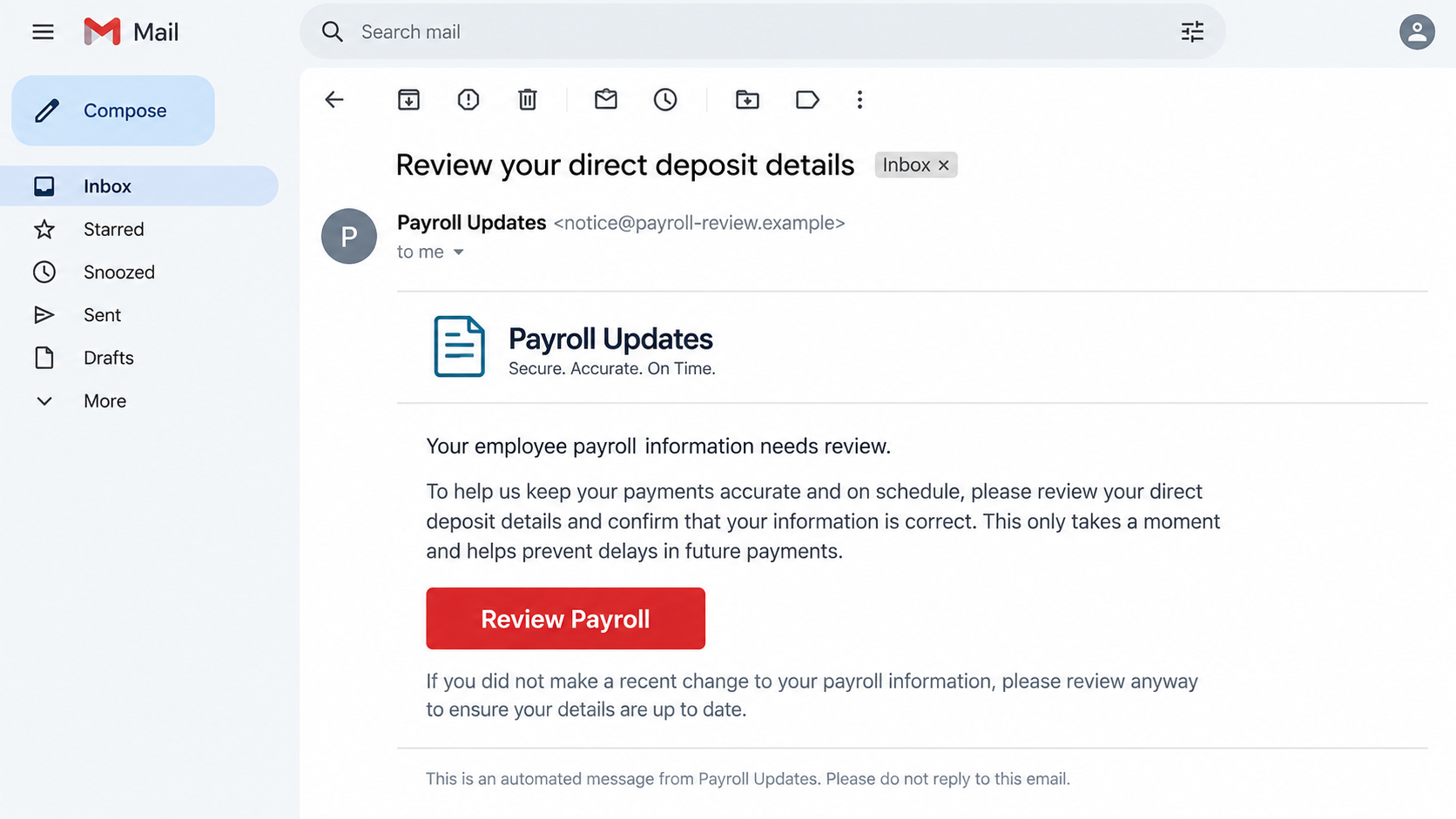
People depend on payroll arriving on time. A message that hints at a delayed paycheck, a failed account verification, or an urgent deposit update turns an ordinary login into a decision made under pressure.
The illustration above is a reconstruction, not a captured Paylocity message. Real attempts can vary in wording and appearance. What matters is the route from an unexpected prompt to a page you did not reach through your employer’s normal sign-in process.
What the attacker wants
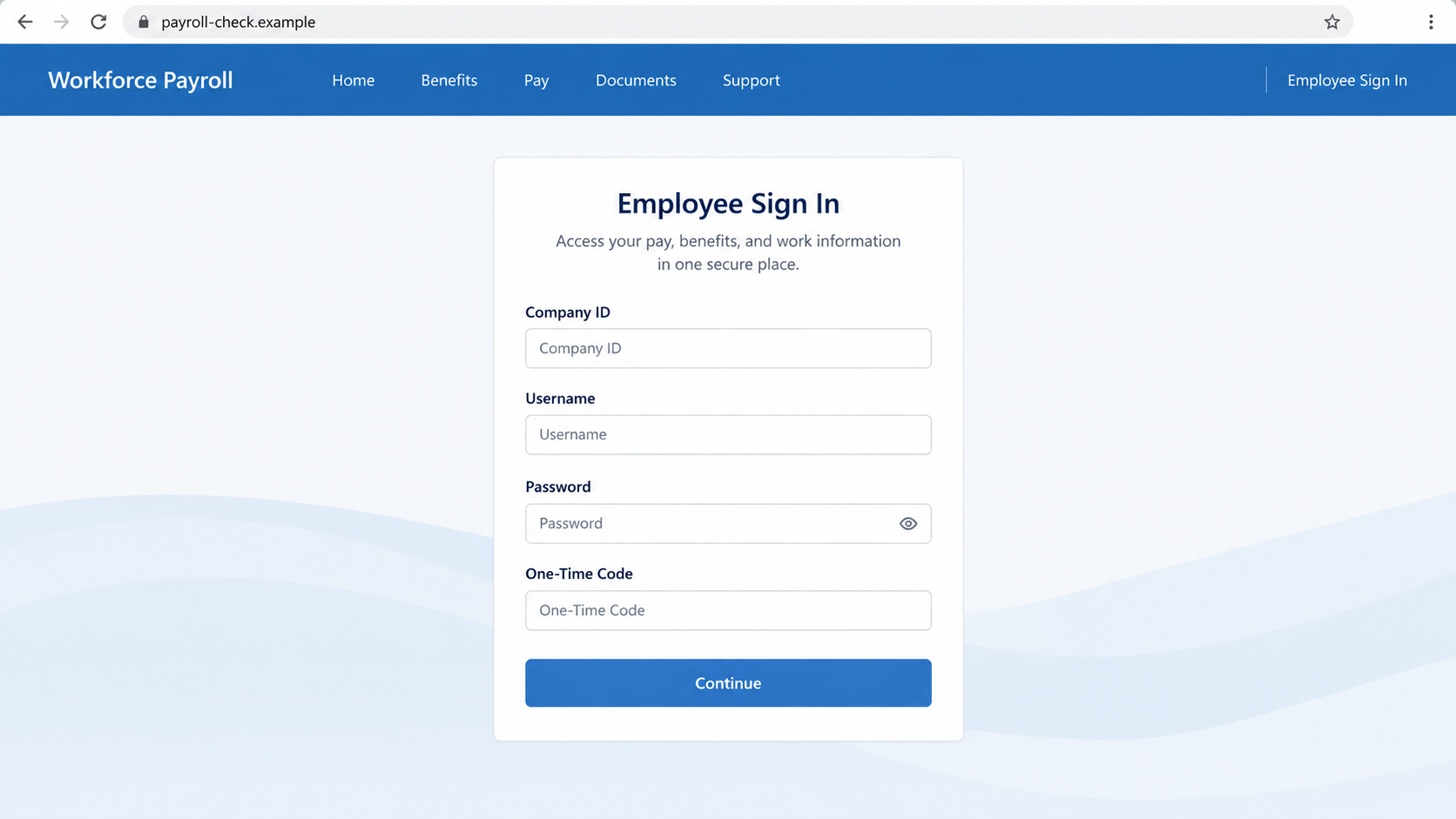
A fake form may ask for a company ID, username, password, and a one-time authentication code. Other versions may seek personal details that can support identity theft. If the attacker gains account access, the next target can be direct deposit settings.
Watch for several clues together:
- A surprise request to re-confirm payroll details immediately.
- A sign-in link in an email or text instead of the employer’s usual portal.
- A search ad presented as the fastest way to employee self-service.
- A web address that resembles a payroll brand but is not its established login route.
- A request to share an authentication code with a person or unfamiliar page.
Why Payroll Phishing Feels So Routine
Most workers do not visit payroll software every day. They sign in when a pay stub arrives, a tax document is ready, or a bank account changes. That gap gives a fake page room to look familiar without being examined closely.
Attackers can also make a message sound employer-specific. It may mention human resources, an upcoming pay cycle, or a supposed compliance review. None of those phrases proves the sender works for your employer or Paylocity.
The delivery route is not always email. Someone who types a product name into a search engine may see a sponsored listing before the official result. Paylocity’s warning specifically describes fake search results that imitate its employee self-service experience.
A sponsored placement is an advertisement, not identity verification. The displayed headline can say “employee login” while the actual destination belongs to someone else. The browser address, not the ad copy, determines where your password goes.
One-time codes can make the trap feel safer than a password-only form. In reality, a counterfeit page asking for a current code may be trying to sign in to the real account at the same moment. Treat an unexpected code prompt as a reason to stop.
For an employer, the consequences can extend beyond one employee. A compromised payroll account may expose personal records or create a fraudulent direct deposit change. A seemingly private login problem therefore belongs in the payroll team’s incident process.
How the Paylocity Login Scam Works
Step 1: A payroll problem is invented
The first message may say a direct deposit profile is incomplete, an upcoming paycheck cannot be processed, or an employee record requires verification. A different attempt may start with a search ad promising quick access to the payroll portal.
The story is built around an action employees sometimes really take. Direct deposit updates and account verification are legitimate tasks. The deception is the claim that this particular unsolicited route is the correct way to complete them.
Step 2: The employee is pushed toward a link
The email button or ad can lead to a domain with words such as pay, workforce, employee, or account. A padlock in the browser means the connection is encrypted; it does not mean the operator is Paylocity.
On a small screen, the visible link text can hide the destination. Long web addresses may also truncate before the suspicious part appears. Open your employer’s known bookmark or type the official address yourself rather than relying on the provided button.
Step 3: A lookalike portal collects sign-in details
The counterfeit page may copy colors, field labels, and the familiar rhythm of an employee login. It might ask for a company ID before showing the password field. Visual polish is easy to imitate and should never be the only trust test.
Paylocity identifies access.paylocity.com as its official login route. Your employer may use an approved single sign-on path, too. Check with payroll or IT if you are unsure; do not infer the correct route from an email that created the emergency.
Step 4: A code or additional information is requested
Once a password is entered, the page may ask for an authentication code, personal details, or a bank account confirmation. An attacker can relay a code to a real login attempt or use collected information in later impersonation.
Not every fake page reaches this stage. Some merely store the password and display an error. Others forward the visitor to the genuine site after collecting details, leaving the impression that the first attempt was a harmless glitch.
Step 5: The attacker attempts account or payroll changes
With working access, a criminal may inspect pay statements, tax forms, addresses, or direct deposit information. They may attempt to redirect a future paycheck to another account. Whether a change succeeds depends on the employer’s controls and the account’s permissions.
This is why speed matters after an accidental login. A password reset alone may not reverse a submitted bank change or end a stolen session. The payroll team needs to check account activity and the upcoming pay run.
Step 6: The victim notices a later symptom
An employee may see an unexpected login alert, an unfamiliar bank account, a missing deposit, or a notice that profile information changed. In other cases, nothing obvious appears immediately. Attackers can wait until a useful moment to act.
Do not wait for money to disappear before reporting a suspected fake login. Tell your employer exactly which page you visited, what you entered, and when. That lets the right team protect your account while evidence is still available.
Login, Address, Employer, and Payment Checks
Confirm the sign-in route
Reach payroll through your employer’s established intranet, bookmark, or instructions from its HR or IT department. Paylocity’s own warning points employees to access.paylocity.com. A link in a new message is not a substitute for a route you already trust.
If your company uses single sign-on, the screen may be branded by the identity provider rather than Paylocity. Ask your employer which flow applies to you. Avoid assuming every unfamiliar login page is fake or every familiar-looking one is genuine.
Read the entire web address
Look beyond words in a page title or ad headline. A domain can contain a recognizable brand word and still be controlled by an unrelated party. Check the actual host before entering credentials, especially after a redirect.
Do not treat HTTPS as proof of ownership. Scam pages can obtain valid certificates. The important question is whether the domain and sign-in path match instructions you obtained independently from your employer or the official service.
Verify the request with payroll
Call or message your payroll or HR team through a contact method you already use. Ask whether a direct deposit update is required and whether they sent the notice. Do not call a number printed inside the suspicious email.
Paylocity’s impersonation guidance also warns that scammers may contact people by email, text, or phone. The channel alone does not settle authenticity; independent confirmation does.
Check the account before the next pay run
Inside the genuine portal, review bank routing details, mailing address, contact information, and recent account activity. A change you did not request is more actionable than an email’s vague threat about “verification.”
Ask payroll whether any pending direct deposit change can be paused or reversed. Your bank may also need to know if account details were shared. Keep copies of alerts and change confirmations without forwarding passwords or one-time codes.
How to Sign In Without Following a Suspicious Message
Open a fresh browser tab and use a saved employer bookmark. If you do not have one, ask HR for the correct employee self-service link. This small pause breaks the connection between an attacker’s message and your login session.
If you searched for Paylocity, read the result’s destination before clicking. A paid result can appear above an official one. Use the known address from your employer or Paylocity rather than choosing the result with the most reassuring headline.
Never tell a caller the code that just arrived by text or authenticator app. A legitimate support process should not require you to disclose that code to someone who contacted you unexpectedly. If a page asks for a code after a suspicious redirect, close it.
Set up account alerts if your employer’s system offers them. Alerts do not prevent every change, but they shorten the time between a fraudulent action and your response. Check pay information before payday rather than only after a deposit fails.
Employers can help by keeping their portal link in a stable place, telling employees how payroll changes are approved, and providing a clear reporting route. A worker who knows whom to call is less likely to use an emergency link in an email.
What to Do if You Have Fallen Victim to This Scam
- Stop using the suspect page and save evidence. Keep the message, sender details, full URL, screenshots, and the time you entered information. Do not reply to the sender or continue filling in fields to see what happens. Evidence helps payroll and security teams trace the exact attempt.
- Contact your employer’s payroll and IT teams immediately. Use a known internal channel, not contact details from the message. Tell them whether you entered a password, a one-time code, bank data, or identity details. Ask them to review sign-ins and block any pending direct deposit change.
- Reset the password from the genuine login route. Change it on the official service or through your company’s single sign-on system. If you reused that password elsewhere, change those accounts too. Ask IT to revoke active sessions when possible; a new password does not always end every existing session.
- Check the next paycheck and bank account details. Review your payroll profile for unfamiliar routing numbers, payment elections, addresses, and tax information. Ask when the next payroll file closes and whether an unauthorized change can still be stopped. Monitor your bank for missing or unexpected deposits.
- Respond to a stolen authentication code as an account compromise. If you gave a code to the page or a caller, tell IT specifically. The code may have supported a live login even if you later changed your password. Review any security alerts and enroll a new authentication method if instructed.
- Protect identity and device information according to what you shared. If you provided Social Security or banking information, discuss identity-protection steps with your employer and use IdentityTheft.gov if appropriate. If you downloaded software, scan with Malwarebytes. AdGuard may help reduce future exposure to malicious pages, but it cannot reverse stolen payroll data.
- Report and document the incident. Your employer may need to preserve logs and coordinate with Paylocity. If you lost wages or personal data, keep written records of calls, changes, and any bank dispute. U.S. victims can also report an attempted fraud through the FTC.
Frequently Asked Questions
What is the real Paylocity login website?
Paylocity identifies access.paylocity.com as its official login route. Your employer may provide a specific approved single sign-on link. Use the route supplied through your workplace, not a new email or sponsored result.
Can a fake Paylocity search result steal my login?
Yes. Paylocity has warned about fraudulent search results leading to imitation employee portals. Check the destination address and open the employer-approved link independently before entering a password.
Does a payroll email mean my direct deposit is at risk?
Not by itself. A message can be legitimate, mistaken, or fraudulent. Verify the request with payroll through a known channel, then inspect your direct deposit settings inside the genuine portal.
Is a padlock enough to trust the login page?
No. HTTPS protects traffic to the page you opened; it does not prove that the page belongs to Paylocity or your employer. Compare the full address with a trusted source.
What if I entered a password but no code?
Report it and change the password anyway. Some accounts or sessions may not require a fresh code. Ask your employer to review sign-ins, reset sessions, and check for payroll changes.
Can payroll reverse a redirected paycheck?
Possibly, but timing and payment systems matter. Contact payroll and your bank immediately. Give them the pay date and the unauthorized account details so they can explain the available recall or recovery options.
The Bottom Line
A Paylocity-branded message is not proof that the sender controls your payroll account. The scam succeeds when a familiar payday task moves you from a trusted workplace route to a lookalike login.
Use your employer’s known portal, verify any surprise request with payroll, and report a suspected fake sign-in before the next pay run. A quick independent check can protect both your credentials and your paycheck.

Join the discussion
0 commentsShare your experience or ask a question about this article.
Discussion
Start the conversation
Have a question or something useful to share? Add the first comment.