

A friend sends a small favor: could you vote for a cousin in a dance contest? The message sounds like something they would say, and the link even appears in an ordinary chat.
That is exactly why this one catches people. You are not being offered a fortune or threatened with a fine. You are simply being asked to help someone you know.
Before you tap, there is one detail worth checking. The WhatsApp vote scam starts with that harmless-looking request.
Overview
The friendly request is the lure
The WhatsApp vote scam begins with a message asking you to support a child, friend, pet, or performer in an online competition. Security researchers at Malwarebytes documented examples involving ballet and school contests after seeing them in scam submissions. The wording changes, but the favor stays small: open a link and cast one vote.
Sometimes the message comes from a real contact whose WhatsApp account has already been abused. That makes the request more persuasive than a random text from an unknown number. The contact may not know that anything was sent.
A familiar name on the screen proves where the message came from, not who is controlling the account at that moment.
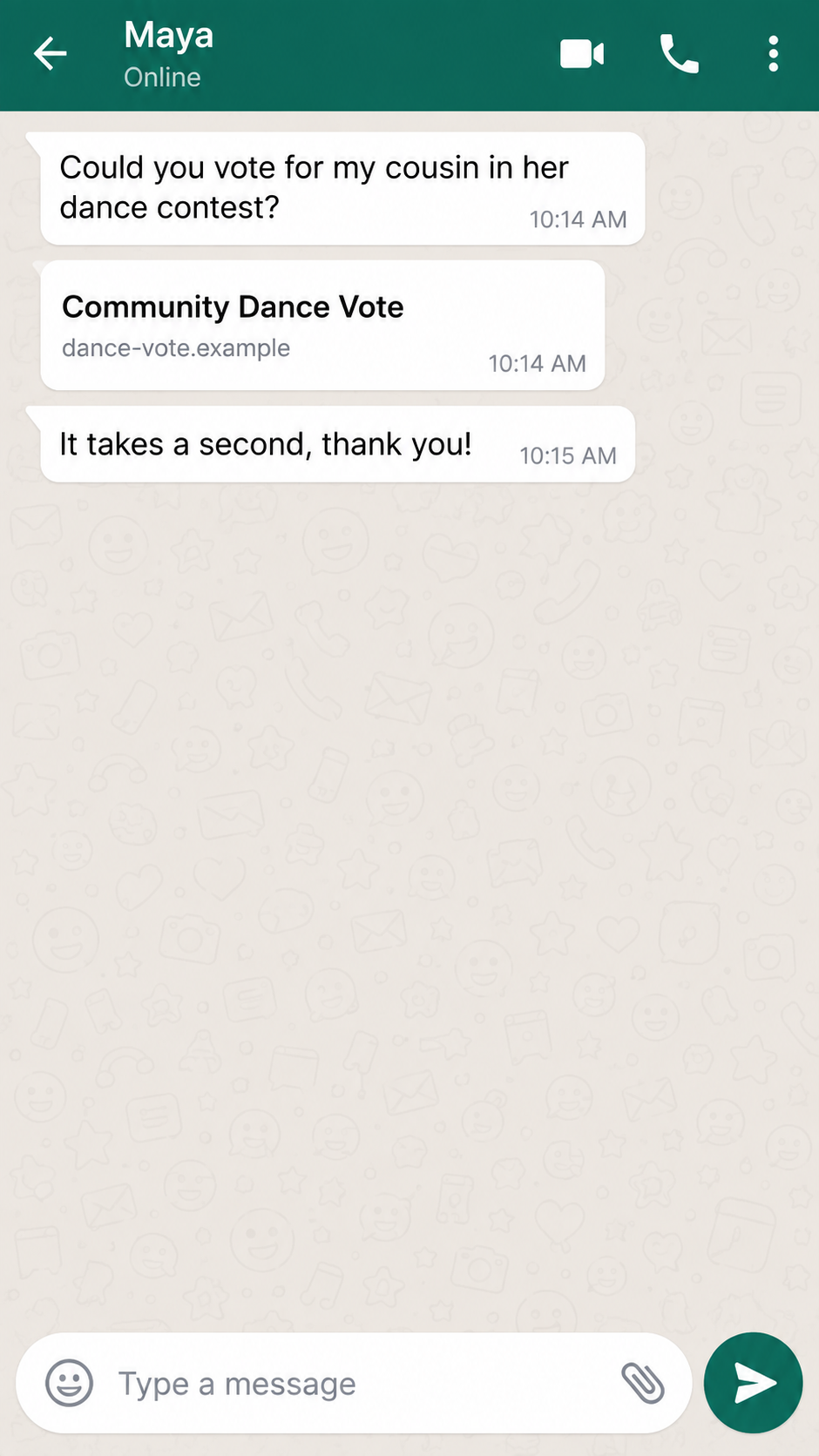
The first image here is an illustrative reconstruction with a fictional address, not a captured message from the campaign. The real examples Malwarebytes examined used changing voting domains. The useful detail is the sequence: an ordinary favor, a contest link, and a later request that has nothing to do with choosing a winner.
The “vote” can become a device-linking request
Following the link may lead to a page that invokes WhatsApp or tells you to verify yourself before voting. In some versions, the victim is guided into WhatsApp’s legitimate Linked devices feature.
The attacker wants the victim to approve a new session under their own account. This is not the same as a normal website login.
WhatsApp lets an account run on a browser or desktop app in addition to the primary phone. You normally initiate that connection yourself, perhaps by scanning a QR code or entering a code displayed on a device you control.
The scam reverses the situation: somebody else starts the connection, then persuades you to complete the approval for them.
That distinction matters because a password change is not the central defense here. The attacker may never learn your password or registration code. They are trying to turn a genuine convenience feature into a silent second seat in your conversations.
What the evidence supports, and what it does not
Malwarebytes documented the vote-for-my-friend campaign, including changing domains and a Linked devices handoff. That is evidence of a real account-access scam, not merely a person complaining about an unfamiliar company. It does not mean every online contest is fraudulent or that tapping any contest link automatically grants account access.
The decisive action is usually a later approval: entering a code, scanning a QR code, or accepting a device connection that you did not initiate. A page might also use a different phishing route, so check what it actually requests. Do not treat a single screenshot or domain spelling as the whole story.
- Initial contact: a message apparently from someone you know asks for a quick vote.
- Detour: the contest link opens a page that introduces WhatsApp verification or connection.
- Risky action: you are asked to approve a new linked device or enter a code for someone else’s session.
- Result: if you approve, the other session may read and send messages until you remove it.
Why a Message From a Friend Is Not Enough Proof
Most people are trained to distrust strangers. They are less prepared for a fraudulent request inside an existing chat. A stolen or linked WhatsApp account can send messages in the victim’s usual conversation threads, using the same name, picture, and history. The presentation is genuine even when the request is not.
The contest story also gives the sender a reason to contact many people quickly. Asking ten friends to vote for a child sounds plausible. Asking ten friends for a password would not. The attacker uses that low-friction request to move people onto a page where the real instruction appears.
Contest themes are disposable. One person may see a ballet audition, another a school performance or a dog photo contest. The domain can be discarded and replaced once flagged. That is why a safe-looking story or a new spelling of the link is not a reliable way to identify the campaign.
In its genuine use, Linked devices is convenient. The danger is not the feature itself. The danger is being coached by an unverified webpage or chat message to link a device you do not own.
Think of it like handing someone an extra key because they claimed it was needed to let you into a building.
How the WhatsApp Vote Scam Works
Step 1: A compromised contact asks for a favor
The opening message tends to be casual. It may say that a daughter, cousin, or friend made a competition final and needs votes. It may include a preview card that makes the link look like a normal contest page. The emotional request is small enough that many people will act before asking questions.
Do not assume the person named in the chat consciously sent it. An attacker with access to their account can message their contacts directly. If the wording feels unusual, call the person using a number you already had, not a number supplied in the new message. A quick separate conversation can break the chain.
Step 2: The voting link changes the task
The destination may briefly resemble a contest site, then introduce an extra step to “confirm” a vote. The page can make WhatsApp appear central to the process, sometimes through a legitimate WhatsApp URL or a prompt that opens the app. A legitimate domain appearing somewhere in the chain does not make the whole chain legitimate.
Ask what a contest organizer would actually need. It might need a vote or a sign-in to its own service. It would not normally need you to connect your private WhatsApp conversations to a new browser session. When the required action jumps from voting to device access, the story has changed.
Step 3: You are asked to link a device you do not control
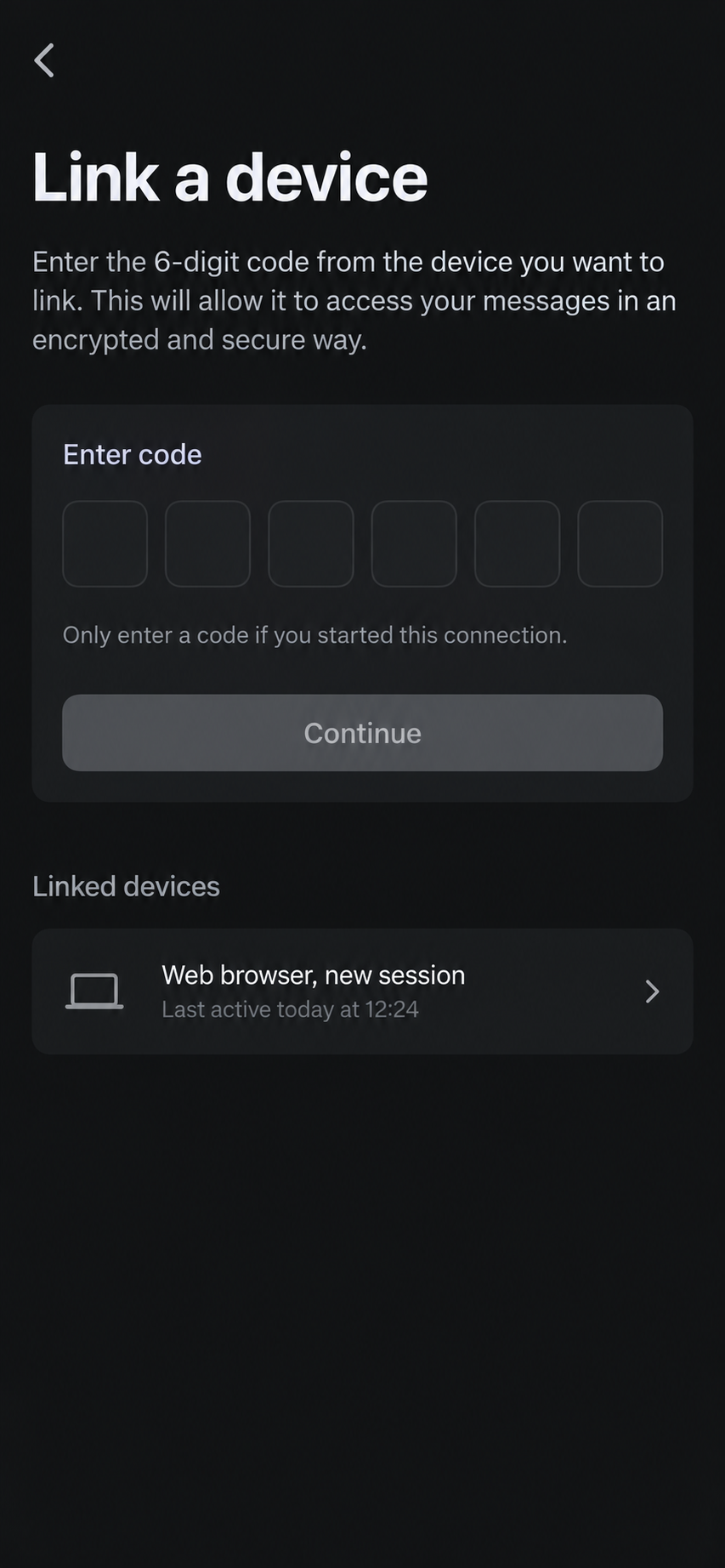
One version sends you toward Linked devices and asks you to enter a code supplied by the page or sender. Another may use a QR-code flow. Either way, the approval is intended to authorize a session initiated by the attacker.
The code is not proof that you are human; it is part of adding a new device.
The second image is a nonfunctional reconstruction of that decision point. It does not reproduce the actual campaign’s screen or contain an active code. Its purpose is to make the permission boundary visible: if you did not start a WhatsApp Web or desktop connection yourself, do not approve one.
Step 4: The new session sits inside your account
Once a device is linked, it may read chats and send messages as you. The attacker can copy the same vote request to your contacts, ask somebody for money, or search conversations for details they can use later. Which actions happen depends on the operator; the access itself is the immediate problem.
Unlike a conventional login theft, this can happen without an obvious password-reset email. The unfamiliar browser or computer is visible in Linked devices, but you have to look. A person may first learn about it when friends reply to messages they never sent.
Step 5: Your contacts become the next targets
The scheme feeds on the trust built into a contact list. If a scam message leaves your account, friends may treat it as safer than the same link from a stranger. They may then link another device, giving the operator a new account and a new set of contacts.
Not every person who receives the link will be compromised, and opening the page alone is not proof that someone is inside your chats. The key question is whether a new device was authorized or another sensitive action was completed. That is what you should check first.
Company, Address, and Fulfillment Checks
The contest name is not an operator identity
A page calling itself a dance vote tells you almost nothing about who runs it. The observed campaign used multiple short-lived domains. A reused contest theme or copied event name is branding, not verification. Look for an identifiable organizer, rules, contact route, and an independent event announcement before engaging.
A changing URL does not locate a real organizer
The malicious links can rotate, so publishing one address as though it were the only dangerous one would mislead readers. A domain registration or website footer also does not prove the physical address of the person behind the scam.
If no credible organizer can be independently verified, treat that uncertainty as a warning, not as a license to invent a company name.
Support cannot undo a linked session for you
A fake voting page may show a help button or make the user think support will fix an error. The practical fix is inside your own WhatsApp account: review Linked devices and log out of any session you do not recognize.
Do not give a supposed contest helper your security code or allow them to guide you through another connection.
The “product” is access to your conversations
There is no parcel to trace or fulfillment company to call. In this funnel, the valuable item is permission to use your messaging account. The record you can inspect is the linked-device list, the time of recent activity, and messages sent from your account.
Save those details before removing the session if doing so is safe.
How to Check a Vote Link Without Helping the Scammer
Start with the sender, not the page. Call the contact from your saved address book or ask in person. If their account has been compromised, warn them to check their own linked devices too. A reply in the same chat is weak verification because the attacker may be reading it.
Next, search for the contest through a separate browser tab. A genuine school or community event should have an independently discoverable organizer. Avoid using a link embedded in the message as your only evidence. The number of likes under a post or the presence of a preview card is not authentication.
Finally, draw a hard line around account-access requests. Voting in a contest should not require a new WhatsApp Web connection. If the page asks you to enter a device-linking code, scan a QR code on somebody else’s screen, or approve a session you did not start, close it.
You can always ask the organizer through a trusted channel later.
MalwareTips has a broader guide to other WhatsApp scam messages, including money requests and impersonation. This report is narrower: it concerns the contest-vote lure used to obtain a linked session.
What to Do if You Have Fallen Victim to This Scam
- Check Linked devices immediately. In WhatsApp, open Settings and review every linked browser or computer. Log out of anything unfamiliar. If you are unsure, logging out of all secondary sessions and reconnecting only devices you own is reasonable. Merely closing the fraudulent webpage is not enough.
- Warn your contacts. Send a short correction through a separate trusted route if possible. Tell them not to use the voting link or follow any new code instructions that appeared to come from you. This prevents your account from becoming the next person’s proof of legitimacy.
- Preserve what happened. Save the message, the link as text, approximate time, screenshots of unfamiliar linked sessions, and any messages sent without your knowledge. Do not revisit the suspicious page just to gather evidence. This record can help your contacts, WhatsApp, and investigators understand the sequence.
- Strengthen the account. Enable WhatsApp two-step verification and review your recovery email, profile, and privacy settings. If you shared a registration code, password, or email credentials as well, secure those accounts separately. A linked-device scam does not automatically mean your other passwords were stolen.
- Check for money requests or exposed information. Review recent conversations for unexpected payment demands and contact anyone who may have sent money. If banking details, identity documents, or private workplace information were visible in chats, consider the appropriate bank, employer, or identity-protection steps.
- Scan if you installed anything. Linking a device does not itself mean malware was installed on your phone. If the page made you download an app or file, scan the affected device with Malwarebytes and remove the software only after preserving relevant evidence. AdGuard can help block known malicious pages and ads during future browsing, but it cannot revoke an already linked session.
- Report and ignore recovery offers. Report the conversation or account through WhatsApp and report any theft to your local fraud authority. Anyone promising to “recover” your account or money for an upfront fee may be running a second scam.
Frequently Asked Questions
Is every dance-contest message on WhatsApp a scam?
No. A real friend may share a real contest. The red flag in this campaign is the move from voting to authorizing a WhatsApp device or entering a code you did not request.
Can a link alone give a stranger my WhatsApp chats?
In the documented linked-device flow, the dangerous step is approving the new session. Opening the link does not by itself establish that the attacker can read your chats. Still, close the page and review your sessions if anything looked suspicious.
Why did the message come from somebody I know?
Their account may already be under an attacker’s control, or they may have been tricked into sending the link. Verify with them by voice using a known number, not by replying inside the possibly compromised chat.
Will changing my password remove a linked browser?
Do not rely on that. Review Linked devices and explicitly log out of any session you do not recognize. Also secure other credentials if you entered them on a suspicious page.
What if I entered a code but see no strange device?
Check again after a few minutes, review sent messages, and contact WhatsApp support through the app if you remain concerned. The meaning of a code depends on which screen requested it, so preserve the original message and page details.
Should I send a warning in the same chat?
You can, but a compromised account may still be watched. A direct phone call, another messaging app, or an in-person conversation is a better way to warn the real contact.
The Bottom Line
The WhatsApp vote scam borrows a believable favor from a familiar person, then tries to turn that favor into permission for another device to enter your account. The contest is interchangeable; the device approval is the event that matters.
If you did not start a new WhatsApp Web or desktop session, do not approve one for a vote. If you already did, remove the unfamiliar linked device, warn your contacts, and check what the session could have accessed.








