

Someone texts about an item you’re supposedly selling. You don’t recognize it, but the attached Marketplace picture has your name on it.
That small detail changes the question from a routine wrong number into something much more personal. It’s worth pausing before you answer.
Overview
The listing arrives outside your normal Marketplace activity
This fake Facebook Marketplace listing scam begins with an unsolicited message, not necessarily a buyer contacting an actual item you’ve posted.
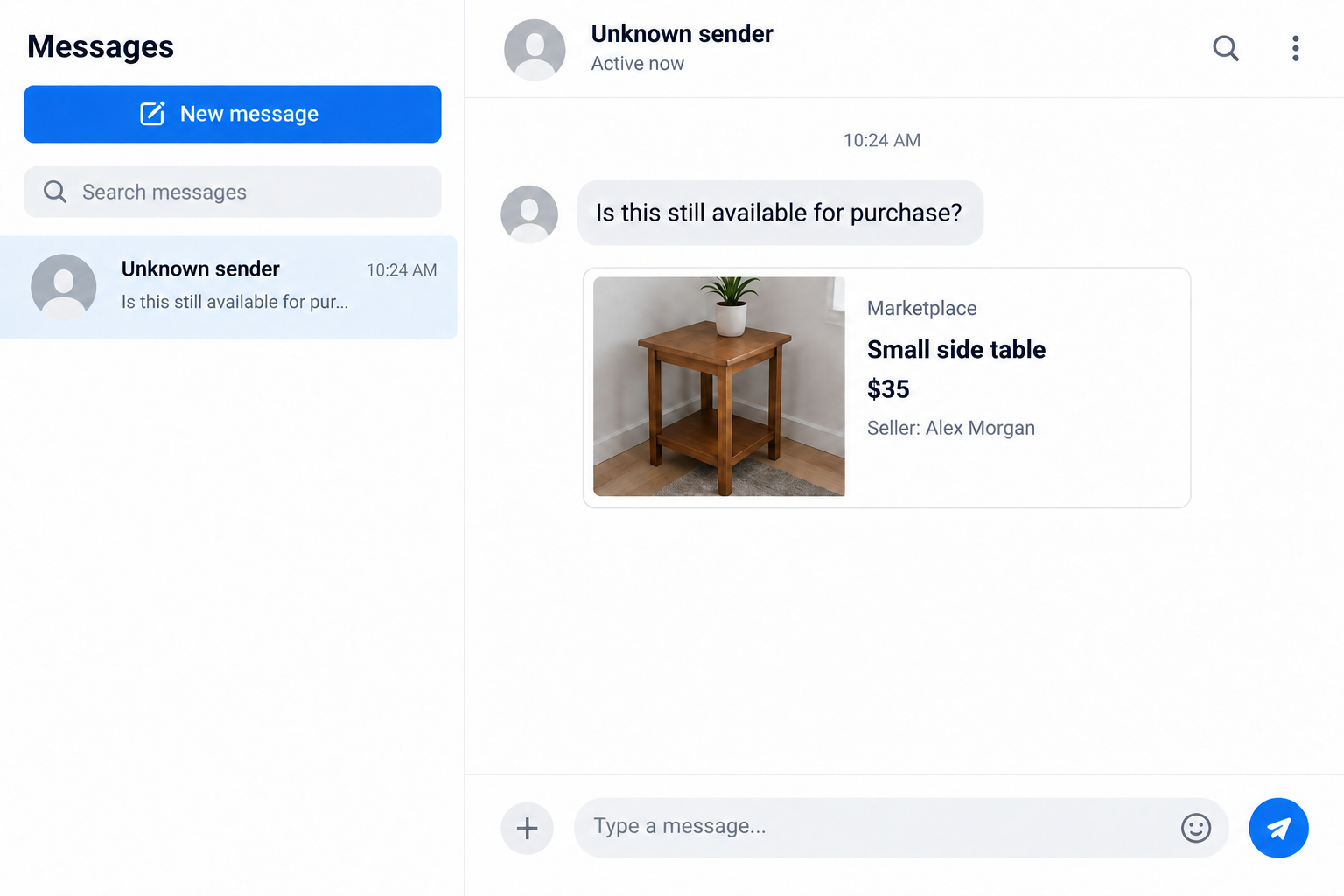
An observed iMessage example asked whether an item remained available and included a fabricated listing naming the recipient as its seller.
The profile photo belonged to a different Facebook user with the same name. The matched name made the image feel personal without authenticating its story.
Our illustration uses a fictional seller and an ordinary table to show that mismatch. It isn’t a screenshot of the reported message.
The first goal is to make you answer
The lure invites a corrective reply. You might want to say you aren’t selling anything, ask where the listing came from, or defend your identity.
All three reactions let the stranger set the conversation in motion. You can investigate the account concern without giving that stranger a response.
The sender’s eventual plan remains unknown. The warning here is the deceptive invitation to reply, not a proven payment demand or account takeover.
A familiar name doesn’t prove a hacked account
An image can be fabricated. A name can be copied. Neither establishes that the sender controls your Facebook account or that a real listing exists.
Separate these possibilities before deciding what to do:
- A fabricated picture with no corresponding live listing.
- A real listing from another person sharing your name.
- A profile impersonating you without access to your account.
- Unauthorized activity inside your genuine account.
The last two situations deserve different reports. Checking Facebook independently helps you distinguish them without trusting information supplied by the unknown texter.
Why This Message Gets Under Your Skin
A generic sales message is easy to ignore. A listing with your own name feels like something you might need to fix.
You may wonder whether friends will see it, whether your photos were taken, or whether someone is accepting money while pretending to be you.
Those are understandable concerns. The problem is letting the person who introduced the concern become the person who controls your investigation.
Imagine answering that the listing isn’t yours. The stranger then offers to send its location. That offer is a possible pressure point, not a documented continuation here.
You don’t need that person’s link to inspect your account. Opening Facebook yourself keeps the check separate from the conversation.
The request can also make politeness work against you. You may feel that ignoring a mistaken buyer is rude, especially if they seem confused.
You’re allowed to stop without correcting them. An unfamiliar person isn’t entitled to your time, identity details, or account access because they sent a picture.
The FTC warns about conversation-opening wrong-number texts. That broader pattern explains why an apparently harmless reply can be the beginning of unwanted contact.
It doesn’t mean every mistaken message is fraudulent. Here, the personalized fabricated listing gives you a concrete reason to verify elsewhere rather than continue chatting.
How the Fake Marketplace Listing Scam Works
Step 1: The sender pairs a name with a reachable contact
The observed lure had enough information to address the recipient with a matching seller name. That isn’t the same as knowing their Facebook password.
A name and phone number can circulate together for many reasons. Their appearance in a message doesn’t identify one particular breach or data source.
Don’t let the sender persuade you that knowing these details proves access to everything else. Personalized information can be accurate while the surrounding story is false.
The useful response is to protect what you reveal next. There is no need to confirm your address, full birth date, employer, or account email.
A request to correct the listing can become an excuse to gather those details. You shouldn’t provide a more complete identity profile to dispute an unverified picture.
Step 2: A familiar-looking listing makes the message feel specific
The attached picture supplies an item, price, seller name, and visual context. Those details make a short buying question feel like it belongs somewhere.
But a screenshot isn’t a live account record. Its seller name, image, or surrounding interface may have been changed before it reached you.
A photo of someone with your name can add plausibility while creating confusion. Looking up that person isn’t proof that they sent the message.
Don’t contact an unrelated person angrily because their picture appears in the attachment. They may be another person whose publicly visible identity was borrowed.
Instead, compare the claim with what your own account actually shows. Look for your current listings, messages, and recent security activity.
Step 3: Concern over your identity becomes a reply trigger
The sender doesn’t need to request money immediately. A reply gives them a responsive person who wants an explanation.
Even saying that the number is wrong confirms someone is reading. Continuing the exchange can also reveal your availability, concerns, and willingness to follow instructions.
If the conversation continues, assess each new request on its own. A polite follow-up doesn’t make a code request, payment, or unfamiliar login safe.
Whatever explanation arrives, don’t share a login code, scan an unsolicited QR code, or enter credentials through a link offered to settle the misunderstanding.
Your decision doesn’t depend on guessing the sender’s complete plan. An unnecessary conversation can be avoided while legitimate account checks happen through Facebook.
Check the Account, Not the Stranger’s Story
Start with the listings you can actually see
Launch Facebook from your usual app or bookmark. Don’t use the attachment as a shortcut, even if it includes something that looks like a listing link.
Inspect your selling activity. Is there an unfamiliar item under your own account? Do its messages or dates correspond to the text?
If nothing matches, record that finding. You don’t have to keep searching indefinitely just because the stranger insists their picture proves something happened.
Keep your check focused on your own account. Searching every namesake’s public profile can become an exhausting distraction without showing whether your account changed.
Look for account changes that matter
Review logged-in devices and the contact details used for recovery. Unexpected changes are more meaningful than an unfamiliar image in a text thread.
Check messages you supposedly sent, newly added authentication methods, and any security emails you received. Consider when the activity occurred, not only its location label.
Location information can be approximate. An unfamiliar city alone doesn’t conclusively identify an intruder, but an unknown device and unauthorized actions warrant prompt recovery.
Distinguish an impersonating profile from your own profile
Someone can pretend to be you without signing in as you. An impersonating account has its own profile address, even if it copies your name.
If you locate an actual impostor, preserve its URL and the misleading listing. Reporting that exact profile is more useful than reporting your genuine account.
Ask a trusted friend to help check public impersonation if necessary. Share the suspected profile address, not your password or a screenshot containing an authentication code.
If You Really Are Selling Something
Actual sellers will receive ordinary availability questions. The suspicious feature here is the personalized fabricated listing, not the phrase asking whether an item is available.
Compare the message with your genuine listing and expected Marketplace conversation. A stranger’s text can refer to a real item while still making an unsafe request.
For example, a buyer doesn’t need a code sent to your phone to establish that you’re a real seller. That code belongs to its issuing service.
You also shouldn’t disclose account access to prove ownership of an item. A reasonable transaction can be discussed without giving someone your Facebook credentials.
Keep price, item condition, and pickup arrangements clear. Confusion about those details is different from a request to move an account-security process into the conversation.
If someone sends a payment notice, verify it inside your own payment account. A picture claiming money arrived isn’t a substitute for a real transaction record.
These are separate Marketplace risks. They help assess later requests, but they aren’t proof that the specific own-name message led to payment fraud.
What to Do If You Received or Answered This Message
-
Pause the exchange without arguing. Don’t offer a correction, identity document, or alternative contact method. If you already replied, you can still stop now.
One response doesn’t automatically expose your account. Focus on whether you shared secrets, opened a destination, made a payment, or installed anything.
-
Save a limited record before reporting. Preserve the message, sender identifier, attachment, and approximate time if you need to explain the incident.
Keep that evidence private. Posting your phone number and account details publicly can create another privacy problem while warning others.
-
Use the message app’s spam and blocking controls. Reporting and blocking aren’t always the same action, and options vary with software and carrier.
Apple explains how to report and block messages. Its reporting option may not be available after you reply.
Don’t answer again to request removal. Blocking through your device lets you end contact without negotiating with the sender.
-
Inspect Facebook through your existing route. Check listings and access settings as described above. A fabricated attachment alone doesn’t require declaring the account hacked.
If you find genuine unauthorized activity, use Facebook’s account-recovery route. Start it yourself rather than following recovery instructions from the texter.
-
Report real impersonation precisely. When a separate profile actually copies you, provide its profile URL and explain the identity misuse.
Warn friends privately if the impostor is contacting them. Tell them not to send money or account codes, without encouraging harassment of a possible namesake.
-
Secure anything you disclosed. Replace an exposed password wherever reused, review sessions, and check recovery details. Contact the relevant provider after sharing a security code.
If financial information or money was involved, notify your bank or payment service promptly. Describe what you authorized and what the sender misrepresented.
-
Treat downloads as a separate exposure. A suspicious attachment isn’t automatically a device infection, and receiving this text doesn’t justify a blanket cleanup claim.
If you installed software during the exchange, follow our Malwarebytes scan guide for your platform and review the installed application’s permissions.
AdGuard can add web-filtering protection where supported. It won’t remove an impersonating profile or replace Facebook’s recovery process.
If a later webpage asked you to allow notifications, review that site’s permission in your browser. Revoke permission you granted to an untrusted destination.
Notification permission is different from installing an app. Write down which action occurred so you can use the appropriate cleanup instructions instead of guessing.
Repeated browser alerts after that permission don’t establish Facebook account theft. Check the notification source separately from your Facebook security activity.
Don’t Let a Recovery Offer Become the Second Problem
After reporting impersonation, you may want the issue resolved immediately. That frustration can make an unsolicited offer to recover or delete the profile appealing.
Don’t hire someone merely because they claim to know a Facebook employee or promise instant restoration. Access to official recovery isn’t established by a convincing direct message.
The FTC’s recovery-scam guidance explains the danger of paying supposed helpers who approach people after a loss.
A person who demands your login code is asking for access, not demonstrating expertise. Someone asking for an advance recovery payment creates another potential loss.
Keep your report number and use the provider’s existing support route. A slow response is frustrating, but it doesn’t authenticate a stranger offering a shortcut.
You can also tell a trusted relative what happened. Having another person review a proposed action can reduce the pressure to fix everything immediately.
Frequently Asked Questions
Does a Marketplace picture with my name prove I was hacked?
No. Check your own listings and account activity independently. A fabricated picture, namesake profile, and actual account intrusion are different situations.
Why would someone ask about an item I never listed?
The personalized picture can provoke a correction and start a conversation. The observed lure doesn’t establish which later request its sender intended to make.
Should I ask the sender for the listing link?
No. Open Facebook yourself and inspect the claim there. Asking the stranger for a verification route keeps your investigation inside their conversation.
What if the photo belongs to another person with my name?
Don’t assume that person is responsible. Their photo may have been copied. Preserve any actual impersonating profile URL and report the correct account.
Did replying once give someone my Facebook password?
An ordinary reply doesn’t reveal that password. Stop contact and review what else you did, particularly sharing codes, signing in elsewhere, or installing software.
Should I warn everyone that my account is compromised?
Warn contacts about confirmed impersonation or unauthorized messages. If all you received was a suspicious picture, describe that accurately rather than announcing an unverified account takeover.
The Bottom Line
Don’t reply to a stranger’s personalized Marketplace lure. Check Facebook independently, because a picture with your name isn’t reliable evidence about your account.
If you already answered, stop the exchange and address the actual exposure. Use official recovery for unauthorized access and report genuine impersonation with its exact profile URL.








