

You find a nearby spa with glowing reviews, late opening hours, and an address you recognize. A quick appointment sounds like an easy treat.
Then booking moves into a text conversation. Before sending a deposit, take a moment to check who is actually arranging your visit.
Overview
The address belongs to a business that didn’t take your booking
Fake spa listings can borrow the location of a legitimate business while directing customers to someone else for reservations and payment.
WLBT documented this in Mississippi: bogus 24-hour listings used unrelated businesses’ addresses, and customers arrived expecting appointments those businesses had never arranged.
During the reporting, unanswered calls led to texts asking about massage choices and requesting payment through PayPal or Zelle.
The fraud lies with the fabricated listing and deposit request. The legitimate business at the copied address may be another victim, not the payment recipient.
The listing borrows signals people normally trust
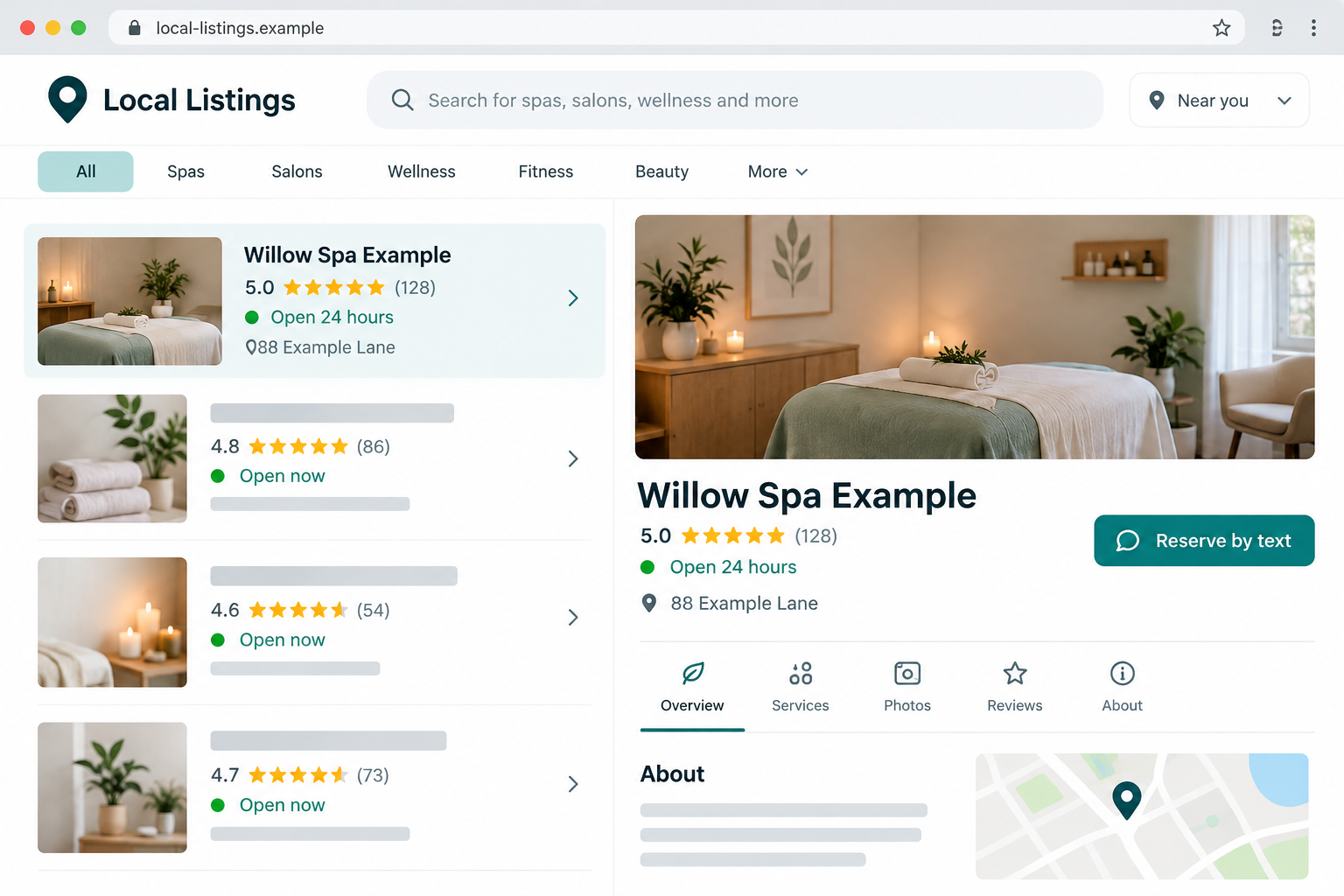
An address, map pin, attractive room photo, and high rating can make a booking look local and established. None identifies who controls the contact number.
Our fictional listing illustration shows that combination. It isn’t an accusation against a real spa, and its example name and address aren’t booking details.
Before paying, establish four things:
- The business actually operates under the advertised name.
- The published booking contact belongs to that business.
- The business recognizes the appointment and requested service.
- The payment destination is authorized to collect its deposit.
A deposit isn’t automatically dishonest, but an impersonator’s deposit is
Legitimate spas may take deposits. Payment apps also have lawful uses. The problem is a stranger collecting money for an appointment they cannot provide.
Don’t send a deposit through a listing that cannot be independently connected to the real business. A small advance payment is still money lost.
If you paid, contact the payment provider promptly and explain the impersonation. Ask what recovery options apply rather than assuming every payment method guarantees reimbursement.
How the Fake Spa Listings Scam Works
Step 1: A fabricated business appears in a local search
You aren’t necessarily browsing a suspicious shopping site. You may simply search for a massage nearby or a business still open after work.
The listing matches that need with useful-looking details. Late availability can be especially appealing when genuine businesses have already closed.
A search result is a starting point, not a verified reservation desk. The platform showing the result isn’t necessarily the person providing the treatment.
That’s an important distinction when the listing offers services or hours that don’t appear on the real business’s own website.
Step 2: A copied location makes the offer look tangible
A map pin reassures you that there is somewhere to go. You might recognize the shopping center or confirm that a building exists.
But the relevant question isn’t whether the building is real. It’s whether the supposed booking operator has any right to trade from it.
Bitdefender’s warning highlights how these listings hurt both customers and the businesses whose identities or locations are borrowed.
An external photo can establish that premises exist without establishing what happens inside. A treatment-room image may also be unrelated to the location.
Step 3: Contact shifts to a conversation the impersonator controls
In the documented case, calls were followed by text exchanges. This moved the booking into a channel controlled by whoever supplied the listing number.
Text booking can be convenient and legitimate. The warning is the missing connection between that number and the real business, not texting by itself.
If the caller doesn’t answer, don’t let a quick text reassure you automatically. The reply still comes from the same unverified contact.
Open the real business’s established website, if available, and compare its contact details. Use an independently obtained number to ask whether the listing belongs to it.
Step 4: The appointment becomes an advance payment
Once the service and time feel settled, paying a deposit can seem like the final routine task. That is the moment to check the recipient.
A message naming a payment app doesn’t establish that the business will receive the money. Look at the actual recipient shown before confirming.
If the recipient’s identity doesn’t make sense, stop. Don’t accept a stranger’s explanation about a manager, relative, or temporary account without independent confirmation.
Also ask what the deposit covers and how cancellation works. A legitimate booking should give you understandable terms before you send money.
Step 5: The customer reaches the address, but the appointment isn’t there
Discovering the problem at the door is upsetting. You have spent money, arranged travel, and may believe the business is refusing a confirmed appointment.
Yet the person at that location may never have seen the text exchange or payment. Show the confirmation calmly and establish whether they recognize it.
Don’t pressure staff to provide a service they didn’t sell. The useful next step is documenting the mismatch and contacting the provider that handled your payment.
If the location is closed, leave rather than repeatedly knocking or trying another entrance. Your safety matters more than resolving the booking on the spot.
Business Identity, Address, Contact, and Payment Checks
The listed name must connect to an actual business
Search the advertised name separately from the map listing. Compare the business’s established website, signage, and contact details where you can find them.
Similar names aren’t enough. A listing might use a slight variation that looks related while directing you away from the real appointment system.
Ask the real business whether it trades under that variation. Don’t assume it runs every nearby listing with spa in the name.
A real street address can be stolen
Look for mismatches between the advertised business, the property’s signage, and the business shown at that address through independent records.
A shared building can legitimately house multiple businesses. That possibility is something to clarify, not a reason to ignore contradictory names and hours.
Ask for the suite and entrance, then confirm those details with the established business. Repeating a street address doesn’t answer which operator is collecting money.
The support number must belong to the booking operator
An out-of-area number can be a clue, but it isn’t proof of fraud. Businesses may use centralized services or owners’ existing mobile numbers.
The stronger test is whether an independently reached business recognizes the number, appointment, and person arranging it.
WLBT’s calls produced follow-up texts. For a different listing, the important test is whether the real business recognizes its contact details.
The payment recipient must match the authorized arrangement
A recipient mismatch shouldn’t be treated as a minor technicality. You need to know where your deposit is going before authorizing it.
For PayPal, a personal payment and a purchase payment aren’t interchangeable. PayPal says personal payments lack Purchase Protection.
Don’t describe a purchase as a gift to help someone avoid fees. Eligible purchase protection also has conditions, so choosing a label isn’t a guaranteed refund.
A Quick Booking Check That Doesn’t Rely on Ratings
Before reserving, try confirming one specific detail through the business’s independent contact route. Ask whether it offers the exact treatment at the advertised time.
Then ask whether it uses the listed phone number and deposit recipient. These questions connect the offer to someone accountable for providing it.
If the answers conflict, don’t keep bargaining with the texter. Find another appointment instead of trying to make a suspicious listing work.
Check reviews for useful detail rather than relying on the overall score. Photos, dates, and service descriptions can help identify contradictions, but they don’t authenticate payment instructions.
For example, reviews about daytime salon appointments wouldn’t explain a separate listing promising overnight spa services. That mismatch deserves clarification.
Don’t assume every five-star review was generated or purchased. You don’t need to prove review fabrication to act on an unauthorized booking number.
Check the cancellation terms while you still have control over the payment. Ask when a deposit becomes nonrefundable and how changes are confirmed.
Keep a confirmation identifying the appointment date, location, treatment, deposit, and outstanding balance. A vague text saying booked won’t resolve confusion about what you purchased.
If the confirmed location changes after payment, verify the new arrangement independently before traveling. Don’t follow a stranger to an unfamiliar venue to resolve a dispute.
A business refusing to explain basic terms before payment isn’t offering a comfortable booking experience. You can decline without proving a criminal case.
What to Do if You Have Fallen Victim to This Scam
-
Stop further payments. Don’t send another deposit to reschedule, unlock a refund, or verify that you’re the original payer.
If the sender offers a refund, watch for a new payment request disguised as reimbursement. Read what the app says you are authorizing.
-
Save the booking and payment trail. Keep the listing URL, business name, telephone contact, texts, advertised address, appointment details, and transaction identifier.
Record when you discovered that the real business wasn’t involved. A short chronological account helps support understand why the payment was obtained deceptively.
-
Report a Zelle payment to your financial institution. Use your banking app or the number printed on your card, not a number from the listing.
Zelle directs scam victims to their financial institution to report the incident and ask about available reimbursement options.
Explain that you authorized a transfer because of a fraudulent booking. Don’t misdescribe it as an unauthorized transfer if that isn’t what happened.
-
Open the appropriate PayPal case. Find the actual transaction in your account and use the Resolution Center or official support.
Explain that the appointment wasn’t provided and the listing impersonated an unrelated business. Check applicable filing and escalation deadlines inside your account.
Disclose whether you used a personal or purchase payment. The available options differ, and no article can promise the outcome of an individual claim.
-
Contact a card issuer if a card payment was involved. Provide the charge, booking records, and reason the service wasn’t supplied.
The FTC recommends contacting the payment provider promptly and asking about reversal or refund options. Keep any case reference and response deadline.
-
Flag the exact false listing. Use the platform’s reporting controls to identify the impersonation or misleading business details.
Google Maps explains how to report listing errors. Include the relevant mismatch rather than submitting only an angry review.
Notify the real business through its independent contact. It can then investigate misuse of its address and warn staff or customers.
-
Report the deception without blaming the wrong spa. In the US, use ReportFraud.ftc.gov and consider a local police report for financial loss.
Provide the deposit recipient and false-listing details. Keep the legitimate business’s role clear so your complaint points investigators toward the impersonator.
-
Ignore paid recovery promises. A stranger claiming they can retrieve your deposit may be looking for another advance fee.
Continue through the bank or payment service you already contacted. Don’t disclose authentication codes to anyone offering to handle the case for you.
If Your Business Address Was Used
Document the listing before it disappears. Keep its URL, name, number, hours, and any customer confirmations showing how the mistaken bookings were arranged.
Tell arriving customers clearly that your business didn’t take the payment. Give them the relevant mismatch without asking to inspect private banking credentials.
A short notice on your established website can identify your genuine booking route. Avoid publishing sensitive customer records while explaining the impersonation.
Train staff to preserve useful details and avoid confrontations. A person arriving upset may have been misled, not knowingly ignored your hours.
Report the specific listing through the platform’s business-support process. Be precise about the copied address and unauthorized contact number.
If visitors arrive after closing or behave threateningly, prioritize staff safety and contact local authorities when needed. Don’t try to settle deposit disputes at an unattended door.
When replying to a misplaced review, explain the unrelated listing calmly. The customer needs a path to the actual payment recipient, not a public argument.
Frequently Asked Questions
Is a spa listing trustworthy because its address is real?
No. The listing may borrow an unrelated business’s location. Confirm that the actual business recognizes the booking contact and payment instructions.
Are all spa deposits or text reservations scams?
No. Both can be legitimate. This warning concerns impersonators collecting money for appointments the real business hasn’t arranged.
Can five-star reviews prove the listing is genuine?
No. Ratings don’t establish control of a phone number or authorization to collect a deposit. Verify the business connection separately.
Will Zelle automatically refund a fake booking deposit?
Don’t assume that. Report it to your financial institution immediately, explain the deception accurately, and ask which reimbursement or recovery options apply.
Should I demand a refund from the spa at the address?
First establish whether it took your booking or payment. An uninvolved spa cannot reverse money sent to an impersonator’s account.
What should I do if the fake listing disappears?
Use the records you saved: contact identifier, texts, receipt, recipient, and listing URL. Report those details to the payment provider and relevant platform.
The Bottom Line
Don’t pay for a spa appointment until the real business confirms the booking route and deposit recipient. A copied address and reassuring ratings aren’t enough.
If a fake listing took your money, stop contact, preserve the transaction, and report it promptly. Keep blame on the impersonator, not the business whose address was borrowed.








