


An invitation to bid looks like the sort of email you hope to receive. There is a project to review, a deadline, and an attached document.
The document is protected, which can feel reassuring. Before you reach the actual project files, though, the process asks you to pass through several more screens.
Overview
A business opportunity becomes a credential request
The project bid invitation scam uses an encrypted PDF as the entrance to a fake document-sharing process. The eventual target is your business email login.
A password protecting a PDF only limits who can read its contents. It says nothing about whether its author or the links inside are trustworthy.
This distinction matters when an unexpected proposal arrives during a busy sales day. The appearance of confidentiality can make the next request seem less suspicious.
The documented chain ends outside Microsoft
Cofense traced a bid-themed campaign from a password-protected attachment to a OneDrive-style button, a selectable file list, and a counterfeit Microsoft sign-in.
Submitted credentials went to the attacker’s server. Microsoft and OneDrive supplied recognizable branding, not authorization for the pages using it.
The reported chain establishes credential phishing. It does not establish that reading the email or unlocking the PDF automatically installed malware.
Several ordinary actions hide one consequential handoff
The first steps resemble document handling, while the final step asks for the password that protects your mailbox and connected workplace services.
- An unsolicited bid offers a reason to open a protected attachment.
- A familiar document-service button moves the reader onto an unrelated website.
- A file-selection screen makes the project appear ready to download.
- An email prompt leads into an imitation account login.
- The stolen password can expose more than the proposal you wanted to read.
Why the Locked PDF Feels Safer Than It Is
Real businesses protect sensitive specifications and financial documents. An employee who recognizes that habit may treat encryption as evidence that this proposal is genuine.
But a sender can put any content behind a document password. The lock protects the contents from inspection; it doesn’t certify the purpose of those contents.
Encryption can also make automated inspection harder, depending on how an email security product handles protected files. It doesn’t universally defeat every security control.
That means two apparently reassuring details can have the same source. The stranger who created the proposal also chose its password and its supposed download instructions.
The right question is whether you can verify the project through a known contact. Solving the attachment’s password challenge doesn’t answer that question.
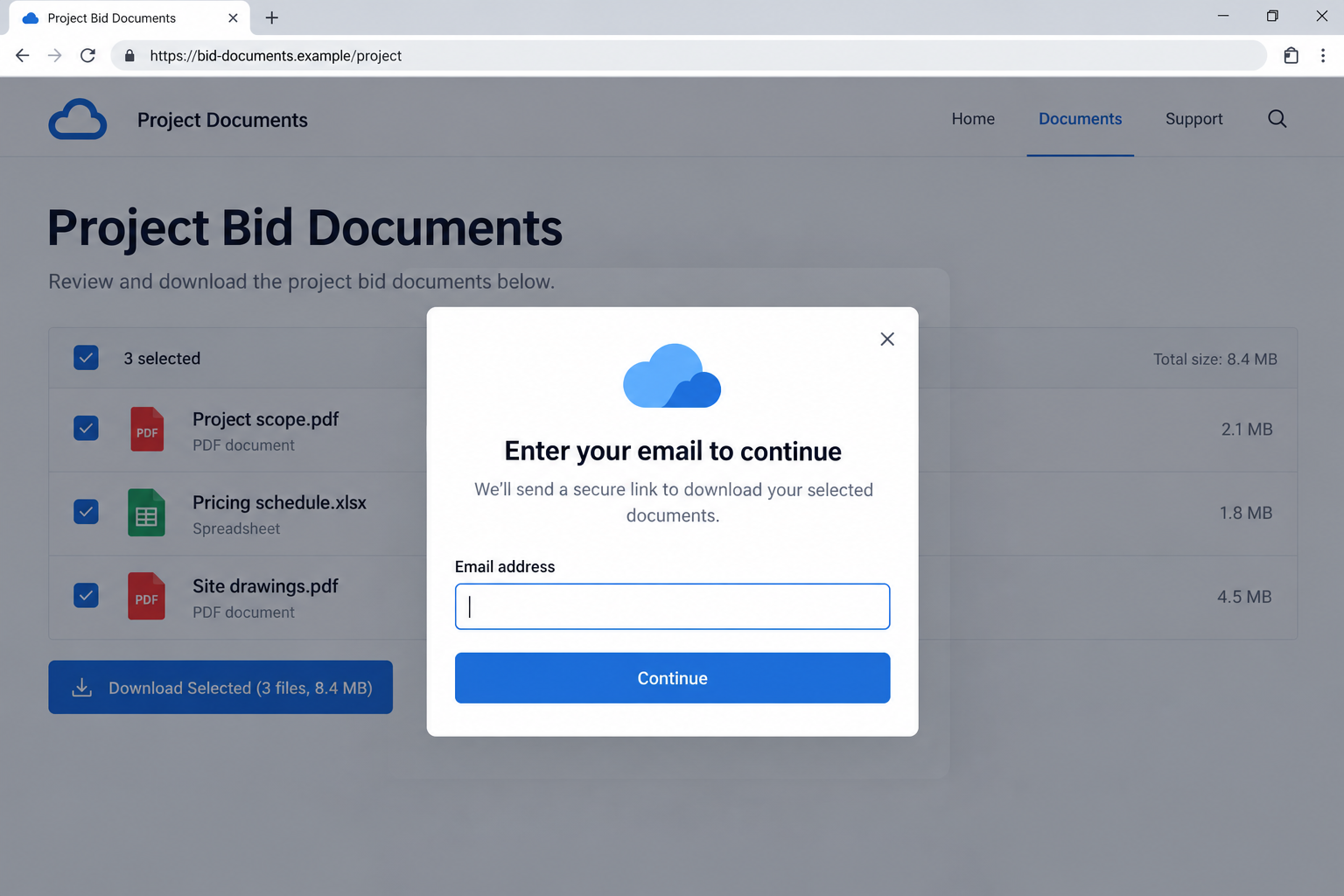
The image above is a fictional portal illustrating the selection-and-login pretext. Its example domain and project filenames are not original campaign evidence.
How the Project Bid Invitation Scam Works
Step 1: A promising invitation arrives without enough context
The subject presents new work, while a deadline gives the recipient a reason to prioritize it. The attachment appears to contain the missing project details.
You still need to know who is offering the work. Opening an attachment to discover that answer puts the sender in control of the next step.
Before doing that, establish who introduced the project, which company is requesting bids, and how the person obtained your contact details.
A genuine opportunity can survive a short independent check. Don’t let the possibility of losing business become a reason to hand an unknown page your credentials.
Step 2: The PDF supplies a link instead of the promised files
After the protected document is unlocked, the reported example presents a button styled like a OneDrive document preview. The files are still another click away.
That is the first useful place to reassess the request. You received a file to review, but its main purpose is now to send you somewhere else.
On a desktop, inspecting a link without opening it can reveal the destination. If the address is unclear, don’t click simply to obtain a larger view.
A legitimate service’s logo inside a PDF has no control over the address behind that button. The document author chooses both the appearance and destination.
Step 3: A fake drive makes the project feel tangible
The next page lists purported contract files with selection boxes and a download control. Choosing documents feels like an ordinary continuation of the task.
Those details provide a sense of progress: the project seems real because there are several items to choose from, rather than one unexplained login page.
Yet filenames and checkboxes are inexpensive to invent. They do not prove that actual drawings, schedules, or specifications exist behind the interface.
If the requester cannot confirm the sharing arrangement through an established business contact, the file list should not persuade you to continue.
Step 4: An email prompt turns into an account login
The download action asks for an email address and then leads to a Microsoft-like sign-in. The request borrows the familiar idea of restricting access to recipients.
At this point, stop treating the process as a document download. You are deciding whether this particular destination should receive a secret that protects other information.
A familiar sign-in layout is easy to reproduce. Verify the actual authentication destination and use the organization’s known portal or established sharing workflow.
If your password manager won’t recognize the page, don’t override it by copying the password manually. That mismatch deserves investigation before disclosure.
Step 5: The attacker receives the credentials instead of delivering a bid
The final form is the theft point. An error, a loading message, or another request to retry would not establish that the first submission failed.
Once a password has been entered, don’t wait for an unfamiliar sign-in alert before reporting it. Your administrator can investigate and interrupt access sooner.
Multi-factor authentication remains useful, but it doesn’t make password disclosure harmless. Never approve an unexpected sign-in request to finish opening the supposed proposal.
If you entered only an email address, report that narrower exposure. It can support follow-up targeting, but it isn’t the same as handing over your password.
What to Check About the Sender and Destination
A real mailbox can carry someone else’s message
A compromised business account can make phishing look like correspondence from a genuine company. That possibility doesn’t prove that every sender in this campaign was compromised.
It does mean checking a sender’s domain is only one part of verification. Confirm the request itself through a route independent of the disputed message.
If a known contact sent the invitation, call a previously saved number. Ask about the project and sharing service without quoting sensitive information from your own account.
Replying to the same thread may reach whoever currently controls the mailbox. A plausible reply can extend the deception instead of resolving it.
The address bar should agree with the claimed service
The analyzed destinations included slotpastimaxwin50jt[.]online and subdomains of lastingonlineexperiences[.]de. Neither becomes a Microsoft login because the page displays Microsoft branding.
These addresses are useful incident details, not a complete list of future versions. A different destination can use the same document-selection pretext.
A padlock indicates an encrypted connection to the displayed site. It doesn’t tell you whether that site’s operator is entitled to your workplace password.
Likewise, a project name placed in a URL path says nothing about ownership. Identify the actual service before deciding whether any login belongs there.
Keep the business opportunity separate from the access request
You may still have a genuine client relationship even if one message is fraudulent. Verify the project without assuming that the entire company is fictitious.
Ask for the proposal through an approved file-sharing channel. A confirmed business contact can arrange a route your organization already knows how to access safely.
If you cannot verify the invitation, stop the submission process. There is no business reason to donate your mailbox access merely to discover whether a project exists.
Why the Mailbox Is More Valuable Than the Bid
A work inbox often contains invoices, supplier conversations, shared-document invitations, and information about who approves payments. Access can help an intruder impersonate you convincingly.
That’s a potential consequence of mailbox compromise, not a claim that every recipient suffered payment fraud. Responders need to establish what actually happened in your account.
Checking only your Sent folder isn’t enough. Ask IT to examine sign-ins, forwarding, inbox rules, connected applications, and authentication settings alongside message activity.
A rule can move an important alert away from your normal view. A forwarding setting can expose later correspondence even after the original phishing message is deleted.
Recovery therefore involves restoring account settings as well as changing a password. Otherwise, a mailbox can look normal while an unauthorized configuration remains.
What to Do if You Have Fallen Victim to This Scam
-
Stop using the fake portal. Don’t enter another password, approve a phone prompt, or download a second file to fix an apparent error.
Make a quick record of the email subject and the last action you took. Distinguish opening the PDF, visiting the page, supplying email, and submitting credentials.
Close the page after preserving its address safely. Don’t send a live link around the sales team as an informal warning.
-
Tell your workplace security team immediately. Use your normal reporting channel or a known telephone number, especially if you have already entered a password.
Provide the original message and attachment through the process they specify. Their analysis can find other recipients and remove related messages without requiring coworkers to inspect them.
If you can’t reach IT promptly, use the genuine account service to change the exposed password from a trusted device. Keep trying the verified support route.
-
Have account access interrupted and reviewed. Administrators can block unauthorized access, reset credentials, and revoke sessions as appropriate to the incident.
Microsoft’s compromised-account guidance covers recovery checks beyond a password reset, including settings that could let an intruder retain access.
Review authentication methods and application permissions with IT. Don’t approve a new prompt because someone claiming to be support says it will cancel the attack.
-
Inspect mailbox changes and connected services. Ask about unexpected forwarding, inbox rules, delegates, missing alerts, and changes to account recovery information.
Review relevant OneDrive or SharePoint activity if your account grants access there. A password used for work identity can affect more services than email alone.
Record suspicious changes before they are removed where your administrator needs evidence. Do not publish confidential mailbox settings or partner information in a public report.
-
Replace reused passwords separately. If the exposed secret was also used elsewhere, change those accounts through their own genuine websites or apps.
Choose unique replacements and protect them with available multi-factor authentication. A password manager can reduce reuse and help identify destinations it doesn’t recognize.
Keep personal recovery actions separate from your employer’s administrative response. Let IT know about relevant reuse without sending them your other passwords.
-
Check for messages or payment changes sent under your identity. Focus on partners and transactions active during the exposure, rather than assuming all correspondence was affected.
Warn impacted contacts through a verified route if responders identify misuse. Explain what request to disregard without forwarding the original credential-stealing page.
If money moved, contact the payment provider promptly and follow its fraud process. Recovery options depend on the actual transaction, and reimbursement cannot be promised.
-
Assess the device only if another exposure occurred. This documented chain sought credentials. A link visit alone doesn’t establish that Windows malware was installed.
If you also ran software, enabled unexpected permissions, or opened another suspicious attachment, give IT those details. That may require a separate device investigation.
Keep the original PDF available through the approved reporting process. Don’t repeatedly reopen it to test whether another security product detects it.
-
Return to the real business task through a clean route. Confirm any genuine bid with the actual requester and arrange approved document access.
Ask your manager about deadlines while recovery proceeds. You shouldn’t have to choose between protecting the account and explaining why a proposal response is delayed.
Keep the incident reference and watch for targeted follow-ups. A caller who knows the project’s name still needs independent verification before receiving more access.
Frequently Asked Questions
Does a document password mean the PDF is safe?
No. It restricts access to the document’s contents. It does not authenticate the sender or approve links placed inside.
Why did the page let me select several files first?
The selection screen made the project appear tangible and the download request feel routine. A list of filenames doesn’t prove the files exist.
Is Microsoft operating this bid portal scam?
No. The analyzed login imitation submitted credentials to attacker infrastructure. Recognizable Microsoft or OneDrive styling was part of the deception.
What if I entered my password but received an error?
Report the disclosure immediately. An error after submission doesn’t establish that the attacker failed to receive the password.
Do I need to reset Windows after reading the email?
Not on that fact alone. The documented campaign concerned credential theft; report any separate installation or permission you actually approved.
Can I still respond to a genuine project invitation?
Yes. Confirm it through the real contact and use an approved sharing route. Avoid returning to the disputed attachment’s login process.
The Bottom Line
Don’t give a bid portal your workplace password because its PDF was locked or its file list looked convincing. Verify the requester and sharing route first.
If credentials were submitted, involve IT immediately and secure the account, sessions, and mailbox settings. Then return to any genuine project through independently confirmed contacts.

Join the discussion
0 commentsShare your experience or ask a question about this article.
Discussion
Start the conversation
Have a question or something useful to share? Add the first comment.