


A FedEx tax invoice arrives while you’re working through email. There is an amount, a payment deadline, and an attachment that seems to contain the details.
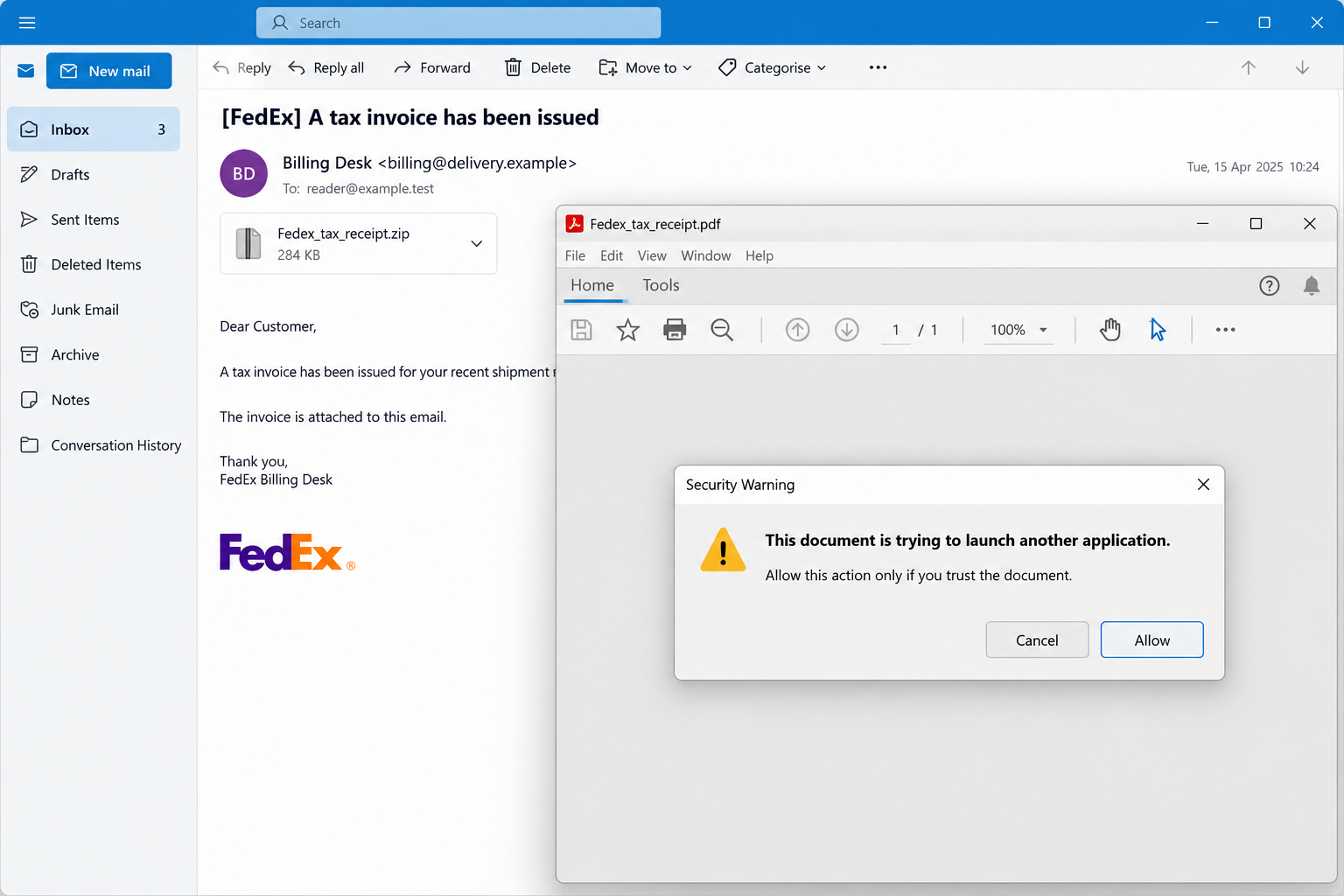
Inside the download, the PDF looks blank. A security question appears instead of an invoice, asking you to allow something that doesn’t belong in routine billing.
Overview
The invoice is bait for a Windows infection
The FedEx tax invoice email scam disguises a malicious Windows delivery chain as shipping paperwork. It abuses the courier’s identity rather than its genuine billing service.
The analyzed email was written in Korean and used a 217,740 KRW invoice claim. That is a Korean-currency claim, not a confirmed USD charge.
The useful warning extends beyond a particular amount: an invoice should not require your PDF reader to launch an unrelated application to display its contents.
The blank PDF has a job you can’t see
Trellix analyzed the campaign using Fedex_tax_receipt.zip and Fedex_tax_receipt.pdf. The document attempts to start a staged infection that delivers Sirius Backdoor.
Crucially, the reported execution requires the user to approve the PDF reader’s security confirmation. Receiving the email is not the same as completing that chain.
Gurucul’s follow-up also describes that approval step. Don’t dismiss the prompt as an inconvenience needed to see your invoice.
Respond according to what actually ran
- If you only received the message, report it without opening the archive.
- If the PDF requested an external action, cancel it and tell your security team.
- If you approved execution, treat the computer as potentially compromised and contain it.
- Use a separate trusted device for sensitive accounts while the affected computer is investigated.
- A clean-looking screen or a deleted attachment does not establish that a running backdoor is gone.
Why an Empty Invoice Can Still Be Dangerous
People usually judge a document by what appears on its pages. A blank page seems useless, damaged, or unfinished, rather than actively hostile.
But a document format can contain instructions as well as visible text. A reader’s security prompt may concern those actions rather than the displayed page.
That makes the prompt a separate decision. The supposed sender’s logo doesn’t authorize an external application, and a billing deadline doesn’t make the action necessary.
If a file won’t show its contents without unusual permissions, you can stop. Confirm the billing matter through your established courier account or finance contact.
The lead image is an English illustration of the attachment-and-prompt scenario. It uses fictional addresses and dates, not an original Korean campaign email.
How the FedEx Tax Invoice Email Scam Works
Step 1: A shipping bill gives the attachment a practical purpose
An invoice invites inspection, especially in an accounting or purchasing inbox. You may want to identify the shipment before deciding whether the amount is correct.
The pressure doesn’t require an extravagant promise. A modest-looking administrative obligation can be enough to move an employee into opening the attachment.
Before opening it, compare the message with your known shipment and billing records. A copied invoice number is still only a claim from the sender.
If you cannot connect the bill to real activity, don’t use its attachment to investigate. Ask through the courier’s independently reached service or your internal shipping team.
Step 2: A ZIP archive leads to a PDF
The archive wraps the document in another file. That can make the contents less immediately visible to the recipient and complicate some automated inspection.
A PDF extension encourages the expectation of readable paperwork. It should not persuade you to ignore warnings about actions the document wants to perform.
The reported attachment names are useful when reporting this incident. Their absence doesn’t make a different unexpected courier archive safe.
Don’t rename suspicious files or move them through several personal services to see which one opens them. Use your organization’s reporting and handling process.
Step 3: The reader asks permission to start an external action
This is the important transition from viewing a document to permitting code execution. Canceling is the appropriate choice when the invoice’s origin is unverified.
A blank page doesn’t justify an Allow button. Nor should a sender’s instruction to ignore security warnings override what the application is telling you.
If you already approved the prompt, don’t reopen the PDF to find out whether it now displays correctly. Tell responders what you accepted and when.
If you aren’t sure which button you chose, say so. Uncertainty is useful information; a second test creates another exposure without resolving the first.
Step 4: Additional stages hide the final payload
The infection uses PowerShell and intermediate components to prepare the backdoor, with important activity occurring in memory. It isn’t limited to the original invoice file.
For a reader, that explains why deleting the attachment is an incomplete response after execution. The work started by the document can continue elsewhere.
Likewise, the absence of an obvious newly installed application isn’t reassurance. Responders need to examine process activity and persistence, not only the Downloads folder.
Step 5: The backdoor can blend into familiar Windows activity
Trellix describes injection into legitimate processes and capabilities involving remote access, surveillance, and credential theft. Which capabilities operate depends on the sample’s configuration and instructions.
Do not delete svchost.exe or msbuild.exe because those names appear in a report. Legitimate Windows processes require investigation in context.
The practical response is containment, qualified assessment, and protection of potentially exposed accounts. Trying to recognize malware solely by a familiar process name is unreliable.
What This Warning Doesn’t Mean About FedEx or Every PDF
The deceptive sender uses a real courier’s identity. The analysis does not establish that FedEx’s genuine application or billing infrastructure was compromised.
It also doesn’t mean every PDF can silently infect every reader. The described route includes a security confirmation, and application settings or defenses can interrupt it.
Keep those boundaries clear without minimizing the warning. An unexpected document trying to start another application is a concrete reason to stop.
There is no need to prove the email belongs to this exact malware family before reporting it. Your team can investigate an unsafe request without a final label.
Continue handling real courier invoices through established billing processes. Don’t let a fraudulent message persuade you either to pay a stranger or ignore verified business obligations.
Why a Routine Reset May Be the Wrong Shortcut
After remote access malware, the question is whether the device can be trusted again. A quick scan and a normal-looking desktop don’t answer every part.
The Sirius analysis describes configuration-dependent persistence, including provisioning packages that may be restored during Windows reset workflows. That warrants professional attention after confirmed execution.
It does not mean every infected computer survives every rebuild. It means responders should choose the recovery method based on what they find.
Don’t experiment with recovery partitions, system scripts, or registry entries yourself. Removing the wrong component can damage Windows and destroy evidence without removing the controller.
If rebuilding is necessary, prepare a trusted installation source and review what will be restored. An unexamined system image can bring unwanted settings back.
Back up necessary personal documents with qualified guidance. Reinstallation can erase data, and executable files or old configuration packages deserve particular scrutiny before restoration.
What to Do if You Have Fallen Victim to This Scam
-
Stop the document’s requested action. Cancel any external-application prompt you have not approved. Don’t disable protection or choose Allow just to see whether the page loads.
For a work machine, report the message through your actual security channel. Include whether you opened the ZIP, opened the PDF, or accepted the confirmation.
If you only saw the email, avoid treating that as a completed infection. The distinction helps the team prioritize a device that actually executed the chain.
-
Contain a computer where execution may have occurred. Disconnect its network connection and use a different, trusted device to contact IT.
Stop financial, email, and administrative activity on the affected machine. Remote or credential-stealing access can make subsequent sensitive actions part of the exposure.
Follow responder instructions about power and evidence. An immediate restart may interrupt activity but can also change volatile information useful to understanding the incident.
-
Preserve the original message and relevant timing. Use the approved submission process for the email, archive, attachment names, and security alerts.
Don’t upload company files or unredacted screenshots to a public forum. Sender headers, internal addresses, and shipment information may contain confidential business details.
Record the approximate prompt text if you remember it. You don’t need to reopen a dangerous file to provide a perfect quotation.
-
Have the system assessed beyond the attachment. Responders should examine the execution chain, unexpected outbound connections, persistence, and potentially affected accounts.
Give them the research reference and observed filenames, but don’t assume every indicator must match. Infrastructure changes and unrelated malicious invoices can look similar.
A matching process name alone isn’t a removal instruction. Use the full context, security detections, and qualified analysis rather than deleting genuine Windows components.
-
Use appropriate Windows scans as part of the response. Let workplace IT approve tools and timing before altering a managed computer.
For personal systems, a reputable scan can assist cleanup. Obtain Malwarebytes through the verified MalwareTips route instead of an unsolicited support link.
From Scanner, use the three-dot menu to reach Advanced Scan. Select Custom Scan, choose the drives and folders, then follow the results and quarantine instructions.
Custom scanning has a free option; ongoing prevention features are separate. A purchase is not required to justify reporting the compromise or asking for qualified help.
Windows Security also provides scan options under Virus & threat protection. A full scan examines files more broadly than a quick scan.
If advised to run Microsoft Defender Offline, save work first because the computer restarts. Review the outcome in Protection history afterward.
Keep scan results for responders. A single clean result should not overrule evidence that a remote-access chain executed or that persistence remains unresolved.
-
Protect accounts from another trusted device. Prioritize email, password managers, banking, business administration, and any account used during the possible compromise.
Replace exposed passwords and revoke active sessions where supported. Ask workplace administrators about authentication methods, connected apps, API secrets, and other access material that may need review.
Monitor financial and account notifications through genuine services. Don’t use an alert’s supplied callback number if its origin is uncertain.
-
Plan restoration around the actual findings. If integrity cannot be established, ask a qualified responder about a clean rebuild and safe data restoration.
Explain the provisioning-package persistence described in the research. A normal reset should not automatically be accepted as sufficient for every confirmed Sirius incident.
Have important files backed up before destructive recovery, using the responder’s instructions. Avoid restoring unknown installers, scripts, management packages, or unexamined full-system settings.
If you need further assistance, the MalwareTips support forum can help organize next steps. Never post passwords or confidential business files.
-
Review the original billing task after containment. Verify any real invoice through your known courier account and your actual finance or shipping contact.
If a payment was also made, contact the relevant payment provider quickly. Device cleanup and payment recovery are separate tasks, and neither guarantees the other.
Warn other recipients through a safe internal notice. Describe the attachment and requested action without circulating a runnable sample or active malicious destination.
Keeping the Invoice Workflow Useful
Businesses still need to receive documents from outside organizations. A workable defense gives staff a safe way to question an invoice without losing the underlying task.
Use established billing accounts, approved document viewers, and a clear reporting channel. Make it normal to ask about an external-application warning before approving it.
Accounting staff shouldn’t have to decode PowerShell or identify a backdoor family. Recognizing that an invoice is requesting unrelated execution is enough to pause.
For administrators, review application controls and document-reader behavior against the threat report. Deploy and test changes through normal management rather than asking users to weaken protections.
Keep legitimate invoice deadlines separate from suspicious attachments. A verified supplier can arrange another delivery route while the security team investigates the message.
Frequently Asked Questions
Does receiving the FedEx invoice email infect Windows?
The reported chain required further actions, including approving a PDF reader’s security confirmation. Receiving or reading the email alone is not that execution step.
Why is Fedex_tax_receipt.pdf blank?
The analyzed PDF served as an execution vehicle rather than a readable invoice. Its lack of visible content did not make its requested actions harmless.
Was the invoice amount 217,740 KRW or USD?
No. The analyzed Korean lure used 217,740 KRW. Preserve the currency when describing the claim; it was not a confirmed charge.
Should I remove svchost.exe from Windows?
No. Legitimate process names can be abused, but deleting Windows components by name can break the system. Have suspicious activity investigated in context.
Does a normal Windows reset always remove Sirius?
Don’t assume it. The research describes persistence options involving recovery provisioning. Choose a restoration method with qualified guidance based on the actual compromise.
Is the genuine FedEx billing service the scam operator?
No. This warning concerns malicious email and attachments impersonating the courier. Verify genuine bills through your established account independently.
The Bottom Line
Don’t authorize an unexpected FedEx invoice PDF to launch another application. The documented archive uses shipping paperwork to start a Windows backdoor infection.
If you approved execution, contain the computer, involve trusted responders, and secure exposed accounts separately. Restore the device through a plan that addresses persistence, not just the attachment.

Join the discussion
0 commentsShare your experience or ask a question about this article.
Discussion
Start the conversation
Have a question or something useful to share? Add the first comment.