


After losing money online, a page offering official complaint assistance can feel like a welcome break. It has a case reference, a formal design, and reassuring language.
When that page appears to represent the Federal Trade Commission, most people would expect help. The address behind the promise deserves a closer look.
Overview
Criminals are borrowing the identity of a consumer watchdog
The FTC has identified websites impersonating the agency itself. These are not unofficial news pages discussing consumer protection, but sites presented as government-related services.
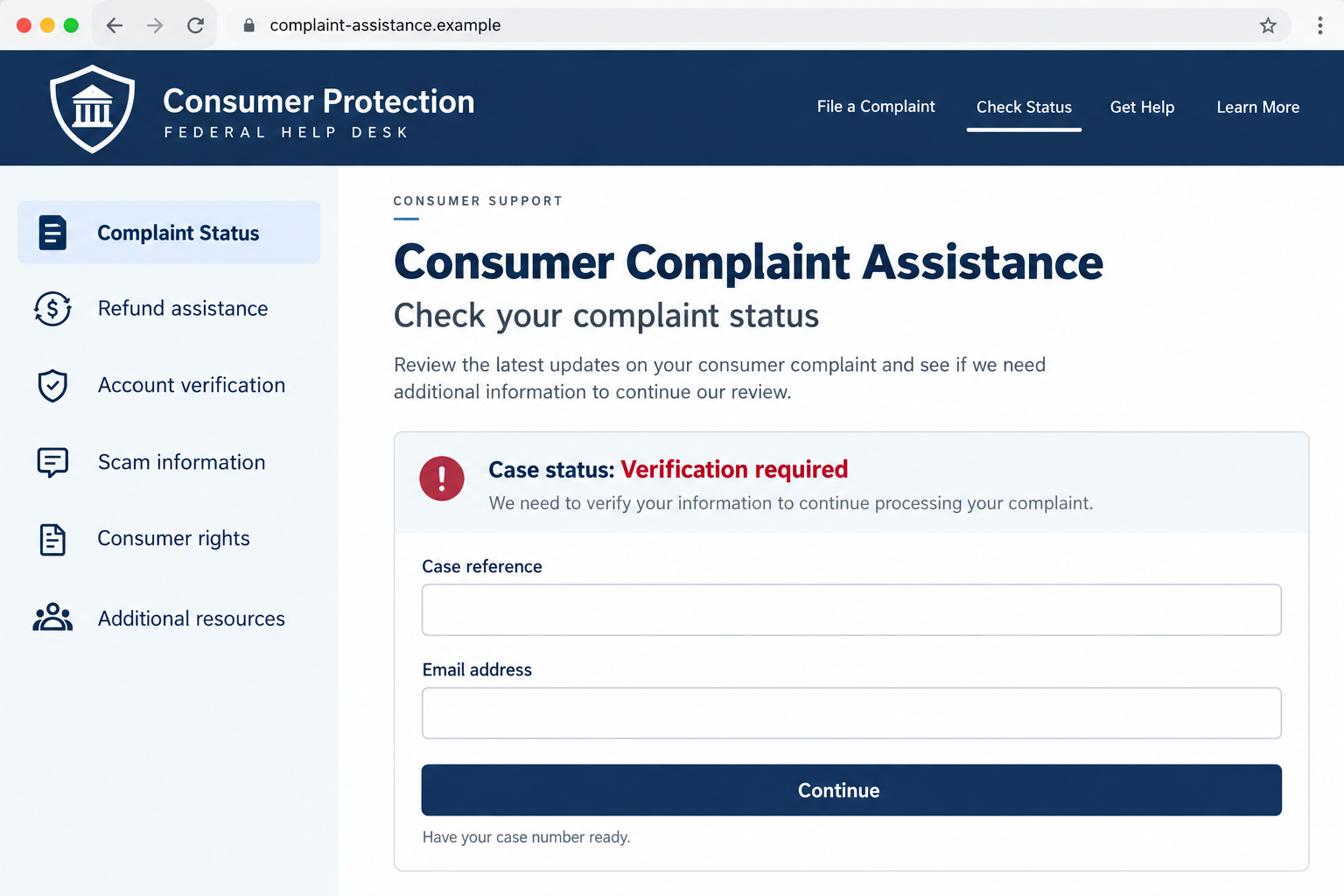
The helpdesk illustration above shows the sort of institutional presentation that can create misplaced trust. It is an illustration, not a capture of a seized website.
In an October 2026 announcement, the agency said registrars had taken down 19 FTC-imposter websites over the preceding year after its intervention.
The danger is more than a familiar logo
A fake official website can give a caller or message a supporting story. The page makes the claimed agency relationship appear independently checkable.
Someone searching for complaint assistance might also reach an imitation without speaking to anyone first. The supposed help can become another request for information or money.
The agency’s announcement identifies the impersonation and takedowns. It does not publish a complete transaction history or identical victim journey for every listed domain.
The official reporting route does not require a recovery payment
- Start from the genuine FTC website or type ReportFraud.ftc.gov yourself when reporting fraud.
- Do not transfer savings, buy gold, or send cryptocurrency because someone claims the FTC instructed you to do so.
- A badge image, employee name, case number, or convincing caller ID does not authenticate the contact.
- Reporting a scam is different from receiving a guaranteed refund or hiring an individual recovery agent.
Do not pay or submit sensitive information through an FTC lookalike. Leave the page and verify the situation through a route you obtained independently.
The Fake FTC Websites Named by the Agency
The FTC’s enforcement announcement lists websites removed after letters to domain registrars and other service providers.
Examples include FTC-Support.org, FTC-Complaints.org, FTC-help.com, federaltradecommission.net, and ftcfederal.org. These names are included for identification, not as links to visit.
The list also includes reportfraudftcgov.netlify.app and ftc-v-credit-glory-llc.pages.dev. Those addresses demonstrate why recognizing government-related words is not enough.
A hosting platform’s domain can carry a page created by a user. The platform name does not make that user a government agency.
The takedowns do not mean every imitation has disappeared. Operators can change an address, and an old warning may still circulate after its linked page stops loading.
Likewise, do not conclude that every listed website belongs to the same group. The announcement establishes a set of impersonators, not one proven common operator.
What survives a name change is the instruction: authenticate the agency before following the requested action. Do not let the page verify itself.
How the Fake FTC Website Scam Works
Step 1: The contact reaches someone who wants an answer
A scam loss creates several urgent questions. Can the payment be stopped? Is there a complaint number? Has someone already found the person responsible?
An impersonator can exploit those questions by offering a reassuring next step. In other versions, the approach is threatening and claims that an investigation needs immediate cooperation.
A message might arrive by email, text, social media, or telephone. A search for assistance can also lead someone toward a page that looks authoritative.
These are common impersonation routes, not a claim that every site named by the FTC used each method. The initial contact alone needs independent checking.
Step 2: An official-looking page supplies borrowed credibility
The contact points to a website that appears to confirm the story. Government-style colors, complaint forms, seals, and formal labels can all create that impression.
Readers may assume that finding a matching webpage means the caller was genuine. But if the caller supplied the address, both pieces can belong to the same deception.
A case reference can reinforce the effect. It looks specific, but anyone can invent a reference number and display the same number on a page.
The same caution applies to an employee’s real name. Public information can be copied without that employee knowing anything about the message.
Step 3: Verification becomes a request that benefits the impostor
The turning point is what the supposed official asks you to do. A page may seek personal details, while a follow-up contact may request payment or access.
Do not treat a demand as harmless because it is called verification, clearance, a refundable deposit, or an administrative step.
A request to move money to protect it is not a protective measure. You are transferring control of the money to a destination chosen by someone else.
The FTC explicitly warns that it will not demand money, threaten you, direct money transfers, or promise a prize. Those instructions are reasons to stop.
Step 4: Urgency discourages an independent conversation
When a person hesitates, an impersonator may insist that waiting will jeopardize the case or the recovery. That pressure tries to make verification feel dangerous.
A secrecy instruction can isolate the target further. Being told not to contact your bank, family, or another agency removes useful opportunities to interrupt the story.
Do not stay on a call while following financial instructions. End the conversation, then reach your bank using the number on your card or its app.
You are allowed to pause. A person who claims official authority does not gain permission to control your accounts or prevent you from seeking advice.
Step 5: A payment or information disclosure creates another opportunity
If money is sent, the impersonator can introduce a further obstacle. A release fee or new verification demand may be presented as the final requirement.
Each additional payment makes it harder emotionally to stop. The person wants the earlier loss resolved, so another small step can seem easier than starting over.
If personal information was shared instead, it can help make later messages sound informed. Knowing details about a loss is not proof of legitimate access.
This is why the safest response is to stop the chain, secure what was exposed, and work directly with the real payment provider and reporting services.
How to Check an FTC Address Without Falling for Another Lookalike
Read the hostname, not just the words inside it
On ReportFraud.ftc.gov, the reporting service sits under ftc.gov. In reportfraudftcgov.netlify.app, government-related words form part of a different hosted address.
A similar spelling is not an organizational relationship. Extra words such as support, complaints, federal, or help cannot turn an unrelated domain into the FTC.
On a small screen, tap the address field to inspect the complete hostname. A shortened display can hide the part that changes its meaning.
HTTPS protects a connection, not the identity claim
A padlock indicates an encrypted connection to the displayed site. It does not certify that the site belongs to the government agency it describes.
Scam websites can obtain ordinary encryption certificates. Treat the padlock as one transport detail, not permission to share bank information or identification documents.
Use an independent starting point
Type the known official address rather than following the message’s link. If you search, inspect the destination instead of assuming the first result is official.
For an existing complaint, use contact instructions from the genuine service you originally used. Do not replace them with a number supplied by an unsolicited caller.
A screenshot of an alleged government page is not an independent check either. Ask whether you can reach the same information through the real agency.
Reporting Fraud Is Not the Same as Guaranteed Recovery
Filing a report helps authorities understand and act on fraud. It does not turn a person who messages you afterward into your assigned recovery representative.
The FTC sometimes distributes money through legitimate cases and refund programs. That does not validate an unsolicited request for an advance recovery payment.
If a message claims to concern a real case, find that case through the agency’s official pages. Compare the published administrator and contact instructions yourself.
Do not use a fee as the deciding test of whether the claimed refund is attractive. The question is whether the contact and instructions are authentic.
A criminal can refer to a real company, lawsuit, or recent enforcement announcement. Accurate background details can be inserted into a completely false payment request.
There is no need to keep negotiating until you expose a contradiction. Once the instructions involve handing money to an unverified contact, stop participating.
What to Do If You Responded to a Fake FTC Website
-
End the contact and preserve the basics. Close the page and stop replying. Keep the original message, full web address, caller details, and dates.
Save screenshots already available, but do not revisit a suspicious form or submit more information just to collect evidence. Do not confront the operator.
-
Contact the payment provider immediately if money moved. Tell its fraud team that someone impersonated a government agency. Give the transaction references and destination details.
Ask about a transfer recall, card dispute, or account restrictions as appropriate. Recovery is not guaranteed, but acting promptly gives the provider more options.
-
Explain exactly what financial access was exposed. A card number, online banking password, and authorized transfer require different responses. Tell the bank which happened.
If someone instructed you to buy cryptocurrency or gift cards, preserve exchange receipts or card details. Do not send another payment to release the earlier amount.
-
Secure any account whose login you entered. Go directly to the real service, change the password, and review active sessions and recovery settings.
Replace reused passwords elsewhere, starting with email. Enable multifactor authentication and never approve an unexpected login prompt to satisfy the supposed investigator.
-
Make an identity-theft plan if documents or sensitive identifiers were shared. Visit IdentityTheft.gov directly for steps matched to the information exposed.
Ask about fraud alerts or credit freezes where relevant. An email address alone does not require the same response as a Social Security number and identification scan.
-
Handle device access separately. If you installed remote-control software, disconnect the affected device from the internet and contact financial services from another trusted device.
Remove unauthorized access with appropriate technical help. If suspicious software was installed, a Windows Malwarebytes Free scan can assist with cleanup.
For advertising and link protection, the site’s AdGuard route offers an additional layer. Neither tool reverses a transfer or authenticates an alleged official.
MalwareTips may earn a commission through these software links. Merely reading a fake page does not, by itself, prove that your device was infected.
-
Report through the real service. Type ReportFraud.ftc.gov yourself and describe the impersonation. Include the domain and requested action.
If a reporting page is temporarily unavailable, try again later through the same genuine address. Do not substitute a lookalike offering faster paid assistance.
-
Expect a possible second approach. Ignore people promising guaranteed recovery for an upfront payment, even if they know the amount you lost.
Tell a trusted person what happened. Having another person review unexpected instructions can help interrupt pressure before another transfer occurs.
What to Keep in a Useful Incident Record
A short timeline makes a bank or police report easier to understand. Record the first contact, each requested action, and what you actually did.
Separate the amounts requested from amounts paid. Include payment dates, references, and the name of the provider used, without posting account numbers publicly.
Keep the original emails where possible. Forwarding a screenshot alone can lose useful sender and routing information that the original message preserves.
Record any remote-access application installed and whether you approved a banking login. These details help distinguish account compromise from a purely persuasive payment scam.
You do not need to investigate the scammer’s location before asking for help. A flag, accent, claimed office, or phone prefix may be misleading.
Most importantly, keep the record for genuine responders. An unsolicited person demanding the entire file may be collecting details for another impersonation.
Frequently Asked Questions
Are FTC-Support.org and FTC-Complaints.org official?
No. The FTC named both among impersonation websites taken down after its intervention. Do not use copied links or a replacement domain offered by a caller.
Does the FTC charge a fee to recover scam losses?
Do not pay an unsolicited contact claiming an FTC recovery fee. Verify any genuine refund program through the agency’s own published case information.
Can a real employee name or badge prove the message is genuine?
No. Names, badge images, and case numbers can be copied or invented. Authenticate the contact independently before sharing information or acting on instructions.
Does a taken-down website mean I am safe now?
Not necessarily. If you shared credentials, documents, money, or device access, address that exposure. Removing a website does not reverse what already happened.
Should I scan my computer after seeing the page?
A scan is appropriate if you installed suspicious software or notice unwanted behavior. Simply viewing a webpage is not enough to conclude that malware was installed.
What if I already paid the supposed FTC representative?
Stop further payments and call your payment provider’s fraud team immediately. Preserve transaction evidence and report the impersonation through the real FTC reporting site.
The Bottom Line
Do not pay, transfer savings, or provide sensitive details through an FTC lookalike. Official-looking complaint assistance is not a substitute for a verified government address.
If you responded, contact the relevant bank or account provider now, secure the information you exposed, and report through the genuine FTC service.

Join the discussion
0 commentsShare your experience or ask a question about this article.
Discussion
Start the conversation
Have a question or something useful to share? Add the first comment.