

Out of nowhere, a PayPal notification pops up on your phone:
“FTC Prime Subscription Settlement Fund has sent you $51.00 USD.”
It mentions Amazon Prime, an FTC lawsuit, and a case number. It sounds official, but it also sounds exactly like the kind of message scammers love to fake.
So what is this payment really? Is it safe to click, or the start of a phishing nightmare?
Let’s walk through what is happening with the Amazon Prime settlement, who is actually getting money, and how to tell the difference between a real payout and a scam.
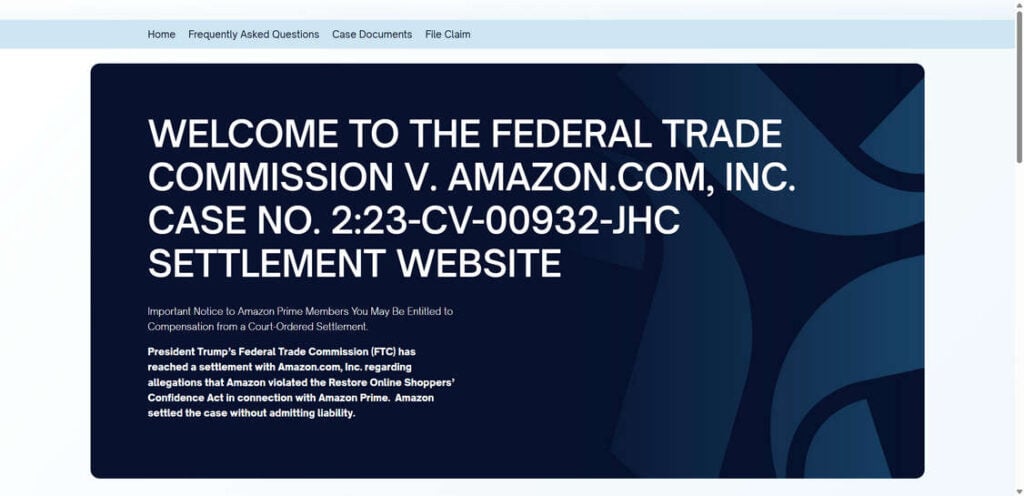
What is the “FTC Prime Subscription Settlement Fund” payment?
The payment relates to a real, court approved settlement between the Federal Trade Commission (FTC) and Amazon over how Amazon signed people up for Prime and how hard it was to cancel.
In 2025, Amazon agreed to a 2.5 billion dollar settlement to resolve an FTC lawsuit that said the company used deceptive “dark patterns” to enroll users in Prime and made cancellation unreasonably difficult. Of that, 1 billion dollars is a civil penalty and 1.5 billion dollars is reserved for refunds to customers.
The “FTC Prime Subscription Settlement Fund” label you see in PayPal is how some of those customer refunds are being delivered.
If you see a payment with that wording, it is most likely connected to this Amazon Prime case, not to some random phishing campaign. The trick is confirming that the message you received is really tied to this legitimate settlement.
Why did the FTC take action against Amazon Prime?
According to the FTC’s complaint, Amazon:
- Steered people into Prime using confusing screens and pre-checked options that made it easy to accept Prime without meaning to.
- Hid key information about recurring charges and renewal terms.
- Built a cancellation process that was “labyrinthine,” nicknamed the “Iliad flow” inside Amazon, with multiple screens and obstacles that discouraged people from canceling.
In short, millions of people were allegedly enrolled or kept in Prime in ways that did not meet consumer protection rules, including the Restore Online Shoppers’ Confidence Act (ROSCA).
Rather than continue the court fight, Amazon agreed to settle. It did not admit wrongdoing, but it did agree to change Prime signup and cancellation flows and to fund the huge refund pool for customers.
Inside the 2.5 billion dollar Prime settlement
How much money is set aside for customers?
The settlement sets aside 1.5 billion dollars for Prime members who were affected by the alleged deceptive practices.
According to the FTC and the official settlement site, eligible Prime customers can receive a refund of their Prime subscription fees up to a maximum of 51 dollars.
Not everyone gets the full 51 dollars. The exact amount depends on how much you paid and how the settlement administrators calculate your eligibility.
Who qualifies for a refund?
Eligibility is quite specific. In general, you may qualify if:
- You enrolled in Amazon Prime between June 23, 2019 and June 23, 2025, and
- You signed up through a “challenged enrollment flow,” such as the Universal Prime decision page, shipping selection page, single page checkout, or Prime Video enrollment prompts, and
- You used no more than three Prime benefits in any 12 month period after enrollment, such as free shipping, Prime Video, or Prime Music.
There is also a second group who used more benefits but may still be eligible to file a claim later, possibly for a smaller refund amount depending on how much money is left in the refund pool.
How refunds are being paid out
Automatic refunds up to 51 dollars
The settlement requires Amazon to automatically pay many customers without making them do anything. For this first wave of payments, Amazon and the settlement administrator are:
- Sending automatic refunds up to 51 dollars
- Using digital payment options like PayPal and Venmo, or issuing checks when digital payments are not claimed.
If you fall into the group that clearly meets the criteria, you simply receive the payment. There is no application form, no login on a third party site, nothing to “activate.”
When payments are being sent
According to both the FTC and multiple news outlets:
- Automatic refunds started November 12, 2025.
- They are scheduled to go out through December 24, 2025.
If you are eligible for an automatic payment, you should receive it during this window, usually via email that prompts you to accept the payment in your PayPal or Venmo account. You typically have 15 days to accept the digital payment, or Amazon will mail a check to the shipping address on your Prime account.
What about people who do not get automatic payments?
If you may qualify but do not receive an automatic refund by late December, the FTC says do not panic and do not contact strangers who claim they can “help” you get paid.
Instead:
- Amazon will run a claims process in 2026 for people who were not automatically refunded.
- The FTC will update its page at ftc.gov/Amazon and the official settlement site SubscriptionMembershipSettlement.com with instructions when that process opens.
There is nothing you need to sign up for right now.
Why payout emails may go to old accounts
Many people have reported that the PayPal email about the FTC Prime Subscription Settlement Fund arrived at an old Gmail, Yahoo, or Hotmail address they barely use anymore.
That is not necessarily a red flag. Under the court order, Amazon and the settlement administrator use the contact information tied to your Prime account during the affected period, even if you later changed emails or created a new PayPal account.
So it is entirely normal for an old email address to receive the payout notification as long as:
- It is indeed the email used with your Amazon account when you had Prime, and
- The PayPal notification was genuinely sent from PayPal, not a forged address.
Real reports from people who already received refunds
If you search Reddit, Facebook, Lemon8, or other social platforms, you will see many posts from people saying things like:
- “I just got 51 dollars from FTC Prime Subscription Settlement Fund in my PayPal balance.”
- “Got an email from service@paypal.com about an Amazon Prime settlement, thought it was a scam, but the money is actually in my PayPal account.”
Several consumer sites and news outlets confirm that legitimate payments are going out and that they tie back to the real FTC v. Amazon.com settlement.
These reports do not mean every message about a settlement is safe. They simply show that there is a real program, which scammers will absolutely try to copy.
How to verify that your payment email is legit
This is the key question: is your specific message genuine?
Here is a simple checklist.
1. Check the sender carefully
For a real PayPal payment you should see:
- Sender: service@paypal.com (spelled exactly like that, no extra letters).
- The domain after the at sign should be paypal.com, not “paypa1.com,” “paypal-support.com,” or anything similar.
Never trust only the display name. Always tap or click on the sender details and view the full email address.
Also, remember that the FTC itself is not emailing you about this Amazon refund. If a message claims to be from the FTC about Prime refunds, it is a scam.
2. Log in to PayPal or your bank independently
Do not rely on links in the email. Instead:
- Open your browser or the PayPal app.
- Type paypal.com yourself or use the official app.
- Sign in and check Recent activity.
If the settlement payment is genuine, you will see an incoming transaction titled something like “FTC Prime Subscription Settlement Fund” with the amount credited to your balance.
If no such transaction shows up, but the email claims you have money waiting, treat the email as suspicious.
3. Look at the message content
Legitimate payment notifications for this settlement usually:
- Reference “Federal Trade Commission v. Amazon.com Inc., 23-cv-0932-JHC” or similar wording.
- State that you are receiving a refund related to Amazon Prime subscription practices.
- Do not ask you to provide personal data like your Social Security number, full bank account, or password.
- Do not ask you to send money or “pay a small fee” to release the funds.
If your message contains links to unrelated sites, attachments, or urgent threats (“your account will be closed unless you click”), delete it.
Important warnings from the FTC about fake refund scams
The FTC knows that every big settlement attracts scammers. In its own guidance about the Amazon refunds, the agency stresses a few very important points:
- The FTC will never ask you to pay to get a refund. If anyone wants a fee or “processing charge,” they are a scammer.
- The FTC is not contacting people about this Amazon Prime refund. If someone calls, texts, or emails saying they are from the FTC about Amazon refunds, it is fake.
- No one from Amazon will ask you for money to get a refund or claim they can get you special access or guaranteed approval. Only scammers say things like that.
- You do not need to provide sensitive information such as your Social Security number or full bank details to receive this refund.
If you receive a suspicious message about an Amazon refund, report it to the FTC at ReportFraud.ftc.gov and ignore the sender.
What to do if you think you qualify but have not been paid
If you had Amazon Prime during the period June 23, 2019 to June 23, 2025 and you believe you were misled or had trouble canceling, but you have not seen any refund, here is what you should do:
- Do nothing for now. The automatic payment window runs through late December 2025.
- Keep an eye on your email accounts, including old ones tied to your Amazon account, for a PayPal or Venmo notice, and verify it using the steps above.
- Bookmark the official pages
- FTC Amazon refunds page: ftc.gov/Amazon
- Official settlement site: SubscriptionMembershipSettlement.com
- In 2026, if you did not get an automatic refund, check those sites for the claims form and instructions. Do not trust links from random emails or social media posts that claim to be the official form.
Quick FAQ
Is the FTC Prime Subscription Settlement Fund payment real?
Yes. The label refers to payments issued as part of the FTC’s 2.5 billion dollar settlement with Amazon over deceptive Prime subscription practices, including 1.5 billion dollars for customer refunds.
How much can I get?
Eligible Prime customers can receive a refund of their Prime membership fees up to a maximum of 51 dollars. Some people may receive less, depending on what they paid and how the settlement is distributed.
Why did my email go to an old address?
The settlement uses the contact information connected to your Prime account during the affected period, which may be an older email address that you rarely use today.
How do I know if my PayPal email is legit?
Check that the message truly comes from service@paypal.com, verify the payment by logging into PayPal directly, and ensure the email does not ask for fees, passwords, or sensitive data. If it does, it is likely a phishing attempt.
Do I need to pay or give personal information to get my refund?
No. The FTC clearly states it will never ask you to pay to get a refund or demand sensitive information. Anyone who does is a scammer and should be reported.
Bottom line: FTC Prime Subscription Settlement Fund – legit or scam?
The settlement itself is absolutely real. There is a genuine 2.5 billion dollar court approved agreement between the FTC and Amazon, and millions of Prime customers are getting up to 51 dollars back in subscription fees, often through PayPal payments labeled FTC Prime Subscription Settlement Fund.
What can be fake are the copycat emails and texts that scammers send while everyone is hearing about refunds. If your message:
- Comes from a strange address,
- Demands money or personal information, or
- Sends you to a non-official website,
then treat it as a scam and delete it.
If instead you see a payment from service@paypal.com, confirm it in your PayPal account, and it matches your history with Amazon Prime, then you are probably just one of the many people finally getting money back from the FTC Amazon Prime settlement.

Join the discussion
2 commentsShare your experience or ask a question about this article.
Discussion
Received a cheque in the post for $50. However, banking app doesnt allow you to deposit cheques in dollars. So had to go into bank. Waited until I was naturally going in. Then told I had to fill in a form and post it off to LLoyds. Did all of this to be told that it had to be done before February even though the cheques date was end of March.
So cheque returned and nothing. I assume Amazon did this for all their UK customers as most will have seen it as a hassle or like us by the time you actually go to a bank, you are told that wasnt done in the window of time.
Very clever of Amazon!
In reply to Annette
Hi Annette, thank you for posting this.
That sounds extremely frustrating. For these Amazon Prime settlement payments, the safest path is to use only the official settlement process and contacts, because the FTC has warned that scammers also try to exploit these refund programs.
Your comment is useful because it shows that even legitimate settlement payments can become a hassle when the payment method or timing does not line up smoothly.