

A text message claims to be from the Arizona Motor Vehicle Division and warns that you must pay an outstanding amount immediately or face registration deactivation, license suspension, collections, and credit consequences.
It may mention Arizona Revised Statutes Title 28, list legal-sounding penalties, and include a link that looks similar to an official Arizona government address.
Do not click it. This is a phishing scam designed to steal your money, credit card details, and personal information.
Scam Overview
The Arizona Motor Vehicle Division scam text is part of a larger wave of fake DMV, MVD, toll, and traffic violation messages being sent to drivers across the country. In Arizona, scammers often pretend to be the Arizona Department of Transportation, the Motor Vehicle Division, or a fake “Department of Motor Vehicles” office.
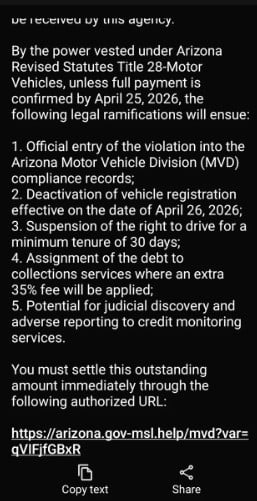
The message shown in your screenshot follows the same pattern used in many recent DMV-style smishing scams.
It claims that if payment is not made by a certain deadline, several penalties will happen, including:
- Entry of the violation into Arizona MVD records
- Deactivation of vehicle registration
- Suspension of driving privileges
- Transfer of the debt to collections
- An added 35% fee
- Possible credit reporting consequences
This is written to sound official and frightening.
But ADOT has already warned that scam texts are circulating in Arizona and that the agency is not texting people to demand payment for unpaid tickets. ADOT says these messages are designed to steal personal information and money, and one obvious red flag is the use of “DMV” language because Arizona uses MVD, short for Motor Vehicle Division.
Why this scam looks convincing
This scam works because it mixes real-sounding legal language with fake urgency.
The message may mention:
- Arizona Revised Statutes
- Title 28
- Motor vehicles
- MVD compliance records
- Registration deactivation
- Driving privilege suspension
- Collections services
- Credit monitoring
Those terms sound serious. They make the message feel like it came from a government enforcement system.
That is the trick.
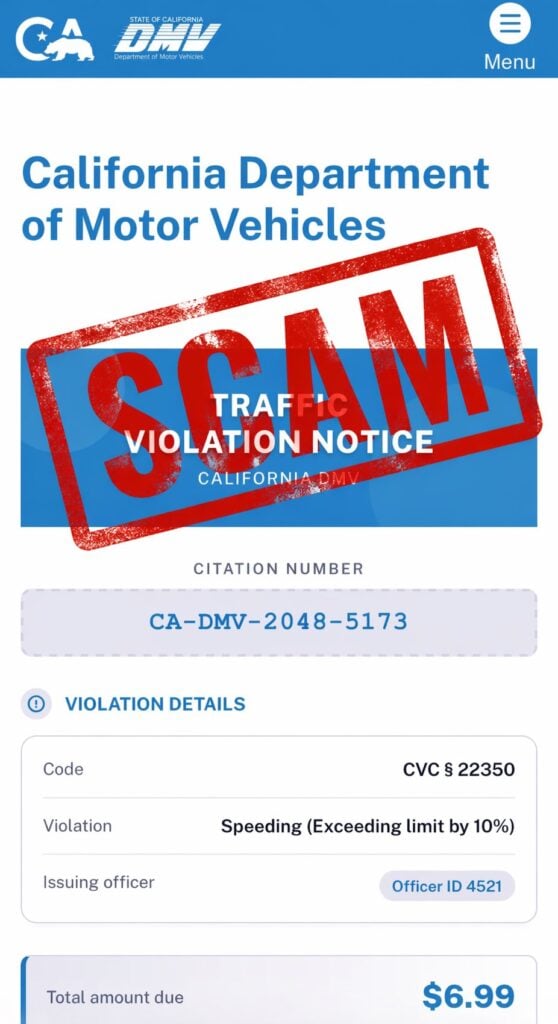
Scammers often use real legal-sounding references to make fake payment demands look more believable. The FTC has warned that these DMV-style scam texts may claim you have an overdue traffic ticket, threaten license or registration suspension, add a 35% service fee, and even warn about prosecution or credit damage. The FTC says the purpose is to get your money and personal information.
The suspicious link is the main trap
The link in the screenshot appears to use a domain like:
arizona.gov-msl.help/mvd?var=…
That is not the same as a normal official Arizona government website.
Scammers often create lookalike links that include familiar words like:
- Arizona
- gov
- MVD
- DMV
- payment
- violation
- ticket
- registration
The goal is to make the link feel official at a glance. But the domain structure is wrong. In a real government website, the official domain matters. A scammer can put “arizona” and “gov” inside a fake domain to trick people who only glance quickly.
This is why you should never use links from unexpected payment texts. If you are worried about a real issue, go directly to the official ADOT or MVD website by typing the address yourself.
What the Scam Text Says
The wording can change, but the message in the screenshot uses a structure like this:
By the power vested under Arizona Revised Statutes Title 28 Motor Vehicles, unless full payment is confirmed by April 25, 2026, the following legal ramifications will ensue:
It then lists consequences such as:
- Official entry of the violation into Arizona MVD compliance records
- Deactivation of vehicle registration effective April 26, 2026
- Suspension of the right to drive for at least 30 days
- Assignment of the debt to collections with an extra 35% fee
- Possible judicial discovery and adverse credit reporting
The message then tells the recipient to settle the amount through a link.
This is classic scam language. It sounds formal, but it is designed to pressure you into clicking before you think.
Why the Arizona MVD Scam Text Is Dangerous
It creates fear
The text threatens serious consequences. Registration deactivation, license suspension, collections, and credit reporting are enough to make most people panic.
That fear is intentional.
Scammers want you to believe that waiting even a few hours could make things worse.
It uses a payment deadline
The message includes a deadline to create urgency.
A short deadline makes victims think:
- “I need to handle this now.”
- “I do not want my registration suspended.”
- “I should just pay and move on.”
That pressure helps scammers bypass your normal skepticism.
It uses fake authority
The message references laws, departments, and official records. This is meant to make the scam feel connected to the government.
But ADOT says it will not text people seeking payment, and ADOT is not involved in collecting unpaid traffic tickets.
It may steal more than the payment
The fake site may ask for:
- Full name
- Address
- Phone number
- Driver information
- Vehicle details
- Credit card number
- Expiration date
- CVV
- Billing ZIP code
Even if the payment amount looks small, the real value is the information you enter.
Once scammers have your card details, they can attempt fraudulent charges or sell the data. Once they have your personal information, they can target you with more scams later.
How the Arizona Motor Vehicle Division Scam Works
Step 1: You receive a threatening text
The scam starts with an unexpected message claiming you owe money.
It may mention:
- An unpaid ticket
- A traffic violation
- A vehicle registration issue
- A compliance problem
- A pending penalty
The message is designed to look like a final warning.
Step 2: The text lists scary consequences
The message may threaten:
- Registration suspension
- License suspension
- Collections
- Extra fees
- Credit damage
- Legal action
This makes the situation feel urgent and serious.
Step 3: The link offers a fast solution
After creating fear, the message gives you a link to pay.
This is the turning point.
The scam wants you to move from panic to action without verifying the claim.
Step 4: The fake website collects information
If you click the link, you may land on a fake MVD or DMV-style payment page.
The site may ask you to enter personal details before showing a fake balance.
It may look official, but it is controlled by scammers.
Step 5: The payment page steals card details
The fake site may ask for:
- Card number
- Expiration date
- CVV
- Billing address
Once entered, your card should be treated as compromised.
Step 6: Fraud may happen later
The damage may not happen immediately.
Scammers may:
- Run small test charges
- Attempt larger purchases later
- Sell your card data
- Send more fake Arizona MVD messages
- Use your personal details in other phishing attempts
That is why fast action matters if you entered any information.
Red Flags in Arizona MVD Scam Texts
The message demands immediate payment
Real government notices should be verified through official channels. A random text pushing urgent payment is suspicious.
The link looks like a government site but is not
A domain containing words like “arizona,” “gov,” or “mvd” is not automatically legitimate.
The message threatens several penalties at once
Scammers stack consequences to create panic.
It mentions a 35% fee
The FTC has specifically warned that DMV scam texts may threaten an additional 35% service fee as part of the scare tactic.
It uses DMV wording for Arizona
Arizona’s motor vehicle agency is the MVD, not “DMV.” ADOT has identified “DMV” wording as a red flag in these scams.
It asks you to use only the text link
A real issue should be independently verifiable. A scam tries to keep you inside its own fake payment flow.
What To Do If You Receive This Text
Do not click the link
Do not open the link to “check.” That is how the scam starts.
Do not reply
Replying can confirm your number is active.
Do not pay
Do not enter card details through a link from an unexpected text.
Verify through official channels
If you are worried about a real Arizona MVD issue:
- Go directly to the official ADOT or MVD website
- Use a trusted browser search or typed address
- Call using a verified phone number from the official site
- Do not use the link or phone number from the text
The FTC recommends contacting your DMV through a phone number or website you know is real, not through the information in the text.
Report and delete the message
The FTC advises people to use the phone’s “report junk” option or forward unwanted texts to 7726 (SPAM), then delete the message.
What To Do If You Already Clicked or Paid
1. Call your card issuer immediately
If you entered card information, call the number on the back of your card.
Tell them:
- You entered payment details on a fraudulent MVD payment site
- The link came from a scam text
- You need the card blocked and replaced
- You want recent transactions reviewed
2. Review recent transactions
Look for:
- Small test charges
- Unknown online purchases
- New subscriptions
- Repeated declined charges
- Charges from unfamiliar merchants
Dispute anything you do not recognize.
3. Turn on transaction alerts
Enable alerts for:
- Every purchase
- Online payments
- Transactions over $1
4. Change passwords if needed
If the fake site asked you to create an account or log in, change that password immediately.
Also change it anywhere else you reused it.
5. Watch for follow-up scams
Once scammers know you interacted, they may send more messages.
Be careful with texts claiming:
- Your payment failed
- Your case has escalated
- A refund is available
- Your bank needs to verify the transaction
- More penalties are pending
6. Save screenshots
Keep screenshots of:
- The original text
- The sender number
- The fake link
- The fake website
- Any payment confirmation
- Any unauthorized charges
The Bottom Line
The Arizona Motor Vehicle Division scam text is a phishing attempt that uses legal-sounding language, registration threats, license suspension warnings, collection threats, and fake government-style links to scare people into paying.
ADOT has warned that these texts are not from the agency, that it does not text people seeking payment, and that scammers are trying to steal money and personal information.
If you receive one of these messages:
- Do not click
- Do not reply
- Do not pay
- Do not trust the link
Verify only through official Arizona government channels you access yourself.
FAQ
What is the Arizona Motor Vehicle Division scam text?
It is a phishing scam where criminals pretend to be the Arizona MVD or ADOT. The message claims you owe money for a traffic, ticket, toll, or registration-related issue and pressures you to pay through a suspicious link.
Is the Arizona MVD really sending these payment texts?
No. A surprise text demanding immediate payment through a link is a major red flag. Arizona MVD-related issues should be verified only through official ADOT or MVD channels you access yourself.
Why does the scam mention Arizona Revised Statutes Title 28?
Scammers use legal-sounding references to make the message feel official. Mentioning a real or realistic law does not make the payment demand legitimate.
Why does the text threaten registration deactivation or license suspension?
Those threats are used to scare you into acting quickly. Scammers want you to panic and click before you verify whether the message is real.
What happens if I click the link?
You may be taken to a fake MVD-style payment website that asks for your name, address, phone number, vehicle details, and credit card information.
What information are scammers trying to steal?
Usually:
- Full name
- Address and ZIP code
- Phone number and email
- Vehicle or license details
- Credit card number
- Expiration date and CVV
- Billing information
I clicked the link but did not enter anything. Am I safe?
Your risk is much lower if you did not submit information. Close the page, do not return, and watch for more scam texts.
I entered my card details. What should I do now?
Call your card issuer immediately, report the card as compromised, freeze or replace it, review recent transactions, dispute anything unfamiliar, and turn on transaction alerts.
How do I verify if I really owe anything?
Do not use the link or phone number in the text. Go directly to the official Arizona MVD or ADOT website by typing the address yourself.
How do I report the scam?
Mark the message as spam, block the sender, forward it to 7726 (SPAM) if your carrier supports it, and keep screenshots of the text and fake site.








