

A dog-license notice arrives with official language and a short payment deadline. It looks like one more responsibility to handle before getting on with the day.
The AVA dog license renewal scam used that familiar obligation as its hook. Before paying, check where the notice is actually taking you.
Overview
The case concerns a false Singapore renewal notice from 2015
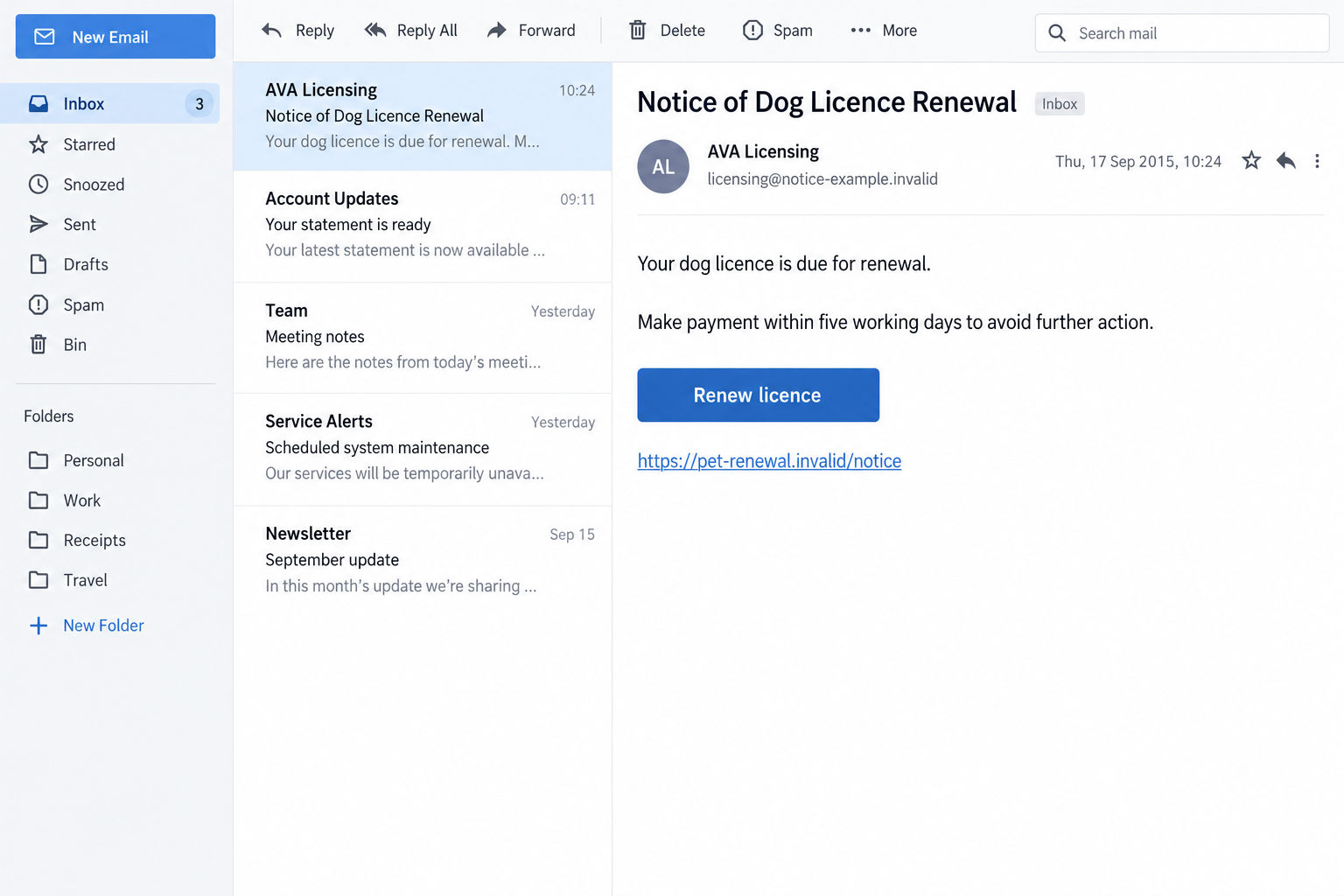
The historical scam impersonated Singapore’s Agri-Food and Veterinary Authority, known as AVA, and asked dog owners to follow a supposed online renewal route.
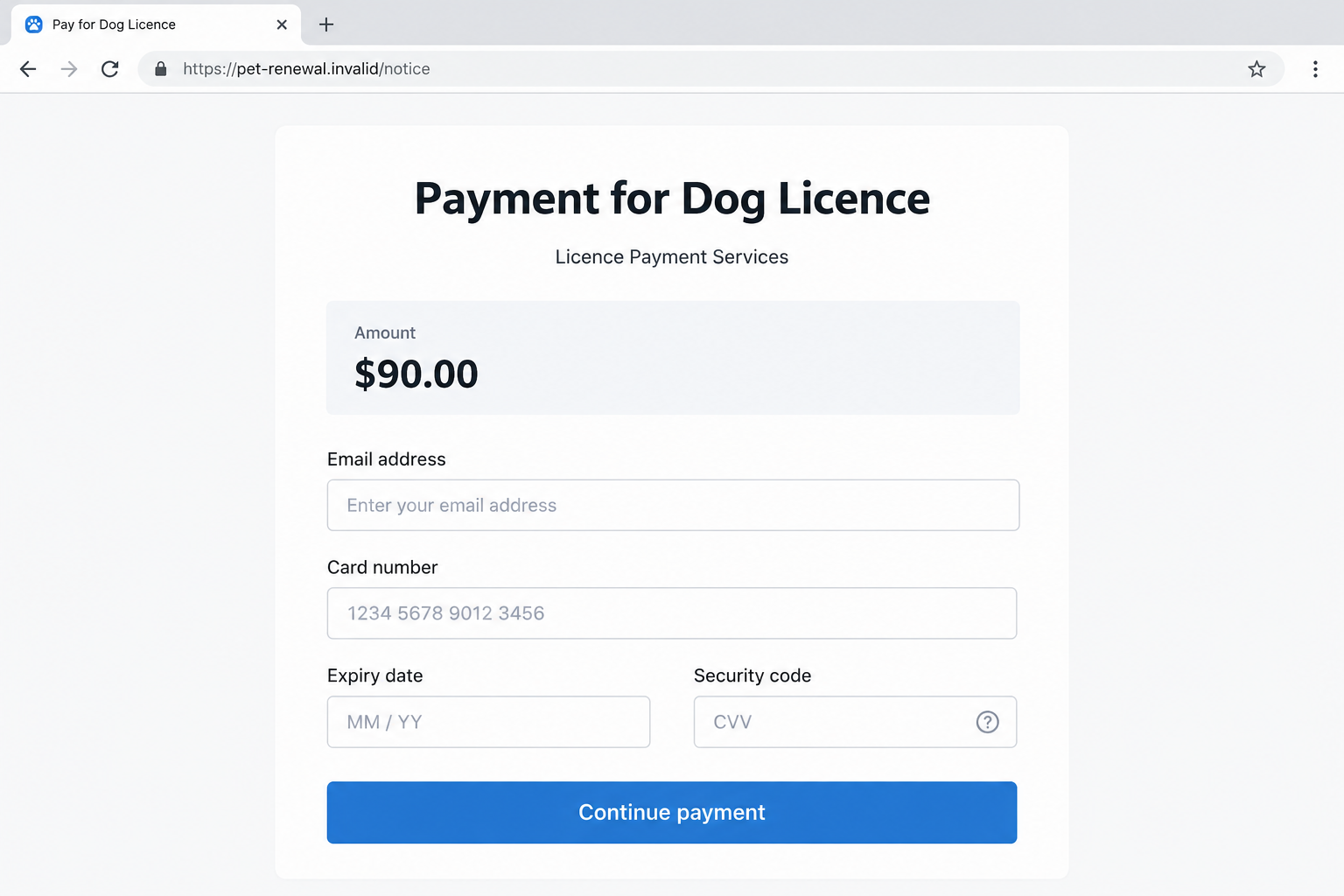
Contemporaneous reporting described a $90 payment demand and a misleading PayPal destination. The figure belongs to the historical Singapore claim, not today’s official fee schedule.
A September 18, 2015 report recorded AVA’s warning that the letters were not issued by it and that police were investigating.
The fraudulent notice is the scam. Pet licensing is a genuine responsibility, and the authority’s identity was being used to make an impostor’s payment request convincing.
This article does not announce a new AVA deadline or a freshly captured 2026 campaign. Historical instructions should not be treated as current government guidance.
A legitimate payment service does not validate the payee
The key question is who receives the payment and how you reached the request. A familiar payment brand cannot authenticate a licensing notice on its own.
Current official AVS guidance allows PayPal among the online payment methods through PALS. Therefore, the word PayPal is not itself evidence of fraud.
Likewise, renewal fees and emailed notices can be genuine. The deception is the false identity and payment route, not every instance of government correspondence.
Check the actual license using the official service reached independently. Do not rely on an email’s display name, copied wording, or reassuring payment-page heading.
Today’s verification starts with AVS and PALS
The current AVS pet-licensing instructions explain how to apply, renew, update, or cancel a license through the appropriate official process.
Before following a payment notice, compare:
- The pet and license details in your own record.
- The expiry or renewal requirement applicable to that license.
- The independently reached PALS service at pals.avs.gov.sg.
- The payment amount and transaction purpose shown by the official process.
- The recipient of any payment request before you approve it.
The images are fictional screen-only reconstructions. They are not genuine agency emails, current payment pages, or instructions for transferring a license fee.
Why a Pet-License Notice Can Feel Urgent
The reader already wants to comply
Many pet owners do not want to miss a renewal or create a problem involving their animal. A regulatory-sounding notice speaks directly to that concern.
The message does not need to offer an unlikely prize. It can suggest that a small task has become overdue and provide a convenient solution.
That framing moves attention toward completing the task. The identity of the sender and the recipient of the payment can receive less scrutiny.
Keep the real responsibility separate from the proposed shortcut. You can confirm a license obligation without accepting the notice’s route to payment.
Formal wording can hide an unfamiliar destination
Rules, license numbers, deadlines, and agency names make a message look administrative. None of those details establishes that the sender is authorized.
A scam can mix accurate information with a false payment instruction. That is more persuasive than a message in which every detail is obviously wrong.
Knowing a pet’s breed or a license reference also does not prove an agency breach. Information can be acquired or guessed in more than one way.
This investigation does not establish how the historical recipients were selected. Do not turn a personalized notice into an unsupported explanation of its data source.
How the AVA Dog License Renewal Scam Works
Step 1: The notice claims an official renewal obligation
The message uses AVA’s name and describes an approaching expiry. A recipient is encouraged to think about compliance before questioning the contact.
In the historical sample, the sender used a short deadline and threatened further action. Those dates and claims belong to 2015, not to a present licensing decision.
Do not copy an old deadline into your current plans. Open the genuine license record and determine whether your own pet’s license requires any action.
A message naming an agency can be fake even when the obligation it discusses is real. Conversely, receiving a renewal notice is not automatically suspicious.
The safe response is independent verification, not ignoring every notice or paying every request that looks formal.
Step 2: A convenient link becomes the proposed solution
The notice offers an online or mobile payment route. Convenience reduces the chance that the recipient will look up the licensing service separately.
A shortened link can conceal where the browser will go. The historical warning involved a misleading route rather than an independently verified government payment process.
Not every short link is fraudulent. What matters is whether the link and transaction can be verified through the real organization.
Do not open an old suspected scam link to see whether it still works. An inactive or changed page would not authenticate the notice you received.
Use the official website you reach yourself. A payment button inside the suspicious message should not be your starting point.
Step 3: The destination borrows the purpose of the genuine fee
A heading such as payment for a dog license makes the transaction look tied to the notice. The label does not establish the beneficiary’s authority.
Anyone’s payment request should be checked against the official process. A merchant or account label can say something plausible without proving a relationship with AVS.
A real payment platform can process a deceptive request. Separately, an imitation payment page may seek card or login details rather than perform the promised renewal.
Those possibilities require different recovery actions. Preserve whether money was actually transferred, credentials were entered, or a form was abandoned before submission.
The second image is an invented payment form with a sample $90 amount. It does not reproduce an authentic PayPal interface or a current PALS fee.
Step 4: Payment does not establish a genuine renewal
A transaction receipt proves that a payment event was recorded. It does not automatically prove that the licensing authority received it or updated your license.
If the wrong party was paid, the real administrative task may remain unresolved. That can create confusion when a genuine reminder later arrives.
However, a delayed status update is not automatically evidence of fraud. Some legitimate payment routes take time to appear in the official record.
Check the current published guidance and contact the real service about your own transaction. Do not diagnose the payment from a delay alone.
The impostor’s reassurance that everything is complete should not replace that check. The license record and verified transaction details are the relevant evidence.
Step 5: A follow-up can ask for another payment or more data
After you question the notice, a contact may claim that a clearance step or refund requires additional information. That can extend the original exposure.
This is a possible escalation, not a confirmed feature of every historical AVA letter. Do not wait for it before responding to an unverified payment demand.
Decline requests for banking passwords, security codes, or remote access. A license question does not authorize a stranger to control your financial accounts.
Continue through the authority and payment provider you reach independently. The sender of the questionable notice should not direct your recovery process.
How to Verify a Real Singapore Pet Renewal
Start with the present service, not an old agency label
The current official service is provided through AVS and PALS. The historical AVA name in this case should not be treated as today’s payment instructions.
Find the licensing process on the AVS website and follow its link to PALS. Check the full address rather than a button’s friendly label.
A genuine record should let you determine what action applies to your pet. Do not assume every license has an annual renewal simply because the email says so.
Current instructions distinguish renewable licenses from one-time licenses. The correct requirement depends on the actual record, not a generalized warning article.
Email delivery and PayPal are not blanket red flags
AVS states that real renewal notices can arrive by email or postal mail according to the notification preference in PALS.
Its current instructions also describe online PayPal and card payments, along with AXS and GIRO options. Verification must consider the route, not merely the brand.
A notice can therefore look superficially similar to an old scam example while being genuine. The independent license record is how you resolve that uncertainty.
Do not tell another owner that every emailed renewal or PayPal payment is fake. That could cause them to ignore a legitimate responsibility.
Confirm the amount without trusting the historical figure
The sample amount in this investigation is part of the old deceptive demand. It is not a quotation of current Singapore fees or a U.S. currency conversion.
Check the official service for the amount applicable to your pet and license type. Fee tables and transition periods can change.
A matching amount still does not authenticate the recipient. A scammer can copy a publicly listed fee just as easily as they copy an agency name.
Equally, a difference needs investigation rather than an immediate accusation. Your selection, license type, or payment status may explain a genuine amount.
What to Keep When the Notice Does Not Match
Preserve the message and the actual transaction
Save the notice, visible destination, sender details, and payment confirmation if one exists. Keep the license information from your independently reached record separately.
That allows a provider to compare the claimed purpose with the actual beneficiary and activity. A cropped screenshot of an agency name may not show enough.
If you never paid, make that clear. A suspected impersonation report does not require claiming an unauthorized charge or a completed transfer.
Keep your pet’s genuine record out of public posts
A license record can contain identifying information about the owner and pet. Redact it before sharing a warning with a community group.
You can explain the suspicious request without publishing a full address, payment identifier, or document that another person could reuse.
Provide necessary unredacted evidence only through verified reporting or support channels. A stranger commenting that they can investigate is not an official evidence route.
What to Do if You Have Fallen Victim to This Scam
-
Stop using the notice’s links and contact route. Do not approve another payment to complete a renewal or release a refund.
Preserve the message before deleting or blocking it. Record the amount requested and whether any transaction actually occurred.
-
Contact the payment provider through a trusted route. If you paid through PayPal, review the transaction from the real account or app.
If a card or bank transfer was involved, contact the relevant issuer or bank. Describe the impersonation and identify the actual recipient when the record shows it.
Ask about applicable protections or reversal options. A payment you approved under deception needs an accurate explanation, not a claim that you never authorized it.
-
Secure any login information you entered. Use the real service on a device you trust to change an exposed password and review account recovery settings.
If banking credentials or security codes were disclosed, alert the bank promptly. Do not give another code to someone claiming to verify the first incident.
Entering a shipping-style address is different from exposing a financial login. Explain exactly what information the page collected.
-
Check the real pet license separately. Start from AVS’s current instructions and reach PALS independently to confirm whether a renewal remains necessary.
Ask the official service about payment status if you believe a legitimate transaction was made. Allow for published processing times rather than guessing from an immediate screen.
Do not let the fake notice supply today’s deadline or fee. A genuine obligation should be verified without repeating the suspicious transaction.
-
Use ScamShield for Singapore scam guidance. The current helpline information lists 1799 for checking suspicious situations and obtaining guidance.
The helpline is not itself a police-report filing service. Its official page explains that distinction and provides guidance for callers outside Singapore.
For urgent financial exposure, contact your bank promptly rather than waiting for every detail of the notice to be resolved.
-
File a police report where appropriate. Follow ScamShield’s evidence guidance and use the verified reporting route it identifies.
Include the chronology, communication channel, payment method, and references from other reports. Do not publish a real official’s name as the scammer merely because it was copied.
A report documents the incident but does not guarantee immediate recovery. Keep its reference alongside your bank or payment-provider case.
-
Investigate additional device exposure if necessary. If the interaction led to a download, remote-access tool, or continuing redirects, obtain trusted technical help.
Use Malwarebytes to investigate questionable downloads or persistent device problems. AdGuard limits unwanted browser advertising, not fraudulent payments or the authenticity of a licensing notice.
Receiving the email alone does not prove infection. Avoid installing an app from a supposed licensing agent who contacted you unexpectedly.
-
Keep later refund offers under the same scrutiny. A contact promising to recover the license payment might demand another fee or your banking access.
Work with the provider handling the original transaction. A refund should not require trusting a new stranger whose only proof is knowledge of your loss.
Frequently Asked Questions
Is the AVA warning about a new 2026 campaign?
No. It describes a documented 2015 impersonation. Current licensing verification uses today’s AVS guidance rather than the dates, fees, or contacts in an old letter.
Are Singapore pet-renewal emails always fake?
No. AVS describes genuine notices delivered by email or post according to PALS preferences. Check the actual license through an independently reached official process.
Does using PayPal make a license payment suspicious?
Not by itself. Current official guidance permits PayPal through PALS. Verify the route and beneficiary instead of judging only the payment brand.
Is $90 the fee I should pay today?
This article does not quote today’s applicable fee. The amount is a historical scam claim. Use the official service to check your own license type and amount.
Does a payment receipt prove the license was renewed?
It records a payment, not necessarily the correct administrative outcome. Compare the genuine license record and transaction details, allowing for legitimate processing times.
Can calling 1799 replace a police report?
No. ScamShield’s helpline provides scam-related guidance, but its official instructions distinguish that service from filing a police report through the verified police route.
The Bottom Line
The AVA dog license renewal scam exploited a real responsibility through a false notice and misleading payment route. Official-looking wording could not establish the recipient’s authority.
Verify the pet’s current record through AVS and PALS before paying. If the wrong party already received money or access information, involve the relevant provider promptly.

Join the discussion
0 commentsShare your experience or ask a question about this article.
Discussion
Start the conversation
Have a question or something useful to share? Add the first comment.