

A short, sensational video of a chimpanzee riding a Vespa scooter on a highway has gone viral, captivating millions of viewers across TikTok, Instagram, Facebook, and YouTube. At first glance, the footage looks like a real news broadcast showing a chimpanzee casually cruising down the freeway, followed by police cars. Many viewers claimed the video was filmed in Indonesia. But is it actually real?
The truth behind this viral clip is far more digital than wild.
What the Viral Video Shows
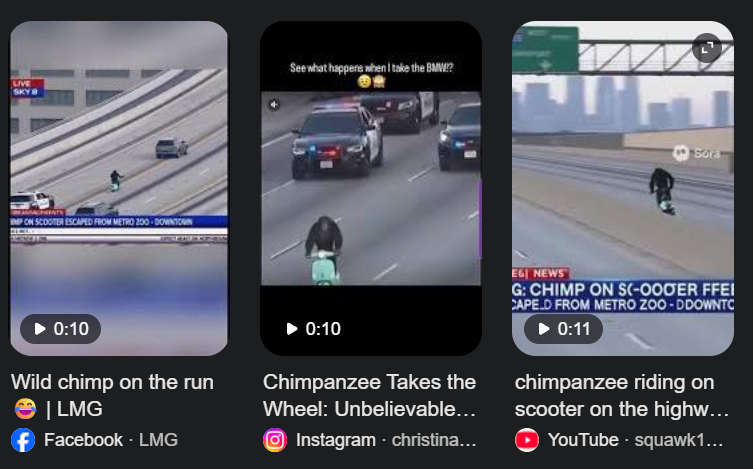
In the 10-second clip, a chimpanzee is seen confidently riding a mint-green Vespa-like scooter at high speed, maintaining perfect balance. It appears to be a real news segment with fake lower-third headlines like “CHIMP ON SCOOTER ESCAPED FROM METRO ZOO – DOWNTOWN.” Multiple police vehicles trail behind the chimp as the camera angle zooms in, mimicking helicopter news coverage.
This believable presentation made many people assume it was an actual incident.
Why the Video Looks So Real
Several factors contributed to the believability of the chimp-on-a-Vespa video:
- Smooth camera motion: The clip mimics aerial news footage, which makes it seem authentic.
- Realistic movement: The chimp’s posture, shadow, and scooter handling look convincing at normal speed.
- Overlay text: The news-style banner and live indicator enhance the illusion.
- Viral reposting: The clip was shared widely, often with captions claiming it came from a zoo escape.
But upon closer inspection, several details don’t add up.
AI Generated Videos
The video didn’t need any formal investigation to be exposed as fake — the clues were right there in plain sight. In many of the versions circulating online, the Sora AI watermark is clearly visible. Sora is a powerful AI video generation tool capable of creating hyper-realistic scenes that look like they were filmed in real life.
Viewers who watched the clip closely also noticed inconsistencies that gave it away:
- The lighting on the chimp doesn’t match the lighting on the road and surrounding cars.
- The scooter’s reflections look digitally generated, especially around the wheels and chrome parts.
- The text in the fake “news ticker” has obvious grammar errors and formatting issues.
- The chimp’s movement, when slowed down, looks slightly robotic and unnaturally smooth.
And perhaps the biggest giveaway: no real news outlets reported any incident involving a chimpanzee riding a scooter on a highway. That alone confirms the clip is staged and AI-generated.
With these obvious signs, it became clear to many online viewers that the viral chimp-on-a-Vespa video wasn’t authentic but a convincing piece of AI content created using Sora.
The Role of Sora AI in Creating the Video
Multiple video analysts have linked the clip to OpenAI’s Sora 2, a powerful AI video generation model capable of creating ultra-realistic footage. The video shows signs characteristic of Sora-generated content:
- Seamless but slightly “too perfect” motion.
- AI watermark remnants on some frames.
- Synthetic rendering of background objects.
This technology can take a simple text prompt — like “a chimpanzee riding a scooter on a highway” — and turn it into a cinematic, realistic-looking clip in seconds.
How the Fake Video Went Viral
The original upload of the chimpanzee Vespa video remains unclear, but it quickly spread after being reshared on major social platforms. Some popular accounts added fake news tickers and catchy captions, which made the clip even more convincing.
Rapper Snoop Dogg also reshared the video, giving it massive exposure and driving millions of additional views. Many users in the comments were genuinely confused — some joked about the chimp’s driving skills, while others debated whether it was real.
Why This Matters: The Rise of AI Fakes
This incident highlights a growing problem online: hyper-realistic AI-generated videos that spread faster than fact-checking can catch up. Anyone with access to advanced tools can now fabricate scenes that look indistinguishable from real events.
These fake videos can:
- Spread misinformation quickly
- Damage public trust in media
- Be weaponized in scams or hoaxes
It’s a clear reminder to always verify sources before believing or sharing viral clips.
How to Spot AI-Generated Videos
While AI videos are becoming harder to detect, some red flags can help identify fakes:
- Look for inconsistencies: Shadows, lighting, reflections, or body movements may look slightly “off.”
- Check for misspellings: Fake news tickers often have small errors.
- Search for credible sources: Real incidents are usually covered by multiple verified outlets.
- Slow down the video: Unnatural motion is easier to spot in slow motion.
- Reverse image/video search: If no reliable source exists, it’s likely a fake or AI-generated.
Conclusion: The Chimp on a Vespa Is Not Real
The viral video of a chimpanzee riding a Vespa scooter is fake. It is an AI-generated video created with advanced tools like Sora 2, designed to mimic real-world footage. While entertaining, it serves as a serious reminder of how quickly digital misinformation can spread.
As AI technology becomes more sophisticated, fact-checking, media literacy, and critical thinking are more important than ever.
Frequently Asked Questions
Is the chimpanzee on the Vespa video real?
No. The video is AI-generated and not real footage of a chimpanzee riding a scooter.
Who made the video?
The exact creator is unknown, but the clip is consistent with videos made using OpenAI’s Sora 2 AI tool.
Why do so many people believe the video?
The combination of realistic AI rendering, fake news overlays, and viral reposting made the clip appear authentic at first glance.
How can I verify similar videos in the future?
Look for original sources, credible news reports, and visual inconsistencies. Reverse searching the video often reveals its origins.
Why is AI video creation dangerous?
Because it can be used to spread misinformation, manipulate public opinion, or create hoaxes that seem real.
Can AI videos be detected automatically?
Yes. Emerging AI-detection tools and forensic analysis can reveal signs of manipulation, though the technology is constantly evolving.
Did this incident involve a real zoo escape?
No. There are no verified reports of any chimpanzee escaping from a zoo in connection with this video.
Why was there a fake news banner on the clip?
It was likely added to make the video seem more authentic and boost its viral potential.
Has Sora AI been used for other fake videos?
Yes. Sora and similar tools have already been used to create multiple viral hoaxes, including fake animal videos, disaster clips, and celebrity deepfakes.
What should I do if I see suspicious viral videos?
Always question extraordinary claims, check multiple sources, use verification tools, and avoid resharing unverified content.

Join the discussion
0 commentsShare your experience or ask a question about this article.
Discussion
Start the conversation
Have a question or something useful to share? Add the first comment.