


Your home address turns up on a site you have never used. Search results show it too, even though you don’t remember posting it anywhere.
Those can be two different copies of the same information. Finding out which one you are looking at determines who can remove it.
Overview
An exposed record does not tell you how it got there
Data scraping is automated collection of information that a site or service makes available. What appears in a listing can also come from public records, brokers, or a breach.
When basic details turn up together, don’t assume they all came from one source. A listing can combine an old phone number with a newer address and an unrelated record.
Assess what the record contains before choosing a response. A copied public profile, a leaked password, and a fraudulent credit account shouldn’t trigger the same steps.
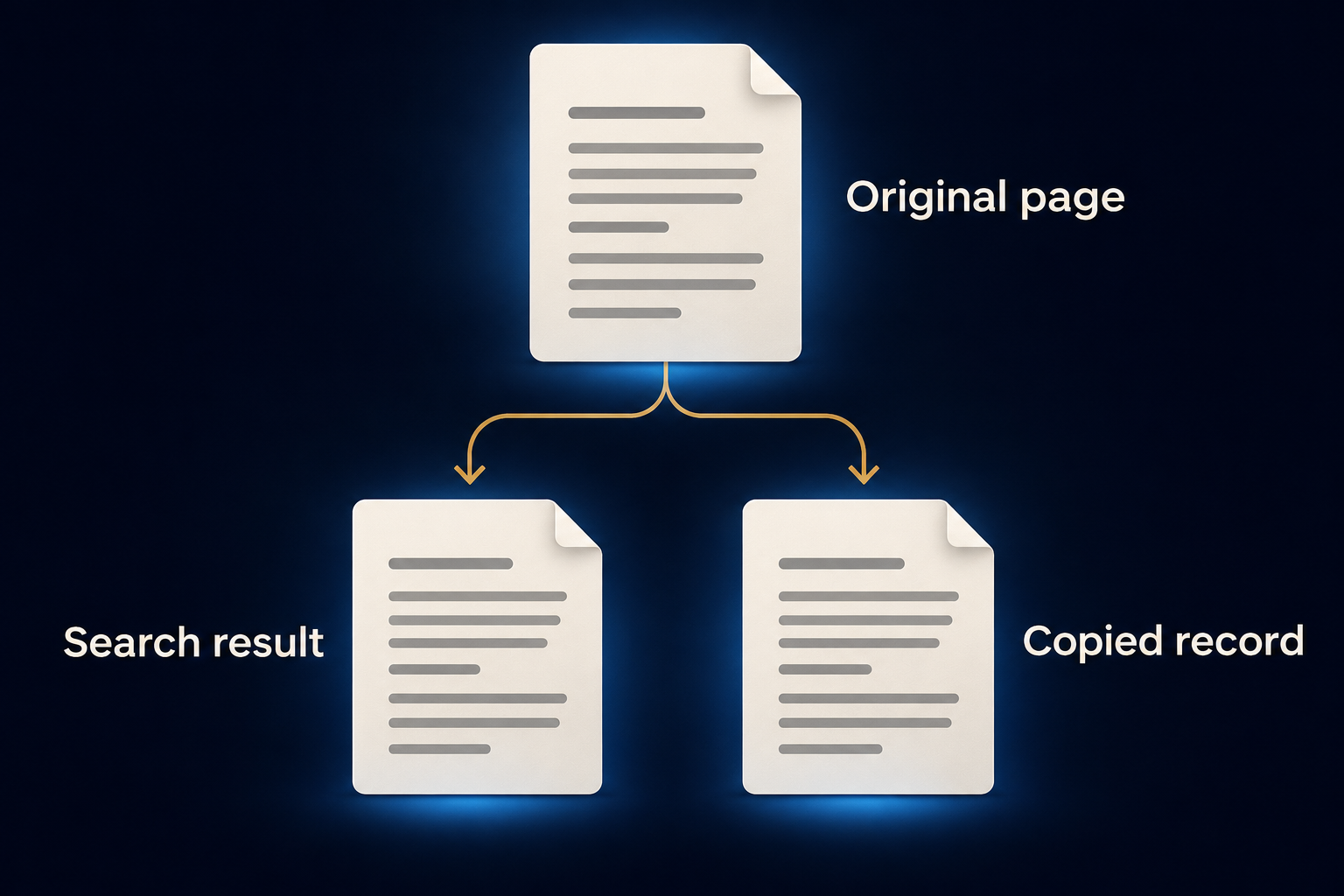
A page, a search result, and a copied listing are separate
Start at the address where you found the detail. Search can point to a page you control, a broker’s copy, or a different source entirely.
Deleting a field from your own account can reduce future visibility. It doesn’t delete a copy another site already made or remove a search result immediately.
Google’s removal guidance describes requests for qualifying personal information in Search. That affects Google’s results, not necessarily the page you can reach directly.
Keep the cleanup focused on what could harm you
A stale job title and a current home address don’t deserve equal attention. Start with the details that make impersonation, unwanted contact, or threats easier.
- A page you manage: Change the field or its visibility, then verify the public version after signing out when safe to do so.
- A broker’s listing: Use its verified suppression, correction, or opt-out route and save the exact profile address.
- A search entry: Decide whether it shows current private information or still reflects content that already changed at the source.
Start With the Record You Found, Not the Story About It
Confirm that the listing actually describes you
People with the same name can appear in several records, and aggregated profiles can contain errors. Before requesting removal, verify that the listing includes an identifying detail you recognize.
Don’t post the listing publicly to ask whether it is right. Save its address privately, noting which fields match and which belong to someone else.
An old address is still useful to someone impersonating you, even if nobody receives your mail there. Mark it separately from the address that creates an immediate safety issue.
When a listing combines you with someone you don’t know, don’t try to investigate that person. Ask the site to resolve the mistaken association without disclosing more than it needs.
Distinguish something that can be seen from evidence of a break-in
Public information can be collected without a stranger ever signing into your account. That doesn’t make the results harmless, or tell you whether every field was publicly visible.
Meta’s account of a historical scraping incident illustrates how exposed profile information isn’t always evidence of a new password compromise. It doesn’t establish how your record was obtained.
If you find an actual change in your account or activity you didn’t authorize, use the provider’s security process. Handle that as a separate problem from removing a listing.
Don’t download a leaked dataset to see whether your information appears in it. A suspect archive can contain other people’s information and may create new security or privacy problems.
Keep a minimal record of the exposure
Write down the page address, the date and which category of information you saw. You may need that record if the listing reappears or you report impersonation.
A screen capture can be useful for a complaint, but store it privately and redact details before forwarding screenshots to anyone who doesn’t need the full record.
If the record is connected to threats or stalking, assess your personal safety before changing settings a person might notice. A trusted safety adviser can help you plan the timing.
Pick the Removal Route for the Copy You Can See
Change the source page if you own or manage it
Start with a profile, post, or directory entry you actually control. Remove or restrict the information there before asking a search engine to update what it shows.
Check both the page and old documents linked from it. A public PDF, meeting notice, or downloadable contact sheet can still expose the detail after you edit the visible profile.
If an employer or group publishes the information, tell its editor which page or file needs changing without giving them unnecessary personal details.
Verify the change from a signed-out view where safe and practical. What you see while managing a profile may include fields ordinary visitors cannot see.
Request suppression or correction at the broker
The FTC’s people-search guidance describes how brokers combine information from multiple sources. Suppressing a broker’s listing does not erase the government or other records behind it.
Find the broker’s privacy or opt-out page independently. Be cautious if a site claiming to remove your data asks for payment or sensitive information you weren’t expecting to provide.
Match the profile address to the removal form. Some sites have several entries for one person, and sending only your name can make it hard to identify the right record.
Where identity verification is required, read the instructions and use the minimum accepted information. Don’t send a full identification document to an unverified support address.
Save the confirmation reference and date, then recheck that exact listing. A request to remove a profile is not the same as an acknowledgment that it is gone.
Remove qualifying search entries without confusing the result and the source
Use Google’s process when a search entry displays eligible personal contact information. Some results are excluded or assessed differently, and approval doesn’t take the underlying page offline.
An old snippet can outlast changes to the source. Use the search provider’s refresh process rather than saying the source still publishes the detail.
After the search entry changes, check the page directly when it is safe to do so. If the detail is still visible there, continue the source request separately.
If you see copies on more than one search service, check each service’s own procedure. One provider’s removal decision doesn’t automatically apply to another.
Prioritize the Information That Creates the Most Risk
An old phone number or home address can make a pitch sound credible
A caller may know an address without working for the bank or company it claims to represent. Test the request through a number or app you already trust.
When the exposed number is still active, think about which accounts use it for recovery. Check the available protections with the provider without giving a stranger access to your line.
If an employer’s staff page still lists a personal number, ask about replacing it with a business contact. This addresses the source rather than only hiding a search link.
An exposed password or financial record needs more than removal
Change an exposed password on the legitimate service, and replace reuse elsewhere. Removing a page that mentions the password doesn’t revoke sessions or restore a changed recovery address.
For an unfamiliar payment or account, report it through the institution’s verified channel. In the United States, IdentityTheft.gov can help you create a recovery plan when identity theft occurs.
Don’t freeze credit just because a result lists your old job title. A credit freeze can be appropriate for some identity risks, but won’t remove your contact information.
Reduce repetition by keeping a simple follow-up plan
Use a private list with the page address, type of record, request date, and confirmation status. That keeps a broker opt-out separate from a request sent to a search engine.
On the follow-up date, verify the exact result rather than searching only for a common name. Note whether the original page, its snippet, or a different copy now needs attention.
A report marked closed might only cover one result or one profile. Compare the decision’s listed address with the page that still shows the information.
If a broker rebuilds a listing, repeat the verified opt-out process as needed. Look for an original source still publishing the detail, particularly if the same error reappears elsewhere.
Walk One Exposed Detail Through All Three Places
A changed profile still has the old phone number in Search
Suppose you took your personal number off an organization page, but a search result still shows the old text. First confirm the live page no longer contains it.
If the source really changed, Google’s outdated content guide explains when to request a refresh. This is different from a removal request about information that remains live.
Check for another live page still supplying the same number. The result might lead to an old membership directory rather than the profile you already fixed.
Once a result is refreshed, record that result separately from the source. The next place publishing the number can still need its own request.
A people-search entry aggregates information you never posted together
A broker might show your old street and current name together, even when no single public profile contains both. Try to identify whether the listing is a composite.
California residents can check CalPrivacy’s DROP guidance for one request to eligible data brokers. Use the state’s own instructions to understand what the request can and cannot cover.
DROP does not automatically remove information you provided directly to a business or erase a public record. Where another rule applies, contact the business or agency through its own process.
If you live elsewhere, check what is available where you reside. A commercial site claiming it can remove every record is not evidence that a legal removal route exists.
An exposed address appears in a targeted message
Suppose a text uses a past address and asks you to confirm a current one. Don’t correct the sender or follow its link, even if the old information is accurate.
If the company name is familiar, verify the request separately through its official app or established contact. A correct detail doesn’t establish that the sender can act for the company.
When a message threatens physical harm, skip the search cleanup until you can take appropriate safety action. Organize evidence for trusted help rather than experimenting with a threatening sender.
Keep your notes small and private. You need enough information to explain what was shown and when, not a collection of every place it appeared.
What to Do If You Find Personal Information You Didn’t Post
- Record the specific page and the exposed field. Save the address and a private note without sharing the record with other people unnecessarily.
- Check whether you control the source. Remove or restrict an unnecessary field on your own profile before pursuing copies elsewhere.
- Submit a request through the right channel. Ask the page owner or broker to handle the source, and request search removal or refresh separately where eligible.
- Set a follow-up date and retain the receipt. Confirm what actually changed rather than treating an automated acknowledgment as removal.
- Review any signs of account or financial misuse. Use the genuine service to respond to unauthorized access or payments without relying on messages that reference the exposed information.
- Seek appropriate help if the exposure comes with a threat. Preserve relevant details safely and follow local advice rather than confronting the person or posting the record publicly.
Frequently Asked Questions
Does a scraped profile mean someone stole my password?
Not by itself, because the information might have been available elsewhere. Check the real account for unauthorized activity if there are reasons to suspect someone accessed it.
Does a Google removal also delete the source page?
No, search removal affects how a result appears in Search. Ask the site that publishes the information to change or remove it when possible.
Can I remove information from a data broker and a public record together?
Usually you must address them separately. A broker can suppress a listing without altering an underlying public record, and the available remedies depend on the record and jurisdiction.
Why did my address come back after I opted out?
A broker may create or update records again as it receives information. Keep a confirmation and verify whether the new entry is the same listing or another copy.
How do I handle outdated text in a search result?
Check whether the source no longer displays the detail. If the page changed, look for the search service’s outdated-content process rather than reporting an unchanged live page.
What if an opt-out form asks for identification?
Verify that it belongs to the company and read what it accepts. Provide only the information required through that official channel, and avoid unsolicited requests for identity documents.
The Bottom Line
Remove the copy you control, then ask the broker or search provider to handle what remains. Keep separate records because each request answers a different problem.
Treat threats, stolen credentials, or unauthorized transactions as their own incidents. A disappeared search result is welcome, but it doesn’t undo anything someone already copied or used.

Join the discussion
0 commentsShare your experience or ask a question about this article.
Community experiences
Did this happen to you?
Your experience could help someone recognize the same scam. Submit a private report for our team to review.
I experienced this tooReports are reviewed before publication. Sharing publicly is always your choice.
Discussion
Start the conversation
Have a question or something useful to share? Add the first comment.