

If you have been scrolling social media lately, chances are you have seen the MoxiPlayer TV Stick. The pitch is tempting: plug it in, unlock loads of entertainment, stop paying for subscriptions, and upgrade any TV in minutes.
Then you click the link and land on something that looks like a tech news article. It has an “UPDATE” banner, a named author, star ratings, huge engagement numbers, and a story about a founder who built a “game-changing” device after years of frustration. It feels credible, almost like you are reading a review instead of an ad.
That is exactly the point.
Because once you look at how the MoxiPlayer TV Stick is being sold, the story starts to feel less like a breakthrough product launch and more like a familiar online sales operation. One that relies on urgency, vague promises, and a return process that can become a dead end when the only option is shipping back overseas.
This article is here to help you make a clear decision. We are going to walk through what the MoxiPlayer TV Stick really is, the red flags inside the TechTrends advertorial, how this type of dropshipping scam works step by step, and what to do if you already bought it.
No panic, no hype, just a calm, detailed breakdown you can actually use.
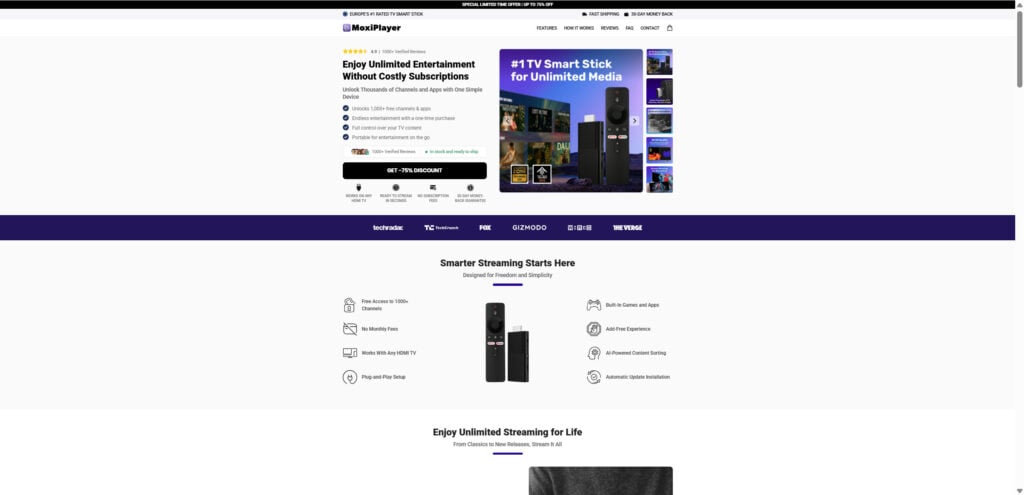
Overview
Let’s start with the big picture. When people search “MoxiPlayer TV Stick review” or “Is MoxiPlayer legit,” they usually are not asking whether a small HDMI stick can run apps. They are asking whether the promises match reality, and whether they are about to get trapped in a purchase they cannot undo.
The strongest warning signs are not hidden in the device itself. They are in the way the product is marketed and fulfilled.
The TechTrends “review” is an advertorial, not independent journalism
The promotional page is framed like an editorial article. It uses a publication-style header, the “TechTrends” name, an author credit, and a confident tone that sounds like it is reporting facts.
It includes details like:
- A bold “UPDATE” claiming the device is “sold out in retail stores nationwide”
- A limited-time sale banner advertising up to 75% off
- A named author and a specific date (for example, February 18, 2026)
- Large engagement numbers that imply massive popularity
- A call-to-action button that sends you straight to the checkout funnel
This format is designed to lower your guard. The goal is to make you feel like you are reading news coverage, not being sold something.
The problem is that advertorials are controlled by the seller or an affiliate network. They can say nearly anything, as long as they avoid a few legal tripwires and tuck key qualifiers into the fine print.
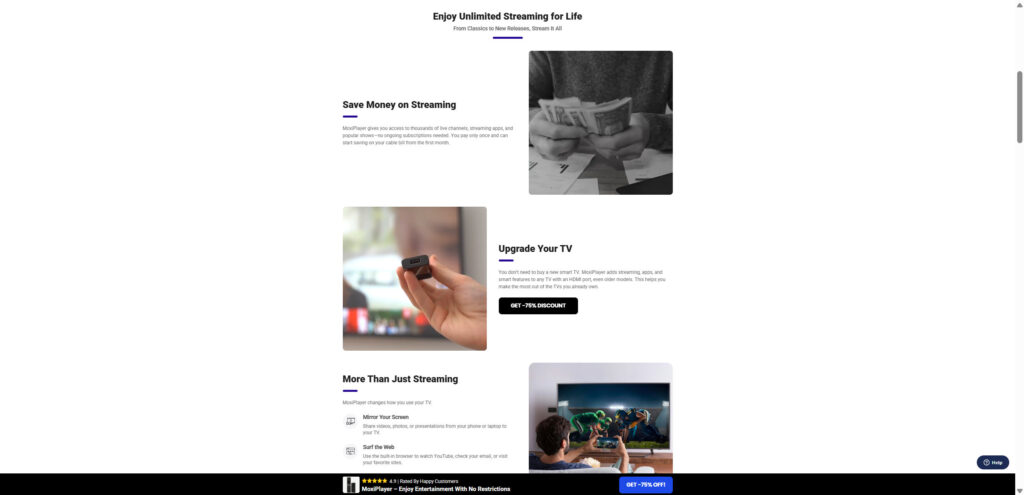
The founder story is emotionally persuasive, but hard to verify
The advertorial introduces “Jacob,” described as an engineer who traveled, loved movies, got frustrated with streaming limitations, then spent two years developing MoxiPlayer.
It is a great story. It is also a common marketing device.
Founder narratives work because they make the purchase feel personal. You are not buying a gadget. You are supporting a clever creator who “finally solved” the problem big companies ignored.
But there are obvious questions a real technology company can answer quickly:
- Who owns the company, and where is it registered?
- Is there a real leadership team with a track record?
- Are there patents, filings, or product documentation?
- Is there a support phone number and a physical address?
- Are there recognized retail partners if it is “sold out nationwide”?
In many dropshipping campaigns, the founder exists only inside the story. The identity is not independently verifiable, and the story is used as a trust shortcut.
The biggest promise is implied, then quietly watered down
The advertorial repeatedly suggests you can enjoy entertainment without paying all those “costly subscriptions.” It strongly hints that the device helps you access content hubs like Netflix, Max, and Disney+ “all in one interface.”
Then it adds a small disclaimer like:
“Subscription fees may apply from streaming platforms, not from MoxiPlayer.”
That single line changes everything.
Because it means the device itself does not charge a monthly fee. It does not mean Netflix becomes free. It does not mean paid sports channels become unlocked. It does not mean premium streaming services suddenly stop requiring accounts.
This is one of the most common tricks in this product category:
- The headline implies “no subscriptions needed”
- The fine print clarifies “we do not charge a subscription”
- The buyer learns later that the real subscriptions still apply
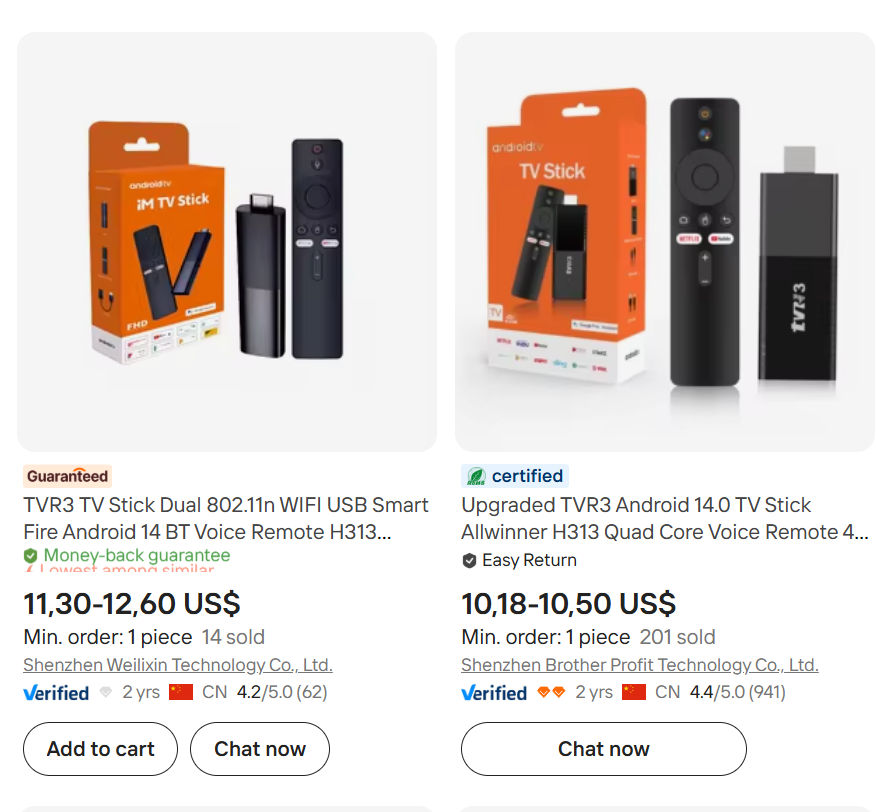
The device appears to be a generic Android TV stick sold under many names
This is where the “dropshipping operation” angle becomes important.
The MoxiPlayer TV Stick, based on the images and commonly advertised specs, looks like a mass-produced Android streaming stick. Similar devices are sold wholesale on overseas supplier sites for around $10 to $15 per unit, sometimes even less in bulk.
They usually come with:
- A basic Android TV style interface
- A generic remote
- Entry-level hardware that can run simple apps
- Very limited long-term software support
These products are designed to be rebranded. Sellers can put any logo on the site, write any story, and push the same hardware as a “new invention.”
That is why you keep seeing similar campaigns with different names. The branding changes. The stick stays the same.
The “sold out nationwide” claim is a classic credibility booster
When an advertorial says something is sold out in retail stores across the country, it triggers a very specific assumption in the reader’s mind:
“This must be big. Stores do not sell out of random devices unless the demand is real.”
But it also creates urgency. If stores are sold out, you better buy online now.
Here is the issue. If a product is truly selling through major retail channels, you can usually confirm it. You would see:
- Retail listings
- Store locator pages
- Official partner announcements
- Legitimate press coverage
In these campaigns, the “sold out” line often exists solely to funnel you into the website checkout, while making the purchase feel safer and more urgent.
The discount structure is designed to anchor your perception
The TechTrends advertorial uses a familiar pricing script:
- “Retail price” is presented as high, around $140
- A temporary discount is offered, around $70
- You are told it is “wholesale pricing”
- You are urged to act fast because only the first 1,000 buyers get it
This structure does two things at once:
- It makes the product feel premium, because “retail” is high.
- It makes you feel smart, because you are “getting a deal.”
But if the underlying hardware is a common $10 to $15 wholesale stick, the discount story is not a generosity move. It is a conversion tactic.
The social proof is controlled, not independently verified
The advertorial shows star ratings, thousands of reviews, and a comment section that looks like social media.
This can be persuasive, especially when you see statements like:
- “Arrived fast”
- “Works just as advertised”
- “Streams anything”
- “No regrets”
- “Love it, already ordered another”
The problem is not that every positive comment must be fake. The problem is that you cannot treat a controlled comment section inside a sales funnel as independent evidence.
A legitimate product with massive sales typically leaves a broad footprint across independent platforms. Dropshipping campaigns tend to concentrate reviews where the seller controls what is visible.
The return process is where many buyers get stuck
This is the part that matters most for consumers.
Many dropshipping operations promise a “30-day money-back guarantee,” but the process often includes one or more of the following obstacles:
- Returns require shipping the item overseas, often to China
- The buyer must pay for return shipping
- The return address may be unclear or delayed
- Support responds slowly or not at all
- Buyers are offered partial refunds to avoid full returns
- The time window can expire while you wait for replies
Even when a refund policy exists on paper, it can be structured in a way that makes real refunds unlikely.
If the return shipping costs nearly as much as the product, or if customer service drags out responses, many people give up.
What the device can likely do, and what it cannot do
To be fair, a generic Android TV stick can still be useful in a limited way. It can:
- Turn a basic HDMI TV into a “smart” interface
- Run some streaming apps
- Play free ad-supported content
- Mirror screens in some setups
- Play certain local media files with the right apps
But it cannot legally do what the marketing heavily implies:
- It cannot make Netflix free
- It cannot unlock Max, Disney+, or Prime Video without accounts
- It cannot bypass paid sports networks without subscriptions
- It cannot magically create premium content access out of nowhere
So when the advertorial says “x10 more entertainment,” what it usually means in practice is:
“You can install more apps, including free ones, and browse more sources.”
That is a very different promise than “replace your subscriptions.”
Why this matters for your purchase decision
This operation is not just about an overpriced device. It is about the risk profile.
When you buy from a known brand, you get:
- Transparent specs
- Verified app compatibility
- Reliable updates
- Easy local returns
- Support you can reach
When you buy through an advertorial dropshipping funnel, you are often taking on:
- Unclear support
- Unclear return logistics
- Overstated capabilities
- Inflated pricing
- Greater chance of buyer regret with fewer ways out
That is why people label these campaigns as scams. Even when a physical device arrives, the marketing, pricing, and refund barriers can still make the overall experience feel deceptive.
How The Operation Works
This section matters because it helps you spot the pattern, not just for MoxiPlayer, but for the next “miracle TV stick” that shows up with a different name and the same promises.
Below is a step-by-step breakdown of how the MoxiPlayer TV Stick scam model typically works, based on the TechTrends advertorial structure and the common dropshipping funnel playbook.
Step 1: Choose a cheap, mass-produced product that is easy to rebrand
The first step is sourcing.
Sellers pick a generic Android TV stick because it checks all the boxes:
- Low cost to acquire, often $10 to $15 wholesale
- Lightweight and cheap to ship
- Broad appeal, because everyone watches TV
- Easy to explain in a 20-second ad
- Easy to rebrand with new names and websites
The device is not unique. The marketing wrapper is.
Step 2: Create a new brand name that sounds established
Next comes branding.
“MoxiPlayer” sounds like a real consumer tech product. It is short, memorable, and feels like something you might see next to Roku or Fire TV.
The seller builds a website with:
- Clean design
- Professional-looking product images
- Badges like “#1 rated”
- Claims like “verified reviews”
- Quick checkout
This is not about technology credibility. It is about purchase confidence.
Step 3: Build an advertorial that looks like a trusted publication
This is where the TechTrends page becomes important.
The advertorial is designed to feel like an independent review, not marketing. It usually includes:
- An author name and date
- A personal tone, like the writer tested it
- An “UPDATE” banner for urgency
- A story that reads like reporting
- A fake sense of mainstream popularity
It is not a review. It is a conversion tool.
And it works because it gives the buyer a narrative to trust.
Step 4: Use a founder story to create emotional buy-in
The “Jacob, the mastermind” storyline is a persuasion technique.
Instead of saying, “Here is a generic Android stick,” the advertorial says:
“This is a device created by an engineer who got tired of streaming limitations.”
It makes the buyer feel like:
- The device is thoughtfully designed
- The company is mission-driven
- The product solves a real pain point
- The buyer is making a smart choice
The emotional angle is used to replace hard proof.
Step 5: Suggest subscription-free access without directly promising it
This is one of the most important steps, and it is where people get misled.
The advertorial uses language like:
- “Enjoy unlimited entertainment without costly subscriptions”
- “Offers content found on hubs like Netflix, Max, Disney+”
- “No subscription fees”
Then it adds a qualifier:
- “Subscriptions may apply from streaming platforms”
This structure allows the marketing to create the impression of free premium content while technically protecting itself with fine print.
Many buyers only remember the headline, not the disclaimer.
Step 6: Add aggressive scarcity and urgency triggers
The funnel then turns up pressure.
You see things like:
- “Only a few left”
- “First 1,000 buyers”
- “Sold out nationwide”
- “Unprecedented spike in sales”
- “Discount ends today”
- “100,000 visitors per day”
These are designed to trigger a simple emotion: rush.
When people rush, they do not comparison shop. They do not check refund policies. They do not look for independent reviews.
They buy.
Step 7: Anchor the price high, then offer a “massive discount”
This is the pricing psychology piece.
The advertorial presents:
- A high “retail price,” around $140
- A discounted price, around $70
- A story explaining why it is discounted
- A warning that the discount is limited
The buyer feels like:
“I am getting a premium device for half price.”
But if the hardware is a low-cost stick, that “retail price” is often just an invented anchor.
Step 8: Convert buyers with bundles and upsells
Many funnels push bundles because they increase revenue per customer.
You might see:
- Buy 1 for $70
- Buy 2 for a lower price each
- Buy 4 for the “best value” price each
This works because:
- People imagine gifting or equipping multiple TVs
- The deal looks better at higher quantities
- The checkout feels like a smart “bulk buy”
For the seller, bundles are extremely profitable when the base product cost is low.
Step 9: Fulfillment is handled overseas, often with long or inconsistent shipping
In many dropshipping operations, the seller is not holding inventory locally.
Orders are forwarded to a fulfillment partner, often in China. That can lead to:
- Delayed tracking activation
- Longer-than-promised delivery
- Limited shipping updates
- Confusion about where the product is coming from
Some campaigns claim fast delivery in a few days, but buyer experiences often vary widely.
Step 10: Customer support is limited, slow, or email-only
Once the purchase is complete, the funnel’s job is done.
Support is often reduced to:
- Email-only contact
- Template responses
- Delays that push you past refund windows
This is not always intentional cruelty. It is often part of the business model. A lean operation can make more profit when it spends less on support and refunds.
Step 11: Returns become “possible,” but not practical
This is where many customers feel trapped.
The policy may say “30-day money-back guarantee,” but the process often includes:
- Shipping the product back to China
- Paying return shipping yourself
- Meeting strict packaging or timing requirements
- Waiting for approval before sending the return
- Receiving partial refund offers instead
If return shipping costs $25 to $50, many people will not bother returning a $70 product. That is the quiet genius of the setup.
Refunds become rare, not because they are forbidden, but because they are inconvenient.
Step 12: If the brand burns, it reappears under a new name
When complaints grow, the seller can:
- Launch a new brand name
- Create a new advertorial
- Reuse the same product
- Repeat the cycle
That is why these “TV stick” campaigns keep resurfacing with different names, the same layout, and the same promises.
What To Do If You Have Bought This
If you already bought the MoxiPlayer TV Stick, take a breath. You are not powerless. You just need to act calmly and quickly, because time matters with refunds and disputes.
Here are the most practical steps, in order.
- Gather evidence before you contact anyone
Take screenshots of the advertorial claims and the product page, especially lines about “no subscriptions,” “sold out nationwide,” “risk-free,” shipping timelines, and the discount offer.
Save:
- Order confirmation email
- Receipt or transaction ID
- Tracking details if available
- Any support emails you send or receive
This documentation helps if you need a chargeback.
- Contact the seller immediately in writing
Send a short, clear message requesting a refund.
Include:
- Full name
- Order number
- Date of purchase
- A direct request for a full refund
- A deadline for response, such as 48 hours
Keep it calm and professional. Do not argue. You want a clean written record.
- If it has not shipped yet, request cancellation
If tracking has not started, ask for cancellation immediately. Some sellers will cancel rather than deal with disputes. - Do not accept a partial refund unless you truly want it
Many operations offer partial refunds to avoid returns. If you accept, you may lose the right to dispute the rest later.
If you are unhappy with the product, push for a full refund.
- If they require shipping back overseas, price it out first
Before you mail anything, check what it will cost to ship to the provided address.
If return shipping is unreasonably high, that is useful information for a payment dispute. It supports the argument that the “money-back guarantee” is not practical.
- Start a dispute with your payment provider if support stalls
If you paid by credit card, contact your bank and request a chargeback for “item not as described” or “misleading advertising,” depending on your situation.
If you paid through PayPal or another payment platform, open a dispute through their resolution center.
Important: do not wait too long. Dispute windows are limited.
- Monitor your account for additional charges
Keep an eye on your card statements for unexpected charges. If you see anything unusual, contact your bank immediately. - If you plugged the device in, take basic safety steps
Generic Android sticks vary in quality and update support.
To reduce risk:
- Do not save payment methods on the device
- Avoid using your primary Google account
- Use a separate streaming account if you must log in
- Keep your Wi-Fi password secure
- Leave a factual review where others will see it
Share your experience on platforms where the seller cannot edit or hide it. Keep it factual and specific.
Mention:
- Shipping time
- Device performance
- Whether claims matched reality
- Whether refunds were honored
- Whether return shipping was overseas
This helps other buyers make smarter decisions.
- Report the advertorial if it feels misleading
You can report misleading advertising to consumer protection agencies in your country, and you can also report the ad platform if you saw it through social media.
Your report matters more than you think. Patterns only get attention when enough consumers document them.
The Bottom Line
The MoxiPlayer TV Stick is being sold through a highly polished TechTrends-style advertorial that uses urgency, social proof, and a founder story to make a basic product feel like a once-in-a-decade innovation.
In reality, the device appears to be a generic Android TV stick that can be sourced cheaply and rebranded easily. The marketing strongly implies subscription-free access to premium entertainment, then quietly retreats into fine print. The pricing is anchored high to make the discount feel irresistible. And the return process can become the real trap, especially when it requires shipping back overseas at your expense.
If you want a reliable streaming device, there are safer options from established brands with clear app compatibility, real support, and simple returns. If you already bought MoxiPlayer, focus on documentation, written communication, and fast action through your payment provider.
The best defense against operations like this is simple: slow down, read the fine print, and trust patterns more than promises.
FAQ
Is the MoxiPlayer TV Stick legit or a scam?
It is a real device, but it is marketed with exaggerated claims and sold through a dropshipping funnel. For many buyers, the mismatch between promises and reality makes it feel like a scam.
Does MoxiPlayer unlock Netflix, Disney+, Max, or live sports for free?
No. Those services still require paid subscriptions and valid accounts. A TV stick cannot legally bypass that.
What does “no monthly fees” actually mean?
It usually means MoxiPlayer does not charge you a monthly fee. It does not mean streaming services become free.
Why does the site claim “sold out nationwide” or “only a few left”?
These are common urgency tactics used in advertorial campaigns to push people to buy quickly without comparing alternatives.
Is the MoxiPlayer stick just a cheap Android TV stick?
It appears to be a generic Android TV stick that can be found under different names from overseas suppliers, often for much less than the advertised price.
Are the reviews and ratings on the advertorial reliable?
Treat them with caution. Reviews shown inside a sales funnel are controlled by the seller or affiliates and may not reflect typical customer experiences.
Can I return it for a refund?
They may advertise a guarantee, but returns can be difficult if you are required to ship it back overseas at your own cost.
What should I do if I already bought it and regret it?
Save screenshots of the claims, contact the seller in writing, and if they stall, contact your bank or payment provider to ask about a dispute or chargeback.
Is it safe to log into my accounts on it?
Be cautious with unknown devices. Avoid storing payment methods, consider using a separate account, and keep your network secure.
What is a safer alternative to MoxiPlayer?
Established streaming devices from well-known brands typically offer clearer specs, better support, regular updates, and easy returns.

Join the discussion
2 commentsShare your experience or ask a question about this article.
Community experiences
Did this happen to you?
Your experience could help someone recognize the same scam. Submit a private report for our team to review.
I experienced this tooReports are reviewed before publication. Sharing publicly is always your choice.
Discussion
I’m glad I reviewed your analysis of MoxiPlayer before buying one. You provide a valuable service. Keep up the good work. I’m a 90-year-old Marine Corps veteran with a service-connected disability. I can’t afford scams like MoxiPlayer.
In reply to Richard M. Block
Hi Richard, thank you very much for the kind words.
I’m glad you checked before buying, and I’m especially glad the article helped you avoid losing money. These scams are often designed to target people who can least afford the risk, which is exactly why independent research matters so much.