

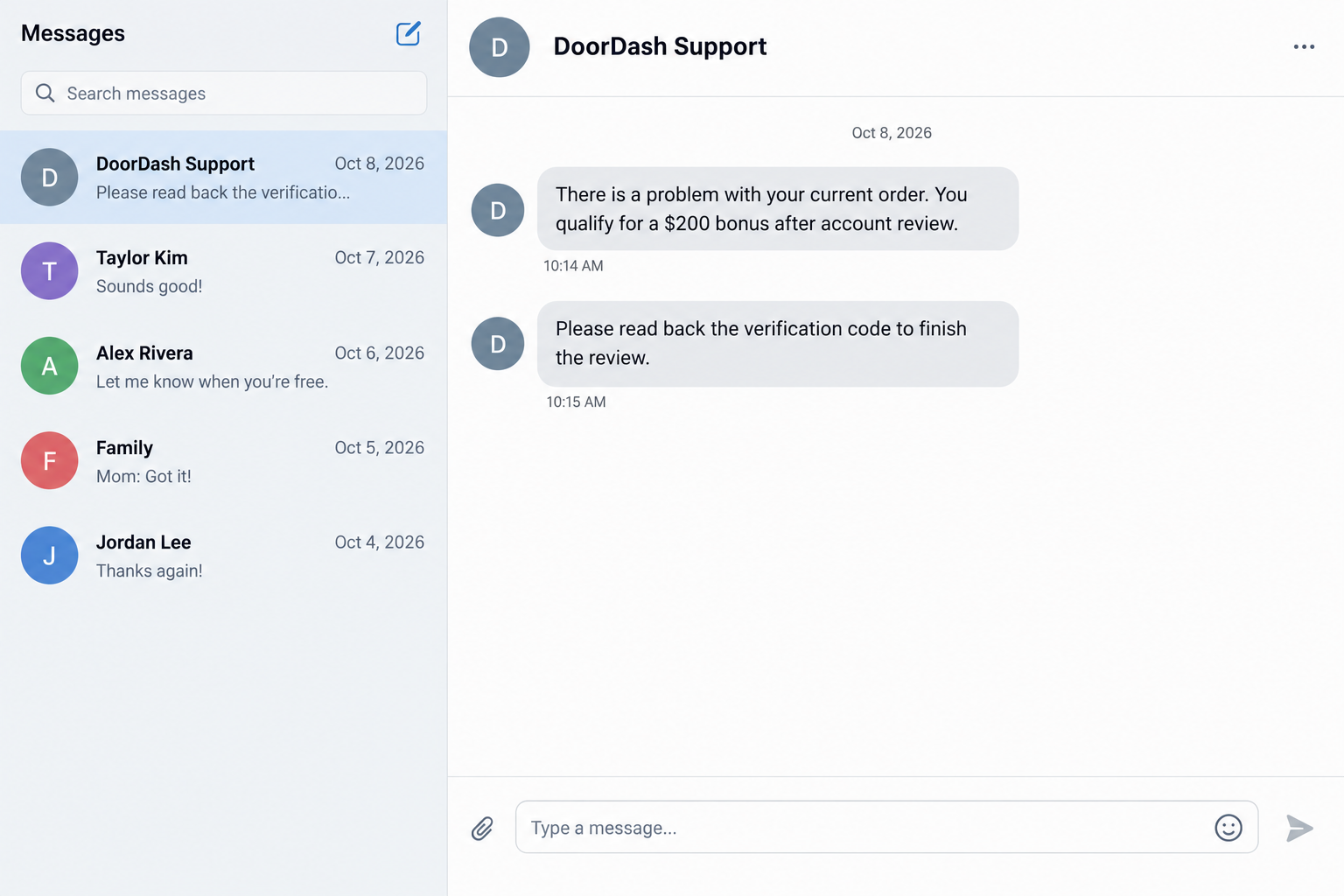
The call arrives while you’re finishing an order. Someone from Support mentions a problem, then offers a $200 bonus for your trouble.
A DoorDash support scam can feel like part of the job. The important question is what that caller needs you to do next.
Overview
The problem is the impersonator, not DoorDash
This is an account-takeover scam in which a caller or message pretends to resolve an order, deliver assistance, or release a bonus.
The request crosses a clear boundary when the supposed helper wants your password, a security code, or an attacker-chosen replacement password.
DoorDash explicitly warns Dashers about those requests in its account-protection guidance. Knowing something about an order does not make the request safe.
The $200 amount is one reported lure, not a confirmed promotion or a fixed feature of every incident. The same approach can use another amount.
DoorDash is a legitimate service. The deceptive call, link, or conversation is the scam, not the existence of support or genuine bonuses.
Different accounts create different kinds of loss
For a Dasher, access can put earnings and payout settings at risk. That is different from a customer account holding order history and payment methods.
A customer should check purchases and payment activity. A driver should also review where earnings are being sent. Restaurant accounts require their own support route.
Do not assume an ordinary delivery customer has a driver payout account. Mixing those roles can send someone toward the wrong recovery steps.
An unexpected code or reset notice is worth investigating, but it does not by itself prove that anyone successfully entered the account.
Use the app to restart the conversation
If a contact asks for account secrets, end that exchange. Open the app yourself and contact support from the route available there.
The useful checks are concrete:
- Did you initiate this support contact independently?
- Is the person requesting a login secret or asking you to change it?
- Does the claimed bonus appear through your normal account?
- Are your account email, phone, and payment settings still yours?
- Has any purchase, withdrawal, or payout changed without your approval?
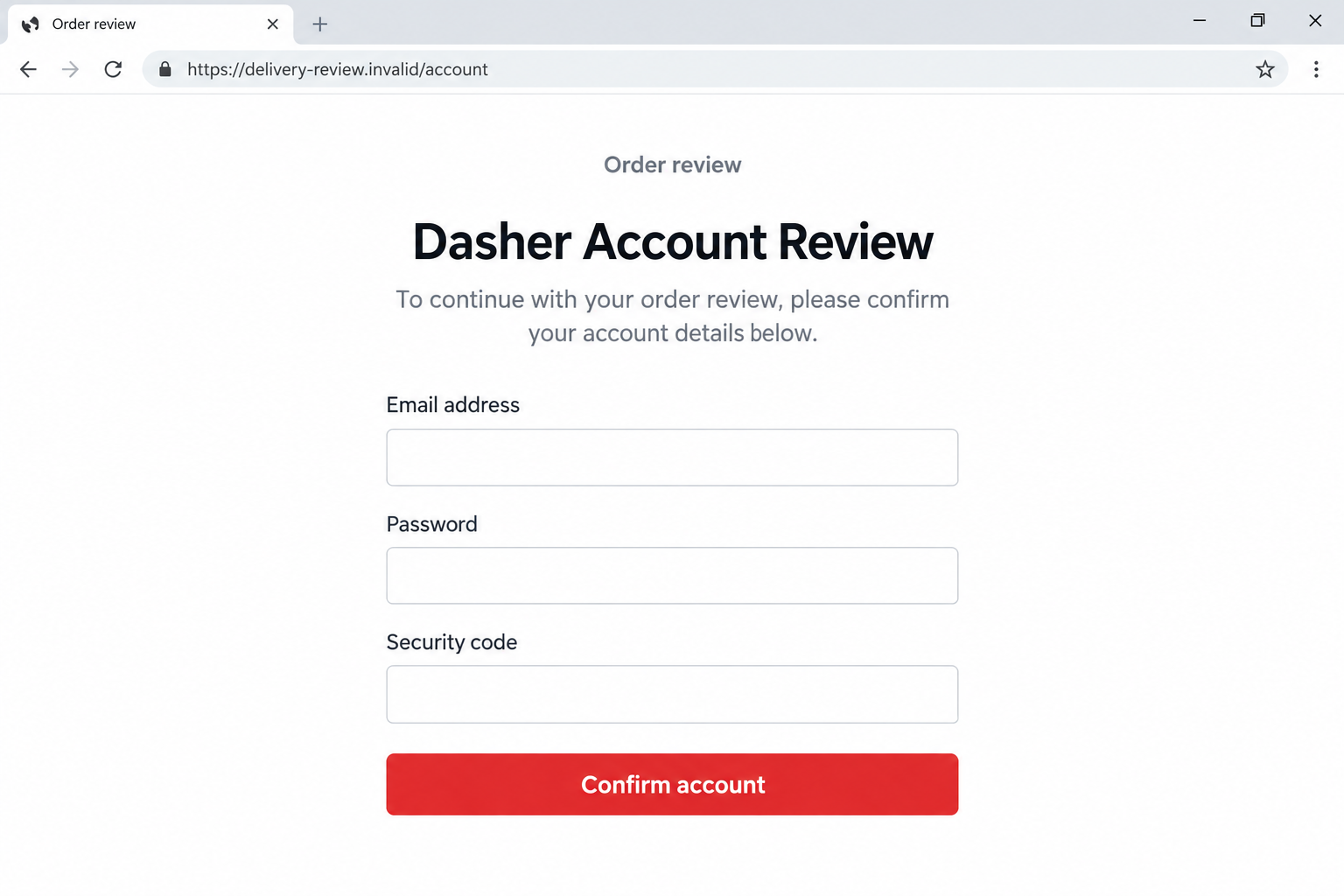
The images are fictional screen-only examples. They illustrate the unsafe requests, not a captured caller, live website, or verified bonus offer.
Why an Order Problem Makes the Call Believable
The interruption fits the working day
A delivery involves timing, substitutions, cancellations, and communication. A call during that process can seem more plausible than an unrelated message arriving overnight.
The driver may be looking for parking or trying to finish a pickup. There is less attention available for checking who actually started the conversation.
A caller can benefit from that ordinary pressure without controlling the whole delivery platform. The recipient supplies much of the missing credibility.
It helps to separate two questions: whether an order has a problem, and whether this person is authorized to request a login secret.
The first question might have a real answer. It does not change the answer to the second.
A bonus changes suspicion into cooperation
The promised credit or assistance gives the call a friendly ending. Instead of threatening a loss, the caller offers to make the inconvenience worthwhile.
That can make a request feel like routine eligibility checking. A code is described as a small administrative step rather than access to an account.
Real incentives can exist, so an article should not dismiss every bonus. The unsafe part is handing over access to obtain the supposed benefit.
A legitimate offer should remain explainable when checked through your own app. You should not need to stay on an unsolicited call to discover it.
How the DoorDash Support Scam Works
Step 1: A caller attaches the story to an order or bonus
The approach may begin with an alleged cancellation, an order review, or financial assistance. Sometimes the caller makes the issue sound urgent.
DoorDash’s warning includes a scenario where a small order leads to a cancellation request and then a supposed support call seeking the driver’s password.
That example is a warning pattern, not evidence that every small order is fraudulent. Ordinary customers place small orders for perfectly legitimate reasons.
Do not confront a customer simply because an order resembles an online anecdote. The important signal is the later request for confidential account access.
Stay focused on what you can verify. Record the order reference and the caller’s claim, then check through support you reach independently.
Step 2: The supposed helper makes access sound necessary
The caller explains that a review must be completed before the issue can be resolved. The explanation may sound technical without identifying any real account process.
You might be asked to provide the account email, enter a linked page, or accept a reset as part of clearing the problem.
Some contacts instead tell you which password to use. A password chosen by an unexpected caller is not private, even if you enter it yourself.
This is the turning point. The conversation stops being about the order and starts changing who can control the account.
You do not owe the caller a demonstration of trust. Leaving the call and opening your own support route is a sensible way to resolve uncertainty.
Step 3: A real security step is repackaged as verification
A code may arrive from a legitimate account system after someone starts a login or recovery attempt. Its arrival does not authenticate the person on the call.
The caller can ask you to read it aloud while insisting that it is needed for the bonus. That story changes the apparent purpose, not the code’s power.
Read the actual message on your screen. A warning against sharing a code is more meaningful than the caller’s explanation of why an exception is needed.
Do not approve an unexpected prompt merely to make it disappear. An approval may complete an action you did not initiate.
If you already disclosed a code, explain that precisely to support. They need to distinguish a possible attempted login from a confirmed account change.
The next illustration shows an invented account-review form. Its address is fictional, and none of the displayed fields should be filled with real information.
Step 4: Access may expose the account’s money-related settings
If access succeeds, the consequences depend on the account and its available controls. Not every stolen code produces an immediate withdrawal.
A driver should investigate earnings destinations, while a customer should investigate orders and payment activity. Both should check account contact details and unfamiliar changes.
The scammer may keep talking while making changes. A calm voice and a promise that the review is almost finished can discourage the recipient from looking.
Do not take a displayed balance as the whole answer. A future payout destination can matter even when today’s balance still looks unchanged.
Similarly, no immediate bank charge does not prove a disclosed password is safe. Account access and financial loss are separate events to contain.
Step 5: The caller leaves the recipient with a second problem
The original order or bonus may never be resolved. The recipient now has to determine what was shared and whether the account remains under their control.
A message that says everything is fixed is not reliable confirmation. The account’s own records and independently reached support are better starting points.
Keep any cancellation or payout dispute separate from the impersonation report. Both can be important, but they may involve different records and teams.
There is no need to keep the scammer available as an adviser. Stop the conversation before another request expands the damage.
What to Check Inside Your Real Account
Review identity and access before looking only for charges
Check whether the account email and phone still belong to you. Unexpected changes can interfere with password recovery and alerts about later activity.
Look for reset notices and any available signs of unfamiliar access. Save useful records without publishing codes, full bank details, or personal information.
If the account is unavailable, do not follow the caller’s recovery link. Tell official support that access is lost and describe the last action you remember.
A driver who also orders as a customer should consider both roles. DoorDash’s reset instructions note that the password change can affect both accounts.
Look at the destination, not just the amount
For drivers, confirm the Earnings bank account and any Fast Pay debit-card information. Ask support to investigate changes you did not authorize.
For customers, compare order records with card statements. An unfamiliar saved payment method or delivery address also deserves a closer look.
Tell the relevant provider whether money moved, a destination changed, or information was merely disclosed. Those are different starting points for their investigation.
Do not test the situation by sending a small payment. You can document an unauthorized change without adding another transaction.
Check the story without following its route
Ask support whether the order problem or offered assistance exists. You can state the caller’s claim without reproducing their instructions.
Use the Dasher app’s support guidance to start a separate conversation. Avoid search ads promising instant account restoration.
When helping another driver, encourage them to perform the account checks themselves. Do not ask them to send you passwords or login codes.
What to Do if You Have Fallen Victim to This Scam
-
End the incoming contact. Stop the call or chat before another verification request arrives. Do not let an alleged support deadline keep you engaged.
Keep the order reference, visible message, and time of the call. You can record what happened without returning to the suspicious page.
-
Reach DoorDash through your own app. Report support impersonation and identify whether you are a customer, Dasher, or merchant.
Explain exactly what you shared: password, code, approval, card information, or remote access. Ask for help securing access and reviewing affected account activity.
Support may need time to investigate. A case reference is more useful than the scammer’s promise that a payout will be restored immediately.
-
Reset exposed account access safely. Start the password-reset process through the app or official help instructions, using a device you have reason to trust.
Choose a new, unique password yourself. If the old password was reused elsewhere, secure those accounts too, especially the email used for recovery.
Ask official support about suspicious sessions or account-contact changes. Do not assume one password reset automatically resolves every possible exposure.
-
Check the money controls relevant to your role. Drivers should verify Earnings bank details and Fast Pay card settings. Customers should review orders and saved payments.
Preserve screenshots of unauthorized changes with sensitive details masked. Tell support which entries do not match your own records.
A missing payout and a card charge need different investigations. Keep those amounts, dates, and transaction references in separate notes.
-
Contact the payment provider if money or card details were exposed. Use its established app or the number on your card, not the caller’s contact.
Describe unauthorized transactions and ask what protective or dispute options apply. If a transfer was authorized under deception, say so accurately.
Do not label every loss a chargeback case. Eligibility, timing, and available reversals depend on the payment method and the provider’s rules.
-
Respond to any software or device exposure. If the caller persuaded you to install a tool, disconnect their access and seek trusted technical assistance.
A Malwarebytes scan can help investigate suspicious downloads or persistent device symptoms. AdGuard can reduce exposure to malicious advertising while browsing.
Neither tool recovers a stolen payout or replaces account recovery. Simply receiving the call does not mean your device contains malware.
-
Keep a useful incident record. Save messages, order details, support references, and payment receipts together. Record when you first noticed each change.
For U.S. reporting, FTC guidance explains payment-specific response options and reporting. Local authorities may also need evidence of a financial loss.
A report helps document the incident, but it is not a guarantee that funds will be returned or a particular caller identified.
-
Reject paid recovery approaches. A stranger who promises to unlock your Dasher earnings after another fee may be targeting the same loss.
Do not hand account access to a social-media recovery expert. Continue through the platform and payment provider you contacted independently.
Frequently Asked Questions
Is every DoorDash bonus a scam?
No. The warning concerns an impersonator who uses an offer to obtain access. Verify genuine incentives through your account without sharing a password or code.
Does a caller knowing my order prove they work for DoorDash?
No. Order context can make a story convincing, but it does not authorize a request for confidential login information. Restart support contact independently.
Can a customer account change my Dasher payout destination?
Do not assume all account roles have identical controls. Check the affected account type and review the money-related settings available to you with official support.
What if I shared a code but see no missing money?
Report the disclosure and secure access anyway. No immediate loss does not establish that the code was unused or that account settings remain unchanged.
Should I use a password supplied by the caller?
No. An unexpected caller knows any password they choose for you. Set your own unique password through the real recovery process.
Will a security scan recover my earnings?
No. Scanning addresses possible device threats. Account recovery, payout review, and payment disputes must be handled through the relevant service and financial provider.
The Bottom Line
The DoorDash support scam turns an order problem or bonus into an access request. A familiar delivery context does not make a password or code safe to share.
End the incoming contact, check your real account, and use in-app support. If you disclosed access, review both account security and the money settings relevant to your role.

Join the discussion
0 commentsShare your experience or ask a question about this article.
Discussion
Start the conversation
Have a question or something useful to share? Add the first comment.