


EpiCooler ads promise a plug-in appliance that cools and heats a room without a window hose, drain, water tank, or installation.
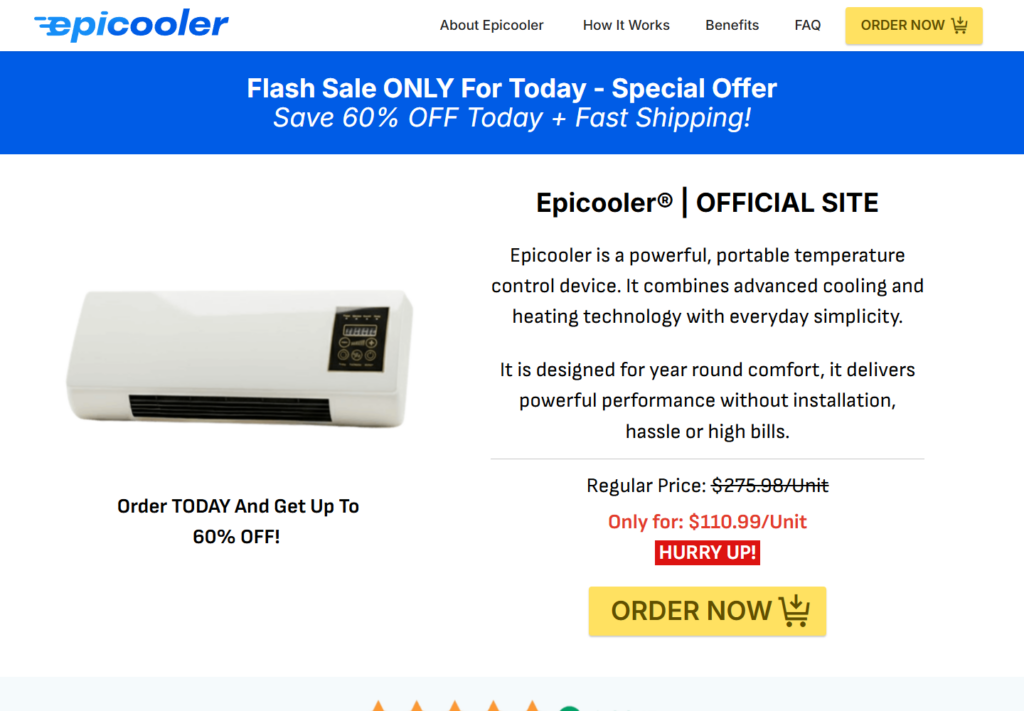
The sales page shows a familiar wall-style device, nearly 10,000 reviews, and a discount that cuts the alleged price from $275.98 to $110.99 per unit.
The most important details appear only after the buyer presses the order button and leaves the EpiCooler website.
Overview
The advertisement sells impossible convenience
EpiCooler is presented as a genuine air conditioner plus heater. The page claims cooling coils, internal evaporation, six climate modes, low-voltage operation, and room-cooling performance without the components normally required to move heat outdoors.
The device resembles a generic wall-mounted PTC fan heater. Such appliances can produce heat and circulate air, but a fan-only mode is not refrigerated air conditioning.
The checkout changes the product
Every buy button on the-epicooler.com pointed to buy4now.click during our test. That tracker redirected to a checkout on coldeez.com.
The checkout did not sell EpiCooler. It selected three units of “Coldeez Cooling Ace,” added $11.99 shipping, and preselected $9.99 shipping protection. The displayed total changed as the page loaded.
The reputation trail is already substantial
Trustpilot currently shows 7,230 reviews and a TrustScore of 2.4 out of 5 for epicooler.com. The rating chart showed 57% one-star reviews during our check.
Reviewers commonly alleged weak fan-like performance, delivery problems, refund delays, short power cords, partial-refund offers, and expensive returns. Those statements are customer allegations, but they closely match risks visible in the sales funnel.
- The sales page offers EpiCooler, but the live checkout offers Coldeez Cooling Ace.
- Three units were selected when the checkout loaded.
- Shipping protection was already checked.
- The site does not show a credible compressor or heat-exhaust system.
- The return policy is narrower than the prominent guarantee.
- Legal and support identities change across the funnel.
The Page Calls a Fan-Heater a Hose-Free Air Conditioner
A true air conditioner is a heat pump. It absorbs heat indoors and releases that heat somewhere else. A portable compressor unit needs an exhaust hose, while a split system needs an outdoor condenser.
EpiCooler is advertised with no hose, no drain, no water tank, and no external section. The page does not publish a recognized BTU capacity, refrigerant type, energy-efficiency rating, compressor model, or independent cooling test.
The “cool” setting on many inexpensive wall heaters simply runs the fan without turning on the heating element. Moving air can improve comfort near the device, but it cannot chill a 550-square-foot room or hold a thermostat setting below ambient temperature.
The marketing image shows exaggerated blue airflow and polished internal “cooling” graphics. These are illustrations, not thermal measurements.
Even the seller’s own terms anticipate that images may be digitally enhanced, staged, computer-generated, or produced with artificial intelligence. That disclosure makes independent specifications more important, not less.
How the EpiCooler Scam Works
Step 1: A heat-wave ad offers instant relief
The ad targets renters, older adults, people with high electricity bills, and anyone desperate to cool a bedroom quickly.
It suggests that conventional air conditioning is expensive because consumers have not discovered this compact alternative.
Step 2: A generic device receives proprietary branding
The sales page names ordinary-looking controls and fan-heater functions as a special climate system. Cooling, heating, eco, timer, fan, and swing modes are presented as evidence of full air-conditioning capability.
No named manufacturer, test report, or model certification establishes that the device is unique to EpiCooler.
Step 3: Review counts replace technical proof
The page claims 9,803 or more reviews and displays enthusiastic testimonials about cooling a lounge within minutes.
On-site testimonials are controlled by the seller. Without a verifiable purchase trail, they cannot answer the basic engineering question of where the room’s heat goes.
Step 4: The discount pushes a bundle
The promotional price is framed as 60% off an alleged $275.98 regular price. The discount makes a generic appliance feel like a rare opportunity.
Package pricing encourages buyers to order several units before testing one.
Step 5: The order link leaves EpiCooler
The-epicooler.com sends all purchase clicks through buy4now.click. The destination in our live test was a Coldeez checkout, not an EpiCooler order page.
The product, logo, support path, and merchant context changed in one click.
Step 6: Multiple units are already selected
The live Coldeez page loaded with three Cooling Ace units selected. The order summary showed a large package discount and a total that changed as dynamic pricing elements loaded.
A buyer focused on the card form could miss that the quantity no longer matched the EpiCooler page.
Step 7: A paid protection option is checked
The checkout included a $9.99 shipping-protection option and displayed it as selected. Terms-acceptance boxes were also checked in the state we inspected.
Optional protection should be reviewed carefully because it raises the order total and may have separate conditions.
Step 8: The return process moves behind support
The guarantee language sounds simple. The formal policy says a change-of-mind return must be unused and in original packaging, and the customer may have to pay return shipping.
Support must provide the return instructions. That can leave buyers negotiating partial refunds instead of testing the product and returning it easily.
The Checkout Tells a Different Story
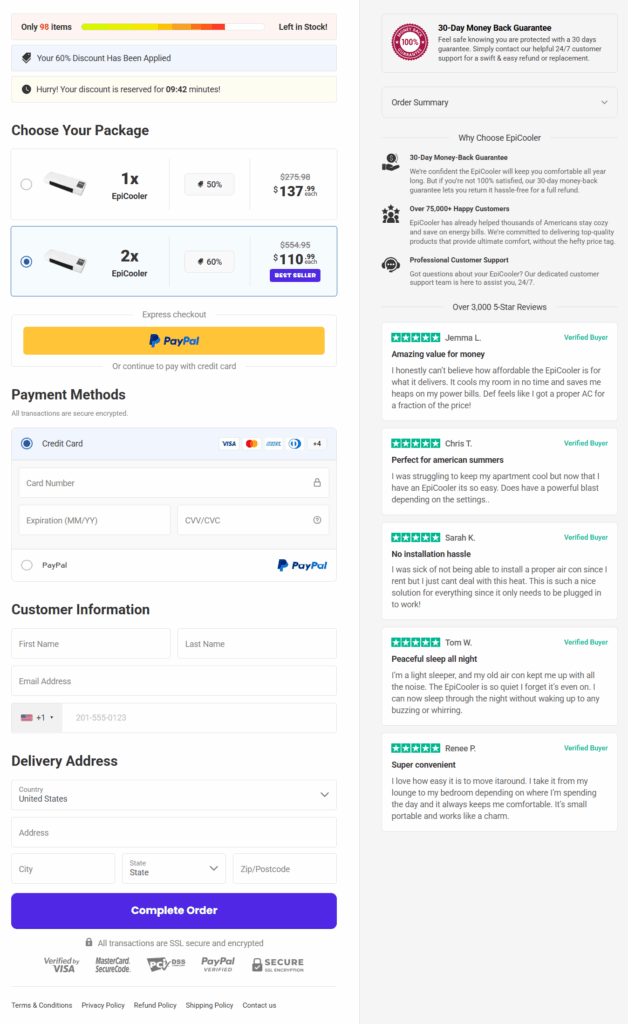
The EpiCooler sales page itself includes a long checkout image. It shows two EpiCooler units selected, countdown language, alleged discounts, and an order form surrounded by seller-controlled testimonials.
That image is already out of step with the current live route. The order buttons now open a Coldeez checkout, where the default package and add-ons are different.
This is why screenshots from an advertorial cannot be treated as a promise of what the buyer will see later. The funnel can change without the ad changing.
During our live check, the Coldeez order summary showed three units, a shipping charge, a discount, and checked shipping protection. The total reached $175.95 in one captured state after initially displaying another amount.
Dynamic totals are not automatically improper. The problem is that the product name, quantity, and add-on can all differ from what the customer thought they were buying.
Before entering payment information, expand the full summary and take a screenshot. The final total alone does not explain which items created it.
What the EpiCooler Hardware Can Realistically Do
The wall-style appliance appears capable of blowing air. If it contains a PTC ceramic element, it may also function as a small electric heater.
Neither function makes it an air conditioner. A fan redistributes room air. A heater adds heat. A refrigeration system must remove heat and reject it outside the space.
Some sales pages use “cool wind” to describe unheated fan mode. That wording is not equivalent to producing refrigerated air.
Comparable Chinese wholesale listings for wall-mounted PTC fan heaters were around $26 to $39 at the quantities we checked. Retail prices vary, and we did not verify the exact EpiCooler unit at $2 to $5.
The large markup is still visible when a generic heater-fan is offered for $110.99 to $137.99 per unit under a changing brand.
The central consumer harm is not that a fan exists. It is the expectation that the box will cool a room like a compressor AC shown in a dramatic advertisement.
Company, Address, and Fulfillment Checks
The sales domain is new
Verisign RDAP shows the-epicooler.com was registered on June 4, 2026. The separate epicooler.com domain dates to October 20, 2025.
A new campaign can be legitimate, but a short history makes large customer-count and “official site” claims harder to audit.
The sales-site terms look unfinished
The terms on the-epicooler.com use generic templates, provide no clear operating company, show a placeholder-style email, and include unrelated wording about the use of “V’s logo.”
The privacy page reads like a generic blog policy rather than documentation for a retailer collecting payment and delivery data.
The checkout support identity is different
The Coldeez policy path used support@trendingadget.com. That name does not match EpiCooler, Coldeez, or the-epicooler.com.
When several brands and support identities appear in one purchase path, the buyer should record all of them for any later dispute.
The return promise has important conditions
The checkout advertises a 30-day “Love it or Return it” style guarantee. The formal terms limit ordinary returns to unused merchandise in original packaging and exclude shipping and handling.
The checkout also says it is proudly American, while Trustpilot’s Epicooler profile lists Lithuania. This is a disclosure mismatch to question, not proof that every transaction has the same seller.
What Epicooler Customers Report
Trustpilot displayed 7,230 reviews and a 2.4 TrustScore during our August 2026 capture. Its chart showed 57% one-star ratings.
The platform’s review summary said customers often reported that the delivered product failed to provide the promised cooling and behaved like a weak fan. It also highlighted order and refund complaints.
Individual reviewers described short cords, slow or missing deliveries, difficult full refunds, partial-refund offers, and return costs. These reports should be read as allegations from customers, not universal outcomes.
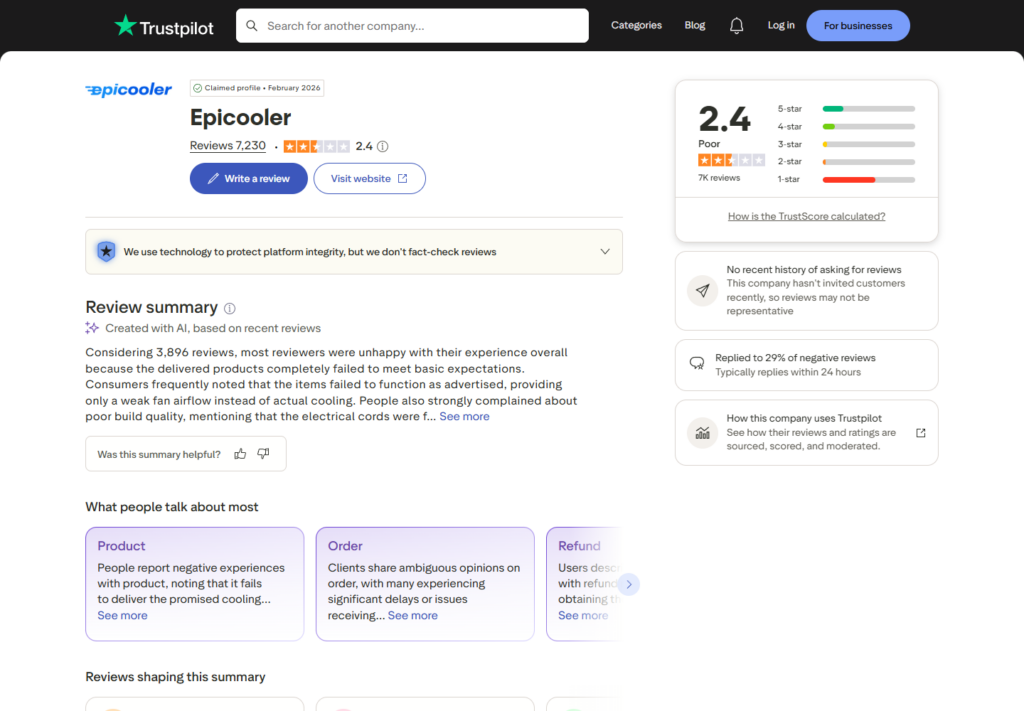
Trustpilot says it uses technology to protect platform integrity but does not fact-check reviews. A large review count can reveal patterns, yet it is not a substitute for testing one claim directly.
Here, the direct evidence is already serious: the live order link changes EpiCooler into Coldeez, and the hardware presentation omits the mechanism a real air conditioner needs.
The review profile supports caution because its recurring themes align with those visible problems.
Why New EpiCooler Sites Keep Appearing
Portable-AC campaigns are inexpensive to rename. The seller can replace a logo, register a fresh domain, change testimonials, and send every new advertorial into the same payment infrastructure.
When complaints accumulate around one name, a new name can start with a clean search profile. The physical product and fulfillment process may remain largely unchanged.
MalwareTips has documented this pattern across Cooling Ace rebrands and the broader 90-second portable AC scam.
The correct research target is therefore the complete path: advertisement, landing page, redirect domain, checkout host, merchant name, support address, card descriptor, and return destination.
What to Do if You Have Fallen Victim to This Scam
- Save every page. Capture the EpiCooler ad, landing page, quantity, guarantee, order summary, and any Coldeez branding.
- Read the confirmation carefully. Note the merchant name, descriptor, product name, number of units, shipping fee, and protection add-on.
- Request correction or cancellation immediately. Send the request in writing if the quantity or product differs from what you chose.
- Keep the product condition documented. Photograph the sealed package, shipping label, model plate, plug, and contents before testing.
- Request return authorization. Ask for the full refund amount, RMA, destination, deadline, and who pays postage.
- Do not accept a partial refund automatically. Compare it with card or PayPal dispute rights and the advertised guarantee.
- Use tracked return shipping. Keep weight, receipt, tracking, and delivery confirmation if you send the package back.
- Dispute unauthorized charges promptly. Give the payment provider the sales claims, checkout mismatch, correspondence, and return evidence.
- Report deceptive marketing. U.S. consumers can use ReportFraud.ftc.gov.
If the route caused an unexpected download, pop-up, or browser extension prompt, scan the device with Malwarebytes. An antivirus scan cannot recover a refund, but it can identify common ad-delivered threats.
AdGuard can block many aggressive ad and tracking domains. It is an additional layer, not permission to trust a checkout that changes the product name.
Frequently Asked Questions
Is EpiCooler a real air conditioner?
The inspected page does not show a compressor, refrigerant, exhaust hose, outdoor condenser, or recognized BTU rating. The device appears closer to a wall-mounted fan heater than a room air conditioner.
Why does the EpiCooler button open Coldeez?
The order links pass through buy4now.click and currently redirect to a Coldeez Cooling Ace checkout. That live brand change is one of the investigation’s strongest warning signs.
How many units does the checkout select?
The live Coldeez checkout selected three units during our test. The older checkout image on the EpiCooler page showed two units. Buyers must verify the current order summary.
Does EpiCooler include a subscription?
We did not find a refill subscription in the inspected transaction. We did find checked shipping protection and checked terms boxes. Review PayPal automatic payments and future statements anyway.
Can I return EpiCooler after trying it?
The formal policy is much narrower than the sales slogan. Change-of-mind returns may need to be unused, in original packaging, approved in advance, and shipped at the customer’s expense.
What is EpiCooler’s current Trustpilot rating?
Our capture showed 2.4 out of 5 from 7,230 reviews, with 57% one-star ratings. The score can change, so confirm it on the live profile.
The Bottom Line
EpiCooler is marketed as a hose-free room AC, but its order button currently changes the product to Coldeez Cooling Ace and loads a multi-unit checkout with a selected add-on.
That is not a small branding error. It is a reason to stop before paying. A real air conditioner should not require buyers to ignore physics, changing identities, and a checkout for another product.

Join the discussion
0 commentsShare your experience or ask a question about this article.
Discussion
Start the conversation
Have a question or something useful to share? Add the first comment.