

Text message scams aimed at stealing money and personal information have been on the rise in recent years. One such scam that has emerged targets Massachusetts drivers with fake texts about unpaid tolls on E-ZPass roads. The messages appear to come from a legitimate source, the state’s Department of Transportation (MassDOT), but are actually a clever scheme to phish for credit cards and personal data. This article will provide an in-depth overview of how the EZDriveMA MassDOT toll road scam texts work, advice for drivers who may have fallen victim, and tips to avoid becoming a target.
An Overview of the EZDriveMA MassDOT Toll Roads Scam
The EZDriveMA MassDOT scam takes advantage of the large number of drivers in Massachusetts who routinely use the state’s extensive E-ZPass electronic tolling system. Scammers send text messages to random phone numbers that mimic legitimate payment reminders from MassDOT’s EZDriveMA program.
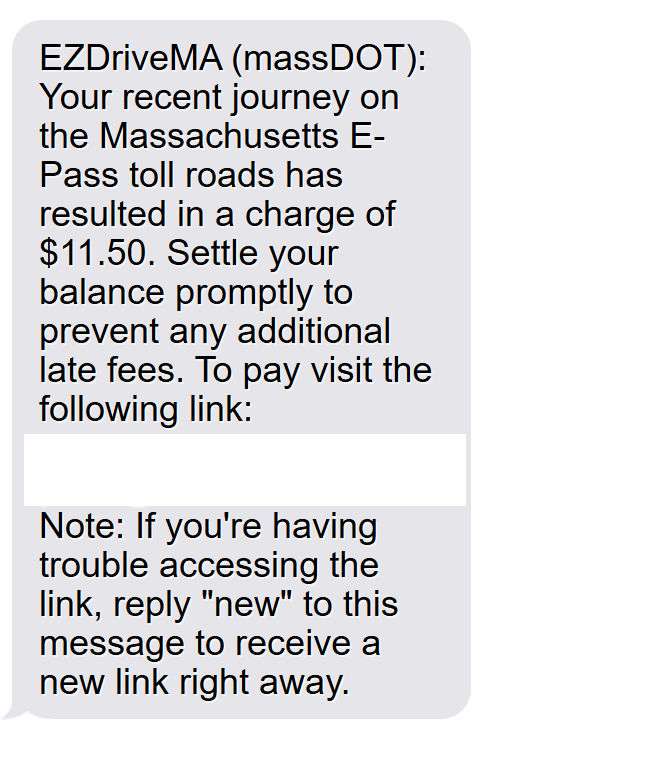
The messages typically state that a license plate has been photographed traveling on a toll road and incurred unpaid toll fees. For example:
“EZDriveMA (MassDOT): Your recent journey on the Massachusetts E-Pass toll roads has resulted in a charge of $11.50. Settle your balance promptly to prevent any additional late fees.”
The texts include a link supposedly for paying the unpaid toll online. However, the link actually directs victims to a fake website designed to steal credit card and personal information.
This scam is particularly deceptive because the texts appear to come from a valid source. The message uses MassDOT’s name and logo and cites EZDriveMA, which is the real E-ZPass account management portal. But the links go to fraudulent sites unaffiliated with state agencies.
Since Massachusetts has an extensive system of electronic tolling on major highways and tunnels, many drivers have E-ZPass accounts with regular toll activity. This makes them more likely to trust the authentication of the messages. Scammers are preying on the likelihood that some drivers will have trouble recalling a specific $11 toll charge and assume the texts are valid.
How the EZDriveMA MassDOT Toll Roads Scam Works
The scammers behind the EZDriveMA MassDOT toll scam employ a variety of deceptive techniques to try to steal personal information:
1. Send Unsolicited Texts En Masse
The scammers use programs to send huge volumes of unsolicited text messages to random cell phone numbers registered in Massachusetts area codes. Casting a wide net increases their chances of reaching drivers who use E-ZPass tolls.
2. Make the Messages Appear Official
The texts are made to mimic the style of legitimate E-ZPass payment reminders, including:
- Using MassDOT and EZDriveMA branding
- Citing the specific dollar amount owed
- Providing a deadline to avoid late fees
- Including an active link to pay the “balance” online
3. Direct Victims to Fake Websites
The link in the text messages goes to sham websites designed to look like official MassDOT and EZDriveMA payment portals. The sites feature:
- Official branding and logos
- Forms for entering personal and payment information
- Space for entering license plate and driver’s license numbers
In reality, the websites are elaborate phishing scams aiming to steal user data.
4. Harvest Entered Credit Card and Personal Information
When victims enter information into the fake websites, the scammers capture it for identity theft and fraudulent charges. They obtain:
- Full name and birth date
- Home address
- Phone number and email address
- Credit card number, expiration date, and CVV code
- Driver’s license number
- License plate number
With these details, scammers can steal identities, clone credit cards, or sell the info on dark web marketplaces.
What to Do If You Get an EZDriveMA MassDOT Toll Scam Text
If you receive a suspicious text from EZDriveMA about unpaid Massachusetts tolls, here are important steps to take:
1. Avoid Clicking Any Links
Do not click on the link included in the message under any circumstances. As explained above, the link goes to fake phishing websites to steal data.
2. Check Your E-ZPass Account
Log directly into your official EZDriveMA E-ZPass account at www.ezdrivema.com. Review recent toll activity to confirm whether you do in fact have any outstanding charges.
3. Contact E-ZPass Customer Support
If you cannot confirm a charge in your account, call the MassDOT E-ZPass Customer Service Center at 877-627-7745. Alert them to the scam text so they can take action.
4. Report the Scam Text
Forward the scam text to 7726 (SPAM) to report it to your cell phone provider. You can also file an online complaint with the Federal Trade Commission.
5. Monitor Accounts for Fraud
Keep an eye out for any fraudulent charges or activity on your accounts in case scammers obtained any personal information. Report any unauthorized transactions to your bank or credit card company immediately. Sign up for transaction monitoring alerts.
6. Add the Number to Your Blocked List
Block the phone number that sent the scam message so you do not receive any more texts from the same sender. Avoid responding “Stop” or “Unsubscribe” as that verifies an active number.
What to Do If You Entered Information into a Fake EZDriveMA Site
If you submitted any personal or financial information into one of the fraudulent websites before realizing it was a scam, take these steps right away:
1. Contact Your Credit Card Company
If you entered a credit card number, call your credit card company and explain you shared the details on a fraudulent site. Request that they freeze or cancel your card to prevent fraudulent charges.
2. Check Credit Reports
Obtain copies of your credit reports from Equifax, Experian and TransUnion to check for any accounts opened fraudulently in your name using stolen info. Consider putting a credit freeze in place to block applications without your consent.
3. Reset Account Passwords
Change the passwords on any online accounts that use the same username or email/password combination you entered on the fake site. Scammers who obtain one set of login credentials will try them on other platforms like email and online banking.
4. File a Police Report
File a report with your local police department to document that your information was entered on a phishing website for identity theft purposes. This creates a paper trail in case any issues emerge.
5. FTC Identity Theft Report
Submit an identity theft report to the FTC at IdentityTheft.gov. This helps alert agencies to fraudulent activity associated with your personal data.
Tips to Avoid EZDriveMA MassDOT Toll Scam Texts
Here are some tips to protect yourself from the fake EZDriveMA toll texts and other similar scams:
- Never click on links in unsolicited text messages. Manually open websites you know are legit.
- Mobile carriers will never contact you by text for bill payments.
- Log into your accounts frequently to look for any unauthorized activity.
- Avoid entering username/password combinations into multiple sites or accounts. Use different unique passwords for each.
- Be wary of urgent demands to pay small bills from government agencies or vendors. Scammers exploit urgency to get victims to act fast.
- Look for incorrect grammar, spelling errors, or awkward phrasing in text messages from companies. This signals a scam.
- Don’t reply to scam texts at all. Responses verify an active number for future targeting.
- Confirm toll road charges directly in your E-ZPass account before paying anything.
- Set up text and email alerts on bank and credit card accounts to monitor transactions.
- Report scam texts by forwarding to 7726. File complaints with the FTC and your local police.
Frequently Asked Questions about the EZDriveMA MassDOT Toll Roads Scam
1. What exactly is the EZDriveMA MassDOT toll road scam?
The EZDriveMA MassDOT scam is a phishing text message scheme where scammers send fake texts about unpaid tolls on Massachusetts electronic toll roads. The messages appear to come from the real EZDriveMA toll payment system and trick users into entering personal and payment card details on fake websites.
2. How do the scam text messages work?
The scammers send texts en masse to random phone numbers with Massachusetts area codes. The messages state that a license plate incurred an unpaid $11.50 toll charge. They include a link to pay the fee but it goes to a fake phishing site instead of the real EZDriveMA portal.
3. What details do the fake texts contain?
The scam texts contain specifics like the MassDOT and EZDriveMA program names, the $11.50 amount owed, and a threat of additional fees if unpaid. This makes the messages appear credible to users who don’t review them carefully.
4. What happens when you click the link in the text message?
The link goes to elaborate fake websites dressed up to mimic the real MassDOT and EZDriveMA payment sites. Users are prompted to enter personal info like name, birthdate, address, license plate, driver’s license number, and payment card details.
5. How do scammers use the details entered on the phishing sites?
Scammers steal the personal and payment card information to commit identity theft and make fraudulent purchases or clone credit cards on the black market.
6. How can I tell if a text message is the EZDriveMA toll scam?
Warning signs include an unsolicited text demand for a small toll payment, a threat of fees for non-payment, use of MassDOT branding, and a link to pay instead of instructions to log into your account.
7. What should I do if I receive an EZDriveMA toll scam text?
Do not click any link. Log into your official EZPass account to confirm if you owe any tolls. Contact E-ZPass support to report the scam text. Forward the text to 7726 to report it as spam to your carrier.
8. What if I already entered info into one of the fake EZDriveMA websites?
Immediately contact your credit card company and request a replacement card. Check your credit reports and freeze your credit to prevent identity theft. Reset any passwords compromised and monitor accounts closely for fraud.
9. How can I avoid the EZDriveMA toll scam in the future?
Never click links in texts from unknown numbers. Avoid entering the same password across multiple accounts. Confirm toll fees directly in your E-ZPass account before paying. Report scam texts to 7726 and file FTC complaints.
10. Who should I contact if I have more questions about the EZDriveMA scam?
You can contact the MassDOT E-ZPass Customer Service Center at 877-627-7745 for help confirming legitimate toll charges. File a complaint with the FTC and your local police department to report that you received a scam text or had info stolen.
The Bottom Line
The EZDriveMA MassDOT toll road scam shows that text messages are an increasingly common vector for phishing attacks due to our reliance on mobile devices. Drivers with E-ZPass accounts are prime targets. Be wary of any urgent texts demanding payment and avoid clicking links. Instead, log into your accounts directly and confirm any charges with your providers. With caution and awareness, drivers can avoid having their personal information compromised through this scam.

Join the discussion
0 commentsShare your experience or ask a question about this article.
Discussion
Start the conversation
Have a question or something useful to share? Add the first comment.