


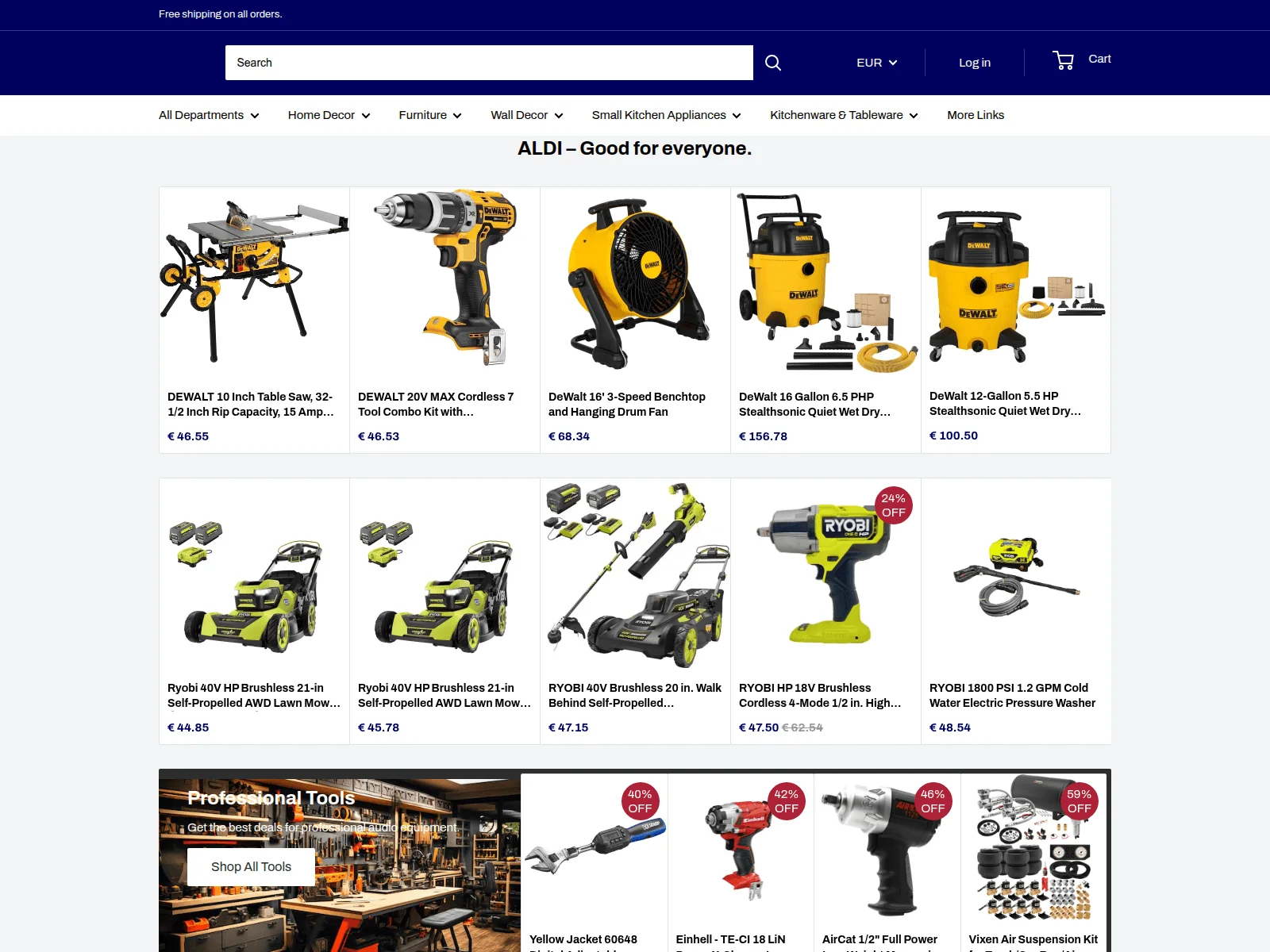
The page calls itself Aldi and promises free shipping on every order. A row of power tools is already waiting below the search bar.
The rest of the address gives you a better clue about where you’ve landed.
Overview
The address puts Aldi in front of somebody else’s domain
A shopper reported a page at aldi[.]pondmart[.]shop that copied Aldi branding and layout. The brand at the left makes the address look familiar.
The controlling domain in that address is pondmart[.]shop. It is separate from the retailer’s own regional websites. Aldi appearing as a subdomain does not make it an Aldi property.
A public Triage analysis tagged the same address as a fake shop and phishing destination. That is independent corroboration of the suspect storefront.
The archived storefront showed real brands and prices
The archived storefront from November 4 shows DeWalt and Ryobi tools priced in euros, including a DeWalt table saw listed at €46.55.
When we checked, the storefront displayed a server error. The archived page shows what was advertised, while the checkout and any completed orders remain unverified.
The storefront borrows a name shoppers already trust, but the unfamiliar domain and the independent analysis give you enough reason to close it before paying.
If you encountered that address, keep track of what you actually did:
- Where you saw the link and how much of its address was visible.
- Whether you only viewed the shop, entered account details or supplied a card.
- Whether your own bank shows an attempted charge or a completed debit.
- What merchant label appears for any actual charge.
- Whether you received a confirmation, password request or delivery message afterward.
Aldi operates separate sites and shopping options by region
It is easy to find different Aldi links when you shop across countries. That is why the presence of a store name or a familiar product can feel convincing.
Begin with the regional website or app you already know. Use it to reach the relevant purchase, delivery or support service.
ALDI Australia’s customer help center provides a scam reporting route in its region. Other shoppers should use their own country’s Aldi support channel.
How the Fake Aldi Shop Scam Works
Step 1: A copied storefront borrows a retailer’s reputation
The person who reported the page recognized Aldi’s logos and layout. They had enough information to identify the address without buying anything.
A retailer’s name gives the page a head start. If the shopper expects groceries, specials or seasonal goods, the name can seem like a shortcut around checking the seller.
The report warned about suspicious social ads in general. It did not establish that this exact page reached shoppers through a particular advertiser, coupon or social network.
Save the original ad or message for your report, then open the retailer independently to check where it actually sells the product.
Step 2: The address looks familiar before you read the whole thing
On a small screen, you may see only part of the address. Tap the address bar to see the complete domain before typing a name, email or card number.
For this example, the Aldi label sits to the left of pondmart[.]shop. An address can start with a brand even when the site is controlled somewhere else.
If the page opens inside an app, leave it and start over through your browser or trusted shopping app. Use a bookmark or the retailer’s established route.
Pay attention when forwarding a page to a relative. The copied link can look different in a preview because the preview may show only the picture or title.
Step 3: Product pages make a shopping session feel ordinary
The archived page gives shoppers a price to compare and a cart to open. That familiar layout can draw attention away from the address.
If a specific product interests you, look it up on the real retailer’s site. Compare its description, availability and payment route from a fresh session.
A listing can copy an accurate product photo, even if its seller cannot supply the item. Treat the product image and the seller’s identity as separate checks.
If the shop presents a new account form, stop and verify the retailer before creating one. You can report the website without finding out what comes after that form.
Step 4: Checkout or a later message can extend the exposure
A shopper who enters a password may need to secure another account where it was reused. A shopper who enters a card should report that exposure to the issuer.
A confirmation email can tell you what the page claims to have accepted. Open the bank app separately to see whether money actually moved.
If a delivery message asks for a later fee, preserve it with the order records. Verify delivery through a known carrier and a tracking number you can independently confirm.
The exact checkout for this address was not used. Treat a bank charge, entered card details or a reused password as individual problems you can report.
How to Verify a Local Aldi Offer Without the Link
Start with the retailer you already use
Use a trusted bookmark, installed app or your country’s Aldi website. From that starting point, check whether the retailer offers ordering in your area.
When Aldi sends you to a delivery partner, confirm that you reached it from Aldi’s site and check which company will take your order.
Open the product listing from that official route. A banner that says an offer was exclusive to social media does not prevent the retailer from confirming its own promotion.
If no matching product appears, ask official support about the offer. Give an ordinary description or send a screenshot through the route it provides.
Check the merchant before looking for a bargain
A real checkout should identify who is processing payment and which purchase it covers. Read the actual checkout name and amount before approving anything.
For a cloned site, a footer copied from a retailer does not resolve the domain mismatch. Check who the real retailer identifies as its sales or delivery partner.
If someone says the page is a marketplace store, find the platform listing directly. Check the seller details and whether the platform shows any actual order.
If the seller asks you to pay in a message before an order exists in your account, end contact. You can check payment methods through the genuine service.
Decide what to secure based on what you shared
If you visited the page and entered nothing, close it. Note the address and how you reached it if you want to report the incident.
If you submitted a password, change it anywhere else you used it. Start with the email account that can receive password resets.
If you typed in card details, call the number on the card. Tell the issuer what you entered even if the purchase never appeared in your account.
If you supplied a phone number or address, watch for a follow-up that quotes them. A message containing familiar information can still come from an unrelated sender.
Compare the bank’s transaction with what the store displayed
Give the issuer the merchant name exactly as it appears on your statement, even if it looks nothing like the name you saw in the shop.
If an entry is pending, ask how the issuer wants you to follow up. If there are several entries, record the amount, currency and time of each.
Do not approve another payment because the page offers to fix a failed transaction. Compare the bank’s record with any order confirmation you received.
If you reached the shop through a marketplace or ad, keep the advertiser name as well. The platform can use it to identify where the link appeared.
Read the link without reopening the store
Use the history or the message that brought you there to recover the exact address. Copy it into a private record if you need to report it.
If all you can see is a title and image in a message, say that in your report. The platform can often find the destination using the original post.
The independent safety report flags the exact storefront address for suspected phishing and fake-shop activity. You can use the report without reopening the storefront.
The result cannot say what will happen to a particular payment. For that, compare the transaction with your provider’s record and report what you can actually confirm.
Check the offer on Aldi’s site for your country
Check the country shown on the genuine retailer’s page before comparing offers. A product, checkout option or promotion can differ between the US, UK and Australia.
If an ad refers to a sale in another currency, save the ad and currency as shown. A real charge can still appear in your own currency.
Tell the issuer which amount you expected and which amount it shows. Ask how it identifies the merchant and how to follow up through its official channel.
If the page uses a familiar country flag, store color or delivery language, keep reading the address. Those visual details can remain the same when someone copies a shop.
Check for two authorizations before retrying a payment
Check your provider’s transaction history because a failed order on the shop’s screen can still leave a pending authorization in your banking app.
If you approved more than one amount, report each one. A shop can claim a retry was necessary even when the provider has a record of the first attempt.
Do not send your card information over an email offering to cancel or reissue the purchase. Contact the genuine issuer instead and tell it what you entered.
If a payment app shows the merchant name, save it exactly as displayed. A contact in a message may use a name that never appears in the payment record.
Match a shipping notice to a purchase you recognize
If a message includes a tracking number, open the carrier’s website independently. Check which shipment the number identifies before paying anything or providing an address.
Keep the order number the shop gave you, then compare it with any purchase record you can open independently through the retailer or issuer.
If your bank requests an order record and you have only a screenshot, explain that. Save the date, amount and currency from the statement to support the dispute.
What to Do if You Have Fallen Victim to This Scam
-
Close the lookalike storefront and keep the address or ad you already have. You can include that record in a report without revisiting the page.
-
Call your card issuer if you entered payment details using the app or the number on your card. Explain what you entered, even if no charge appeared.
-
Give the bank the exact statement entry with the merchant, date, amount and currency. Ask how to dispute a charge or replace an exposed card.
-
Change any reused password at the genuine service where it also works. Check recent sign-ins and recovery details if someone may have gained access there.
-
Report the storefront to Aldi through its verified contact route and to the platform that showed the link. Keep both reports so you can track any response.
-
Keep any shop receipt, order record or delivery message with the payment record. Shoppers in the US can include those details in a report through FTC ReportFraud.
The FTC’s online shopping guidance explains why you should confirm a seller and keep transaction records. Use the exact information your own payment provider displays.
If a message offers a refund in exchange for a new payment, keep it as evidence. Check with the issuer about the original charge through its app or website.
Ask whether you should monitor the old card after replacement or update any valid recurring payments. Get that advice from the issuer, away from the suspicious shop.
If a family member forwarded the link, tell them where the domain ends and which store route works. They can warn others without passing along the original link.
Frequently Asked Questions
Does a site starting with Aldi belong to the retailer?
Look for the actual controlling domain and compare it with the genuine regional retailer. The name at the left of the reported address appears under pondmart[.]shop.
Is pondmart[.]shop the same as an official Aldi domain?
The scan flagged a subdomain of pondmart[.]shop as a suspected fake shop and phishing destination. Search for the item through your official regional Aldi site instead.
Did the case confirm that shoppers paid and received nothing?
The report identifies a lookalike and independent scanner flag. It does not document a completed order, a specific charge or a delivery outcome.
What if my card shows no payment?
Tell the issuer if you typed your card details. It can check attempted activity and advise whether an added restriction or card replacement makes sense.
Can I just check whether the real store has the same item?
Look up the item independently and confirm that the seller is Aldi or a partner the retailer identifies on its own site.
Where should I report the ad if I saw it on a social platform?
Use that platform’s own reporting feature and identify the advertiser or original post. Keep your bank and identity information out of any public report.
The Bottom Line
Leave the Aldi-branded page at aldi[.]pondmart[.]shop and shop through your known regional retailer. Do not use that link to make a purchase or open an account.
If you entered card details or see a charge, contact the issuer. Save the address and any confirmation so the bank can identify the transaction.

Join the discussion
0 commentsShare your experience or ask a question about this article.
Community experiences
Did this happen to you?
Your experience could help someone recognize the same scam. Submit a private report for our team to review.
I experienced this tooReports are reviewed before publication. Sharing publicly is always your choice.
Discussion
Start the conversation
Have a question or something useful to share? Add the first comment.