

An email says your company has been ordered into court mediation. It includes a case number, formal language, and a link to the documents.
That is enough to make a busy owner stop what they are doing. Before opening the supposed case file, check where this particular notice really leads.
Overview
The real court has denied sending these notices
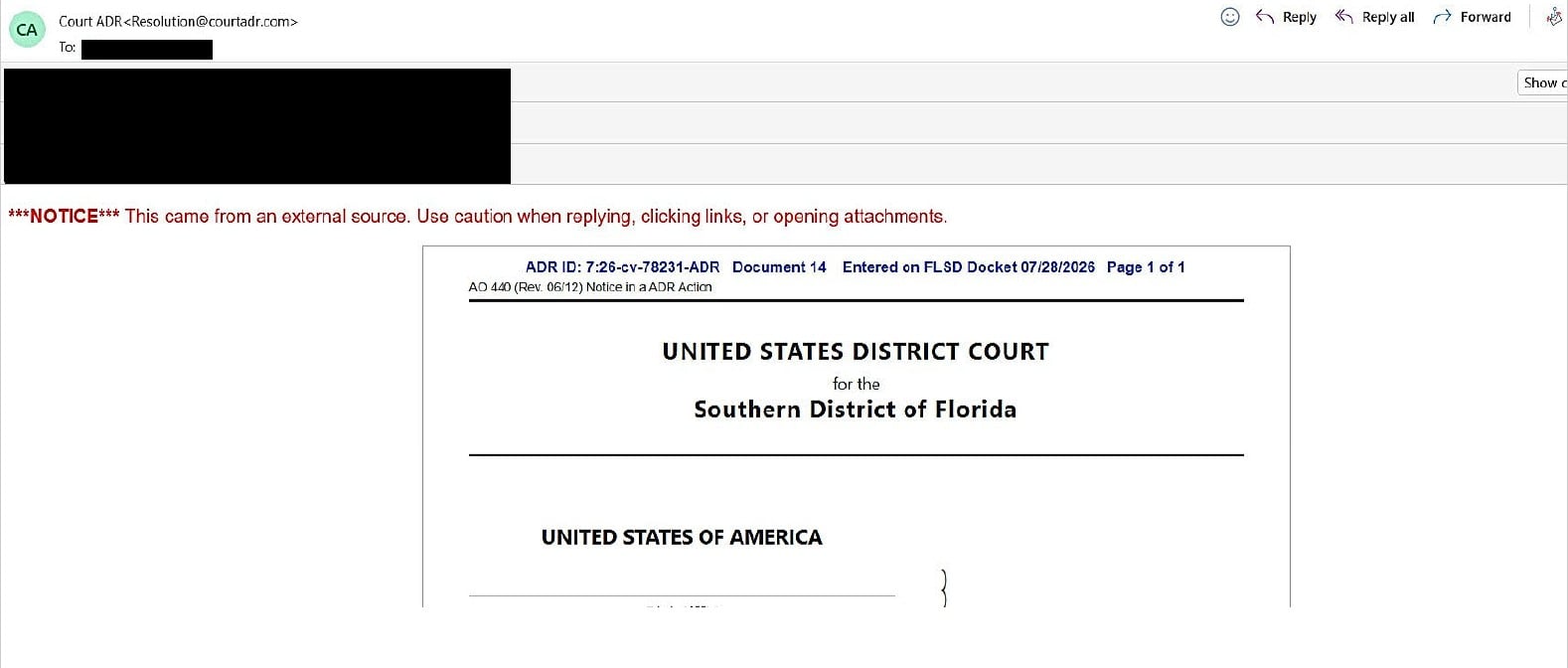
The U.S. District Court for the Southern District of Florida has published an alert about fraudulent court emails reported by multiple people.
The court says the supposed mediator and case identifiers did not match its system. These messages were not sent by the court.
The image above is the court’s redacted example, preserved unchanged. Its formal appearance and printed dates belong to the fraudulent message, not a verified proceeding.
The download is a malware delivery route
In an October 27, 2026 ThreatDown investigation, the fake ADR portal delivered a password-protected ZIP containing a disk image and malicious launch files.
The chain installed LodaRAT, a remote-access Trojan. Documented capabilities included credential theft, keylogging, surveillance, remote control, and persistence.
ThreatDown estimated the campaign’s targeting list covered more than 100,000 companies. That estimate does not mean 100,000 companies downloaded the files or became infected.
Details that should make you stop
- A court-themed email sends you to courtadr[.]com or a related subdomain to retrieve a case file.
- The portal asks you to download a ZIP and use the ADR identifier as its password.
- The supposed paperwork arrives as Court_Order_for_ADR.iso rather than an ordinary document you can inspect safely.
- A page insists on a particular browser before letting you continue to the download.
ADR stands for alternative dispute resolution, a real legal process. The scam borrows that process and the court’s identity to get malicious files opened.
How the Fake Court ADR Email Scam Works
Step 1: A formal notice makes the problem feel immediate
The message frames the recipient as someone who must respond to an existing legal matter. A company name and case number help make that demand feel specific.
You may be tempted to open the documents first and investigate later. That order favors the sender because the download is the dangerous part.
Separate the alleged legal issue from the supplied route. You can investigate whether a matter exists without opening a file from an unverified portal.
Do not decide that every court email is fake. Decide that this message needs independent verification before its attachment or download gets any trust.
Step 2: The portal echoes the company and case details
A page repeating information from the email can feel like a second source. In reality, the same sender can control both the email and the page.
A familiar-looking court heading does not change that relationship. Neither does a search result that repeats language copied from the fraudulent message.
Use the real court’s website to find contact information. Do not call a number simply because it appears beside a seal on the download page.
If your company has legal counsel, send the notice details through your established channel. Make clear that the portal and files have not been verified.
Step 3: A case-file button starts the download
The researched portal presented a case-file download. Using the case identifier as an archive password reinforced the idea that the files were confidential court material.
That password does not establish the archive’s origin. A criminal can generate a case number, place it in an email, and use it to lock a ZIP.
Do not interpret a password-protected archive as a reason to bypass security checks. If a protection tool cannot examine it, that is a limitation, not an endorsement.
The investigation also found browser restrictions in the portal. If a suspicious page will not work, stop rather than changing browsers to satisfy it.
Step 4: The disk image introduces files that are not legal paperwork
An ISO is a disk image. Windows can mount it as a virtual drive, exposing the files inside as though another disk had been connected.
That extra layer can obscure the moment when reading a document becomes launching a program. Pay attention to the actual file type, not its court-themed name.
The analyzed image contained MSC, BAT, and LNK launch routes. These are not interchangeable with a plain PDF complaint, even when their names refer to a lawsuit.
Do not open them to discover which one contains the real document. In this case, the alternative launch files led to the same malicious outcome.
Step 5: LodaRAT gives the intruder more than a view of one file
A remote-access Trojan can turn a document incident into a broader computer compromise. Removing the visible download window does not revoke that kind of access.
Consider what the device was used for after the suspicious file ran: email, banking, business portals, shared folders, or saved credentials.
Those questions help define the investigation. They do not prove every capability was used or every account was stolen on a particular machine.
The reported components also used familiar Windows filenames as disguises. That makes it especially unwise to delete genuine system files based only on their names.
Step 6: Persistence makes a quick cleanup unreliable
The analysis describes mechanisms that keep the malware present and running. Deleting the original ZIP therefore cannot establish that the computer has recovered.
Affected workplaces need to consider other systems and removable media as well. Do not move suspicious files to another computer in an effort to inspect them.
For a home user, the practical priority is simpler: stop sensitive activity, contain the device, and get help before treating it as trustworthy again.
How to Verify a Court Notice Without Following Its Link
Write down the alleged court, case number, named parties, and any stated deadline. Keep those details separate from the sender’s contact links.
Find the court through its official website. Use the clerk’s published contact information or your lawyer’s established details to ask whether the communication is genuine.
Explain that you received a court-themed download request and have not verified it. Ask how the court normally provides access to documents in such matters.
A case number shaped like a real docket number is not proof that the proceeding exists. Formatting is easy to imitate.
Likewise, information about your business may be publicly available. Personalization should help you ask precise questions, not persuade you to skip verification.
If an actual legal matter is confirmed independently, use the access route the court or your counsel provides. Do not return to the suspicious portal for convenience.
Keep colleagues from forwarding the download internally as urgent court paperwork. A short warning that verification is pending can prevent additional launches while you check.
What to Do if You Received or Opened the Fake Case File
- Stop interacting with the portal. Do not download another copy, try a different launch file, or switch browsers because the page tells you to.
- Record what actually happened. Distinguish reading the email, saving the ZIP, mounting the ISO, and running a file inside. Approximate times are still useful.
- Isolate a computer that ran the payload. Disconnect its network connection and notify IT immediately. Leave further evidence collection to the response team.
- Save the message safely. Preserve headers, sender details, case identifier, and portal address. Avoid forwarding the archive itself to people who might open it.
- Secure important accounts from another device. Review sessions and authentication settings, then change potentially exposed credentials through the genuine providers.
- Contact financial providers when needed. Report exposed banking access or suspicious transactions through a verified number or app, with the relevant timeline and payment details.
- Check the alleged case independently. Use the real court or your established lawyer. Handling the malicious download does not answer whether an unrelated legal matter exists.
- Warn other recipients through a clean channel. Tell them not to open the same download. Keep the warning factual and avoid circulating executable files.
If you only received the email, that alone does not establish infection. Report the impersonation and avoid the download rather than running cleanup software in a panic.
If you cannot remember whether a file launched, tell the technician what you do remember. A missing window or apparent error does not settle that question.
Do not use the potentially controlled PC to draft sensitive incident notes or reset all your passwords. Use a separate trusted device while containment is assessed.
Recovering Windows After a Suspected LodaRAT Launch
A remote-control infection deserves more than deleting a suspicious folder. Recovery must address persistence, account exposure, and the possibility that the attacker changed the system.
For a company device, follow the incident team’s instructions. A clean rebuild may be appropriate when the team cannot establish trustworthy recovery.
- Keep the affected machine contained. Do not reconnect it just to fetch a removal tool. Arrange help using another device and explain the suspected remote-access infection.
- Use Windows’ offline check where available. In Windows Security, open Virus & threat protection, choose Scan options, then select Microsoft Defender Antivirus (offline scan).
- Expect a restart. Save unsaved work beforehand. After the scan, inspect Protection history and retain detection details instead of assuming silence means no exposure.
- Add a verified scanner if advised. A technician can arrange Malwarebytes and check the system drive through Custom Scan after managing the containment risk.
- Follow quarantine and restart instructions. Avoid restoring removed files or deleting every Windows-named program manually. Share unresolved findings with the person handling recovery.
- Rebuild when trust remains uncertain. Preserve required evidence and personal documents first. Use clean installation media and a recovery plan that avoids restoring suspicious programs.
The Microsoft Windows Security instructions explain the offline scan. Its result is one piece of the investigation, not a guarantee against remote-access persistence.
Use the verified MalwareTips Malwarebytes download link when a scanner is needed. Do not obtain a cleaner from the court-themed message or an unsolicited helper.
For a Custom Scan, open the Scanner tile’s three-dot menu, choose Advanced Scan, then configure Custom Scan for the relevant drives.
Current vendor documentation lists Custom Scan as free. Premium protection is optional and paid; it does not replace rebuilding an untrusted system or recovering exposed accounts.
After recovery, restore work carefully and keep monitoring important accounts. A changed password cannot retrieve information an intruder may already have copied.
If the Notice Reaches Several Coworkers
Choose one person to coordinate verification with counsel or the court, and let IT coordinate the technical response. That prevents five employees from separately testing the same download.
Ask recipients to report their actions privately: email read, archive saved, disk image mounted, or file launched. Do not require them to reopen anything to answer.
Compare approximate times and devices. A shared mailbox may have been opened on several computers, while only one person actually interacted with the payload.
Keep the distinction between recipients and affected devices clear. A company-wide email does not automatically mean a company-wide infection.
Tell staff where to send additional examples. A short internal instruction to stop opening the portal is more useful than repeatedly forwarding the original malicious message.
If someone already sent the file to an outside adviser, notify them through your usual contact route. Say which attachment needs to remain unopened.
Do not circulate private case allegations, employee addresses, or incident screenshots in public comments. Those details belong with the people verifying the notice and investigating exposure.
Once the real court or counsel responds, share that conclusion with the recipients. Otherwise, the original deadline language may keep prompting people to revisit the portal.
For any confirmed infected device, have IT decide when work can resume. A colleague’s successful scan on another computer does not establish that this one recovered.
Document the final route used to verify the notice. The next person who receives a similar court-themed message should know whom to contact before opening a download.
That small process change removes the scam’s strongest advantage: making a worried employee feel they must investigate a legal threat alone and immediately.
Frequently Asked Questions
What does ADR mean in the fake notice?
It means alternative dispute resolution, a genuine legal process. The fraudulent notice borrows that terminology to make its case-file download seem official and necessary.
Has the real Florida court confirmed the impersonation?
Yes. Its published alert says reported emails were not from the court and the claimed mediator and case identifiers did not match its system.
Is Court_Order_for_ADR.iso a normal PDF?
No. It is a disk-image filename used in the analyzed chain. Opening files inside that image can run code instead of displaying ordinary legal paperwork.
Was every targeted company infected?
No such finding was established. The research estimate describes potential targets, not confirmed downloads, infections, or the number of companies that suffered a loss.
Should I delete Taskmgr.exe or msedge.exe?
Not by filename alone. The campaign used familiar names as disguises, but genuine Windows and browser files can share them. Have their context assessed.
Can I ignore every future court email?
No. Verify questionable communications through the actual court or your lawyer. Avoiding a malicious download and handling a genuine legal matter are separate responsibilities.
The Bottom Line
Do not open the courtadr case-file download to find out whether the notice is real. Verify the alleged case with the actual court through an independent contact.
If a file inside the downloaded image already ran, treat the computer as potentially compromised. Contain it, get qualified help, and secure important accounts elsewhere.

Join the discussion
0 commentsShare your experience or ask a question about this article.
Discussion
Start the conversation
Have a question or something useful to share? Add the first comment.