

The seller provides a custom photograph, a real carrier number, and a delivery scan on the official FedEx website. Every layer seems to confirm that an expensive marketplace purchase is moving normally.
Then the proof-of-delivery image shows a doorstep the buyer has never seen.
Overview
The buyer asked for proof and still received the wrong evidence
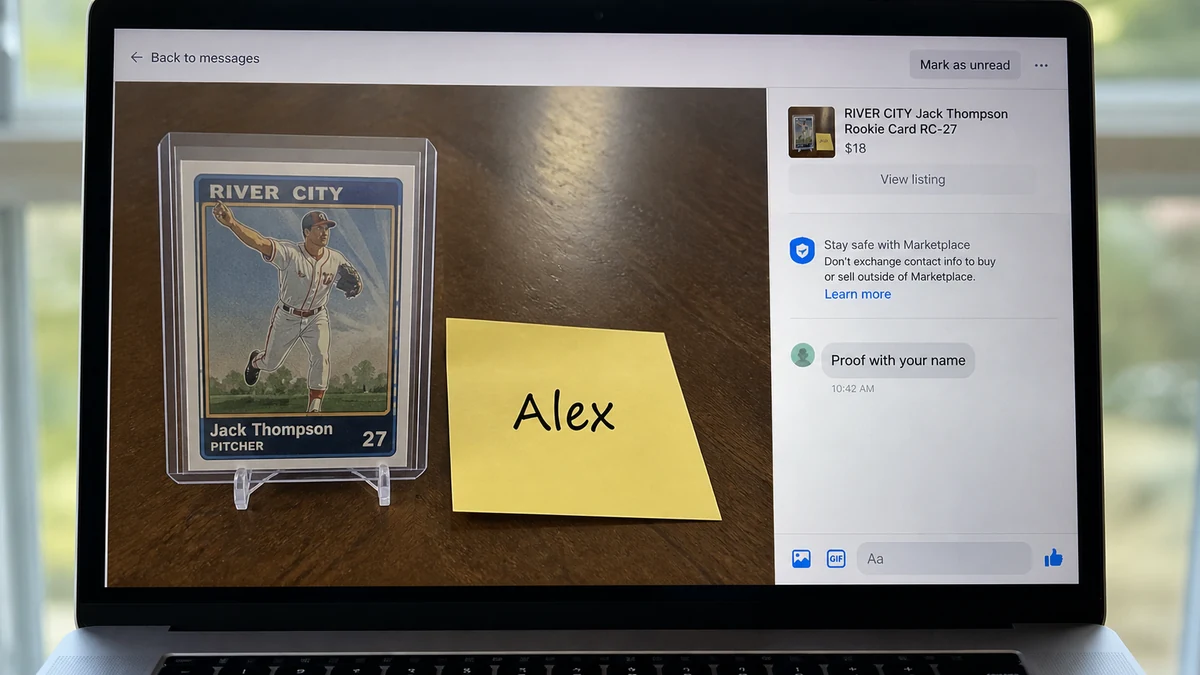
A recent consumer report described the purchase of a baseball card through an online marketplace. The buyer asked the seller to photograph the card beside a note bearing the buyer’s name and address.
After examining the image more closely, the buyer believed the note text had been digitally inserted. The seller allegedly refused the requested refund and claimed the item had already shipped.
An AI detector was mentioned in the report, but such tools are not reliable proof that an image was generated or edited. The useful evidence is the inconsistency between the seller’s story, the delivery location, and what the buyer actually received.
The tracking number was real but the package was not theirs
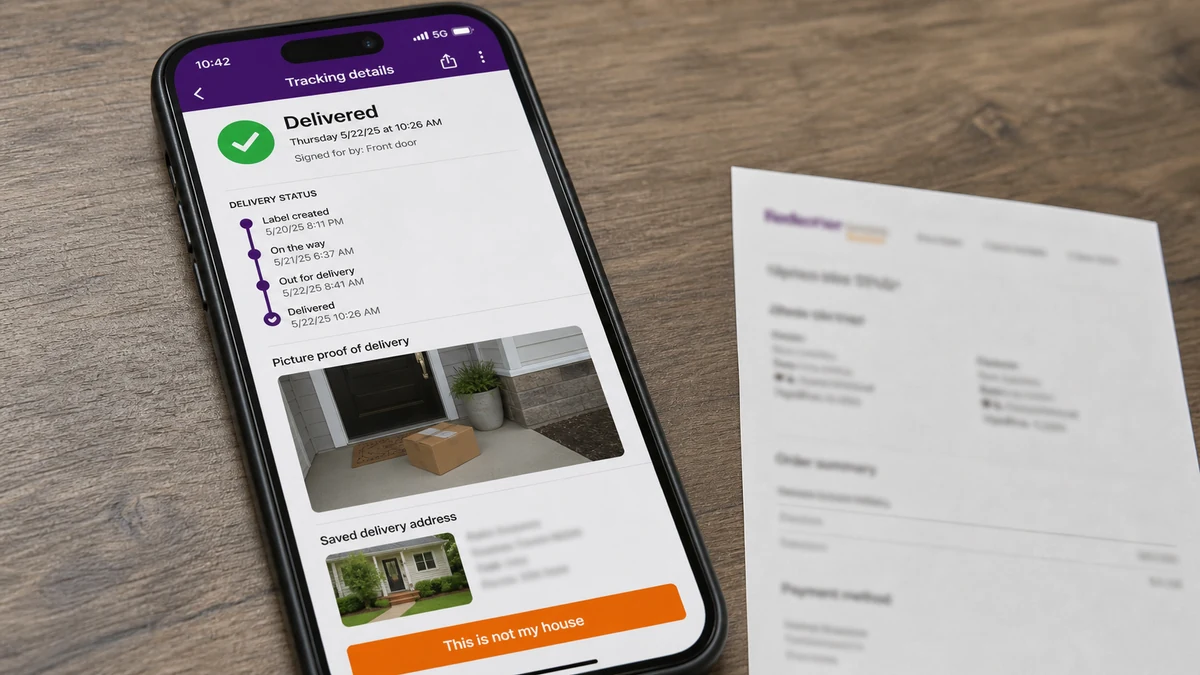
The supplied FedEx number reportedly worked on the real carrier site. It moved through the network and eventually showed Delivered. The proof-of-delivery photo, however, showed another house.
A valid tracking number proves that FedEx handled a package. It does not, by itself, prove the package was addressed to the buyer, contained the purchased item, or came from the marketplace seller.
The tracking number may belong to an unrelated shipment in the same broad area, a cheap decoy parcel sent to a different address, or a shipment connected through another method. The Reddit post does not establish exactly how the seller obtained it, so claims about stolen tracking databases should be treated as speculation.
The official delivery photo can expose the mismatch
FedEx’s picture proof of delivery guidance says recipients can view where a residential package was left and should contact customer support if the image shows the wrong location.
Before trusting a marketplace tracking number, check:
- Did the seller purchase the label through the marketplace order?
- Does the carrier confirm your full delivery address?
- Does the package weight fit the purchased item?
- Does the acceptance date match the seller’s timeline?
- Does the proof photo match your entrance?
- Did the seller reuse a number from another order?
- Did you pay with a protected purchase method?
- Can the seller provide an origin receipt tied to the item?
A green Delivered status is one clue, not the conclusion.
A Real FedEx Page Can Carry the Wrong Story
Many scam warnings focus on fake carrier texts and cloned tracking sites. This version is more persuasive because the victim can type the number into FedEx.com and see a real shipment.
The carrier record is authentic for the parcel associated with that number. The deception lies in the seller’s claim that this parcel fulfills the buyer’s order.
A marketplace seller may send a small, low-value item to another address in the buyer’s city or postal area. When the carrier marks that parcel delivered, the scammer submits the tracking as evidence in a payment dispute.
Another possibility is that the number belongs to an unrelated shipment. Tracking details that reveal only the city or partial postal code can make a coincidence look like confirmation.
The carrier protects recipient privacy, so customer service may not disclose someone else’s full address. That can frustrate a buyer, but it does not make the seller’s evidence conclusive.
Ask FedEx to record that the proof image and destination do not match your property. Request a case number and any confirmation the carrier can lawfully provide to the payment platform.
How the Fake FedEx Tracking Scam Works
Step 1: A desirable item appears in a private listing
The seller offers a collectible, electronic device, ticket, designer item, or other product that can attract a fast buyer. The account may have plausible photos and a normal-looking profile.
The deal often moves through direct messages where the marketplace cannot control payment or shipping.
Step 2: Personalised proof overcomes doubt
The buyer asks for today’s date, a handwritten name, a video, or a particular angle. The seller supplies an image that appears to satisfy the request.
That proof may be edited, generated, staged with an item the seller never intends to ship, or created by another person. Even a genuine photo proves possession at one moment, not honest fulfillment.
Step 3: Payment leaves the marketplace
The seller prefers PayPal, a payment app, bank transfer, gift card, or another route. They may recommend a protected option to appear trustworthy and rely on tracking to fight the later dispute.
Buyer protection helps, but it is not automatic. The victim must preserve evidence and follow the dispute timeline.
Step 4: A real tracking number is attached
The number may be for a decoy parcel or an unrelated package. The seller sends it quickly, creating relief and delaying suspicion.
Early scans make the transaction look professional. The buyer waits while chargeback and platform clocks continue to run.
Step 5: Delivery occurs somewhere else
The carrier legitimately delivers the associated parcel to the address on its label. The tracking page shows Delivered and may include a photograph.
The victim sees a different door, porch, building, or landscape. No purchased item arrives.
Step 6: The seller cites the green status
When challenged, the seller says the carrier made a mistake, a neighbour has it, or the buyer is lying. In a dispute, the seller submits the delivery scan as proof.
The victim must show that the number was not tied to their order or address, not merely repeat that the package is missing.
Step 7: The account disappears or repeats the listing
After the claim, the seller blocks the buyer, changes names, or opens a new profile. The same product images may appear in another city.
Search the image, wording, payment email, and username before the evidence vanishes.
Why Custom Item Photos Are Not Enough
Requesting a handwritten note is better than accepting a stock image, but it addresses only one question: can the seller produce an image that looks customised?
It does not answer whether the item is genuine, whether the account controls it, whether it will be packed, or whether the tracking number belongs to it.
Digital editing can alter a note, date, screen, label, and background. Generative tools can create new scenes. Compression inside a marketplace can hide the artifacts a buyer hopes to inspect.
Reverse-image searching is useful but incomplete. A new or edited image may produce no matches, while a genuine seller’s image may have been reposted elsewhere.
AI detection scores should not decide a payment dispute. False positives and false negatives are common, and the models do not establish who created an image or why.
Ask for proof that connects the item, seller, transaction, and fulfillment. Examples include a marketplace checkout, seller history, serial number, timestamped video with a requested movement, and a shipping receipt that matches the order.
None is perfect. The strongest protection is a payment and marketplace system that can hold funds, inspect evidence, and enforce a refund.
How to Challenge Wrong-Address Tracking
Start with the tracking page. Save the complete history, delivery date, proof photograph, package weight if shown, service type, and any available destination information.
Photograph your own entrance from a similar angle. Include stable features such as door colour, house number, railing, brick, mailbox, or landscaping without posting private details publicly.
Contact FedEx through its official site or the number on FedEx.com. Explain that a seller assigned the tracking to your purchase but the delivery photo is not your property.
FedEx’s missing-package guidance explains how to report a package from the tracking page and obtain a case number.
Ask whether the shipment address matches yours. The agent may not disclose the actual recipient, but a written note that it does not match can be valuable.
Open the marketplace or payment dispute immediately. Choose Item Not Received and explain that the seller supplied tracking for a different destination. Upload the carrier case, mismatched photo, order address, seller messages, and purchase record.
Keep the dispute open until the platform resolves it. Do not close a case because the seller promises a refund outside the system.
PayPal Protection Still Requires a Strong File
The Reddit buyer said payment was made through PayPal Goods and Services and that a dispute was underway. That was a safer choice than an unprotected friends-and-family transfer.
PayPal’s current Item Not Received guidance directs buyers to open a dispute in the Resolution Center when an order does not arrive.
A tracking number can complicate the case, so the description must be precise. Do not say only “nothing arrived.” State that the seller’s tracking delivered to a location that is not the confirmed transaction address.
Upload the FedEx proof image, your address from the PayPal transaction, the seller’s listing, the false fulfillment claim, and the carrier case number.
PayPal says a dispute must be escalated to a claim if the parties cannot resolve it. Watch the Resolution Center deadline and respond to every request for evidence.
Do not move the conversation to an unrecorded phone call if the seller contacts you. Keep promises and admissions in the dispute channel.
If PayPal rejects the claim, ask for the specific evidence used and appeal with the carrier mismatch. A card issuer may offer another dispute route, but explain that a PayPal case already exists and avoid duplicate recovery.
What a Strong Wrong-Address Dispute Should Contain
Write a short chronology instead of sending an unstructured folder. State when the item was purchased, what address was confirmed, when the seller supplied tracking, when it showed delivery, and when the carrier photo revealed another property.
Label every attachment. Include the order receipt, confirmed address, seller message assigning the number, full tracking history, delivery photograph, your own entrance photograph, and FedEx case number. Redact unrelated financial details but leave dates and transaction identifiers visible.
Explain why the evidence is objective. Door colour, building material, steps, railings, unit layout, landscaping, and visible house numbers can establish that the delivery location differs from the order address without relying on speculation about the seller.
If FedEx confirms that the shipment address is not yours, ask for wording that the payment provider can understand. The carrier may protect the actual recipient’s privacy while still confirming a mismatch.
Do not centre the claim on an AI detector. The payment platform can decide the case from fulfillment facts even if the marketplace proof photograph was genuine. The seller failed to connect the delivered parcel to the purchased item and confirmed address.
Keep copies of everything submitted and note the time of every call. If an appeal becomes necessary, a consistent record is more persuasive than new theories about where the tracking number came from.
Ask the payment platform to compare the tracking destination with the address stored on the transaction, not merely the city shown on a public page. Internal carrier or merchant tools may contain detail that the buyer cannot see.
If the package weight is missing from public tracking, ask whether FedEx can confirm it in the case notes. A material mismatch can support the argument that the parcel could not contain the purchased item.
Keep communications factual and brief. Avoid accusing an unrelated homeowner, carrier employee, or marketplace support agent. The documented mismatch is enough to demand a proper review.
Check the seller’s other listings while they remain visible. Repeated photographs, identical descriptions in different cities, or multiple expensive items with the same background can help the marketplace identify a coordinated account pattern.
Company, Address, and Fulfillment Checks
Verify the seller outside the listing
Check account age, completed sales, independent feedback, name changes, duplicate listings, and reverse-image results. A social profile is not a business identity.
Search the payment email and distinctive item description with words such as scam and complaint.
Match the transaction address
The address in the protected payment record should be the address used for shipment. Do not accept a seller’s claim that any package delivered in your city proves fulfillment.
Save the exact confirmed address before opening the dispute.
Connect tracking to the actual item
Compare package weight, origin, acceptance time, service, and delivery photo with the product. A baseball card shipment should not have the characteristics of an unrelated parcel.
Ask the seller for the carrier receipt and label record, not another screenshot.
Keep fulfillment inside protected systems
Use marketplace shipping labels and checkout when available. They connect the seller, order, address, and tracking more clearly than a number pasted into chat.
Never mark an item received or close a dispute to unlock a promised refund.
Warning Signs of a Fake Tracking Order
- The seller insists on private payment.
- A desirable item is priced to force a quick decision.
- The custom proof image looks slightly inconsistent.
- The seller refuses a live platform verification.
- Tracking appears without a marketplace shipping record.
- The package weight does not fit the item.
- The origin or timing conflicts with the seller’s story.
- The carrier reveals only a broad destination area.
- The delivery photo shows another property.
- The seller blames the carrier but will not open a trace.
- The seller pressures the buyer to close a dispute.
- The same listing images appear under new accounts.
The FTC’s online marketplace guidance recommends checking sellers, using safer payment methods, keeping records, and disputing charges when goods do not arrive.
This wrong-address scheme is different from the malicious attachment covered in our FedEx Tracking Information email scam. One abuses a real shipment record; the other impersonates a carrier to deliver malware.
What to Do if You Have Fallen Victim to This Scam
- Save the tracking page. Capture the complete history, delivery image, date, weight, and service before anything changes.
- Open a FedEx case. Report that the delivery image is not your property and request written confirmation or a case number.
- Open an Item Not Received dispute. Use the payment provider’s official Resolution Center and describe the wrong-address tracking clearly.
- Do not close the dispute. A seller’s promise is not a refund. Follow the claim deadline.
- Preserve the marketplace evidence. Save the listing, account, messages, requested proof, order address, and payment receipt.
- Photograph your entrance. Document why the proof-of-delivery location cannot be yours without publishing your address.
- Report the seller account. Provide the platform with the tracking mismatch and carrier case.
- Notify the card issuer if appropriate. Explain the payment-provider dispute and ask about remaining rights without seeking duplicate recovery.
- Watch for identity abuse. The seller has your name and address, so be cautious with follow-up delivery texts and recovery messages.
- Scan suspicious files. Run Malwarebytes if the seller sent an invoice, archive, extension, or tracking application.
- Block known malicious redirects. AdGuard can stop many recognized phishing domains, but a real FedEx page can still be paired with an unrelated shipment.
- Report broader fraud. Use ReportFraud.ftc.gov and IC3.gov for significant online fraud.
Frequently Asked Questions
Can a scammer use a real FedEx tracking number?
Yes. A real number can belong to a decoy or unrelated parcel. It proves the carrier handled that shipment, not that the seller sent your item to your address.
How did the seller find tracking in my area?
The report does not establish the method. Do not assume a hacked database. The seller may have sent a cheap parcel elsewhere or obtained an unrelated number through another route.
Does a delivered status defeat a PayPal claim?
Not necessarily. Show that the shipment was not delivered to the confirmed transaction address and provide the carrier case and mismatched photo.
Can AI detectors prove the seller edited the photo?
No. Detector scores are not conclusive. Use objective inconsistencies and fulfillment records rather than relying on an AI label.
Should I contact the house in the delivery photo?
No. The occupants may be unrelated. Give the image and tracking to FedEx, the marketplace, and the payment provider.
What is the safest way to buy collectibles online?
Use an established marketplace with authenticated seller history, on-platform checkout, tracked order labels, and a clear dispute process. Avoid private transfers.
The Bottom Line
The fake FedEx tracking scam uses genuine carrier data to support a false fulfillment claim. The tracking page can be real while the parcel, address, and purchased item have nothing to do with one another.
Check the delivery image, connect the number to the confirmed address, and open carrier and payment cases immediately. In this scam, Delivered is the start of the investigation, not proof that the seller kept the deal.








